Test Management tools
Working with Tests
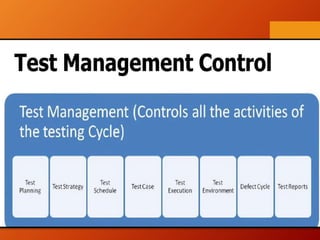
Test management - process of
managing the tests. A test
management is also performed
using tools to manage both
types of tests, automated and
manual, that have been
previously specified by a test
procedure.
What is Test
Management?
Test Management tools
TMT
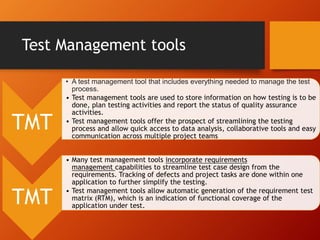
• A test management tool that includes everything needed to manage the test
process.
• Test management tools are used to store information on how testing is to be
done, plan testing activities and report the status of quality assurance
activities.
• Test management tools offer the prospect of streamlining the testing
process and allow quick access to data analysis, collaborative tools and easy
communication across multiple project teams
TMT
• Many test management tools incorporate requirements
management capabilities to streamline test case design from the
requirements. Tracking of defects and project tasks are done within one
application to further simplify the testing.
• Test management tools allow automatic generation of the requirement test
matrix (RTM), which is an indication of functional coverage of the
application under test.
List of The Best Test
Management Tools
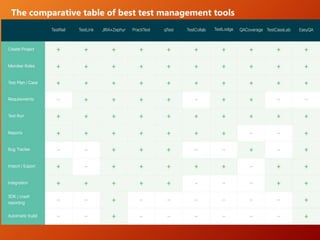
The comparative table of best test management tools
Jira + TMT
• If you using JIRA to organize and manage tasks
at your organization. If so, you can transform
your instance into a powerful tool for test
management thanks to a range of dedicated
plugins/tools.
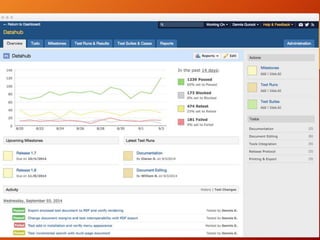
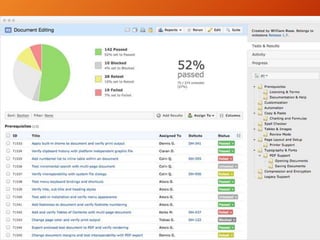
TestRail :
• The tool has a user-friendly interface, intuitively comprehensible buttons’
arrangement, and carefully thought the system of switching between
contiguous features.
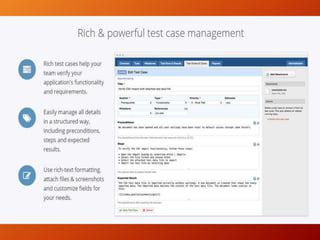
• Besides creating test cases, you are able to:
• execute testing based on created test scenarios
• create a bug and
• upload it to integrated bug trackers such as JIRA, GitHub, YouTrack and
others
• create projects
• make comprehensible and informative reports
• customize the system to your needs using the open TestRail API
Perfect for agile & traditional
testing approaches
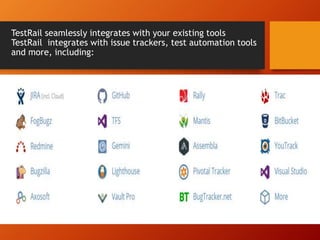
TestRail seamlessly integrates with your existing tools
TestRail integrates with issue trackers, test automation tools
and more, including:
Zephyr for JIRA
Zephyr offers functionalities for filing, linking and tracking defects. Users can track
the progress of their tests execution in a smart Execution Navigator.
The tool also grants access to a range of quality metrics – teams can configure and
track them, share dashboards, and create 2-way traceability reports which can then
be exported.
Zephyr supports 7 languages and offers some smart integration options with tools
such as Crowd, HipChat, Capture, Confluence, as well as test automation and CI
tools.
you are able to create a test plan
describe test cases
execute testing
generate reports
if a test product behaves wrong, you can immediately create a bug
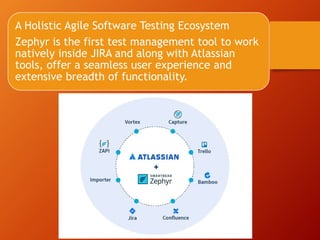
A Holistic Agile Software Testing Ecosystem
Zephyr is the first test management tool to work
natively inside JIRA and along with Atlassian
tools, offer a seamless user experience and
extensive breadth of functionality.
Zephyr for Jira - Test Management
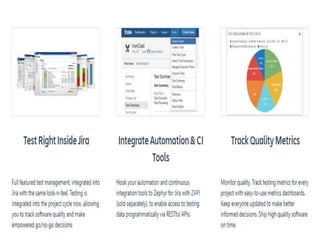
• Native Inside Jira
• Create, clone, search, edit, bulk modify and export tests
• Link to stories, tasks, requirements and defects
• Easy, intuitive onboarding with In-App Walkthrough
• Test Planning and Execution
• Plan test execution cycles in an ad hoc or structured manner
• Manage custom fields at global level and configure per project level
• Logically group test cases with folder structure
• Traceability and Reporting
• Get two-way end-to-end traceability, from requirements to defects
• Utilize Agile Test Boards to manage and report on work in progress
• Report detailed test metrics via customized Gadgets
• Advanced searching with Zephyr Query Language (ZQL)
• Seamless Integration
• Integrate test automation and CI tools with ZAPI
• Import data from excel and xml to Jira, and link to Jira stories
• Supports German, French, Spanish, Russian, Korean, Japanese, Simplified Chinese and Turkish
Additional info
• https://www.youtube.com/watch?v=eHvva9
• https://www.youtube.com/watch?v=eHvva93A2Jc3A2Jc

Tmt

  • 1.
  • 2.
    Test management -process of managing the tests. A test management is also performed using tools to manage both types of tests, automated and manual, that have been previously specified by a test procedure. What is Test Management?
  • 4.
    Test Management tools TMT •A test management tool that includes everything needed to manage the test process. • Test management tools are used to store information on how testing is to be done, plan testing activities and report the status of quality assurance activities. • Test management tools offer the prospect of streamlining the testing process and allow quick access to data analysis, collaborative tools and easy communication across multiple project teams TMT • Many test management tools incorporate requirements management capabilities to streamline test case design from the requirements. Tracking of defects and project tasks are done within one application to further simplify the testing. • Test management tools allow automatic generation of the requirement test matrix (RTM), which is an indication of functional coverage of the application under test.
  • 5.
    List of TheBest Test Management Tools
  • 6.
    The comparative tableof best test management tools
  • 7.
    Jira + TMT •If you using JIRA to organize and manage tasks at your organization. If so, you can transform your instance into a powerful tool for test management thanks to a range of dedicated plugins/tools.
  • 8.
    TestRail : • Thetool has a user-friendly interface, intuitively comprehensible buttons’ arrangement, and carefully thought the system of switching between contiguous features. • Besides creating test cases, you are able to: • execute testing based on created test scenarios • create a bug and • upload it to integrated bug trackers such as JIRA, GitHub, YouTrack and others • create projects • make comprehensible and informative reports • customize the system to your needs using the open TestRail API
  • 12.
    Perfect for agile& traditional testing approaches
  • 13.
    TestRail seamlessly integrateswith your existing tools TestRail integrates with issue trackers, test automation tools and more, including:
  • 14.
    Zephyr for JIRA Zephyroffers functionalities for filing, linking and tracking defects. Users can track the progress of their tests execution in a smart Execution Navigator. The tool also grants access to a range of quality metrics – teams can configure and track them, share dashboards, and create 2-way traceability reports which can then be exported. Zephyr supports 7 languages and offers some smart integration options with tools such as Crowd, HipChat, Capture, Confluence, as well as test automation and CI tools. you are able to create a test plan describe test cases execute testing generate reports if a test product behaves wrong, you can immediately create a bug
  • 15.
    A Holistic AgileSoftware Testing Ecosystem Zephyr is the first test management tool to work natively inside JIRA and along with Atlassian tools, offer a seamless user experience and extensive breadth of functionality.
  • 17.
    Zephyr for Jira- Test Management • Native Inside Jira • Create, clone, search, edit, bulk modify and export tests • Link to stories, tasks, requirements and defects • Easy, intuitive onboarding with In-App Walkthrough • Test Planning and Execution • Plan test execution cycles in an ad hoc or structured manner • Manage custom fields at global level and configure per project level • Logically group test cases with folder structure • Traceability and Reporting • Get two-way end-to-end traceability, from requirements to defects • Utilize Agile Test Boards to manage and report on work in progress • Report detailed test metrics via customized Gadgets • Advanced searching with Zephyr Query Language (ZQL) • Seamless Integration • Integrate test automation and CI tools with ZAPI • Import data from excel and xml to Jira, and link to Jira stories • Supports German, French, Spanish, Russian, Korean, Japanese, Simplified Chinese and Turkish
  • 18.
    Additional info • https://www.youtube.com/watch?v=eHvva9 •https://www.youtube.com/watch?v=eHvva93A2Jc3A2Jc