QTP 101
Sharful Alam
What is software testing?
Software testing is an investigative process that
provides an objective, independent view of a
software; that in turn allows a business to appreciate
and understand the risks of a new or updated
software implementation
How do you conduct software testing?
There are two ways to conduct software testing:
•Manual Testing
•Automated Testing
They both have their own advantages and
applications. However as the name suggests, manual
testing is a manual operation whereas automated
testing enables you to automate the testing
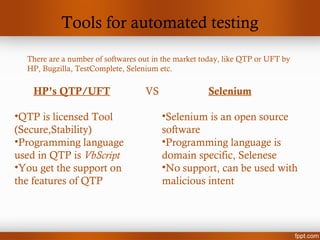
Tools for automated testing
There are a number of softwares out in the market today, like QTP or UFT by
HP, Bugzilla, TestComplete, Selenium etc.
HP’s QTP/UFT
•QTP is licensed Tool
(Secure,Stability)
•Programming language
used in QTP is VbScript
•You get the support on
the features of QTP
Selenium
•Selenium is an open source
software
•Programming language is
domain specific, Selenese
•No support, can be used with
malicious intent
VS
How to work with QTP
You can prepare a script using one of the following
formats:
•Record and Run
•Custom written code
•Combination of record and run & custom written
code
The take away for success with QTP lies in your
comfort level with Vbscript. If you know Vbscript,
you know 75% of QTP!
Recording Modes
There are 3 types of recording modes in QTP. They
are:
•Context Sensitive
•Analog
•Low Level
Recording Modes
Context Sensitive
– Aka normal recording mode
– It recognizes objects in an application regardless of their location on screen
Analog Mode
– In this mode QTP records and tracks the movement of the mouse
– Recordings are captured as tracks and stored in the directory of the test
– Can be relative to screen or relative to window
Low Level Recording
– Lets you record a any object irrespective of weather QTO recognizes the
object or operation
– QTP automatically reverts to low level recording when it does not
recognize an object or environment
– Records the x,y co-ordinates of any clicks
Checkpoints
A check point is QTP function that enables a user to
identify whether an automated test script is correctly
working or not by comparing values/results to
expected values/results. There are a number of
different types of checkpoints but the 3 most
commonly used are:
•Standard checkpoint
•Bit map checkpoint
•Text checkpoint
Checkpoints
• Standard checkpoint
– Standard checkpoint enables users to check object property values
– Can be entered during active recording mode or in keyword or
expert view
• Bitmap checkpoint
– Bitmap checkpoint enables user to compare two bitmaps (images)
– Can only be entered in recording mode
• Text checkpoint
– Text checkpoint enables user to Check object’s text
– Can only be entered in recording mode
Checkpoints
• Standard checkpoint
– Standard checkpoint enables users to check object property values
– Can be entered during active recording mode or in keyword or
expert view
• Bitmap checkpoint
– Bitmap checkpoint enables user to compare two bitmaps (images)
– Can only be entered in recording mode
• Text checkpoint
– Text checkpoint enables user to Check object’s text
– Can only be entered in recording mode

Qtp 101

  • 1.
  • 2.
    What is softwaretesting? Software testing is an investigative process that provides an objective, independent view of a software; that in turn allows a business to appreciate and understand the risks of a new or updated software implementation
  • 3.
    How do youconduct software testing? There are two ways to conduct software testing: •Manual Testing •Automated Testing They both have their own advantages and applications. However as the name suggests, manual testing is a manual operation whereas automated testing enables you to automate the testing
  • 4.
    Tools for automatedtesting There are a number of softwares out in the market today, like QTP or UFT by HP, Bugzilla, TestComplete, Selenium etc. HP’s QTP/UFT •QTP is licensed Tool (Secure,Stability) •Programming language used in QTP is VbScript •You get the support on the features of QTP Selenium •Selenium is an open source software •Programming language is domain specific, Selenese •No support, can be used with malicious intent VS
  • 5.
    How to workwith QTP You can prepare a script using one of the following formats: •Record and Run •Custom written code •Combination of record and run & custom written code The take away for success with QTP lies in your comfort level with Vbscript. If you know Vbscript, you know 75% of QTP!
  • 6.
    Recording Modes There are3 types of recording modes in QTP. They are: •Context Sensitive •Analog •Low Level
  • 7.
    Recording Modes Context Sensitive –Aka normal recording mode – It recognizes objects in an application regardless of their location on screen Analog Mode – In this mode QTP records and tracks the movement of the mouse – Recordings are captured as tracks and stored in the directory of the test – Can be relative to screen or relative to window Low Level Recording – Lets you record a any object irrespective of weather QTO recognizes the object or operation – QTP automatically reverts to low level recording when it does not recognize an object or environment – Records the x,y co-ordinates of any clicks
  • 8.
    Checkpoints A check pointis QTP function that enables a user to identify whether an automated test script is correctly working or not by comparing values/results to expected values/results. There are a number of different types of checkpoints but the 3 most commonly used are: •Standard checkpoint •Bit map checkpoint •Text checkpoint
  • 9.
    Checkpoints • Standard checkpoint –Standard checkpoint enables users to check object property values – Can be entered during active recording mode or in keyword or expert view • Bitmap checkpoint – Bitmap checkpoint enables user to compare two bitmaps (images) – Can only be entered in recording mode • Text checkpoint – Text checkpoint enables user to Check object’s text – Can only be entered in recording mode
  • 10.
    Checkpoints • Standard checkpoint –Standard checkpoint enables users to check object property values – Can be entered during active recording mode or in keyword or expert view • Bitmap checkpoint – Bitmap checkpoint enables user to compare two bitmaps (images) – Can only be entered in recording mode • Text checkpoint – Text checkpoint enables user to Check object’s text – Can only be entered in recording mode

Editor's Notes

  • #3 In other words, a software tester analyzes and tests a developers product to assess it’s functionality and look for errors within the programming code to certify it’s intended use.
  • #4 For example, anything that requires repeated operation of the same kind, like checking the login functionality for gmail would be efficiently handled automating the test. But a test that requires you to assess the aesthetic component of the same login page (meaning the look and feel) is best handled by a human tester manually.
  • #5 The most important aspect of this comparison is the language used to run these applications. While QTP uses only VbScript language to run its tests, Selenium uses domain specific language. For example you would have to learn a multitude of programming languages and protocols, especially java, in order to utilize Selenium to its maximum potential. Whereas Qtp uses a watered down scripting software based on Visual Basic that is easy to learn