QCP*
*Quality Control Program
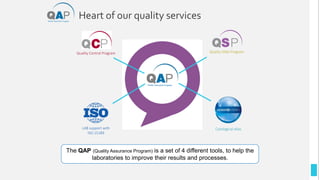
Heart of our quality services
LAB support with
ISO 15189
Cytological atlas
Quality Slide Program
Quality Control Program
The QAP (Quality Assurance Program) is a set of 4 different tools, to help the
laboratories to improve their results and processes.
Overview
3
What’s the QCP ?
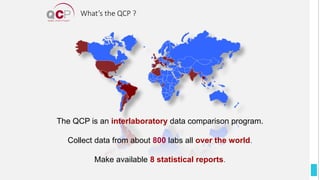
The QCP is an interlaboratory data comparison program.
Collect data from about 800 labs all over the world.
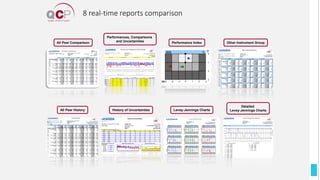
Make available 8 statistical reports.
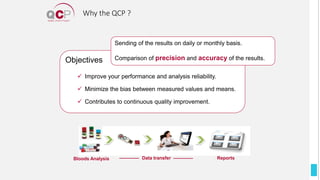
Bloods Analysis Data transfer Reports
Why the QCP ?
Objectives
 Improve your performance and analysis reliability.
 Minimize the bias between measured values and means.
 Contributes to continuous quality improvement.
Sending of the results on daily or monthly basis.
Comparison of precision and accuracy of the results.
What’s the QCP ?
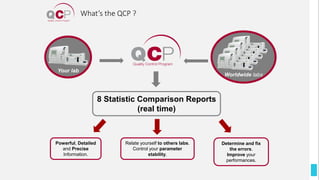
8 Statistic Comparison Reports
(real time)
Relate yourself to others labs.
Control your parameter
stability.
Powerful, Detailed
and Precise
Information.
Determine and fix
the errors.
Improve your
performances.
Your lab
Worldwide labs
IndicatorsCalculation
7
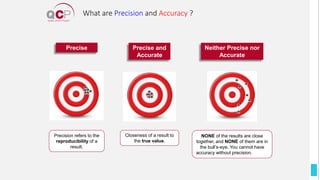
NONE of the results are close
together, and NONE of them are in
the bull’s-eye. You cannot have
accuracy without precision.
Closeness of a result to
the true value.
Precision refers to the
reproducibility of a
result.
Precise Precise and
Accurate
Neither Precise nor
Accurate
What are Precision and Accuracy ?
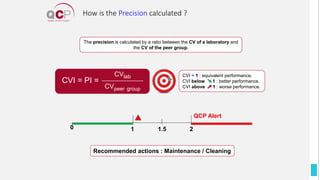
The precision is calculated by a ratio between the CV of a laboratory and
the CV of the peer group.
Recommended actions : Maintenance / Cleaning
CVI = PI =
CVlab
CVpeer group
CVI = 1 : equivalent performance.
CVI below 1 : better performance.
CVI above 1 : worse performance.
0 1 1.5 2
QCP Alert
How is the Precision calculated ?
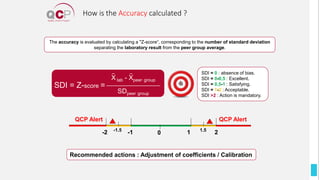
Recommended actions : Adjustment of coefficients / Calibration
The accuracy is evaluated by calculating a "Z-score“, corresponding to the number of standard deviation
separating the laboratory result from the peer group average.
SDI = Z-score =
X lab - Xpeer group
SDpeer group
SDI = 0 : absence of bias.
SDI = 0-0,5 : Excellent.
SDI = 0,5-1 : Satisfying.
SDI = 1-2 : Acceptable.
SDI >2 : Action is mandatory.
-1
-1.5
-2
QCP Alert
2
1.5
1
QCP Alert
0
How is the Accuracy calculated ?
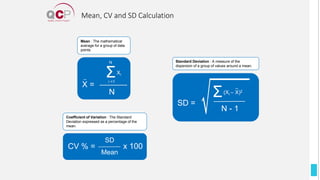
Mean, CV and SD Calculation
CV % =
SD
Mean
x 100
Coefficient of Variation : The Standard
Deviation expressed as a percentage of the
mean.
Mean : The mathematical
average for a group of data
points.
X =
N
Σ
N
i =1
Xi
SD =
Σ(Xi – X)2
N - 1
Standard Deviation : A measure of the
dispersion of a group of values around a mean.
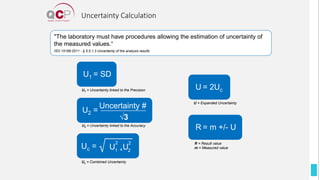
Uncertainty Calculation
U = 2Uc
U = Expanded Uncertainty
R = m +/- U
R = Result value
m = Measured value
"The laboratory must have procedures allowing the estimation of uncertainty of
the measured values.“
ISO 15189:2011 - § 5.5.1.3 Uncertainty of the analysis results
Uc = U +U
1
2
2
2
Uc = Combined Uncertainty
U1 = SD
U1 = Uncertainty linked to the Precision
U2 =
Uncertainty #
√3
U2 = Uncertainty linked to the Accuracy
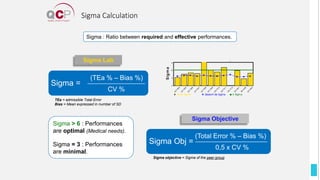
Sigma : Ratio between required and effective performances.
Sigma > 6 : Performances
are optimal (Medical needs).
Sigma = 3 : Performances
are minimal.
Sigma Lab
Sigma =
(TEa % – Bias %)
CV %
TEa = admissible Total Error
Bias = Mean expressed in number of SD
Sigma Objective
Sigma Obj =
(Total Error % – Bias %)
0,5 x CV %
Sigma objective = Sigma of the peer group
Sigma Calculation
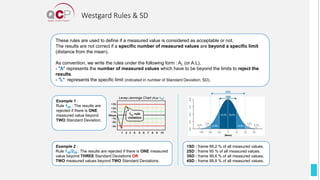
These rules are used to define if a measured value is considered as acceptable or not.
The results are not correct if a specific number of measured values are beyond a specific limit
(distance from the mean).
As convention, we write the rules under the following form : AL (or A:L).
- "A" represents the number of measured values which have to be beyond the limits to reject the
results.
- "L" represents the specific limit (indicated in number of Standard Deviation, SD).
Example 1 :
Rule 12S : The results are
rejected if there is ONE
measured value beyond
TWO Standard Deviation.
Levey-Jennings Chart (Rule 12S)
Example 2 :
Rule 13S/22S : The results are rejected if there is ONE measured
value beyond THREE Standard Deviations OR
TWO measured values beyond TWO Standard Deviations.
1SD : frame 68,2 % of all measured values.
2SD : frame 95 % of all measured values.
3SD : frame 99,6 % of all measured values.
4SD : frame 99,8 % of all measured values.
(Mean)
1SD
2SD
Westgard Rules & SD
Real-TimeReports
15
All Peer Comparison
Performances, Comparisons
and Uncertainties
Levey-Jennings Charts
Detailed
Levey-Jennings Charts
Other Instrument Group
History of Uncertainties
All Peer History
Performance Index
8 real-time reports comparison
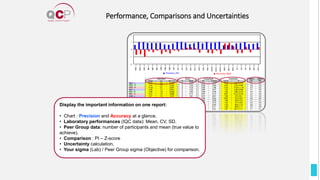
Performance, Comparisons and Uncertainties
Display the important information on one report:
• Chart : Precision and Accuracy at a glance.
• Laboratory performances (IQC data): Mean, CV, SD.
• Peer Group data: number of participants and mean (true value to
achieve).
• Comparison : PI – Z-score
• Uncertainty calculation.
• Your sigma (Lab) / Peer Group sigma (Objective) for comparison.
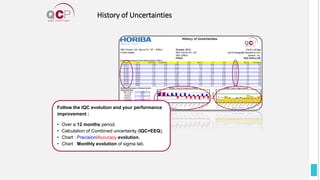
History of Uncertainties
Follow the IQC evolution and your performance
improvement :
• Over a 12 months period.
• Calculation of Combined uncertainty (IQC+EEQ).
• Chart : Precision/Accuracy evolution.
• Chart : Monthly evolution of sigma lab.
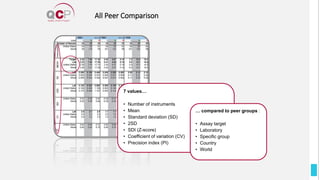
All Peer Comparison
7 values…
• Number of instruments
• Mean
• Standard deviation (SD)
• 2SD
• SDI (Z-score)
• Coefficient of variation (CV)
• Precision index (PI)
… compared to peer groups :
• Assay target
• Laboratory
• Specific group
• Country
• World
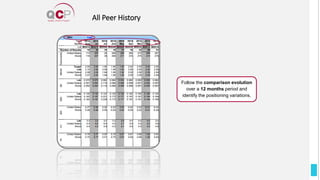
All Peer History
Follow the comparison evolution
over a 12 months period and
identify the positioning variations.
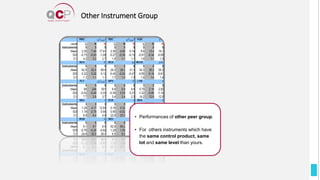
Other Instrument Group
• Performances of other peer group.
• For others instruments which have
the same control product, same
lot and same level than yours.
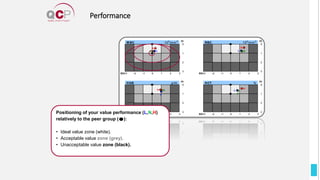
Performance
Positioning of your value performance (L,N,H)
relatively to the peer group ( ):
• Ideal value zone (white).
• Acceptable value zone (grey).
• Unacceptable value zone (black).
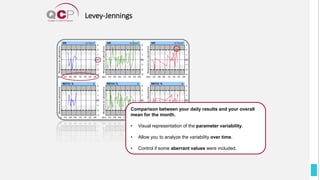
Levey-Jennings
Comparison between your daily results and your overall
mean for the month.
• Visual representation of the parameter variability.
• Allow you to analyze the variability over time.
• Control if some aberrant values were included.
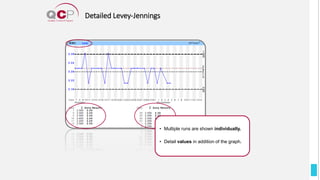
Detailed Levey-Jennings
• Multiple runs are shown individually.
• Detail values in addition of the graph.
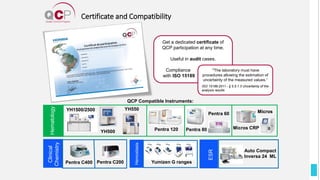
Certificate and Compatibility
Get a dedicated certificate of
QCP participation at any time.
Useful in audit cases.
Compliance .
with ISO 15189 .
Auto Compact
Inversa 24 ML
Hematology
Clinical
Chemistry
ESR
Pentra C400 Pentra C200
QCP Compatible Instruments:
Pentra 80
Pentra 60
Pentra 120 Micros CRP
Micros
"The laboratory must have
procedures allowing the estimation of
uncertainty of the measured values.“
ISO 15189:2011 - § 5.5.1.3 Uncertainty of the
analysis results
Hematology
Micros
YH500
YH550
YH1500/2500
Yumizen G ranges
PracticalSheet
26
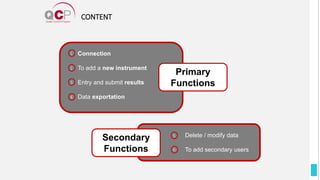
CONTENT
5
6
Delete / modify data
To add secondary users
Secondary
Functions
Connection
To add a new instrument
Entry and submit results
Data exportation
1
2
3
4
Primary
Functions
Primary Functions
28
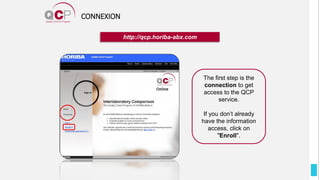
CONNEXION
http://qcp.horiba-abx.com
The first step is the
connection to get
access to the QCP
service.
If you don’t already
have the information
access, click on
"Enroll".
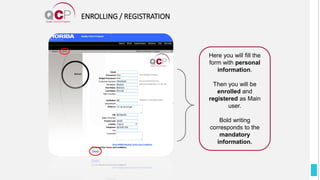
ENROLLING / REGISTRATION
Here you will fill the
form with personal
information.
Then you will be
enrolled and
registered as Main
user.
Bold writing
corresponds to the
mandatory
information.
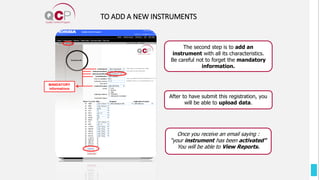
MANDATORY
informations
Once you receive an email saying :
“your instrument has been activated”
You will be able to View Reports.
TO ADD A NEW INSTRUMENTS
After to have submit this registration, you
will be able to upload data.
The second step is to add an
instrument with all its characteristics.
Be careful not to forget the mandatory
information.
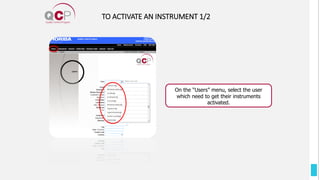
TO ACTIVATE AN INSTRUMENT 1/2
On the “Users” menu, select the user
which need to get their instruments
activated.
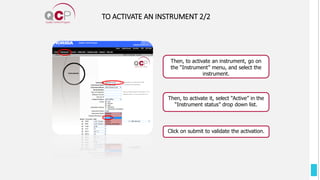
TO ACTIVATE AN INSTRUMENT 2/2
Then, to activate it, select “Active” in the
“Instrument status” drop down list.
Then, to activate an instrument, go on
the “Instrument” menu, and select the
instrument.
Click on submit to validate the activation.
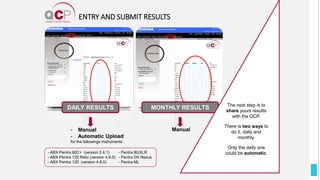
ENTRY AND SUBMIT RESULTS
- Manual
- Automatic Upload
for the followings instruments :
Manual
- ABX Pentra 60C+ (version 2.4.1)
- ABX Pentra 120 Retic (version 4.8.0)
- ABX Pentra 120 (version 4.8.0)
DAILY RESULTS
- Pentra 80/XLR
- Pentra DX Nexus
- Pentra ML
MONTHLY RESULTS The next step is to
share yours results
with the QCP.
There is two ways to
do it, daily and
monthly.
Only the daily one
could be automatic.
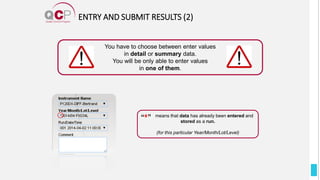
ENTRY AND SUBMIT RESULTS (2)
You have to choose between enter values
in detail or summary data.
You will be only able to enter values
in one of them.
means that data has already been entered and
stored as a run.
(for this particular Year/Month/Lot/Level)
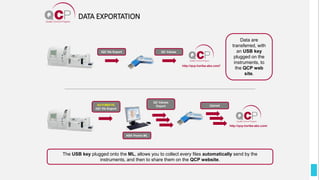
IQC file Export
http://qcp.horiba-abx.com/
Data are
transferred, with
an USB key
plugged on the
instruments, to
the QCP web
site.
The USB key plugged onto the ML, allows you to collect every files automatically send by the
instruments, and then to share them on the QCP website.
DATA EXPORTATION
QC Values
AUTOMATIC
IQC file Export
ABX Pentra ML
QC Values
Export Upload
SecondaryFunctions
37
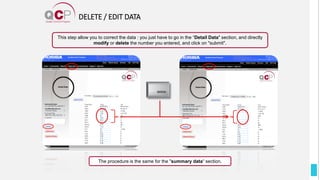
DELETE / EDIT DATA
The procedure is the same for the "summary data“ section.
This step allow you to correct the data : you just have to go in the “Detail Data" section, and directly
modify or delete the number you entered, and click on "submit".
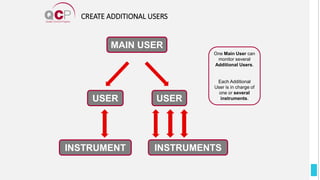
CREATE ADDITIONAL USERS
One Main User can
monitor several
Additional Users.
Each Additional
User is in charge of
one or several
instruments.
MAIN USER
USER USER
INSTRUMENT INSTRUMENTS
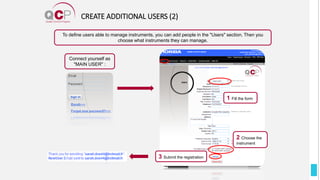
CREATE ADDITIONAL USERS (2)
Connect yourself as
"MAIN USER" :
To define users able to manage instruments, you can add people in the "Users" section. Then you
choose what instruments they can manage.
1 Fill the form
2 Choose the
instrument
3 Submit the registration
MORE INFORMATIONS
For other and more detailed
information, see the
user manual.
Thanks foryourattention
HORIBA Medical Training Division
Training.med@horiba.com
https://www.horiba.com/en_en/servi
ce/training/product-training/medical-
product-training/

QCP user manual EN.pdf

  • 1.
  • 2.
    Heart of ourquality services LAB support with ISO 15189 Cytological atlas Quality Slide Program Quality Control Program The QAP (Quality Assurance Program) is a set of 4 different tools, to help the laboratories to improve their results and processes.
  • 3.
  • 4.
    What’s the QCP? The QCP is an interlaboratory data comparison program. Collect data from about 800 labs all over the world. Make available 8 statistical reports.
  • 5.
    Bloods Analysis Datatransfer Reports Why the QCP ? Objectives  Improve your performance and analysis reliability.  Minimize the bias between measured values and means.  Contributes to continuous quality improvement. Sending of the results on daily or monthly basis. Comparison of precision and accuracy of the results.
  • 6.
    What’s the QCP? 8 Statistic Comparison Reports (real time) Relate yourself to others labs. Control your parameter stability. Powerful, Detailed and Precise Information. Determine and fix the errors. Improve your performances. Your lab Worldwide labs
  • 7.
  • 8.
    NONE of theresults are close together, and NONE of them are in the bull’s-eye. You cannot have accuracy without precision. Closeness of a result to the true value. Precision refers to the reproducibility of a result. Precise Precise and Accurate Neither Precise nor Accurate What are Precision and Accuracy ?
  • 9.
    The precision iscalculated by a ratio between the CV of a laboratory and the CV of the peer group. Recommended actions : Maintenance / Cleaning CVI = PI = CVlab CVpeer group CVI = 1 : equivalent performance. CVI below 1 : better performance. CVI above 1 : worse performance. 0 1 1.5 2 QCP Alert How is the Precision calculated ?
  • 10.
    Recommended actions :Adjustment of coefficients / Calibration The accuracy is evaluated by calculating a "Z-score“, corresponding to the number of standard deviation separating the laboratory result from the peer group average. SDI = Z-score = X lab - Xpeer group SDpeer group SDI = 0 : absence of bias. SDI = 0-0,5 : Excellent. SDI = 0,5-1 : Satisfying. SDI = 1-2 : Acceptable. SDI >2 : Action is mandatory. -1 -1.5 -2 QCP Alert 2 1.5 1 QCP Alert 0 How is the Accuracy calculated ?
  • 11.
    Mean, CV andSD Calculation CV % = SD Mean x 100 Coefficient of Variation : The Standard Deviation expressed as a percentage of the mean. Mean : The mathematical average for a group of data points. X = N Σ N i =1 Xi SD = Σ(Xi – X)2 N - 1 Standard Deviation : A measure of the dispersion of a group of values around a mean.
  • 12.
    Uncertainty Calculation U =2Uc U = Expanded Uncertainty R = m +/- U R = Result value m = Measured value "The laboratory must have procedures allowing the estimation of uncertainty of the measured values.“ ISO 15189:2011 - § 5.5.1.3 Uncertainty of the analysis results Uc = U +U 1 2 2 2 Uc = Combined Uncertainty U1 = SD U1 = Uncertainty linked to the Precision U2 = Uncertainty # √3 U2 = Uncertainty linked to the Accuracy
  • 13.
    Sigma : Ratiobetween required and effective performances. Sigma > 6 : Performances are optimal (Medical needs). Sigma = 3 : Performances are minimal. Sigma Lab Sigma = (TEa % – Bias %) CV % TEa = admissible Total Error Bias = Mean expressed in number of SD Sigma Objective Sigma Obj = (Total Error % – Bias %) 0,5 x CV % Sigma objective = Sigma of the peer group Sigma Calculation
  • 14.
    These rules areused to define if a measured value is considered as acceptable or not. The results are not correct if a specific number of measured values are beyond a specific limit (distance from the mean). As convention, we write the rules under the following form : AL (or A:L). - "A" represents the number of measured values which have to be beyond the limits to reject the results. - "L" represents the specific limit (indicated in number of Standard Deviation, SD). Example 1 : Rule 12S : The results are rejected if there is ONE measured value beyond TWO Standard Deviation. Levey-Jennings Chart (Rule 12S) Example 2 : Rule 13S/22S : The results are rejected if there is ONE measured value beyond THREE Standard Deviations OR TWO measured values beyond TWO Standard Deviations. 1SD : frame 68,2 % of all measured values. 2SD : frame 95 % of all measured values. 3SD : frame 99,6 % of all measured values. 4SD : frame 99,8 % of all measured values. (Mean) 1SD 2SD Westgard Rules & SD
  • 15.
  • 16.
    All Peer Comparison Performances,Comparisons and Uncertainties Levey-Jennings Charts Detailed Levey-Jennings Charts Other Instrument Group History of Uncertainties All Peer History Performance Index 8 real-time reports comparison
  • 17.
    Performance, Comparisons andUncertainties Display the important information on one report: • Chart : Precision and Accuracy at a glance. • Laboratory performances (IQC data): Mean, CV, SD. • Peer Group data: number of participants and mean (true value to achieve). • Comparison : PI – Z-score • Uncertainty calculation. • Your sigma (Lab) / Peer Group sigma (Objective) for comparison.
  • 18.
    History of Uncertainties Followthe IQC evolution and your performance improvement : • Over a 12 months period. • Calculation of Combined uncertainty (IQC+EEQ). • Chart : Precision/Accuracy evolution. • Chart : Monthly evolution of sigma lab.
  • 19.
    All Peer Comparison 7values… • Number of instruments • Mean • Standard deviation (SD) • 2SD • SDI (Z-score) • Coefficient of variation (CV) • Precision index (PI) … compared to peer groups : • Assay target • Laboratory • Specific group • Country • World
  • 20.
    All Peer History Followthe comparison evolution over a 12 months period and identify the positioning variations.
  • 21.
    Other Instrument Group •Performances of other peer group. • For others instruments which have the same control product, same lot and same level than yours.
  • 22.
    Performance Positioning of yourvalue performance (L,N,H) relatively to the peer group ( ): • Ideal value zone (white). • Acceptable value zone (grey). • Unacceptable value zone (black).
  • 23.
    Levey-Jennings Comparison between yourdaily results and your overall mean for the month. • Visual representation of the parameter variability. • Allow you to analyze the variability over time. • Control if some aberrant values were included.
  • 24.
    Detailed Levey-Jennings • Multipleruns are shown individually. • Detail values in addition of the graph.
  • 25.
    Certificate and Compatibility Geta dedicated certificate of QCP participation at any time. Useful in audit cases. Compliance . with ISO 15189 . Auto Compact Inversa 24 ML Hematology Clinical Chemistry ESR Pentra C400 Pentra C200 QCP Compatible Instruments: Pentra 80 Pentra 60 Pentra 120 Micros CRP Micros "The laboratory must have procedures allowing the estimation of uncertainty of the measured values.“ ISO 15189:2011 - § 5.5.1.3 Uncertainty of the analysis results Hematology Micros YH500 YH550 YH1500/2500 Yumizen G ranges
  • 26.
  • 27.
    CONTENT 5 6 Delete / modifydata To add secondary users Secondary Functions Connection To add a new instrument Entry and submit results Data exportation 1 2 3 4 Primary Functions
  • 28.
  • 29.
    CONNEXION http://qcp.horiba-abx.com The first stepis the connection to get access to the QCP service. If you don’t already have the information access, click on "Enroll".
  • 30.
    ENROLLING / REGISTRATION Hereyou will fill the form with personal information. Then you will be enrolled and registered as Main user. Bold writing corresponds to the mandatory information.
  • 31.
    MANDATORY informations Once you receivean email saying : “your instrument has been activated” You will be able to View Reports. TO ADD A NEW INSTRUMENTS After to have submit this registration, you will be able to upload data. The second step is to add an instrument with all its characteristics. Be careful not to forget the mandatory information.
  • 32.
    TO ACTIVATE ANINSTRUMENT 1/2 On the “Users” menu, select the user which need to get their instruments activated.
  • 33.
    TO ACTIVATE ANINSTRUMENT 2/2 Then, to activate it, select “Active” in the “Instrument status” drop down list. Then, to activate an instrument, go on the “Instrument” menu, and select the instrument. Click on submit to validate the activation.
  • 34.
    ENTRY AND SUBMITRESULTS - Manual - Automatic Upload for the followings instruments : Manual - ABX Pentra 60C+ (version 2.4.1) - ABX Pentra 120 Retic (version 4.8.0) - ABX Pentra 120 (version 4.8.0) DAILY RESULTS - Pentra 80/XLR - Pentra DX Nexus - Pentra ML MONTHLY RESULTS The next step is to share yours results with the QCP. There is two ways to do it, daily and monthly. Only the daily one could be automatic.
  • 35.
    ENTRY AND SUBMITRESULTS (2) You have to choose between enter values in detail or summary data. You will be only able to enter values in one of them. means that data has already been entered and stored as a run. (for this particular Year/Month/Lot/Level)
  • 36.
    IQC file Export http://qcp.horiba-abx.com/ http://qcp.horiba-abx.com/ Dataare transferred, with an USB key plugged on the instruments, to the QCP web site. The USB key plugged onto the ML, allows you to collect every files automatically send by the instruments, and then to share them on the QCP website. DATA EXPORTATION QC Values AUTOMATIC IQC file Export ABX Pentra ML QC Values Export Upload
  • 37.
  • 38.
    DELETE / EDITDATA The procedure is the same for the "summary data“ section. This step allow you to correct the data : you just have to go in the “Detail Data" section, and directly modify or delete the number you entered, and click on "submit".
  • 39.
    CREATE ADDITIONAL USERS OneMain User can monitor several Additional Users. Each Additional User is in charge of one or several instruments. MAIN USER USER USER INSTRUMENT INSTRUMENTS
  • 40.
    CREATE ADDITIONAL USERS(2) Connect yourself as "MAIN USER" : To define users able to manage instruments, you can add people in the "Users" section. Then you choose what instruments they can manage. 1 Fill the form 2 Choose the instrument 3 Submit the registration
  • 41.
    MORE INFORMATIONS For otherand more detailed information, see the user manual.
  • 42.
    Thanks foryourattention HORIBA MedicalTraining Division Training.med@horiba.com https://www.horiba.com/en_en/servi ce/training/product-training/medical- product-training/