Apache Pulsar Development 101
With Python
Tim Spann | Developer Advocate
● What is Apache Pulsar?
● Python 3 Coding
● Python Consumers
● Python Producers
● Python via MQTT, Web
Sockets, Kafka
● Python for Pulsar Functions
● Schemas
Tim Spann
Developer Advocate
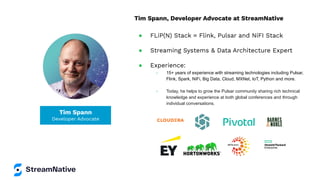
Tim Spann, Developer Advocate at StreamNative
● FLiP(N) Stack = Flink, Pulsar and NiFI Stack
● Streaming Systems & Data Architecture Expert
● Experience:
○ 15+ years of experience with streaming technologies including Pulsar,
Flink, Spark, NiFi, Big Data, Cloud, MXNet, IoT, Python and more.
○ Today, he helps to grow the Pulsar community sharing rich technical
knowledge and experience at both global conferences and through
individual conversations.
streamnative.io
Passionate and dedicated team.
Founded by the original developers of
Apache Pulsar.
StreamNative helps teams to capture,
manage, and leverage data using Pulsar’s
unified messaging and streaming
platform.
FLiP Stack Weekly
This week in Apache Flink, Apache Pulsar, Apache
NiFi, Apache Spark and open source friends.
https://bit.ly/32dAJft
Apache Pulsar Training
● Instructor-led courses
○ Pulsar Fundamentals
○ Pulsar Developers
○ Pulsar Operations
● On-demand learning with labs
● 300+ engineers, admins and architects trained!
StreamNative Academy
Now Available
On-Demand
Pulsar Training
Academy.StreamNative.io
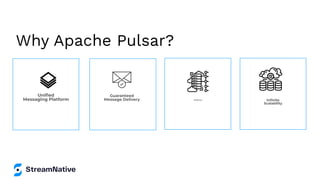
Why Apache Pulsar?
Unified
Messaging Platform
Guaranteed
Message Delivery Resiliency Infinite
Scalability
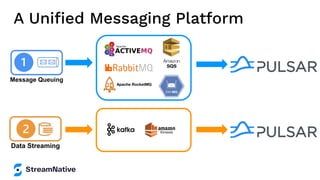
A Unified Messaging Platform
Message Queuing
Data Streaming
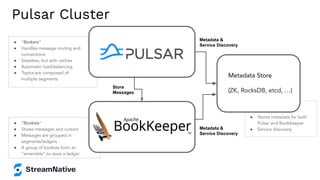
● “Bookies”
● Stores messages and cursors
● Messages are grouped in
segments/ledgers
● A group of bookies form an
“ensemble” to store a ledger
● “Brokers”
● Handles message routing and
connections
● Stateless, but with caches
● Automatic load-balancing
● Topics are composed of
multiple segments
●
● Stores metadata for both
Pulsar and BookKeeper
● Service discovery
Store
Messages
Metadata &
Service Discovery
Metadata &
Service Discovery
Pulsar Cluster
Metadata Store
(ZK, RocksDB, etcd, …)
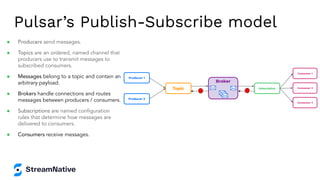
Pulsar’s Publish-Subscribe model
Broker
Subscription
Consumer 1
Consumer 2
Consumer 3
Topic
Producer 1
Producer 2
● Producers send messages.
● Topics are an ordered, named channel that
producers use to transmit messages to
subscribed consumers.
● Messages belong to a topic and contain an
arbitrary payload.
● Brokers handle connections and routes
messages between producers / consumers.
● Subscriptions are named configuration
rules that determine how messages are
delivered to consumers.
● Consumers receive messages.
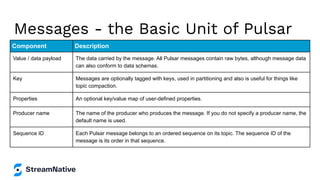
Messages - the Basic Unit of Pulsar
Component Description
Value / data payload The data carried by the message. All Pulsar messages contain raw bytes, although message data
can also conform to data schemas.
Key Messages are optionally tagged with keys, used in partitioning and also is useful for things like
topic compaction.
Properties An optional key/value map of user-defined properties.
Producer name The name of the producer who produces the message. If you do not specify a producer name, the
default name is used.
Sequence ID Each Pulsar message belongs to an ordered sequence on its topic. The sequence ID of the
message is its order in that sequence.
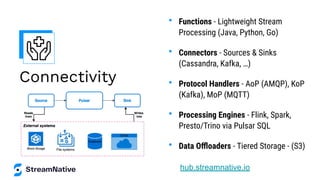
Connectivity
• Functions - Lightweight Stream
Processing (Java, Python, Go)
• Connectors - Sources & Sinks
(Cassandra, Kafka, …)
• Protocol Handlers - AoP (AMQP), KoP
(Kafka), MoP (MQTT)
• Processing Engines - Flink, Spark,
Presto/Trino via Pulsar SQL
• Data Offloaders - Tiered Storage - (S3)
hub.streamnative.io
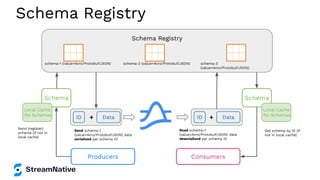
Schema Registry
Schema Registry
schema-1 (value=Avro/Protobuf/JSON) schema-2 (value=Avro/Protobuf/JSON) schema-3
(value=Avro/Protobuf/JSON)
Schema
Data
ID
Local Cache
for Schemas
+
Schema
Data
ID +
Local Cache
for Schemas
Send schema-1
(value=Avro/Protobuf/JSON) data
serialized per schema ID
Send (register)
schema (if not in
local cache)
Read schema-1
(value=Avro/Protobuf/JSON) data
deserialized per schema ID
Get schema by ID (if
not in local cache)
Producers Consumers
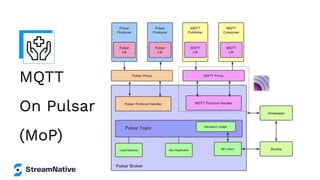
MQTT
On Pulsar
(MoP)
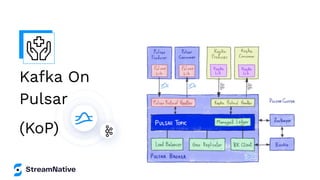
Kafka On
Pulsar
(KoP)
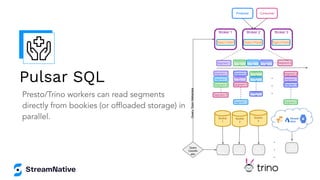
Presto/Trino workers can read segments
directly from bookies (or offloaded storage) in
parallel. Bookie
1
Segment 1
Producer Consumer
Broker 1
Topic1-Part1
Broker 2
Topic1-Part2
Broker 3
Topic1-Part3
Segment
2
Segment
3
Segment
4
Segment X
Segment 1
Segment
1 Segment 1
Segment 3
Segment
3
Segment 3
Segment 2
Segment
2
Segment 2
Segment 4
Segment 4
Segment
4
Segment X
Segment X
Segment X
Bookie
2
Bookie
3
Query
Coordin
ator
.
.
.
.
.
.
SQL
Worker
SQL
Worker
SQL
Worker
SQL
Worker
Query
Topic
Metadata
Pulsar SQL
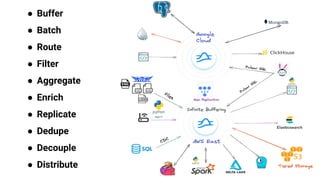
● Buffer
● Batch
● Route
● Filter
● Aggregate
● Enrich
● Replicate
● Dedupe
● Decouple
● Distribute
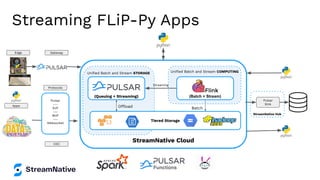
Streaming FLiP-Py Apps
StreamNative Hub
StreamNative Cloud
Unified Batch and Stream COMPUTING
Batch
(Batch + Stream)
Unified Batch and Stream STORAGE
Offload
(Queuing + Streaming)
Tiered Storage
Pulsar
---
KoP
---
MoP
---
Websocket
Pulsar
Sink
Streaming
Edge Gateway
Protocols
CDC
Apps
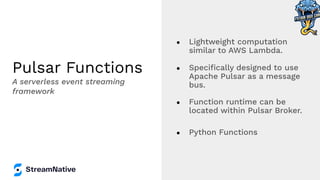
Pulsar Functions
● Lightweight computation
similar to AWS Lambda.
● Specifically designed to use
Apache Pulsar as a message
bus.
● Function runtime can be
located within Pulsar Broker.
● Python Functions
A serverless event streaming
framework
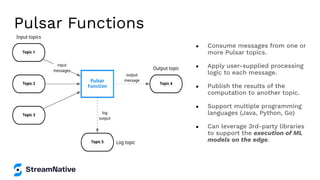
● Consume messages from one or
more Pulsar topics.
● Apply user-supplied processing
logic to each message.
● Publish the results of the
computation to another topic.
● Support multiple programming
languages (Java, Python, Go)
● Can leverage 3rd-party libraries
to support the execution of ML
models on the edge.
Pulsar Functions
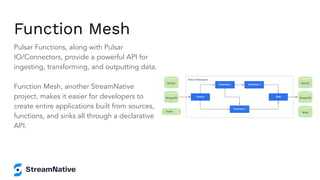
Function Mesh
Pulsar Functions, along with Pulsar
IO/Connectors, provide a powerful API for
ingesting, transforming, and outputting data.
Function Mesh, another StreamNative
project, makes it easier for developers to
create entire applications built from sources,
functions, and sinks all through a declarative
API.
Python 3 Coding
Code Along With Tim
<<DEMO>>
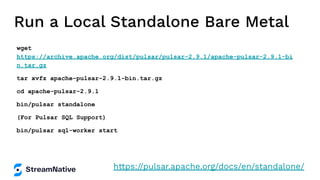
Run a Local Standalone Bare Metal
wget
https://archive.apache.org/dist/pulsar/pulsar-2.9.1/apache-pulsar-2.9.1-bi
n.tar.gz
tar xvfz apache-pulsar-2.9.1-bin.tar.gz
cd apache-pulsar-2.9.1
bin/pulsar standalone
(For Pulsar SQL Support)
bin/pulsar sql-worker start
https://pulsar.apache.org/docs/en/standalone/
<or> Run in StreamNative Cloud
Scan the QR code to earn
$200 in cloud credit
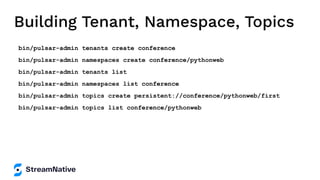
Building Tenant, Namespace, Topics
bin/pulsar-admin tenants create conference
bin/pulsar-admin namespaces create conference/pythonweb
bin/pulsar-admin tenants list
bin/pulsar-admin namespaces list conference
bin/pulsar-admin topics create persistent://conference/pythonweb/first
bin/pulsar-admin topics list conference/pythonweb
Install Python 3 Pulsar Client
pip3 install pulsar-client=='2.9.1[all]'
# Depending on Platform May Need to Build C++ Client
For Python on Pulsar on Pi https://github.com/tspannhw/PulsarOnRaspberryPi
https://pulsar.apache.org/docs/en/client-libraries-python/
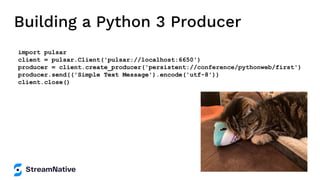
Building a Python 3 Producer
import pulsar
client = pulsar.Client('pulsar://localhost:6650')
producer = client.create_producer('persistent://conference/pythonweb/first')
producer.send(('Simple Text Message').encode('utf-8'))
client.close()
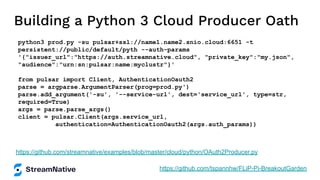
Building a Python 3 Cloud Producer Oath
python3 prod.py -su pulsar+ssl://name1.name2.snio.cloud:6651 -t
persistent://public/default/pyth --auth-params
'{"issuer_url":"https://auth.streamnative.cloud", "private_key":"my.json",
"audience":"urn:sn:pulsar:name:myclustr"}'
from pulsar import Client, AuthenticationOauth2
parse = argparse.ArgumentParser(prog=prod.py')
parse.add_argument('-su', '--service-url', dest='service_url', type=str,
required=True)
args = parse.parse_args()
client = pulsar.Client(args.service_url,
authentication=AuthenticationOauth2(args.auth_params))
https://github.com/streamnative/examples/blob/master/cloud/python/OAuth2Producer.py
https://github.com/tspannhw/FLiP-Pi-BreakoutGarden
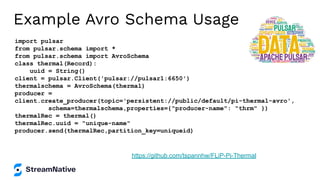
Example Avro Schema Usage
import pulsar
from pulsar.schema import *
from pulsar.schema import AvroSchema
class thermal(Record):
uuid = String()
client = pulsar.Client('pulsar://pulsar1:6650')
thermalschema = AvroSchema(thermal)
producer =
client.create_producer(topic='persistent://public/default/pi-thermal-avro',
schema=thermalschema,properties={"producer-name": "thrm" })
thermalRec = thermal()
thermalRec.uuid = "unique-name"
producer.send(thermalRec,partition_key=uniqueid)
https://github.com/tspannhw/FLiP-Pi-Thermal
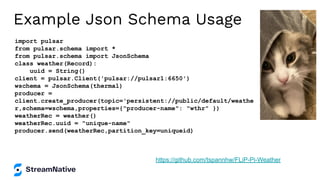
Example Json Schema Usage
import pulsar
from pulsar.schema import *
from pulsar.schema import JsonSchema
class weather(Record):
uuid = String()
client = pulsar.Client('pulsar://pulsar1:6650')
wschema = JsonSchema(thermal)
producer =
client.create_producer(topic='persistent://public/default/weathe
r,schema=wschema,properties={"producer-name": "wthr" })
weatherRec = weather()
weatherRec.uuid = "unique-name"
producer.send(weatherRec,partition_key=uniqueid)
https://github.com/tspannhw/FLiP-Pi-Weather
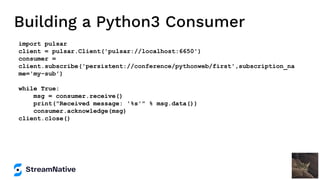
Building a Python3 Consumer
import pulsar
client = pulsar.Client('pulsar://localhost:6650')
consumer =
client.subscribe('persistent://conference/pythonweb/first',subscription_na
me='my-sub')
while True:
msg = consumer.receive()
print("Received message: '%s'" % msg.data())
consumer.acknowledge(msg)
client.close()
MQTT from Python
pip3 install paho-mqtt
import paho.mqtt.client as mqtt
client = mqtt.Client("rpi4-iot")
row = { }
row['gasKO'] = str(readings)
json_string = json.dumps(row)
json_string = json_string.strip()
client.connect("pulsar-server.com", 1883, 180)
client.publish("persistent://public/default/mqtt-2",
payload=json_string,qos=0,retain=True)
https://www.slideshare.net/bunkertor/data-minutes-2-apache-pulsar-with-mqtt-for-edge-computing-lightning-2022
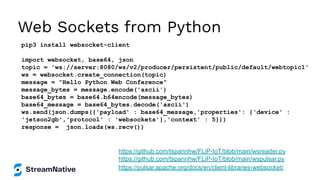
Web Sockets from Python
pip3 install websocket-client
import websocket, base64, json
topic = 'ws://server:8080/ws/v2/producer/persistent/public/default/webtopic1'
ws = websocket.create_connection(topic)
message = "Hello Python Web Conference"
message_bytes = message.encode('ascii')
base64_bytes = base64.b64encode(message_bytes)
base64_message = base64_bytes.decode('ascii')
ws.send(json.dumps({'payload' : base64_message,'properties': {'device' :
'jetson2gb','protocol' : 'websockets'},'context' : 5}))
response = json.loads(ws.recv())
https://pulsar.apache.org/docs/en/client-libraries-websocket/
https://github.com/tspannhw/FLiP-IoT/blob/main/wspulsar.py
https://github.com/tspannhw/FLiP-IoT/blob/main/wsreader.py
Kafka from Python
pip3 install kafka-python
from kafka import KafkaProducer
from kafka.errors import KafkaError
row = { }
row['gasKO'] = str(readings)
json_string = json.dumps(row)
json_string = json_string.strip()
producer = KafkaProducer(bootstrap_servers='pulsar1:9092',retries=3)
producer.send('topic-kafka-1', json.dumps(row).encode('utf-8'))
producer.flush()
https://github.com/streamnative/kop
https://docs.streamnative.io/platform/v1.0.0/concepts/kop-concepts
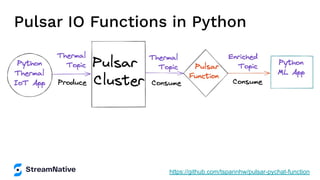
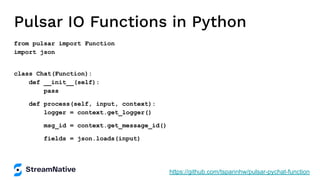
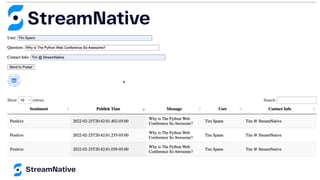
Pulsar IO Functions in Python
https://github.com/tspannhw/pulsar-pychat-function
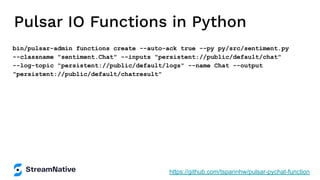
Pulsar IO Functions in Python
bin/pulsar-admin functions create --auto-ack true --py py/src/sentiment.py
--classname "sentiment.Chat" --inputs "persistent://public/default/chat"
--log-topic "persistent://public/default/logs" --name Chat --output
"persistent://public/default/chatresult"
https://github.com/tspannhw/pulsar-pychat-function
Pulsar IO Functions in Python
from pulsar import Function
import json
class Chat(Function):
def __init__(self):
pass
def process(self, input, context):
logger = context.get_logger()
msg_id = context.get_message_id()
fields = json.loads(input)
https://github.com/tspannhw/pulsar-pychat-function
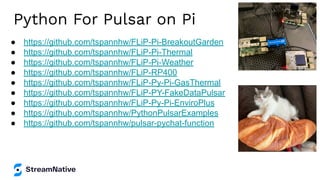
Python For Pulsar on Pi
● https://github.com/tspannhw/FLiP-Pi-BreakoutGarden
● https://github.com/tspannhw/FLiP-Pi-Thermal
● https://github.com/tspannhw/FLiP-Pi-Weather
● https://github.com/tspannhw/FLiP-RP400
● https://github.com/tspannhw/FLiP-Py-Pi-GasThermal
● https://github.com/tspannhw/FLiP-PY-FakeDataPulsar
● https://github.com/tspannhw/FLiP-Py-Pi-EnviroPlus
● https://github.com/tspannhw/PythonPulsarExamples
● https://github.com/tspannhw/pulsar-pychat-function
Connect with the Community
● Join the Pulsar Slack channel - Apache-Pulsar.slack.com
● Follow @streamnativeio and @apache_pulsar on Twitter
● Subscribe to Monthly Pulsar Newsletter for major news, events, project
updates, and resources in the Pulsar community
40
Let’s Keep
in Touch!
Tim Spann
Developer Advocate
@PassDev
https://www.linkedin.com/in/timothyspann
https://github.com/tspannhw
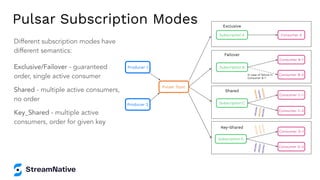
Pulsar Subscription Modes
Different subscription modes have
different semantics:
Exclusive/Failover - guaranteed
order, single active consumer
Shared - multiple active consumers,
no order
Key_Shared - multiple active
consumers, order for given key
Producer 1
Producer 2
Pulsar Topic
Subscription D
Consumer D-1
Consumer D-2
Key-Shared
<
K
1,
V
10
>
<
K
1,
V
11
>
<
K
1,
V
12
>
<
K
2
,V
2
0
>
<
K
2
,V
2
1>
<
K
2
,V
2
2
>
Subscription C
Consumer C-1
Consumer C-2
Shared
<
K
1,
V
10
>
<
K
2,
V
21
>
<
K
1,
V
12
>
<
K
2
,V
2
0
>
<
K
1,
V
11
>
<
K
2
,V
2
2
>
Subscription A Consumer A
Exclusive
Subscription B
Consumer B-1
Consumer B-2
In case of failure in
Consumer B-1
Failover
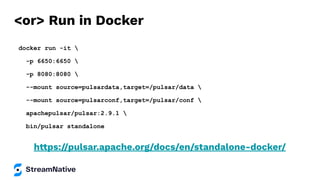
<or> Run in Docker
docker run -it 
-p 6650:6650 
-p 8080:8080 
--mount source=pulsardata,target=/pulsar/data 
--mount source=pulsarconf,target=/pulsar/conf 
apachepulsar/pulsar:2.9.1 
bin/pulsar standalone
https://pulsar.apache.org/docs/en/standalone-docker/
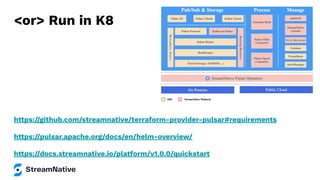
<or> Run in K8
https://github.com/streamnative/terraform-provider-pulsar#requirements
https://pulsar.apache.org/docs/en/helm-overview/
https://docs.streamnative.io/platform/v1.0.0/quickstart
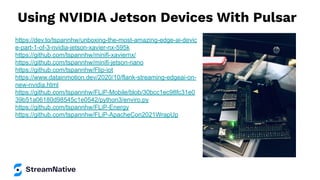
Using NVIDIA Jetson Devices With Pulsar
https://dev.to/tspannhw/unboxing-the-most-amazing-edge-ai-devic
e-part-1-of-3-nvidia-jetson-xavier-nx-595k
https://github.com/tspannhw/minifi-xaviernx/
https://github.com/tspannhw/minifi-jetson-nano
https://github.com/tspannhw/Flip-iot
https://www.datainmotion.dev/2020/10/flank-streaming-edgeai-on-
new-nvidia.html
https://github.com/tspannhw/FLiP-Mobile/blob/30bcc1ec98fc31e0
39b51a06180d98545c1e0542/python3/enviro.py
https://github.com/tspannhw/FLiP-Energy
https://github.com/tspannhw/FLiP-ApacheCon2021WrapUp
Other Applications and Code
● https://github.com/tspannhw/PythonPulsarExamples
● https://milvus.io/
● https://github.com/tspannhw/FLiP-SQL
● https://github.com/tspannhw/StreamingAnalyticsUsingFlinkSQL
● https://github.com/tspannhw/FLiP-CloudIngest
● https://github.com/tspannhw/FLiP-InfluxDB
● https://github.com/tspannhw/FLiP-EdgeAI
● https://github.com/tspannhw/FLiP-Stream2Clickhouse
● https://github.com/tspannhw/FLiP-Jetson
● https://github.com/tspannhw/FLiP-SOLR
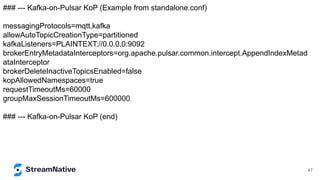
### --- Kafka-on-Pulsar KoP (Example from standalone.conf)
messagingProtocols=mqtt,kafka
allowAutoTopicCreationType=partitioned
kafkaListeners=PLAINTEXT://0.0.0.0:9092
brokerEntryMetadataInterceptors=org.apache.pulsar.common.intercept.AppendIndexMetad
ataInterceptor
brokerDeleteInactiveTopicsEnabled=false
kopAllowedNamespaces=true
requestTimeoutMs=60000
groupMaxSessionTimeoutMs=600000
### --- Kafka-on-Pulsar KoP (end)
47
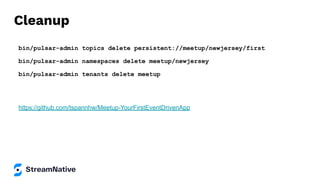
Cleanup
bin/pulsar-admin topics delete persistent://meetup/newjersey/first
bin/pulsar-admin namespaces delete meetup/newjersey
bin/pulsar-admin tenants delete meetup
https://github.com/tspannhw/Meetup-YourFirstEventDrivenApp
Messaging Ordering Guarantees
To guarantee message ordering, architect Pulsar to take advantage of subscription
modes and topic ordering guarantees.
Topic Ordering Guarantees
● Messages sent to a single topic or partition DO have an ordering guarantee.
● Messages sent to different partitions DO NOT have an ordering guarantee.
Subscription Mode Guarantees
● A single consumer can receive messages from the same partition in order using an
exclusive or failover subscription mode.
● Multiple consumers can receive messages from the same key in order using the
key_shared subscription mode.

Python web conference 2022 apache pulsar development 101 with python (f li-p-py)

  • 1.
    Apache Pulsar Development101 With Python Tim Spann | Developer Advocate
  • 2.
    ● What isApache Pulsar? ● Python 3 Coding ● Python Consumers ● Python Producers ● Python via MQTT, Web Sockets, Kafka ● Python for Pulsar Functions ● Schemas
  • 3.
    Tim Spann Developer Advocate TimSpann, Developer Advocate at StreamNative ● FLiP(N) Stack = Flink, Pulsar and NiFI Stack ● Streaming Systems & Data Architecture Expert ● Experience: ○ 15+ years of experience with streaming technologies including Pulsar, Flink, Spark, NiFi, Big Data, Cloud, MXNet, IoT, Python and more. ○ Today, he helps to grow the Pulsar community sharing rich technical knowledge and experience at both global conferences and through individual conversations.
  • 4.
    streamnative.io Passionate and dedicatedteam. Founded by the original developers of Apache Pulsar. StreamNative helps teams to capture, manage, and leverage data using Pulsar’s unified messaging and streaming platform.
  • 5.
    FLiP Stack Weekly Thisweek in Apache Flink, Apache Pulsar, Apache NiFi, Apache Spark and open source friends. https://bit.ly/32dAJft
  • 6.
    Apache Pulsar Training ●Instructor-led courses ○ Pulsar Fundamentals ○ Pulsar Developers ○ Pulsar Operations ● On-demand learning with labs ● 300+ engineers, admins and architects trained! StreamNative Academy Now Available On-Demand Pulsar Training Academy.StreamNative.io
  • 7.
    Why Apache Pulsar? Unified MessagingPlatform Guaranteed Message Delivery Resiliency Infinite Scalability
  • 8.
    A Unified MessagingPlatform Message Queuing Data Streaming
  • 9.
    ● “Bookies” ● Storesmessages and cursors ● Messages are grouped in segments/ledgers ● A group of bookies form an “ensemble” to store a ledger ● “Brokers” ● Handles message routing and connections ● Stateless, but with caches ● Automatic load-balancing ● Topics are composed of multiple segments ● ● Stores metadata for both Pulsar and BookKeeper ● Service discovery Store Messages Metadata & Service Discovery Metadata & Service Discovery Pulsar Cluster Metadata Store (ZK, RocksDB, etcd, …)
  • 10.
    Pulsar’s Publish-Subscribe model Broker Subscription Consumer1 Consumer 2 Consumer 3 Topic Producer 1 Producer 2 ● Producers send messages. ● Topics are an ordered, named channel that producers use to transmit messages to subscribed consumers. ● Messages belong to a topic and contain an arbitrary payload. ● Brokers handle connections and routes messages between producers / consumers. ● Subscriptions are named configuration rules that determine how messages are delivered to consumers. ● Consumers receive messages.
  • 11.
    Messages - theBasic Unit of Pulsar Component Description Value / data payload The data carried by the message. All Pulsar messages contain raw bytes, although message data can also conform to data schemas. Key Messages are optionally tagged with keys, used in partitioning and also is useful for things like topic compaction. Properties An optional key/value map of user-defined properties. Producer name The name of the producer who produces the message. If you do not specify a producer name, the default name is used. Sequence ID Each Pulsar message belongs to an ordered sequence on its topic. The sequence ID of the message is its order in that sequence.
  • 12.
    Connectivity • Functions -Lightweight Stream Processing (Java, Python, Go) • Connectors - Sources & Sinks (Cassandra, Kafka, …) • Protocol Handlers - AoP (AMQP), KoP (Kafka), MoP (MQTT) • Processing Engines - Flink, Spark, Presto/Trino via Pulsar SQL • Data Offloaders - Tiered Storage - (S3) hub.streamnative.io
  • 13.
    Schema Registry Schema Registry schema-1(value=Avro/Protobuf/JSON) schema-2 (value=Avro/Protobuf/JSON) schema-3 (value=Avro/Protobuf/JSON) Schema Data ID Local Cache for Schemas + Schema Data ID + Local Cache for Schemas Send schema-1 (value=Avro/Protobuf/JSON) data serialized per schema ID Send (register) schema (if not in local cache) Read schema-1 (value=Avro/Protobuf/JSON) data deserialized per schema ID Get schema by ID (if not in local cache) Producers Consumers
  • 14.
  • 15.
  • 16.
    Presto/Trino workers canread segments directly from bookies (or offloaded storage) in parallel. Bookie 1 Segment 1 Producer Consumer Broker 1 Topic1-Part1 Broker 2 Topic1-Part2 Broker 3 Topic1-Part3 Segment 2 Segment 3 Segment 4 Segment X Segment 1 Segment 1 Segment 1 Segment 3 Segment 3 Segment 3 Segment 2 Segment 2 Segment 2 Segment 4 Segment 4 Segment 4 Segment X Segment X Segment X Bookie 2 Bookie 3 Query Coordin ator . . . . . . SQL Worker SQL Worker SQL Worker SQL Worker Query Topic Metadata Pulsar SQL
  • 17.
    ● Buffer ● Batch ●Route ● Filter ● Aggregate ● Enrich ● Replicate ● Dedupe ● Decouple ● Distribute
  • 18.
    Streaming FLiP-Py Apps StreamNativeHub StreamNative Cloud Unified Batch and Stream COMPUTING Batch (Batch + Stream) Unified Batch and Stream STORAGE Offload (Queuing + Streaming) Tiered Storage Pulsar --- KoP --- MoP --- Websocket Pulsar Sink Streaming Edge Gateway Protocols CDC Apps
  • 19.
    Pulsar Functions ● Lightweightcomputation similar to AWS Lambda. ● Specifically designed to use Apache Pulsar as a message bus. ● Function runtime can be located within Pulsar Broker. ● Python Functions A serverless event streaming framework
  • 20.
    ● Consume messagesfrom one or more Pulsar topics. ● Apply user-supplied processing logic to each message. ● Publish the results of the computation to another topic. ● Support multiple programming languages (Java, Python, Go) ● Can leverage 3rd-party libraries to support the execution of ML models on the edge. Pulsar Functions
  • 21.
    Function Mesh Pulsar Functions,along with Pulsar IO/Connectors, provide a powerful API for ingesting, transforming, and outputting data. Function Mesh, another StreamNative project, makes it easier for developers to create entire applications built from sources, functions, and sinks all through a declarative API.
  • 22.
    Python 3 Coding CodeAlong With Tim <<DEMO>>
  • 23.
    Run a LocalStandalone Bare Metal wget https://archive.apache.org/dist/pulsar/pulsar-2.9.1/apache-pulsar-2.9.1-bi n.tar.gz tar xvfz apache-pulsar-2.9.1-bin.tar.gz cd apache-pulsar-2.9.1 bin/pulsar standalone (For Pulsar SQL Support) bin/pulsar sql-worker start https://pulsar.apache.org/docs/en/standalone/
  • 24.
    <or> Run inStreamNative Cloud Scan the QR code to earn $200 in cloud credit
  • 25.
    Building Tenant, Namespace,Topics bin/pulsar-admin tenants create conference bin/pulsar-admin namespaces create conference/pythonweb bin/pulsar-admin tenants list bin/pulsar-admin namespaces list conference bin/pulsar-admin topics create persistent://conference/pythonweb/first bin/pulsar-admin topics list conference/pythonweb
  • 26.
    Install Python 3Pulsar Client pip3 install pulsar-client=='2.9.1[all]' # Depending on Platform May Need to Build C++ Client For Python on Pulsar on Pi https://github.com/tspannhw/PulsarOnRaspberryPi https://pulsar.apache.org/docs/en/client-libraries-python/
  • 27.
    Building a Python3 Producer import pulsar client = pulsar.Client('pulsar://localhost:6650') producer = client.create_producer('persistent://conference/pythonweb/first') producer.send(('Simple Text Message').encode('utf-8')) client.close()
  • 28.
    Building a Python3 Cloud Producer Oath python3 prod.py -su pulsar+ssl://name1.name2.snio.cloud:6651 -t persistent://public/default/pyth --auth-params '{"issuer_url":"https://auth.streamnative.cloud", "private_key":"my.json", "audience":"urn:sn:pulsar:name:myclustr"}' from pulsar import Client, AuthenticationOauth2 parse = argparse.ArgumentParser(prog=prod.py') parse.add_argument('-su', '--service-url', dest='service_url', type=str, required=True) args = parse.parse_args() client = pulsar.Client(args.service_url, authentication=AuthenticationOauth2(args.auth_params)) https://github.com/streamnative/examples/blob/master/cloud/python/OAuth2Producer.py https://github.com/tspannhw/FLiP-Pi-BreakoutGarden
  • 29.
    Example Avro SchemaUsage import pulsar from pulsar.schema import * from pulsar.schema import AvroSchema class thermal(Record): uuid = String() client = pulsar.Client('pulsar://pulsar1:6650') thermalschema = AvroSchema(thermal) producer = client.create_producer(topic='persistent://public/default/pi-thermal-avro', schema=thermalschema,properties={"producer-name": "thrm" }) thermalRec = thermal() thermalRec.uuid = "unique-name" producer.send(thermalRec,partition_key=uniqueid) https://github.com/tspannhw/FLiP-Pi-Thermal
  • 30.
    Example Json SchemaUsage import pulsar from pulsar.schema import * from pulsar.schema import JsonSchema class weather(Record): uuid = String() client = pulsar.Client('pulsar://pulsar1:6650') wschema = JsonSchema(thermal) producer = client.create_producer(topic='persistent://public/default/weathe r,schema=wschema,properties={"producer-name": "wthr" }) weatherRec = weather() weatherRec.uuid = "unique-name" producer.send(weatherRec,partition_key=uniqueid) https://github.com/tspannhw/FLiP-Pi-Weather
  • 31.
    Building a Python3Consumer import pulsar client = pulsar.Client('pulsar://localhost:6650') consumer = client.subscribe('persistent://conference/pythonweb/first',subscription_na me='my-sub') while True: msg = consumer.receive() print("Received message: '%s'" % msg.data()) consumer.acknowledge(msg) client.close()
  • 32.
    MQTT from Python pip3install paho-mqtt import paho.mqtt.client as mqtt client = mqtt.Client("rpi4-iot") row = { } row['gasKO'] = str(readings) json_string = json.dumps(row) json_string = json_string.strip() client.connect("pulsar-server.com", 1883, 180) client.publish("persistent://public/default/mqtt-2", payload=json_string,qos=0,retain=True) https://www.slideshare.net/bunkertor/data-minutes-2-apache-pulsar-with-mqtt-for-edge-computing-lightning-2022
  • 33.
    Web Sockets fromPython pip3 install websocket-client import websocket, base64, json topic = 'ws://server:8080/ws/v2/producer/persistent/public/default/webtopic1' ws = websocket.create_connection(topic) message = "Hello Python Web Conference" message_bytes = message.encode('ascii') base64_bytes = base64.b64encode(message_bytes) base64_message = base64_bytes.decode('ascii') ws.send(json.dumps({'payload' : base64_message,'properties': {'device' : 'jetson2gb','protocol' : 'websockets'},'context' : 5})) response = json.loads(ws.recv()) https://pulsar.apache.org/docs/en/client-libraries-websocket/ https://github.com/tspannhw/FLiP-IoT/blob/main/wspulsar.py https://github.com/tspannhw/FLiP-IoT/blob/main/wsreader.py
  • 34.
    Kafka from Python pip3install kafka-python from kafka import KafkaProducer from kafka.errors import KafkaError row = { } row['gasKO'] = str(readings) json_string = json.dumps(row) json_string = json_string.strip() producer = KafkaProducer(bootstrap_servers='pulsar1:9092',retries=3) producer.send('topic-kafka-1', json.dumps(row).encode('utf-8')) producer.flush() https://github.com/streamnative/kop https://docs.streamnative.io/platform/v1.0.0/concepts/kop-concepts
  • 35.
    Pulsar IO Functionsin Python https://github.com/tspannhw/pulsar-pychat-function
  • 36.
    Pulsar IO Functionsin Python bin/pulsar-admin functions create --auto-ack true --py py/src/sentiment.py --classname "sentiment.Chat" --inputs "persistent://public/default/chat" --log-topic "persistent://public/default/logs" --name Chat --output "persistent://public/default/chatresult" https://github.com/tspannhw/pulsar-pychat-function
  • 37.
    Pulsar IO Functionsin Python from pulsar import Function import json class Chat(Function): def __init__(self): pass def process(self, input, context): logger = context.get_logger() msg_id = context.get_message_id() fields = json.loads(input) https://github.com/tspannhw/pulsar-pychat-function
  • 39.
    Python For Pulsaron Pi ● https://github.com/tspannhw/FLiP-Pi-BreakoutGarden ● https://github.com/tspannhw/FLiP-Pi-Thermal ● https://github.com/tspannhw/FLiP-Pi-Weather ● https://github.com/tspannhw/FLiP-RP400 ● https://github.com/tspannhw/FLiP-Py-Pi-GasThermal ● https://github.com/tspannhw/FLiP-PY-FakeDataPulsar ● https://github.com/tspannhw/FLiP-Py-Pi-EnviroPlus ● https://github.com/tspannhw/PythonPulsarExamples ● https://github.com/tspannhw/pulsar-pychat-function
  • 40.
    Connect with theCommunity ● Join the Pulsar Slack channel - Apache-Pulsar.slack.com ● Follow @streamnativeio and @apache_pulsar on Twitter ● Subscribe to Monthly Pulsar Newsletter for major news, events, project updates, and resources in the Pulsar community 40
  • 41.
    Let’s Keep in Touch! TimSpann Developer Advocate @PassDev https://www.linkedin.com/in/timothyspann https://github.com/tspannhw
  • 42.
    Pulsar Subscription Modes Differentsubscription modes have different semantics: Exclusive/Failover - guaranteed order, single active consumer Shared - multiple active consumers, no order Key_Shared - multiple active consumers, order for given key Producer 1 Producer 2 Pulsar Topic Subscription D Consumer D-1 Consumer D-2 Key-Shared < K 1, V 10 > < K 1, V 11 > < K 1, V 12 > < K 2 ,V 2 0 > < K 2 ,V 2 1> < K 2 ,V 2 2 > Subscription C Consumer C-1 Consumer C-2 Shared < K 1, V 10 > < K 2, V 21 > < K 1, V 12 > < K 2 ,V 2 0 > < K 1, V 11 > < K 2 ,V 2 2 > Subscription A Consumer A Exclusive Subscription B Consumer B-1 Consumer B-2 In case of failure in Consumer B-1 Failover
  • 43.
    <or> Run inDocker docker run -it -p 6650:6650 -p 8080:8080 --mount source=pulsardata,target=/pulsar/data --mount source=pulsarconf,target=/pulsar/conf apachepulsar/pulsar:2.9.1 bin/pulsar standalone https://pulsar.apache.org/docs/en/standalone-docker/
  • 44.
    <or> Run inK8 https://github.com/streamnative/terraform-provider-pulsar#requirements https://pulsar.apache.org/docs/en/helm-overview/ https://docs.streamnative.io/platform/v1.0.0/quickstart
  • 45.
    Using NVIDIA JetsonDevices With Pulsar https://dev.to/tspannhw/unboxing-the-most-amazing-edge-ai-devic e-part-1-of-3-nvidia-jetson-xavier-nx-595k https://github.com/tspannhw/minifi-xaviernx/ https://github.com/tspannhw/minifi-jetson-nano https://github.com/tspannhw/Flip-iot https://www.datainmotion.dev/2020/10/flank-streaming-edgeai-on- new-nvidia.html https://github.com/tspannhw/FLiP-Mobile/blob/30bcc1ec98fc31e0 39b51a06180d98545c1e0542/python3/enviro.py https://github.com/tspannhw/FLiP-Energy https://github.com/tspannhw/FLiP-ApacheCon2021WrapUp
  • 46.
    Other Applications andCode ● https://github.com/tspannhw/PythonPulsarExamples ● https://milvus.io/ ● https://github.com/tspannhw/FLiP-SQL ● https://github.com/tspannhw/StreamingAnalyticsUsingFlinkSQL ● https://github.com/tspannhw/FLiP-CloudIngest ● https://github.com/tspannhw/FLiP-InfluxDB ● https://github.com/tspannhw/FLiP-EdgeAI ● https://github.com/tspannhw/FLiP-Stream2Clickhouse ● https://github.com/tspannhw/FLiP-Jetson ● https://github.com/tspannhw/FLiP-SOLR
  • 47.
    ### --- Kafka-on-PulsarKoP (Example from standalone.conf) messagingProtocols=mqtt,kafka allowAutoTopicCreationType=partitioned kafkaListeners=PLAINTEXT://0.0.0.0:9092 brokerEntryMetadataInterceptors=org.apache.pulsar.common.intercept.AppendIndexMetad ataInterceptor brokerDeleteInactiveTopicsEnabled=false kopAllowedNamespaces=true requestTimeoutMs=60000 groupMaxSessionTimeoutMs=600000 ### --- Kafka-on-Pulsar KoP (end) 47
  • 48.
    Cleanup bin/pulsar-admin topics deletepersistent://meetup/newjersey/first bin/pulsar-admin namespaces delete meetup/newjersey bin/pulsar-admin tenants delete meetup https://github.com/tspannhw/Meetup-YourFirstEventDrivenApp
  • 49.
    Messaging Ordering Guarantees Toguarantee message ordering, architect Pulsar to take advantage of subscription modes and topic ordering guarantees. Topic Ordering Guarantees ● Messages sent to a single topic or partition DO have an ordering guarantee. ● Messages sent to different partitions DO NOT have an ordering guarantee. Subscription Mode Guarantees ● A single consumer can receive messages from the same partition in order using an exclusive or failover subscription mode. ● Multiple consumers can receive messages from the same key in order using the key_shared subscription mode.