Apache Pulsar Development 101
With Java
Tim Spann | Developer Advocate
Tim Spann
Developer Advocate
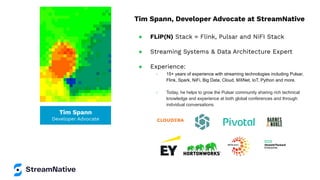
Tim Spann, Developer Advocate at StreamNative
ā— FLiP(N) Stack = Flink, Pulsar and NiFI Stack
ā— Streaming Systems & Data Architecture Expert
ā— Experience:
ā—‹ 15+ years of experience with streaming technologies including Pulsar,
Flink, Spark, NiFi, Big Data, Cloud, MXNet, IoT, Python and more.
ā—‹ Today, he helps to grow the Pulsar community sharing rich technical
knowledge and experience at both global conferences and through
individual conversations.
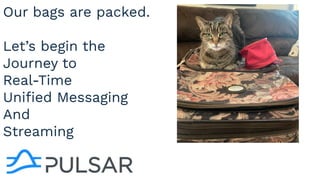
Our bags are packed.
Let’s begin the
Journey to
Real-Time
Unified Messaging
And
Streaming
ā— Introduction
ā— What is Apache Pulsar?
ā— Spring Apps
ā—‹ Native Pulsar
ā—‹ AMQP
ā—‹ MQTT
ā—‹ Kafka
ā— Demo
ā— Q&A
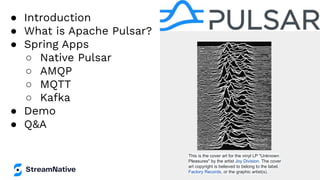
This is the cover art for the vinyl LP "Unknown
Pleasures" by the artist Joy Division. The cover
art copyright is believed to belong to the label,
Factory Records, or the graphic artist(s).
In this session I will get you started with
real-time cloud native streaming
programming with Java.
We will start off with a gentle introduction
to Apache Pulsar and setting up your first
easy standalone cluster. We will then l
show you how to produce and consume
message to Pulsar using several different
Java libraries including native Java client,
AMQP/RabbitMQ, MQTT and even Kafka.
After this session you will building
real-time streaming and messaging
applications with Java. We will also touch
on Apache Spark and Apache Flink.
WHERE?
FLiP Stack Weekly
This week in Apache Flink, Apache Pulsar, Apache
NiFi, Apache Spark and open source friends.
https://bit.ly/32dAJft
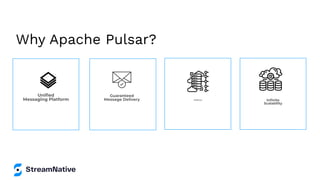
Why Apache Pulsar?
Unified
Messaging Platform
Guaranteed
Message Delivery Resiliency Infinite
Scalability
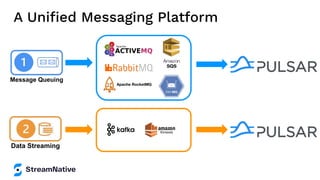
A Unified Messaging Platform
Message Queuing
Data Streaming
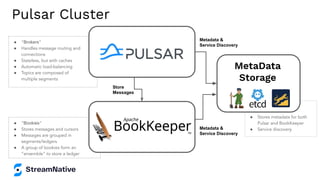
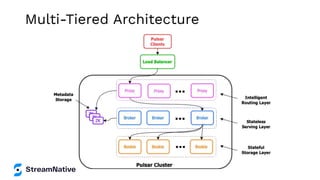
ā— ā€œBookiesā€
ā— Stores messages and cursors
ā— Messages are grouped in
segments/ledgers
ā— A group of bookies form an
ā€œensembleā€ to store a ledger
ā— ā€œBrokersā€
ā— Handles message routing and
connections
ā— Stateless, but with caches
ā— Automatic load-balancing
ā— Topics are composed of
multiple segments
ā—
ā— Stores metadata for both
Pulsar and BookKeeper
ā— Service discovery
Store
Messages
Metadata &
Service Discovery
Metadata &
Service Discovery
Pulsar Cluster
MetaData
Storage
Multi-Tiered Architecture
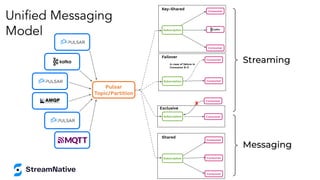
Streaming
Consumer
Consumer
Consumer
Subscription
Shared
Failover
Consumer
Consumer
Subscription
In case of failure in
Consumer B-0
Consumer
Consumer
Subscription
Exclusive
X
Consumer
Consumer
Key-Shared
Subscription
Pulsar
Topic/Partition
Messaging
Unified Messaging
Model
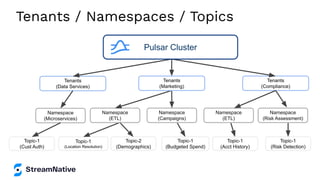
Tenants / Namespaces / Topics
Tenants
(Compliance)
Tenants
(Data Services)
Namespace
(Microservices)
Topic-1
(Cust Auth)
Topic-1
(Location Resolution)
Topic-2
(Demographics)
Topic-1
(Budgeted Spend)
Topic-1
(Acct History)
Topic-1
(Risk Detection)
Namespace
(ETL)
Namespace
(Campaigns)
Namespace
(ETL)
Tenants
(Marketing)
Namespace
(Risk Assessment)
Pulsar Cluster
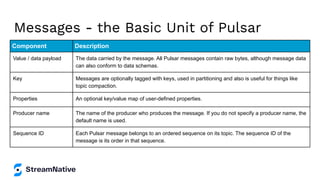
Messages - the Basic Unit of Pulsar
Component Description
Value / data payload The data carried by the message. All Pulsar messages contain raw bytes, although message data
can also conform to data schemas.
Key Messages are optionally tagged with keys, used in partitioning and also is useful for things like
topic compaction.
Properties An optional key/value map of user-defined properties.
Producer name The name of the producer who produces the message. If you do not specify a producer name, the
default name is used.
Sequence ID Each Pulsar message belongs to an ordered sequence on its topic. The sequence ID of the
message is its order in that sequence.
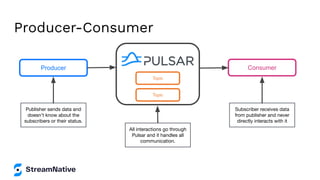
Producer-Consumer
Producer Consumer
Publisher sends data and
doesn't know about the
subscribers or their status.
All interactions go through
Pulsar and it handles all
communication.
Subscriber receives data
from publisher and never
directly interacts with it
Topic
Topic
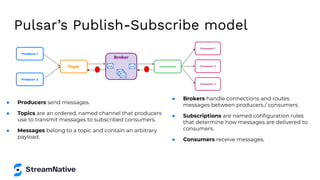
Pulsar’s Publish-Subscribe model
Broker
Subscription
Consumer 1
Consumer 2
Consumer 3
Topic
Producer 1
Producer 2
ā— Producers send messages.
ā— Topics are an ordered, named channel that producers
use to transmit messages to subscribed consumers.
ā— Messages belong to a topic and contain an arbitrary
payload.
ā— Brokers handle connections and routes
messages between producers / consumers.
ā— Subscriptions are named configuration rules
that determine how messages are delivered to
consumers.
ā— Consumers receive messages.
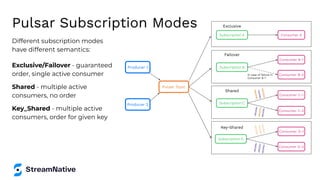
Pulsar Subscription Modes
Different subscription modes
have different semantics:
Exclusive/Failover - guaranteed
order, single active consumer
Shared - multiple active
consumers, no order
Key_Shared - multiple active
consumers, order for given key
Producer 1
Producer 2
Pulsar Topic
Subscription D
Consumer D-1
Consumer D-2
Key-Shared
<
K
1,
V
10
>
<
K
1,
V
11
>
<
K
1,
V
12
>
<
K
2
,V
2
0
>
<
K
2
,V
2
1>
<
K
2
,V
2
2
>
Subscription C
Consumer C-1
Consumer C-2
Shared
<
K
1,
V
10
>
<
K
2,
V
21
>
<
K
1,
V
12
>
<
K
2
,V
2
0
>
<
K
1,
V
11
>
<
K
2
,V
2
2
>
Subscription A Consumer A
Exclusive
Subscription B
Consumer B-1
Consumer B-2
In case of failure in
Consumer B-1
Failover
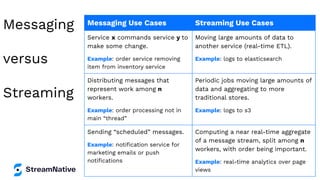
Messaging
versus
Streaming
Messaging Use Cases Streaming Use Cases
Service x commands service y to
make some change.
Example: order service removing
item from inventory service
Moving large amounts of data to
another service (real-time ETL).
Example: logs to elasticsearch
Distributing messages that
represent work among n
workers.
Example: order processing not in
main ā€œthreadā€
Periodic jobs moving large amounts of
data and aggregating to more
traditional stores.
Example: logs to s3
Sending ā€œscheduledā€ messages.
Example: notification service for
marketing emails or push
notifications
Computing a near real-time aggregate
of a message stream, split among n
workers, with order being important.
Example: real-time analytics over page
views
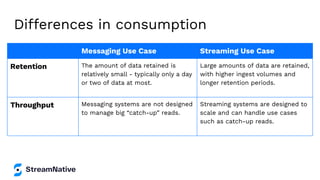
Differences in consumption
Messaging Use Case Streaming Use Case
Retention The amount of data retained is
relatively small - typically only a day
or two of data at most.
Large amounts of data are retained,
with higher ingest volumes and
longer retention periods.
Throughput Messaging systems are not designed
to manage big ā€œcatch-upā€ reads.
Streaming systems are designed to
scale and can handle use cases
such as catch-up reads.
Reader Interface
byte[] msgIdBytes = // Some byte
array
MessageId id =
MessageId.fromByteArray(msgIdBytes);
Reader<byte[]> reader =
pulsarClient.newReader()
.topic(topic)
.startMessageId(id)
.create();
Create a reader that will read from
some message between earliest and
latest.
Reader
Messaging
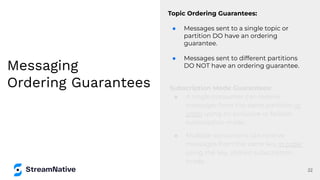
Ordering Guarantees
Topic Ordering Guarantees:
ā— Messages sent to a single topic or
partition DO have an ordering
guarantee.
ā— Messages sent to different partitions
DO NOT have an ordering guarantee.
22
Subscription Mode Guarantees:
ā— A single consumer can receive
messages from the same partition in
order using an exclusive or failover
subscription mode.
ā— Multiple consumers can receive
messages from the same key in order
using the key_shared subscription
mode.
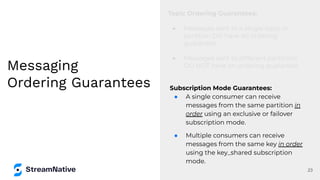
Messaging
Ordering Guarantees
Topic Ordering Guarantees:
ā— Messages sent to a single topic or
partition DO have an ordering
guarantee.
ā— Messages sent to different partitions
DO NOT have an ordering guarantee.
23
Subscription Mode Guarantees:
ā— A single consumer can receive
messages from the same partition in
order using an exclusive or failover
subscription mode.
ā— Multiple consumers can receive
messages from the same key in order
using the key_shared subscription
mode.
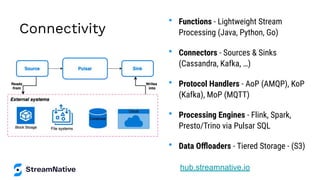
Connectivity
• Functions - Lightweight Stream
Processing (Java, Python, Go)
• Connectors - Sources & Sinks
(Cassandra, Kafka, …)
• Protocol Handlers - AoP (AMQP), KoP
(Kafka), MoP (MQTT)
• Processing Engines - Flink, Spark,
Presto/Trino via Pulsar SQL
• Data Offloaders - Tiered Storage - (S3)
hub.streamnative.io
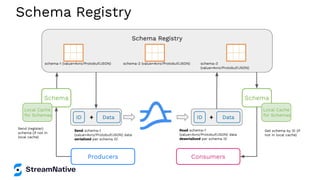
Schema Registry
Schema Registry
schema-1 (value=Avro/Protobuf/JSON) schema-2 (value=Avro/Protobuf/JSON) schema-3
(value=Avro/Protobuf/JSON)
Schema
Data
ID
Local Cache
for Schemas
+
Schema
Data
ID +
Local Cache
for Schemas
Send schema-1
(value=Avro/Protobuf/JSON) data
serialized per schema ID
Send (register)
schema (if not in
local cache)
Read schema-1
(value=Avro/Protobuf/JSON) data
deserialized per schema ID
Get schema by ID (if
not in local cache)
Producers Consumers
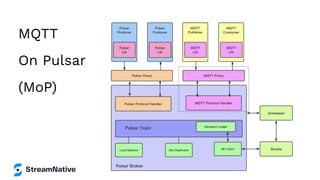
MQTT
On Pulsar
(MoP)
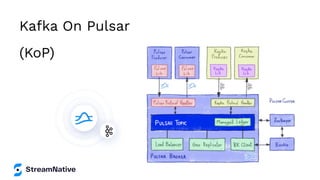
Kafka On Pulsar
(KoP)
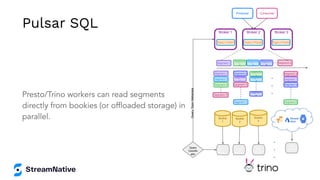
Presto/Trino workers can read segments
directly from bookies (or offloaded storage) in
parallel. Bookie
1
Segment 1
Producer Consumer
Broker 1
Topic1-Part1
Broker 2
Topic1-Part2
Broker 3
Topic1-Part3
Segment
2
Segment
3
Segment
4
Segment X
Segment 1
Segment
1 Segment 1
Segment 3
Segment
3
Segment 3
Segment 2
Segment
2
Segment 2
Segment 4
Segment 4
Segment
4
Segment X
Segment X
Segment X
Bookie
2
Bookie
3
Query
Coordin
ator
.
.
.
.
.
.
SQL
Worker
SQL
Worker
SQL
Worker
SQL
Worker
Query
Topic
Metadata
Pulsar SQL
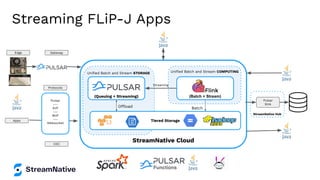
Streaming FLiP-J Apps
StreamNative Hub
StreamNative Cloud
Unified Batch and Stream COMPUTING
Batch
(Batch + Stream)
Unified Batch and Stream STORAGE
Offload
(Queuing + Streaming)
Tiered Storage
Pulsar
---
KoP
---
MoP
---
Websocket
Pulsar
Sink
Streaming
Edge Gateway
Protocols
CDC
Apps
Easy
Event
Processing
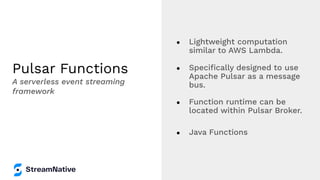
Pulsar Functions
ā— Lightweight computation
similar to AWS Lambda.
ā— Specifically designed to use
Apache Pulsar as a message
bus.
ā— Function runtime can be
located within Pulsar Broker.
ā— Java Functions
A serverless event streaming
framework
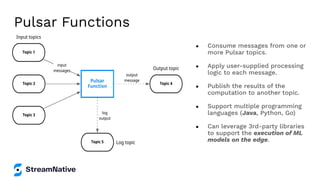
ā— Consume messages from one or
more Pulsar topics.
ā— Apply user-supplied processing
logic to each message.
ā— Publish the results of the
computation to another topic.
ā— Support multiple programming
languages (Java, Python, Go)
ā— Can leverage 3rd-party libraries
to support the execution of ML
models on the edge.
Pulsar Functions
ā— Route
ā— Enrich
ā— Convert
ā— Lookups
ā— Run
Machine Learning
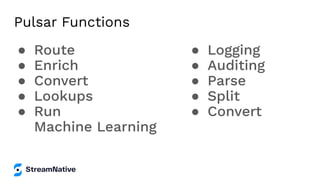
Pulsar Functions
ā— Logging
ā— Auditing
ā— Parse
ā— Split
ā— Convert
Build Your
Own Little
Cluster
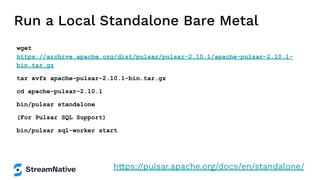
Run a Local Standalone Bare Metal
wget
https://archive.apache.org/dist/pulsar/pulsar-2.10.1/apache-pulsar-2.10.1-
bin.tar.gz
tar xvfz apache-pulsar-2.10.1-bin.tar.gz
cd apache-pulsar-2.10.1
bin/pulsar standalone
(For Pulsar SQL Support)
bin/pulsar sql-worker start
https://pulsar.apache.org/docs/en/standalone/
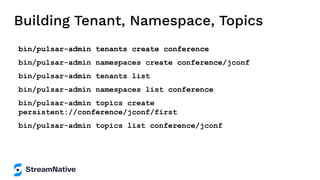
Building Tenant, Namespace, Topics
bin/pulsar-admin tenants create conference
bin/pulsar-admin namespaces create conference/jconf
bin/pulsar-admin tenants list
bin/pulsar-admin namespaces list conference
bin/pulsar-admin topics create
persistent://conference/jconf/first
bin/pulsar-admin topics list conference/jconf
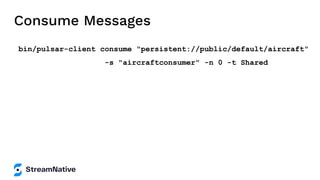
Consume Messages
bin/pulsar-client consume "persistent://public/default/aircraft"
-s "aircraftconsumer" -n 0 -t Shared
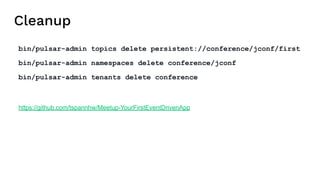
Cleanup
bin/pulsar-admin topics delete persistent://conference/jconf/first
bin/pulsar-admin namespaces delete conference/jconf
bin/pulsar-admin tenants delete conference
https://github.com/tspannhw/Meetup-YourFirstEventDrivenApp
Java Coding
for Pulsar
Functions
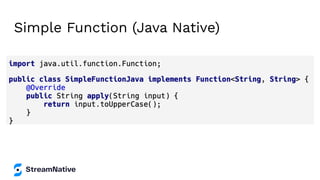
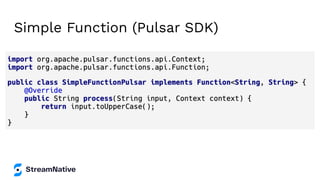
Simple Function (Java Native)
Simple Function (Pulsar SDK)
Java Coding
for Pulsar
Clients
Built-in
Back
Pressure
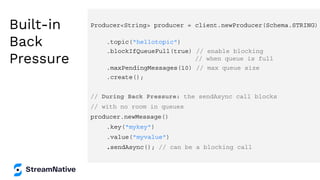
Producer<String> producer = client.newProducer(Schema.STRING)
.topic("hellotopic")
.blockIfQueueFull(true) // enable blocking
// when queue is full
.maxPendingMessages(10) // max queue size
.create();
// During Back Pressure: the sendAsync call blocks
// with no room in queues
producer.newMessage()
.key("mykey")
.value("myvalue")
.sendAsync(); // can be a blocking call
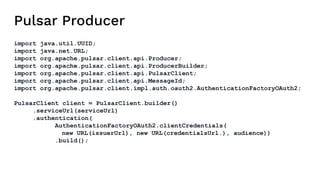
Pulsar Producer
import java.util.UUID;
import java.net.URL;
import org.apache.pulsar.client.api.Producer;
import org.apache.pulsar.client.api.ProducerBuilder;
import org.apache.pulsar.client.api.PulsarClient;
import org.apache.pulsar.client.api.MessageId;
import org.apache.pulsar.client.impl.auth.oauth2.AuthenticationFactoryOAuth2;
PulsarClient client = PulsarClient.builder()
.serviceUrl(serviceUrl)
.authentication(
AuthenticationFactoryOAuth2.clientCredentials(
new URL(issuerUrl), new URL(credentialsUrl.), audience))
.build();
Pulsar Simple Producer
String pulsarKey = UUID.randomUUID().toString();
String OS = System.getProperty("os.name").toLowerCase();
ProducerBuilder<byte[]> producerBuilder = client.newProducer().topic(topic)
.producerName("demo");
Producer<byte[]> producer = producerBuilder.create();
MessageId msgID = producer.newMessage().key(pulsarKey).value("msg".getBytes())
.property("device",OS).send();
producer.close();
client.close();
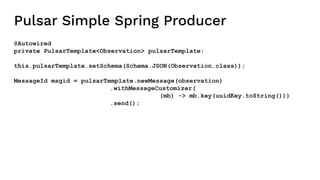
Pulsar Simple Spring Producer
@Autowired
private PulsarTemplate<Observation> pulsarTemplate;
this.pulsarTemplate.setSchema(Schema.JSON(Observation.class));
MessageId msgid = pulsarTemplate.newMessage(observation)
.withMessageCustomizer(
(mb) -> mb.key(uuidKey.toString()))
.send();
Setting Subscription Type Java
Consumer<byte[]> consumer = pulsarClient.newConsumer()
.topic(topic)
.subscriptionName("subscriptionName")
.subscriptionType(SubscriptionType.Shared)
.subscribe();
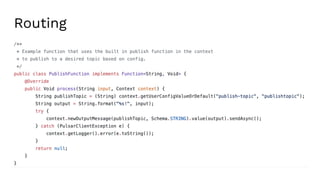
Routing
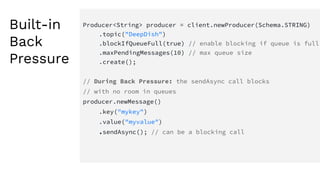
Built-in
Back
Pressure
Producer<String> producer = client.newProducer(Schema.STRING)
.topic("DeepDish")
.blockIfQueueFull(true) // enable blocking if queue is full
.maxPendingMessages(10) // max queue size
.create();
// During Back Pressure: the sendAsync call blocks
// with no room in queues
producer.newMessage()
.key("mykey")
.value("myvalue")
.sendAsync(); // can be a blocking call
Java Coding
for Many
Protocols to
Pulsar
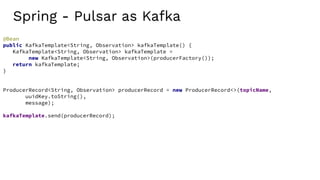
Spring - Pulsar as Kafka
@Bean
public KafkaTemplate<String, Observation> kafkaTemplate() {
KafkaTemplate<String, Observation> kafkaTemplate =
new KafkaTemplate<String, Observation>(producerFactory());
return kafkaTemplate;
}
ProducerRecord<String, Observation> producerRecord = new ProducerRecord<>(topicName,
uuidKey.toString(),
message);
kafkaTemplate.send(producerRecord);
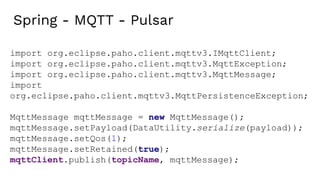
Spring - MQTT - Pulsar
import org.eclipse.paho.client.mqttv3.IMqttClient;
import org.eclipse.paho.client.mqttv3.MqttException;
import org.eclipse.paho.client.mqttv3.MqttMessage;
import
org.eclipse.paho.client.mqttv3.MqttPersistenceException;
MqttMessage mqttMessage = new MqttMessage();
mqttMessage.setPayload(DataUtility.serialize(payload));
mqttMessage.setQos(1);
mqttMessage.setRetained(true);
mqttClient.publish(topicName, mqttMessage);
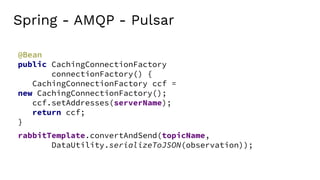
Spring - AMQP - Pulsar
rabbitTemplate.convertAndSend(topicName,
DataUtility.serializeToJSON(observation));
@Bean
public CachingConnectionFactory
connectionFactory() {
CachingConnectionFactory ccf =
new CachingConnectionFactory();
ccf.setAddresses(serverName);
return ccf;
}
Streaming
Java Apps
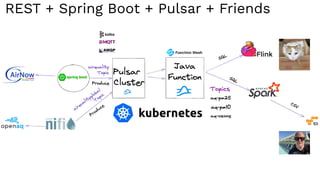
REST + Spring Boot + Pulsar + Friends
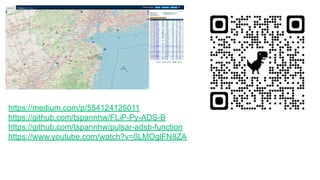
https://medium.com/p/554124125011
https://github.com/tspannhw/FLiP-Py-ADS-B
https://github.com/tspannhw/pulsar-adsb-function
https://www.youtube.com/watch?v=0LMOglFN8ZA
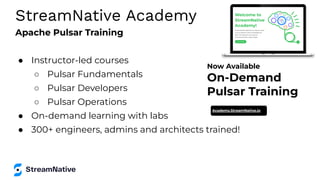
Apache Pulsar Training
ā— Instructor-led courses
ā—‹ Pulsar Fundamentals
ā—‹ Pulsar Developers
ā—‹ Pulsar Operations
ā— On-demand learning with labs
ā— 300+ engineers, admins and architects trained!
StreamNative Academy
Now Available
On-Demand
Pulsar Training
Academy.StreamNative.io
Let’s Keep
in Touch!
Tim Spann
Developer Advocate
@PassDev
https://www.linkedin.com/in/timothyspann
https://github.com/tspannhw
JConf.dev 2022 - Apache Pulsar Development 101 with Java

JConf.dev 2022 - Apache Pulsar Development 101 with Java

  • 1.
    Apache Pulsar Development101 With Java Tim Spann | Developer Advocate
  • 2.
    Tim Spann Developer Advocate TimSpann, Developer Advocate at StreamNative ā— FLiP(N) Stack = Flink, Pulsar and NiFI Stack ā— Streaming Systems & Data Architecture Expert ā— Experience: ā—‹ 15+ years of experience with streaming technologies including Pulsar, Flink, Spark, NiFi, Big Data, Cloud, MXNet, IoT, Python and more. ā—‹ Today, he helps to grow the Pulsar community sharing rich technical knowledge and experience at both global conferences and through individual conversations.
  • 3.
    Our bags arepacked. Let’s begin the Journey to Real-Time Unified Messaging And Streaming
  • 4.
    ā— Introduction ā— Whatis Apache Pulsar? ā— Spring Apps ā—‹ Native Pulsar ā—‹ AMQP ā—‹ MQTT ā—‹ Kafka ā— Demo ā— Q&A This is the cover art for the vinyl LP "Unknown Pleasures" by the artist Joy Division. The cover art copyright is believed to belong to the label, Factory Records, or the graphic artist(s).
  • 5.
    In this sessionI will get you started with real-time cloud native streaming programming with Java. We will start off with a gentle introduction to Apache Pulsar and setting up your first easy standalone cluster. We will then l show you how to produce and consume message to Pulsar using several different Java libraries including native Java client, AMQP/RabbitMQ, MQTT and even Kafka. After this session you will building real-time streaming and messaging applications with Java. We will also touch on Apache Spark and Apache Flink.
  • 6.
  • 7.
    FLiP Stack Weekly Thisweek in Apache Flink, Apache Pulsar, Apache NiFi, Apache Spark and open source friends. https://bit.ly/32dAJft
  • 9.
    Why Apache Pulsar? Unified MessagingPlatform Guaranteed Message Delivery Resiliency Infinite Scalability
  • 10.
    A Unified MessagingPlatform Message Queuing Data Streaming
  • 11.
    ā— ā€œBookiesā€ ā— Storesmessages and cursors ā— Messages are grouped in segments/ledgers ā— A group of bookies form an ā€œensembleā€ to store a ledger ā— ā€œBrokersā€ ā— Handles message routing and connections ā— Stateless, but with caches ā— Automatic load-balancing ā— Topics are composed of multiple segments ā— ā— Stores metadata for both Pulsar and BookKeeper ā— Service discovery Store Messages Metadata & Service Discovery Metadata & Service Discovery Pulsar Cluster MetaData Storage
  • 12.
  • 13.
    Streaming Consumer Consumer Consumer Subscription Shared Failover Consumer Consumer Subscription In case offailure in Consumer B-0 Consumer Consumer Subscription Exclusive X Consumer Consumer Key-Shared Subscription Pulsar Topic/Partition Messaging Unified Messaging Model
  • 14.
    Tenants / Namespaces/ Topics Tenants (Compliance) Tenants (Data Services) Namespace (Microservices) Topic-1 (Cust Auth) Topic-1 (Location Resolution) Topic-2 (Demographics) Topic-1 (Budgeted Spend) Topic-1 (Acct History) Topic-1 (Risk Detection) Namespace (ETL) Namespace (Campaigns) Namespace (ETL) Tenants (Marketing) Namespace (Risk Assessment) Pulsar Cluster
  • 15.
    Messages - theBasic Unit of Pulsar Component Description Value / data payload The data carried by the message. All Pulsar messages contain raw bytes, although message data can also conform to data schemas. Key Messages are optionally tagged with keys, used in partitioning and also is useful for things like topic compaction. Properties An optional key/value map of user-defined properties. Producer name The name of the producer who produces the message. If you do not specify a producer name, the default name is used. Sequence ID Each Pulsar message belongs to an ordered sequence on its topic. The sequence ID of the message is its order in that sequence.
  • 16.
    Producer-Consumer Producer Consumer Publisher sendsdata and doesn't know about the subscribers or their status. All interactions go through Pulsar and it handles all communication. Subscriber receives data from publisher and never directly interacts with it Topic Topic
  • 17.
    Pulsar’s Publish-Subscribe model Broker Subscription Consumer1 Consumer 2 Consumer 3 Topic Producer 1 Producer 2 ā— Producers send messages. ā— Topics are an ordered, named channel that producers use to transmit messages to subscribed consumers. ā— Messages belong to a topic and contain an arbitrary payload. ā— Brokers handle connections and routes messages between producers / consumers. ā— Subscriptions are named configuration rules that determine how messages are delivered to consumers. ā— Consumers receive messages.
  • 18.
    Pulsar Subscription Modes Differentsubscription modes have different semantics: Exclusive/Failover - guaranteed order, single active consumer Shared - multiple active consumers, no order Key_Shared - multiple active consumers, order for given key Producer 1 Producer 2 Pulsar Topic Subscription D Consumer D-1 Consumer D-2 Key-Shared < K 1, V 10 > < K 1, V 11 > < K 1, V 12 > < K 2 ,V 2 0 > < K 2 ,V 2 1> < K 2 ,V 2 2 > Subscription C Consumer C-1 Consumer C-2 Shared < K 1, V 10 > < K 2, V 21 > < K 1, V 12 > < K 2 ,V 2 0 > < K 1, V 11 > < K 2 ,V 2 2 > Subscription A Consumer A Exclusive Subscription B Consumer B-1 Consumer B-2 In case of failure in Consumer B-1 Failover
  • 19.
    Messaging versus Streaming Messaging Use CasesStreaming Use Cases Service x commands service y to make some change. Example: order service removing item from inventory service Moving large amounts of data to another service (real-time ETL). Example: logs to elasticsearch Distributing messages that represent work among n workers. Example: order processing not in main ā€œthreadā€ Periodic jobs moving large amounts of data and aggregating to more traditional stores. Example: logs to s3 Sending ā€œscheduledā€ messages. Example: notification service for marketing emails or push notifications Computing a near real-time aggregate of a message stream, split among n workers, with order being important. Example: real-time analytics over page views
  • 20.
    Differences in consumption MessagingUse Case Streaming Use Case Retention The amount of data retained is relatively small - typically only a day or two of data at most. Large amounts of data are retained, with higher ingest volumes and longer retention periods. Throughput Messaging systems are not designed to manage big ā€œcatch-upā€ reads. Streaming systems are designed to scale and can handle use cases such as catch-up reads.
  • 21.
    Reader Interface byte[] msgIdBytes= // Some byte array MessageId id = MessageId.fromByteArray(msgIdBytes); Reader<byte[]> reader = pulsarClient.newReader() .topic(topic) .startMessageId(id) .create(); Create a reader that will read from some message between earliest and latest. Reader
  • 22.
    Messaging Ordering Guarantees Topic OrderingGuarantees: ā— Messages sent to a single topic or partition DO have an ordering guarantee. ā— Messages sent to different partitions DO NOT have an ordering guarantee. 22 Subscription Mode Guarantees: ā— A single consumer can receive messages from the same partition in order using an exclusive or failover subscription mode. ā— Multiple consumers can receive messages from the same key in order using the key_shared subscription mode.
  • 23.
    Messaging Ordering Guarantees Topic OrderingGuarantees: ā— Messages sent to a single topic or partition DO have an ordering guarantee. ā— Messages sent to different partitions DO NOT have an ordering guarantee. 23 Subscription Mode Guarantees: ā— A single consumer can receive messages from the same partition in order using an exclusive or failover subscription mode. ā— Multiple consumers can receive messages from the same key in order using the key_shared subscription mode.
  • 24.
    Connectivity • Functions -Lightweight Stream Processing (Java, Python, Go) • Connectors - Sources & Sinks (Cassandra, Kafka, …) • Protocol Handlers - AoP (AMQP), KoP (Kafka), MoP (MQTT) • Processing Engines - Flink, Spark, Presto/Trino via Pulsar SQL • Data Offloaders - Tiered Storage - (S3) hub.streamnative.io
  • 25.
    Schema Registry Schema Registry schema-1(value=Avro/Protobuf/JSON) schema-2 (value=Avro/Protobuf/JSON) schema-3 (value=Avro/Protobuf/JSON) Schema Data ID Local Cache for Schemas + Schema Data ID + Local Cache for Schemas Send schema-1 (value=Avro/Protobuf/JSON) data serialized per schema ID Send (register) schema (if not in local cache) Read schema-1 (value=Avro/Protobuf/JSON) data deserialized per schema ID Get schema by ID (if not in local cache) Producers Consumers
  • 26.
  • 27.
  • 28.
    Presto/Trino workers canread segments directly from bookies (or offloaded storage) in parallel. Bookie 1 Segment 1 Producer Consumer Broker 1 Topic1-Part1 Broker 2 Topic1-Part2 Broker 3 Topic1-Part3 Segment 2 Segment 3 Segment 4 Segment X Segment 1 Segment 1 Segment 1 Segment 3 Segment 3 Segment 3 Segment 2 Segment 2 Segment 2 Segment 4 Segment 4 Segment 4 Segment X Segment X Segment X Bookie 2 Bookie 3 Query Coordin ator . . . . . . SQL Worker SQL Worker SQL Worker SQL Worker Query Topic Metadata Pulsar SQL
  • 29.
    Streaming FLiP-J Apps StreamNativeHub StreamNative Cloud Unified Batch and Stream COMPUTING Batch (Batch + Stream) Unified Batch and Stream STORAGE Offload (Queuing + Streaming) Tiered Storage Pulsar --- KoP --- MoP --- Websocket Pulsar Sink Streaming Edge Gateway Protocols CDC Apps
  • 30.
  • 31.
    Pulsar Functions ā— Lightweightcomputation similar to AWS Lambda. ā— Specifically designed to use Apache Pulsar as a message bus. ā— Function runtime can be located within Pulsar Broker. ā— Java Functions A serverless event streaming framework
  • 32.
    ā— Consume messagesfrom one or more Pulsar topics. ā— Apply user-supplied processing logic to each message. ā— Publish the results of the computation to another topic. ā— Support multiple programming languages (Java, Python, Go) ā— Can leverage 3rd-party libraries to support the execution of ML models on the edge. Pulsar Functions
  • 33.
    ā— Route ā— Enrich ā—Convert ā— Lookups ā— Run Machine Learning Pulsar Functions ā— Logging ā— Auditing ā— Parse ā— Split ā— Convert
  • 34.
  • 35.
    Run a LocalStandalone Bare Metal wget https://archive.apache.org/dist/pulsar/pulsar-2.10.1/apache-pulsar-2.10.1- bin.tar.gz tar xvfz apache-pulsar-2.10.1-bin.tar.gz cd apache-pulsar-2.10.1 bin/pulsar standalone (For Pulsar SQL Support) bin/pulsar sql-worker start https://pulsar.apache.org/docs/en/standalone/
  • 36.
    Building Tenant, Namespace,Topics bin/pulsar-admin tenants create conference bin/pulsar-admin namespaces create conference/jconf bin/pulsar-admin tenants list bin/pulsar-admin namespaces list conference bin/pulsar-admin topics create persistent://conference/jconf/first bin/pulsar-admin topics list conference/jconf
  • 37.
    Consume Messages bin/pulsar-client consume"persistent://public/default/aircraft" -s "aircraftconsumer" -n 0 -t Shared
  • 38.
    Cleanup bin/pulsar-admin topics deletepersistent://conference/jconf/first bin/pulsar-admin namespaces delete conference/jconf bin/pulsar-admin tenants delete conference https://github.com/tspannhw/Meetup-YourFirstEventDrivenApp
  • 39.
  • 40.
  • 41.
  • 42.
  • 43.
    Built-in Back Pressure Producer<String> producer =client.newProducer(Schema.STRING) .topic("hellotopic") .blockIfQueueFull(true) // enable blocking // when queue is full .maxPendingMessages(10) // max queue size .create(); // During Back Pressure: the sendAsync call blocks // with no room in queues producer.newMessage() .key("mykey") .value("myvalue") .sendAsync(); // can be a blocking call
  • 44.
    Pulsar Producer import java.util.UUID; importjava.net.URL; import org.apache.pulsar.client.api.Producer; import org.apache.pulsar.client.api.ProducerBuilder; import org.apache.pulsar.client.api.PulsarClient; import org.apache.pulsar.client.api.MessageId; import org.apache.pulsar.client.impl.auth.oauth2.AuthenticationFactoryOAuth2; PulsarClient client = PulsarClient.builder() .serviceUrl(serviceUrl) .authentication( AuthenticationFactoryOAuth2.clientCredentials( new URL(issuerUrl), new URL(credentialsUrl.), audience)) .build();
  • 45.
    Pulsar Simple Producer StringpulsarKey = UUID.randomUUID().toString(); String OS = System.getProperty("os.name").toLowerCase(); ProducerBuilder<byte[]> producerBuilder = client.newProducer().topic(topic) .producerName("demo"); Producer<byte[]> producer = producerBuilder.create(); MessageId msgID = producer.newMessage().key(pulsarKey).value("msg".getBytes()) .property("device",OS).send(); producer.close(); client.close();
  • 46.
    Pulsar Simple SpringProducer @Autowired private PulsarTemplate<Observation> pulsarTemplate; this.pulsarTemplate.setSchema(Schema.JSON(Observation.class)); MessageId msgid = pulsarTemplate.newMessage(observation) .withMessageCustomizer( (mb) -> mb.key(uuidKey.toString())) .send();
  • 47.
    Setting Subscription TypeJava Consumer<byte[]> consumer = pulsarClient.newConsumer() .topic(topic) .subscriptionName("subscriptionName") .subscriptionType(SubscriptionType.Shared) .subscribe();
  • 48.
  • 49.
    Built-in Back Pressure Producer<String> producer =client.newProducer(Schema.STRING) .topic("DeepDish") .blockIfQueueFull(true) // enable blocking if queue is full .maxPendingMessages(10) // max queue size .create(); // During Back Pressure: the sendAsync call blocks // with no room in queues producer.newMessage() .key("mykey") .value("myvalue") .sendAsync(); // can be a blocking call
  • 50.
  • 51.
    Spring - Pulsaras Kafka @Bean public KafkaTemplate<String, Observation> kafkaTemplate() { KafkaTemplate<String, Observation> kafkaTemplate = new KafkaTemplate<String, Observation>(producerFactory()); return kafkaTemplate; } ProducerRecord<String, Observation> producerRecord = new ProducerRecord<>(topicName, uuidKey.toString(), message); kafkaTemplate.send(producerRecord);
  • 52.
    Spring - MQTT- Pulsar import org.eclipse.paho.client.mqttv3.IMqttClient; import org.eclipse.paho.client.mqttv3.MqttException; import org.eclipse.paho.client.mqttv3.MqttMessage; import org.eclipse.paho.client.mqttv3.MqttPersistenceException; MqttMessage mqttMessage = new MqttMessage(); mqttMessage.setPayload(DataUtility.serialize(payload)); mqttMessage.setQos(1); mqttMessage.setRetained(true); mqttClient.publish(topicName, mqttMessage);
  • 53.
    Spring - AMQP- Pulsar rabbitTemplate.convertAndSend(topicName, DataUtility.serializeToJSON(observation)); @Bean public CachingConnectionFactory connectionFactory() { CachingConnectionFactory ccf = new CachingConnectionFactory(); ccf.setAddresses(serverName); return ccf; }
  • 54.
  • 55.
    REST + SpringBoot + Pulsar + Friends
  • 56.
  • 57.
    Apache Pulsar Training ā—Instructor-led courses ā—‹ Pulsar Fundamentals ā—‹ Pulsar Developers ā—‹ Pulsar Operations ā— On-demand learning with labs ā— 300+ engineers, admins and architects trained! StreamNative Academy Now Available On-Demand Pulsar Training Academy.StreamNative.io
  • 58.
    Let’s Keep in Touch! TimSpann Developer Advocate @PassDev https://www.linkedin.com/in/timothyspann https://github.com/tspannhw