Real-Time AI With Open Source
Timothy Spann
Principal Developer Advocate / Field Engineer
https://medium.com/@tspann
Real-Time AI with Open Source
In this talk we will discuss the various ways real-time intersects with AI and some practical
steps in building your own real-time AI enhanced applications. For data we will work with air
quality readings and sensors.
While building it we will see the practical reasons we choose what indexes make sense, what
to vectorize, how to query multiple vectors even when one is an image and one is text. We will
see why we do filtering. We will then use our vector database of Air Quality readings to feed
our LLM and get proper answers to Air Quality questions. I will show you how to all the steps
to build a RAG application with Milvus, LangChain, Ollama, Python and Air Quality Reports.
Finally after demos I will answer questions, provide the source code and additional resources
including articles.
https://medium.com/@tspann/whats-in-the-air-tonight-mr-milvus-fbd42f06e482
Tim Spann
Twitter: @PaasDev // Blog: datainmotion.dev
Principal Developer Advocate / Field Engineer
NY AI Meetups
ex-Pivotal, ex-Cloudera, ex-StreamNative,
ex-PwC, ex-HPE, ex-E&Y.
https://medium.com/@tspann
https://github.com/tspannhw
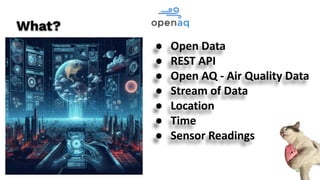
● Open Data
● REST API
● Open AQ - Air Quality Data
● Stream of Data
● Location
● Time
● Sensor Readings
What?
● REST Calls
● Python
● Vector Storage
● Embeddings
How?
When?
● Continuously
● Query on recent
Key Challengers
● Lots of data
● Sensor Readings
● Unstructured Text
● Geospatial Data
● Time Series
● Sparse Data
● Not part of LLM
Unstructured Data
● Lots of formats
● Text, Documents
● Images
● Videos
● Logs
● Audio
● Email
● Multiple Languages
Solve with
Vector
Embeddings
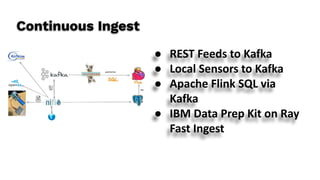
Continuous Ingest
● REST Feeds to Kafka
● Local Sensors to Kafka
● Apache Flink SQL via
Kafka
● IBM Data Prep Kit on Ray
Fast Ingest
Tiered Sensor Storage Options
● Apache Iceberg
● Redis
● Apache Pinot
● Object Storage
○ MiNio
○ S3
○ ADLSv2
○ GCS
Ingest For Today
TODAYS_DATE = str(
datetime.today().strftime('%Y-%m-%d') )
YESTERDAYS_DATE = (datetime.now() -
timedelta(1)).strftime('%Y-%m-%d')
url =
'https://api.openaq.org/v2/measurements?country=U
S&date_from={0}&date_to={1}&limit=1000&page={2}
&offset=0&sort=desc&radius=1000&order_by=dateti
me'.format(str(YESTERDAYS_DATE),
str(TODAYS_DATE), str(aqpage) )
headers = {"accept": "application/json", "x-api-key":
str(API_KEY)}
Ingest into Vectors
● RedisVL
● Milvus
● Snowflake
● Apache Pinot
● PgVector
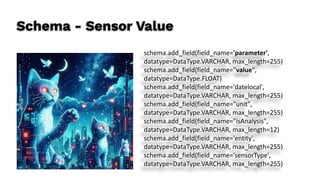
Schema - Sensor Value
schema.add_field(field_name='parameter',
datatype=DataType.VARCHAR, max_length=255)
schema.add_field(field_name="value",
datatype=DataType.FLOAT)
schema.add_field(field_name='datelocal',
datatype=DataType.VARCHAR, max_length=255)
schema.add_field(field_name="unit",
datatype=DataType.VARCHAR, max_length=255)
schema.add_field(field_name="isAnalysis",
datatype=DataType.VARCHAR, max_length=12)
schema.add_field(field_name='entity',
datatype=DataType.VARCHAR, max_length=255)
schema.add_field(field_name='sensorType',
datatype=DataType.VARCHAR, max_length=255)
Schema - Geo / Location
schema.add_field(field_name='locationId', datatype=DataType.INT32)
schema.add_field(field_name='location',
datatype=DataType.VARCHAR, max_length=255)
schema.add_field(field_name="latitude", datatype=DataType.FLOAT)
schema.add_field(field_name="longitude", datatype=DataType.FLOAT)
schema.add_field(field_name="country",
datatype=DataType.VARCHAR, max_length=255)
schema.add_field(field_name="city", datatype=DataType.VARCHAR,
max_length=255)
schema.add_field(field_name="isMobile",
datatype=DataType.VARCHAR, max_length=12)
Schema - Vectors, Large Strings & ID
schema.add_field(field_name='id', datatype=DataType.INT64,
is_primary=True, auto_id=True)
schema.add_field(field_name="vector",
datatype=DataType.FLOAT_VECTOR, dim=DIMENSION)
schema.add_field(field_name="details",
datatype=DataType.VARCHAR, max_length=8000)
schema.add_field(field_name="fulllocation",
datatype=DataType.VARCHAR, max_length=2000)
Index
field_name="vector",
index_type="IVF_FLAT",
metric_type="L2",
params={"nlist": 100}
Collection - “openaqmeasurements”
● vector IVF_FLAT (384)
● id - STL_SORT
Similarity Search
results = milvus_client.search(“aq”,
data=[model(details)],
filter='location like "%H%"',
output_fields=["location", "details",
"parameter","value", "datelocal","fulllocation"])
Horicon Wildlife Are Current Air Quality Reading for
co is 0.2 ppm for Location 1285: Horicon Wildlife Are,
None, US @ 43.46611000000001,-88.621109 at
2024-11-17T20:00:00-06:00. Location 1285: Horicon
Wildlife Are, None, US @
43.46611000000001,-88.621109
Non Vector Query
res = milvus_client.query(
collection_name=”aq”,
filter='location like "%Tr%" && parameter ==
"pm25"',
group_by_field="location",
output_fields=["location", "parameter","value"],
limit=250
)
for result in res:
print(result)
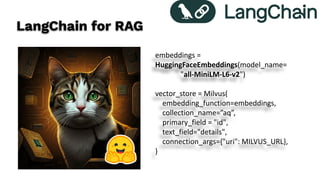
LangChain for RAG
embeddings =
HuggingFaceEmbeddings(model_name=
"all-MiniLM-L6-v2")
vector_store = Milvus(
embedding_function=embeddings,
collection_name=”aq”,
primary_field = "id",
text_field="details",
connection_args={"uri": MILVUS_URL},
)
Ollama + LLama 3.1
llm = Ollama(
model="llama3.1",
callback_manager=CallbackManager([StreamingStdOut
CallbackHandler()]),
stop=["<|eot_id|>"],
)
query = input("nQuery: ")
qa_chain = RetrievalQA.from_chain_type(
llm, retriever=vector_store.as_retriever(collection
= “aq”))
result = qa_chain.invoke({"query": query})
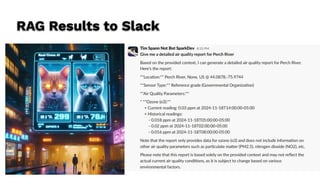
RAG Results to Slack
/tspannhw/AIM-BecomingAnAIEngineer:
AIM - Becoming An AI Engineer
https://bit.ly/3BV4IKX
What’s in the Air Tonight Mr. Milvus?
https://bit.ly/4fQhBog
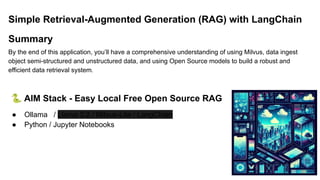
Simple Retrieval-Augmented Generation (RAG) with LangChain
Summary
By the end of this application, you’ll have a comprehensive understanding of using Milvus, data ingest
object semi-structured and unstructured data, and using Open Source models to build a robust and
efficient data retrieval system.
🐍 AIM Stack - Easy Local Free Open Source RAG
● Ollama / Llama 3.2 / Milvus-Lite / LangChain
● Python / Jupyter Notebooks
🔥 Install Ollama
🛩 Download for Mac, Linux, Windows
https://ollama.com/download
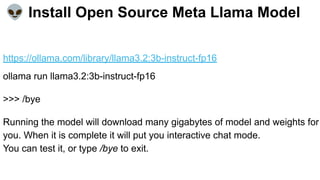
👽 Install Open Source Meta Llama Model
https://ollama.com/library/llama3.2:3b-instruct-fp16
ollama run llama3.2:3b-instruct-fp16
>>> /bye
Running the model will download many gigabytes of model and weights for
you. When it is complete it will put you interactive chat mode.
You can test it, or type /bye to exit.
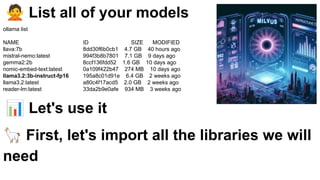
🙅 List all of your models
ollama list
NAME ID SIZE MODIFIED
llava:7b 8dd30f6b0cb1 4.7 GB 40 hours ago
mistral-nemo:latest 994f3b8b7801 7.1 GB 9 days ago
gemma2:2b 8ccf136fdd52 1.6 GB 10 days ago
nomic-embed-text:latest 0a109f422b47 274 MB 10 days ago
llama3.2:3b-instruct-fp16 195a8c01d91e 6.4 GB 2 weeks ago
llama3.2:latest a80c4f17acd5 2.0 GB 2 weeks ago
reader-lm:latest 33da2b9e0afe 934 MB 3 weeks ago
📊 Let's use it
🦙 First, let's import all the libraries we will
need
import os
from pymilvus import MilvusClient
from langchain_community.document_loaders import PyPDFLoader
from langchain.text_splitter import RecursiveCharacterTextSplitter
from langchain.chains import RetrievalQA
from langchain_milvus import Milvus
from langchain_community.embeddings import HuggingFaceEmbeddings
from langchain.callbacks.manager import CallbackManager
from langchain.callbacks.streaming_stdout import StreamingStdOutCallbackHandler
from langchain import hub
#### Constant For PDF Downloads
path_pdfs = "talks/"
#### Initialize Our Documents
documents = []
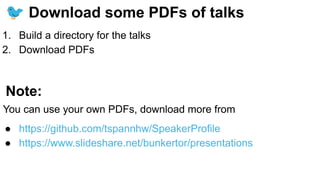
🐦 Download some PDFs of talks
1. Build a directory for the talks
2. Download PDFs
Note:
You can use your own PDFs, download more from
● https://github.com/tspannhw/SpeakerProfile
● https://www.slideshare.net/bunkertor/presentations
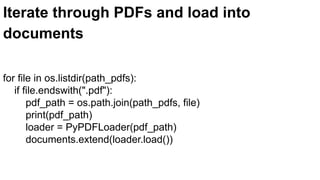
Iterate through PDFs and load into
documents
for file in os.listdir(path_pdfs):
if file.endswith(".pdf"):
pdf_path = os.path.join(path_pdfs, file)
print(pdf_path)
loader = PyPDFLoader(pdf_path)
documents.extend(loader.load())
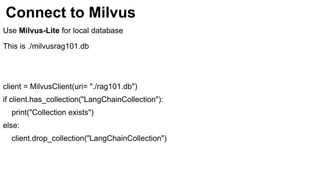
Connect to Milvus
Use Milvus-Lite for local database
This is ./milvusrag101.db
client = MilvusClient(uri= "./rag101.db")
if client.has_collection("LangChainCollection"):
print("Collection exists")
else:
client.drop_collection("LangChainCollection")
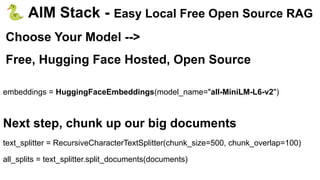
🐍 AIM Stack - Easy Local Free Open Source RAG
Choose Your Model -->
Free, Hugging Face Hosted, Open Source
embeddings = HuggingFaceEmbeddings(model_name="all-MiniLM-L6-v2")
Next step, chunk up our big documents
text_splitter = RecursiveCharacterTextSplitter(chunk_size=500, chunk_overlap=100)
all_splits = text_splitter.split_documents(documents)
🐍Load Text embedding model via
HuggingFace
Then we load all of the splits and embeddings to Milvus
Verify Documents are Loaded
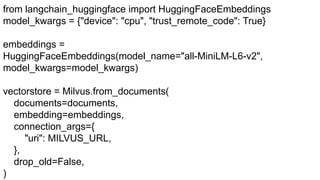
from langchain_huggingface import HuggingFaceEmbeddings
model_kwargs = {"device": "cpu", "trust_remote_code": True}
embeddings =
HuggingFaceEmbeddings(model_name="all-MiniLM-L6-v2",
model_kwargs=model_kwargs)
vectorstore = Milvus.from_documents(
documents=documents,
embedding=embeddings,
connection_args={
"uri": MILVUS_URL,
},
drop_old=False,
)
from langchain_ollama import OllamaLLM
def run_query() -> None:
llm = OllamaLLM(
model="llama3.2:3b-instruct-fp16",
callback_manager=CallbackManager([StreamingStdOutCallbackHandler
()]), stop=["<|eot_id|>"],)
query = input("nQuery: ")
prompt = hub.pull("rlm/rag-prompt")
qa_chain = RetrievalQA.from_chain_type(
llm, retriever=vectorstore.as_retriever(),
chain_type_kwargs={"prompt": prompt}
)
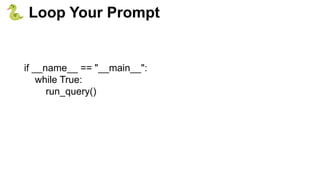
if __name__ == "__main__":
while True:
run_query()
🐍 Loop Your Prompt
https://medium.com/cloudera-inc/streaming-street-cams-to-yolo-v8-with-python-and-nifi-to-minio-s3-3277e73723ce
Street Cameras
This week in Apache NiFi, Apache Flink,
Apache Kafka, ML, AI, Apache Spark, Apache
Iceberg, Python, Java, LLM, GenAI, Vector
DB and Open Source friends.
https://bit.ly/32dAJft
https://www.meetup.com/futureofdata-
princeton/
AI + Streaming Weekly by Tim Spann
https://medium.com/cloudera-inc/wildfires-air-quality-time-to
-fire-up-the-sensors-and-start-flanking-12ea0ba33f63
Resources

2024Nov20-BigDataEU-RealTimeAIWithOpenSource

  • 1.
    Real-Time AI WithOpen Source Timothy Spann Principal Developer Advocate / Field Engineer https://medium.com/@tspann
  • 2.
    Real-Time AI withOpen Source In this talk we will discuss the various ways real-time intersects with AI and some practical steps in building your own real-time AI enhanced applications. For data we will work with air quality readings and sensors. While building it we will see the practical reasons we choose what indexes make sense, what to vectorize, how to query multiple vectors even when one is an image and one is text. We will see why we do filtering. We will then use our vector database of Air Quality readings to feed our LLM and get proper answers to Air Quality questions. I will show you how to all the steps to build a RAG application with Milvus, LangChain, Ollama, Python and Air Quality Reports. Finally after demos I will answer questions, provide the source code and additional resources including articles. https://medium.com/@tspann/whats-in-the-air-tonight-mr-milvus-fbd42f06e482
  • 3.
    Tim Spann Twitter: @PaasDev// Blog: datainmotion.dev Principal Developer Advocate / Field Engineer NY AI Meetups ex-Pivotal, ex-Cloudera, ex-StreamNative, ex-PwC, ex-HPE, ex-E&Y. https://medium.com/@tspann https://github.com/tspannhw
  • 4.
    ● Open Data ●REST API ● Open AQ - Air Quality Data ● Stream of Data ● Location ● Time ● Sensor Readings What?
  • 5.
    ● REST Calls ●Python ● Vector Storage ● Embeddings How?
  • 6.
  • 7.
    Key Challengers ● Lotsof data ● Sensor Readings ● Unstructured Text ● Geospatial Data ● Time Series ● Sparse Data ● Not part of LLM
  • 8.
    Unstructured Data ● Lotsof formats ● Text, Documents ● Images ● Videos ● Logs ● Audio ● Email ● Multiple Languages Solve with Vector Embeddings
  • 9.
    Continuous Ingest ● RESTFeeds to Kafka ● Local Sensors to Kafka ● Apache Flink SQL via Kafka ● IBM Data Prep Kit on Ray Fast Ingest
  • 10.
    Tiered Sensor StorageOptions ● Apache Iceberg ● Redis ● Apache Pinot ● Object Storage ○ MiNio ○ S3 ○ ADLSv2 ○ GCS
  • 11.
    Ingest For Today TODAYS_DATE= str( datetime.today().strftime('%Y-%m-%d') ) YESTERDAYS_DATE = (datetime.now() - timedelta(1)).strftime('%Y-%m-%d') url = 'https://api.openaq.org/v2/measurements?country=U S&date_from={0}&date_to={1}&limit=1000&page={2} &offset=0&sort=desc&radius=1000&order_by=dateti me'.format(str(YESTERDAYS_DATE), str(TODAYS_DATE), str(aqpage) ) headers = {"accept": "application/json", "x-api-key": str(API_KEY)}
  • 12.
    Ingest into Vectors ●RedisVL ● Milvus ● Snowflake ● Apache Pinot ● PgVector
  • 13.
    Schema - SensorValue schema.add_field(field_name='parameter', datatype=DataType.VARCHAR, max_length=255) schema.add_field(field_name="value", datatype=DataType.FLOAT) schema.add_field(field_name='datelocal', datatype=DataType.VARCHAR, max_length=255) schema.add_field(field_name="unit", datatype=DataType.VARCHAR, max_length=255) schema.add_field(field_name="isAnalysis", datatype=DataType.VARCHAR, max_length=12) schema.add_field(field_name='entity', datatype=DataType.VARCHAR, max_length=255) schema.add_field(field_name='sensorType', datatype=DataType.VARCHAR, max_length=255)
  • 14.
    Schema - Geo/ Location schema.add_field(field_name='locationId', datatype=DataType.INT32) schema.add_field(field_name='location', datatype=DataType.VARCHAR, max_length=255) schema.add_field(field_name="latitude", datatype=DataType.FLOAT) schema.add_field(field_name="longitude", datatype=DataType.FLOAT) schema.add_field(field_name="country", datatype=DataType.VARCHAR, max_length=255) schema.add_field(field_name="city", datatype=DataType.VARCHAR, max_length=255) schema.add_field(field_name="isMobile", datatype=DataType.VARCHAR, max_length=12)
  • 15.
    Schema - Vectors,Large Strings & ID schema.add_field(field_name='id', datatype=DataType.INT64, is_primary=True, auto_id=True) schema.add_field(field_name="vector", datatype=DataType.FLOAT_VECTOR, dim=DIMENSION) schema.add_field(field_name="details", datatype=DataType.VARCHAR, max_length=8000) schema.add_field(field_name="fulllocation", datatype=DataType.VARCHAR, max_length=2000) Index field_name="vector", index_type="IVF_FLAT", metric_type="L2", params={"nlist": 100}
  • 16.
    Collection - “openaqmeasurements” ●vector IVF_FLAT (384) ● id - STL_SORT
  • 17.
    Similarity Search results =milvus_client.search(“aq”, data=[model(details)], filter='location like "%H%"', output_fields=["location", "details", "parameter","value", "datelocal","fulllocation"]) Horicon Wildlife Are Current Air Quality Reading for co is 0.2 ppm for Location 1285: Horicon Wildlife Are, None, US @ 43.46611000000001,-88.621109 at 2024-11-17T20:00:00-06:00. Location 1285: Horicon Wildlife Are, None, US @ 43.46611000000001,-88.621109
  • 18.
    Non Vector Query res= milvus_client.query( collection_name=”aq”, filter='location like "%Tr%" && parameter == "pm25"', group_by_field="location", output_fields=["location", "parameter","value"], limit=250 ) for result in res: print(result)
  • 19.
    LangChain for RAG embeddings= HuggingFaceEmbeddings(model_name= "all-MiniLM-L6-v2") vector_store = Milvus( embedding_function=embeddings, collection_name=”aq”, primary_field = "id", text_field="details", connection_args={"uri": MILVUS_URL}, )
  • 20.
    Ollama + LLama3.1 llm = Ollama( model="llama3.1", callback_manager=CallbackManager([StreamingStdOut CallbackHandler()]), stop=["<|eot_id|>"], ) query = input("nQuery: ") qa_chain = RetrievalQA.from_chain_type( llm, retriever=vector_store.as_retriever(collection = “aq”)) result = qa_chain.invoke({"query": query})
  • 21.
  • 22.
    /tspannhw/AIM-BecomingAnAIEngineer: AIM - BecomingAn AI Engineer https://bit.ly/3BV4IKX
  • 23.
    What’s in theAir Tonight Mr. Milvus? https://bit.ly/4fQhBog
  • 24.
    Simple Retrieval-Augmented Generation(RAG) with LangChain Summary By the end of this application, you’ll have a comprehensive understanding of using Milvus, data ingest object semi-structured and unstructured data, and using Open Source models to build a robust and efficient data retrieval system. 🐍 AIM Stack - Easy Local Free Open Source RAG ● Ollama / Llama 3.2 / Milvus-Lite / LangChain ● Python / Jupyter Notebooks
  • 25.
    🔥 Install Ollama 🛩Download for Mac, Linux, Windows https://ollama.com/download
  • 26.
    👽 Install OpenSource Meta Llama Model https://ollama.com/library/llama3.2:3b-instruct-fp16 ollama run llama3.2:3b-instruct-fp16 >>> /bye Running the model will download many gigabytes of model and weights for you. When it is complete it will put you interactive chat mode. You can test it, or type /bye to exit.
  • 27.
    🙅 List allof your models ollama list NAME ID SIZE MODIFIED llava:7b 8dd30f6b0cb1 4.7 GB 40 hours ago mistral-nemo:latest 994f3b8b7801 7.1 GB 9 days ago gemma2:2b 8ccf136fdd52 1.6 GB 10 days ago nomic-embed-text:latest 0a109f422b47 274 MB 10 days ago llama3.2:3b-instruct-fp16 195a8c01d91e 6.4 GB 2 weeks ago llama3.2:latest a80c4f17acd5 2.0 GB 2 weeks ago reader-lm:latest 33da2b9e0afe 934 MB 3 weeks ago 📊 Let's use it 🦙 First, let's import all the libraries we will need
  • 28.
    import os from pymilvusimport MilvusClient from langchain_community.document_loaders import PyPDFLoader from langchain.text_splitter import RecursiveCharacterTextSplitter from langchain.chains import RetrievalQA from langchain_milvus import Milvus from langchain_community.embeddings import HuggingFaceEmbeddings from langchain.callbacks.manager import CallbackManager from langchain.callbacks.streaming_stdout import StreamingStdOutCallbackHandler from langchain import hub #### Constant For PDF Downloads path_pdfs = "talks/" #### Initialize Our Documents documents = []
  • 29.
    🐦 Download somePDFs of talks 1. Build a directory for the talks 2. Download PDFs Note: You can use your own PDFs, download more from ● https://github.com/tspannhw/SpeakerProfile ● https://www.slideshare.net/bunkertor/presentations
  • 30.
    Iterate through PDFsand load into documents for file in os.listdir(path_pdfs): if file.endswith(".pdf"): pdf_path = os.path.join(path_pdfs, file) print(pdf_path) loader = PyPDFLoader(pdf_path) documents.extend(loader.load())
  • 31.
    Connect to Milvus UseMilvus-Lite for local database This is ./milvusrag101.db client = MilvusClient(uri= "./rag101.db") if client.has_collection("LangChainCollection"): print("Collection exists") else: client.drop_collection("LangChainCollection")
  • 32.
    🐍 AIM Stack- Easy Local Free Open Source RAG Choose Your Model --> Free, Hugging Face Hosted, Open Source embeddings = HuggingFaceEmbeddings(model_name="all-MiniLM-L6-v2") Next step, chunk up our big documents text_splitter = RecursiveCharacterTextSplitter(chunk_size=500, chunk_overlap=100) all_splits = text_splitter.split_documents(documents)
  • 33.
    🐍Load Text embeddingmodel via HuggingFace Then we load all of the splits and embeddings to Milvus Verify Documents are Loaded
  • 34.
    from langchain_huggingface importHuggingFaceEmbeddings model_kwargs = {"device": "cpu", "trust_remote_code": True} embeddings = HuggingFaceEmbeddings(model_name="all-MiniLM-L6-v2", model_kwargs=model_kwargs) vectorstore = Milvus.from_documents( documents=documents, embedding=embeddings, connection_args={ "uri": MILVUS_URL, }, drop_old=False, )
  • 35.
    from langchain_ollama importOllamaLLM def run_query() -> None: llm = OllamaLLM( model="llama3.2:3b-instruct-fp16", callback_manager=CallbackManager([StreamingStdOutCallbackHandler ()]), stop=["<|eot_id|>"],) query = input("nQuery: ") prompt = hub.pull("rlm/rag-prompt") qa_chain = RetrievalQA.from_chain_type( llm, retriever=vectorstore.as_retriever(), chain_type_kwargs={"prompt": prompt} )
  • 36.
    if __name__ =="__main__": while True: run_query() 🐍 Loop Your Prompt
  • 38.
  • 39.
    This week inApache NiFi, Apache Flink, Apache Kafka, ML, AI, Apache Spark, Apache Iceberg, Python, Java, LLM, GenAI, Vector DB and Open Source friends. https://bit.ly/32dAJft https://www.meetup.com/futureofdata- princeton/ AI + Streaming Weekly by Tim Spann
  • 40.