Presented By
Saurabh Upadhyay
1773513908
Operators
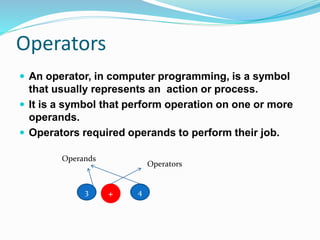
 An operator, in computer programming, is a symbol
that usually represents an action or process.
 It is a symbol that perform operation on one or more
operands.
 Operators required operands to perform their job.
3 4+
Operands
Operators
List Of Operators
i. Arithmetic Operator
ii. Relational Operator
iii. Logical Operator
iv. Bitwise Operator
v. Assignment Operator
vi. Identity Operator
vii. Membership Operator
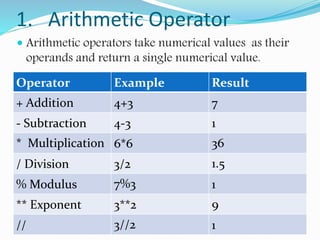
1. Arithmetic Operator
 Arithmetic operators take numerical values as their
operands and return a single numerical value.
Operator Example Result
+ Addition 4+3 7
- Subtraction 4-3 1
* Multiplication 6*6 36
/ Division 3/2 1.5
% Modulus 7%3 1
** Exponent 3**2 9
// 3//2 1
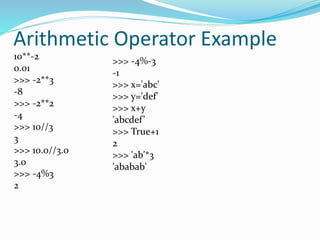
Arithmetic Operator Example
10**-2
0.01
>>> -2**3
-8
>>> -2**2
-4
>>> 10//3
3
>>> 10.0//3.0
3.0
>>> -4%3
2
>>> -4%-3
-1
>>> x='abc'
>>> y='def'
>>> x+y
'abcdef’
>>> True+1
2
>>> 'ab'*3
'ababab'
2. Relational Operator
Oper
ator
Description Example
== If the values of two operands are equal, then the
condition becomes true.
(a ==
b) is not true.
!= If values of two operands are not equal, then
condition becomes true. a!=b is true
> If the value of left operand is greater than the value of
right operand, then condition becomes true.
(a > b) is true.
< If the value of left operand is less than the value of right
operand, then condition becomes true.
(a < b) is not true.
>= If the value of left operand is greater than or equal to
the value of right operand, then condition becomes true.
(a >=
b) is true.
<= If the value of left operand is less than or equal to the
value of right operand, then condition becomes true.
(a <=
b) is not
true.
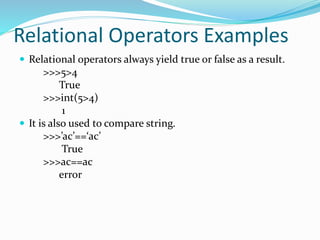
Relational Operators Examples
 Relational operators always yield true or false as a result.
>>>5>4
True
>>>int(5>4)
1
 It is also used to compare string.
>>>’ac’==‘ac’
True
>>>ac==ac
error
 5>4<2 if any result value is false all result value is false.
>>>5>4>2
True
 If we use equality(==) operator with any type of operand
they never give error.
>>>5==‘5’
False
>>>’a’==97
False
>>>5=5.0
True
>>>’AB’==‘CD’
False
3. Logical Operator
Operator Expression Example
and a>b and a>c
When both operands are
True ,result will be True
or a>b or a>c
When both operands are
False result will be False
not not a>b
Invert the result
Expression 1 Expression 2 and or not(Exp 1)
T T T T F
T F F T F
F T F T T
F F F F T
 These operators return boolean value by validating
more than one expression.
 If the operands of logical operator are boolean value
then result is boolean otherwise if the operands of
logical operators are integer then result is integer.
>>>4>3 or 3<2
True
>>> 0 or False
False
 Logical operator must be written in lowercase only.
>>>5 and 4
4
 Empty string is always False non-empty string is True.
>>>3 and ‘ab’ #‘ab’ is string so ab=1(True)
‘ab’
Logical Operator Examples
>>>not ‘null’ #String is treated as True
False
>>>not ‘’
True
>>>’ram’ and ‘shyam’
‘ram’
>>>3 and x=4 #Assignment operator does not work their
error
>>>3 or 5/0
3
>>>3 and 5/0 #Evaluation is infinite
error
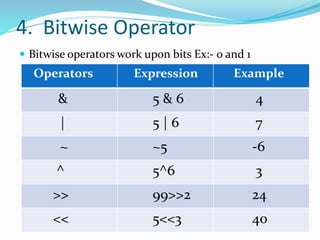
4. Bitwise Operator
 Bitwise operators work upon bits Ex:- 0 and 1
Operators Expression Example
& 5 & 6 4
| 5 | 6 7
~ ~5 -6
^ 5^6 3
>> 99>>2 24
<< 5<<3 40
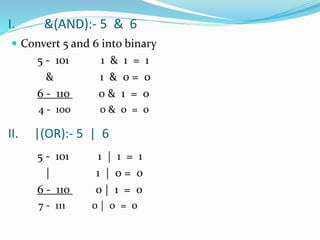
I. &(AND):- 5 & 6
 Convert 5 and 6 into binary
5 - 101 1 & 1 = 1
& 1 & 0 = 0
6 - 110 0 & 1 = 0
4 - 100 0 & 0 = 0
5 - 101 1 | 1 = 1
| 1 | 0 = 0
6 - 110 0 | 1 = 0
7 - 111 0 | 0 = 0
II. |(OR):- 5 | 6
III. ~(Complement):-
>>>~12
-13
~x = -x -1
~12 = -12-1 = -13
Note: Our system does not store the negative
numbers , first we convert the number into 2’s
complement and then store.
12 = 00001100
1’s complement = 11110011
13 = 00001101
1’s complement = 11110010
2’s complement = 11110011
IV. ^(XOR):- 5^6
5 - 0101 1 ^ 1 = 0
^ 1 ^ 0 = 1
6 - 0110 0 ^ 1 = 1
3 - 0011 0 ^ 0 = 0
V. >>(right shift) :- 99>>2 VI. <<(left shift) :- 5<<3
99=1100011 5 = 101
1st time = 0110001 1st time = 1010
2nd time = 0011000 =24 2nd time = 10100
3rd time = 101000=40
5. Assignment Operator
Operator expression
= X=5
+=,-=,*=,/=,%= X+=5
//=,**= X**=2
&=,/=,^= X&=3
>>=,<<= X>>=2
(i) x=5
x*=6
x=x*6
=5*6
=30
(ii) x=5
x+=6
x=x+6
=5+6
=11
(iii) x=5
x/=6
x=x/6
=5/6
=0.833
(iv) x=5
x%=6
x=x%6
=5%6
=5
(v) x=5
x//=2
x=5//2
x=2
(vi) x=5
x**=2
x=5**2
x=25
6. Identity Operator
Operator Explanation
is Return True if both variables
are same object.
is not Return False if both variables
are same object.
-> Every variable in python is an object.
->Objects are dynamically created.
-> Objects do not have name but references.
x=5 x
y=5
y
5
1000
>>>X=5
>>>Y=5
>>>X==Y
True
>>>X is Y
True
>>>X=5
>>>Y=5.0
>>>X==Y
True
>>>X is Y
False
>>>X is not Y
True
6. Membership Operator
Operator Explanation
in Return True if a sequence with the
specified value is present in the object.
not in Return False if a sequence with the
specified value is present in the object.
>>>x=“abc”
>>>‘a’ in x
True
>>>x=“abc”
>>>’A’ not in x
True
>>>x=256
>>>’5’ in x
error
>>>’5 ‘ in x
False
>>> x=1,2,3,4
>>> 4 in x
True
Practice Session
>>>x=25*3/2-1
36.5
>>>x=5>4>3>2
True
>>>x=3
>>>x * = 3 + 4
21
>>>x = 3 and 4
4
>>>x = 2 or ‘Hello’
2
>>>x = ‘Hello’ + 3
error
>>>x = ‘ab’ * 4
abababab
>>>x = 3 == ‘Three’
False
Python operators

Python operators

  • 1.
  • 3.
    Operators  An operator,in computer programming, is a symbol that usually represents an action or process.  It is a symbol that perform operation on one or more operands.  Operators required operands to perform their job. 3 4+ Operands Operators
  • 4.
    List Of Operators i.Arithmetic Operator ii. Relational Operator iii. Logical Operator iv. Bitwise Operator v. Assignment Operator vi. Identity Operator vii. Membership Operator
  • 5.
    1. Arithmetic Operator Arithmetic operators take numerical values as their operands and return a single numerical value. Operator Example Result + Addition 4+3 7 - Subtraction 4-3 1 * Multiplication 6*6 36 / Division 3/2 1.5 % Modulus 7%3 1 ** Exponent 3**2 9 // 3//2 1
  • 6.
    Arithmetic Operator Example 10**-2 0.01 >>>-2**3 -8 >>> -2**2 -4 >>> 10//3 3 >>> 10.0//3.0 3.0 >>> -4%3 2 >>> -4%-3 -1 >>> x='abc' >>> y='def' >>> x+y 'abcdef’ >>> True+1 2 >>> 'ab'*3 'ababab'
  • 7.
    2. Relational Operator Oper ator DescriptionExample == If the values of two operands are equal, then the condition becomes true. (a == b) is not true. != If values of two operands are not equal, then condition becomes true. a!=b is true > If the value of left operand is greater than the value of right operand, then condition becomes true. (a > b) is true. < If the value of left operand is less than the value of right operand, then condition becomes true. (a < b) is not true. >= If the value of left operand is greater than or equal to the value of right operand, then condition becomes true. (a >= b) is true. <= If the value of left operand is less than or equal to the value of right operand, then condition becomes true. (a <= b) is not true.
  • 8.
    Relational Operators Examples Relational operators always yield true or false as a result. >>>5>4 True >>>int(5>4) 1  It is also used to compare string. >>>’ac’==‘ac’ True >>>ac==ac error
  • 9.
     5>4<2 ifany result value is false all result value is false. >>>5>4>2 True  If we use equality(==) operator with any type of operand they never give error. >>>5==‘5’ False >>>’a’==97 False >>>5=5.0 True >>>’AB’==‘CD’ False
  • 10.
    3. Logical Operator OperatorExpression Example and a>b and a>c When both operands are True ,result will be True or a>b or a>c When both operands are False result will be False not not a>b Invert the result Expression 1 Expression 2 and or not(Exp 1) T T T T F T F F T F F T F T T F F F F T
  • 11.
     These operatorsreturn boolean value by validating more than one expression.  If the operands of logical operator are boolean value then result is boolean otherwise if the operands of logical operators are integer then result is integer. >>>4>3 or 3<2 True >>> 0 or False False  Logical operator must be written in lowercase only. >>>5 and 4 4  Empty string is always False non-empty string is True. >>>3 and ‘ab’ #‘ab’ is string so ab=1(True) ‘ab’
  • 12.
    Logical Operator Examples >>>not‘null’ #String is treated as True False >>>not ‘’ True >>>’ram’ and ‘shyam’ ‘ram’ >>>3 and x=4 #Assignment operator does not work their error >>>3 or 5/0 3 >>>3 and 5/0 #Evaluation is infinite error
  • 13.
    4. Bitwise Operator Bitwise operators work upon bits Ex:- 0 and 1 Operators Expression Example & 5 & 6 4 | 5 | 6 7 ~ ~5 -6 ^ 5^6 3 >> 99>>2 24 << 5<<3 40
  • 14.
    I. &(AND):- 5& 6  Convert 5 and 6 into binary 5 - 101 1 & 1 = 1 & 1 & 0 = 0 6 - 110 0 & 1 = 0 4 - 100 0 & 0 = 0 5 - 101 1 | 1 = 1 | 1 | 0 = 0 6 - 110 0 | 1 = 0 7 - 111 0 | 0 = 0 II. |(OR):- 5 | 6
  • 15.
    III. ~(Complement):- >>>~12 -13 ~x =-x -1 ~12 = -12-1 = -13 Note: Our system does not store the negative numbers , first we convert the number into 2’s complement and then store. 12 = 00001100 1’s complement = 11110011 13 = 00001101 1’s complement = 11110010 2’s complement = 11110011
  • 16.
    IV. ^(XOR):- 5^6 5- 0101 1 ^ 1 = 0 ^ 1 ^ 0 = 1 6 - 0110 0 ^ 1 = 1 3 - 0011 0 ^ 0 = 0 V. >>(right shift) :- 99>>2 VI. <<(left shift) :- 5<<3 99=1100011 5 = 101 1st time = 0110001 1st time = 1010 2nd time = 0011000 =24 2nd time = 10100 3rd time = 101000=40
  • 17.
    5. Assignment Operator Operatorexpression = X=5 +=,-=,*=,/=,%= X+=5 //=,**= X**=2 &=,/=,^= X&=3 >>=,<<= X>>=2
  • 18.
    (i) x=5 x*=6 x=x*6 =5*6 =30 (ii) x=5 x+=6 x=x+6 =5+6 =11 (iii)x=5 x/=6 x=x/6 =5/6 =0.833 (iv) x=5 x%=6 x=x%6 =5%6 =5 (v) x=5 x//=2 x=5//2 x=2 (vi) x=5 x**=2 x=5**2 x=25
  • 19.
    6. Identity Operator OperatorExplanation is Return True if both variables are same object. is not Return False if both variables are same object. -> Every variable in python is an object. ->Objects are dynamically created. -> Objects do not have name but references.
  • 20.
    x=5 x y=5 y 5 1000 >>>X=5 >>>Y=5 >>>X==Y True >>>X isY True >>>X=5 >>>Y=5.0 >>>X==Y True >>>X is Y False >>>X is not Y True
  • 21.
    6. Membership Operator OperatorExplanation in Return True if a sequence with the specified value is present in the object. not in Return False if a sequence with the specified value is present in the object. >>>x=“abc” >>>‘a’ in x True >>>x=“abc” >>>’A’ not in x True >>>x=256 >>>’5’ in x error >>>’5 ‘ in x False >>> x=1,2,3,4 >>> 4 in x True
  • 22.
    Practice Session >>>x=25*3/2-1 36.5 >>>x=5>4>3>2 True >>>x=3 >>>x *= 3 + 4 21 >>>x = 3 and 4 4 >>>x = 2 or ‘Hello’ 2 >>>x = ‘Hello’ + 3 error >>>x = ‘ab’ * 4 abababab >>>x = 3 == ‘Three’ False