Python Basics
Python Basics
Introduction to Python
● Python is an interpreted, object-oriented, high-level programming
language with dynamic semantics. It was created by Guido van
Rossum, and released in 1991.
● Python is the most popular programming language because of its
simplicity, powerful libraries, and readability. Python has a simple
syntax, is readable, and has great community support.
Python
Python Basics
Introduction to Python
● Python is the very first step in many new age technologies like Machine
Learning, Data Science, Deep Learning and Artificial Intelligence.
However It is also used in Web Development, Game Development,
Desktop GUI, Web Scraping Applications, Business Applications ,cad
Applications, Embedded Applications etc.
Python
Python Basics
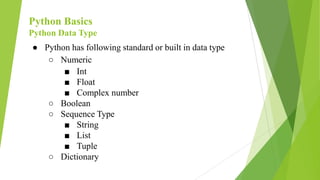
Python Data Type
● Python has following standard or built in data type
○ Numeric
■ Int
■ Float
■ Complex number
○ Boolean
○ Sequence Type
■ String
■ List
■ Tuple
○ Dictionary
Python Basics
Python Data Type
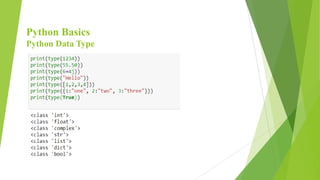
● Python has built in function type() to ascertain the data type of
certain value.
Numeric Data Type
● Integer
○ It includes zero, positive, negative whole numbers having
unlimited precision(number of digit in number) without any
fractional part.
Python Basics
Python Data Type
● Float
○ It includes any real numbers with floating point representation.
And fractional part is denoted by decimal symbol or scientific
notation.
● Boolean
○ It includes data with two built-in values “True” or “False”. Here
“T” and “F” must be in capital letter. In python true and false are
invalid boolean and python will throw error for that.
Python Basics
Python Data Type
Dictionary
● In python, a dictionary is similar to hash or maps in other languages.
It consists of key value pairs. The value can be accessed by a unique
key in the dictionary.In Python dictionaries are written with curly
brackets
● Dictionary is a collection which is unordered, changeable and
indexed. No duplicate members.
● Syntax- dict = { key1:value1, key2:value2,...keyN:valueN }
Python Basics
Python Data Type
Sequence Type
● A sequence is ordered collection of similar or different data type.
● String
○ A string value is collection of one or more characters.It is
defined in single,double or triple quotes
○ String is a object of python’s built in class ‘str’.
Python Basics
Python Data Type
● List
○ Lists are used to store data of different data types in a sequential
manner.List is a collection which is ordered and changeable.
Allows duplicate members.In Python lists are written with
square brackets.
○ There are addresses assigned to every element of the list, which
is called an Index. The index value starts from 0 and goes on
until the last element called the positive index. There is also
negative indexing which starts from -1 enabling you to access
elements from the last to first.
Python Basics
Python Data Type
● Tuple
A tuple is a collection which is ordered and unchangeable.
Python tuples work exactly like Python lists except they are
immutable, i.e. they can’t be changed in place.
In Python tuples are written with round brackets.
Python Basics
Python Data Type
Python Basics
Operators
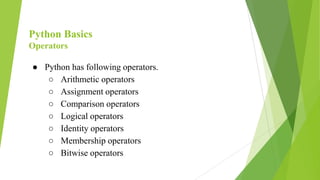
● Python has following operators.
○ Arithmetic operators
○ Assignment operators
○ Comparison operators
○ Logical operators
○ Identity operators
○ Membership operators
○ Bitwise operators
Python Basics
Operators
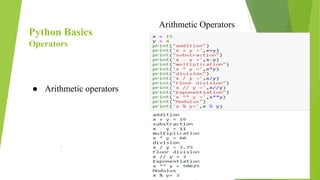
● Arithmetic operators
.
Arithmetic Operators
Python Basics
Operators
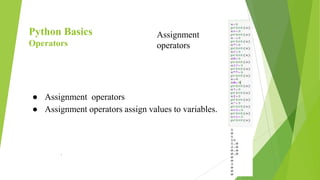
● Assignment operators
● Assignment operators assign values to variables.
.
Assignment
operators
Python Basics
Operators
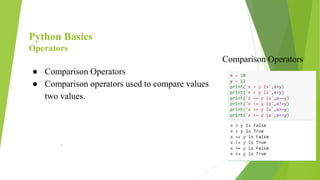
● Comparison Operators
● Comparison operators used to compare values
two values.
.
Comparison Operators
Python Basics
Operators
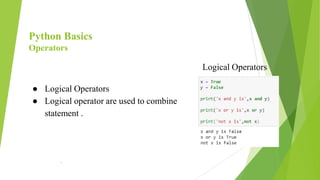
● Logical Operators
● Logical operator are used to combine
statement .
.
Logical Operators
Python Basics
Operators
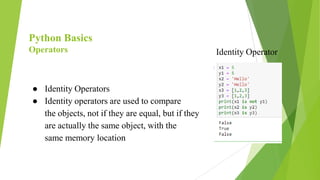
● Identity Operators
● Identity operators are used to compare
the objects, not if they are equal, but if they
are actually the same object, with the
same memory location
Identity Operator
Python Basics
Operators
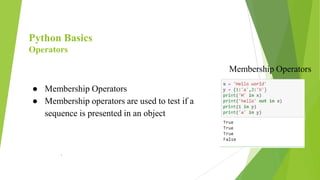
● Membership Operators
● Membership operators are used to test if a
sequence is presented in an object
.
Membership Operators
Python Basics
Operators
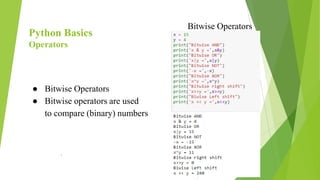
● Bitwise Operators
● Bitwise operators are used
to compare (binary) numbers
.
Bitwise Operators
Python Basics
Code Block
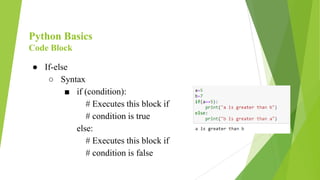
● If-else
○ Syntax
■ if (condition):
# Executes this block if
# condition is true
else:
# Executes this block if
# condition is false
Python Basics
Code Block
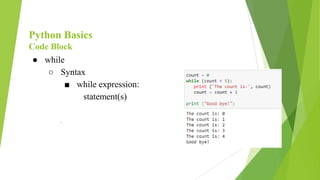
● while
○ Syntax
■ while expression:
statement(s)
.
Python Basics
Code Block
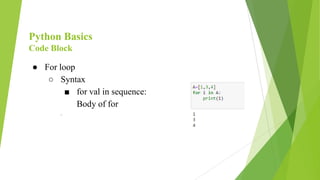
● For loop
○ Syntax
■ for val in sequence:
Body of for
.
Python Basics
Functions
.
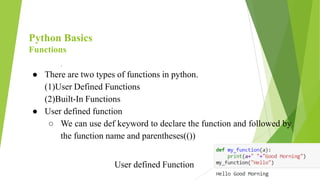
● There are two types of functions in python.
(1)User Defined Functions
(2)Built-In Functions
● User defined function
○ We can use def keyword to declare the function and followed by
the function name and parentheses(())
User defined Function
Python Basics
Functions
● Any input parameters or arguments should be placed within these
parenthesis. We can can also define parameters inside these
parentheses.
● The code block within every function starts with a colon (:) and is
indented.
● The statement return [expression] exits a function, optionally passing
back an expression to the caller. A return statement with no
arguments is the same as return None.
● We can call the function by function name followed by parenthesis.
Python Basics
Functions
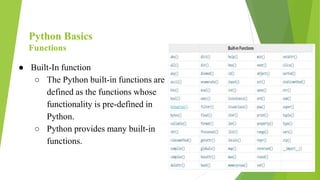
● Built-In function
○ The Python built-in functions are
defined as the functions whose
functionality is pre-defined in
Python.
○ Python provides many built-in
functions.
Python Basics
Functions
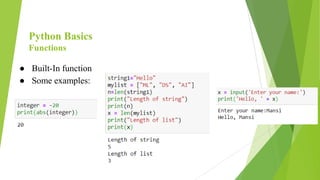
● Built-In function
● Some examples:
Python Basics
Packages
● A Python package refers to a directory of Python module(s).Python
package is basically a directory with python files and a file with the
name with init.py.
● Steps For creating and importing package in Python:
○ Create a new folder with any name.Example: G:My_App
○ Inside this folder create subfolder with any name:Example:
G:My_Appmypackage
○ Create an empty __init__.py file in the mypackage(subfolder)
folder.
Python Basics
Packages
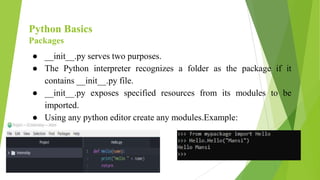
● __init__.py serves two purposes.
● The Python interpreter recognizes a folder as the package if it
contains __init__.py file.
● __init__.py exposes specified resources from its modules to be
imported.
● Using any python editor create any modules.Example:
Python Basics
File handling
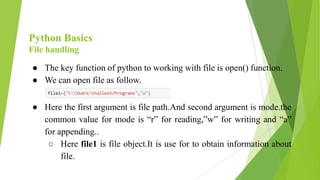
● The key function of python to working with file is open() function.
● We can open file as follow.
● Here the first argument is file path.And second argument is mode.the
common value for mode is “r” for reading,”w” for writing and “a”
for appending..
○ Here file1 is file object.It is use for to obtain information about
file.
Python Basics
File handling
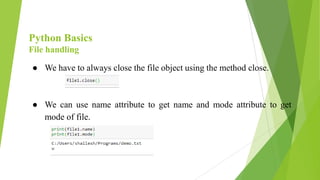
● We have to always close the file object using the method close.
● We can use name attribute to get name and mode attribute to get
mode of file.
Python Basics
File handling
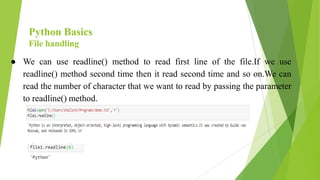
● We can use readline() method to read first line of the file.If we use
readline() method second time then it read second time and so on.We can
read the number of character that we want to read by passing the parameter
to readline() method.
Python Basics
File handling
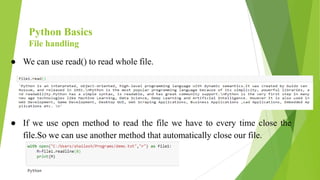
● We can use read() to read whole file.
● If we use open method to read the file we have to every time close the
file.So we can use another method that automatically close our file.
Python Basics
File handling
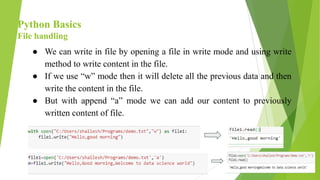
● We can write in file by opening a file in write mode and using write
method to write content in the file.
● If we use “w” mode then it will delete all the previous data and then
write the content in the file.
● But with append “a” mode we can add our content to previously
written content of file.
Python Basics
Classes
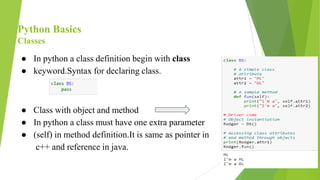
● In python a class definition begin with class
● keyword.Syntax for declaring class.
● Class with object and method
● In python a class must have one extra parameter
● (self) in method definition.It is same as pointer in
c++ and reference in java.
Python Basics
Classes
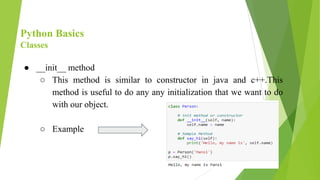
● __init__ method
○ This method is similar to constructor in java and c++.This
method is useful to do any any initialization that we want to do
with our object.
○ Example
Python Basics
Numpy
● NumPy is a python library used for working with arrays.
● It also has functions for working in the domain of linear
algebra,fourier transform, and matrices.
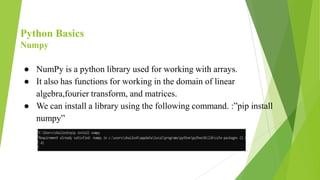
● We can install a library using the following command. :”pip install
numpy”
Python Basics
Numpy
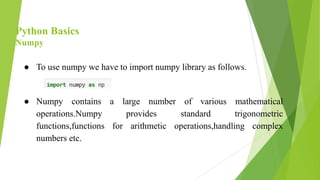
● To use numpy we have to import numpy library as follows.
● Numpy contains a large number of various mathematical
operations.Numpy provides standard trigonometric
functions,functions for arithmetic operations,handling complex
numbers etc.
Python Basics
Numpy
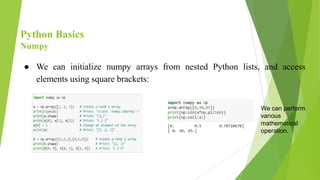
● We can initialize numpy arrays from nested Python lists, and access
elements using square brackets:
We can perform
various
mathematical
operation.
Python Basics
Plotting
● We can use many libraries of to plot data like matplotlib,seaborn,ggplot etc.
● Matplotlib
● Matplotlib.pyplot is a plotting library used for
2D graphics in python programming language.
● It can be used in python scripts,shell,web application
servers and other graphical user interface toolkits.
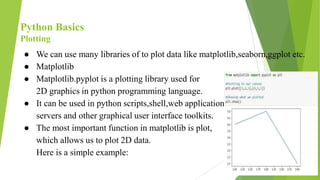
● The most important function in matplotlib is plot,
which allows us to plot 2D data.
Here is a simple example:
Python Basics
Plotting
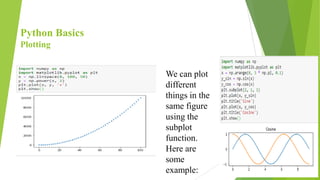
We can plot
different
things in the
same figure
using the
subplot
function.
Here are
some
example:
Python Basics
Plotting
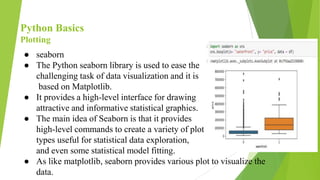
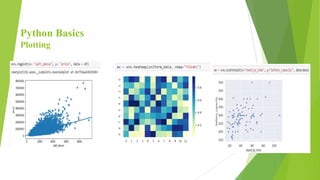
● seaborn
● The Python seaborn library is used to ease the
challenging task of data visualization and it is
based on Matplotlib.
● It provides a high-level interface for drawing
attractive and informative statistical graphics.
● The main idea of Seaborn is that it provides
high-level commands to create a variety of plot
types useful for statistical data exploration,
and even some statistical model fitting.
● As like matplotlib, seaborn provides various plot to visualize the
data.
Python Basics
Plotting
Thank You!!!

Introduction to Python programming Language

  • 1.
  • 2.
    Python Basics Introduction toPython ● Python is an interpreted, object-oriented, high-level programming language with dynamic semantics. It was created by Guido van Rossum, and released in 1991. ● Python is the most popular programming language because of its simplicity, powerful libraries, and readability. Python has a simple syntax, is readable, and has great community support. Python
  • 3.
    Python Basics Introduction toPython ● Python is the very first step in many new age technologies like Machine Learning, Data Science, Deep Learning and Artificial Intelligence. However It is also used in Web Development, Game Development, Desktop GUI, Web Scraping Applications, Business Applications ,cad Applications, Embedded Applications etc. Python
  • 4.
    Python Basics Python DataType ● Python has following standard or built in data type ○ Numeric ■ Int ■ Float ■ Complex number ○ Boolean ○ Sequence Type ■ String ■ List ■ Tuple ○ Dictionary
  • 5.
    Python Basics Python DataType ● Python has built in function type() to ascertain the data type of certain value. Numeric Data Type ● Integer ○ It includes zero, positive, negative whole numbers having unlimited precision(number of digit in number) without any fractional part.
  • 6.
    Python Basics Python DataType ● Float ○ It includes any real numbers with floating point representation. And fractional part is denoted by decimal symbol or scientific notation. ● Boolean ○ It includes data with two built-in values “True” or “False”. Here “T” and “F” must be in capital letter. In python true and false are invalid boolean and python will throw error for that.
  • 7.
    Python Basics Python DataType Dictionary ● In python, a dictionary is similar to hash or maps in other languages. It consists of key value pairs. The value can be accessed by a unique key in the dictionary.In Python dictionaries are written with curly brackets ● Dictionary is a collection which is unordered, changeable and indexed. No duplicate members. ● Syntax- dict = { key1:value1, key2:value2,...keyN:valueN }
  • 8.
    Python Basics Python DataType Sequence Type ● A sequence is ordered collection of similar or different data type. ● String ○ A string value is collection of one or more characters.It is defined in single,double or triple quotes ○ String is a object of python’s built in class ‘str’.
  • 9.
    Python Basics Python DataType ● List ○ Lists are used to store data of different data types in a sequential manner.List is a collection which is ordered and changeable. Allows duplicate members.In Python lists are written with square brackets. ○ There are addresses assigned to every element of the list, which is called an Index. The index value starts from 0 and goes on until the last element called the positive index. There is also negative indexing which starts from -1 enabling you to access elements from the last to first.
  • 10.
    Python Basics Python DataType ● Tuple A tuple is a collection which is ordered and unchangeable. Python tuples work exactly like Python lists except they are immutable, i.e. they can’t be changed in place. In Python tuples are written with round brackets.
  • 11.
  • 12.
    Python Basics Operators ● Pythonhas following operators. ○ Arithmetic operators ○ Assignment operators ○ Comparison operators ○ Logical operators ○ Identity operators ○ Membership operators ○ Bitwise operators
  • 13.
    Python Basics Operators ● Arithmeticoperators . Arithmetic Operators
  • 14.
    Python Basics Operators ● Assignmentoperators ● Assignment operators assign values to variables. . Assignment operators
  • 15.
    Python Basics Operators ● ComparisonOperators ● Comparison operators used to compare values two values. . Comparison Operators
  • 16.
    Python Basics Operators ● LogicalOperators ● Logical operator are used to combine statement . . Logical Operators
  • 17.
    Python Basics Operators ● IdentityOperators ● Identity operators are used to compare the objects, not if they are equal, but if they are actually the same object, with the same memory location Identity Operator
  • 18.
    Python Basics Operators ● MembershipOperators ● Membership operators are used to test if a sequence is presented in an object . Membership Operators
  • 19.
    Python Basics Operators ● BitwiseOperators ● Bitwise operators are used to compare (binary) numbers . Bitwise Operators
  • 20.
    Python Basics Code Block ●If-else ○ Syntax ■ if (condition): # Executes this block if # condition is true else: # Executes this block if # condition is false
  • 21.
    Python Basics Code Block ●while ○ Syntax ■ while expression: statement(s) .
  • 22.
    Python Basics Code Block ●For loop ○ Syntax ■ for val in sequence: Body of for .
  • 23.
    Python Basics Functions . ● Thereare two types of functions in python. (1)User Defined Functions (2)Built-In Functions ● User defined function ○ We can use def keyword to declare the function and followed by the function name and parentheses(()) User defined Function
  • 24.
    Python Basics Functions ● Anyinput parameters or arguments should be placed within these parenthesis. We can can also define parameters inside these parentheses. ● The code block within every function starts with a colon (:) and is indented. ● The statement return [expression] exits a function, optionally passing back an expression to the caller. A return statement with no arguments is the same as return None. ● We can call the function by function name followed by parenthesis.
  • 25.
    Python Basics Functions ● Built-Infunction ○ The Python built-in functions are defined as the functions whose functionality is pre-defined in Python. ○ Python provides many built-in functions.
  • 26.
    Python Basics Functions ● Built-Infunction ● Some examples:
  • 27.
    Python Basics Packages ● APython package refers to a directory of Python module(s).Python package is basically a directory with python files and a file with the name with init.py. ● Steps For creating and importing package in Python: ○ Create a new folder with any name.Example: G:My_App ○ Inside this folder create subfolder with any name:Example: G:My_Appmypackage ○ Create an empty __init__.py file in the mypackage(subfolder) folder.
  • 28.
    Python Basics Packages ● __init__.pyserves two purposes. ● The Python interpreter recognizes a folder as the package if it contains __init__.py file. ● __init__.py exposes specified resources from its modules to be imported. ● Using any python editor create any modules.Example:
  • 29.
    Python Basics File handling ●The key function of python to working with file is open() function. ● We can open file as follow. ● Here the first argument is file path.And second argument is mode.the common value for mode is “r” for reading,”w” for writing and “a” for appending.. ○ Here file1 is file object.It is use for to obtain information about file.
  • 30.
    Python Basics File handling ●We have to always close the file object using the method close. ● We can use name attribute to get name and mode attribute to get mode of file.
  • 31.
    Python Basics File handling ●We can use readline() method to read first line of the file.If we use readline() method second time then it read second time and so on.We can read the number of character that we want to read by passing the parameter to readline() method.
  • 32.
    Python Basics File handling ●We can use read() to read whole file. ● If we use open method to read the file we have to every time close the file.So we can use another method that automatically close our file.
  • 33.
    Python Basics File handling ●We can write in file by opening a file in write mode and using write method to write content in the file. ● If we use “w” mode then it will delete all the previous data and then write the content in the file. ● But with append “a” mode we can add our content to previously written content of file.
  • 34.
    Python Basics Classes ● Inpython a class definition begin with class ● keyword.Syntax for declaring class. ● Class with object and method ● In python a class must have one extra parameter ● (self) in method definition.It is same as pointer in c++ and reference in java.
  • 35.
    Python Basics Classes ● __init__method ○ This method is similar to constructor in java and c++.This method is useful to do any any initialization that we want to do with our object. ○ Example
  • 36.
    Python Basics Numpy ● NumPyis a python library used for working with arrays. ● It also has functions for working in the domain of linear algebra,fourier transform, and matrices. ● We can install a library using the following command. :”pip install numpy”
  • 37.
    Python Basics Numpy ● Touse numpy we have to import numpy library as follows. ● Numpy contains a large number of various mathematical operations.Numpy provides standard trigonometric functions,functions for arithmetic operations,handling complex numbers etc.
  • 38.
    Python Basics Numpy ● Wecan initialize numpy arrays from nested Python lists, and access elements using square brackets: We can perform various mathematical operation.
  • 39.
    Python Basics Plotting ● Wecan use many libraries of to plot data like matplotlib,seaborn,ggplot etc. ● Matplotlib ● Matplotlib.pyplot is a plotting library used for 2D graphics in python programming language. ● It can be used in python scripts,shell,web application servers and other graphical user interface toolkits. ● The most important function in matplotlib is plot, which allows us to plot 2D data. Here is a simple example:
  • 40.
    Python Basics Plotting We canplot different things in the same figure using the subplot function. Here are some example:
  • 41.
    Python Basics Plotting ● seaborn ●The Python seaborn library is used to ease the challenging task of data visualization and it is based on Matplotlib. ● It provides a high-level interface for drawing attractive and informative statistical graphics. ● The main idea of Seaborn is that it provides high-level commands to create a variety of plot types useful for statistical data exploration, and even some statistical model fitting. ● As like matplotlib, seaborn provides various plot to visualize the data.
  • 42.
  • 43.