Marianna Zichar
University of Debrecen
Agenda
 Motivation
 The language (with the main pitfalls)
 ArcGIS
 KML
 QGIS
 Projections
 Visualization
 Analysis and management of geospatial data
2
The language
 General-purpose interpreted, interactive, high-level
programming language
 Multiple programming paradigms
 Object-oriented
 Imperative
 Functional programming
 Procedural
 Dynamic language: Scripting  Non scripting
3
The language
 Python code can be packaged into standalone
executable programs
 Popular
 open source
 lots of tutorials and online resources
 very active community
4
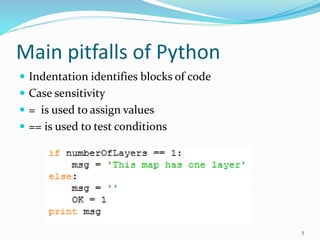
Main pitfalls of Python
 Indentation identifies blocks of code
 Case sensitivity
 = is used to assign values
 == is used to test conditions
5
Python in geoinformatics?
YES!
Thousands of different modules and packages are
available to extend the functionality of Python
containing several ones related to geoinformatics.
6
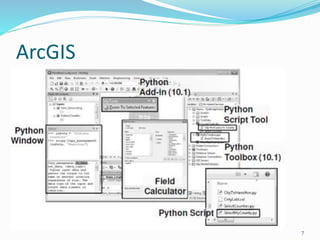
ArcGIS
7
ArcGIS
Arcgisscripting (ArGIS 9.x)
Arcpy (ArcGIS 10.x)
 automate geoprocessing tasks
 manage map documents and layers
 find and fix broken data links
 edit data in feature classes and tables
8
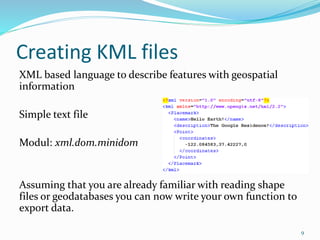
Creating KML files
XML based language to describe features with geospatial
information
Simple text file
Modul: xml.dom.minidom
Assuming that you are already familiar with reading shape
files or geodatabases you can now write your own function to
export data.
9
QGIS
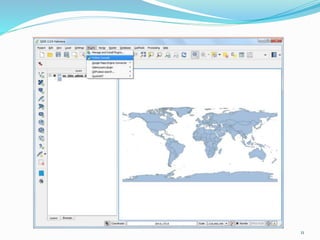
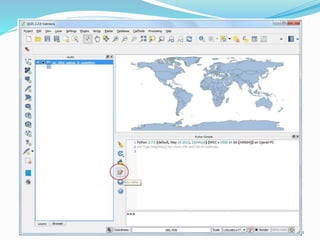
 Python Console
The integrated Python console is ideal for scripting. When
the console is started the modules qgis.core and qgis.utils
will be imported automatically.
 Python Plugins
It is possible to create and use Python plugins to enhance
the functionality of QGIS. The plugin installer allows users
to easily fetch, upgrade and remove Python plugins.
 Python Applications
Custom applications can be developed based on QGIS API.
10
11
12
Projections
 Pyproj
 ”wrapper’” around library called PROJ.4
 Class: Proj
longitude, latitude  native map (x,y) coordinates
 Class: Geod
performs various Great Circle distance and angle
calculations
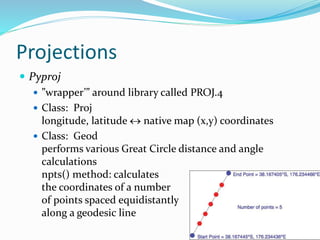
npts() method: calculates
the coordinates of a number
of points spaced equidistantly
along a geodesic line
13
Projections
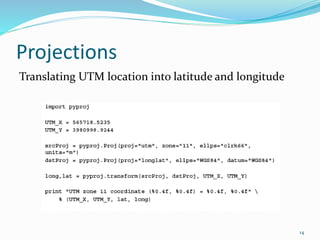
Translating UTM location into latitude and longitude
14
Visualizing geospatial data
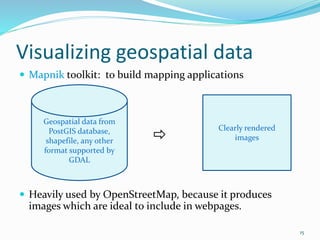
 Mapnik toolkit: to build mapping applications

 Heavily used by OpenStreetMap, because it produces
images which are ideal to include in webpages.
15
Geospatial data from
PostGIS database,
shapefile, any other
format supported by
GDAL
Clearly rendered
images
Analyzing and manipulating geospatial
data
Shapely
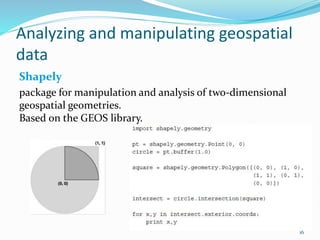
package for manipulation and analysis of two-dimensional
geospatial geometries.
Based on the GEOS library.
16
Conclusion
Do you maybe know additional packages?
There are several packages which support
geoinformatics, and from which I overviewed some,
pointing out how useful is to get to know Python
language.
17

Python in geoinformatics

  • 1.
  • 2.
    Agenda  Motivation  Thelanguage (with the main pitfalls)  ArcGIS  KML  QGIS  Projections  Visualization  Analysis and management of geospatial data 2
  • 3.
    The language  General-purposeinterpreted, interactive, high-level programming language  Multiple programming paradigms  Object-oriented  Imperative  Functional programming  Procedural  Dynamic language: Scripting  Non scripting 3
  • 4.
    The language  Pythoncode can be packaged into standalone executable programs  Popular  open source  lots of tutorials and online resources  very active community 4
  • 5.
    Main pitfalls ofPython  Indentation identifies blocks of code  Case sensitivity  = is used to assign values  == is used to test conditions 5
  • 6.
    Python in geoinformatics? YES! Thousandsof different modules and packages are available to extend the functionality of Python containing several ones related to geoinformatics. 6
  • 7.
  • 8.
    ArcGIS Arcgisscripting (ArGIS 9.x) Arcpy(ArcGIS 10.x)  automate geoprocessing tasks  manage map documents and layers  find and fix broken data links  edit data in feature classes and tables 8
  • 9.
    Creating KML files XMLbased language to describe features with geospatial information Simple text file Modul: xml.dom.minidom Assuming that you are already familiar with reading shape files or geodatabases you can now write your own function to export data. 9
  • 10.
    QGIS  Python Console Theintegrated Python console is ideal for scripting. When the console is started the modules qgis.core and qgis.utils will be imported automatically.  Python Plugins It is possible to create and use Python plugins to enhance the functionality of QGIS. The plugin installer allows users to easily fetch, upgrade and remove Python plugins.  Python Applications Custom applications can be developed based on QGIS API. 10
  • 11.
  • 12.
  • 13.
    Projections  Pyproj  ”wrapper’”around library called PROJ.4  Class: Proj longitude, latitude  native map (x,y) coordinates  Class: Geod performs various Great Circle distance and angle calculations npts() method: calculates the coordinates of a number of points spaced equidistantly along a geodesic line 13
  • 14.
    Projections Translating UTM locationinto latitude and longitude 14
  • 15.
    Visualizing geospatial data Mapnik toolkit: to build mapping applications   Heavily used by OpenStreetMap, because it produces images which are ideal to include in webpages. 15 Geospatial data from PostGIS database, shapefile, any other format supported by GDAL Clearly rendered images
  • 16.
    Analyzing and manipulatinggeospatial data Shapely package for manipulation and analysis of two-dimensional geospatial geometries. Based on the GEOS library. 16
  • 17.
    Conclusion Do you maybeknow additional packages? There are several packages which support geoinformatics, and from which I overviewed some, pointing out how useful is to get to know Python language. 17

Editor's Notes

  • #3 Motivation: VBA ->
  • #4 It was created in the late eighties and early nineties Python supports multiple programming paradigms, including
  • #6 compact; there is no begin/end (or similar) statements to identify blocks of code colon
  • #8 demonstrates a number of ways how to use Python in ArcGIS.
  • #9 site package . In ArcGIS 9.x Python was just an option to perform geoprocessing tasks, although it was installed automatically with ArcGIS. Since the support of VBA will end totally after the version 10, every developer has to select a new platform.
  • #10 Every piece of information is enclosed by tags
  • #11 http://www.qgistutorials.com/en/docs/find_neighbor_polygons.html It is probably not surprising that the open source Python is ready to support an open source GIS software product too. Python can be used in several ways in QGIS:
  • #15 Two Proj objects
  • #16 works with geospatial data from PostGIS database, shapefile, or any other format supported by GDAL, and produces clearly-rendered, good-looking images
  • #17 https://pypi.python.org/pypi/Shapely Manipulation and analysis of geometric objects in the Cartesian plane. Shapely uses the GEOS library for all operations. GEOS is written in C++ and used in many applications and you can expect that all operations are highly optimized. The creation of new geometries with many coordinates, however, involves some overhead that might slow down your code.