.
.
Building Bridges
pyfilesystem: unified access to storages and services
Andreas Jung
@MacYET

info@zopyx.com

www.zopyx.com

Python Users Berlin 03/2016
/about
• 20 years in publishing
business since 1995
• Python, Zope, Plone
• XML, PDF, EPUB, 

DOCX, DITA
Agenda
• pyfilesystem
• storages systems
• storage APIs
• unified access to
storages
• not: storage/service
specific higher API
functionality
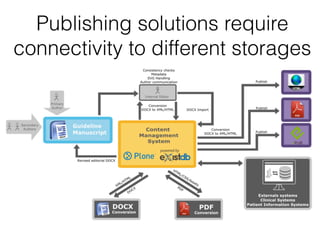
Publishing solutions require
connectivity to different storages
Our Publishing Universe
Characteristics of storages
• usually hierarchical model (folders, collections,
files)
• folder operations:
• makedir, renamedir, removedir, exists…
• file operations:
• open, read, write, exists, stat…
Common problem
• every storage/filesystem/service has its own API/SDK 

(or several )
• standard filesystem API
• Dropbox API
• Google Drive API
• Sharepoint: WebDAV, CMIS, REST
• specific code for each storage type
• storages not easily interchangeable
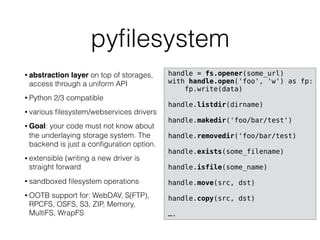
pyfilesystem
• abstraction layer on top of storages,
access through a uniform API
• Python 2/3 compatible
• various filesystem/webservices drivers
• Goal: your code must not know about
the underlaying storage system. The
backend is just a configuration option.
• extensible (writing a new driver is
straight forward
• sandboxed filesystem operations
• OOTB support for: WebDAV, S(FTP),
RPCFS, OSFS, S3, ZIP, Memory,
MultiFS, WrapFS
handle = fs.opener(some_url)
with handle.open('foo', 'w') as fp:
fp.write(data)
handle.listdir(dirname)
handle.makedir('foo/bar/test')
handle.removedir('foo/bar/test)
handle.exists(some_filename)
handle.isfile(some_name)
handle.move(src, dst)
handle.copy(src, dst)
….
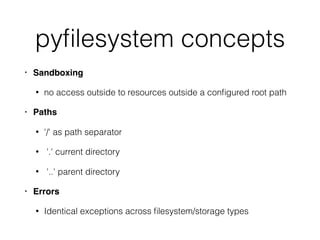
pyfilesystem concepts
• Sandboxing
• no access outside to resources outside a configured root path
• Paths
• '/' as path separator
• '.' current directory
• '..' parent directory
• Errors
• Identical exceptions across filesystem/storage types
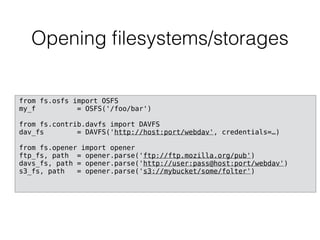
Opening filesystems/storages
from fs.osfs import OSFS
my_f = OSFS('/foo/bar')
from fs.contrib.davfs import DAVFS
dav_fs = DAVFS('http://host:port/webdav', credentials=…)
from fs.opener import opener
ftp_fs, path = opener.parse('ftp://ftp.mozilla.org/pub')
davs_fs, path = opener.parse('http://user:pass@host:port/webdav')
s3_fs, path = opener.parse('s3://mybucket/some/folter')
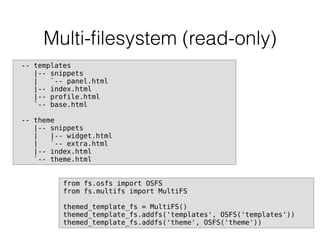
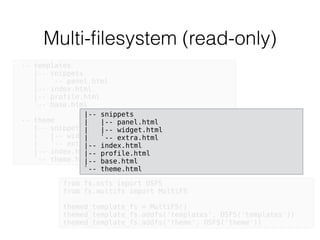
Multi-filesystem (read-only)
from fs.osfs import OSFS
from fs.multifs import MultiFS
themed_template_fs = MultiFS()
themed_template_fs.addfs('templates', OSFS('templates'))
themed_template_fs.addfs('theme', OSFS('theme'))
-- templates
|-- snippets
| `-- panel.html
|-- index.html
|-- profile.html
`-- base.html
-- theme
|-- snippets
| |-- widget.html
| `-- extra.html
|-- index.html
`-- theme.html
Multi-filesystem (read-only)
from fs.osfs import OSFS
from fs.multifs import MultiFS
themed_template_fs = MultiFS()
themed_template_fs.addfs('templates', OSFS('templates'))
themed_template_fs.addfs('theme', OSFS('theme'))
-- templates
|-- snippets
| `-- panel.html
|-- index.html
|-- profile.html
`-- base.html
-- theme
|-- snippets
| |-- widget.html
| `-- extra.html
|-- index.html
`-- theme.html
|-- snippets
| |-- panel.html
| |-- widget.html
| `-- extra.html
|-- index.html
|-- profile.html
|-- base.html
`-- theme.html
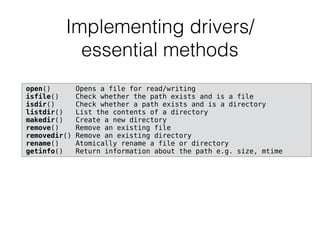
Implementing drivers/

essential methods
open() Opens a file for read/writing
isfile() Check whether the path exists and is a file
isdir() Check whether a path exists and is a directory
listdir() List the contents of a directory
makedir() Create a new directory
remove() Remove an existing file
removedir() Remove an existing directory
rename() Atomically rename a file or directory
getinfo() Return information about the path e.g. size, mtime
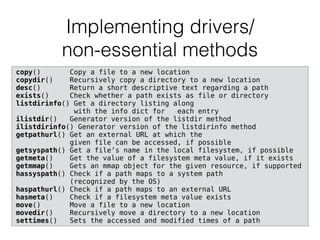
Implementing drivers/

non-essential methods
copy() Copy a file to a new location
copydir() Recursively copy a directory to a new location
desc() Return a short descriptive text regarding a path
exists() Check whether a path exists as file or directory
listdirinfo() Get a directory listing along 

with the info dict for each entry
ilistdir() Generator version of the listdir method
ilistdirinfo() Generator version of the listdirinfo method
getpathurl() Get an external URL at which the 

given file can be accessed, if possible
getsyspath() Get a file’s name in the local filesystem, if possible
getmeta() Get the value of a filesystem meta value, if it exists
getmmap() Gets an mmap object for the given resource, if supported
hassyspath() Check if a path maps to a system path 

(recognized by the OS)
haspathurl() Check if a path maps to an external URL
hasmeta() Check if a filesystem meta value exists
move() Move a file to a new location
movedir() Recursively move a directory to a new location
settimes() Sets the accessed and modified times of a path
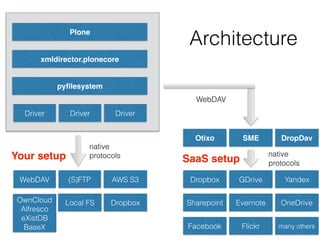
WebDAV (S)FTP
pyfilesystem
Plone
xmldirector.plonecore
Dropbox
GDriveAWS S3
Local FS
Architecture
OwnCloud

Alfresco

eXistDB

BaseX
Dropbox
Sharepoint Evernote
Facebook Flickr
Yandex
OneDrive
many others
Driver Driver Driver
SMEOtixo DropDav
WebDAV
native

protocols native

protocols
Your setup SaaS setup
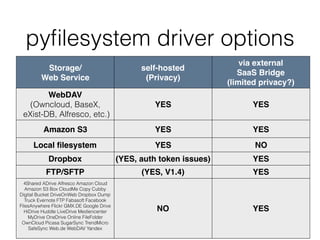
Storage/

Web Service
self-hosted
(Privacy)
via external
SaaS Bridge
(limited privacy?)
WebDAV 

(Owncloud, BaseX,

eXist-DB, Alfresco, etc.)
YES YES
Amazon S3 YES YES
Local filesystem YES NO
Dropbox (YES, auth token issues) YES
FTP/SFTP (YES, V1.4) YES
4Shared ADrive Alfresco Amazon Cloud
Amazon S3 Box CloudMe Copy Cubby
Digital Bucket DriveOnWeb Dropbox Dump
Truck Evernote FTP Fabasoft Facebook
FilesAnywhere Flickr GMX.DE Google Drive
HiDrive Huddle LiveDrive Mediencenter
MyDrive OneDrive Online FileFolder
OwnCloud Picasa SugarSync TrendMicro
SafeSync Web.de WebDAV Yandex
NO YES
pyfilesystem driver options
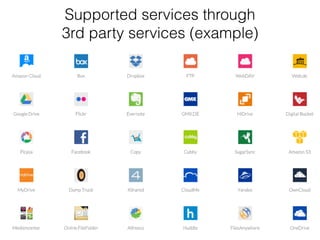
Supported services through 

3rd party services (example)
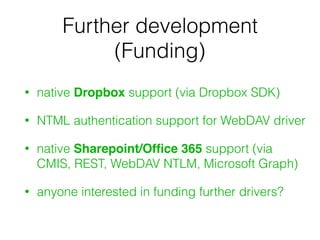
Further development
(Funding)
• native Dropbox support (via Dropbox SDK)
• NTML authentication support for WebDAV driver
• native Sharepoint/Office 365 support (via
CMIS, REST, WebDAV NTLM, Microsoft Graph)
• anyone interested in funding further drivers?
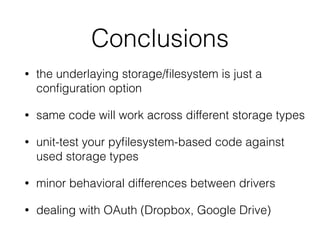
Conclusions
• the underlaying storage/filesystem is just a
configuration option
• same code will work across different storage types
• unit-test your pyfilesystem-based code against
used storage types
• minor behavioral differences between drivers
• dealing with OAuth (Dropbox, Google Drive)
pyfilesystem
> pip install fs
https://pyfilesystem.readthedocs.org/
https://github.com/revolunet/pyfilesystem

PyFilesystem

  • 1.
    . . Building Bridges pyfilesystem: unifiedaccess to storages and services Andreas Jung @MacYET
 info@zopyx.com
 www.zopyx.com
 Python Users Berlin 03/2016
  • 2.
    /about • 20 yearsin publishing business since 1995 • Python, Zope, Plone • XML, PDF, EPUB, 
 DOCX, DITA
  • 3.
    Agenda • pyfilesystem • storagessystems • storage APIs • unified access to storages • not: storage/service specific higher API functionality
  • 4.
  • 5.
  • 6.
  • 7.
    Characteristics of storages •usually hierarchical model (folders, collections, files) • folder operations: • makedir, renamedir, removedir, exists… • file operations: • open, read, write, exists, stat…
  • 8.
    Common problem • everystorage/filesystem/service has its own API/SDK 
 (or several ) • standard filesystem API • Dropbox API • Google Drive API • Sharepoint: WebDAV, CMIS, REST • specific code for each storage type • storages not easily interchangeable
  • 9.
    pyfilesystem • abstraction layeron top of storages, access through a uniform API • Python 2/3 compatible • various filesystem/webservices drivers • Goal: your code must not know about the underlaying storage system. The backend is just a configuration option. • extensible (writing a new driver is straight forward • sandboxed filesystem operations • OOTB support for: WebDAV, S(FTP), RPCFS, OSFS, S3, ZIP, Memory, MultiFS, WrapFS handle = fs.opener(some_url) with handle.open('foo', 'w') as fp: fp.write(data) handle.listdir(dirname) handle.makedir('foo/bar/test') handle.removedir('foo/bar/test) handle.exists(some_filename) handle.isfile(some_name) handle.move(src, dst) handle.copy(src, dst) ….
  • 10.
    pyfilesystem concepts • Sandboxing •no access outside to resources outside a configured root path • Paths • '/' as path separator • '.' current directory • '..' parent directory • Errors • Identical exceptions across filesystem/storage types
  • 11.
    Opening filesystems/storages from fs.osfsimport OSFS my_f = OSFS('/foo/bar') from fs.contrib.davfs import DAVFS dav_fs = DAVFS('http://host:port/webdav', credentials=…) from fs.opener import opener ftp_fs, path = opener.parse('ftp://ftp.mozilla.org/pub') davs_fs, path = opener.parse('http://user:pass@host:port/webdav') s3_fs, path = opener.parse('s3://mybucket/some/folter')
  • 12.
    Multi-filesystem (read-only) from fs.osfsimport OSFS from fs.multifs import MultiFS themed_template_fs = MultiFS() themed_template_fs.addfs('templates', OSFS('templates')) themed_template_fs.addfs('theme', OSFS('theme')) -- templates |-- snippets | `-- panel.html |-- index.html |-- profile.html `-- base.html -- theme |-- snippets | |-- widget.html | `-- extra.html |-- index.html `-- theme.html
  • 13.
    Multi-filesystem (read-only) from fs.osfsimport OSFS from fs.multifs import MultiFS themed_template_fs = MultiFS() themed_template_fs.addfs('templates', OSFS('templates')) themed_template_fs.addfs('theme', OSFS('theme')) -- templates |-- snippets | `-- panel.html |-- index.html |-- profile.html `-- base.html -- theme |-- snippets | |-- widget.html | `-- extra.html |-- index.html `-- theme.html |-- snippets | |-- panel.html | |-- widget.html | `-- extra.html |-- index.html |-- profile.html |-- base.html `-- theme.html
  • 14.
    Implementing drivers/
 essential methods open()Opens a file for read/writing isfile() Check whether the path exists and is a file isdir() Check whether a path exists and is a directory listdir() List the contents of a directory makedir() Create a new directory remove() Remove an existing file removedir() Remove an existing directory rename() Atomically rename a file or directory getinfo() Return information about the path e.g. size, mtime
  • 15.
    Implementing drivers/
 non-essential methods copy()Copy a file to a new location copydir() Recursively copy a directory to a new location desc() Return a short descriptive text regarding a path exists() Check whether a path exists as file or directory listdirinfo() Get a directory listing along 
 with the info dict for each entry ilistdir() Generator version of the listdir method ilistdirinfo() Generator version of the listdirinfo method getpathurl() Get an external URL at which the 
 given file can be accessed, if possible getsyspath() Get a file’s name in the local filesystem, if possible getmeta() Get the value of a filesystem meta value, if it exists getmmap() Gets an mmap object for the given resource, if supported hassyspath() Check if a path maps to a system path 
 (recognized by the OS) haspathurl() Check if a path maps to an external URL hasmeta() Check if a filesystem meta value exists move() Move a file to a new location movedir() Recursively move a directory to a new location settimes() Sets the accessed and modified times of a path
  • 17.
    WebDAV (S)FTP pyfilesystem Plone xmldirector.plonecore Dropbox GDriveAWS S3 LocalFS Architecture OwnCloud
 Alfresco
 eXistDB
 BaseX Dropbox Sharepoint Evernote Facebook Flickr Yandex OneDrive many others Driver Driver Driver SMEOtixo DropDav WebDAV native
 protocols native
 protocols Your setup SaaS setup
  • 18.
    Storage/
 Web Service self-hosted (Privacy) via external SaaSBridge (limited privacy?) WebDAV 
 (Owncloud, BaseX,
 eXist-DB, Alfresco, etc.) YES YES Amazon S3 YES YES Local filesystem YES NO Dropbox (YES, auth token issues) YES FTP/SFTP (YES, V1.4) YES 4Shared ADrive Alfresco Amazon Cloud Amazon S3 Box CloudMe Copy Cubby Digital Bucket DriveOnWeb Dropbox Dump Truck Evernote FTP Fabasoft Facebook FilesAnywhere Flickr GMX.DE Google Drive HiDrive Huddle LiveDrive Mediencenter MyDrive OneDrive Online FileFolder OwnCloud Picasa SugarSync TrendMicro SafeSync Web.de WebDAV Yandex NO YES pyfilesystem driver options
  • 19.
    Supported services through
 3rd party services (example)
  • 20.
    Further development (Funding) • nativeDropbox support (via Dropbox SDK) • NTML authentication support for WebDAV driver • native Sharepoint/Office 365 support (via CMIS, REST, WebDAV NTLM, Microsoft Graph) • anyone interested in funding further drivers?
  • 22.
    Conclusions • the underlayingstorage/filesystem is just a configuration option • same code will work across different storage types • unit-test your pyfilesystem-based code against used storage types • minor behavioral differences between drivers • dealing with OAuth (Dropbox, Google Drive)
  • 23.
    pyfilesystem > pip installfs https://pyfilesystem.readthedocs.org/ https://github.com/revolunet/pyfilesystem