Plone migrations
using plone.restapi
Andreas Jung

Plone Conference 

November 2018, Tokyo
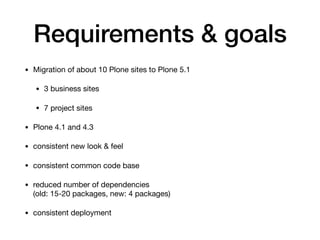
Requirements & goals
• Migration of about 10 Plone sites to Plone 5.1

• 3 business sites

• 7 project sites

• Plone 4.1 and 4.3

• consistent new look & feel

• consistent common code base

• reduced number of dependencies 

(old: 15-20 packages, new: 4 packages)

• consistent deployment
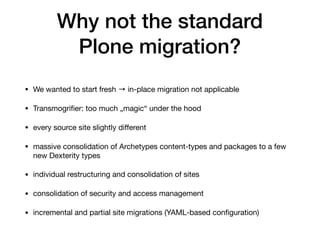
Why not the standard 

Plone migration?
• We wanted to start fresh → in-place migration not applicable

• Transmogrifier: too much „magic“ under the hood

• every source site slightly different

• massive consolidation of Archetypes content-types and packages to a few
new Dexterity types

• individual restructuring and consolidation of sites

• consolidation of security and access management

• incremental and partial site migrations (YAML-based configuration)
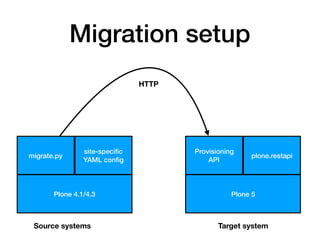
Migration setup
Plone 5
plone.restapi
Provisioning
API
Target systemSource systems
Plone 4.1/4.3
migrate.py
site-specific

YAML config
HTTP
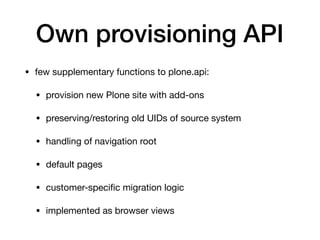
Own provisioning API
• few supplementary functions to plone.api:

• provision new Plone site with add-ons 

• preserving/restoring old UIDs of source system

• handling of navigation root

• default pages

• customer-specific migration logic

• implemented as browser views
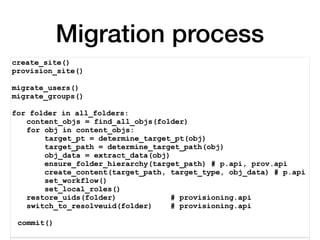
Migration process
create_site()
provision_site()
migrate_users()
migrate_groups()
for folder in all_folders:
content_objs = find_all_objs(folder)
for obj in content_objs:
target_pt = determine_target_pt(obj)
target_path = determine_target_path(obj)
obj_data = extract_data(obj)
ensure_folder_hierarchy(target_path) # p.api, prov.api
create_content(target_path, target_type, obj_data) # p.api
set_workflow()
set_local_roles()
restore_uids(folder) # provisioning.api
switch_to_resolveuid(folder) # provisioning.api
commit()
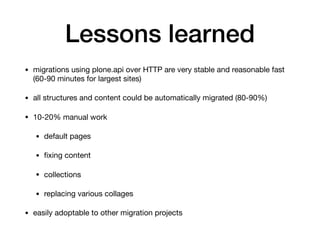
Lessons learned
• migrations using plone.api over HTTP are very stable and reasonable fast
(60-90 minutes for largest sites)

• all structures and content could be automatically migrated (80-90%)

• 10-20% manual work

• default pages

• fixing content

• collections

• replacing various collages

• easily adoptable to other migration projects

Plone migrations using plone.restapi

  • 1.
    Plone migrations using plone.restapi AndreasJung Plone Conference 
 November 2018, Tokyo
  • 2.
    Requirements & goals •Migration of about 10 Plone sites to Plone 5.1 • 3 business sites • 7 project sites • Plone 4.1 and 4.3 • consistent new look & feel • consistent common code base • reduced number of dependencies 
 (old: 15-20 packages, new: 4 packages) • consistent deployment
  • 3.
    Why not thestandard 
 Plone migration? • We wanted to start fresh → in-place migration not applicable • Transmogrifier: too much „magic“ under the hood • every source site slightly different • massive consolidation of Archetypes content-types and packages to a few new Dexterity types • individual restructuring and consolidation of sites • consolidation of security and access management • incremental and partial site migrations (YAML-based configuration)
  • 4.
    Migration setup Plone 5 plone.restapi Provisioning API TargetsystemSource systems Plone 4.1/4.3 migrate.py site-specific
 YAML config HTTP
  • 5.
    Own provisioning API •few supplementary functions to plone.api: • provision new Plone site with add-ons • preserving/restoring old UIDs of source system • handling of navigation root • default pages • customer-specific migration logic • implemented as browser views
  • 6.
    Migration process create_site() provision_site() migrate_users() migrate_groups() for folderin all_folders: content_objs = find_all_objs(folder) for obj in content_objs: target_pt = determine_target_pt(obj) target_path = determine_target_path(obj) obj_data = extract_data(obj) ensure_folder_hierarchy(target_path) # p.api, prov.api create_content(target_path, target_type, obj_data) # p.api set_workflow() set_local_roles() restore_uids(folder) # provisioning.api switch_to_resolveuid(folder) # provisioning.api commit()
  • 7.
    Lessons learned • migrationsusing plone.api over HTTP are very stable and reasonable fast (60-90 minutes for largest sites) • all structures and content could be automatically migrated (80-90%) • 10-20% manual work • default pages • fixing content • collections • replacing various collages • easily adoptable to other migration projects