Putting the PRO in
PROGRAMMER
Improving your development processes
Kris Sum / Switch Systems Ltd
So you’re a rockstar developer…
You write lots of code
You have to fix everyone
else’s stuff
You don’t have time to be
doing any more work
… its time to go PRO!
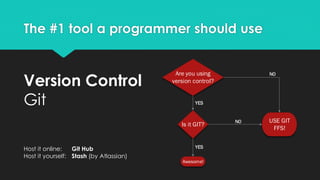
The #1 tool a programmer should use
Are you using
version control?
YES
Is it GIT?
NO
NO
YES
Awesome!
USE GIT
FFS!
Version Control
Git
Host it online: Git Hub
Host it yourself: Stash (by Atlassian)
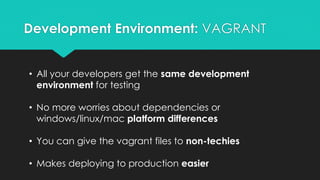
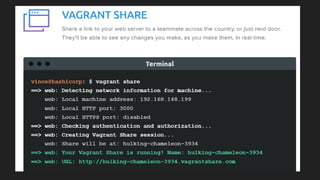
Development Environment: VAGRANT
• All your developers get the same development
environment for testing
• No more worries about dependencies or
windows/linux/mac platform differences
• You can give the vagrant files to non-techies
• Makes deploying to production easier
BONUS FEATURE
Fixing Bugs
Use bug trackers (and project management tools) to
improve communication and transparency
• Redmine
• Jira
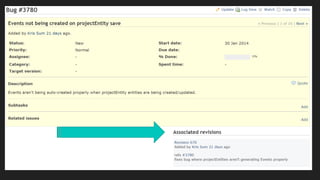
Pro-Tip
Integrate these tools with your
versioning system so you can
track what code went into each
bug-fix
“NO COMMITS
WITHOUT TICKET IDs”
Some wise bloke
You can enforce this with
pre-commit hooks!
So you fixed a bug
NOW WRITE A TEST
• If the bug wasn’t down to user error, write a unit test
that proves that your patch fixes it.
• This means that you can’t ever re-introduce the bug. (but
obviously no one here has ever done that!)
• It also improves your understanding of the code, as your
unit test should be testing all edge cases, including the
ones the original bug may have missed
Now we’re getting somewhere!
 Your code is in good shape
 It’s all version controlled
 Project Management is happening
 You have tests that prove the code works
Time for
Continuous
Integration!
CONTINUOUS WHAT?
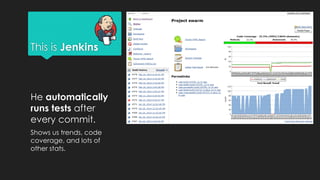
This is Jenkins
He automatically
runs tests after
every commit.
Shows us trends, code
coverage, and lots of
other stats.
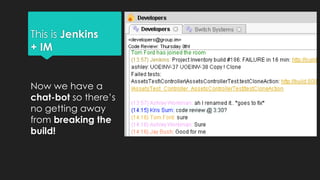
This is Jenkins
+ IM
Now we have a
chat-bot so there’s
no getting away
from breaking the
build!
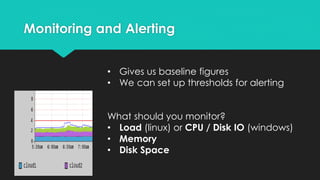
Monitoring and Alerting
• Gives us baseline figures
• We can set up thresholds for alerting
What should you monitor?
• Load (linux) or CPU / Disk IO (windows)
• Memory
• Disk Space
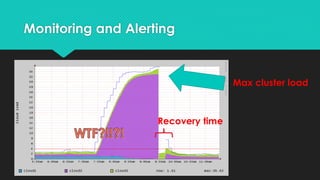
Monitoring and Alerting
Max cluster load
Recovery time
THANK YOU
Putting the pro in programmer

Putting the pro in programmer

  • 1.
    Putting the PROin PROGRAMMER Improving your development processes Kris Sum / Switch Systems Ltd
  • 2.
    So you’re arockstar developer… You write lots of code You have to fix everyone else’s stuff You don’t have time to be doing any more work … its time to go PRO!
  • 3.
    The #1 toola programmer should use Are you using version control? YES Is it GIT? NO NO YES Awesome! USE GIT FFS! Version Control Git Host it online: Git Hub Host it yourself: Stash (by Atlassian)
  • 6.
  • 7.
    Development Environment: VAGRANT •All your developers get the same development environment for testing • No more worries about dependencies or windows/linux/mac platform differences • You can give the vagrant files to non-techies • Makes deploying to production easier
  • 9.
  • 11.
    Fixing Bugs Use bugtrackers (and project management tools) to improve communication and transparency • Redmine • Jira Pro-Tip Integrate these tools with your versioning system so you can track what code went into each bug-fix
  • 13.
    “NO COMMITS WITHOUT TICKETIDs” Some wise bloke You can enforce this with pre-commit hooks!
  • 14.
    So you fixeda bug NOW WRITE A TEST • If the bug wasn’t down to user error, write a unit test that proves that your patch fixes it. • This means that you can’t ever re-introduce the bug. (but obviously no one here has ever done that!) • It also improves your understanding of the code, as your unit test should be testing all edge cases, including the ones the original bug may have missed
  • 16.
    Now we’re gettingsomewhere!  Your code is in good shape  It’s all version controlled  Project Management is happening  You have tests that prove the code works Time for Continuous Integration!
  • 17.
  • 18.
    This is Jenkins Heautomatically runs tests after every commit. Shows us trends, code coverage, and lots of other stats.
  • 19.
    This is Jenkins +IM Now we have a chat-bot so there’s no getting away from breaking the build!
  • 20.
    Monitoring and Alerting •Gives us baseline figures • We can set up thresholds for alerting What should you monitor? • Load (linux) or CPU / Disk IO (windows) • Memory • Disk Space
  • 21.
    Monitoring and Alerting Maxcluster load Recovery time
  • 23.