Arena Integration and Customization Simulation with Arena, 3 rd  ed. Chapter 10 – Arena Integration and Customization Slide   of 54 Chapter 10 Last revision July 14, 2003
What We’ll Do ... Reading and Writing Data Files (ReadWrite) ActiveX ™  and Visual Basic ®  for Applications (VBA) Creating Modules with Arena Professional Edition Simulation with Arena, 3 rd  ed. Chapter 10 – Arena Integration and Customization Slide   of 54
Reading and Writing Data Files Reading entity arrivals from a text file Reading and writing Microsoft Access  and Excel files Advanced reading and writing Simulation with Arena, 3 rd  ed. Chapter 10 – Arena Integration and Customization Slide   of 54
Reading Entity Arrivals From  a Text File Why data-driven simulations? Model validation Evaluating how a particular scenario is handled Modeling a specific arrival pattern Assumes historical data exist and can be transformed for use in simulation Simulation with Arena, 3 rd  ed. Chapter 10 – Arena Integration and Customization Slide   of 54
Simple Call Center Model Single call stream  Single agent resource Random call processing time Simulation with Arena, 3 rd  ed. Chapter 10 – Arena Integration and Customization Slide   of 54
External Call Center Data Historical call arrival times Model 10-02 Input.txt ASCII file (e.g., Notepad, saved as text from Excel) Absolute simulation arrival times 1.038457  2.374120  4.749443  9.899661  10.525897  17.098860  Simulation with Arena, 3 rd  ed. Chapter 10 – Arena Integration and Customization Slide   of 54
Model Logic to Read Data Can’t use simple time between arrivals  Control entity Create only one Duplicate to send actual “call” entity into model Simulation with Arena, 3 rd  ed. Chapter 10 – Arena Integration and Customization Slide   of 54 Control Entity Actual “Call” Entity
Model Logic to Read Data  (cont’d.) ReadWrite module (Advanced Process) Arena File Name : description (actual disk filename is specified in File module) Assignments : model variables/attributes to be assigned based on data read from file ( Call Start Time  attribute) Delay/Duplicate Logic File contains “absolute” times; Delay module holds entity for a time  interval Delay control entity for interval until actual arrival time of call ( Call Start Time - TNOW ) Create a duplicate (Separate module) to dispatch actual call into model. Original entity loops back to read next time. Simulation with Arena, 3 rd  ed. Chapter 10 – Arena Integration and Customization Slide   of 54
Model Logic to Read Data  (cont’d.) File data module (Advanced Process) Name : Name referenced in other Arena modules. Access Type:  Sequential indicates to read in order. Operating System File Name : The name used by file system. May be relative or fully qualified. End of File Action : What to do when all records are read. Simulation with Arena, 3 rd  ed. Chapter 10 – Arena Integration and Customization Slide   of 54
Run Termination Run Setup options Maximum replications / simulation end time always terminates the simulation run. System empties If no entities on calendar and no other time-based controls, run may terminate earlier than setup options dictate. The control entity is disposed after it reads the last data value. Simulation with Arena, 3 rd  ed. Chapter 10 – Arena Integration and Customization Slide   of 54
Reading Access Files Sample Access data Model 10-03 Input.mdb Table: ArrivalTimes Simulation with Arena, 3 rd  ed. Chapter 10 – Arena Integration and Customization Slide   of 54
Reading Access Files File data module (Advanced Process) Access Type : Microsoft Access (*.mdb) Operating System File Name : Model 10-03 Input.mdb Recordsets : Click to load the Recordsets Editor Important:  Never name an access file the same as the model name or it will conflict with the automatic output database file. Simulation with Arena, 3 rd  ed. Chapter 10 – Arena Integration and Customization Slide   of 54
Reading Access Files Recordsets Editor Associates a  recordset name  with a  table Table must already exist View  allows you to see a sample of the real data Simulation with Arena, 3 rd  ed. Chapter 10 – Arena Integration and Customization Slide   of 54
Reading Access Files ReadWrite module (Advanced Process) Recordset ID : Same as defined in Recordsets Editor Simulation with Arena, 3 rd  ed. Chapter 10 – Arena Integration and Customization Slide   of 54
Reading Excel Files Excel is not a relational database but has many similarities: An Excel workbook is similar to an Access database file. The rows and columns in a  rectangular named range  in an Excel worksheet are similar to the rows and columns of an Access table.  Simulation with Arena, 3 rd  ed. Chapter 10 – Arena Integration and Customization Slide   of 54
Reading Excel Files Sample Excel data Model 10-03 Input.xls Named Range: ArrivalTimes Simulation with Arena, 3 rd  ed. Chapter 10 – Arena Integration and Customization Slide   of 54
Reading Excel Files File data module (Advanced Process) Access Type : Microsoft Excel (*.xls) Operating System File Name : Model 10-03 Input.xls Recordsets : Click to load the Recordsets Editor Simulation with Arena, 3 rd  ed. Chapter 10 – Arena Integration and Customization Slide   of 54
Reading Excel Files Recordsets Editor Associates a recordset name with a named range Named range must already exist View  allows you to see a sample of the real data Simulation with Arena, 3 rd  ed. Chapter 10 – Arena Integration and Customization Slide   of 54
Writing Access and Excel Files The file: The table or named range must already exist. An Excel named range should be formatted as numeric. ReadWrite module:  Add new module to specify which data to write . Simulation with Arena, 3 rd  ed. Chapter 10 – Arena Integration and Customization Slide   of 54
Writing Access and Excel Files ReadWrite module:  Use  Type  of  Write To File Use Recordset ID as before. Simulation with Arena, 3 rd  ed. Chapter 10 – Arena Integration and Customization Slide   of 54
Writing Access and Excel Files Spreadsheet options:  You may predefine a plot on the named range and the plot will be built dynamically as data is added to the file. Simulation with Arena, 3 rd  ed. Chapter 10 – Arena Integration and Customization Slide   of 54
Advanced Reading and Writing Formatting can be used to handle text files with fields not delimited by spaces:  Simulation with Arena, 3 rd  ed. Chapter 10 – Arena Integration and Customization Slide   of 54 Part 1  1.038  Part 27 2.374  Part 5194.749  Part 67 9.899  Part 72 10.52  Part 16217.09
Advanced Reading and Writing Skip columns in Access & Excel by using dummy variables: Simulation with Arena, 3 rd  ed. Chapter 10 – Arena Integration and Customization Slide   of 54
Advanced Reading and Writing Advanced data access is available using  Access Type  of  Active Data Objects (ADO)  and a  Connection String: Excel With Headings Using ADO SQL Commands Using ADO Simulation with Arena, 3 rd  ed. Chapter 10 – Arena Integration and Customization Slide   of 54 Provider=Microsoft.JET.OLEDB.4.0; Data Source=C:\Documents\Book1.xls; Extended Properties=””Excel 8.0; HDR=Yes;”” Driver={SQL Server}; Server=RSI-Joe; Database=BizBikes; Uid=BizWareUser; pwd=MyPassword Use two double quotes for each embedded double quote
What We’ll Do ... Reading and Writing Data Files (ReadWrite) ActiveX ™  and Visual Basic ®  for Applications (VBA) Creating Modules with Arena Professional Edition Simulation with Arena, 3 rd  ed. Chapter 10 – Arena Integration and Customization Slide   of 54
ActiveX Automation Program applications to “automate” tasks Act on themselves (e.g., macros in Excel) Act on other applications (e.g., Arena creating Excel file) External programming languages C++, Visual Basic ® , Java, etc. Visual Basic for Applications (VBA) programming embedded in application Microsoft Office ® , Visio ® , AutoCAD ® , Arena ® , … Both types work together (e.g., Arena VBA controlling Excel) Simulation with Arena, 3 rd  ed. Chapter 10 – Arena Integration and Customization Slide   of 54
Application Object Model Objects : application  components  that can be controlled Properties :  characteristics  of objects Methods :  actions  performed on or by objects Arena Objects Properties Methods Application Visible Show Model Name, State Close, Go View Background Color Zoom In … Simulation with Arena, 3 rd  ed. Chapter 10 – Arena Integration and Customization Slide   of 54
Visual Basic for Applications (VBA) Included with Arena Full Visual Basic programming environment Code stored with Arena model ( .doe ) file UserForms (dialogs) for custom interfaces Code-debugging tools Comprehensive online help Visual Basic Editor window: “child” of Arena (Tools/Show Visual Basic Editor)  Simulation with Arena, 3 rd  ed. Chapter 10 – Arena Integration and Customization Slide   of 54
Built-in Arena VBA Events ThisDocument: accesses objects, events in Arena’s object model Built-in VBA events: locations where VBA code can be activated Pre-run events (e.g., DocumentOpen) Arena-initiated run events (e.g., RunBegin, RunEndReplication) Model/user-initiated run events (e.g., UserFunction, VBA_Block_Fire) Type code in Visual Basic Editor to populate an event Simulation with Arena, 3 rd  ed. Chapter 10 – Arena Integration and Customization Slide   of 54
Simulation Run VBA Events Arena/VBA sequence of events when model runs: Simulation with Arena, 3 rd  ed. Chapter 10 – Arena Integration and Customization Slide   of 54 1.  RunBegin 3.  RunBeginSimulation 4.  RunBeginReplication 9.  RunEnd 7.  RunEndSimulation 6.  RunEndReplication 5.  Arena runs replication  2.  Arena checks and initializes the model 8.  Arena terminates the simulation run Simulation run data available OnKeystroke, UserFunction, etc. Module data available Module data available
Arena’s Object Model Model-window objects: items placed in model window, such as: Modules Connections Lines SIMAN object: simulation run data, such as: Variable values Queue lengths Simulation time Structural objects: access general functions Application Panels Simulation with Arena, 3 rd  ed. Chapter 10 – Arena Integration and Customization Slide   of 54
Sample: Create Ten Status Variables Simulation with Arena, 3 rd  ed. Chapter 10 – Arena Integration and Customization Slide   of 54 WIP(1) WIP(10) Dim oModel As Arena.Model Dim i As Integer Dim nX As Long ' Add the status variables to this Arena model Set oModel = ThisDocument.Model nX = 0  ' Start at x position 0 For i = 1 To 10 ' Add a status variable to the model window oModel.StatusVariables.Create nX, 0, _ nX + 400, 150, "WIP(" & i & ")", "**.*", False, _ RGB(0, 0, 255), RGB(0, 255, 255), RGB(0, 0, 0), "Arial" ' Move over 500 world units for next position nX = nX + 500 Next i
Sample: Assign Variable Value  During Run Simulation with Arena, 3 rd  ed. Chapter 10 – Arena Integration and Customization Slide   of 54 Dim oSIMAN As Arena.SIMAN Dim nVarIndex As Long Dim sNewValue As String ' Prompt for a new value sNewValue = InputBox("Enter the new average cycle time:") ' Assign their answer to the Mean Cycle Time variable Set oSIMAN = ThisDocument.Model.SIMAN nVarIndex = oSIMAN.SymbolNumber("Mean Cycle Time") oSIMAN.VariableArrayValue(nVarIndex) = sNewValue
Arena Macro Recorder A  Macro  is a VBA function to perform a task. Macro recording automatically creates the VBA code to reproduce the actions you take while performing the steps in the task. Use the  Record Macro  toolbar to start/stop and pause/resume recording. Useful for automating repetitive tasks. Ideal for learning VBA commands and prototyping  functions. Simulation with Arena, 3 rd  ed. Chapter 10 – Arena Integration and Customization Slide   of 54
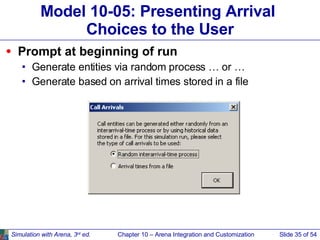
Model 10-05: Presenting Arrival  Choices to the User Prompt at beginning of run Generate entities via random process … or … Generate based on arrival times stored in a file Simulation with Arena, 3 rd  ed. Chapter 10 – Arena Integration and Customization Slide   of 54
Our Approach Both sets of logic placed in model window and connected to start of call logic (Process module) Simulation with Arena, 3 rd  ed. Chapter 10 – Arena Integration and Customization Slide   of 54
Our Approach  (cont’d.) Change Max Arrivals field in Create module to turn “on” or “off” its generation of entities Random interarrival-time process Create Call  module:  Infinite Create Control Entity to Read Data  module:  0 Arrival times from a file Create Call  module:  0 Create Control Entity to Read Data  module:  1 Give unique “tag” to each Create module (so VBA code can find them) Simulation with Arena, 3 rd  ed. Chapter 10 – Arena Integration and Customization Slide   of 54
VBA UserForm Insert/UserForm menu in Visual Basic Editor Drop controls from Control Toolbox (labels, option buttons, command button) Simulation with Arena, 3 rd  ed. Chapter 10 – Arena Integration and Customization Slide   of 54 Label Option buttons Command button
Show the UserForm At beginning of run (ModelLogic_RunBegin), show the form: Simulation with Arena, 3 rd  ed. Chapter 10 – Arena Integration and Customization Slide   of 54 Option Explicit Private Sub ModelLogic_RunBegin() ' Display the UserForm to ask for the type of arrivals frmArrivalTypeSelection.Show Exit Sub End Sub Program control passes to the form until it’s closed Arena run “suspended” while form is in control
Change Module Data On OK When user clicks OK button on form, modify the Create module data Find the Create modules Set the Max Arrivals fields Play a sound  Close the UserForm When form is closed, simulation run commences with the new data values in the Create modules Simulation with Arena, 3 rd  ed. Chapter 10 – Arena Integration and Customization Slide   of 54
Model 10-06: Record Call Data  in Microsoft Excel Our goal: Raw call data tables Daily call duration charts Simulation with Arena, 3 rd  ed. Chapter 10 – Arena Integration and Customization Slide   of 54
Using ActiveX Automation in VBA Reference the Excel Object Library Tools/References menu in Visual Basic Editor Check the Microsoft Excel Object Library Establishes link between Arena VBA and Excel Object variables from application’s object model Excel.Application ,  Excel.Workbook Arena.SIMAN Starting Excel CreateObject : starts application, returning “handle” to the program (stored in  oExcelApp  variable) oExcelApp.Workbooks.Add : similar to “File/New” in Excel Simulation with Arena, 3 rd  ed. Chapter 10 – Arena Integration and Customization Slide   of 54
Retrieving Simulation Data ThisDocument Built-in variable accessing the Arena model Use only within Arena’s VBA ThisDocument.Model.SIMAN Used to access simulation run data Browse ( F2 ) in VBA window for full list of variables Active only when simulation run data is available -- i.e., built-in events: after (and including) ModelLogic_RunBeginSimulation before (and including) ModelLogic_RunEndSimulation Simulation with Arena, 3 rd  ed. Chapter 10 – Arena Integration and Customization Slide   of 54
Our Approach VBA ModelLogic_RunBeginSimulation Called  once  at the beginning of the simulation run Start Excel with a new spreadsheet (“Workbook”) Format header rows for data worksheet VBA ModelLogic_RunBeginReplication Called at the beginning of  each   replication Write headers for the three columns and the Day Format the data columns Simulation with Arena, 3 rd  ed. Chapter 10 – Arena Integration and Customization Slide   of 54
Our Approach  (cont’d.) VBA Module (Blocks panel) Insert in model logic just before disposing calls Simulation with Arena, 3 rd  ed. Chapter 10 – Arena Integration and Customization Slide   of 54 VBA Code VBA modules numbered as they’re placed, with corresponding VBA_Block_<n>_Fire events in VBA
Our Approach  (cont’d.) VBA_Block_1_Fire Called each time an entity enters the VBA Block in the model Retrieve data from running simulation via SIMAN object (stored in  oSIMAN  variable) Row and columns into which to write data stored in global VBA variables ( nNextRow ,  nColumnA ,  nColumnB ,  nColumnC ) Simulation with Arena, 3 rd  ed. Chapter 10 – Arena Integration and Customization Slide   of 54
Our Approach  (cont’d.) ModelLogic_RunEndReplication Called at end of each replication Creates the chart and updates the global variables Hint: Use Excel macro recording for “skeleton” code (e.g., for formatting commands, creation of chart); copy into Arena VBA and adjust variable names (e.g., add  oExcelApp  to access Excel) ModelLogic_RunEndSimulation Turn  DisplayAlerts  off (overwrites  .xls  file if it exists) SaveAs  method to give filename Excel still running. Could use  oExcelApp.Quit Simulation with Arena, 3 rd  ed. Chapter 10 – Arena Integration and Customization Slide   of 54
What We’ll Do ... Reading and Writing Data Files (ReadWrite) ActiveX ™  and Visual Basic ®  for Applications (VBA) Creating Modules with Arena Professional Edition Simulation with Arena, 3 rd  ed. Chapter 10 – Arena Integration and Customization Slide   of 54
Creating Modules with Arena Professional Edition Template 10-01: Create from File  module Template ( .tpo ) can be attached and used in Academic Arena Place and edit  like any other  module Need Research/ Professional Arena  to create/edit  template source  ( .tpl ) Simulation with Arena, 3 rd  ed. Chapter 10 – Arena Integration and Customization Slide   of 54
Panel Icon and User View Panel Icon : “Button” displayed in template panel to represent the module Simulation with Arena, 3 rd  ed. Chapter 10 – Arena Integration and Customization Slide   of 54 User View : Graphics objects placed in the model window with an “instance” of the module Module handle Entry, exit points Animation Operand values
Operands Operands : Fields that can be filled out by the modeler Allow different data for each instance of the same module type in a model Passed down to logic via back quotes ( ` ) Entry and exit point operands permit entities to move through underlying module logic Simulation with Arena, 3 rd  ed. Chapter 10 – Arena Integration and Customization Slide   of 54 Operands
Module Logic Module Logic : A “submodel” containing module instances Can paste from a model into a module definition’s logic window Same interface as for building models Simulation with Arena, 3 rd  ed. Chapter 10 – Arena Integration and Customization Slide   of 54 Reference to module operand (  `Data File`  ) Reference to module operand (  `Name`  )
Uses of Templates Commercial templates Arena templates (Basic Process, Advanced Process, etc.) Contact Center, Packaging templates … Application-focused templates Terminology, modeling capabilities designed for a particular application environment (e.g., mining, material handling, order processing) “ Personal” / utility templates Reuse what you learn Share your modeling techniques Simulation with Arena, 3 rd  ed. Chapter 10 – Arena Integration and Customization Slide   of 54
Summary We have just barely scratched the surface of Arena customization and interactions with other software including: Reading and writing various types of external data files.  Visual Basic for Applications Interacting with Microsoft Office Building custom applications with templates. There are many other ways of customizing Arena and allowing Arena to interact and exchange data with other software. Simulation with Arena, 3 rd  ed. Chapter 10 – Arena Integration and Customization Slide   of 54

Prueba

  • 1.
    Arena Integration andCustomization Simulation with Arena, 3 rd ed. Chapter 10 – Arena Integration and Customization Slide of 54 Chapter 10 Last revision July 14, 2003
  • 2.
    What We’ll Do... Reading and Writing Data Files (ReadWrite) ActiveX ™ and Visual Basic ® for Applications (VBA) Creating Modules with Arena Professional Edition Simulation with Arena, 3 rd ed. Chapter 10 – Arena Integration and Customization Slide of 54
  • 3.
    Reading and WritingData Files Reading entity arrivals from a text file Reading and writing Microsoft Access and Excel files Advanced reading and writing Simulation with Arena, 3 rd ed. Chapter 10 – Arena Integration and Customization Slide of 54
  • 4.
    Reading Entity ArrivalsFrom a Text File Why data-driven simulations? Model validation Evaluating how a particular scenario is handled Modeling a specific arrival pattern Assumes historical data exist and can be transformed for use in simulation Simulation with Arena, 3 rd ed. Chapter 10 – Arena Integration and Customization Slide of 54
  • 5.
    Simple Call CenterModel Single call stream Single agent resource Random call processing time Simulation with Arena, 3 rd ed. Chapter 10 – Arena Integration and Customization Slide of 54
  • 6.
    External Call CenterData Historical call arrival times Model 10-02 Input.txt ASCII file (e.g., Notepad, saved as text from Excel) Absolute simulation arrival times 1.038457 2.374120 4.749443 9.899661 10.525897 17.098860 Simulation with Arena, 3 rd ed. Chapter 10 – Arena Integration and Customization Slide of 54
  • 7.
    Model Logic toRead Data Can’t use simple time between arrivals Control entity Create only one Duplicate to send actual “call” entity into model Simulation with Arena, 3 rd ed. Chapter 10 – Arena Integration and Customization Slide of 54 Control Entity Actual “Call” Entity
  • 8.
    Model Logic toRead Data (cont’d.) ReadWrite module (Advanced Process) Arena File Name : description (actual disk filename is specified in File module) Assignments : model variables/attributes to be assigned based on data read from file ( Call Start Time attribute) Delay/Duplicate Logic File contains “absolute” times; Delay module holds entity for a time interval Delay control entity for interval until actual arrival time of call ( Call Start Time - TNOW ) Create a duplicate (Separate module) to dispatch actual call into model. Original entity loops back to read next time. Simulation with Arena, 3 rd ed. Chapter 10 – Arena Integration and Customization Slide of 54
  • 9.
    Model Logic toRead Data (cont’d.) File data module (Advanced Process) Name : Name referenced in other Arena modules. Access Type: Sequential indicates to read in order. Operating System File Name : The name used by file system. May be relative or fully qualified. End of File Action : What to do when all records are read. Simulation with Arena, 3 rd ed. Chapter 10 – Arena Integration and Customization Slide of 54
  • 10.
    Run Termination RunSetup options Maximum replications / simulation end time always terminates the simulation run. System empties If no entities on calendar and no other time-based controls, run may terminate earlier than setup options dictate. The control entity is disposed after it reads the last data value. Simulation with Arena, 3 rd ed. Chapter 10 – Arena Integration and Customization Slide of 54
  • 11.
    Reading Access FilesSample Access data Model 10-03 Input.mdb Table: ArrivalTimes Simulation with Arena, 3 rd ed. Chapter 10 – Arena Integration and Customization Slide of 54
  • 12.
    Reading Access FilesFile data module (Advanced Process) Access Type : Microsoft Access (*.mdb) Operating System File Name : Model 10-03 Input.mdb Recordsets : Click to load the Recordsets Editor Important: Never name an access file the same as the model name or it will conflict with the automatic output database file. Simulation with Arena, 3 rd ed. Chapter 10 – Arena Integration and Customization Slide of 54
  • 13.
    Reading Access FilesRecordsets Editor Associates a recordset name with a table Table must already exist View allows you to see a sample of the real data Simulation with Arena, 3 rd ed. Chapter 10 – Arena Integration and Customization Slide of 54
  • 14.
    Reading Access FilesReadWrite module (Advanced Process) Recordset ID : Same as defined in Recordsets Editor Simulation with Arena, 3 rd ed. Chapter 10 – Arena Integration and Customization Slide of 54
  • 15.
    Reading Excel FilesExcel is not a relational database but has many similarities: An Excel workbook is similar to an Access database file. The rows and columns in a rectangular named range in an Excel worksheet are similar to the rows and columns of an Access table. Simulation with Arena, 3 rd ed. Chapter 10 – Arena Integration and Customization Slide of 54
  • 16.
    Reading Excel FilesSample Excel data Model 10-03 Input.xls Named Range: ArrivalTimes Simulation with Arena, 3 rd ed. Chapter 10 – Arena Integration and Customization Slide of 54
  • 17.
    Reading Excel FilesFile data module (Advanced Process) Access Type : Microsoft Excel (*.xls) Operating System File Name : Model 10-03 Input.xls Recordsets : Click to load the Recordsets Editor Simulation with Arena, 3 rd ed. Chapter 10 – Arena Integration and Customization Slide of 54
  • 18.
    Reading Excel FilesRecordsets Editor Associates a recordset name with a named range Named range must already exist View allows you to see a sample of the real data Simulation with Arena, 3 rd ed. Chapter 10 – Arena Integration and Customization Slide of 54
  • 19.
    Writing Access andExcel Files The file: The table or named range must already exist. An Excel named range should be formatted as numeric. ReadWrite module: Add new module to specify which data to write . Simulation with Arena, 3 rd ed. Chapter 10 – Arena Integration and Customization Slide of 54
  • 20.
    Writing Access andExcel Files ReadWrite module: Use Type of Write To File Use Recordset ID as before. Simulation with Arena, 3 rd ed. Chapter 10 – Arena Integration and Customization Slide of 54
  • 21.
    Writing Access andExcel Files Spreadsheet options: You may predefine a plot on the named range and the plot will be built dynamically as data is added to the file. Simulation with Arena, 3 rd ed. Chapter 10 – Arena Integration and Customization Slide of 54
  • 22.
    Advanced Reading andWriting Formatting can be used to handle text files with fields not delimited by spaces: Simulation with Arena, 3 rd ed. Chapter 10 – Arena Integration and Customization Slide of 54 Part 1 1.038 Part 27 2.374 Part 5194.749 Part 67 9.899 Part 72 10.52 Part 16217.09
  • 23.
    Advanced Reading andWriting Skip columns in Access & Excel by using dummy variables: Simulation with Arena, 3 rd ed. Chapter 10 – Arena Integration and Customization Slide of 54
  • 24.
    Advanced Reading andWriting Advanced data access is available using Access Type of Active Data Objects (ADO) and a Connection String: Excel With Headings Using ADO SQL Commands Using ADO Simulation with Arena, 3 rd ed. Chapter 10 – Arena Integration and Customization Slide of 54 Provider=Microsoft.JET.OLEDB.4.0; Data Source=C:\Documents\Book1.xls; Extended Properties=””Excel 8.0; HDR=Yes;”” Driver={SQL Server}; Server=RSI-Joe; Database=BizBikes; Uid=BizWareUser; pwd=MyPassword Use two double quotes for each embedded double quote
  • 25.
    What We’ll Do... Reading and Writing Data Files (ReadWrite) ActiveX ™ and Visual Basic ® for Applications (VBA) Creating Modules with Arena Professional Edition Simulation with Arena, 3 rd ed. Chapter 10 – Arena Integration and Customization Slide of 54
  • 26.
    ActiveX Automation Programapplications to “automate” tasks Act on themselves (e.g., macros in Excel) Act on other applications (e.g., Arena creating Excel file) External programming languages C++, Visual Basic ® , Java, etc. Visual Basic for Applications (VBA) programming embedded in application Microsoft Office ® , Visio ® , AutoCAD ® , Arena ® , … Both types work together (e.g., Arena VBA controlling Excel) Simulation with Arena, 3 rd ed. Chapter 10 – Arena Integration and Customization Slide of 54
  • 27.
    Application Object ModelObjects : application components that can be controlled Properties : characteristics of objects Methods : actions performed on or by objects Arena Objects Properties Methods Application Visible Show Model Name, State Close, Go View Background Color Zoom In … Simulation with Arena, 3 rd ed. Chapter 10 – Arena Integration and Customization Slide of 54
  • 28.
    Visual Basic forApplications (VBA) Included with Arena Full Visual Basic programming environment Code stored with Arena model ( .doe ) file UserForms (dialogs) for custom interfaces Code-debugging tools Comprehensive online help Visual Basic Editor window: “child” of Arena (Tools/Show Visual Basic Editor) Simulation with Arena, 3 rd ed. Chapter 10 – Arena Integration and Customization Slide of 54
  • 29.
    Built-in Arena VBAEvents ThisDocument: accesses objects, events in Arena’s object model Built-in VBA events: locations where VBA code can be activated Pre-run events (e.g., DocumentOpen) Arena-initiated run events (e.g., RunBegin, RunEndReplication) Model/user-initiated run events (e.g., UserFunction, VBA_Block_Fire) Type code in Visual Basic Editor to populate an event Simulation with Arena, 3 rd ed. Chapter 10 – Arena Integration and Customization Slide of 54
  • 30.
    Simulation Run VBAEvents Arena/VBA sequence of events when model runs: Simulation with Arena, 3 rd ed. Chapter 10 – Arena Integration and Customization Slide of 54 1. RunBegin 3. RunBeginSimulation 4. RunBeginReplication 9. RunEnd 7. RunEndSimulation 6. RunEndReplication 5. Arena runs replication 2. Arena checks and initializes the model 8. Arena terminates the simulation run Simulation run data available OnKeystroke, UserFunction, etc. Module data available Module data available
  • 31.
    Arena’s Object ModelModel-window objects: items placed in model window, such as: Modules Connections Lines SIMAN object: simulation run data, such as: Variable values Queue lengths Simulation time Structural objects: access general functions Application Panels Simulation with Arena, 3 rd ed. Chapter 10 – Arena Integration and Customization Slide of 54
  • 32.
    Sample: Create TenStatus Variables Simulation with Arena, 3 rd ed. Chapter 10 – Arena Integration and Customization Slide of 54 WIP(1) WIP(10) Dim oModel As Arena.Model Dim i As Integer Dim nX As Long ' Add the status variables to this Arena model Set oModel = ThisDocument.Model nX = 0 ' Start at x position 0 For i = 1 To 10 ' Add a status variable to the model window oModel.StatusVariables.Create nX, 0, _ nX + 400, 150, &quot;WIP(&quot; & i & &quot;)&quot;, &quot;**.*&quot;, False, _ RGB(0, 0, 255), RGB(0, 255, 255), RGB(0, 0, 0), &quot;Arial&quot; ' Move over 500 world units for next position nX = nX + 500 Next i
  • 33.
    Sample: Assign VariableValue During Run Simulation with Arena, 3 rd ed. Chapter 10 – Arena Integration and Customization Slide of 54 Dim oSIMAN As Arena.SIMAN Dim nVarIndex As Long Dim sNewValue As String ' Prompt for a new value sNewValue = InputBox(&quot;Enter the new average cycle time:&quot;) ' Assign their answer to the Mean Cycle Time variable Set oSIMAN = ThisDocument.Model.SIMAN nVarIndex = oSIMAN.SymbolNumber(&quot;Mean Cycle Time&quot;) oSIMAN.VariableArrayValue(nVarIndex) = sNewValue
  • 34.
    Arena Macro RecorderA Macro is a VBA function to perform a task. Macro recording automatically creates the VBA code to reproduce the actions you take while performing the steps in the task. Use the Record Macro toolbar to start/stop and pause/resume recording. Useful for automating repetitive tasks. Ideal for learning VBA commands and prototyping functions. Simulation with Arena, 3 rd ed. Chapter 10 – Arena Integration and Customization Slide of 54
  • 35.
    Model 10-05: PresentingArrival Choices to the User Prompt at beginning of run Generate entities via random process … or … Generate based on arrival times stored in a file Simulation with Arena, 3 rd ed. Chapter 10 – Arena Integration and Customization Slide of 54
  • 36.
    Our Approach Bothsets of logic placed in model window and connected to start of call logic (Process module) Simulation with Arena, 3 rd ed. Chapter 10 – Arena Integration and Customization Slide of 54
  • 37.
    Our Approach (cont’d.) Change Max Arrivals field in Create module to turn “on” or “off” its generation of entities Random interarrival-time process Create Call module: Infinite Create Control Entity to Read Data module: 0 Arrival times from a file Create Call module: 0 Create Control Entity to Read Data module: 1 Give unique “tag” to each Create module (so VBA code can find them) Simulation with Arena, 3 rd ed. Chapter 10 – Arena Integration and Customization Slide of 54
  • 38.
    VBA UserForm Insert/UserFormmenu in Visual Basic Editor Drop controls from Control Toolbox (labels, option buttons, command button) Simulation with Arena, 3 rd ed. Chapter 10 – Arena Integration and Customization Slide of 54 Label Option buttons Command button
  • 39.
    Show the UserFormAt beginning of run (ModelLogic_RunBegin), show the form: Simulation with Arena, 3 rd ed. Chapter 10 – Arena Integration and Customization Slide of 54 Option Explicit Private Sub ModelLogic_RunBegin() ' Display the UserForm to ask for the type of arrivals frmArrivalTypeSelection.Show Exit Sub End Sub Program control passes to the form until it’s closed Arena run “suspended” while form is in control
  • 40.
    Change Module DataOn OK When user clicks OK button on form, modify the Create module data Find the Create modules Set the Max Arrivals fields Play a sound Close the UserForm When form is closed, simulation run commences with the new data values in the Create modules Simulation with Arena, 3 rd ed. Chapter 10 – Arena Integration and Customization Slide of 54
  • 41.
    Model 10-06: RecordCall Data in Microsoft Excel Our goal: Raw call data tables Daily call duration charts Simulation with Arena, 3 rd ed. Chapter 10 – Arena Integration and Customization Slide of 54
  • 42.
    Using ActiveX Automationin VBA Reference the Excel Object Library Tools/References menu in Visual Basic Editor Check the Microsoft Excel Object Library Establishes link between Arena VBA and Excel Object variables from application’s object model Excel.Application , Excel.Workbook Arena.SIMAN Starting Excel CreateObject : starts application, returning “handle” to the program (stored in oExcelApp variable) oExcelApp.Workbooks.Add : similar to “File/New” in Excel Simulation with Arena, 3 rd ed. Chapter 10 – Arena Integration and Customization Slide of 54
  • 43.
    Retrieving Simulation DataThisDocument Built-in variable accessing the Arena model Use only within Arena’s VBA ThisDocument.Model.SIMAN Used to access simulation run data Browse ( F2 ) in VBA window for full list of variables Active only when simulation run data is available -- i.e., built-in events: after (and including) ModelLogic_RunBeginSimulation before (and including) ModelLogic_RunEndSimulation Simulation with Arena, 3 rd ed. Chapter 10 – Arena Integration and Customization Slide of 54
  • 44.
    Our Approach VBAModelLogic_RunBeginSimulation Called once at the beginning of the simulation run Start Excel with a new spreadsheet (“Workbook”) Format header rows for data worksheet VBA ModelLogic_RunBeginReplication Called at the beginning of each replication Write headers for the three columns and the Day Format the data columns Simulation with Arena, 3 rd ed. Chapter 10 – Arena Integration and Customization Slide of 54
  • 45.
    Our Approach (cont’d.) VBA Module (Blocks panel) Insert in model logic just before disposing calls Simulation with Arena, 3 rd ed. Chapter 10 – Arena Integration and Customization Slide of 54 VBA Code VBA modules numbered as they’re placed, with corresponding VBA_Block_<n>_Fire events in VBA
  • 46.
    Our Approach (cont’d.) VBA_Block_1_Fire Called each time an entity enters the VBA Block in the model Retrieve data from running simulation via SIMAN object (stored in oSIMAN variable) Row and columns into which to write data stored in global VBA variables ( nNextRow , nColumnA , nColumnB , nColumnC ) Simulation with Arena, 3 rd ed. Chapter 10 – Arena Integration and Customization Slide of 54
  • 47.
    Our Approach (cont’d.) ModelLogic_RunEndReplication Called at end of each replication Creates the chart and updates the global variables Hint: Use Excel macro recording for “skeleton” code (e.g., for formatting commands, creation of chart); copy into Arena VBA and adjust variable names (e.g., add oExcelApp to access Excel) ModelLogic_RunEndSimulation Turn DisplayAlerts off (overwrites .xls file if it exists) SaveAs method to give filename Excel still running. Could use oExcelApp.Quit Simulation with Arena, 3 rd ed. Chapter 10 – Arena Integration and Customization Slide of 54
  • 48.
    What We’ll Do... Reading and Writing Data Files (ReadWrite) ActiveX ™ and Visual Basic ® for Applications (VBA) Creating Modules with Arena Professional Edition Simulation with Arena, 3 rd ed. Chapter 10 – Arena Integration and Customization Slide of 54
  • 49.
    Creating Modules withArena Professional Edition Template 10-01: Create from File module Template ( .tpo ) can be attached and used in Academic Arena Place and edit like any other module Need Research/ Professional Arena to create/edit template source ( .tpl ) Simulation with Arena, 3 rd ed. Chapter 10 – Arena Integration and Customization Slide of 54
  • 50.
    Panel Icon andUser View Panel Icon : “Button” displayed in template panel to represent the module Simulation with Arena, 3 rd ed. Chapter 10 – Arena Integration and Customization Slide of 54 User View : Graphics objects placed in the model window with an “instance” of the module Module handle Entry, exit points Animation Operand values
  • 51.
    Operands Operands :Fields that can be filled out by the modeler Allow different data for each instance of the same module type in a model Passed down to logic via back quotes ( ` ) Entry and exit point operands permit entities to move through underlying module logic Simulation with Arena, 3 rd ed. Chapter 10 – Arena Integration and Customization Slide of 54 Operands
  • 52.
    Module Logic ModuleLogic : A “submodel” containing module instances Can paste from a model into a module definition’s logic window Same interface as for building models Simulation with Arena, 3 rd ed. Chapter 10 – Arena Integration and Customization Slide of 54 Reference to module operand ( `Data File` ) Reference to module operand ( `Name` )
  • 53.
    Uses of TemplatesCommercial templates Arena templates (Basic Process, Advanced Process, etc.) Contact Center, Packaging templates … Application-focused templates Terminology, modeling capabilities designed for a particular application environment (e.g., mining, material handling, order processing) “ Personal” / utility templates Reuse what you learn Share your modeling techniques Simulation with Arena, 3 rd ed. Chapter 10 – Arena Integration and Customization Slide of 54
  • 54.
    Summary We havejust barely scratched the surface of Arena customization and interactions with other software including: Reading and writing various types of external data files. Visual Basic for Applications Interacting with Microsoft Office Building custom applications with templates. There are many other ways of customizing Arena and allowing Arena to interact and exchange data with other software. Simulation with Arena, 3 rd ed. Chapter 10 – Arena Integration and Customization Slide of 54