For loop in java
Presented by:
Shubham S Kamate.
MCA 2nd sem .
CONTENTS:
The for loop in java:
• Syntax
• Flow chart
• Example code
The varitions in for loop:
• Multiple loop control vaiable
• missing pieces
• The infinite loop
• Loops with no body
The enhanced for loop
• Syntax
• Example code
Java for Loop
Java for loop is used to run a block of code for a certain number of times. The
syntax of for loop is:
for (initialExpression; testExpression; updateExpression) {
// body of the loop
}
Here,
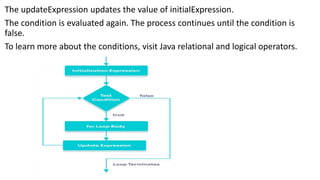
The initialExpression initializes and/or declares variables and executes only once.
The condition is evaluated. If the condition is true, the body of the for loop is
executed.
The updateExpression updates the value of initialExpression.
The condition is evaluated again. The process continues until the condition is
false.
To learn more about the conditions, visit Java relational and logical operators.
Example 1: Display a Text Five Times
// Program to print a text 5 times
class Main {
public static void main(String[] args) {
int n = 5;
// for loop
for (int i = 1; i <= n; ++i) {
System.out.println("Java is fun");
}
}
}
Output:
Java is fun
Java is fun
Java is fun
Java is fun
Java is fun
SOME VARIATIONS ON THE LOOP
// Infinite for Loop
class Infinite {
public static void main(String[] args) {
int sum = 0;
for (int i = 1; i <= 10; --i) {
System.out.println("Hello");
}
}
}
Run Code
Here, the test expression ,i <= 10, is never false and Hello is printed repeatedly
until the memory runs out.
Out put
Hello
Hello
Hello
Hello
Hello
Hello
Hello
Hello
Hello
Hello
Multiple loop control variable
The for is one of the most versatile statements in the Java language because it
allows a wide range of varia tions. One of the most common is the use of multiple
loop control variables. When using multiple loop control variables, the
initialization and iteration expressions for each variable are separated by commas
Here is a simple example:
//Use multiple loop control variable in a for.
Class Multiple loop control variable in a for.
public static void main(string[] args) {
Int i,j;
for(i=0, j=10; i<j ; i++, j--) --------notice the two loop control variables.
system.out.println(“i and j : “ + i + “ “ + j);
}
}
The output from program:
i and j : 0 10
i and j : 1 9
i and j : 2 8
i and j : 3 7
i and j : 4 6
MISSING PIECES
Some interesting for loop variations are created by leaving pieces of the loop
definition empty. In Java, a is possible for any or all of the initialization, condition,
or intration portions of the for loop to be blank.
For example, consider the following program.
//Parts of the for can be empty
class Empty {
public static void main(string[] args) {
Int I;
For(i=0;i<10;) {
System.out.println(“Pass #”+i );
i++; // increment loop control var
}
}
}
Here the iteration expression of the for is empty .Instead, the loop control
variable i is incremented inside the body of the loop This means that each
time the loop repeats, i is tested to see whether it equals 10, but the no no
further action takes place Of course, since i is still incremented within the
body of the loop, the loop runs normally, displaying the following output:
Pass#0
pass #1
Pass #2
Pass #3
Pass #4
Pass #5
Pass #6
Pass #7
Pass #8
Pass #9
Loops with No body:
In Java, the body associated with a for loop (or any other loop)can be empty. This
is because a null statement is syntactically valid. Body-less loops are often useful.
For example, the following program uses one to sum the numbers 1 through 5
//The body of a loop can be empty.
class Empty3 {
public static void main(String[] args) {
int i;
int sum=0;
//sum the numbers through 5
for(i=1; i<=5;sum += i++) ;-----No body in this loop!
System .out .println (“Sum is “ + sum);
}
}
The output from the program is shown here:
Sum in 15
THE ENHANCED FOR LOOP
In Java, the for-each loop is used to iterate through elements of arrays and
collections (like ArrayList). It is also known as the enhanced for loop.
for-each Loop Sytnax
The syntax of the Java for-each loop is:
for(dataType item : array) {
...
}
Here,
array - an array or a collection
item - each item of array/collection is assigned to this variable
dataType - the data type of the array/collection
Example 1: Print Array Elements
// print array elements
class Main {
public static void main(String[] args) {
// create an array
int[] numbers = {3, 9, 5, -5};
// for each loop
for (int number: numbers) {
System.out.println(number);
}
}
}
Run Code
Output:-
3
9
5
-5
Here, we have used the for-each loop to print each element of the numbers array
one by one.
In the first iteration, item will be 3.
In the second iteration, item will be 9.
In the third iteration, item will be 5.
In the fourth iteration, item will be -5
THANK YOU

prt123.pptx

  • 1.
    For loop injava Presented by: Shubham S Kamate. MCA 2nd sem .
  • 2.
    CONTENTS: The for loopin java: • Syntax • Flow chart • Example code The varitions in for loop: • Multiple loop control vaiable • missing pieces • The infinite loop • Loops with no body The enhanced for loop • Syntax • Example code
  • 3.
    Java for Loop Javafor loop is used to run a block of code for a certain number of times. The syntax of for loop is: for (initialExpression; testExpression; updateExpression) { // body of the loop } Here, The initialExpression initializes and/or declares variables and executes only once. The condition is evaluated. If the condition is true, the body of the for loop is executed.
  • 4.
    The updateExpression updatesthe value of initialExpression. The condition is evaluated again. The process continues until the condition is false. To learn more about the conditions, visit Java relational and logical operators.
  • 5.
    Example 1: Displaya Text Five Times // Program to print a text 5 times class Main { public static void main(String[] args) { int n = 5; // for loop for (int i = 1; i <= n; ++i) { System.out.println("Java is fun"); } } }
  • 6.
    Output: Java is fun Javais fun Java is fun Java is fun Java is fun
  • 7.
    SOME VARIATIONS ONTHE LOOP // Infinite for Loop class Infinite { public static void main(String[] args) { int sum = 0; for (int i = 1; i <= 10; --i) { System.out.println("Hello"); } } }
  • 8.
    Run Code Here, thetest expression ,i <= 10, is never false and Hello is printed repeatedly until the memory runs out. Out put Hello Hello Hello Hello Hello Hello Hello Hello Hello Hello
  • 9.
    Multiple loop controlvariable The for is one of the most versatile statements in the Java language because it allows a wide range of varia tions. One of the most common is the use of multiple loop control variables. When using multiple loop control variables, the initialization and iteration expressions for each variable are separated by commas Here is a simple example: //Use multiple loop control variable in a for. Class Multiple loop control variable in a for. public static void main(string[] args) { Int i,j; for(i=0, j=10; i<j ; i++, j--) --------notice the two loop control variables. system.out.println(“i and j : “ + i + “ “ + j); } }
  • 10.
    The output fromprogram: i and j : 0 10 i and j : 1 9 i and j : 2 8 i and j : 3 7 i and j : 4 6
  • 11.
    MISSING PIECES Some interestingfor loop variations are created by leaving pieces of the loop definition empty. In Java, a is possible for any or all of the initialization, condition, or intration portions of the for loop to be blank. For example, consider the following program. //Parts of the for can be empty class Empty { public static void main(string[] args) { Int I; For(i=0;i<10;) { System.out.println(“Pass #”+i ); i++; // increment loop control var } }
  • 12.
    } Here the iterationexpression of the for is empty .Instead, the loop control variable i is incremented inside the body of the loop This means that each time the loop repeats, i is tested to see whether it equals 10, but the no no further action takes place Of course, since i is still incremented within the body of the loop, the loop runs normally, displaying the following output: Pass#0 pass #1 Pass #2 Pass #3 Pass #4 Pass #5 Pass #6 Pass #7 Pass #8 Pass #9
  • 13.
    Loops with Nobody: In Java, the body associated with a for loop (or any other loop)can be empty. This is because a null statement is syntactically valid. Body-less loops are often useful. For example, the following program uses one to sum the numbers 1 through 5 //The body of a loop can be empty. class Empty3 { public static void main(String[] args) { int i; int sum=0; //sum the numbers through 5 for(i=1; i<=5;sum += i++) ;-----No body in this loop! System .out .println (“Sum is “ + sum); } } The output from the program is shown here: Sum in 15
  • 14.
    THE ENHANCED FORLOOP In Java, the for-each loop is used to iterate through elements of arrays and collections (like ArrayList). It is also known as the enhanced for loop. for-each Loop Sytnax The syntax of the Java for-each loop is: for(dataType item : array) { ... } Here, array - an array or a collection item - each item of array/collection is assigned to this variable dataType - the data type of the array/collection Example 1: Print Array Elements
  • 15.
    // print arrayelements class Main { public static void main(String[] args) { // create an array int[] numbers = {3, 9, 5, -5}; // for each loop for (int number: numbers) { System.out.println(number); } } }
  • 16.
    Run Code Output:- 3 9 5 -5 Here, wehave used the for-each loop to print each element of the numbers array one by one.
  • 17.
    In the firstiteration, item will be 3. In the second iteration, item will be 9. In the third iteration, item will be 5. In the fourth iteration, item will be -5
  • 18.