Protect Our Kids from The Internet ACSI Sacramento October 19 th , 2006 T. Kobelt
The Issue … Increased access to the Internet means increased access to inappropriate sites and content.
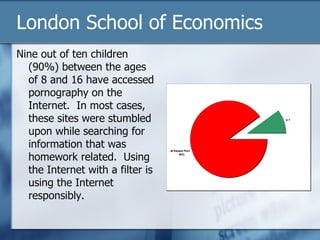
London School of Economics Nine out of ten children  (90%) between the ages of 8 and 16 have accessed pornography on the Internet.  In most cases, these sites were stumbled upon while searching for information that was homework related.  Using the Internet with a filter is using the Internet responsibly.
The Internet Frontier & the Issues Myspace & related Sites Instant Messaging & related sites Unfiltered Search Engine Results
What is the point of Giving Students Internet Access? We must have the internet so we are “not behind” in technology. The internet is a tool for information and research.
Searching for a Paradigm of Internet Use Looking for something that parallels developmental stages Mental Social Looking for something that people can relate to Physical Limits (Playground & Garden) Maslow’s Hierarchy of Needs
Age Appropriate Strategies K – 2 – White list Define the boundaries of the playground and ensure that kids can not go anywhere else. 3 – 12 – Blacklist & Dynamic Content Filter You can go anywhere in the garden, just don’t eat of the fruit of the tree in the middle of the garden.
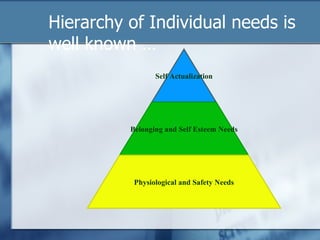
Hierarchy of Individual needs is well known … Self Actualization Belonging and Self Esteem Needs Physiological and Safety Needs
Expansion on Maslow At the top of the original pyramid is self actualization. Later writings gives us transcendence A life transformation process Romans 12: 1,2
Maslow’s Premise The essence of the hierarchy is the notion of “pre-potency” This means that you are not going to be motivated by any higher-level needs until your lower-level ones have been satisfied. Note  pre-potency only makes sense over a substantial time-scale. I ate a good breakfast this morning, but I shall be hungry again tonight: thus I may become concerned about Physiological needs again then. But if I know where the next meal is coming from, concern about meeting those needs will not be a great motivator.  
Student Research Capabilities Give students the capabilities to explore their world. Secure the Borders What does this mean? Expand the Borders What does this mean for me? Expand their Horizons Where do I go from here?
For your School I can’t expand my network structure for tomorrow if I am plagued with computer virus issues and network security issues today. Restrict internet access (secure your borders) I can’t build strategic knowledge based information systems if I can’t trust and interrogate the underlying data.
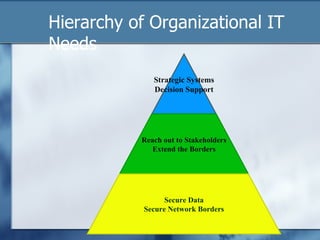
Hierarchy of Organizational IT Needs Strategic Systems Decision Support Reach out to Stakeholders Extend the Borders Secure Data Secure Network Borders
Transformational  We need to move from systems that run well. To systems well run (or used well) We need to move from a secure internet connection. To a safe & secure internet experience. We need to move from more information. To more meaningful information
Internet Experiences gone wrong Chemistry search for Platinum Image search on your first name 6 year old searches for Barbie Doll Search for horses A history class watches the page get redirected to a “new” site.
Approaches to a Safe Internet Parent / Teacher Guidance & Supervision PC Based Programs Network, Server or Appliance Solutions
Parent / Teacher Supervision Works well only in low PC to Supervisor ratios. Kids can quickly minimize a browser screen
PC Based Solutions Browser Settings IE Content Filter Can be circumvented at the PC Level High Maintenance Requires constant updates and Maintenance Can be used in small network environments with Supervision Ie: Net Nanny
Server or Network Based Solution With a single gateway it is difficult to circumvent. Consistent application of content and network security policy One point of update and control Allows for comprehensive web activity reporting Not a panacea for education and supervision
Content Filter Solutions White list Block all access except for specific sites. Works well in K to 2. Can be implemented at least two ways. Lock Browser to a specified web page. Put all approved sites on the web page. Warning ensure those pages don’t have any “bad” links. Restrict all domains in the firewall (ie D. Link) Set-up a white list in the Firewall
White list Concerns It is very restrictive Works well in younger grades It is high maintenance A white list does not check the content of the pages coming to the browser By definition everything in the list is approved.
Black List List of known bad sites. Over 5 million known porn sites Thousands of new “bad” sites every day Block the known bad sites quickly and easily Ie. Playboy.com, myspace.com Very high maintenance Allows “bad” sites to get through Websense, Sonicwall, N2H2, Surfcontrol
Dynamic Content Filtering Analysis the content of every web page ICRA Tags Internet content rating association Voluntary rating (Not many pages are rated) Keyword blocking May ban good sites using the word in a legitimate way. Ie: Middlesex University Leads to over blocking Available in most firewalls
Dynamic Content Filtering Context sensitive keyword blocking Parse each word and combination Very intensive May slow down internet searching Dan’s Guardian
Combination Filters Does the URL (blacklist) blocking first Fastest test Does Dynamic Content Filter only on pages that pass the blacklist Catches new websites and “bad” results in search engines and proxy servers NetSentron
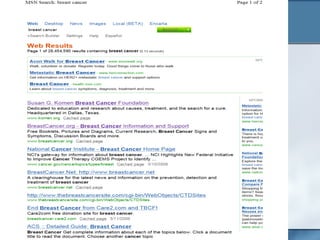
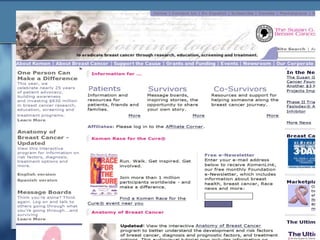
An example October is Breast cancer Awareness month Johnny, a 14 year old boy, is given an assignment on breast cancer. He turns to MSN to do his research. He enters breast cancer and gets the following results
 
 
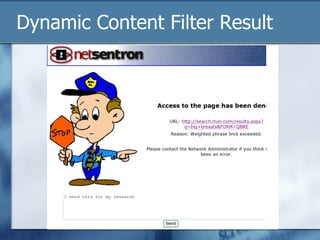
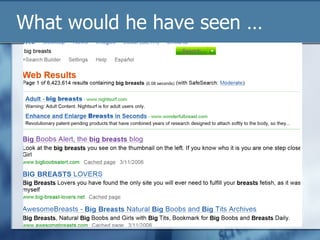
Johnny continues with his research He has the basics Now he gets an idea. The hypothesis is that there is a correlation between size and the occurrence of breast cancer. Johnny decides to search on “big breasts” A white list will let anything from MSN or Google through A blacklist will show the results, but may not let you go to the site
Dynamic Content Filter Result
What would he have seen …
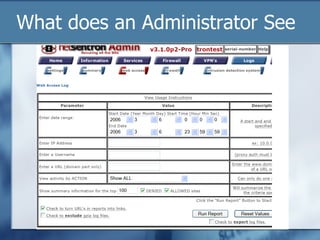
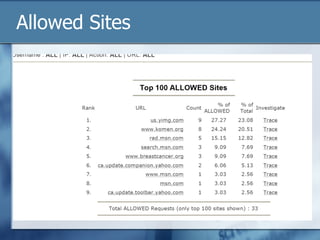
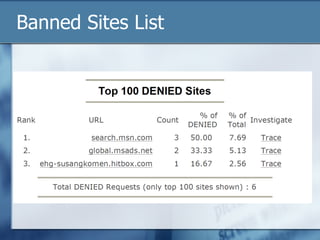
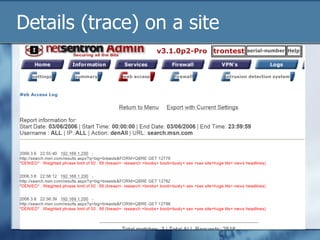
What does an Administrator See
Allowed Sites
Banned Sites List
Details (trace) on a site
Content Filtering & Beyond Concern that filtering technology is enough. What do we do when the filter fails? Myspace … A quick survey … What is your name? Where do you teach?
Myspace Facebook & Related Issues Virtual Community Addresses a need. Social Needs Found on related site: My name is x I am a Junior at Y High School I work at Toys R US at the local Mall Here is a picture of me and my friend Social Conditioning
Instant Messaging (chat) Meant for Quick, unimportant messages Time waster Resource waster Block websites (URL’s) & port Web based IM (iloveim.com) Fulfills a social need
Teaching & Technology The Medium is the Message Ie: Powerpoint Television The Internet The medium does not replace content The challenge is to engage the learner with the content in a cold medium
Resources Internet Rating Content Association www.icra.org www.safekids.com www.netsentron.com Our Product www.netsentron.com/acsi.html Presentation materials
More “stuff” to cover After we defend our borders how do we safely extend our borders. Wiki’s etc. Varied sources of information Not verified information If it is on the internet it has to be true Once we get past the first stage of the pyramid, teachers and technicians can move on up to more interesting “stuff”

Protect Our Kids From The Internet

  • 1.
    Protect Our Kidsfrom The Internet ACSI Sacramento October 19 th , 2006 T. Kobelt
  • 2.
    The Issue …Increased access to the Internet means increased access to inappropriate sites and content.
  • 3.
    London School ofEconomics Nine out of ten children (90%) between the ages of 8 and 16 have accessed pornography on the Internet. In most cases, these sites were stumbled upon while searching for information that was homework related. Using the Internet with a filter is using the Internet responsibly.
  • 4.
    The Internet Frontier& the Issues Myspace & related Sites Instant Messaging & related sites Unfiltered Search Engine Results
  • 5.
    What is thepoint of Giving Students Internet Access? We must have the internet so we are “not behind” in technology. The internet is a tool for information and research.
  • 6.
    Searching for aParadigm of Internet Use Looking for something that parallels developmental stages Mental Social Looking for something that people can relate to Physical Limits (Playground & Garden) Maslow’s Hierarchy of Needs
  • 7.
    Age Appropriate StrategiesK – 2 – White list Define the boundaries of the playground and ensure that kids can not go anywhere else. 3 – 12 – Blacklist & Dynamic Content Filter You can go anywhere in the garden, just don’t eat of the fruit of the tree in the middle of the garden.
  • 8.
    Hierarchy of Individualneeds is well known … Self Actualization Belonging and Self Esteem Needs Physiological and Safety Needs
  • 9.
    Expansion on MaslowAt the top of the original pyramid is self actualization. Later writings gives us transcendence A life transformation process Romans 12: 1,2
  • 10.
    Maslow’s Premise Theessence of the hierarchy is the notion of “pre-potency” This means that you are not going to be motivated by any higher-level needs until your lower-level ones have been satisfied. Note pre-potency only makes sense over a substantial time-scale. I ate a good breakfast this morning, but I shall be hungry again tonight: thus I may become concerned about Physiological needs again then. But if I know where the next meal is coming from, concern about meeting those needs will not be a great motivator.  
  • 11.
    Student Research CapabilitiesGive students the capabilities to explore their world. Secure the Borders What does this mean? Expand the Borders What does this mean for me? Expand their Horizons Where do I go from here?
  • 12.
    For your SchoolI can’t expand my network structure for tomorrow if I am plagued with computer virus issues and network security issues today. Restrict internet access (secure your borders) I can’t build strategic knowledge based information systems if I can’t trust and interrogate the underlying data.
  • 13.
    Hierarchy of OrganizationalIT Needs Strategic Systems Decision Support Reach out to Stakeholders Extend the Borders Secure Data Secure Network Borders
  • 14.
    Transformational Weneed to move from systems that run well. To systems well run (or used well) We need to move from a secure internet connection. To a safe & secure internet experience. We need to move from more information. To more meaningful information
  • 15.
    Internet Experiences gonewrong Chemistry search for Platinum Image search on your first name 6 year old searches for Barbie Doll Search for horses A history class watches the page get redirected to a “new” site.
  • 16.
    Approaches to aSafe Internet Parent / Teacher Guidance & Supervision PC Based Programs Network, Server or Appliance Solutions
  • 17.
    Parent / TeacherSupervision Works well only in low PC to Supervisor ratios. Kids can quickly minimize a browser screen
  • 18.
    PC Based SolutionsBrowser Settings IE Content Filter Can be circumvented at the PC Level High Maintenance Requires constant updates and Maintenance Can be used in small network environments with Supervision Ie: Net Nanny
  • 19.
    Server or NetworkBased Solution With a single gateway it is difficult to circumvent. Consistent application of content and network security policy One point of update and control Allows for comprehensive web activity reporting Not a panacea for education and supervision
  • 20.
    Content Filter SolutionsWhite list Block all access except for specific sites. Works well in K to 2. Can be implemented at least two ways. Lock Browser to a specified web page. Put all approved sites on the web page. Warning ensure those pages don’t have any “bad” links. Restrict all domains in the firewall (ie D. Link) Set-up a white list in the Firewall
  • 21.
    White list ConcernsIt is very restrictive Works well in younger grades It is high maintenance A white list does not check the content of the pages coming to the browser By definition everything in the list is approved.
  • 22.
    Black List Listof known bad sites. Over 5 million known porn sites Thousands of new “bad” sites every day Block the known bad sites quickly and easily Ie. Playboy.com, myspace.com Very high maintenance Allows “bad” sites to get through Websense, Sonicwall, N2H2, Surfcontrol
  • 23.
    Dynamic Content FilteringAnalysis the content of every web page ICRA Tags Internet content rating association Voluntary rating (Not many pages are rated) Keyword blocking May ban good sites using the word in a legitimate way. Ie: Middlesex University Leads to over blocking Available in most firewalls
  • 24.
    Dynamic Content FilteringContext sensitive keyword blocking Parse each word and combination Very intensive May slow down internet searching Dan’s Guardian
  • 25.
    Combination Filters Doesthe URL (blacklist) blocking first Fastest test Does Dynamic Content Filter only on pages that pass the blacklist Catches new websites and “bad” results in search engines and proxy servers NetSentron
  • 26.
    An example Octoberis Breast cancer Awareness month Johnny, a 14 year old boy, is given an assignment on breast cancer. He turns to MSN to do his research. He enters breast cancer and gets the following results
  • 27.
  • 28.
  • 29.
    Johnny continues withhis research He has the basics Now he gets an idea. The hypothesis is that there is a correlation between size and the occurrence of breast cancer. Johnny decides to search on “big breasts” A white list will let anything from MSN or Google through A blacklist will show the results, but may not let you go to the site
  • 30.
  • 31.
    What would hehave seen …
  • 32.
    What does anAdministrator See
  • 33.
  • 34.
  • 35.
  • 36.
    Content Filtering &Beyond Concern that filtering technology is enough. What do we do when the filter fails? Myspace … A quick survey … What is your name? Where do you teach?
  • 37.
    Myspace Facebook &Related Issues Virtual Community Addresses a need. Social Needs Found on related site: My name is x I am a Junior at Y High School I work at Toys R US at the local Mall Here is a picture of me and my friend Social Conditioning
  • 38.
    Instant Messaging (chat)Meant for Quick, unimportant messages Time waster Resource waster Block websites (URL’s) & port Web based IM (iloveim.com) Fulfills a social need
  • 39.
    Teaching & TechnologyThe Medium is the Message Ie: Powerpoint Television The Internet The medium does not replace content The challenge is to engage the learner with the content in a cold medium
  • 40.
    Resources Internet RatingContent Association www.icra.org www.safekids.com www.netsentron.com Our Product www.netsentron.com/acsi.html Presentation materials
  • 41.
    More “stuff” tocover After we defend our borders how do we safely extend our borders. Wiki’s etc. Varied sources of information Not verified information If it is on the internet it has to be true Once we get past the first stage of the pyramid, teachers and technicians can move on up to more interesting “stuff”