Internet Safety: Protecting Your Child Online Presented by the St. Martin’s Episcopal School Technology Department
Agenda Staying Connected Making the Right Decisions Internet Safety Checklist Appropriate Internet Usage According to Age Important Safety Issues Conclusion
Staying in the Moment! Children must realize the importance of staying connected – and not electronically!
There is a proper time and place for: Cell phone usage Text messaging iPods Are you being a good example for your children?
How do you make the right decisions to ensure your children stay safe online?  The answer is a combination of: Good parenting Educating your child about Internet safety rules Filtering Software - as you can't always be there!  KidsHealth
Internet Safety Checklist Talk to your family about Internet safety Train your children – there are a variety of free educational programs Does your ISP (Internet Service Provider) offer parental controls? Computers used by children should be placed in a central location (family room, etc.).
Internet Safety Checklist (cont.) Install safety software Use family-friendly search engines http://www.kids.gov/ Discuss the benefits and hazards of going online
Internet Safety Checklist (cont.) Urge children to inform a parent or adult if they accidentally stumble on something inappropriate Set up house rules or create an Internet safety contract. Online Code of Conduct Supervise children carefully Increase children’s level of responsibility as they get older
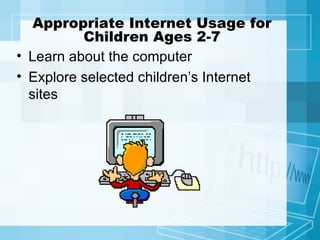
Appropriate Internet Usage for Children Ages 2-7 Learn about the computer Explore selected children’s Internet sites
What Should Parents Do? Closely supervise children Select sites for children Set up bookmarks for children Limit or deny email usage Use a filter (software) for content control
Appropriate Internet Usage for Children Ages 8-11 Exploring selected sites Chatting and corresponding online in controlled environments Skills and usage will continue to increase Curiosity will increase
What Should Parents Do? Be actively involved Emphasize safe behavior Investigate any chat rooms or online clubs your child wants to participate in Use content filters Discuss good cyber manners (“netiquette”) Place the computer in a central area  Periodically check Internet history (demo)
Appropriate Internet Usage for Children Ages 12-18 The Internet becomes a valuable tool for homework and projects Children develop greater independence and want more freedom Use email extensively (STM restrictions) More “net-savvy” The Internet becomes more global
What Should Parents Do? Stay in touch with their children’s online activities Keep the computer in a central location Reinforce safety messages and cyber rules.  Stress privacy protection.
How much time should my child spend online? Rules for Internet usage should be the decision of a child’s parents.  Like many other things, such as watching television or reading in bed, parents should strive to achieve a healthy balance.
Cyber Bullying What is cyber bullying? http:// www.stopcyberbullying.org /
Which video games are appropriate for my child? Game Ratings and Descriptor Guide
Which Content Filter Should I Use? Net Nanny http://www.netnanny.com/products/netnanny CYBERSitter   http://www.cybersitter.com/ CyberPatrol http://www.cyberpatrol.com/ K9 Web Protection (Free) http://www1.k9webprotection.com/
What is Social Networking? Social Networking
Social Networking Sites Face Book My Space Classmates.com
Pros and Cons of My Space Pros and Cons of Social Networking
Conclusion The Internet can be a rich, multimedia experience that enhances the learning experience for children.  It can also be a perilous place.  With basic safety measures, parents can adequately protect their children and make their Internet experience an enjoyable one.
References http://www.kidshealth.org/parent/positive/family/net_safety.html http://www.kids.gov/ http://www.netalert.gov.au http://www.commoncraft.com/video-social-networking http://www.stopcyberbullying.org/ http://www.esrb.org/ratings/ratings_guide.jsp http://www.microsoft.com/protect/family/guidelines/contract.mspx http://www.cbsnews.com/stories/2006/02/06/eveningnews/main1286130.shtml

Protecting Your Child Online

  • 1.
    Internet Safety: ProtectingYour Child Online Presented by the St. Martin’s Episcopal School Technology Department
  • 2.
    Agenda Staying ConnectedMaking the Right Decisions Internet Safety Checklist Appropriate Internet Usage According to Age Important Safety Issues Conclusion
  • 3.
    Staying in theMoment! Children must realize the importance of staying connected – and not electronically!
  • 4.
    There is aproper time and place for: Cell phone usage Text messaging iPods Are you being a good example for your children?
  • 5.
    How do youmake the right decisions to ensure your children stay safe online? The answer is a combination of: Good parenting Educating your child about Internet safety rules Filtering Software - as you can't always be there! KidsHealth
  • 6.
    Internet Safety ChecklistTalk to your family about Internet safety Train your children – there are a variety of free educational programs Does your ISP (Internet Service Provider) offer parental controls? Computers used by children should be placed in a central location (family room, etc.).
  • 7.
    Internet Safety Checklist(cont.) Install safety software Use family-friendly search engines http://www.kids.gov/ Discuss the benefits and hazards of going online
  • 8.
    Internet Safety Checklist(cont.) Urge children to inform a parent or adult if they accidentally stumble on something inappropriate Set up house rules or create an Internet safety contract. Online Code of Conduct Supervise children carefully Increase children’s level of responsibility as they get older
  • 9.
    Appropriate Internet Usagefor Children Ages 2-7 Learn about the computer Explore selected children’s Internet sites
  • 10.
    What Should ParentsDo? Closely supervise children Select sites for children Set up bookmarks for children Limit or deny email usage Use a filter (software) for content control
  • 11.
    Appropriate Internet Usagefor Children Ages 8-11 Exploring selected sites Chatting and corresponding online in controlled environments Skills and usage will continue to increase Curiosity will increase
  • 12.
    What Should ParentsDo? Be actively involved Emphasize safe behavior Investigate any chat rooms or online clubs your child wants to participate in Use content filters Discuss good cyber manners (“netiquette”) Place the computer in a central area Periodically check Internet history (demo)
  • 13.
    Appropriate Internet Usagefor Children Ages 12-18 The Internet becomes a valuable tool for homework and projects Children develop greater independence and want more freedom Use email extensively (STM restrictions) More “net-savvy” The Internet becomes more global
  • 14.
    What Should ParentsDo? Stay in touch with their children’s online activities Keep the computer in a central location Reinforce safety messages and cyber rules. Stress privacy protection.
  • 15.
    How much timeshould my child spend online? Rules for Internet usage should be the decision of a child’s parents. Like many other things, such as watching television or reading in bed, parents should strive to achieve a healthy balance.
  • 16.
    Cyber Bullying Whatis cyber bullying? http:// www.stopcyberbullying.org /
  • 17.
    Which video gamesare appropriate for my child? Game Ratings and Descriptor Guide
  • 18.
    Which Content FilterShould I Use? Net Nanny http://www.netnanny.com/products/netnanny CYBERSitter http://www.cybersitter.com/ CyberPatrol http://www.cyberpatrol.com/ K9 Web Protection (Free) http://www1.k9webprotection.com/
  • 19.
    What is SocialNetworking? Social Networking
  • 20.
    Social Networking SitesFace Book My Space Classmates.com
  • 21.
    Pros and Consof My Space Pros and Cons of Social Networking
  • 22.
    Conclusion The Internetcan be a rich, multimedia experience that enhances the learning experience for children. It can also be a perilous place. With basic safety measures, parents can adequately protect their children and make their Internet experience an enjoyable one.
  • 23.
    References http://www.kidshealth.org/parent/positive/family/net_safety.html http://www.kids.gov/http://www.netalert.gov.au http://www.commoncraft.com/video-social-networking http://www.stopcyberbullying.org/ http://www.esrb.org/ratings/ratings_guide.jsp http://www.microsoft.com/protect/family/guidelines/contract.mspx http://www.cbsnews.com/stories/2006/02/06/eveningnews/main1286130.shtml