PROGRAMMING TECHNIQUES
• Looping
• Counting
• Indexing
• The program is an implementation of certain
logic by executing group of instructions.
• To implement program logic, we need to take
help of some common programming
techniques such as looping, counting, and
indexing
PROGRAMMING TECHNIQUES
• Looping:
• This programming technique using
8085 is instructed to execute certain
set of instructions repeatedly to
perform a particular task number of
times.
• For example, to add ten numbers
stored in the consecutive memory
locations we have to perform addition
ten times.
• Counting:
• This technique allows programmer to
count how many times the instruction/set
of instructions are executed.
• Indexing:
• This technique allows programmer to
point or refer the data stored in
sequential memory locations one by one.
PROGRAMMING TECHNIQUES
• Example:
• Illustrate the steps needed to
add 10 bytes of data stored in
memory locations staring at a
given location, and display the
sum.
Procedure: the microprocessor needs:
• A counter to count 10 data bytes
• An index or a memory pointer to locate where
data bytes are stored
• To transfer the data from a memory location
to microprocessor (ALU)
• To perform addition
• Registers for temporary storage of partial
answers
• A flag to indicate the completion of task
• To store or output the result
Looping
• The Programming Techniques using 8085 loop is the basic structure which forces the
processor to repeat a sequence of instructions.
• There are two types of loops:
• Continuous loop-repeat task continuously
• Conditional loop-repeats a task until certain data conditions are met
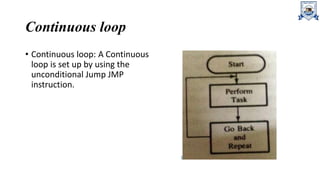
Continuous loop
• Continuous loop: A Continuous
loop is set up by using the
unconditional Jump JMP
instruction.
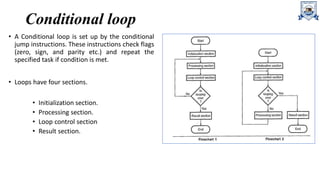
Conditional loop
• A Conditional loop is set up by the conditional
jump instructions. These instructions check flags
(zero, sign, and parity etc.) and repeat the
specified task if condition is met.
• Loops have four sections.
• Initialization section.
• Processing section.
• Loop control section
• Result section.
Conditional loop
• 1. The initialization section establishes the starting values of
• loop counters for counting how many times loop is executed,
• address registers for indexing which give pointers to memory locations and
• other variables
• 2. The actual data manipulation occurs in the processing section. This is the section which
does the work.
• 3. The loop control section updates counters, indices (pointers) for the next
• 4. The result section analyzes and stores the results.
Code Conversion:
• This programming technique in 8085 to
translate a number represented using one
coding system to another.
• For example, when we accept any number from
the keyboard it is in ASCII code. But for
processing, we have to convert this number in
its hex equivalent.
• The code conversion involves some basic
conversions such as
• BCD to Binary conversion
• Binary to BCD conversion
• BCD to seven segment code
conversion
• Binary to ASCII conversion and
• ASCII to binary conversion
BCD to Binary Conversion
• BCD to Binary Conversion:
• We are more familiar with the decimal number system. But the microprocessor
understands the binary/hex number system. To convert BCD number into its binary
equivalent we have to use the principle of positional weighting in a given number.
• To perform above operation it is necessary to separate an 8-bit packed BCD number into
two 4-bit unpacked BCD digits: BCD1 and BCD2 and then convert each digit into its binary
value according to its positions. Finally, add both binary numbers to obtain the binary
equivalent of the BCD number.
Binary to BCD Conversion
• Binary to BCD Conversion:
• We know that microprocessor processes data in the binary form. But when it is displayed, it
is in the BCD form. In this case we need binary to BCD conversion of data. The conversion
of binary to BCD is performed by dividing the number by the power of ten.
BCD to Seven Segment Conversion:
• BCD to Seven Segment Conversion:
• Many times 7-segment LED display is used to display the results or parameters in the
microprocessor system.
• In such cases we have to convert the result or parameter in 7-segment code.
• This conversion can be done using look-up technique.
• In the look-up table the codes of the digits (0-9) to be displayed are stored sequentially in
the memory. The conversion program locates the code of a digit based on its BCD digit. Let
us see the Programming Techniques using 8085 for BCD to common cathode 7-segment
code conversion.
Binary to ASCII Code Conversion:
• Binary to ASCII Code Conversion:
• The ASCII Code (American Standard Code for Information Interchange) is commonly used
for communication.
• In such cases we need to convert binary number to its ASCII equivalent.
• It is a seven bit code. In this code number 0 through 9 are represented as 30 through 39
respectively and letters A through Z are represented as 41H through 5AH. Therefore, by
adding 30H we can convert number into its ASCII equivalent and by adding 37H we can
convert letter to its ASCII equivalent.
ASCII Code to Binary Conversion:
• ASCII Code to Binary Conversion:
• It is exactly reverse process to binary to ASCII conversion.
• Here, if ASCII code is less than 3AH then 30H is subtracted to get the
binary equivalent and if it is in between 41H and 5AH then 37H is
subtracted to get the binary equivalent of letter (A-F).

Programming Techniques.pptx

  • 1.
  • 2.
    PROGRAMMING TECHNIQUES • Looping •Counting • Indexing • The program is an implementation of certain logic by executing group of instructions. • To implement program logic, we need to take help of some common programming techniques such as looping, counting, and indexing
  • 3.
    PROGRAMMING TECHNIQUES • Looping: •This programming technique using 8085 is instructed to execute certain set of instructions repeatedly to perform a particular task number of times. • For example, to add ten numbers stored in the consecutive memory locations we have to perform addition ten times. • Counting: • This technique allows programmer to count how many times the instruction/set of instructions are executed. • Indexing: • This technique allows programmer to point or refer the data stored in sequential memory locations one by one.
  • 4.
    PROGRAMMING TECHNIQUES • Example: •Illustrate the steps needed to add 10 bytes of data stored in memory locations staring at a given location, and display the sum. Procedure: the microprocessor needs: • A counter to count 10 data bytes • An index or a memory pointer to locate where data bytes are stored • To transfer the data from a memory location to microprocessor (ALU) • To perform addition • Registers for temporary storage of partial answers • A flag to indicate the completion of task • To store or output the result
  • 5.
    Looping • The ProgrammingTechniques using 8085 loop is the basic structure which forces the processor to repeat a sequence of instructions. • There are two types of loops: • Continuous loop-repeat task continuously • Conditional loop-repeats a task until certain data conditions are met
  • 6.
    Continuous loop • Continuousloop: A Continuous loop is set up by using the unconditional Jump JMP instruction.
  • 7.
    Conditional loop • AConditional loop is set up by the conditional jump instructions. These instructions check flags (zero, sign, and parity etc.) and repeat the specified task if condition is met. • Loops have four sections. • Initialization section. • Processing section. • Loop control section • Result section.
  • 8.
    Conditional loop • 1.The initialization section establishes the starting values of • loop counters for counting how many times loop is executed, • address registers for indexing which give pointers to memory locations and • other variables • 2. The actual data manipulation occurs in the processing section. This is the section which does the work. • 3. The loop control section updates counters, indices (pointers) for the next • 4. The result section analyzes and stores the results.
  • 9.
    Code Conversion: • Thisprogramming technique in 8085 to translate a number represented using one coding system to another. • For example, when we accept any number from the keyboard it is in ASCII code. But for processing, we have to convert this number in its hex equivalent. • The code conversion involves some basic conversions such as • BCD to Binary conversion • Binary to BCD conversion • BCD to seven segment code conversion • Binary to ASCII conversion and • ASCII to binary conversion
  • 10.
    BCD to BinaryConversion • BCD to Binary Conversion: • We are more familiar with the decimal number system. But the microprocessor understands the binary/hex number system. To convert BCD number into its binary equivalent we have to use the principle of positional weighting in a given number. • To perform above operation it is necessary to separate an 8-bit packed BCD number into two 4-bit unpacked BCD digits: BCD1 and BCD2 and then convert each digit into its binary value according to its positions. Finally, add both binary numbers to obtain the binary equivalent of the BCD number.
  • 11.
    Binary to BCDConversion • Binary to BCD Conversion: • We know that microprocessor processes data in the binary form. But when it is displayed, it is in the BCD form. In this case we need binary to BCD conversion of data. The conversion of binary to BCD is performed by dividing the number by the power of ten.
  • 12.
    BCD to SevenSegment Conversion: • BCD to Seven Segment Conversion: • Many times 7-segment LED display is used to display the results or parameters in the microprocessor system. • In such cases we have to convert the result or parameter in 7-segment code. • This conversion can be done using look-up technique. • In the look-up table the codes of the digits (0-9) to be displayed are stored sequentially in the memory. The conversion program locates the code of a digit based on its BCD digit. Let us see the Programming Techniques using 8085 for BCD to common cathode 7-segment code conversion.
  • 13.
    Binary to ASCIICode Conversion: • Binary to ASCII Code Conversion: • The ASCII Code (American Standard Code for Information Interchange) is commonly used for communication. • In such cases we need to convert binary number to its ASCII equivalent. • It is a seven bit code. In this code number 0 through 9 are represented as 30 through 39 respectively and letters A through Z are represented as 41H through 5AH. Therefore, by adding 30H we can convert number into its ASCII equivalent and by adding 37H we can convert letter to its ASCII equivalent.
  • 14.
    ASCII Code toBinary Conversion: • ASCII Code to Binary Conversion: • It is exactly reverse process to binary to ASCII conversion. • Here, if ASCII code is less than 3AH then 30H is subtracted to get the binary equivalent and if it is in between 41H and 5AH then 37H is subtracted to get the binary equivalent of letter (A-F).