Production Log
Adam Bailey
3rd December 2014
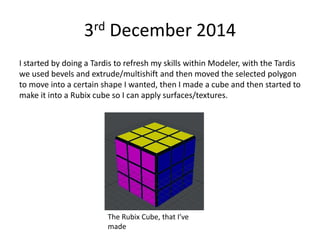
I started by doing a Tardis to refresh my skills within Modeler, with the Tardis
we used bevels and extrude/multishift and then moved the selected polygon
to move into a certain shape I wanted, then I made a cube and then started to
make it into a Rubix cube so I can apply surfaces/textures.
The Rubix Cube, that I’ve
made
5th December 2014
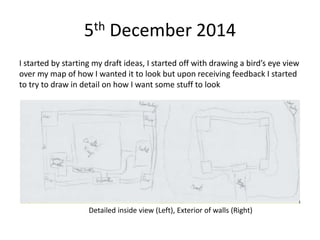
I started by starting my draft ideas, I started off with drawing a bird’s eye view
over my map of how I wanted it to look but upon receiving feedback I started
to try to draw in detail on how I want some stuff to look
Detailed inside view (Left), Exterior of walls (Right)
9th December 2014
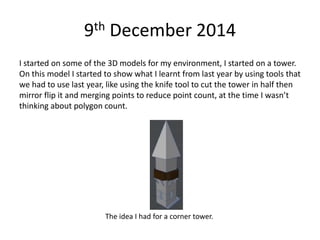
I started on some of the 3D models for my environment, I started on a tower.
On this model I started to show what I learnt from last year by using tools that
we had to use last year, like using the knife tool to cut the tower in half then
mirror flip it and merging points to reduce point count, at the time I wasn’t
thinking about polygon count.
The idea I had for a corner tower.
12th December 2014
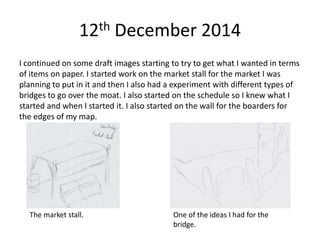
I continued on some draft images starting to try to get what I wanted in terms
of items on paper. I started work on the market stall for the market I was
planning to put in it and then I also had a experiment with different types of
bridges to go over the moat. I also started on the schedule so I knew what I
started and when I started it. I also started on the wall for the boarders for
the edges of my map.
The market stall. One of the ideas I had for the
bridge.
16th December 2014
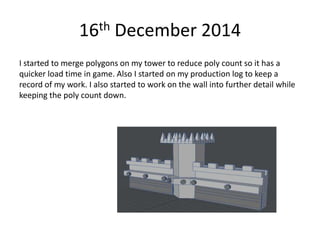
I started to merge polygons on my tower to reduce poly count so it has a
quicker load time in game. Also I started on my production log to keep a
record of my work. I also started to work on the wall into further detail while
keeping the poly count down.
6th January 2015
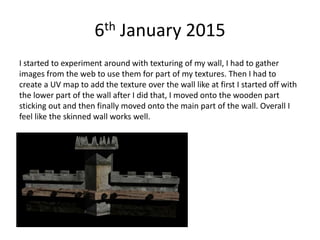
I started to experiment around with texturing of my wall, I had to gather
images from the web to use them for part of my textures. Then I had to
create a UV map to add the texture over the wall like at first I started off with
the lower part of the wall after I did that, I moved onto the wooden part
sticking out and then finally moved onto the main part of the wall. Overall I
feel like the skinned wall works well.
9th January 2015
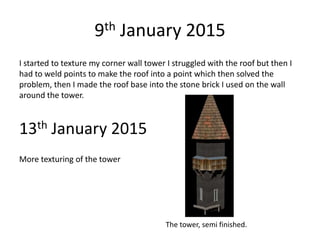
I started to texture my corner wall tower I struggled with the roof but then I
had to weld points to make the roof into a point which then solved the
problem, then I made the roof base into the stone brick I used on the wall
around the tower.
13th January 2015
More texturing of the tower
The tower, semi finished.
16th January 2015
I continued texturing my tower finally texturing my stairs, I encountered a
problem with going over my quota on CGTextures, despite this setback I
managed to overcome it by getting a screen shot of the image I wanted.
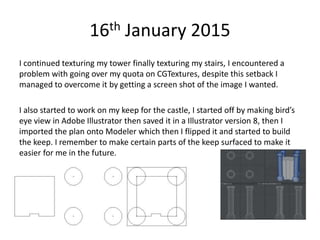
I also started to work on my keep for the castle, I started off by making bird’s
eye view in Adobe Illustrator then saved it in a Illustrator version 8, then I
imported the plan onto Modeler which then I flipped it and started to build
the keep. I remember to make certain parts of the keep surfaced to make it
easier for me in the future.

)Production log (models)

  • 1.
  • 2.
    3rd December 2014 Istarted by doing a Tardis to refresh my skills within Modeler, with the Tardis we used bevels and extrude/multishift and then moved the selected polygon to move into a certain shape I wanted, then I made a cube and then started to make it into a Rubix cube so I can apply surfaces/textures. The Rubix Cube, that I’ve made
  • 3.
    5th December 2014 Istarted by starting my draft ideas, I started off with drawing a bird’s eye view over my map of how I wanted it to look but upon receiving feedback I started to try to draw in detail on how I want some stuff to look Detailed inside view (Left), Exterior of walls (Right)
  • 4.
    9th December 2014 Istarted on some of the 3D models for my environment, I started on a tower. On this model I started to show what I learnt from last year by using tools that we had to use last year, like using the knife tool to cut the tower in half then mirror flip it and merging points to reduce point count, at the time I wasn’t thinking about polygon count. The idea I had for a corner tower.
  • 5.
    12th December 2014 Icontinued on some draft images starting to try to get what I wanted in terms of items on paper. I started work on the market stall for the market I was planning to put in it and then I also had a experiment with different types of bridges to go over the moat. I also started on the schedule so I knew what I started and when I started it. I also started on the wall for the boarders for the edges of my map. The market stall. One of the ideas I had for the bridge.
  • 6.
    16th December 2014 Istarted to merge polygons on my tower to reduce poly count so it has a quicker load time in game. Also I started on my production log to keep a record of my work. I also started to work on the wall into further detail while keeping the poly count down.
  • 7.
    6th January 2015 Istarted to experiment around with texturing of my wall, I had to gather images from the web to use them for part of my textures. Then I had to create a UV map to add the texture over the wall like at first I started off with the lower part of the wall after I did that, I moved onto the wooden part sticking out and then finally moved onto the main part of the wall. Overall I feel like the skinned wall works well.
  • 8.
    9th January 2015 Istarted to texture my corner wall tower I struggled with the roof but then I had to weld points to make the roof into a point which then solved the problem, then I made the roof base into the stone brick I used on the wall around the tower. 13th January 2015 More texturing of the tower The tower, semi finished.
  • 9.
    16th January 2015 Icontinued texturing my tower finally texturing my stairs, I encountered a problem with going over my quota on CGTextures, despite this setback I managed to overcome it by getting a screen shot of the image I wanted. I also started to work on my keep for the castle, I started off by making bird’s eye view in Adobe Illustrator then saved it in a Illustrator version 8, then I imported the plan onto Modeler which then I flipped it and started to build the keep. I remember to make certain parts of the keep surfaced to make it easier for me in the future.