




Steps to create custom profile
frames on Facebook
A motion-blog by
Facebook now introduced a feature known as “Create a
Frame” or custom profile frames in which you can create
custom frames for profile photos.
Here is the step by
step process
given
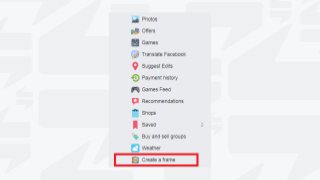
To begin with, you need to check the
‘Explore’ tab on the extreme left of your
Facebook homepage and select ‘Create a
Frame’.
In Frames Studio, the designs you create
must be uploaded in the form of a PNG file
only. You need to ensure that your design
background is transparent and doesn’t
contain logos or watermark of any brand.
You can schedule your frame by giving it a
start date and the end date. You can also
set targeted locations for your frames and
add relevant keywords that will make it
easy for people to search for your frame.
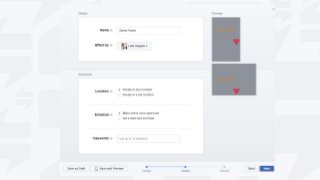
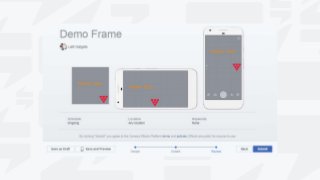
A preview of uploaded designs will be
displayed prior to your submission.
What to do next?
After submission, the frame generally
takes 1 week for approval. The frame
must adhere to the terms and conditions
of Facebook policies.
Once approved, your followers will then
be able to add your frame to their
respective photos from the camera
Effects Platform.
Share this video to let everyone know about it
Connect with us on
/iengageonline
or visit
www.i-engage.in

Process to create custom profile frames on facebook

  • 1.
    Steps to createcustom profile frames on Facebook
  • 2.
  • 3.
    Facebook now introduceda feature known as “Create a Frame” or custom profile frames in which you can create custom frames for profile photos.
  • 4.
    Here is thestep by step process given
  • 5.
    To begin with,you need to check the ‘Explore’ tab on the extreme left of your Facebook homepage and select ‘Create a Frame’.
  • 7.
    In Frames Studio,the designs you create must be uploaded in the form of a PNG file only. You need to ensure that your design background is transparent and doesn’t contain logos or watermark of any brand.
  • 10.
    You can scheduleyour frame by giving it a start date and the end date. You can also set targeted locations for your frames and add relevant keywords that will make it easy for people to search for your frame.
  • 12.
    A preview ofuploaded designs will be displayed prior to your submission.
  • 14.
  • 15.
    After submission, theframe generally takes 1 week for approval. The frame must adhere to the terms and conditions of Facebook policies.
  • 16.
    Once approved, yourfollowers will then be able to add your frame to their respective photos from the camera Effects Platform.
  • 17.
    Share this videoto let everyone know about it Connect with us on /iengageonline or visit www.i-engage.in