Process Lifecycle: A
JourneyThrough Windows
and Linux
Exploring the core concepts of process management across two
leading operating systems.
By Daksh Rana
2.
Defining a Process:More Than Just a Running
Program
Executable Code
The instructions to be run.
Memory Space
Dedicated area for data and variables.
Resources
Files, I/O devices, network connections.
Execution Context
CPU registers, program counter, stack.
A process is an instance of an executing program,
encompassing all its necessary components.
3.
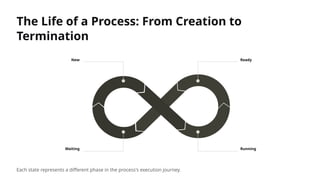
The Life ofa Process: From Creation to
Termination
New Ready
Running
Waiting
Each state represents a different phase in the process's execution journey.
4.
Windows Process Management:An Inside Look
• Executive Layer: Handles fundamental system services.
• Kernel: Manages core operations, scheduling, memory.
• Process Control Blocks (PCBs): Data structures holding process info.
• Threads: Units of execution within a process, enabling concurrency.
Windows employs a robust architecture for efficient
process handling.
5.
Case Study: Launchingand Managing a
Program in Windows
01
User Initiates
Clicking an icon, running an executable.
02
OS Creates Process
Allocates PID, memory, loads executable code.
03
Threads Begin Execution
Main thread starts, child threads may follow.
04
Resource Management
File access, network connections handled.
05
Termination
Process completes, resources released.
Task Manager provides insights into running processes and resource usage.
6.
Linux Process Management:The Unix Way
Linux, true to its Unix heritage, manages processes
with distinct principles.
• Fork-Exec Model: Parent process duplicates, then child loads new program.
• Process ID (PID): Unique identifier for each process.
• Parent-Child Relationships: Processes form a tree structure.
• init/systemd: The first process, managing all others.
7.
Case Study: UnderstandingDaemons and
Services in Linux
Daemons
Background processes
performing system tasks (e.g.,
web server, printer spooler).
No Controlling Terminal
Run independently of user logins,
often started at boot.
Service Management
Managed by systemd (or init)
for starting, stopping, restarting.
These invisible workers are critical for system functionality and stability.
8.
Key Takeaways &Future Considerations
• Fundamental Similarities: Both OS manage processes through creation, states, and termination.
• Architectural Differences: Windows uses threads heavily; Linux employs fork-exec model.
• Resource Management: Efficient allocation and deallocation are crucial for performance.
Understanding process lifecycles is key to system administration, debugging, and software development.