Procedure Text
How to Upload Video on YouTube
Start!
Made By :
658-956-87
Salsabilaintanmahara@gmail.com
SALSABILA INTAN
MAHARA
(06/XII MIPA 5)
2
3
4
1
+62 858 694 618 05
YouTube
What is YouTube ??
YouTube is a platform that
provides a simple way for
people to store videos
online. YouTube videos
cover any topic anyone cares
to upload a video about. So,
with uploading video on
YouTube, you can share your
knowledge and passion with
others.
2
3
4
1
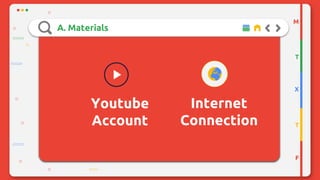
A. Materials
Youtube
Account
M
T
X
T
F
Internet
Connection
B. Steps/Method
www.youtube.com
M
T
X
T
F
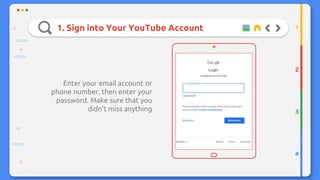
1. Sign into Your YouTube Account
Enter your email account or
phone number, then enter your
password. Make sure that you
didn’t miss anything
2
3
4
1
2. Click Camera Icon on The Top of Page
2
3
4
1
Then, choose
“Upload
video” menu
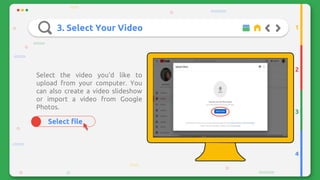
3. Select Your Video
Select file
Select the video you'd like to
upload from your computer. You
can also create a video slideshow
or import a video from Google
Photos.
2
3
4
1
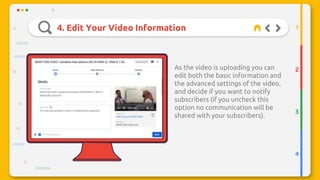
4. Edit Your Video Information
2
3
4
1
This icon
As the video is uploading you can
edit both the basic information and
the advanced settings of the video,
and decide if you want to notify
subscribers (if you uncheck this
option no communication will be
shared with your subscribers).
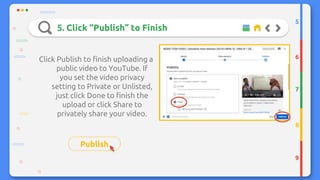
5. Click “Publish” to Finish
Click Publish to finish uploading a
public video to YouTube. If
you set the video privacy
setting to Private or Unlisted,
just click Done to finish the
upload or click Share to
privately share your video.
Publish
5
6
7
8
9
And Your Video is Readyy
M
T
X
T
F
https://youtu.be/Irl82C1KkqE
CREDITS: This presentation template was created by Slidesgo, including icons
by Flaticon, and infographics & images by Freepik.
Thank You
Do you have any questions?
Please keep this slide for attribution.

PROCEDURE TEXT IN ENGLISH ABOUT TECHNOLOGY

  • 1.
    Procedure Text How toUpload Video on YouTube Start!
  • 2.
    Made By : 658-956-87 Salsabilaintanmahara@gmail.com SALSABILAINTAN MAHARA (06/XII MIPA 5) 2 3 4 1 +62 858 694 618 05
  • 3.
    YouTube What is YouTube?? YouTube is a platform that provides a simple way for people to store videos online. YouTube videos cover any topic anyone cares to upload a video about. So, with uploading video on YouTube, you can share your knowledge and passion with others. 2 3 4 1
  • 4.
  • 5.
  • 6.
    1. Sign intoYour YouTube Account Enter your email account or phone number, then enter your password. Make sure that you didn’t miss anything 2 3 4 1
  • 7.
    2. Click CameraIcon on The Top of Page 2 3 4 1 Then, choose “Upload video” menu
  • 8.
    3. Select YourVideo Select file Select the video you'd like to upload from your computer. You can also create a video slideshow or import a video from Google Photos. 2 3 4 1
  • 9.
    4. Edit YourVideo Information 2 3 4 1 This icon As the video is uploading you can edit both the basic information and the advanced settings of the video, and decide if you want to notify subscribers (if you uncheck this option no communication will be shared with your subscribers).
  • 10.
    5. Click “Publish”to Finish Click Publish to finish uploading a public video to YouTube. If you set the video privacy setting to Private or Unlisted, just click Done to finish the upload or click Share to privately share your video. Publish 5 6 7 8 9
  • 11.
    And Your Videois Readyy M T X T F https://youtu.be/Irl82C1KkqE
  • 12.
    CREDITS: This presentationtemplate was created by Slidesgo, including icons by Flaticon, and infographics & images by Freepik. Thank You Do you have any questions? Please keep this slide for attribution.