Prioritize Your Critical CSS and Images

WebRTCfast
to render your site
Jan-Willem Maessen

PageSpeed Optimization Library
Google
jmaessen@google.com
Prioritizing Critical CSS and Images Makes Render Fast

jmaessen@google
Inline critical CSS in <head>
Inline low res visible images
Lazy load everything else
jmaessen@google
Users Expect Speed
Delay

User reaction

0 - 100 ms

Instant

100 - 300 ms

Slight perceptible delay

300 - 1000 ms

Task focus, perceptible delay

1 s+

Mental context switch

10 s+

I'll come back later...

Our pages
should render in
1000 ms or less
Website Abandonment (Strangeloop)

Ilya Grigorik (Go to his talk)
BUT
jmaessen@google
Mobile web performance is
crippled by network latency
We need to build fast pages for today’s devices

jmaessen@google
Network Performance Varies Even in the Lab

jmaessen@google
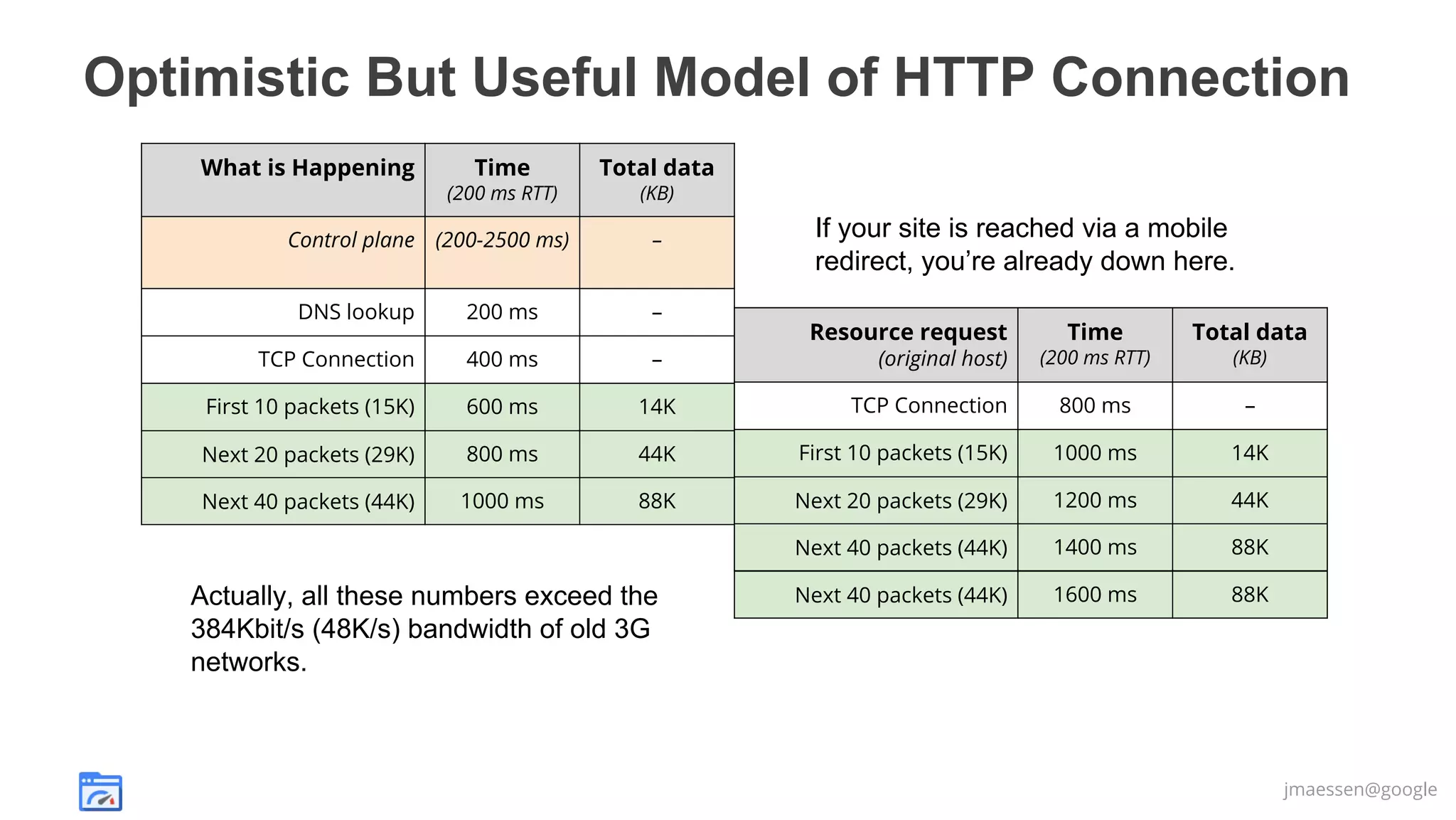
Optimistic But Useful Model of HTTP Connection
What is Happening

Time

Total data

(200 ms RTT)

(KB)

Control plane (200-2500 ms)

–

DNS lookup

200 ms

–

TCP Connection

400 ms

–

First 10 packets (15K)

600 ms

14K

Next 20 packets (29K)

800 ms

Next 40 packets (44K)

1000 ms

If your site is reached via a mobile
redirect, you’re already down here.
Time

Total data

(200 ms RTT)

(KB)

TCP DNS lookup
Connection

800 ms

–

44K

First 10 packets (15K)
TCP Connection

1000 ms

14K
–

88K

First 10
(15K)
Next 20 packets (29K)

1200 ms

44K
14K

40
(44K)
Next 20 packets (29K)

1400 ms

88K
44K

Next 40 packets (44K)

1600 ms

88K

Actually, all these numbers exceed the
384Kbit/s (48K/s) bandwidth of old 3G
networks.

Resource request
(original host)
(second

jmaessen@google
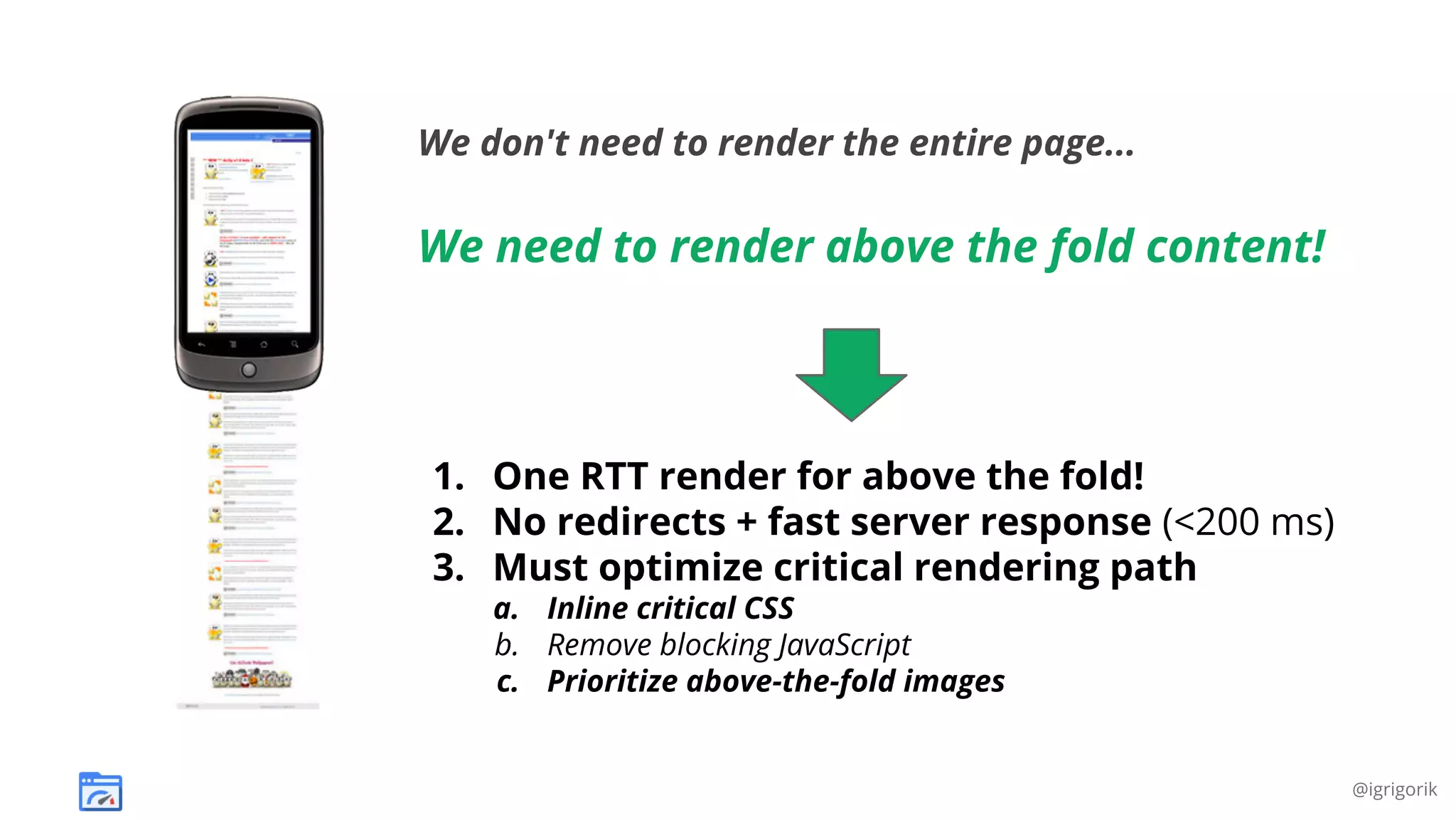
We don't need to render the entire page...

We need to render above the fold content!

1. One RTT render for above the fold!
2. No redirects + fast server response (<200 ms)
3. Must optimize critical rendering path
a. Inline critical CSS
b. Remove blocking JavaScript
c. Prioritize above-the-fold images

@igrigorik
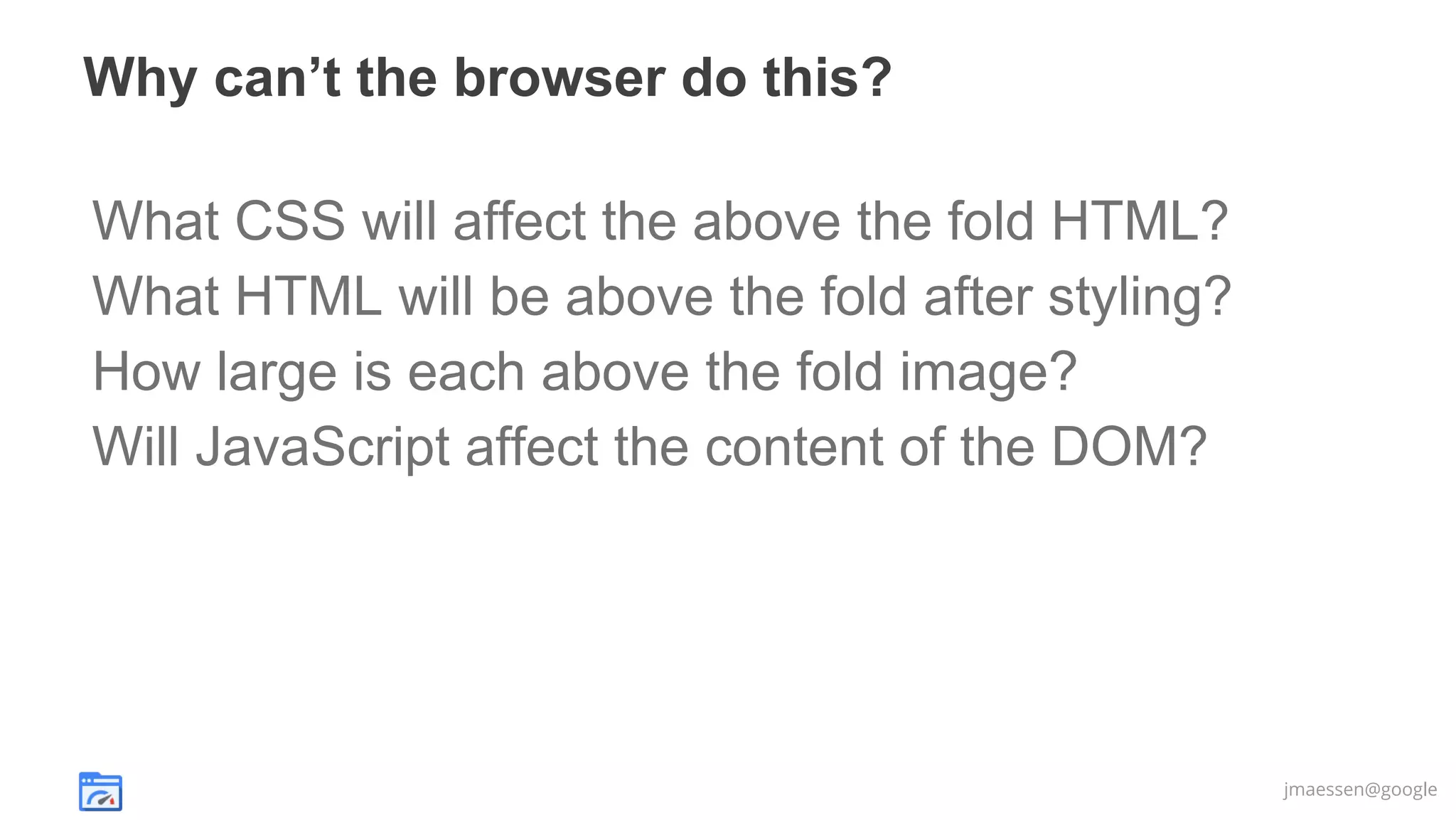
Why can’t the browser do this?
What CSS will affect the above the fold HTML?
What HTML will be above the fold after styling?
How large is each above the fold image?
Will JavaScript affect the content of the DOM?

jmaessen@google
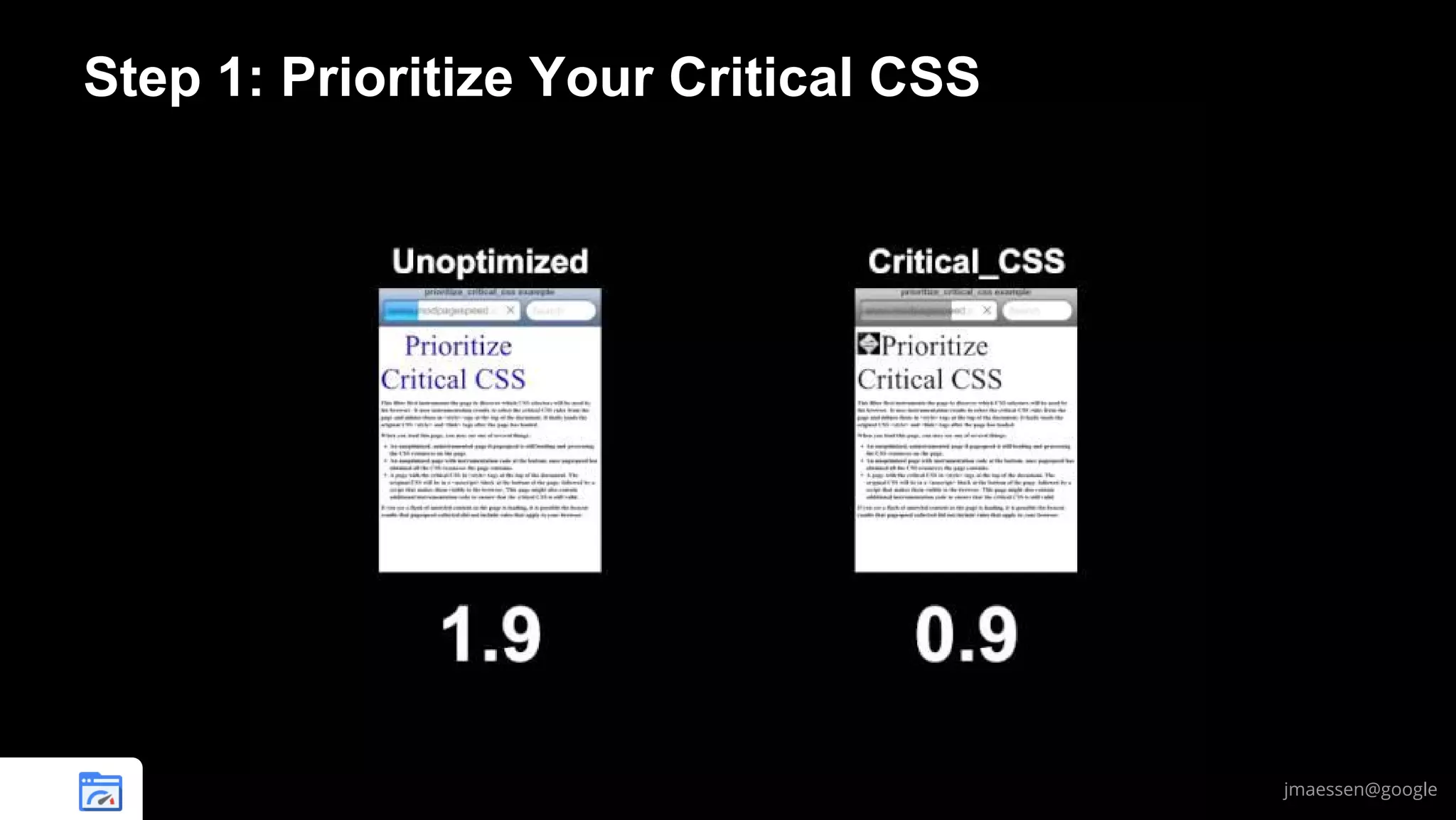
Step 1: Prioritize Your Critical CSS

jmaessen@google
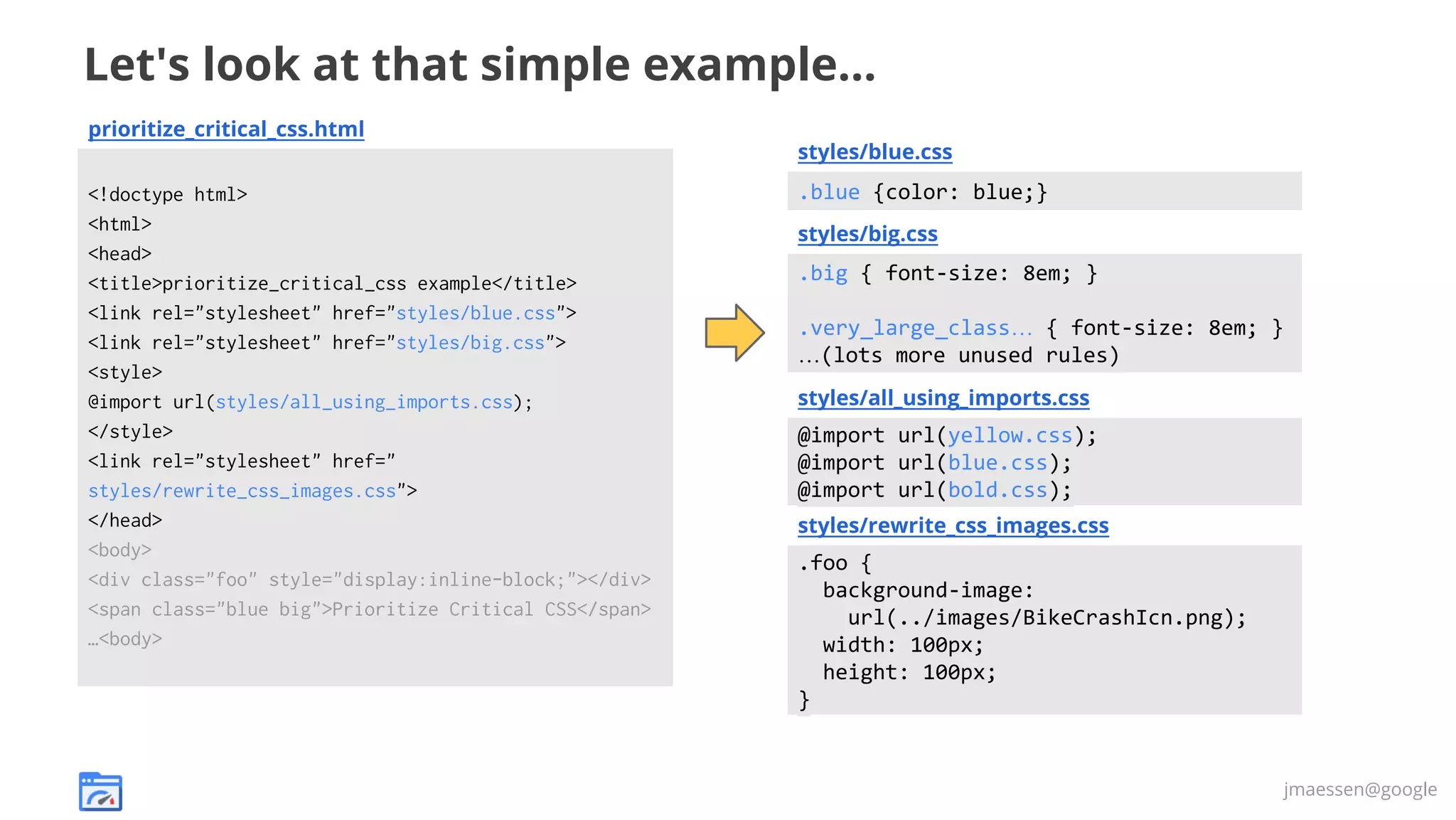
Let's look at that simple example...
prioritize_critical_css.html
styles/blue.css
<!doctype html>
<html>
<head>
<title>prioritize_critical_css example</title>
<link rel="stylesheet" href="styles/blue.css">
<link rel="stylesheet" href="styles/big.css">
<style>
@import url(styles/all_using_imports.css);
</style>
<link rel="stylesheet" href="
styles/rewrite_css_images.css">
</head>
<body>
<div class="foo" style="display:inline-block;"></div>
<span class="blue big">Prioritize Critical CSS</span>
…<body>

.blue {color: blue;}
styles/big.css

.big { font-size: 8em; }
.very_large_class… { font-size: 8em; }
…(lots more unused rules)
styles/all_using_imports.css

@import url(yellow.css);
@import url(blue.css);
@import url(bold.css);
styles/rewrite_css_images.css

.foo {
background-image:
url(../images/BikeCrashIcn.png);
width: 100px;
height: 100px;
}

jmaessen@google
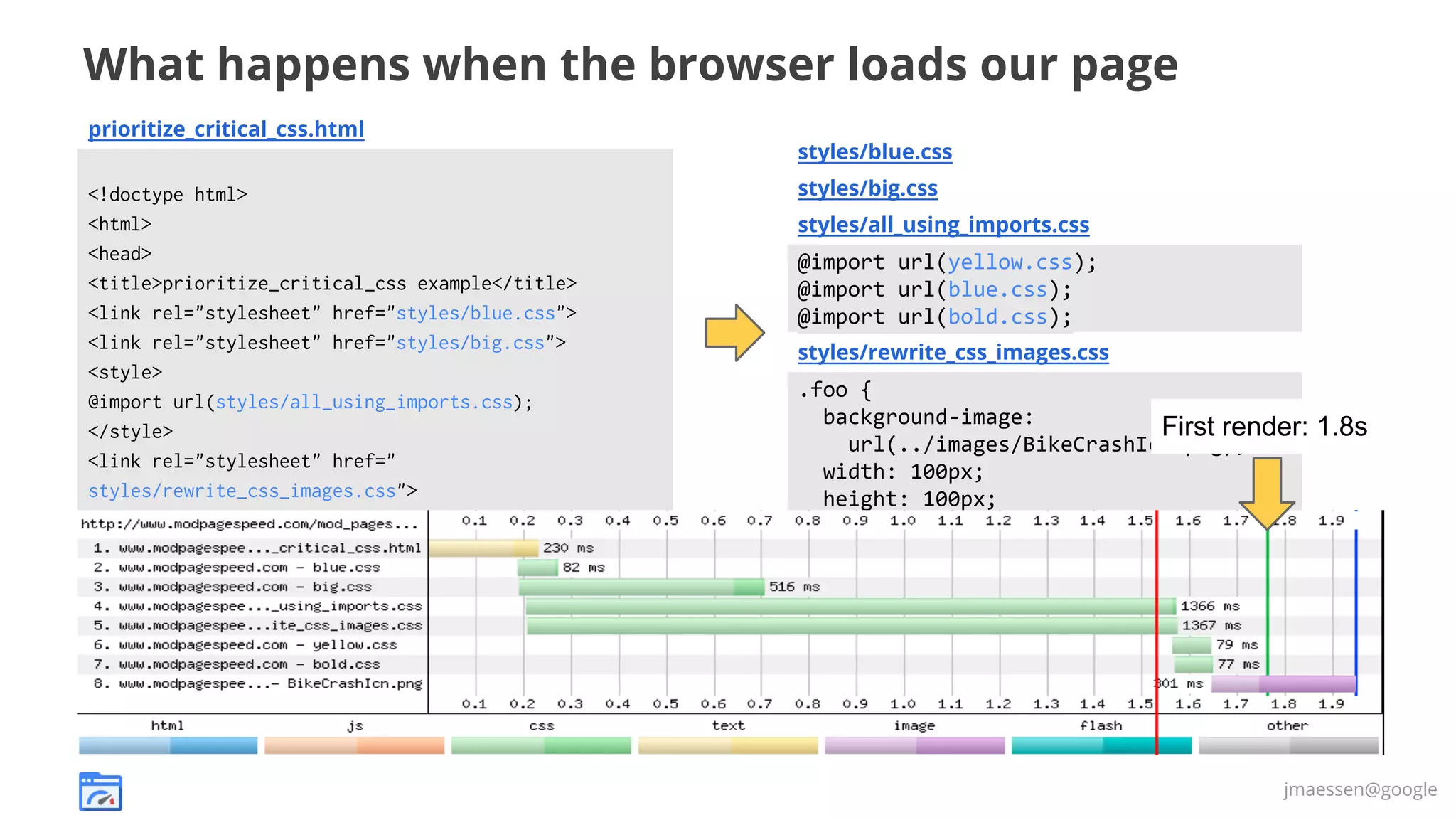
What happens when the browser loads our page
prioritize_critical_css.html
styles/blue.css
<!doctype html>
<html>
<head>
<title>prioritize_critical_css example</title>
<link rel="stylesheet" href="styles/blue.css">
<link rel="stylesheet" href="styles/big.css">
<style>
@import url(styles/all_using_imports.css);
</style>
<link rel="stylesheet" href="
styles/rewrite_css_images.css">
</head>
<body>
<div class="foo" style="display:inline-block;"></div>
<span class="blue big">Prioritize Critical CSS</span>
…<body>

styles/big.css
styles/all_using_imports.css

@import url(yellow.css);
@import url(blue.css);
@import url(bold.css);
styles/rewrite_css_images.css

.foo {
background-image:
First render:
url(../images/BikeCrashIcn.png);
width: 100px;
height: 100px;
}

1.8s

jmaessen@google
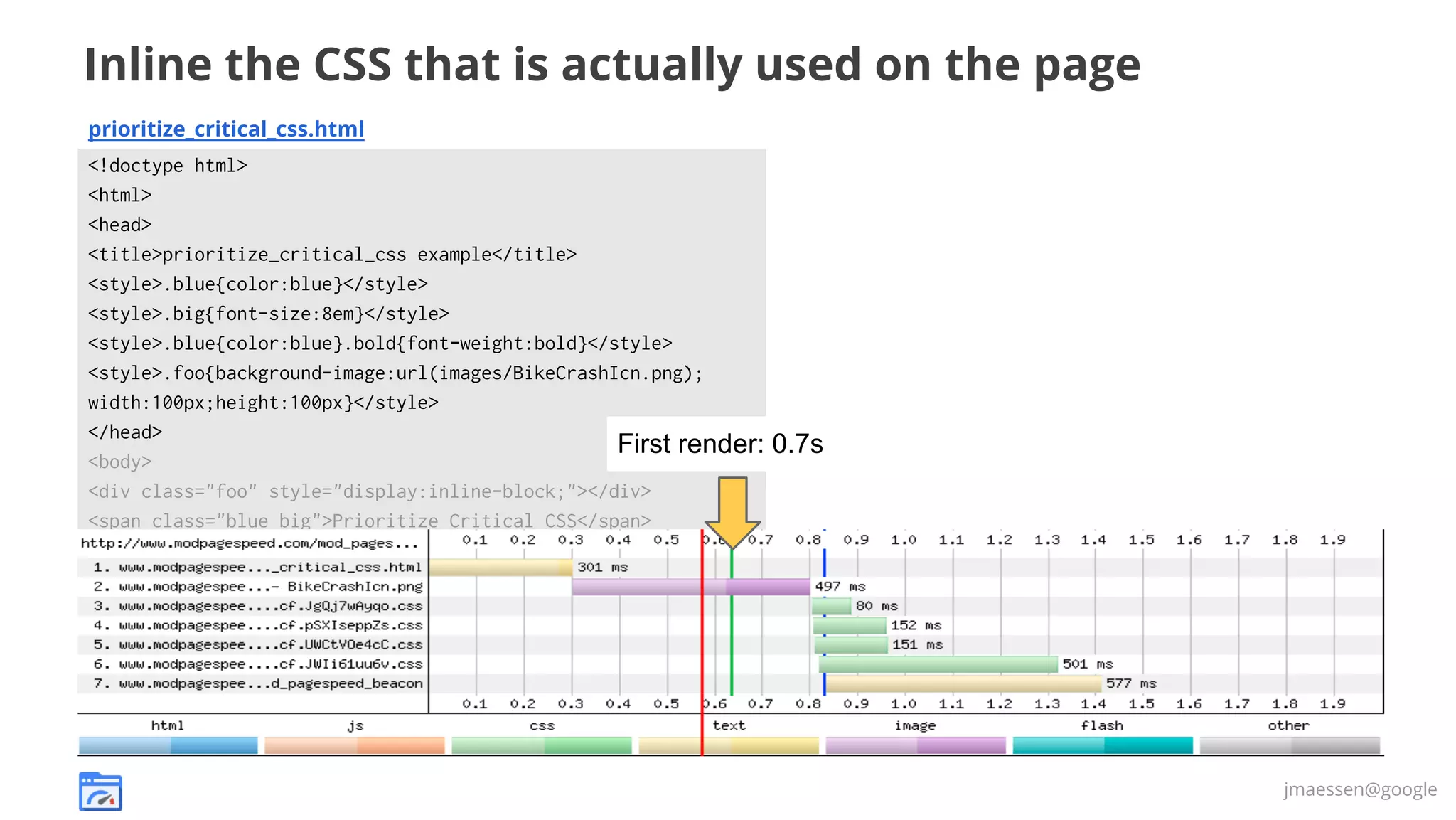
Inline the CSS that is actually used on the page
prioritize_critical_css.html
<!doctype html>
<html>
<head>
<title>prioritize_critical_css example</title>
<style>.blue{color:blue}</style>
<style>.big{font-size:8em}</style>
<style>.blue{color:blue}.bold{font-weight:bold}</style>
<style>.foo{background-image:url(images/BikeCrashIcn.png);
width:100px;height:100px}</style>
</head>
First render:
<body>
<div class="foo" style="display:inline-block;"></div>
<span class="blue big">Prioritize Critical CSS</span>
…<body>

0.7s

jmaessen@google
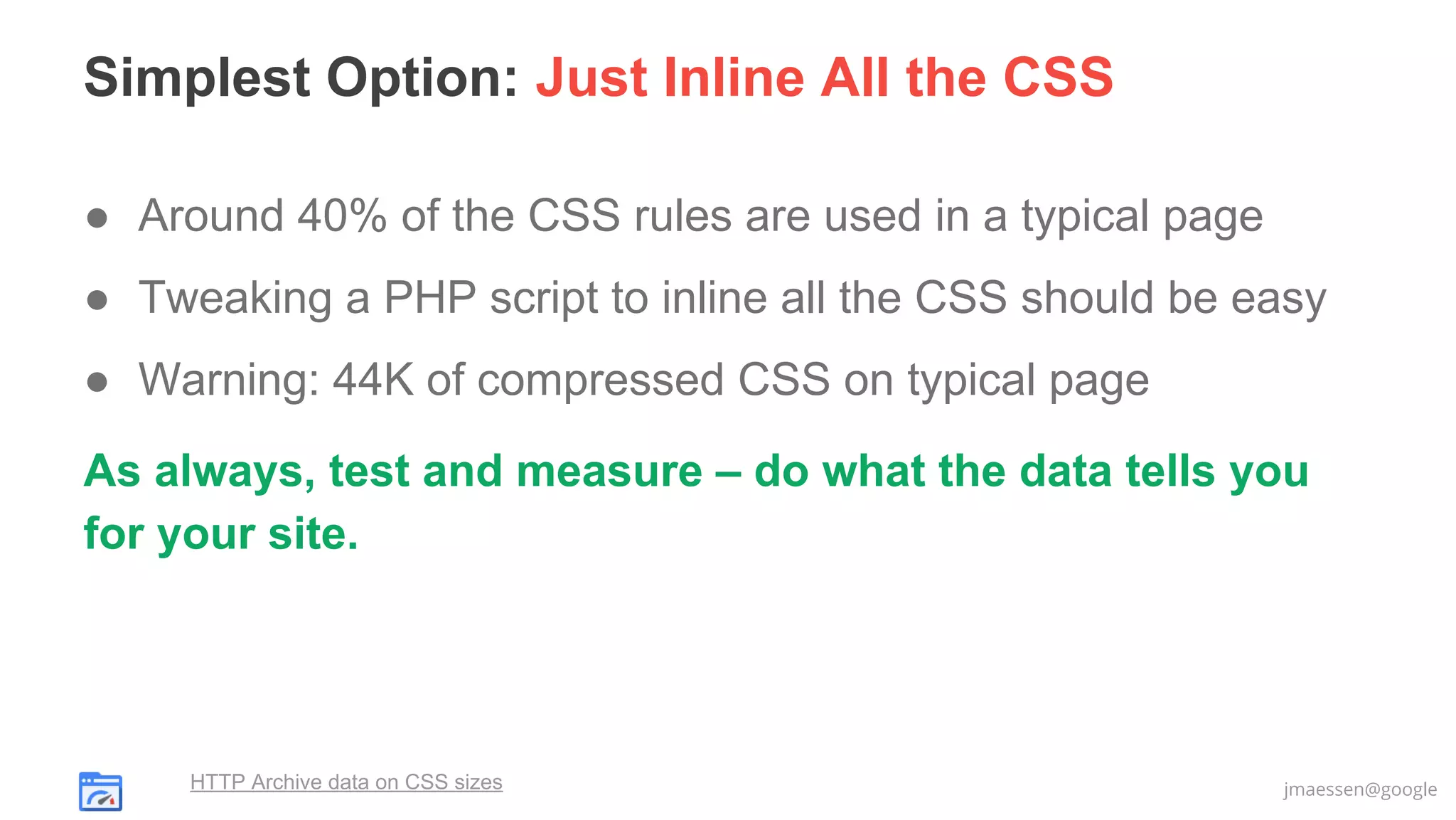
Simplest Option: Just Inline All the CSS
● Around 40% of the CSS rules are used in a typical page
● Tweaking a PHP script to inline all the CSS should be easy
● Warning: 44K of compressed CSS on typical page
As always, test and measure – do what the data tells you
for your site.

HTTP Archive data on CSS sizes

jmaessen@google
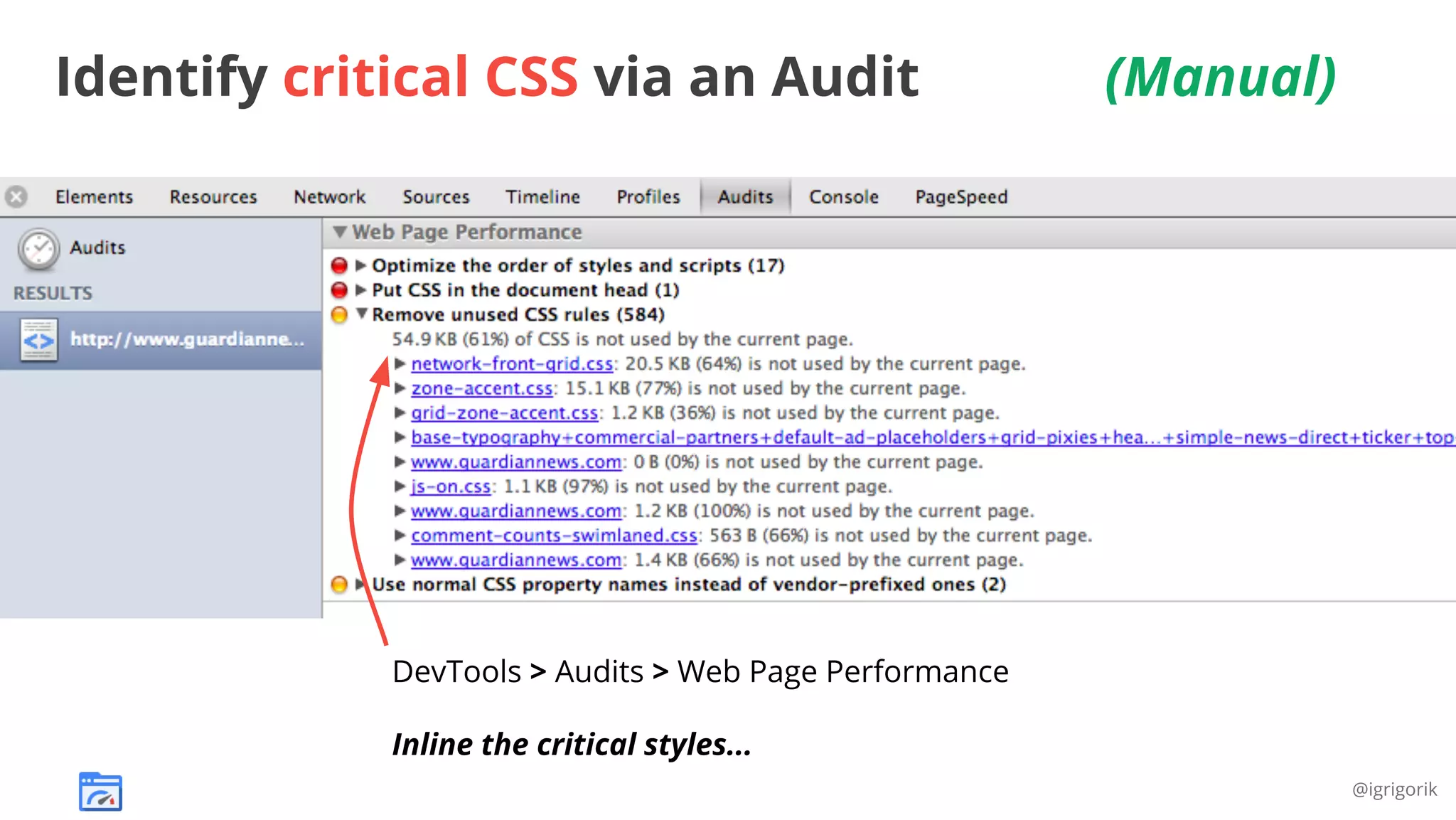
Identify critical CSS via an Audit

(Manual)

DevTools > Audits > Web Page Performance
Inline the critical styles...
@igrigorik
Let PageSpeed Find Critical CSS Automatically
ModPagespeedEnableFilters prioritize_critical_css

# Apache

pagespeed EnableFilters

# Nginx

prioritize_critical_css;

Instrumented
Page

PageSpeed
Server

Beacon result:
List of critical selectors
Client
Browser

Downside: first access to the page won’t be optimized.
Upside: will be based on actual client browser behavior
jmaessen@google
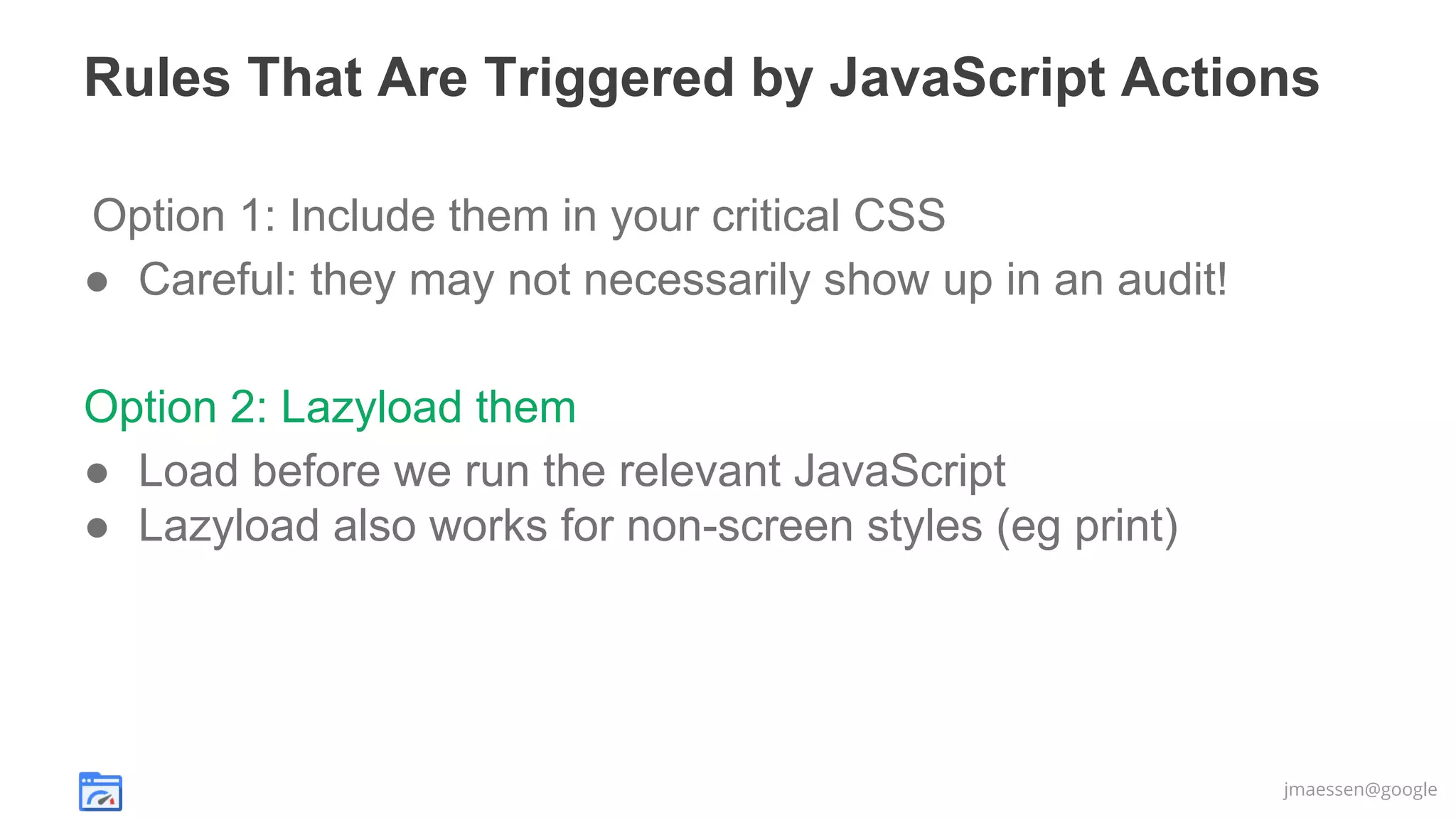
Rules That Are Triggered by JavaScript Actions
Option 1: Include them in your critical CSS
● Careful: they may not necessarily show up in an audit!
Option 2: Lazyload them
● Load before we run the relevant JavaScript
● Lazyload also works for non-screen styles (eg print)

jmaessen@google
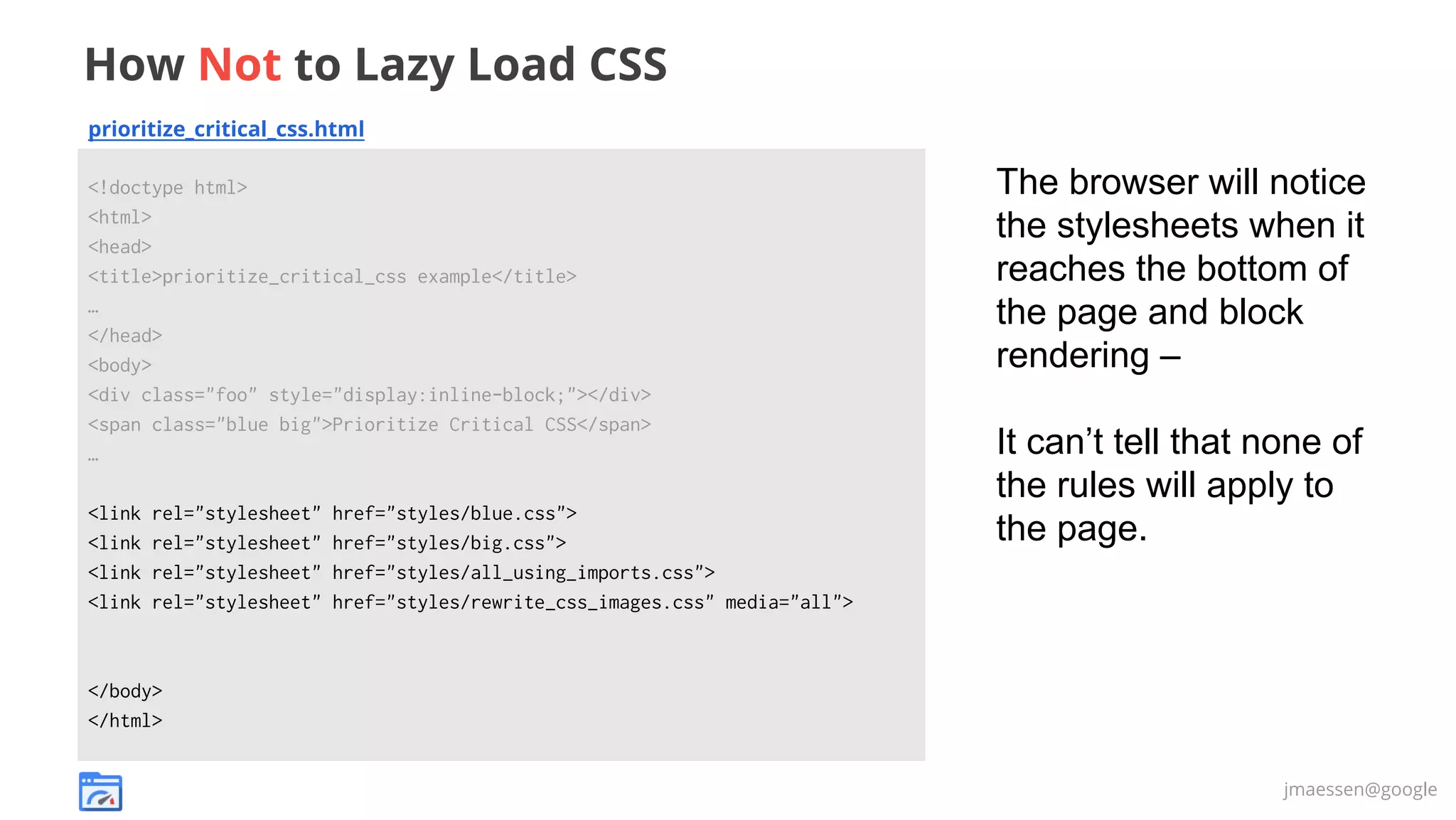
How Not to Lazy Load CSS
prioritize_critical_css.html
<!doctype html>
<html>
<head>
<title>prioritize_critical_css example</title>
…
</head>
<body>
<div class="foo" style="display:inline-block;"></div>
<span class="blue big">Prioritize Critical CSS</span>
…
<link
<link
<link
<link

rel="stylesheet"
rel="stylesheet"
rel="stylesheet"
rel="stylesheet"

href="styles/blue.css">
href="styles/big.css">
href="styles/all_using_imports.css">
href="styles/rewrite_css_images.css" media="all">

The browser will notice
the stylesheets when it
reaches the bottom of
the page and block
rendering –
It can’t tell that none of
the rules will apply to
the page.

</body>
</html>
jmaessen@google
How PageSpeed Optimization Library Lazy Loads CSS
prioritize_critical_css.html
<!doctype html>
<html>
<head>
<title>prioritize_critical_css example</title>
…
</head>
<body>
<div class="foo" style="display:inline-block;"></div>
<span class="blue big">Prioritize Critical CSS</span>
…
<noscript class="psa_add_styles">
<link rel="stylesheet" href="styles/blue.css">
<link rel="stylesheet" href="styles/big.css">
<link rel="stylesheet" href="styles/all_using_imports.css">
<link rel="stylesheet" href="styles/rewrite_css_images.css" media="all">
</noscript>
<script>...Move <noscript> to a div...</script>
</body>
</html>

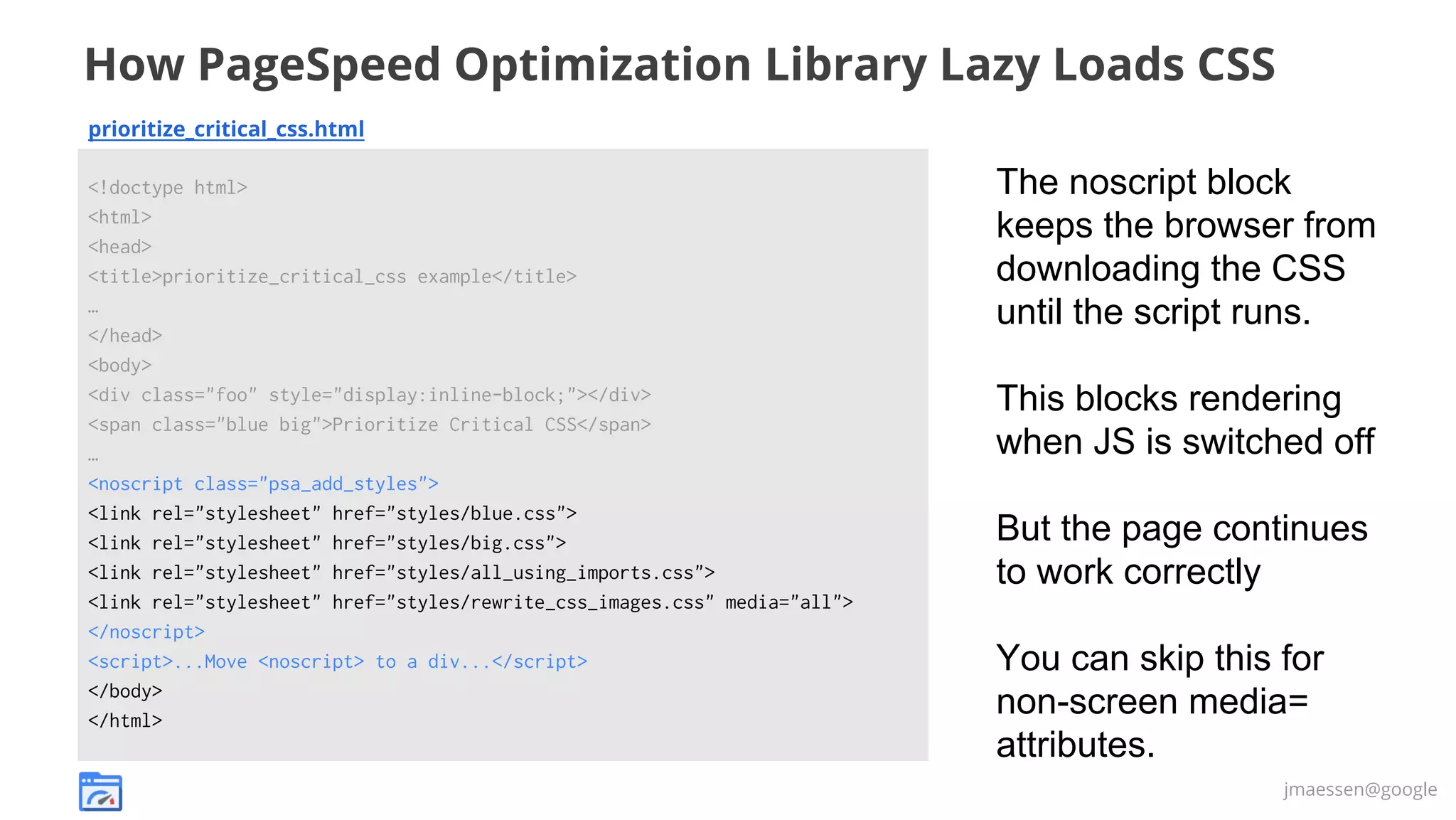
The noscript block
keeps the browser from
downloading the CSS
until the script runs.
This blocks rendering
when JS is switched off
But the page continues
to work correctly
You can skip this for
non-screen media=
attributes.
jmaessen@google
Step 2: Lazy Load Below the Fold Images

jmaessen@google
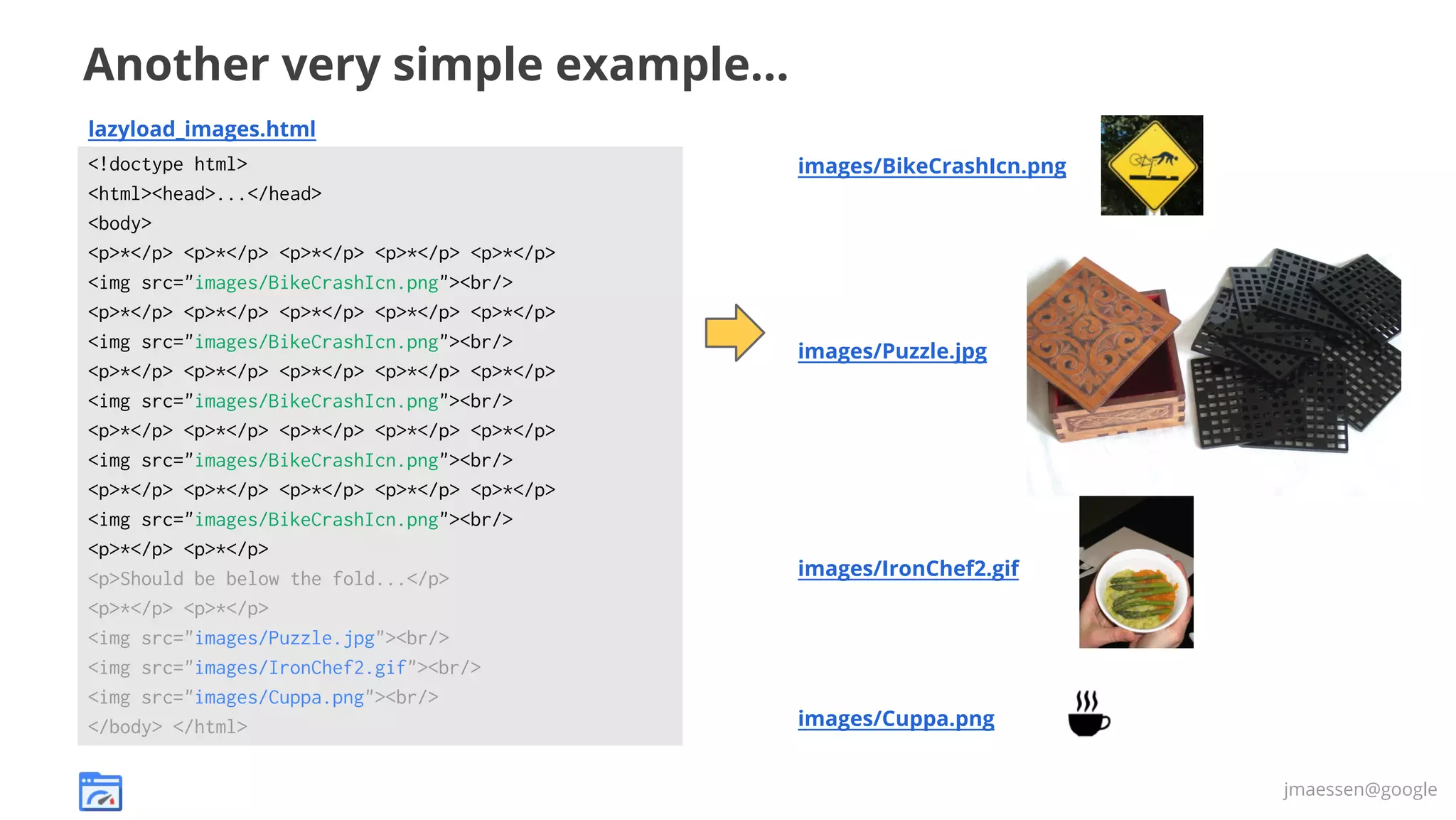
Another very simple example...
lazyload_images.html
<!doctype html>
<html><head>...</head>
<body>
<p>*</p> <p>*</p> <p>*</p> <p>*</p> <p>*</p>
<img src="images/BikeCrashIcn.png"><br/>
<p>*</p> <p>*</p> <p>*</p> <p>*</p> <p>*</p>
<img src="images/BikeCrashIcn.png"><br/>
<p>*</p> <p>*</p> <p>*</p> <p>*</p> <p>*</p>
<img src="images/BikeCrashIcn.png"><br/>
<p>*</p> <p>*</p> <p>*</p> <p>*</p> <p>*</p>
<img src="images/BikeCrashIcn.png"><br/>
<p>*</p> <p>*</p> <p>*</p> <p>*</p> <p>*</p>
<img src="images/BikeCrashIcn.png"><br/>
<p>*</p> <p>*</p>
<p>Should be below the fold...</p>
<p>*</p> <p>*</p>
<img src="images/Puzzle.jpg"><br/>
<img src="images/IronChef2.gif"><br/>
<img src="images/Cuppa.png"><br/>
</body> </html>

images/BikeCrashIcn.png

images/Puzzle.jpg

images/IronChef2.gif

images/Cuppa.png
jmaessen@google
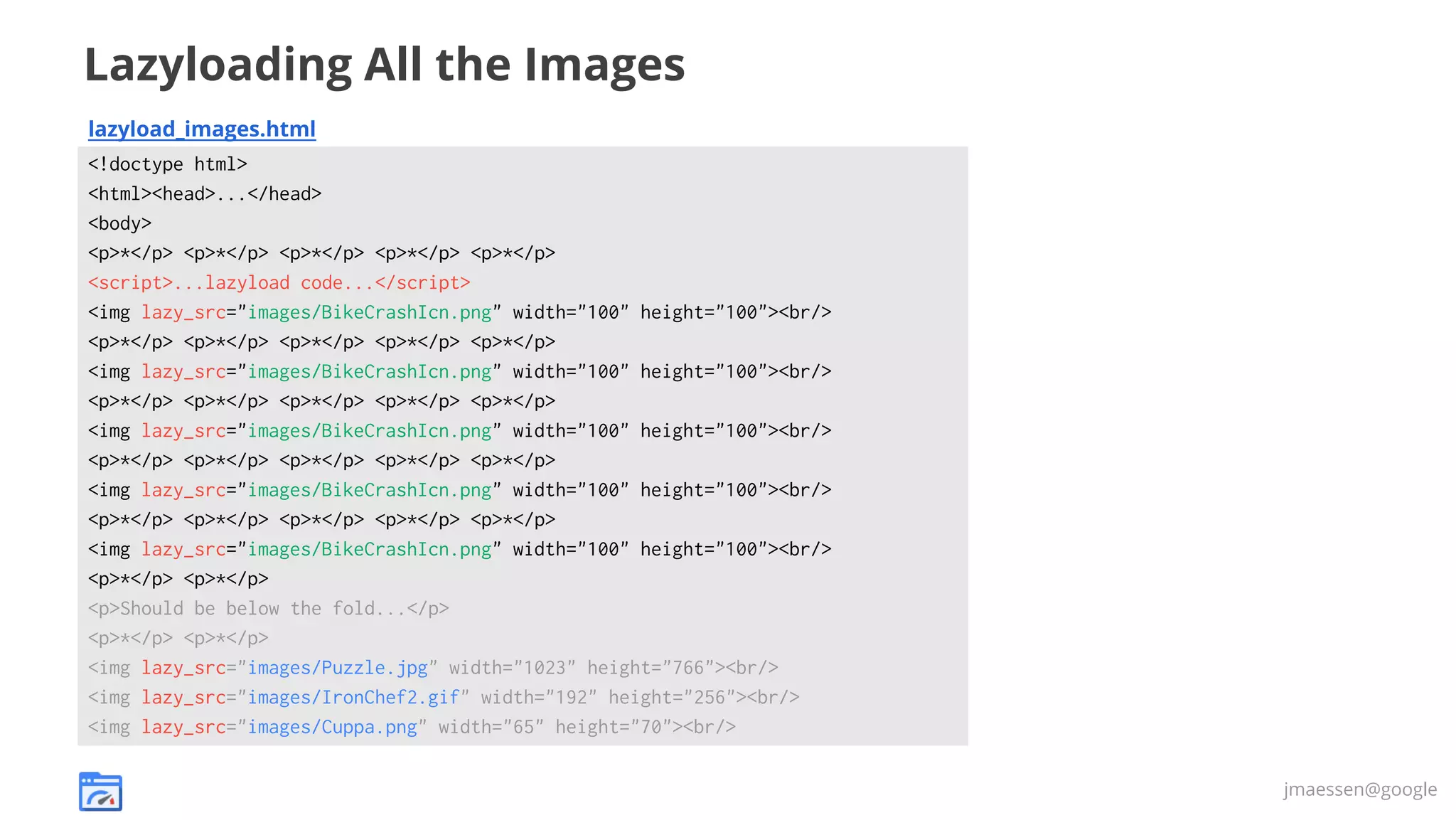
Lazyloading All the Images
lazyload_images.html
<!doctype html>
<html><head>...</head>
<body>
<p>*</p> <p>*</p> <p>*</p> <p>*</p> <p>*</p>
<script>...lazyload code...</script>
<img lazy_src="images/BikeCrashIcn.png" width="100" height="100"><br/>
<p>*</p> <p>*</p> <p>*</p> <p>*</p> <p>*</p>
<img lazy_src="images/BikeCrashIcn.png" width="100" height="100"><br/>
<p>*</p> <p>*</p> <p>*</p> <p>*</p> <p>*</p>
<img lazy_src="images/BikeCrashIcn.png" width="100" height="100"><br/>
<p>*</p> <p>*</p> <p>*</p> <p>*</p> <p>*</p>
<img lazy_src="images/BikeCrashIcn.png" width="100" height="100"><br/>
<p>*</p> <p>*</p> <p>*</p> <p>*</p> <p>*</p>
<img lazy_src="images/BikeCrashIcn.png" width="100" height="100"><br/>
<p>*</p> <p>*</p>
<p>Should be below the fold...</p>
<p>*</p> <p>*</p>
<img lazy_src="images/Puzzle.jpg" width="1023" height="766"><br/>
<img lazy_src="images/IronChef2.gif" width="192" height="256"><br/>
<img lazy_src="images/Cuppa.png" width="65" height="70"><br/>
jmaessen@google
Include Dimensions with Lazy Loaded Images

Without image dimensions (left), page reflows on image load
jmaessen@google
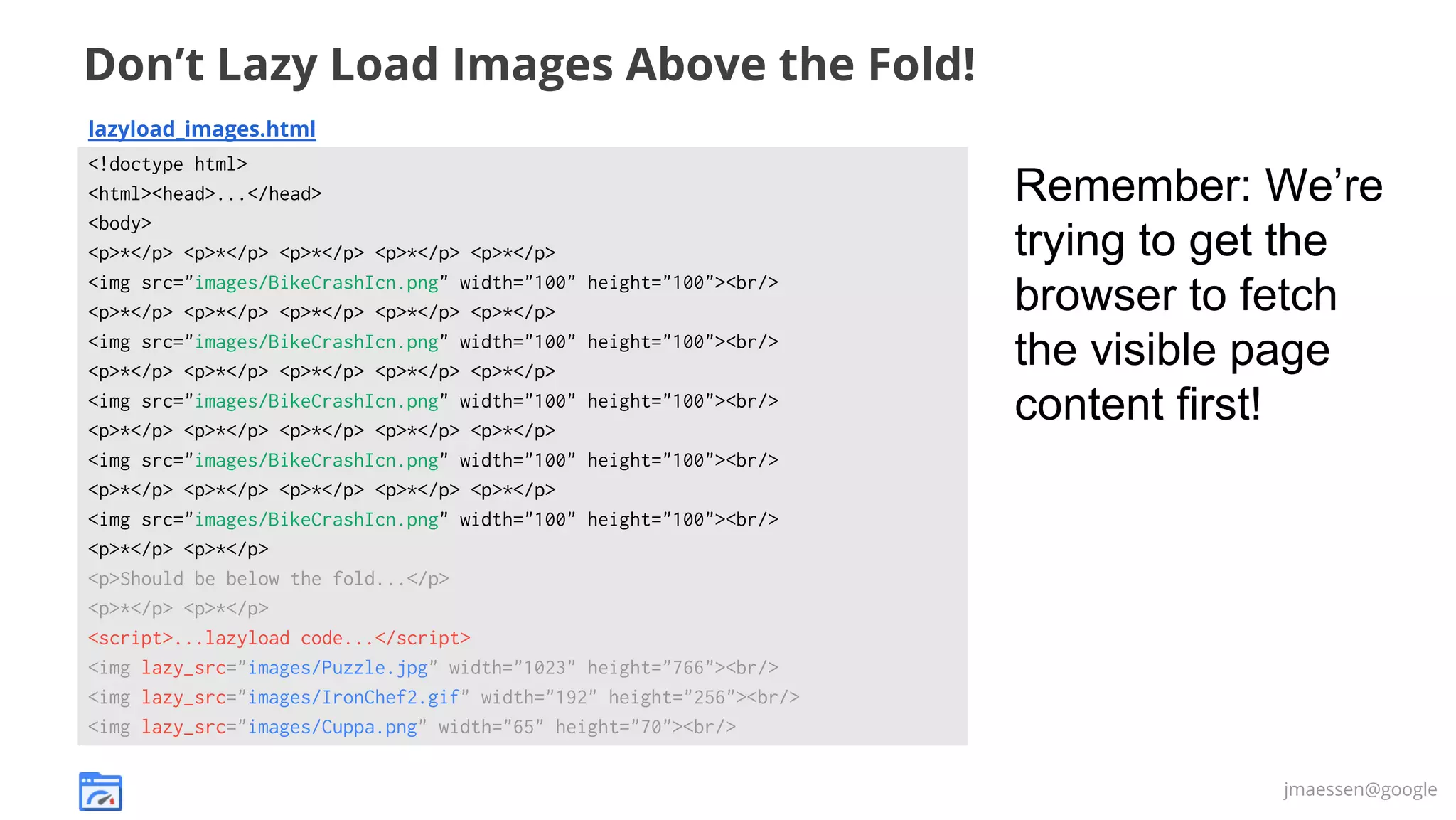
Don’t Lazy Load Images Above the Fold!
lazyload_images.html
<!doctype html>
<html><head>...</head>
<body>
<p>*</p> <p>*</p> <p>*</p> <p>*</p> <p>*</p>
<img src="images/BikeCrashIcn.png" width="100" height="100"><br/>
<p>*</p> <p>*</p> <p>*</p> <p>*</p> <p>*</p>
<img src="images/BikeCrashIcn.png" width="100" height="100"><br/>
<p>*</p> <p>*</p> <p>*</p> <p>*</p> <p>*</p>
<img src="images/BikeCrashIcn.png" width="100" height="100"><br/>
<p>*</p> <p>*</p> <p>*</p> <p>*</p> <p>*</p>
<img src="images/BikeCrashIcn.png" width="100" height="100"><br/>
<p>*</p> <p>*</p> <p>*</p> <p>*</p> <p>*</p>
<img src="images/BikeCrashIcn.png" width="100" height="100"><br/>
<p>*</p> <p>*</p>
<p>Should be below the fold...</p>
<p>*</p> <p>*</p>
<script>...lazyload code...</script>
<img lazy_src="images/Puzzle.jpg" width="1023" height="766"><br/>
<img lazy_src="images/IronChef2.gif" width="192" height="256"><br/>
<img lazy_src="images/Cuppa.png" width="65" height="70"><br/>

Remember: We’re
trying to get the
browser to fetch
the visible page
content first!

jmaessen@google
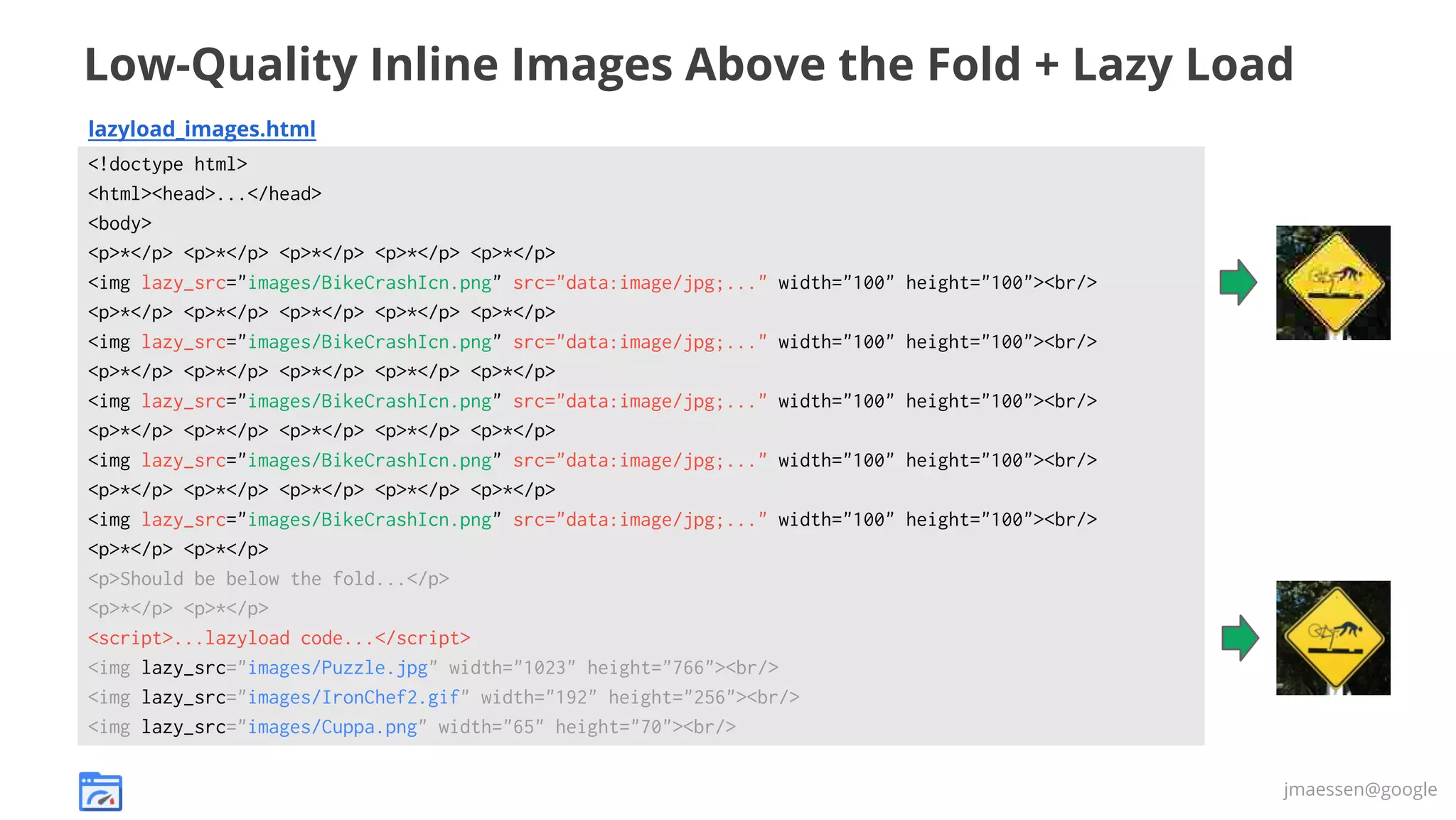
Low-Quality Inline Images Above the Fold + Lazy Load
lazyload_images.html
<!doctype html>
<html><head>...</head>
<body>
<p>*</p> <p>*</p> <p>*</p> <p>*</p> <p>*</p>
<img lazy_src="images/BikeCrashIcn.png" src="data:image/jpg;..." width="100"
<p>*</p> <p>*</p> <p>*</p> <p>*</p> <p>*</p>
<img lazy_src="images/BikeCrashIcn.png" src="data:image/jpg;..." width="100"
<p>*</p> <p>*</p> <p>*</p> <p>*</p> <p>*</p>
<img lazy_src="images/BikeCrashIcn.png" src="data:image/jpg;..." width="100"
<p>*</p> <p>*</p> <p>*</p> <p>*</p> <p>*</p>
<img lazy_src="images/BikeCrashIcn.png" src="data:image/jpg;..." width="100"
<p>*</p> <p>*</p> <p>*</p> <p>*</p> <p>*</p>
<img lazy_src="images/BikeCrashIcn.png" src="data:image/jpg;..." width="100"
<p>*</p> <p>*</p>
<p>Should be below the fold...</p>
<p>*</p> <p>*</p>
<script>...lazyload code...</script>
<img lazy_src="images/Puzzle.jpg" width="1023" height="766"><br/>
<img lazy_src="images/IronChef2.gif" width="192" height="256"><br/>
<img lazy_src="images/Cuppa.png" width="65" height="70"><br/>

height="100"><br/>
height="100"><br/>
height="100"><br/>
height="100"><br/>
height="100"><br/>

jmaessen@google
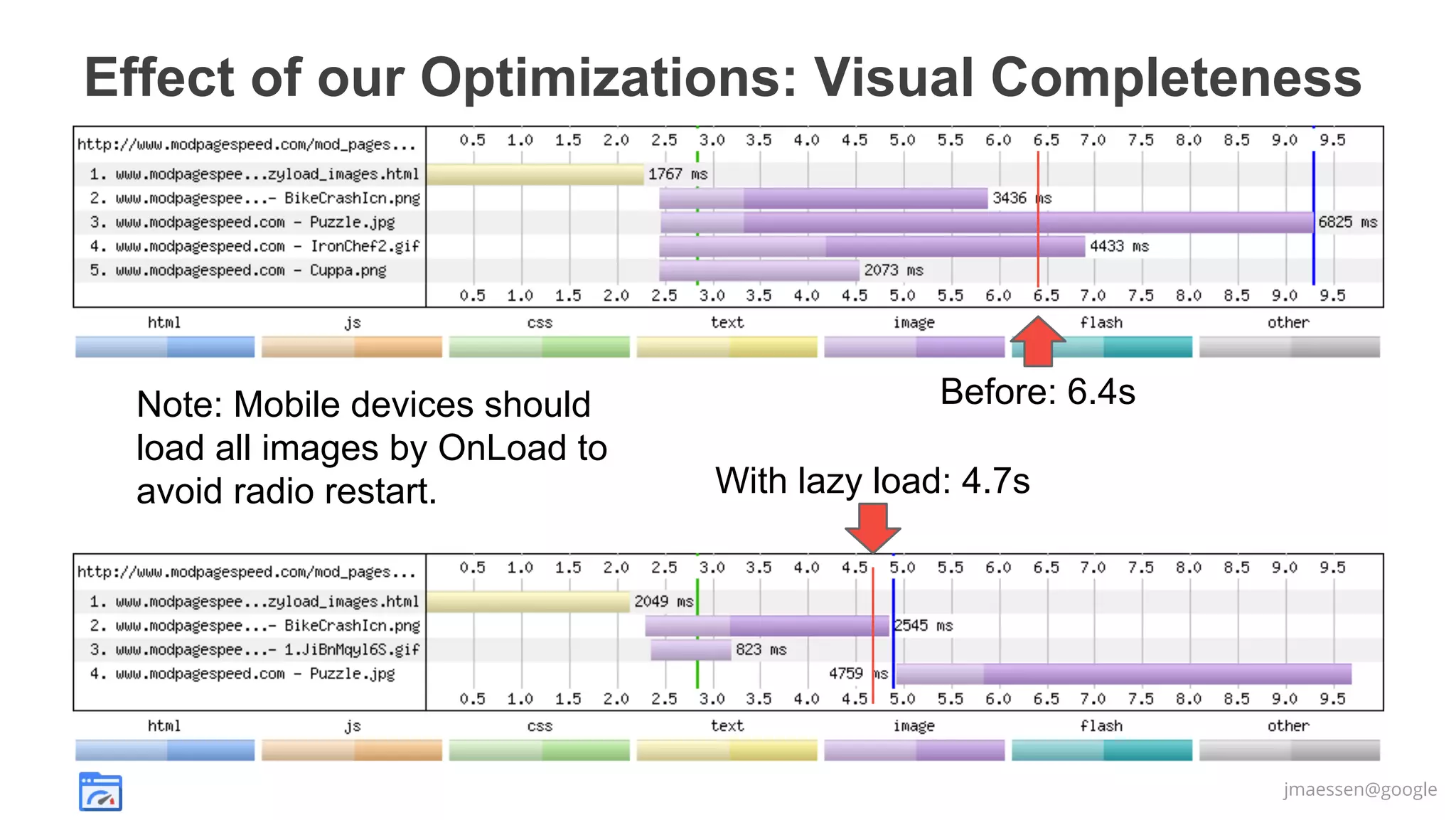
Effect of our Optimizations: Visual Completeness

Note: Mobile devices should
load all images by OnLoad to
avoid radio restart.

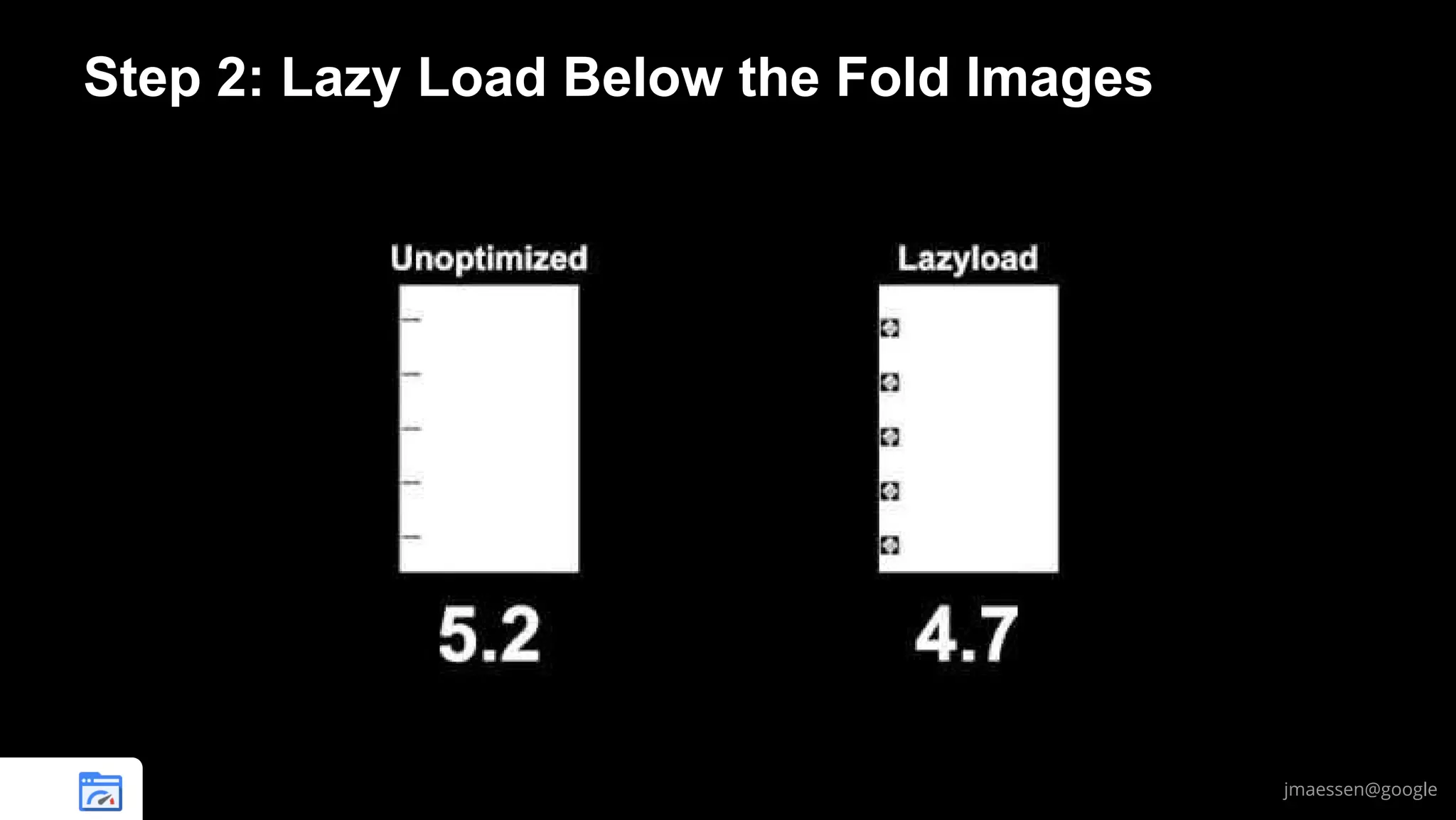
Before: 6.4s
With lazy load: 4.7s

jmaessen@google
Let PageSpeed Find Above the Fold Images
ModPagespeedEnableFilters lazyload_images,insert_image_dimensions
ModPagespeedEnableFilters resize_mobile_images

# Apache

pagespeed EnableFilters

# Nginx

lazyload_images,insert_image_dimensions;
resize_mobile_images;

Instrumented
Page

PageSpeed
Server

Clients vote on what
images are visible
above the fold

Beacon result:
List of visible images
Client
Browser

jmaessen@google
Lazy load your images
Use low-quality inline placeholder
images above the fold
Load all images before radio off
jmaessen@google
A Note About JavaScript
Page Reflows due to JavaScript are a problem
Statically sizing dynamically loaded areas eliminates page jank
Consider loading JS that affects the page earlier
But use asynchronous techniques (eg async ads load)

jmaessen@google
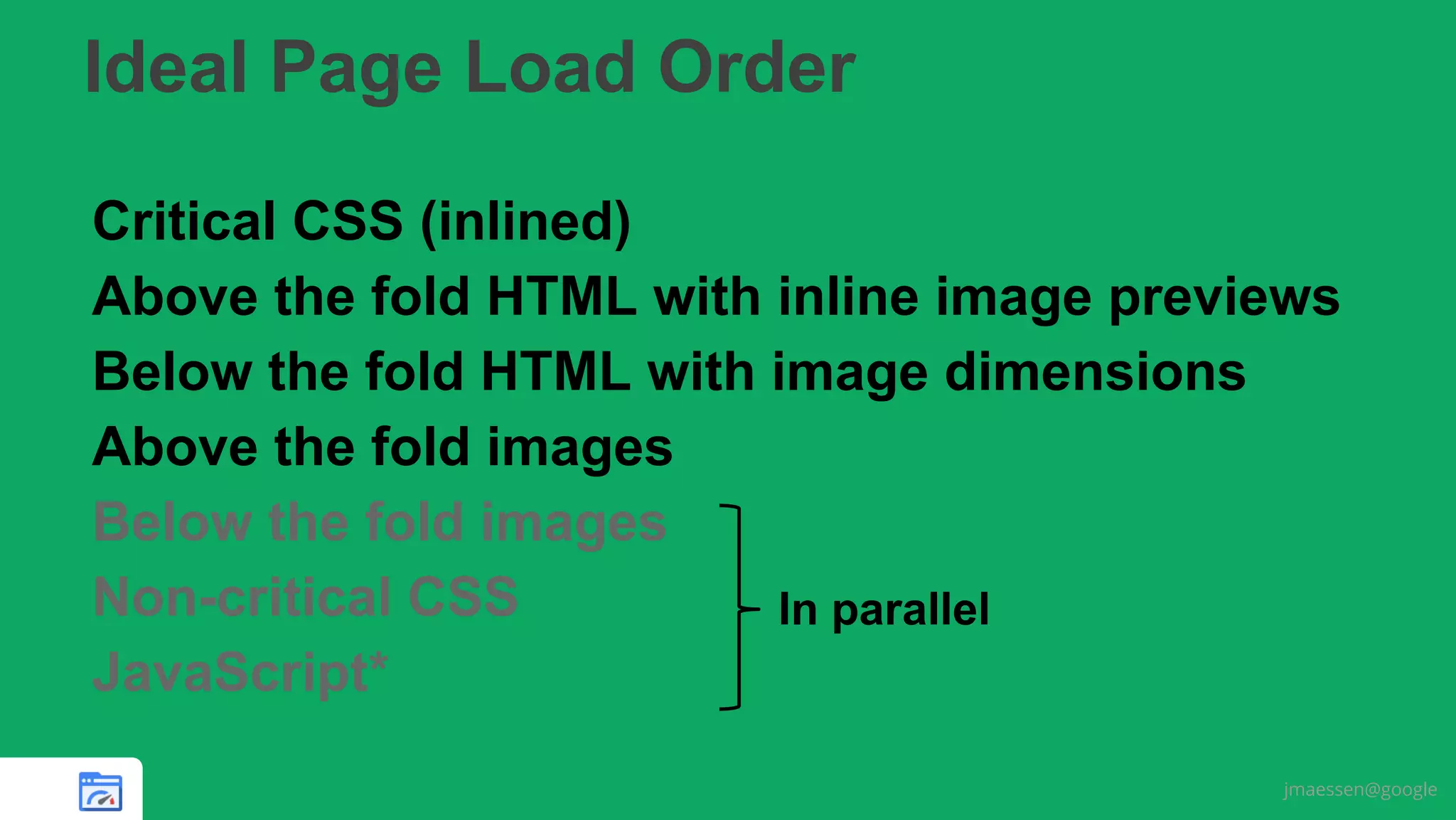
Ideal Page Load Order
Critical CSS (inlined)
Above the fold HTML with inline image previews
Below the fold HTML with image dimensions
Above the fold images
Below the fold images
Non-critical CSS
In parallel
JavaScript*
jmaessen@google
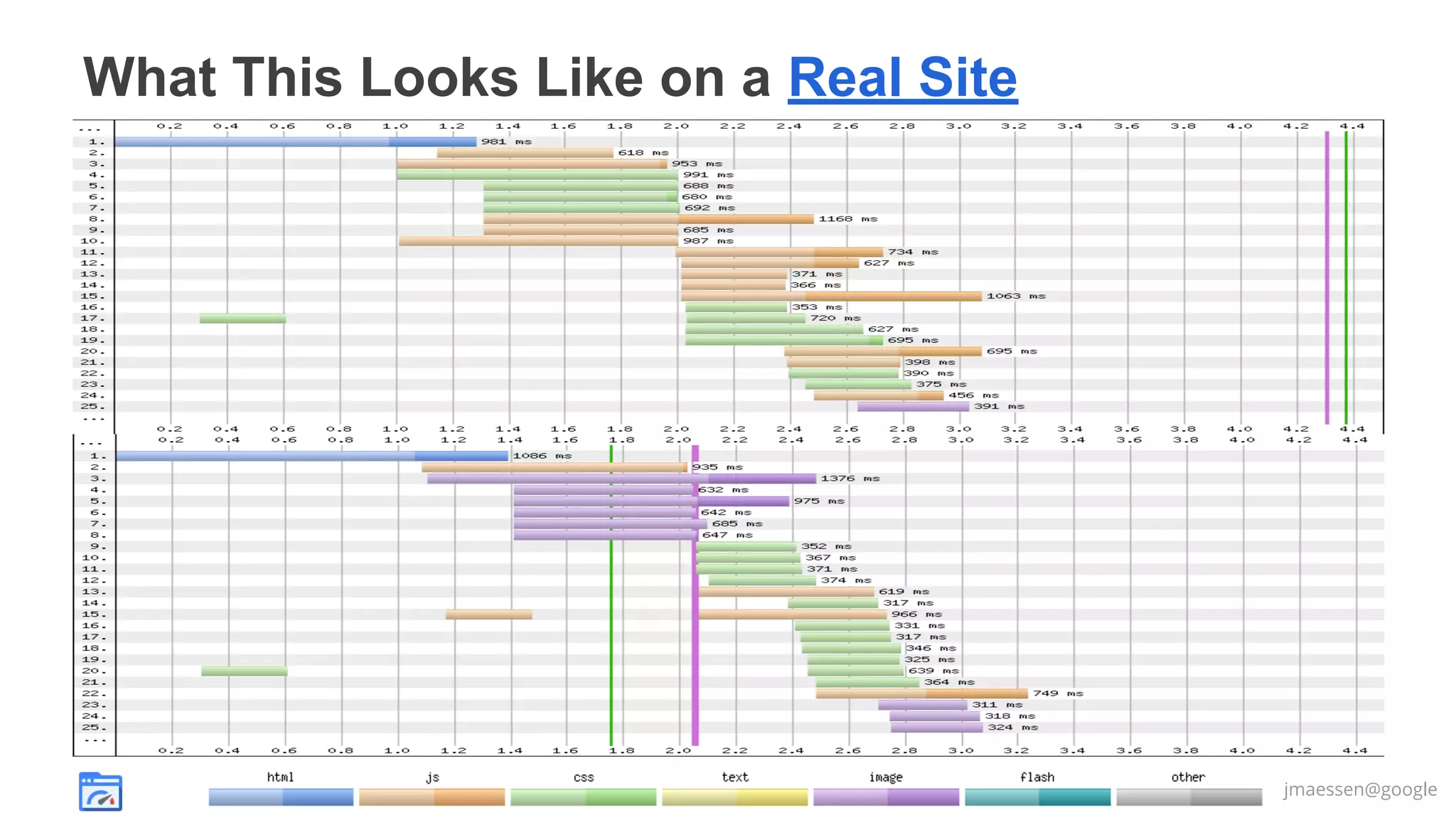
What This Looks Like on a Real Site

jmaessen@google
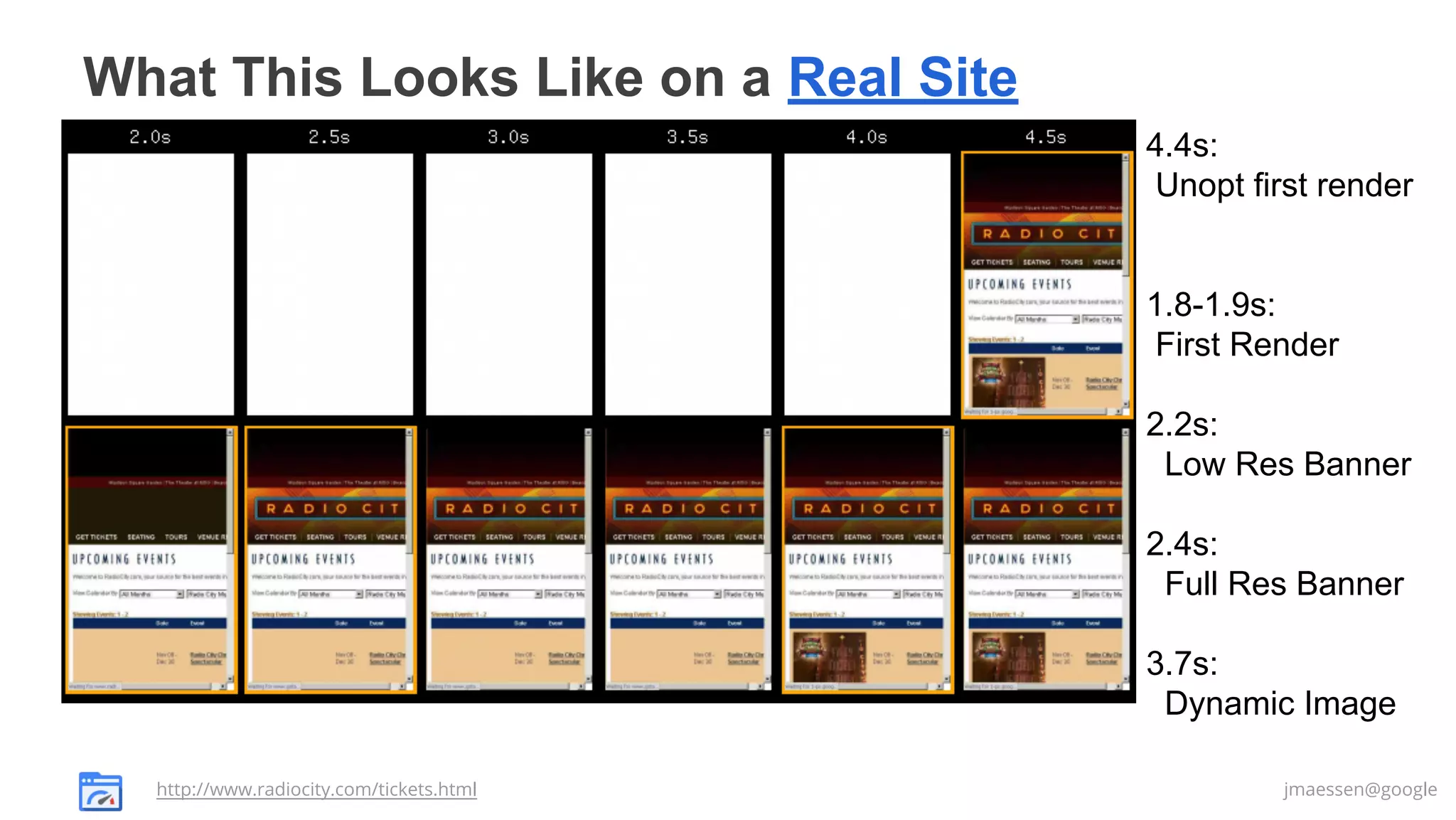
What This Looks Like on a Real Site
4.4s:
Unopt first render

1.8-1.9s:
First Render
2.2s:
Low Res Banner
2.4s:
Full Res Banner
3.7s:
Dynamic Image
http://www.radiocity.com/tickets.html

jmaessen@google
Inline critical CSS in <head>
Inline low res visible images
Lazy load everything else
jmaessen@google
Thank you!
Slides @

email
mod_pagespeed
nginx_pagespeed
PageSpeed Service

jmaessen@google.com
http://www.modpagespeed.com
http://ngxpagespeed.com
https://developers.google.com/speed/pagespeed/service

Prioritize your critical css and images to render your site fast velocity nyc 2013

  • 1.
    Prioritize Your CriticalCSS and Images WebRTCfast to render your site Jan-Willem Maessen PageSpeed Optimization Library Google jmaessen@google.com
  • 2.
    Prioritizing Critical CSSand Images Makes Render Fast jmaessen@google
  • 3.
    Inline critical CSSin <head> Inline low res visible images Lazy load everything else jmaessen@google
  • 4.
    Users Expect Speed Delay Userreaction 0 - 100 ms Instant 100 - 300 ms Slight perceptible delay 300 - 1000 ms Task focus, perceptible delay 1 s+ Mental context switch 10 s+ I'll come back later... Our pages should render in 1000 ms or less Website Abandonment (Strangeloop) Ilya Grigorik (Go to his talk)
  • 5.
  • 6.
    Mobile web performanceis crippled by network latency We need to build fast pages for today’s devices jmaessen@google
  • 7.
    Network Performance VariesEven in the Lab jmaessen@google
  • 8.
    Optimistic But UsefulModel of HTTP Connection What is Happening Time Total data (200 ms RTT) (KB) Control plane (200-2500 ms) – DNS lookup 200 ms – TCP Connection 400 ms – First 10 packets (15K) 600 ms 14K Next 20 packets (29K) 800 ms Next 40 packets (44K) 1000 ms If your site is reached via a mobile redirect, you’re already down here. Time Total data (200 ms RTT) (KB) TCP DNS lookup Connection 800 ms – 44K First 10 packets (15K) TCP Connection 1000 ms 14K – 88K First 10 (15K) Next 20 packets (29K) 1200 ms 44K 14K 40 (44K) Next 20 packets (29K) 1400 ms 88K 44K Next 40 packets (44K) 1600 ms 88K Actually, all these numbers exceed the 384Kbit/s (48K/s) bandwidth of old 3G networks. Resource request (original host) (second jmaessen@google
  • 9.
    We don't needto render the entire page... We need to render above the fold content! 1. One RTT render for above the fold! 2. No redirects + fast server response (<200 ms) 3. Must optimize critical rendering path a. Inline critical CSS b. Remove blocking JavaScript c. Prioritize above-the-fold images @igrigorik
  • 10.
    Why can’t thebrowser do this? What CSS will affect the above the fold HTML? What HTML will be above the fold after styling? How large is each above the fold image? Will JavaScript affect the content of the DOM? jmaessen@google
  • 11.
    Step 1: PrioritizeYour Critical CSS jmaessen@google
  • 12.
    Let's look atthat simple example... prioritize_critical_css.html styles/blue.css <!doctype html> <html> <head> <title>prioritize_critical_css example</title> <link rel="stylesheet" href="styles/blue.css"> <link rel="stylesheet" href="styles/big.css"> <style> @import url(styles/all_using_imports.css); </style> <link rel="stylesheet" href=" styles/rewrite_css_images.css"> </head> <body> <div class="foo" style="display:inline-block;"></div> <span class="blue big">Prioritize Critical CSS</span> …<body> .blue {color: blue;} styles/big.css .big { font-size: 8em; } .very_large_class… { font-size: 8em; } …(lots more unused rules) styles/all_using_imports.css @import url(yellow.css); @import url(blue.css); @import url(bold.css); styles/rewrite_css_images.css .foo { background-image: url(../images/BikeCrashIcn.png); width: 100px; height: 100px; } jmaessen@google
  • 13.
    What happens whenthe browser loads our page prioritize_critical_css.html styles/blue.css <!doctype html> <html> <head> <title>prioritize_critical_css example</title> <link rel="stylesheet" href="styles/blue.css"> <link rel="stylesheet" href="styles/big.css"> <style> @import url(styles/all_using_imports.css); </style> <link rel="stylesheet" href=" styles/rewrite_css_images.css"> </head> <body> <div class="foo" style="display:inline-block;"></div> <span class="blue big">Prioritize Critical CSS</span> …<body> styles/big.css styles/all_using_imports.css @import url(yellow.css); @import url(blue.css); @import url(bold.css); styles/rewrite_css_images.css .foo { background-image: First render: url(../images/BikeCrashIcn.png); width: 100px; height: 100px; } 1.8s jmaessen@google
  • 14.
    Inline the CSSthat is actually used on the page prioritize_critical_css.html <!doctype html> <html> <head> <title>prioritize_critical_css example</title> <style>.blue{color:blue}</style> <style>.big{font-size:8em}</style> <style>.blue{color:blue}.bold{font-weight:bold}</style> <style>.foo{background-image:url(images/BikeCrashIcn.png); width:100px;height:100px}</style> </head> First render: <body> <div class="foo" style="display:inline-block;"></div> <span class="blue big">Prioritize Critical CSS</span> …<body> 0.7s jmaessen@google
  • 15.
    Simplest Option: JustInline All the CSS ● Around 40% of the CSS rules are used in a typical page ● Tweaking a PHP script to inline all the CSS should be easy ● Warning: 44K of compressed CSS on typical page As always, test and measure – do what the data tells you for your site. HTTP Archive data on CSS sizes jmaessen@google
  • 16.
    Identify critical CSSvia an Audit (Manual) DevTools > Audits > Web Page Performance Inline the critical styles... @igrigorik
  • 17.
    Let PageSpeed FindCritical CSS Automatically ModPagespeedEnableFilters prioritize_critical_css # Apache pagespeed EnableFilters # Nginx prioritize_critical_css; Instrumented Page PageSpeed Server Beacon result: List of critical selectors Client Browser Downside: first access to the page won’t be optimized. Upside: will be based on actual client browser behavior jmaessen@google
  • 18.
    Rules That AreTriggered by JavaScript Actions Option 1: Include them in your critical CSS ● Careful: they may not necessarily show up in an audit! Option 2: Lazyload them ● Load before we run the relevant JavaScript ● Lazyload also works for non-screen styles (eg print) jmaessen@google
  • 19.
    How Not toLazy Load CSS prioritize_critical_css.html <!doctype html> <html> <head> <title>prioritize_critical_css example</title> … </head> <body> <div class="foo" style="display:inline-block;"></div> <span class="blue big">Prioritize Critical CSS</span> … <link <link <link <link rel="stylesheet" rel="stylesheet" rel="stylesheet" rel="stylesheet" href="styles/blue.css"> href="styles/big.css"> href="styles/all_using_imports.css"> href="styles/rewrite_css_images.css" media="all"> The browser will notice the stylesheets when it reaches the bottom of the page and block rendering – It can’t tell that none of the rules will apply to the page. </body> </html> jmaessen@google
  • 20.
    How PageSpeed OptimizationLibrary Lazy Loads CSS prioritize_critical_css.html <!doctype html> <html> <head> <title>prioritize_critical_css example</title> … </head> <body> <div class="foo" style="display:inline-block;"></div> <span class="blue big">Prioritize Critical CSS</span> … <noscript class="psa_add_styles"> <link rel="stylesheet" href="styles/blue.css"> <link rel="stylesheet" href="styles/big.css"> <link rel="stylesheet" href="styles/all_using_imports.css"> <link rel="stylesheet" href="styles/rewrite_css_images.css" media="all"> </noscript> <script>...Move <noscript> to a div...</script> </body> </html> The noscript block keeps the browser from downloading the CSS until the script runs. This blocks rendering when JS is switched off But the page continues to work correctly You can skip this for non-screen media= attributes. jmaessen@google
  • 21.
    Step 2: LazyLoad Below the Fold Images jmaessen@google
  • 22.
    Another very simpleexample... lazyload_images.html <!doctype html> <html><head>...</head> <body> <p>*</p> <p>*</p> <p>*</p> <p>*</p> <p>*</p> <img src="images/BikeCrashIcn.png"><br/> <p>*</p> <p>*</p> <p>*</p> <p>*</p> <p>*</p> <img src="images/BikeCrashIcn.png"><br/> <p>*</p> <p>*</p> <p>*</p> <p>*</p> <p>*</p> <img src="images/BikeCrashIcn.png"><br/> <p>*</p> <p>*</p> <p>*</p> <p>*</p> <p>*</p> <img src="images/BikeCrashIcn.png"><br/> <p>*</p> <p>*</p> <p>*</p> <p>*</p> <p>*</p> <img src="images/BikeCrashIcn.png"><br/> <p>*</p> <p>*</p> <p>Should be below the fold...</p> <p>*</p> <p>*</p> <img src="images/Puzzle.jpg"><br/> <img src="images/IronChef2.gif"><br/> <img src="images/Cuppa.png"><br/> </body> </html> images/BikeCrashIcn.png images/Puzzle.jpg images/IronChef2.gif images/Cuppa.png jmaessen@google
  • 23.
    Lazyloading All theImages lazyload_images.html <!doctype html> <html><head>...</head> <body> <p>*</p> <p>*</p> <p>*</p> <p>*</p> <p>*</p> <script>...lazyload code...</script> <img lazy_src="images/BikeCrashIcn.png" width="100" height="100"><br/> <p>*</p> <p>*</p> <p>*</p> <p>*</p> <p>*</p> <img lazy_src="images/BikeCrashIcn.png" width="100" height="100"><br/> <p>*</p> <p>*</p> <p>*</p> <p>*</p> <p>*</p> <img lazy_src="images/BikeCrashIcn.png" width="100" height="100"><br/> <p>*</p> <p>*</p> <p>*</p> <p>*</p> <p>*</p> <img lazy_src="images/BikeCrashIcn.png" width="100" height="100"><br/> <p>*</p> <p>*</p> <p>*</p> <p>*</p> <p>*</p> <img lazy_src="images/BikeCrashIcn.png" width="100" height="100"><br/> <p>*</p> <p>*</p> <p>Should be below the fold...</p> <p>*</p> <p>*</p> <img lazy_src="images/Puzzle.jpg" width="1023" height="766"><br/> <img lazy_src="images/IronChef2.gif" width="192" height="256"><br/> <img lazy_src="images/Cuppa.png" width="65" height="70"><br/> jmaessen@google
  • 24.
    Include Dimensions withLazy Loaded Images Without image dimensions (left), page reflows on image load jmaessen@google
  • 25.
    Don’t Lazy LoadImages Above the Fold! lazyload_images.html <!doctype html> <html><head>...</head> <body> <p>*</p> <p>*</p> <p>*</p> <p>*</p> <p>*</p> <img src="images/BikeCrashIcn.png" width="100" height="100"><br/> <p>*</p> <p>*</p> <p>*</p> <p>*</p> <p>*</p> <img src="images/BikeCrashIcn.png" width="100" height="100"><br/> <p>*</p> <p>*</p> <p>*</p> <p>*</p> <p>*</p> <img src="images/BikeCrashIcn.png" width="100" height="100"><br/> <p>*</p> <p>*</p> <p>*</p> <p>*</p> <p>*</p> <img src="images/BikeCrashIcn.png" width="100" height="100"><br/> <p>*</p> <p>*</p> <p>*</p> <p>*</p> <p>*</p> <img src="images/BikeCrashIcn.png" width="100" height="100"><br/> <p>*</p> <p>*</p> <p>Should be below the fold...</p> <p>*</p> <p>*</p> <script>...lazyload code...</script> <img lazy_src="images/Puzzle.jpg" width="1023" height="766"><br/> <img lazy_src="images/IronChef2.gif" width="192" height="256"><br/> <img lazy_src="images/Cuppa.png" width="65" height="70"><br/> Remember: We’re trying to get the browser to fetch the visible page content first! jmaessen@google
  • 26.
    Low-Quality Inline ImagesAbove the Fold + Lazy Load lazyload_images.html <!doctype html> <html><head>...</head> <body> <p>*</p> <p>*</p> <p>*</p> <p>*</p> <p>*</p> <img lazy_src="images/BikeCrashIcn.png" src="data:image/jpg;..." width="100" <p>*</p> <p>*</p> <p>*</p> <p>*</p> <p>*</p> <img lazy_src="images/BikeCrashIcn.png" src="data:image/jpg;..." width="100" <p>*</p> <p>*</p> <p>*</p> <p>*</p> <p>*</p> <img lazy_src="images/BikeCrashIcn.png" src="data:image/jpg;..." width="100" <p>*</p> <p>*</p> <p>*</p> <p>*</p> <p>*</p> <img lazy_src="images/BikeCrashIcn.png" src="data:image/jpg;..." width="100" <p>*</p> <p>*</p> <p>*</p> <p>*</p> <p>*</p> <img lazy_src="images/BikeCrashIcn.png" src="data:image/jpg;..." width="100" <p>*</p> <p>*</p> <p>Should be below the fold...</p> <p>*</p> <p>*</p> <script>...lazyload code...</script> <img lazy_src="images/Puzzle.jpg" width="1023" height="766"><br/> <img lazy_src="images/IronChef2.gif" width="192" height="256"><br/> <img lazy_src="images/Cuppa.png" width="65" height="70"><br/> height="100"><br/> height="100"><br/> height="100"><br/> height="100"><br/> height="100"><br/> jmaessen@google
  • 27.
    Effect of ourOptimizations: Visual Completeness Note: Mobile devices should load all images by OnLoad to avoid radio restart. Before: 6.4s With lazy load: 4.7s jmaessen@google
  • 28.
    Let PageSpeed FindAbove the Fold Images ModPagespeedEnableFilters lazyload_images,insert_image_dimensions ModPagespeedEnableFilters resize_mobile_images # Apache pagespeed EnableFilters pagespeed EnableFilters # Nginx lazyload_images,insert_image_dimensions; resize_mobile_images; Instrumented Page PageSpeed Server Clients vote on what images are visible above the fold Beacon result: List of visible images Client Browser jmaessen@google
  • 29.
    Lazy load yourimages Use low-quality inline placeholder images above the fold Load all images before radio off jmaessen@google
  • 30.
    A Note AboutJavaScript Page Reflows due to JavaScript are a problem Statically sizing dynamically loaded areas eliminates page jank Consider loading JS that affects the page earlier But use asynchronous techniques (eg async ads load) jmaessen@google
  • 31.
    Ideal Page LoadOrder Critical CSS (inlined) Above the fold HTML with inline image previews Below the fold HTML with image dimensions Above the fold images Below the fold images Non-critical CSS In parallel JavaScript* jmaessen@google
  • 32.
    What This LooksLike on a Real Site jmaessen@google
  • 33.
    What This LooksLike on a Real Site 4.4s: Unopt first render 1.8-1.9s: First Render 2.2s: Low Res Banner 2.4s: Full Res Banner 3.7s: Dynamic Image http://www.radiocity.com/tickets.html jmaessen@google
  • 34.
    Inline critical CSSin <head> Inline low res visible images Lazy load everything else jmaessen@google
  • 35.
    Thank you! Slides @ email mod_pagespeed nginx_pagespeed PageSpeedService jmaessen@google.com http://www.modpagespeed.com http://ngxpagespeed.com https://developers.google.com/speed/pagespeed/service