Managing Your Content Nicole C. Engard September 4, 2007 Princeton Public Library – Tech Talks
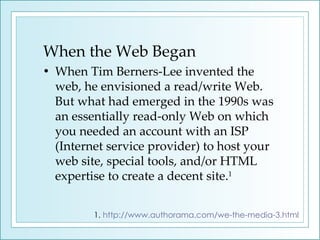
When the Web Began When Tim Berners-Lee invented the web, he envisioned a read/write Web. But what had emerged in the 1990s was an essentially read-only Web on which you needed an account with an ISP (Internet service provider) to host your web site, special tools, and/or HTML expertise to create a decent site. 1 1.  http://www.authorama.com/we-the-media-3.html
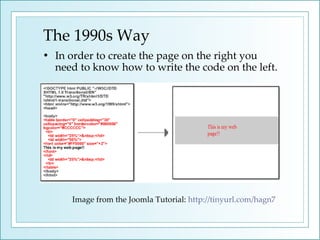
The 1990s Way In order to create the page on the right you need to know how to write the code on the left. Image from the Joomla Tutorial:  http://tinyurl.com/hagn7
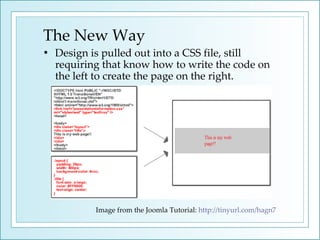
The New Way Design is pulled out into a CSS file, still requiring that know how to write the code on the left to create the page on the right. Image from the Joomla Tutorial:  http://tinyurl.com/hagn7
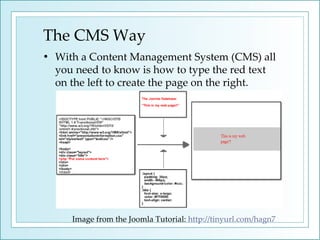
The CMS Way With a Content Management System (CMS) all you need to know is how to type the red text on the left to create the page on the right. Image from the Joomla Tutorial:  http://tinyurl.com/hagn7
What Does that Mean? No more asking IT or Web Developers to edit content No programming knowledge necessary to create web pages The right experts are working on the right parts In short: Content and Presentation are kept separate.
CMS Options Proprietary options like MS Sharepoint  Provides you with an enterprise solution that only a professional IT person can install and set up Minimal control Costs $$$$ Learn More:  http://www.microsoft.com/sharepoint/default.mspx
CMS Options  cont… Open source options like Joomla and Drupal Provides you with a file that anyone can download, install and administer  Lots of control Costs 0-$ (depending on external support) Do It Yourself All of the control Costs $-$$$$
Benefits of the Open Source CMS Consistent website design Availability of pre-packaged modules  Active open source community (for support) Empowers staff and potentially customers Encourages communication and collaboration Content can easily be repurposed Content is organized and searchable
Benefits of Doing It Yourself Designed specifically for your organization Access to staff input throughout the process Complete control over ever aspect of the site Empowers staff and potentially customers Encourages communication and collaboration Learn More: Engard, Nicole C. "DIY: Developing Web Applications In-House."  Online Magazine  30.6 (2006): 35. ( http://tinyurl.com/yqyb9u )
Open Source Resources Open Source CMS:   www.opensourcecms.com   Demo open source tools before installing them on your machine. [click Portals (CMS)] Joomla:   www.joomla.org An easy to use, award winning, open source content management system. Drupal:   www.drupal.org Highly respected, widely used content management system.
Do It Yourself Resources Thomson, Laura, and Luke Welling.  PHP and MySQL Web Development (3rd Edition) (Developer's Library) . U.S.: Sams, 2004. (ISBN: 0672326728) Williams, Hugh E.  Web Database Applications with PHP & MySQL, 2nd Edition . Portland, OR: O'Reilly Media, Inc., 2004. (ISBN: 0596005431) Yank, Kevin.  Build Your Own Database Driven Website Using PHP and MySQL . Stockholm: Sitepoint, 2004. (ISBN: 0975240218)
Thank You Nicole C. Engard Metadata Librarian Princeton Theological Seminary Library [email_address]  &  [email_address]   Website:  http://web2learning.net

Princeton Cms

  • 1.
    Managing Your ContentNicole C. Engard September 4, 2007 Princeton Public Library – Tech Talks
  • 2.
    When the WebBegan When Tim Berners-Lee invented the web, he envisioned a read/write Web. But what had emerged in the 1990s was an essentially read-only Web on which you needed an account with an ISP (Internet service provider) to host your web site, special tools, and/or HTML expertise to create a decent site. 1 1. http://www.authorama.com/we-the-media-3.html
  • 3.
    The 1990s WayIn order to create the page on the right you need to know how to write the code on the left. Image from the Joomla Tutorial: http://tinyurl.com/hagn7
  • 4.
    The New WayDesign is pulled out into a CSS file, still requiring that know how to write the code on the left to create the page on the right. Image from the Joomla Tutorial: http://tinyurl.com/hagn7
  • 5.
    The CMS WayWith a Content Management System (CMS) all you need to know is how to type the red text on the left to create the page on the right. Image from the Joomla Tutorial: http://tinyurl.com/hagn7
  • 6.
    What Does thatMean? No more asking IT or Web Developers to edit content No programming knowledge necessary to create web pages The right experts are working on the right parts In short: Content and Presentation are kept separate.
  • 7.
    CMS Options Proprietaryoptions like MS Sharepoint Provides you with an enterprise solution that only a professional IT person can install and set up Minimal control Costs $$$$ Learn More: http://www.microsoft.com/sharepoint/default.mspx
  • 8.
    CMS Options cont… Open source options like Joomla and Drupal Provides you with a file that anyone can download, install and administer Lots of control Costs 0-$ (depending on external support) Do It Yourself All of the control Costs $-$$$$
  • 9.
    Benefits of theOpen Source CMS Consistent website design Availability of pre-packaged modules Active open source community (for support) Empowers staff and potentially customers Encourages communication and collaboration Content can easily be repurposed Content is organized and searchable
  • 10.
    Benefits of DoingIt Yourself Designed specifically for your organization Access to staff input throughout the process Complete control over ever aspect of the site Empowers staff and potentially customers Encourages communication and collaboration Learn More: Engard, Nicole C. "DIY: Developing Web Applications In-House." Online Magazine 30.6 (2006): 35. ( http://tinyurl.com/yqyb9u )
  • 11.
    Open Source ResourcesOpen Source CMS: www.opensourcecms.com Demo open source tools before installing them on your machine. [click Portals (CMS)] Joomla: www.joomla.org An easy to use, award winning, open source content management system. Drupal: www.drupal.org Highly respected, widely used content management system.
  • 12.
    Do It YourselfResources Thomson, Laura, and Luke Welling. PHP and MySQL Web Development (3rd Edition) (Developer's Library) . U.S.: Sams, 2004. (ISBN: 0672326728) Williams, Hugh E. Web Database Applications with PHP & MySQL, 2nd Edition . Portland, OR: O'Reilly Media, Inc., 2004. (ISBN: 0596005431) Yank, Kevin. Build Your Own Database Driven Website Using PHP and MySQL . Stockholm: Sitepoint, 2004. (ISBN: 0975240218)
  • 13.
    Thank You NicoleC. Engard Metadata Librarian Princeton Theological Seminary Library [email_address] & [email_address] Website: http://web2learning.net

Editor's Notes

  • #4 When the web was first introduced, only an elite few could create websites. These people were usually programmers who knew HTML.
  • #5 Later in the life of the web, programmers were still holding the reigns, but now they were able to work more efficiently with CSS. CSS allowed them to pull the style elements out of the code and edit them separately.
  • #6 Now, anyone can create a web page (both a good and bad thing). With content management systems, the design and HTML are both compiled by the tools, leaving the user to write their own content and decide where it displays.
  • #8 This is all I’m going to say about proprietary options because I’m guessing that you all want to hear about how to do this fast and cheap. I also have no expertise in the area of the proprietary CMS except from the user end of MS Sharepoint.
  • #11 If you have the skills in house to program your own CMS, this route is another one to consider.