Robust Industrial Data Communications – Made Easy
Network-to-Network protection
Best practices for using VPNs for easy
network-to-network protection
Westermo webinar
2
Westermo group 2018
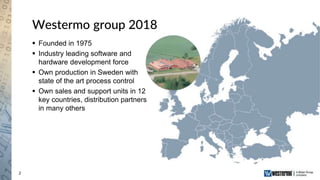
 Founded in 1975
 Industry leading software and
hardware development force
 Own production in Sweden with
state of the art process control
 Own sales and support units in 12
key countries, distribution partners
in many others
3
Questions
 Ask questions in the chat window
 Ask question to ”Host”
 Questions will be answered in the end of
the presentation
4
Presenters
Niklas Mörth
Product manager,
Cybersecurity
Dr. Jon-Olov Vatn
Network applications expert
Topic:
Network-to-Network protection
Run-time:
45 minutes + questions
A webinar recording will be
provided after the session is
completed.
Robust Industrial Data Communications – Made Easy
How to protect site-to-site
communication with VPN
Dr. Jon-Olov Vatn
6
Outline
 Introduction
 What do we mean with a VPN?
 Network security concepts
 VPN standards
 How to setup a site-to-site VPN
 Preparation
 VPN Configuration
 Routing, NAT, Firewall, etc.
 Q&A
7
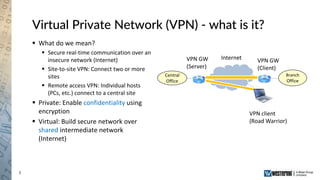
Virtual Private Network (VPN) - what is it?
 What do we mean?
 Secure real-time communication over an
insecure network (Internet)
 Site-to-site VPN: Connect two or more
sites
 Remote access VPN: Individual hosts
(PCs, etc.) connect to a central site
 Private: Enable confidentiality using
encryption
 Virtual: Build secure network over
shared intermediate network
(Internet)
VPN GW
(Server)
VPN GW
(Client)
VPN client
(Road Warrior)
Internet
Central
Office
Branch
Office
8
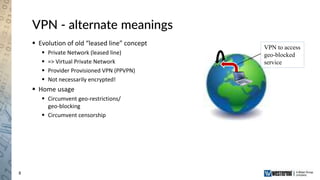
VPN - alternate meanings
 Evolution of old “leased line” concept
 Private Network (leased line)
 => Virtual Private Network
 Provider Provisioned VPN (PPVPN)
 Not necessarily encrypted!
 Home usage
 Circumvent geo-restrictions/
geo-blocking
 Circumvent censorship
VPN to access
geo-blocked
service
9
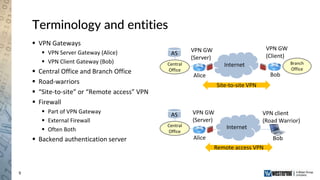
Terminology and entities
 VPN Gateways
 VPN Server Gateway (Alice)
 VPN Client Gateway (Bob)
 Central Office and Branch Office
 Road-warriors
 “Site-to-site” or “Remote access” VPN
 Firewall
 Part of VPN Gateway
 External Firewall
 Often Both
 Backend authentication server
Internet
VPN GW
(Server)
VPN GW
(Client)
VPN client
(Road Warrior)
Alice Bob
Site-to-site VPN
Internet
VPN GW
(Server)
Alice Bob
Remote access VPN
AS
AS
Central
Office
Central
Office
Branch
Office
10
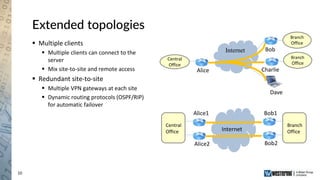
Extended topologies
 Multiple clients
 Multiple clients can connect to the
server
 Mix site-to-site and remote access
 Redundant site-to-site
 Multiple VPN gateways at each site
 Dynamic routing protocols (OSPF/RIP)
for automatic failover
Alice Charlie
Bob
Dave
Internet
Alice2 Bob2
Alice1 Bob1
Internet
Central
Office
Branch
Office
Branch
Office
Central
Office
Branch
Office
11
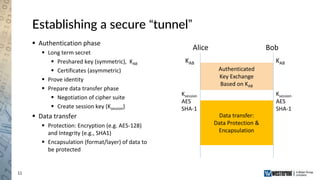
Establishing a secure “tunnel”
 Authentication phase
 Long term secret
 Preshared key (symmetric), KAB
 Certificates (asymmetric)
 Prove identity
 Prepare data transfer phase
 Negotiation of cipher suite
 Create session key (Ksession)
 Data transfer
 Protection: Encryption (e.g. AES-128)
and Integrity (e.g., SHA1)
 Encapsulation (format/layer) of data to
be protected
Alice Bob
KAB
Ksession
AES
SHA-1
Authenticated
Key Exchange
Based on KAB
Data transfer:
Data Protection &
Encapsulation
KAB
Ksession
AES
SHA-1
12
Real-time security protocols
 “Real-time” as opposed to
asynchronous communication (secure
email, etc)
 WeOS support two protocols
 OpenVPN (SSL VPN)
 IPsec VPN
 Roughly equivalent service
 Encapsulation
 OpenVPN: Layer-4 (UDP/TCP)
 IPsec: Layer-3 (IP)
 Pros of IPsec
 Well recognized IETF standard
 Relatively good performance
 Pros of OpenVPN
 Widespread platform support
 Easier to setup (in particular if VPN GW
is placed behind a 3rd party firewall)
13
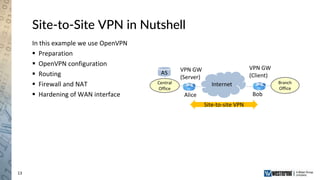
Site-to-Site VPN in Nutshell
In this example we use OpenVPN
 Preparation
 OpenVPN configuration
 Routing
 Firewall and NAT
 Hardening of WAN interface
Internet
VPN GW
(Server)
VPN GW
(Client)
Alice Bob
Site-to-site VPN
AS
Central
Office
Branch
Office
14
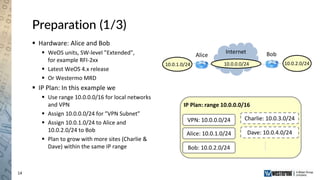
Preparation (1/3)
 Hardware: Alice and Bob
 WeOS units, SW-level ”Extended”,
for example RFI-2xx
 Latest WeOS 4.x release
 Or Westermo MRD
 IP Plan: In this example we
 Use range 10.0.0.0/16 for local networks
and VPN
 Assign 10.0.0.0/24 for ”VPN Subnet”
 Assign 10.0.1.0/24 to Alice and
10.0.2.0/24 to Bob
 Plan to grow with more sites (Charlie &
Dave) within the same IP range
Alice Bob
10.0.2.0/2410.0.1.0/24
IP Plan: range 10.0.0.0/16
VPN: 10.0.0.0/24 Charlie: 10.0.3.0/24
Dave: 10.0.4.0/24
Internet
10.0.0.0/24
Alice: 10.0.1.0/24
Bob: 10.0.2.0/24
15
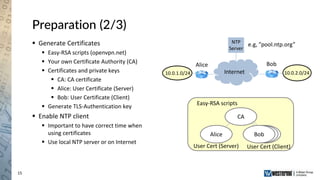
Preparation (2/3)
 Generate Certificates
 Easy-RSA scripts (openvpn.net)
 Your own Certificate Authority (CA)
 Certificates and private keys
 CA: CA certificate
 Alice: User Certificate (Server)
 Bob: User Certificate (Client)
 Generate TLS-Authentication key
 Enable NTP client
 Important to have correct time when
using certificates
 Use local NTP server or on Internet
Internet
Alice Bob
e.g, ”pool.ntp.org”NTP
Server
Easy-RSA scripts
Alice
User Cert (Client)User Cert (Server)
CA
Bob
10.0.2.0/2410.0.1.0/24
16
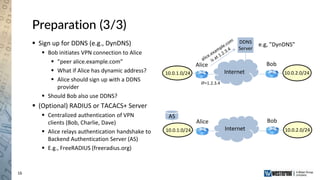
Preparation (3/3)
 Sign up for DDNS (e.g., DynDNS)
 Bob initiates VPN connection to Alice
 ”peer alice.example.com”
 What if Alice has dynamic address?
 Alice should sign up with a DDNS
provider
 Should Bob also use DDNS?
 (Optional) RADIUS or TACACS+ Server
 Centralized authentication of VPN
clients (Bob, Charlie, Dave)
 Alice relays authentication handshake to
Backend Authentication Server (AS)
 E.g., FreeRADIUS (freeradius.org)
Internet
Alice Bob
e.g, ”DynDNS”DDNS
Server
IP=1.2.3.4
AS
Internet
Alice Bob
10.0.2.0/2410.0.1.0/24
10.0.2.0/2410.0.1.0/24
17
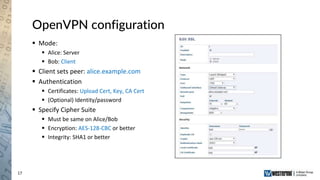
OpenVPN configuration
 Mode:
 Alice: Server
 Bob: Client
 Client sets peer: alice.example.com
 Authentication
 Certificates: Upload Cert, Key, CA Cert
 (Optional) Identity/password
 Specify Cipher Suite
 Must be same on Alice/Bob
 Encryption: AES-128-CBC or better
 Integrity: SHA1 or better
18
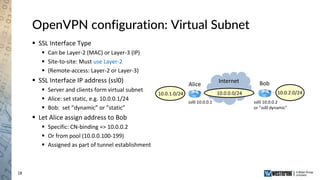
OpenVPN configuration: Virtual Subnet
 SSL Interface Type
 Can be Layer-2 (MAC) or Layer-3 (IP)
 Site-to-site: Must use Layer-2
 (Remote-access: Layer-2 or Layer-3)
 SSL Interface IP address (ssl0)
 Server and clients form virtual subnet
 Alice: set static, e.g. 10.0.0.1/24
 Bob: set ”dynamic” or ”static”
 Let Alice assign address to Bob
 Specific: CN-binding => 10.0.0.2
 Or from pool (10.0.0.100-199)
 Assigned as part of tunnel establishment
Alice Bob
10.0.2.0/2410.0.1.0/24
Internet
10.0.0.0/24
ssl0 10.0.0.1 ssl0 10.0.0.2
or ”ssl0 dynamic”
19
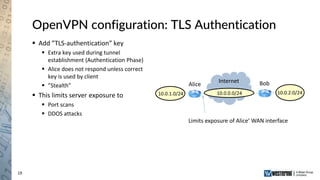
OpenVPN configuration: TLS Authentication
 Add ”TLS-authentication” key
 Extra key used during tunnel
establishment (Authentication Phase)
 Alice does not respond unless correct
key is used by client
 ”Stealth”
 This limits server exposure to
 Port scans
 DDOS attacks
Alice Bob
10.0.2.0/2410.0.1.0/24
Internet
10.0.0.0/24
Limits exposure of Alice’ WAN interface
20
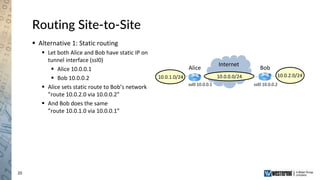
Routing Site-to-Site
 Alternative 1: Static routing
 Let both Alice and Bob have static IP on
tunnel interface (ssl0)
 Alice 10.0.0.1
 Bob 10.0.0.2
 Alice sets static route to Bob’s network
”route 10.0.2.0 via 10.0.0.2”
 And Bob does the same
”route 10.0.1.0 via 10.0.0.1”
Alice Bob
10.0.2.0/2410.0.1.0/24
Internet
10.0.0.0/24
ssl0 10.0.0.1 ssl0 10.0.0.2
21
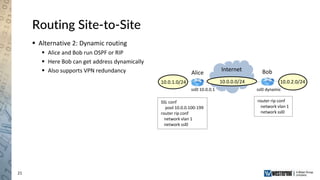
Routing Site-to-Site
 Alternative 2: Dynamic routing
 Alice and Bob run OSPF or RIP
 Here Bob can get address dynamically
 Also supports VPN redundancy Alice Bob
10.0.2.0/2410.0.1.0/24
Internet
10.0.0.0/24
SSL conf
pool 10.0.0.100-199
router rip conf
network vlan 1
network ssl0
ssl0 10.0.0.1 ssl0 dynamic
router rip conf
network vlan 1
network ssl0
22
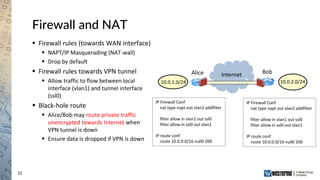
Firewall and NAT
 Firewall rules (towards WAN interface)
 NAPT/IP Masquerading (NAT-wall)
 Drop by default
 Firewall rules towards VPN tunnel
 Allow traffic to flow between local
interface (vlan1) and tunnel interface
(ssl0)
 Black-hole route
 Alice/Bob may route private traffic
unencrypted towards Internet when
VPN tunnel is down
 Ensure data is dropped if VPN is down
Alice Bob
10.0.2.0/2410.0.1.0/24
Internet
IP Firewall Conf
nat type napt out vlan2 addfilter
filter allow in vlan1 out ssl0
filter allow in ssl0 out vlan1
IP route conf
route 10.0.0.0/16 null0 200
IP Firewall Conf
nat type napt out vlan2 addfilter
filter allow in vlan1 out ssl0
filter allow in ssl0 out vlan1
IP route conf
route 10.0.0.0/16 null0 200
23
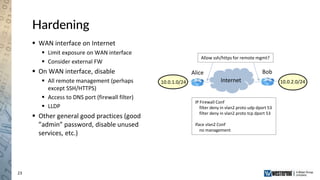
Hardening
 WAN interface on Internet
 Limit exposure on WAN interface
 Consider external FW
 On WAN interface, disable
 All remote management (perhaps
except SSH/HTTPS)
 Access to DNS port (firewall filter)
 LLDP
 Other general good practices (good
”admin” password, disable unused
services, etc.)
Alice Bob
10.0.2.0/2410.0.1.0/24 Internet
IP Firewall Conf
filter deny in vlan2 proto udp dport 53
filter deny in vlan2 proto tcp dport 53
Iface vlan2 Conf
no management
Allow ssh/https for remote mgmt?
24
Done!
25
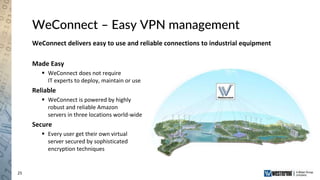
WeConnect – Easy VPN management
WeConnect delivers easy to use and reliable connections to industrial equipment
Made Easy
 WeConnect does not require
IT experts to deploy, maintain or use
Reliable
 WeConnect is powered by highly
robust and reliable Amazon
servers in three locations world-wide
Secure
 Every user get their own virtual
server secured by sophisticated
encryption techniques
26
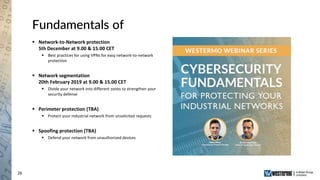
Fundamentals of
 Network-to-Network protection
5th December at 9.00 & 15.00 CET
 Best practices for using VPNs for easy network-to-network
protection
 Network segmentation
20th February 2019 at 9.00 & 15.00 CET
 Divide your network into different zones to strengthen your
security defense
 Perimeter protection (TBA)
 Protect your industrial network from unsolicited requests
 Spoofing protection (TBA)
 Defend your network from unauthorized devices
27
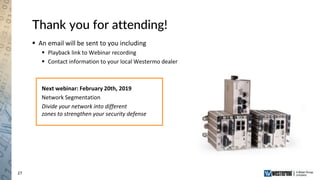
Thank you for attending!
 An email will be sent to you including
 Playback link to Webinar recording
 Contact information to your local Westermo dealer
Next webinar: February 20th, 2019
Network Segmentation
Divide your network into different
zones to strengthen your security defense
28
Creating the World’s Most
Robust Networks

Best practices for using VPNs for easy network-to-network protection

  • 1.
    Robust Industrial DataCommunications – Made Easy Network-to-Network protection Best practices for using VPNs for easy network-to-network protection Westermo webinar
  • 2.
    2 Westermo group 2018 Founded in 1975  Industry leading software and hardware development force  Own production in Sweden with state of the art process control  Own sales and support units in 12 key countries, distribution partners in many others
  • 3.
    3 Questions  Ask questionsin the chat window  Ask question to ”Host”  Questions will be answered in the end of the presentation
  • 4.
    4 Presenters Niklas Mörth Product manager, Cybersecurity Dr.Jon-Olov Vatn Network applications expert Topic: Network-to-Network protection Run-time: 45 minutes + questions A webinar recording will be provided after the session is completed.
  • 5.
    Robust Industrial DataCommunications – Made Easy How to protect site-to-site communication with VPN Dr. Jon-Olov Vatn
  • 6.
    6 Outline  Introduction  Whatdo we mean with a VPN?  Network security concepts  VPN standards  How to setup a site-to-site VPN  Preparation  VPN Configuration  Routing, NAT, Firewall, etc.  Q&A
  • 7.
    7 Virtual Private Network(VPN) - what is it?  What do we mean?  Secure real-time communication over an insecure network (Internet)  Site-to-site VPN: Connect two or more sites  Remote access VPN: Individual hosts (PCs, etc.) connect to a central site  Private: Enable confidentiality using encryption  Virtual: Build secure network over shared intermediate network (Internet) VPN GW (Server) VPN GW (Client) VPN client (Road Warrior) Internet Central Office Branch Office
  • 8.
    8 VPN - alternatemeanings  Evolution of old “leased line” concept  Private Network (leased line)  => Virtual Private Network  Provider Provisioned VPN (PPVPN)  Not necessarily encrypted!  Home usage  Circumvent geo-restrictions/ geo-blocking  Circumvent censorship VPN to access geo-blocked service
  • 9.
    9 Terminology and entities VPN Gateways  VPN Server Gateway (Alice)  VPN Client Gateway (Bob)  Central Office and Branch Office  Road-warriors  “Site-to-site” or “Remote access” VPN  Firewall  Part of VPN Gateway  External Firewall  Often Both  Backend authentication server Internet VPN GW (Server) VPN GW (Client) VPN client (Road Warrior) Alice Bob Site-to-site VPN Internet VPN GW (Server) Alice Bob Remote access VPN AS AS Central Office Central Office Branch Office
  • 10.
    10 Extended topologies  Multipleclients  Multiple clients can connect to the server  Mix site-to-site and remote access  Redundant site-to-site  Multiple VPN gateways at each site  Dynamic routing protocols (OSPF/RIP) for automatic failover Alice Charlie Bob Dave Internet Alice2 Bob2 Alice1 Bob1 Internet Central Office Branch Office Branch Office Central Office Branch Office
  • 11.
    11 Establishing a secure“tunnel”  Authentication phase  Long term secret  Preshared key (symmetric), KAB  Certificates (asymmetric)  Prove identity  Prepare data transfer phase  Negotiation of cipher suite  Create session key (Ksession)  Data transfer  Protection: Encryption (e.g. AES-128) and Integrity (e.g., SHA1)  Encapsulation (format/layer) of data to be protected Alice Bob KAB Ksession AES SHA-1 Authenticated Key Exchange Based on KAB Data transfer: Data Protection & Encapsulation KAB Ksession AES SHA-1
  • 12.
    12 Real-time security protocols “Real-time” as opposed to asynchronous communication (secure email, etc)  WeOS support two protocols  OpenVPN (SSL VPN)  IPsec VPN  Roughly equivalent service  Encapsulation  OpenVPN: Layer-4 (UDP/TCP)  IPsec: Layer-3 (IP)  Pros of IPsec  Well recognized IETF standard  Relatively good performance  Pros of OpenVPN  Widespread platform support  Easier to setup (in particular if VPN GW is placed behind a 3rd party firewall)
  • 13.
    13 Site-to-Site VPN inNutshell In this example we use OpenVPN  Preparation  OpenVPN configuration  Routing  Firewall and NAT  Hardening of WAN interface Internet VPN GW (Server) VPN GW (Client) Alice Bob Site-to-site VPN AS Central Office Branch Office
  • 14.
    14 Preparation (1/3)  Hardware:Alice and Bob  WeOS units, SW-level ”Extended”, for example RFI-2xx  Latest WeOS 4.x release  Or Westermo MRD  IP Plan: In this example we  Use range 10.0.0.0/16 for local networks and VPN  Assign 10.0.0.0/24 for ”VPN Subnet”  Assign 10.0.1.0/24 to Alice and 10.0.2.0/24 to Bob  Plan to grow with more sites (Charlie & Dave) within the same IP range Alice Bob 10.0.2.0/2410.0.1.0/24 IP Plan: range 10.0.0.0/16 VPN: 10.0.0.0/24 Charlie: 10.0.3.0/24 Dave: 10.0.4.0/24 Internet 10.0.0.0/24 Alice: 10.0.1.0/24 Bob: 10.0.2.0/24
  • 15.
    15 Preparation (2/3)  GenerateCertificates  Easy-RSA scripts (openvpn.net)  Your own Certificate Authority (CA)  Certificates and private keys  CA: CA certificate  Alice: User Certificate (Server)  Bob: User Certificate (Client)  Generate TLS-Authentication key  Enable NTP client  Important to have correct time when using certificates  Use local NTP server or on Internet Internet Alice Bob e.g, ”pool.ntp.org”NTP Server Easy-RSA scripts Alice User Cert (Client)User Cert (Server) CA Bob 10.0.2.0/2410.0.1.0/24
  • 16.
    16 Preparation (3/3)  Signup for DDNS (e.g., DynDNS)  Bob initiates VPN connection to Alice  ”peer alice.example.com”  What if Alice has dynamic address?  Alice should sign up with a DDNS provider  Should Bob also use DDNS?  (Optional) RADIUS or TACACS+ Server  Centralized authentication of VPN clients (Bob, Charlie, Dave)  Alice relays authentication handshake to Backend Authentication Server (AS)  E.g., FreeRADIUS (freeradius.org) Internet Alice Bob e.g, ”DynDNS”DDNS Server IP=1.2.3.4 AS Internet Alice Bob 10.0.2.0/2410.0.1.0/24 10.0.2.0/2410.0.1.0/24
  • 17.
    17 OpenVPN configuration  Mode: Alice: Server  Bob: Client  Client sets peer: alice.example.com  Authentication  Certificates: Upload Cert, Key, CA Cert  (Optional) Identity/password  Specify Cipher Suite  Must be same on Alice/Bob  Encryption: AES-128-CBC or better  Integrity: SHA1 or better
  • 18.
    18 OpenVPN configuration: VirtualSubnet  SSL Interface Type  Can be Layer-2 (MAC) or Layer-3 (IP)  Site-to-site: Must use Layer-2  (Remote-access: Layer-2 or Layer-3)  SSL Interface IP address (ssl0)  Server and clients form virtual subnet  Alice: set static, e.g. 10.0.0.1/24  Bob: set ”dynamic” or ”static”  Let Alice assign address to Bob  Specific: CN-binding => 10.0.0.2  Or from pool (10.0.0.100-199)  Assigned as part of tunnel establishment Alice Bob 10.0.2.0/2410.0.1.0/24 Internet 10.0.0.0/24 ssl0 10.0.0.1 ssl0 10.0.0.2 or ”ssl0 dynamic”
  • 19.
    19 OpenVPN configuration: TLSAuthentication  Add ”TLS-authentication” key  Extra key used during tunnel establishment (Authentication Phase)  Alice does not respond unless correct key is used by client  ”Stealth”  This limits server exposure to  Port scans  DDOS attacks Alice Bob 10.0.2.0/2410.0.1.0/24 Internet 10.0.0.0/24 Limits exposure of Alice’ WAN interface
  • 20.
    20 Routing Site-to-Site  Alternative1: Static routing  Let both Alice and Bob have static IP on tunnel interface (ssl0)  Alice 10.0.0.1  Bob 10.0.0.2  Alice sets static route to Bob’s network ”route 10.0.2.0 via 10.0.0.2”  And Bob does the same ”route 10.0.1.0 via 10.0.0.1” Alice Bob 10.0.2.0/2410.0.1.0/24 Internet 10.0.0.0/24 ssl0 10.0.0.1 ssl0 10.0.0.2
  • 21.
    21 Routing Site-to-Site  Alternative2: Dynamic routing  Alice and Bob run OSPF or RIP  Here Bob can get address dynamically  Also supports VPN redundancy Alice Bob 10.0.2.0/2410.0.1.0/24 Internet 10.0.0.0/24 SSL conf pool 10.0.0.100-199 router rip conf network vlan 1 network ssl0 ssl0 10.0.0.1 ssl0 dynamic router rip conf network vlan 1 network ssl0
  • 22.
    22 Firewall and NAT Firewall rules (towards WAN interface)  NAPT/IP Masquerading (NAT-wall)  Drop by default  Firewall rules towards VPN tunnel  Allow traffic to flow between local interface (vlan1) and tunnel interface (ssl0)  Black-hole route  Alice/Bob may route private traffic unencrypted towards Internet when VPN tunnel is down  Ensure data is dropped if VPN is down Alice Bob 10.0.2.0/2410.0.1.0/24 Internet IP Firewall Conf nat type napt out vlan2 addfilter filter allow in vlan1 out ssl0 filter allow in ssl0 out vlan1 IP route conf route 10.0.0.0/16 null0 200 IP Firewall Conf nat type napt out vlan2 addfilter filter allow in vlan1 out ssl0 filter allow in ssl0 out vlan1 IP route conf route 10.0.0.0/16 null0 200
  • 23.
    23 Hardening  WAN interfaceon Internet  Limit exposure on WAN interface  Consider external FW  On WAN interface, disable  All remote management (perhaps except SSH/HTTPS)  Access to DNS port (firewall filter)  LLDP  Other general good practices (good ”admin” password, disable unused services, etc.) Alice Bob 10.0.2.0/2410.0.1.0/24 Internet IP Firewall Conf filter deny in vlan2 proto udp dport 53 filter deny in vlan2 proto tcp dport 53 Iface vlan2 Conf no management Allow ssh/https for remote mgmt?
  • 24.
  • 25.
    25 WeConnect – EasyVPN management WeConnect delivers easy to use and reliable connections to industrial equipment Made Easy  WeConnect does not require IT experts to deploy, maintain or use Reliable  WeConnect is powered by highly robust and reliable Amazon servers in three locations world-wide Secure  Every user get their own virtual server secured by sophisticated encryption techniques
  • 26.
    26 Fundamentals of  Network-to-Networkprotection 5th December at 9.00 & 15.00 CET  Best practices for using VPNs for easy network-to-network protection  Network segmentation 20th February 2019 at 9.00 & 15.00 CET  Divide your network into different zones to strengthen your security defense  Perimeter protection (TBA)  Protect your industrial network from unsolicited requests  Spoofing protection (TBA)  Defend your network from unauthorized devices
  • 27.
    27 Thank you forattending!  An email will be sent to you including  Playback link to Webinar recording  Contact information to your local Westermo dealer Next webinar: February 20th, 2019 Network Segmentation Divide your network into different zones to strengthen your security defense
  • 28.
    28 Creating the World’sMost Robust Networks