Site-to-Site VPNs
November 2015 Hangout
Jim Pingle
Basic Site-to-Site VPNs
● Project News
● Site-to-Site VPN Overview
● Limitations of VPNs
● Policy-based vs Routed VPNs
● Prerequisites
● IPsec vs OpenVPN
● OpenVPN Shared Key vs PKI
● Connecting two sites (demo)
● Connecting many sites (discussion)
● Q&A
Project Notes
● 2.2.5 is out now, upgrade if you haven't yet
● Big push on 2.3, progressing fast
– Beta very soon
– All devs are dogfooding 2.3 on their home networks
– Public alpha snapshots at
https://snapshots.pfsense.org/
– Bootstrap GUI still needs testing and refinement – join
in and help!
● Training – Booked up through the end of the year
but check back soon for more availability
Overview
● What is a VPN?
– Virtual Private Network
– Connects two or more remote networks as if they had a direct link, even
over many intermediate networks
– Encrypts traffic for secure communication across untrusted networks
● Why use a VPN?
– Secure means of accessing resources at HQ/remote
– Protect sensitive data being transferred between sites
– Easily access resources without exposing them to the public
● Where and when would a VPN be used?
– VPNs are typically handled at the edge of a network
– VPNs should be employed any time sensitive data has to enter or exit a
physical premises to a known remote location
Limitations of VPNs
● Added latency/delay
– Due to encryption and extra processing, added latency is inevitable
– Some protocols like older SMB revisions fall apart with higher latency
● Smaller MTU
– Because traffic is encapsulated, less actual data may be sent per
packet
● Lower throughput
– Due to encryption and increased processing per packet, the burden
on the CPU of the firewall is higher
– Encryption offloading, such as AES-NI with IPsec, can help
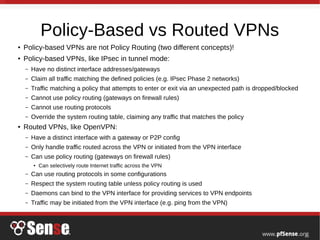
Policy-Based vs Routed VPNs
● Policy-based VPNs are not Policy Routing (two different concepts)!
● Policy-based VPNs, like IPsec in tunnel mode:
– Have no distinct interface addresses/gateways
– Claim all traffic matching the defined policies (e.g. IPsec Phase 2 networks)
– Traffic matching a policy that attempts to enter or exit via an unexpected path is dropped/blocked
– Cannot use policy routing (gateways on firewall rules)
– Cannot use routing protocols
– Override the system routing table, claiming any traffic that matches the policy
● Routed VPNs, like OpenVPN:
– Have a distinct interface with a gateway or P2P config
– Only handle traffic routed across the VPN or initiated from the VPN interface
– Can use policy routing (gateways on firewall rules)
● Can selectively route Internet traffic across the VPN
– Can use routing protocols in some configurations
– Respect the system routing table unless policy routing is used
– Daemons can bind to the VPN interface for providing services to VPN endpoints
– Traffic may be initiated from the VPN interface (e.g. ping from the VPN)
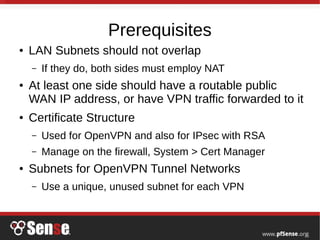
Prerequisites
● LAN Subnets should not overlap
– If they do, both sides must employ NAT
● At least one side should have a routable public
WAN IP address, or have VPN traffic forwarded to it
● Certificate Structure
– Used for OpenVPN and also for IPsec with RSA
– Manage on the firewall, System > Cert Manager
● Subnets for OpenVPN Tunnel Networks
– Use a unique, unused subnet for each VPN
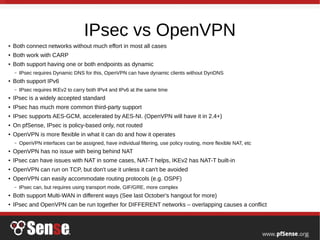
IPsec vs OpenVPN
● Both connect networks without much effort in most all cases
● Both work with CARP
● Both support having one or both endpoints as dynamic
– IPsec requires Dynamic DNS for this, OpenVPN can have dynamic clients without DynDNS
● Both support IPv6
– IPsec requires IKEv2 to carry both IPv4 and IPv6 at the same time
● IPsec is a widely accepted standard
● IPsec has much more common third-party support
● IPsec supports AES-GCM, accelerated by AES-NI. (OpenVPN will have it in 2.4+)
● On pfSense, IPsec is policy-based only, not routed
● OpenVPN is more flexible in what it can do and how it operates
– OpenVPN interfaces can be assigned, have individual filtering, use policy routing, more flexible NAT, etc
● OpenVPN has no issue with being behind NAT
● IPsec can have issues with NAT in some cases, NAT-T helps, IKEv2 has NAT-T built-in
● OpenVPN can run on TCP, but don't use it unless it can't be avoided
● OpenVPN can easily accommodate routing protocols (e.g. OSPF)
– IPsec can, but requires using transport mode, GIF/GRE, more complex
● Both support Multi-WAN in different ways (See last October's hangout for more)
● IPsec and OpenVPN can be run together for DIFFERENT networks – overlapping causes a conflict
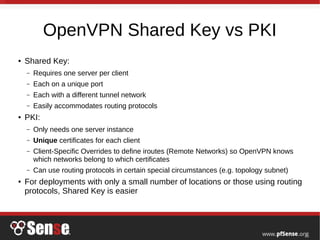
OpenVPN Shared Key vs PKI
● Shared Key:
– Requires one server per client
– Each on a unique port
– Each with a different tunnel network
– Easily accommodates routing protocols
● PKI:
– Only needs one server instance
– Unique certificates for each client
– Client-Specific Overrides to define iroutes (Remote Networks) so OpenVPN knows
which networks belong to which certificates
– Can use routing protocols in certain special circumstances (e.g. topology subnet)
● For deployments with only a small number of locations or those using routing
protocols, Shared Key is easier
Connecting Two Sites - IPsec
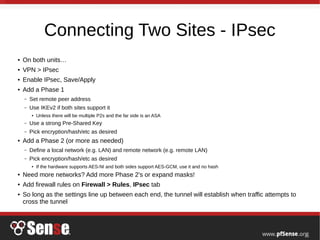
● On both units…
● VPN > IPsec
● Enable IPsec, Save/Apply
● Add a Phase 1
– Set remote peer address
– Use IKEv2 if both sites support it
● Unless there will be multiple P2s and the far side is an ASA
– Use a strong Pre-Shared Key
– Pick encryption/hash/etc as desired
● Add a Phase 2 (or more as needed)
– Define a local network (e.g. LAN) and remote network (e.g. remote LAN)
– Pick encryption/hash/etc as desired
● If the hardware supports AES-NI and both sides support AES-GCM, use it and no hash
● Need more networks? Add more Phase 2's or expand masks!
● Add firewall rules on Firewall > Rules, IPsec tab
● So long as the settings line up between each end, the tunnel will establish when traffic attempts to
cross the tunnel
Connecting – OpenVPN Shared Key
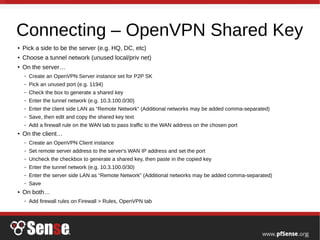
● Pick a side to be the server (e.g. HQ, DC, etc)
● Choose a tunnel network (unused local/priv net)
● On the server…
– Create an OpenVPN Server instance set for P2P SK
– Pick an unused port (e.g. 1194)
– Check the box to generate a shared key
– Enter the tunnel network (e.g. 10.3.100.0/30)
– Enter the client side LAN as “Remote Network” (Additional networks may be added comma-separated)
– Save, then edit and copy the shared key text
– Add a firewall rule on the WAN tab to pass traffic to the WAN address on the chosen port
● On the client…
– Create an OpenVPN Client instance
– Set remote server address to the server's WAN IP address and set the port
– Uncheck the checkbox to generate a shared key, then paste in the copied key
– Enter the tunnel network (e.g. 10.3.100.0/30)
– Enter the server side LAN as “Remote Network” (Additional networks may be added comma-separated)
– Save
● On both…
– Add firewall rules on Firewall > Rules, OpenVPN tab
Connecting Multiple Sites (No Demo)
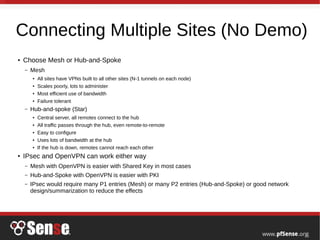
● Choose Mesh or Hub-and-Spoke
– Mesh
● All sites have VPNs built to all other sites (N-1 tunnels on each node)
● Scales poorly, lots to administer
● Most efficient use of bandwidth
● Failure tolerant
– Hub-and-spoke (Star)
● Central server, all remotes connect to the hub
● All traffic passes through the hub, even remote-to-remote
● Easy to configure
● Uses lots of bandwidth at the hub
● If the hub is down, remotes cannot reach each other
● IPsec and OpenVPN can work either way
– Mesh with OpenVPN is easier with Shared Key in most cases
– Hub-and-Spoke with OpenVPN is easier with PKI
– IPsec would require many P1 entries (Mesh) or many P2 entries (Hub-and-Spoke) or good network
design/summarization to reduce the effects
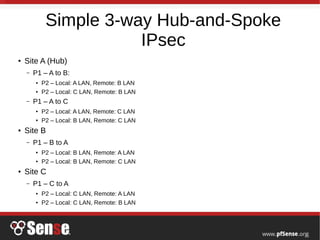
Simple 3-way Hub-and-Spoke
IPsec
● Site A (Hub)
– P1 – A to B:
● P2 – Local: A LAN, Remote: B LAN
● P2 – Local: C LAN, Remote: B LAN
– P1 – A to C
● P2 – Local: A LAN, Remote: C LAN
● P2 – Local: B LAN, Remote: C LAN
● Site B
– P1 – B to A
● P2 – Local: B LAN, Remote: A LAN
● P2 – Local: B LAN, Remote: C LAN
● Site C
– P1 – C to A
● P2 – Local: C LAN, Remote: A LAN
● P2 – Local: C LAN, Remote: B LAN
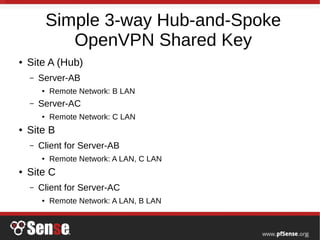
Simple 3-way Hub-and-Spoke
OpenVPN Shared Key
● Site A (Hub)
– Server-AB
● Remote Network: B LAN
– Server-AC
● Remote Network: C LAN
● Site B
– Client for Server-AB
● Remote Network: A LAN, C LAN
● Site C
– Client for Server-AC
● Remote Network: A LAN, B LAN
Conclusion
● Questions?
● Ideas for hangout topics? Post on forum,
comment on the blog posts, Reddit, etc