
www.batracomputercentre.com 0171-4066670, 9729666670
info.jatinbatra@gmail.com
Agenda:
 What Is MS-Office?
 Definition Of MS-Office
 Application Of MS-Office
 Types Of MS-Office
 What Is MS-Word and its uses?
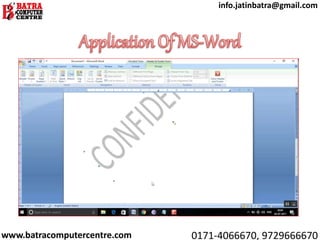
 Application Of MS-Word
 What Is MS-Excel and its uses?
 Application Of MS-Excel
 What is MS-PowerPoint and Its uses?
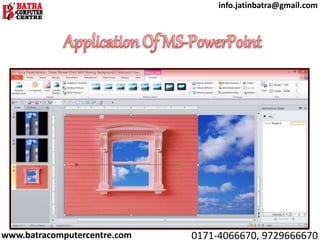
 Application Of PowerPoint
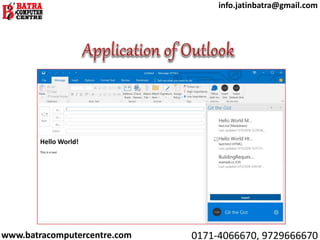
 What is MS-Outlook and its uses?
 Application of Outlook
www.batracomputercentre.com 0171-4066670, 9729666670
info.jatinbatra@gmail.com
Microsoft Office is a suite of desktop
productivity applications that is designed
specifically to be used for office or business use.
It is a proprietary product of Microsoft
Corporation and was first released in 1990.
Microsoft Office is available in 35 different
languages and is supported by Windows, Mac
and most Linux variants. It mainly consists of
Word, Excel, PowerPoint, Access, OneNote,
Outlook and Publisher applications.
www.batracomputercentre.com 0171-4066670, 9729666670
info.jatinbatra@gmail.com
According to the “Moris Wall” MS- Office is an
integrated suite of business software applications
for Windows and Macintosh computers. Office
includes word processing, spreadsheet,
presentation graphics and email communication
programs that provide functionality which is
commonly used to run a business office. Office
2010 for Microsoft Windows and Office 2008 for
the Macintosh computer are the versions
available as of July 2010.
www.batracomputercentre.com 0171-4066670, 9729666670
info.jatinbatra@gmail.com
www.batracomputercentre.com 0171-4066670, 9729666670
info.jatinbatra@gmail.com
Microsoft Word is a widely used commercial word
processor designed by Microsoft. Microsoft Word is a
component of the Microsoft Office suite of productivity
software, but can also be purchased as a stand-alone
product.
It was initially launched in 1983 and has since been
revised numerous times. Microsoft Word is available for
both Windows and Macintosh operating systems.
Microsoft Word is often called simply Word or MS Word.
www.batracomputercentre.com 0171-4066670, 9729666670
info.jatinbatra@gmail.com
1. Business and workplace use of Microsoft Word
2. MS word uses in Education
3. Home based uses of Microsoft Word
4. Microsoft Word helps you to get a job
5. Help to create resumes, notes, and assignments
6. You can create books, articles, and newsletters
7. Used to create edit, transcribe, and convert PDF
documents
8. You can start an offline/online business after learning
the Microsoft word
9. Collaborate with team members anytime and from
anywhere
10. You can use Microsoft Word to teach student
www.batracomputercentre.com 0171-4066670, 9729666670
info.jatinbatra@gmail.com
www.batracomputercentre.com 0171-4066670, 9729666670
info.jatinbatra@gmail.com
Microsoft Excel is a software program
produced by Microsoft that allows users
to organize, format and calculate data
with formulas using a spreadsheet
system. This software is part of the
Microsoft Office suite and is compatible
with other applications in the Office
suite.
www.batracomputercentre.com 0171-4066670, 9729666670
info.jatinbatra@gmail.com
1. Administrative Functions
2. Storing Data
3. Reports
4. Research
5. Data recovery and spreadsheets
6. Mathematical formulas of MS Excel make
things easier
7. Security
www.batracomputercentre.com 0171-4066670, 9729666670
info.jatinbatra@gmail.com
www.batracomputercentre.com 0171-4066670, 9729666670
info.jatinbatra@gmail.com
Microsoft PowerPoint is a powerful presentation
software developed by Microsoft. It is a
standard component of the company's
Microsoft Office suite software, and is bundled
together with Word, Excel and other Office
productivity tools. The program uses slides to
convey information rich in multimedia. The term
"slide" refers to the slide projector, which this
software effectively replaces. It was renamed
PowerPoint in 1987 as suggested by Robert
Gaskins. In August of 1987, Microsoft bought
Forethought for $14 million
www.batracomputercentre.com 0171-4066670, 9729666670
info.jatinbatra@gmail.com
1. Uses of PowerPoint in Education
2. Uses of PowerPoint in Business
3. Uses of PowerPoint for House-Wives
4. Uses in Governance and citizen
services
5. Uses for job Seekers
6. Uses in earning money and in
starting an online business.
www.batracomputercentre.com 0171-4066670, 9729666670
info.jatinbatra@gmail.com
www.batracomputercentre.com 0171-4066670, 9729666670
info.jatinbatra@gmail.com
Microsoft Outlook is the preferred email client
used to access Microsoft Exchange Server email.
Not only does Microsoft Outlook provide access
to Exchange Server email, but it also includes
contact, calendaring and task management
functionality. Companies can also integrate
Outlook with Microsoft’s SharePoint platform to
share documents, project notes, collaborate
with colleagues, send reminders and much
more.
www.batracomputercentre.com 0171-4066670, 9729666670
info.jatinbatra@gmail.com
1. Outlook and Microsoft Exchange Play Well
Together
2. Outlook Plays Well With Active Directory.
3. Outlook Integrates with Many Devices and
Applications
4. Outlook Makes it Easy to Organize Your Assets
5. Outlook Plays Nicely With SharePoint
6. Outlook Expedites Workflow
7. Outlook's User Interface is Familiar
8. Outlook Offers Integrated Calendar, Tasks, etc.
9. Believe It or Not, Outlook Has Pretty Good Security
10. Outlook Offers One-Stop E-mail
www.batracomputercentre.com 0171-4066670, 9729666670
info.jatinbatra@gmail.com
www.batracomputercentre.com 0171-4066670, 9729666670
info.jatinbatra@gmail.com
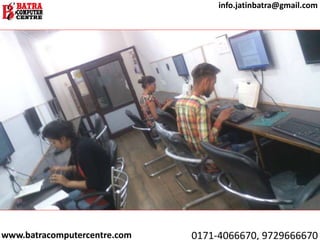
BATRA COMPUTER CENTRE is the one of
the entre in Ambala. It is the Govt. ISO
Certified 9001:2008. We provide
different courses like Basic Computers,
Programming Languages, Web
Designing and Development,
Photoshop, CorelDraw, SEO and other
courses are also available.
www.batracomputercentre.com 0171-4066670, 9729666670
info.jatinbatra@gmail.com
www.batracomputercentre.com 0171-4066670, 9729666670
info.jatinbatra@gmail.com
www.batracomputercentre.com 0171-4066670, 9729666670
info.jatinbatra@gmail.com
BATRA COMPUTER CENTRE
SCO 15, Dayal Bagh, Ambala Cantt
Near Panchmukhi Hanuman Mandir
Ph. No.: 0171-4066670, 9729666670
info.jatinbatra@gmail.com
www.batracomputercentre.com
www.batracomputercentre.com 0171-4066670, 9729666670
info.jatinbatra@gmail.com
www.batracomputercentre.com 0171-4066670, 9729666670
info.jatinbatra@gmail.com

Presentation on MS-Office

  • 1.
  • 2.
    Agenda:  What IsMS-Office?  Definition Of MS-Office  Application Of MS-Office  Types Of MS-Office  What Is MS-Word and its uses?  Application Of MS-Word  What Is MS-Excel and its uses?  Application Of MS-Excel  What is MS-PowerPoint and Its uses?  Application Of PowerPoint  What is MS-Outlook and its uses?  Application of Outlook www.batracomputercentre.com 0171-4066670, 9729666670 info.jatinbatra@gmail.com
  • 3.
    Microsoft Office isa suite of desktop productivity applications that is designed specifically to be used for office or business use. It is a proprietary product of Microsoft Corporation and was first released in 1990. Microsoft Office is available in 35 different languages and is supported by Windows, Mac and most Linux variants. It mainly consists of Word, Excel, PowerPoint, Access, OneNote, Outlook and Publisher applications. www.batracomputercentre.com 0171-4066670, 9729666670 info.jatinbatra@gmail.com
  • 4.
    According to the“Moris Wall” MS- Office is an integrated suite of business software applications for Windows and Macintosh computers. Office includes word processing, spreadsheet, presentation graphics and email communication programs that provide functionality which is commonly used to run a business office. Office 2010 for Microsoft Windows and Office 2008 for the Macintosh computer are the versions available as of July 2010. www.batracomputercentre.com 0171-4066670, 9729666670 info.jatinbatra@gmail.com
  • 5.
  • 6.
    Microsoft Word isa widely used commercial word processor designed by Microsoft. Microsoft Word is a component of the Microsoft Office suite of productivity software, but can also be purchased as a stand-alone product. It was initially launched in 1983 and has since been revised numerous times. Microsoft Word is available for both Windows and Macintosh operating systems. Microsoft Word is often called simply Word or MS Word. www.batracomputercentre.com 0171-4066670, 9729666670 info.jatinbatra@gmail.com
  • 7.
    1. Business andworkplace use of Microsoft Word 2. MS word uses in Education 3. Home based uses of Microsoft Word 4. Microsoft Word helps you to get a job 5. Help to create resumes, notes, and assignments 6. You can create books, articles, and newsletters 7. Used to create edit, transcribe, and convert PDF documents 8. You can start an offline/online business after learning the Microsoft word 9. Collaborate with team members anytime and from anywhere 10. You can use Microsoft Word to teach student www.batracomputercentre.com 0171-4066670, 9729666670 info.jatinbatra@gmail.com
  • 8.
  • 9.
    Microsoft Excel isa software program produced by Microsoft that allows users to organize, format and calculate data with formulas using a spreadsheet system. This software is part of the Microsoft Office suite and is compatible with other applications in the Office suite. www.batracomputercentre.com 0171-4066670, 9729666670 info.jatinbatra@gmail.com
  • 10.
    1. Administrative Functions 2.Storing Data 3. Reports 4. Research 5. Data recovery and spreadsheets 6. Mathematical formulas of MS Excel make things easier 7. Security www.batracomputercentre.com 0171-4066670, 9729666670 info.jatinbatra@gmail.com
  • 11.
  • 12.
    Microsoft PowerPoint isa powerful presentation software developed by Microsoft. It is a standard component of the company's Microsoft Office suite software, and is bundled together with Word, Excel and other Office productivity tools. The program uses slides to convey information rich in multimedia. The term "slide" refers to the slide projector, which this software effectively replaces. It was renamed PowerPoint in 1987 as suggested by Robert Gaskins. In August of 1987, Microsoft bought Forethought for $14 million www.batracomputercentre.com 0171-4066670, 9729666670 info.jatinbatra@gmail.com
  • 13.
    1. Uses ofPowerPoint in Education 2. Uses of PowerPoint in Business 3. Uses of PowerPoint for House-Wives 4. Uses in Governance and citizen services 5. Uses for job Seekers 6. Uses in earning money and in starting an online business. www.batracomputercentre.com 0171-4066670, 9729666670 info.jatinbatra@gmail.com
  • 14.
  • 15.
    Microsoft Outlook isthe preferred email client used to access Microsoft Exchange Server email. Not only does Microsoft Outlook provide access to Exchange Server email, but it also includes contact, calendaring and task management functionality. Companies can also integrate Outlook with Microsoft’s SharePoint platform to share documents, project notes, collaborate with colleagues, send reminders and much more. www.batracomputercentre.com 0171-4066670, 9729666670 info.jatinbatra@gmail.com
  • 16.
    1. Outlook andMicrosoft Exchange Play Well Together 2. Outlook Plays Well With Active Directory. 3. Outlook Integrates with Many Devices and Applications 4. Outlook Makes it Easy to Organize Your Assets 5. Outlook Plays Nicely With SharePoint 6. Outlook Expedites Workflow 7. Outlook's User Interface is Familiar 8. Outlook Offers Integrated Calendar, Tasks, etc. 9. Believe It or Not, Outlook Has Pretty Good Security 10. Outlook Offers One-Stop E-mail www.batracomputercentre.com 0171-4066670, 9729666670 info.jatinbatra@gmail.com
  • 17.
  • 18.
    BATRA COMPUTER CENTREis the one of the entre in Ambala. It is the Govt. ISO Certified 9001:2008. We provide different courses like Basic Computers, Programming Languages, Web Designing and Development, Photoshop, CorelDraw, SEO and other courses are also available. www.batracomputercentre.com 0171-4066670, 9729666670 info.jatinbatra@gmail.com
  • 19.
  • 20.
  • 21.
    BATRA COMPUTER CENTRE SCO15, Dayal Bagh, Ambala Cantt Near Panchmukhi Hanuman Mandir Ph. No.: 0171-4066670, 9729666670 info.jatinbatra@gmail.com www.batracomputercentre.com www.batracomputercentre.com 0171-4066670, 9729666670 info.jatinbatra@gmail.com
  • 22.