DIRECTED ACYCLIC GRAPH
LAHAR SRIVASTAVA
ARTI JAIN
DIRECTED ACYCLIC GRAPH(DAG)
The Directed Acyclic Graph (DAG) is used to represent the structure of basic blocks, to visualize the
flow of values between basic blocks.
A directed acyclic graph is a directed graph that has no cycles.
A DAG is a three-address code that is generated as the result of an intermediate code generation.
Determines common subexpressions.
Leaves are labelled by variables names or constraints initial values are subscripted with 0.
Interior nodes are operators and internal nodes are also represent result of the expressions.
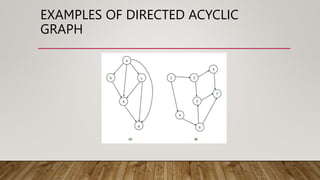
EXAMPLES OF DIRECTED ACYCLIC
GRAPH
ALGORITHM FOR CONSTRUCTION OF DIRECTED
ACYCLIC GRAPH
• Case 1 – x = y op z
Case 2 – x = op y
Case 3 – x = y
• Directed Acyclic Graph for the above cases can be built as follows :
• Step 1 –
• If the y operand is not defined, then create a node (y).
• If the z operand is not defined, create a node for case(1) as node(z).
• Step 2 –
• Create node(OP) for case(1), with node(z) as its right child and node(OP) as its left child (y).
• For the case (2), see if there is a node operator (OP) with one child node (y).
• Node n will be node(y) in case (3).
• Step 3 –
Remove x from the list of node identifiers. Step 2: Add x to the list of attached identifiers for node n.
APPLICATIONS OF DAG
• Directed acyclic graph determines the subexpressions that are commonly used.
• Directed acyclic graph determines the names used within the block as well as the names
computed outside the block.
• Determines which statements in the block may have their computed value outside the
block.
• Code can be represented by a Directed acyclic graph that describes the inputs and outputs
of each of the arithmetic operations performed within the code.
• Several programming languages describe value systems that are linked together by a
directed acyclic graph.
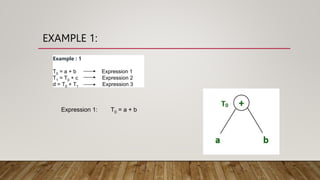
EXAMPLE 1:
Example : 1
T0 = a + b Expression 1
T1 = T0 + c Expression 2
d = T0 + T1 Expression 3
Expression 1: T0 = a + b
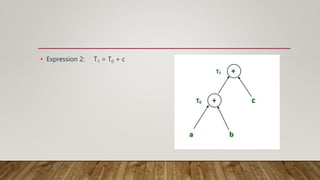
• Expression 2: T1 = T0 + c
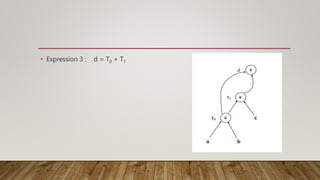
• Expression 3 : d = T0 + T1
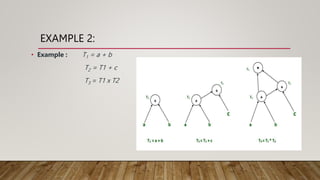
EXAMPLE 2:
• Example : T1 = a + b
T2 = T1 + c
T3 = T1 x T2
COMPLEXITY OF DIRECTED ACYCLIC GRAPH
• A DAG having "width" and "depth" is more complex than a DAG having only
"width" or only "depth": E←D←A→B→C is more complex than A→B→C→D→E
or the graph with edges from A to each of B,C,D, and E.
• The sum of the sizes of the adjacency lists of all nodes in a directed graph is E.
Thus, for a directed graph, the time complexity is O(V) + O(E) = O(V + E). In an
undirected graph, each edge appears twice. Once at either end of the adjacency
list for the edge
TRIES: AN EXCELLENT DATA
STRUCTURE FOR STRINGS
Overview
 History & Definition
Types of tries
Standard Tries
Compressed Tries
Suffix Tries
 Conclusion
History
 The term trie comes from retrieval.
This term was coined by Edward Fredkin, who pronounce it tri as in
the word retrieval
Definition of tries
 A data structure for representing a collection of strings.
In computer science, a trie. Also called digital tree and sometimes
radix tree or prefix tree.
Tries support fast pattern matching
Properties of a tries
 A multi-way tree.
Each node has from 1 to n children.
Each edge of the tree is labeled with a character.
Each leaf nodes correspond to the stored string, which is a
concatenation of characters on a path from the root to this node.
Standard tries
 The standard trie for a set of strings S is an ordered tree such that:
Each node labeled with a character but not root node.
The children of a node are alphabetically ordered.
The paths from the external nodes to the root yield the strings of S.
Standard tries - Insertion
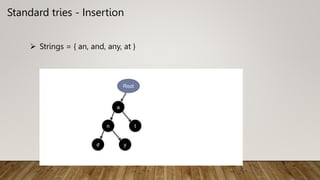
 Strings = { an, and, any, at }
Example of Standard tries
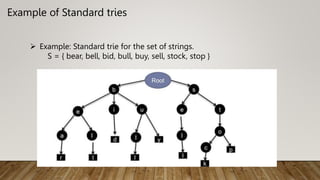
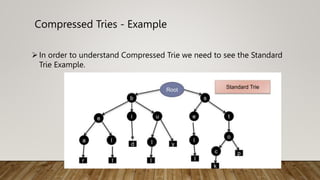
 Example: Standard trie for the set of strings.
S = { bear, bell, bid, bull, buy, sell, stock, stop }
Handling keys (strings)
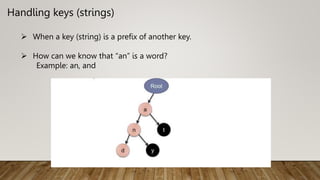
 When a key (string) is a prefix of another key.
 How can we know that “an” is a word?
Example: an, and
Handling keys (strings)
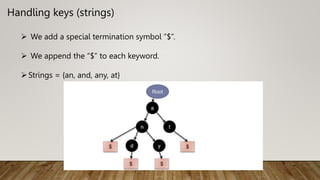
 We add a special termination symbol ”$”.
 We append the “$” to each keyword.
Strings = {an, and, any, at}
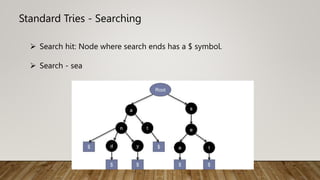
Standard Tries - Searching
 Search hit: Node where search ends has a $ symbol.
 Search - sea
Standard Tries - Deletion
3 cases
1. Word not found……!
2. Word exists as a strand alone word.
3. Word exists as a prefix of another word.
Standard Tries - Deletion
 Word not found.
return false
 Word exists as a stand alone word
part of any other word
does not a part of any other word
Standard Tries - Deletion
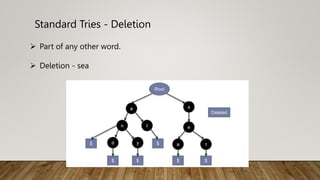
 Part of any other word.
 Deletion - sea
Standard Tries - Deletion
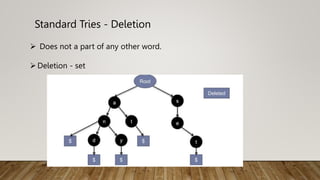
 Does not a part of any other word.
Deletion - set
Standard Tries - Deletion
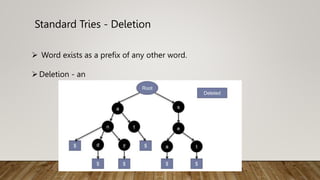
 Word exists as a prefix of any other word.
Deletion - an
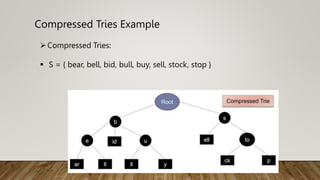
Compressed Tries
 Tries with nodes of degree atleast 2.
 Obtained by standard tries by compressing chains of redundant
nodes.
Compressed Tries - Example
In order to understand Compressed Trie we need to see the Standard
Trie Example.
Compressed Tries Example
Compressed Tries:
 S = { bear, bell, bid, bull, buy, sell, stock, stop }
Suffix Tries
A suffix trie is a compressed trie for all the suffixes of a text.
Suffix trie are a space-efficient data structure to store a string that
allows many kinds of queries to be answered quickly.
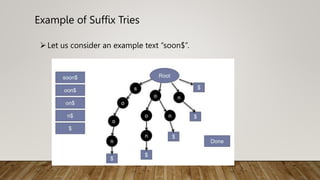
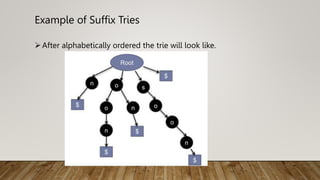
Example of Suffix Tries
Let us consider an example text “soon$”.
Example of Suffix Tries
After alphabetically ordered the trie will look like.
Understanding Requirements
Insertion is faster as compared to the Hash Table.
Lookup is much more faster than Hash Table implementations.
There are no collision of different keys in tries.
<<HASHING>>
Dictionaries
Dictionaries stores elements so that they can be located quickly
using keys.
For e.g.
 A Dictionary may hold bank accounts.
 In which key will be account number.
 And each account may stores many additional information.
How to Implement a Dictionary?
Different data structure to realize a key
o Array, Linked list
o Binary tree
o Hash table
o Red/Black tree
o AVL Tree
o B-Tree
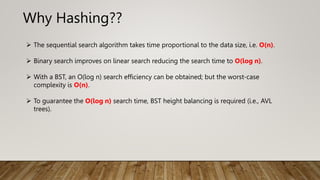
Why Hashing??
 The sequential search algorithm takes time proportional to the data size, i.e. O(n).
 Binary search improves on linear search reducing the search time to O(log n).
 With a BST, an O(log n) search efficiency can be obtained; but the worst-case
complexity is O(n).
 To guarantee the O(log n) search time, BST height balancing is required (i.e., AVL
trees).
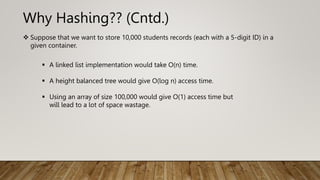
Why Hashing?? (Cntd.)
 Suppose that we want to store 10,000 students records (each with a 5-digit ID) in a
given container.
 A linked list implementation would take O(n) time.
 A height balanced tree would give O(log n) access time.
 Using an array of size 100,000 would give O(1) access time but
will lead to a lot of space wastage.
Why Hashing?? (Cntd.)
 Is there some way that we could get O(1) access without
wasting a lot of space?
The answer is
HASHING.
Hashing
Another important and widely useful technique for implementing
dictionaries.
Constant time per operation (on the average).
Like an array, come up with a function to map the large range into one
which we can manage.
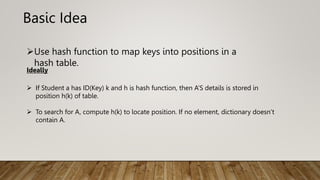
Basic Idea
Use hash function to map keys into positions in a
hash table.
Ideally
 If Student a has ID(Key) k and h is hash function, then A’S details is stored in
position h(k) of table.
 To search for A, compute h(k) to locate position. If no element, dictionary doesn’t
contain A.
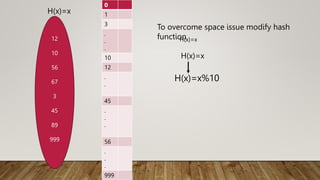
12
10
56
67
3
45
89
999
H(x)=x
0
1
3
.
.
.
10
12
.
.
45
.
.
.
56
.
.
.
999
To overcome space issue modify hash
function
H(x)=x
H(x)=x%10
H(x)=x
12
10
56
76
67
3
45
89
999
H(x)=x%10
0
1
2
.
6
.
10
12
.
.
45
.
.
.
56
.
.
.
999
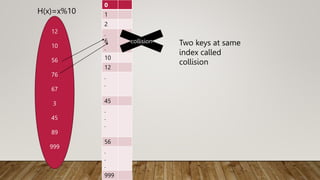
collision Two keys at same
index called
collision
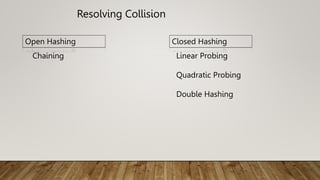
Resolving Collision
Open Hashing Closed Hashing
Chaining Linear Probing
Quadratic Probing
Double Hashing
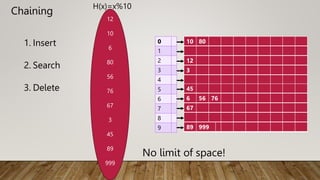
Chaining
1. Insert
2. Search
3. Delete
12
10
6
80
56
76
67
3
45
89
999
H(x)=x%10
0
1
2
3
4
5
6
7
8
9
10 80
12
3
45
6 56 76
67
89 999
No limit of space!
4.
Analysis:
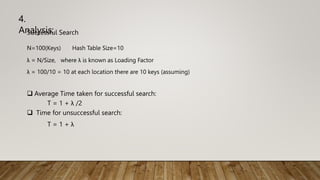
Successful Search
N=100(Keys) Hash Table Size=10
λ = N/Size, where λ is known as Loading Factor
λ = 100/10 = 10 at each location there are 10 keys (assuming)
 Average Time taken for successful search:
T = 1 + λ /2
 Time for unsuccessful search:
T = 1 + λ
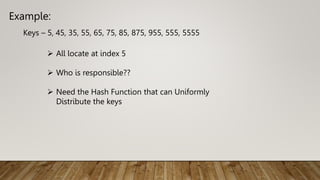
Example:
Keys – 5, 45, 35, 55, 65, 75, 85, 875, 955, 555, 5555
 All locate at index 5
 Who is responsible??
 Need the Hash Function that can Uniformly
Distribute the keys
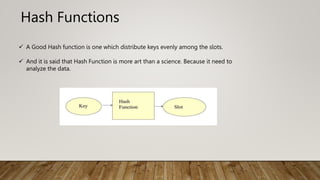
Hash Functions
 A Good Hash function is one which distribute keys evenly among the slots.
 And it is said that Hash Function is more art than a science. Because it need to
analyze the data.
Hash Function (contd.)
Need of choose a good Hash function
Quick Compute
Distribute Keys in uniform manner throughout the table.
How to deal with Hashing non integer Key???
1. Find some way of turning keys into integer.
eg if key is in character then convert it into integer using ASCII
2. Then use standard Hash Function on the integer.
Hash Function (contd.)
 The Mapping of keys to indices of a hash table is called a hash function.
 The Hash Function is usually the composition of two maps.
 Hash code map
Keys Integer
 Compression map
Integer A[o…….m-1]
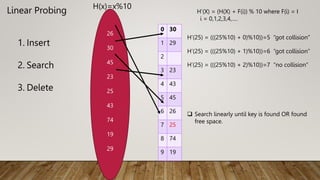
Linear Probing
26
30
45
23
25
43
74
19
29
H(x)=x%10
0 30
1 29
2
3 23
4 43
5 45
6 26
7 25
8 74
9 19
H’(X) = (H(X) + F(i)) % 10 where F(i) = I
i = 0,1,2,3,4,….
H’(25) = (((25%10) + 0)%10))=5 “got collision”
H’(25) = (((25%10) + 1)%10))=6 “got collision”
H’(25) = (((25%10) + 2)%10))=7 “no collision”
1. Insert
2. Search
3. Delete
 Search linearly until key is found OR found
free space.
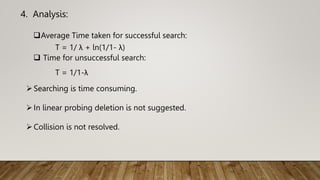
4. Analysis:
Average Time taken for successful search:
T = 1/ λ + ln(1/1- λ)
 Time for unsuccessful search:
T = 1/1-λ
Searching is time consuming.
In linear probing deletion is not suggested.
Collision is not resolved.
Linear Probe(contd.)
 If the current location is used, Try the next table location.
 Used less memory than chaining as one does not have to store all those link (i.e. address of
others).
 Slower than chaining as one might have to walk along the table for a long time.
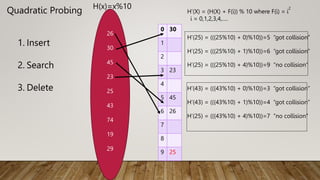
Quadratic Probing
26
30
45
23
25
43
74
19
29
H(x)=x%10
0 30
1
2
3 23
4
5 45
6 26
7
8
9 25
H’(X) = (H(X) + F(i)) % 10 where F(i) = i
2
i = 0,1,2,3,4,….
H’(25) = (((25%10) + 0)%10))=5 “got collision”
H’(25) = (((25%10) + 1)%10))=6 “got collision”
H’(25) = (((25%10) + 4)%10))=9 “no collision”
1. Insert
2. Search
3. Delete H’(43) = (((43%10) + 0)%10))=3 “got collision”
H’(43) = (((43%10) + 1)%10))=4 “got collision”
H’(25) = (((43%10) + 4)%10))=7 “no collision”
4. Analysis:
Average Time taken for successful search:
T = - (loge
(1- λ)/ λ)
 Time for unsuccessful search:
T = 1/1-λ
Searching is time consuming.
Collision is not resolved.
Keys are uniformly distributed.
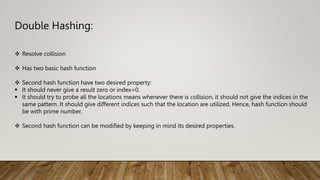
Double Hashing:
 Resolve collision
 Has two basic hash function
 Second hash function have two desired property:
 It should never give a result zero or index=0.
 It should try to probe all the locations means whenever there is collision, it should not give the indices in the
same pattern. It should give different indices such that the location are utilized. Hence, hash function should
be with prime number.
 Second hash function can be modified by keeping in mind its desired properties.
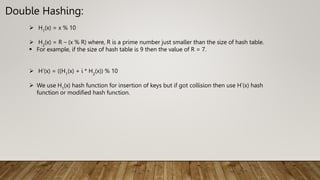
Double Hashing:
 H1
(x) = x % 10
 H2
(x) = R – (x % R) where, R is a prime number just smaller than the size of hash table.
 For example, if the size of hash table is 9 then the value of R = 7.
 H’(x) = ((H1
(x) + i * H2
(x)) % 10
 We use H1
(x) hash function for insertion of keys but if got collision then use H’(x) hash
function or modified hash function.
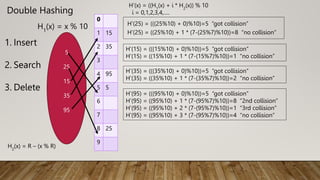
Double Hashing
5
25
15
35
95
H1
(x) = x % 10
0
1 15
2 35
3
4 95
5 5
6
7
8 25
9
H’(x) = ((H1
(x) + i * H2
(x)) % 10
i = 0,1,2,3,4,….
H’(25) = (((25%10) + 0)%10)=5 “got collision”
H’(25) = ((25%10) + 1 * (7-(25%7)%10))=8 “no collision”
1. Insert
2. Search
3. Delete
H2
(x) = R – (x % R)
H’(15) = (((15%10) + 0)%10))=5 “got collision”
H’(15) = ((15%10) + 1 * (7-(15%7)%10))=1 “no collision”
H’(35) = (((35%10) + 0)%10))=5 “got collision”
H’(35) = ((35%10) + 1 * (7-(35%7)%10))=2 “no collision”
H’(95) = (((95%10) + 0)%10))=5 “got collision”
H’(95) = ((95%10) + 1 * (7-(95%7)%10))=8 “2nd collision”
H’(95) = ((95%10) + 2 * (7-(95%7)%10))=1 “3rd collision”
H’(95) = ((95%10) + 3 * (7-(95%7)%10))=4 “no collision”
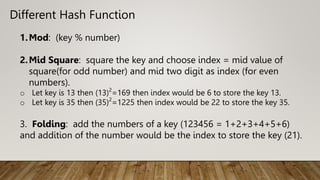
Different Hash Function
1.Mod: (key % number)
2.Mid Square: square the key and choose index = mid value of
square(for odd number) and mid two digit as index (for even
numbers).
o Let key is 13 then (13)2
=169 then index would be 6 to store the key 13.
o Let key is 35 then (35)2
=1225 then index would be 22 to store the key 35.
3. Folding: add the numbers of a key (123456 = 1+2+3+4+5+6)
and addition of the number would be the index to store the key (21).
THANK YOU

presentation on important DAG,TRIE,Hashing.pptx

  • 1.
    DIRECTED ACYCLIC GRAPH LAHARSRIVASTAVA ARTI JAIN
  • 2.
    DIRECTED ACYCLIC GRAPH(DAG) TheDirected Acyclic Graph (DAG) is used to represent the structure of basic blocks, to visualize the flow of values between basic blocks. A directed acyclic graph is a directed graph that has no cycles. A DAG is a three-address code that is generated as the result of an intermediate code generation. Determines common subexpressions. Leaves are labelled by variables names or constraints initial values are subscripted with 0. Interior nodes are operators and internal nodes are also represent result of the expressions.

  • 3.
    EXAMPLES OF DIRECTEDACYCLIC GRAPH
  • 4.
    ALGORITHM FOR CONSTRUCTIONOF DIRECTED ACYCLIC GRAPH • Case 1 – x = y op z Case 2 – x = op y Case 3 – x = y • Directed Acyclic Graph for the above cases can be built as follows : • Step 1 – • If the y operand is not defined, then create a node (y). • If the z operand is not defined, create a node for case(1) as node(z). • Step 2 – • Create node(OP) for case(1), with node(z) as its right child and node(OP) as its left child (y). • For the case (2), see if there is a node operator (OP) with one child node (y). • Node n will be node(y) in case (3). • Step 3 – Remove x from the list of node identifiers. Step 2: Add x to the list of attached identifiers for node n.
  • 5.
    APPLICATIONS OF DAG •Directed acyclic graph determines the subexpressions that are commonly used. • Directed acyclic graph determines the names used within the block as well as the names computed outside the block. • Determines which statements in the block may have their computed value outside the block. • Code can be represented by a Directed acyclic graph that describes the inputs and outputs of each of the arithmetic operations performed within the code. • Several programming languages describe value systems that are linked together by a directed acyclic graph.
  • 6.
    EXAMPLE 1: Example :1 T0 = a + b Expression 1 T1 = T0 + c Expression 2 d = T0 + T1 Expression 3 Expression 1: T0 = a + b
  • 7.
    • Expression 2:T1 = T0 + c
  • 8.
    • Expression 3: d = T0 + T1
  • 9.
    EXAMPLE 2: • Example: T1 = a + b T2 = T1 + c T3 = T1 x T2
  • 10.
    COMPLEXITY OF DIRECTEDACYCLIC GRAPH • A DAG having "width" and "depth" is more complex than a DAG having only "width" or only "depth": E←D←A→B→C is more complex than A→B→C→D→E or the graph with edges from A to each of B,C,D, and E. • The sum of the sizes of the adjacency lists of all nodes in a directed graph is E. Thus, for a directed graph, the time complexity is O(V) + O(E) = O(V + E). In an undirected graph, each edge appears twice. Once at either end of the adjacency list for the edge
  • 11.
    TRIES: AN EXCELLENTDATA STRUCTURE FOR STRINGS
  • 12.
    Overview  History &Definition Types of tries Standard Tries Compressed Tries Suffix Tries  Conclusion
  • 13.
    History  The termtrie comes from retrieval. This term was coined by Edward Fredkin, who pronounce it tri as in the word retrieval
  • 14.
    Definition of tries A data structure for representing a collection of strings. In computer science, a trie. Also called digital tree and sometimes radix tree or prefix tree. Tries support fast pattern matching
  • 15.
    Properties of atries  A multi-way tree. Each node has from 1 to n children. Each edge of the tree is labeled with a character. Each leaf nodes correspond to the stored string, which is a concatenation of characters on a path from the root to this node.
  • 16.
    Standard tries  Thestandard trie for a set of strings S is an ordered tree such that: Each node labeled with a character but not root node. The children of a node are alphabetically ordered. The paths from the external nodes to the root yield the strings of S.
  • 17.
    Standard tries -Insertion  Strings = { an, and, any, at }
  • 18.
    Example of Standardtries  Example: Standard trie for the set of strings. S = { bear, bell, bid, bull, buy, sell, stock, stop }
  • 19.
    Handling keys (strings) When a key (string) is a prefix of another key.  How can we know that “an” is a word? Example: an, and
  • 20.
    Handling keys (strings) We add a special termination symbol ”$”.  We append the “$” to each keyword. Strings = {an, and, any, at}
  • 21.
    Standard Tries -Searching  Search hit: Node where search ends has a $ symbol.  Search - sea
  • 22.
    Standard Tries -Deletion 3 cases 1. Word not found……! 2. Word exists as a strand alone word. 3. Word exists as a prefix of another word.
  • 23.
    Standard Tries -Deletion  Word not found. return false  Word exists as a stand alone word part of any other word does not a part of any other word
  • 24.
    Standard Tries -Deletion  Part of any other word.  Deletion - sea
  • 25.
    Standard Tries -Deletion  Does not a part of any other word. Deletion - set
  • 26.
    Standard Tries -Deletion  Word exists as a prefix of any other word. Deletion - an
  • 27.
    Compressed Tries  Trieswith nodes of degree atleast 2.  Obtained by standard tries by compressing chains of redundant nodes.
  • 28.
    Compressed Tries -Example In order to understand Compressed Trie we need to see the Standard Trie Example.
  • 29.
    Compressed Tries Example CompressedTries:  S = { bear, bell, bid, bull, buy, sell, stock, stop }
  • 30.
    Suffix Tries A suffixtrie is a compressed trie for all the suffixes of a text. Suffix trie are a space-efficient data structure to store a string that allows many kinds of queries to be answered quickly.
  • 31.
    Example of SuffixTries Let us consider an example text “soon$”.
  • 32.
    Example of SuffixTries After alphabetically ordered the trie will look like.
  • 33.
    Understanding Requirements Insertion isfaster as compared to the Hash Table. Lookup is much more faster than Hash Table implementations. There are no collision of different keys in tries.
  • 35.
  • 36.
    Dictionaries Dictionaries stores elementsso that they can be located quickly using keys. For e.g.  A Dictionary may hold bank accounts.  In which key will be account number.  And each account may stores many additional information.
  • 37.
    How to Implementa Dictionary? Different data structure to realize a key o Array, Linked list o Binary tree o Hash table o Red/Black tree o AVL Tree o B-Tree
  • 38.
    Why Hashing??  Thesequential search algorithm takes time proportional to the data size, i.e. O(n).  Binary search improves on linear search reducing the search time to O(log n).  With a BST, an O(log n) search efficiency can be obtained; but the worst-case complexity is O(n).  To guarantee the O(log n) search time, BST height balancing is required (i.e., AVL trees).
  • 39.
    Why Hashing?? (Cntd.) Suppose that we want to store 10,000 students records (each with a 5-digit ID) in a given container.  A linked list implementation would take O(n) time.  A height balanced tree would give O(log n) access time.  Using an array of size 100,000 would give O(1) access time but will lead to a lot of space wastage.
  • 40.
    Why Hashing?? (Cntd.) Is there some way that we could get O(1) access without wasting a lot of space? The answer is HASHING.
  • 41.
    Hashing Another important andwidely useful technique for implementing dictionaries. Constant time per operation (on the average). Like an array, come up with a function to map the large range into one which we can manage.
  • 42.
    Basic Idea Use hashfunction to map keys into positions in a hash table. Ideally  If Student a has ID(Key) k and h is hash function, then A’S details is stored in position h(k) of table.  To search for A, compute h(k) to locate position. If no element, dictionary doesn’t contain A.
  • 43.
  • 44.
  • 45.
    Resolving Collision Open HashingClosed Hashing Chaining Linear Probing Quadratic Probing Double Hashing
  • 46.
    Chaining 1. Insert 2. Search 3.Delete 12 10 6 80 56 76 67 3 45 89 999 H(x)=x%10 0 1 2 3 4 5 6 7 8 9 10 80 12 3 45 6 56 76 67 89 999 No limit of space!
  • 47.
    4. Analysis: Successful Search N=100(Keys) HashTable Size=10 λ = N/Size, where λ is known as Loading Factor λ = 100/10 = 10 at each location there are 10 keys (assuming)  Average Time taken for successful search: T = 1 + λ /2  Time for unsuccessful search: T = 1 + λ
  • 48.
    Example: Keys – 5,45, 35, 55, 65, 75, 85, 875, 955, 555, 5555  All locate at index 5  Who is responsible??  Need the Hash Function that can Uniformly Distribute the keys
  • 49.
    Hash Functions  AGood Hash function is one which distribute keys evenly among the slots.  And it is said that Hash Function is more art than a science. Because it need to analyze the data.
  • 50.
    Hash Function (contd.) Needof choose a good Hash function Quick Compute Distribute Keys in uniform manner throughout the table. How to deal with Hashing non integer Key??? 1. Find some way of turning keys into integer. eg if key is in character then convert it into integer using ASCII 2. Then use standard Hash Function on the integer.
  • 51.
    Hash Function (contd.) The Mapping of keys to indices of a hash table is called a hash function.  The Hash Function is usually the composition of two maps.  Hash code map Keys Integer  Compression map Integer A[o…….m-1]
  • 52.
    Linear Probing 26 30 45 23 25 43 74 19 29 H(x)=x%10 0 30 129 2 3 23 4 43 5 45 6 26 7 25 8 74 9 19 H’(X) = (H(X) + F(i)) % 10 where F(i) = I i = 0,1,2,3,4,…. H’(25) = (((25%10) + 0)%10))=5 “got collision” H’(25) = (((25%10) + 1)%10))=6 “got collision” H’(25) = (((25%10) + 2)%10))=7 “no collision” 1. Insert 2. Search 3. Delete  Search linearly until key is found OR found free space.
  • 53.
    4. Analysis: Average Timetaken for successful search: T = 1/ λ + ln(1/1- λ)  Time for unsuccessful search: T = 1/1-λ Searching is time consuming. In linear probing deletion is not suggested. Collision is not resolved.
  • 54.
    Linear Probe(contd.)  Ifthe current location is used, Try the next table location.  Used less memory than chaining as one does not have to store all those link (i.e. address of others).  Slower than chaining as one might have to walk along the table for a long time.
  • 55.
    Quadratic Probing 26 30 45 23 25 43 74 19 29 H(x)=x%10 0 30 1 2 323 4 5 45 6 26 7 8 9 25 H’(X) = (H(X) + F(i)) % 10 where F(i) = i 2 i = 0,1,2,3,4,…. H’(25) = (((25%10) + 0)%10))=5 “got collision” H’(25) = (((25%10) + 1)%10))=6 “got collision” H’(25) = (((25%10) + 4)%10))=9 “no collision” 1. Insert 2. Search 3. Delete H’(43) = (((43%10) + 0)%10))=3 “got collision” H’(43) = (((43%10) + 1)%10))=4 “got collision” H’(25) = (((43%10) + 4)%10))=7 “no collision”
  • 56.
    4. Analysis: Average Timetaken for successful search: T = - (loge (1- λ)/ λ)  Time for unsuccessful search: T = 1/1-λ Searching is time consuming. Collision is not resolved. Keys are uniformly distributed.
  • 57.
    Double Hashing:  Resolvecollision  Has two basic hash function  Second hash function have two desired property:  It should never give a result zero or index=0.  It should try to probe all the locations means whenever there is collision, it should not give the indices in the same pattern. It should give different indices such that the location are utilized. Hence, hash function should be with prime number.  Second hash function can be modified by keeping in mind its desired properties.
  • 58.
    Double Hashing:  H1 (x)= x % 10  H2 (x) = R – (x % R) where, R is a prime number just smaller than the size of hash table.  For example, if the size of hash table is 9 then the value of R = 7.  H’(x) = ((H1 (x) + i * H2 (x)) % 10  We use H1 (x) hash function for insertion of keys but if got collision then use H’(x) hash function or modified hash function.
  • 59.
    Double Hashing 5 25 15 35 95 H1 (x) =x % 10 0 1 15 2 35 3 4 95 5 5 6 7 8 25 9 H’(x) = ((H1 (x) + i * H2 (x)) % 10 i = 0,1,2,3,4,…. H’(25) = (((25%10) + 0)%10)=5 “got collision” H’(25) = ((25%10) + 1 * (7-(25%7)%10))=8 “no collision” 1. Insert 2. Search 3. Delete H2 (x) = R – (x % R) H’(15) = (((15%10) + 0)%10))=5 “got collision” H’(15) = ((15%10) + 1 * (7-(15%7)%10))=1 “no collision” H’(35) = (((35%10) + 0)%10))=5 “got collision” H’(35) = ((35%10) + 1 * (7-(35%7)%10))=2 “no collision” H’(95) = (((95%10) + 0)%10))=5 “got collision” H’(95) = ((95%10) + 1 * (7-(95%7)%10))=8 “2nd collision” H’(95) = ((95%10) + 2 * (7-(95%7)%10))=1 “3rd collision” H’(95) = ((95%10) + 3 * (7-(95%7)%10))=4 “no collision”
  • 60.
    Different Hash Function 1.Mod:(key % number) 2.Mid Square: square the key and choose index = mid value of square(for odd number) and mid two digit as index (for even numbers). o Let key is 13 then (13)2 =169 then index would be 6 to store the key 13. o Let key is 35 then (35)2 =1225 then index would be 22 to store the key 35. 3. Folding: add the numbers of a key (123456 = 1+2+3+4+5+6) and addition of the number would be the index to store the key (21).
  • 62.