• Computer network topology
Network Topology
Computer network topology is the way various
components of a network (like nodes, links,
peripherals, etc) are arranged. Network
topologies define the layout, virtual shape or
structure of network, not only physically but
also logically. The way in which different
systems and nodes are connected and
communicate with each other is determined
by topology of the network.
Topology can be physical or logical
• Physical Topology is the physical layout of
nodes, workstations and cables in the
network.
• Logical topology is the way information flows
between different components.
Types of Physical Network Topologies
• Bus Topology
• Star Topology
• Ring Topology
• Mesh Topology
• Tree Topology
• Hybrid Topology
Bus Topology
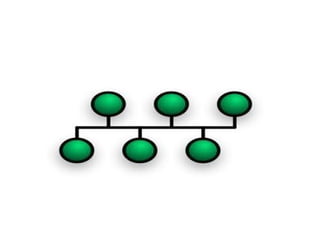
• In the bus topology, the computers are
connected through a common communication
media. A special type of central wire is used as
communication media. This central wire is
called Bus. The computer are attached
through the bus the ends of the bus are closed
with the terminator .The terminators are used
to absorb signals.
Advantages of Bus Topology
• Easy to install and configure
• Inexpensive
• Easily extended
Disadvantages of Bus Topology
• Performance decreases
• Weak signals
• Difficult troubleshooting
Star Topology
• The star topology uses a separate cable for
each work station as shown in fig.The cable
connects the work station to a central device
typically a HUB. The configuration provides a
more reliable network that is easily expended.
With star there is no central point of failure in
the cable .if there is a problem with the cable
only the station connected to that cable is a
effected .to add more work stations simply
connect another HUB
Advantages of Star Topology
• Easily expended and modified
• Easy to troubleshoot
• Multiple cable types supported by hub
Disadvantages of Star Topology
• If hub fails then entire network will fail
• Require more cables
• May require a device to rebroadcast signals
across the network
Ring Topology
• Every computer is connected to the next computer in the
ring and each transmits what it receives from the previous
computer. The messages flow around the ring in one
direction.
Some ring network do ring token passing. A short message
called token (memory area)is passed around a ring until a
computer wishes to send information to other computers.
That computer modifies token, adds an electronic address
and data and send it around the ring. Each computer in
sequence receives the token and next computer until either
the electronic address matches the address of a computer
Or the token return to its origin .The receiving computer
returns a message to the sender indicating that message
has been received.
Advantages
• It provides an orderly network in which every
device has access to the token and can
transmit.
• It performs well under a heavy load.
Disadvantages
• Failure of one computer can effect the whole
network .
• Difficult to troubleshoot.
• Change mode with adding or removing a
device effect the entire network.
Mesh Topology
• A mesh network or mesh topology uses
separate cable to connect each device to
every other device on the network, providing
a straight communication path. For sending
messages, check the cable connected into two
devices. A message is send directly from
sender to receiver because each one has
individual and separate connection.
Advantages
• Enhance for error tolerance provided by
redundant links.
• Easy to troubleshoot.
Disadvantages
• Difficult to install and maintain.
• Expensive.
Tree Topology
• The type of network topology in which a central 'root' node (the
top level of the hierarchy) is connected to one or more other nodes
that are one level lower in the hierarchy (i.e., the second level) with
a point-to-point link between each of the second level nodes and
the top level central 'root' node, while each of the second level
nodes that are connected to the top level central 'root' node will
also have one or more other nodes that are one level lower in the
hierarchy (i.e., the third level) connected to it, also with a point-to-
point link, the top level central 'root' node being the only node that
has no other node above it in the hierarchy (The hierarchy of the
tree is symmetrical.) Each node in the network having a specific
fixed number, of nodes connected to it at the next lower level in
the hierarchy, the number, being referred to as the 'branching
factor' of the hierarchical tree.
Advantages
• It is scalable.Secondary nodes allow more
devices to be connected to a central node.
• Point to point connection of devices.
• Having different levels of the network makes
it more manageable hence easier fault
identification and isolation.
Disadvantages
• Maintenance of the network may be an issue
when the network spans a great area.
• Since it is a variation of bus topology, if the
backbone fails, the entire network is crippled.
Hybrid Topology
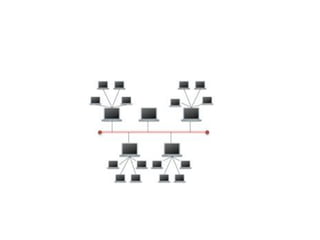
• Hybrid networks use a combination of any two or
more topologies in such a way that the resulting
network does not exhibit one of the standard
topologies (e.g., bus, star, ring, etc.). For
example, a tree network connected to a tree
network is still a tree network topology. A hybrid
topology is always produced when two different
basic network topologies are connected. Two
common examples for Hybrid network are: star
ring network and star bus network.
presentation on Computer network topology.ppt

presentation on Computer network topology.ppt

  • 1.
  • 2.
    Network Topology Computer networktopology is the way various components of a network (like nodes, links, peripherals, etc) are arranged. Network topologies define the layout, virtual shape or structure of network, not only physically but also logically. The way in which different systems and nodes are connected and communicate with each other is determined by topology of the network.
  • 3.
    Topology can bephysical or logical • Physical Topology is the physical layout of nodes, workstations and cables in the network. • Logical topology is the way information flows between different components.
  • 4.
    Types of PhysicalNetwork Topologies • Bus Topology • Star Topology • Ring Topology • Mesh Topology • Tree Topology • Hybrid Topology
  • 5.
    Bus Topology • Inthe bus topology, the computers are connected through a common communication media. A special type of central wire is used as communication media. This central wire is called Bus. The computer are attached through the bus the ends of the bus are closed with the terminator .The terminators are used to absorb signals.
  • 7.
    Advantages of BusTopology • Easy to install and configure • Inexpensive • Easily extended
  • 8.
    Disadvantages of BusTopology • Performance decreases • Weak signals • Difficult troubleshooting
  • 9.
    Star Topology • Thestar topology uses a separate cable for each work station as shown in fig.The cable connects the work station to a central device typically a HUB. The configuration provides a more reliable network that is easily expended. With star there is no central point of failure in the cable .if there is a problem with the cable only the station connected to that cable is a effected .to add more work stations simply connect another HUB
  • 11.
    Advantages of StarTopology • Easily expended and modified • Easy to troubleshoot • Multiple cable types supported by hub
  • 12.
    Disadvantages of StarTopology • If hub fails then entire network will fail • Require more cables • May require a device to rebroadcast signals across the network
  • 13.
    Ring Topology • Everycomputer is connected to the next computer in the ring and each transmits what it receives from the previous computer. The messages flow around the ring in one direction. Some ring network do ring token passing. A short message called token (memory area)is passed around a ring until a computer wishes to send information to other computers. That computer modifies token, adds an electronic address and data and send it around the ring. Each computer in sequence receives the token and next computer until either the electronic address matches the address of a computer Or the token return to its origin .The receiving computer returns a message to the sender indicating that message has been received.
  • 15.
    Advantages • It providesan orderly network in which every device has access to the token and can transmit. • It performs well under a heavy load.
  • 16.
    Disadvantages • Failure ofone computer can effect the whole network . • Difficult to troubleshoot. • Change mode with adding or removing a device effect the entire network.
  • 17.
    Mesh Topology • Amesh network or mesh topology uses separate cable to connect each device to every other device on the network, providing a straight communication path. For sending messages, check the cable connected into two devices. A message is send directly from sender to receiver because each one has individual and separate connection.
  • 19.
    Advantages • Enhance forerror tolerance provided by redundant links. • Easy to troubleshoot.
  • 20.
    Disadvantages • Difficult toinstall and maintain. • Expensive.
  • 21.
    Tree Topology • Thetype of network topology in which a central 'root' node (the top level of the hierarchy) is connected to one or more other nodes that are one level lower in the hierarchy (i.e., the second level) with a point-to-point link between each of the second level nodes and the top level central 'root' node, while each of the second level nodes that are connected to the top level central 'root' node will also have one or more other nodes that are one level lower in the hierarchy (i.e., the third level) connected to it, also with a point-to- point link, the top level central 'root' node being the only node that has no other node above it in the hierarchy (The hierarchy of the tree is symmetrical.) Each node in the network having a specific fixed number, of nodes connected to it at the next lower level in the hierarchy, the number, being referred to as the 'branching factor' of the hierarchical tree.
  • 23.
    Advantages • It isscalable.Secondary nodes allow more devices to be connected to a central node. • Point to point connection of devices. • Having different levels of the network makes it more manageable hence easier fault identification and isolation.
  • 24.
    Disadvantages • Maintenance ofthe network may be an issue when the network spans a great area. • Since it is a variation of bus topology, if the backbone fails, the entire network is crippled.
  • 25.
    Hybrid Topology • Hybridnetworks use a combination of any two or more topologies in such a way that the resulting network does not exhibit one of the standard topologies (e.g., bus, star, ring, etc.). For example, a tree network connected to a tree network is still a tree network topology. A hybrid topology is always produced when two different basic network topologies are connected. Two common examples for Hybrid network are: star ring network and star bus network.