Client Project
Jess Stanton
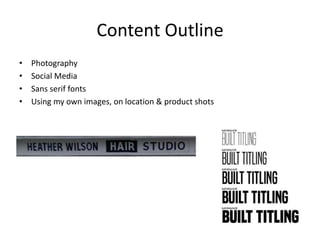
• Photography
• Social Media
• Sans serif fonts
• Using my own images, on location & product shots
Content Outline
Target Audience
• “Naught to 90”
• Men & Women
• Located in village
• Mainly females due to nature
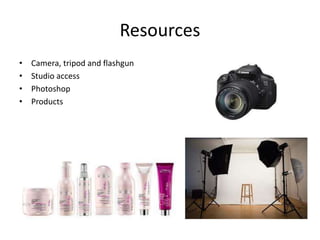
• Camera, tripod and flashgun
• Studio access
• Photoshop
• Products
Resources
• No additional help
• Client will provide feedback
Personnel Requirements
• No cost for equipment
• No travel expenses
Budget
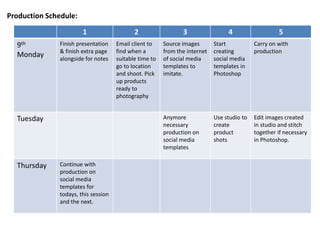
Production Schedule:
1 2 3 4 5
9th
Monday
Finish presentation
& finish extra page
alongside for notes
Email client to
find when a
suitable time to
go to location
and shoot. Pick
up products
ready to
photography
Source images
from the internet
of social media
templates to
imitate.
Start
creating
social media
templates in
Photoshop
Carry on with
production
Tuesday Anymore
necessary
production on
social media
templates
Use studio to
create
product
shots
Edit images created
in studio and stitch
together if necessary
in Photoshop.
Thursday Continue with
production on
social media
templates for
todays, this session
and the next.
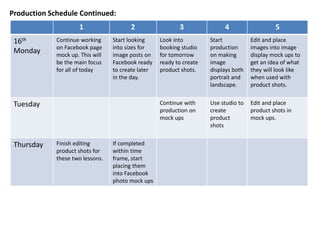
Production Schedule Continued:
1 2 3 4 5
16th
Monday
Continue working
on Facebook page
mock up. This will
be the main focus
for all of today
Start looking
into sizes for
image posts on
Facebook ready
to create later
in the day.
Look into
booking studio
for tomorrow
ready to create
product shots.
Start
production
on making
image
displays both
portrait and
landscape.
Edit and place
images into image
display mock ups to
get an idea of what
they will look like
when used with
product shots.
Tuesday Continue with
production on
mock ups
Use studio to
create
product
shots
Edit and place
product shots in
mock ups.
Thursday Finish editing
product shots for
these two lessons.
If completed
within time
frame, start
placing them
into Facebook
photo mock ups
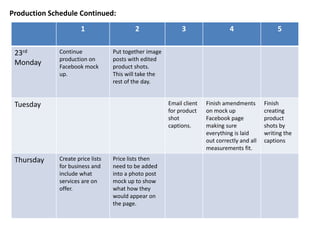
1 2 3 4 5
23rd
Monday
Continue
production on
Facebook mock
up.
Put together image
posts with edited
product shots.
This will take the
rest of the day.
Tuesday Email client
for product
shot
captions.
Finish amendments
on mock up
Facebook page
making sure
everything is laid
out correctly and all
measurements fit.
Finish
creating
product
shots by
writing the
captions
Thursday Create price lists
for business and
include what
services are on
offer.
Price lists then
need to be added
into a photo post
mock up to show
what how they
would appear on
the page.
Production Schedule Continued:

Presentation

  • 1.
  • 2.
    • Photography • SocialMedia • Sans serif fonts • Using my own images, on location & product shots Content Outline
  • 3.
    Target Audience • “Naughtto 90” • Men & Women • Located in village • Mainly females due to nature
  • 4.
    • Camera, tripodand flashgun • Studio access • Photoshop • Products Resources
  • 5.
    • No additionalhelp • Client will provide feedback Personnel Requirements
  • 6.
    • No costfor equipment • No travel expenses Budget
  • 7.
    Production Schedule: 1 23 4 5 9th Monday Finish presentation & finish extra page alongside for notes Email client to find when a suitable time to go to location and shoot. Pick up products ready to photography Source images from the internet of social media templates to imitate. Start creating social media templates in Photoshop Carry on with production Tuesday Anymore necessary production on social media templates Use studio to create product shots Edit images created in studio and stitch together if necessary in Photoshop. Thursday Continue with production on social media templates for todays, this session and the next.
  • 8.
    Production Schedule Continued: 12 3 4 5 16th Monday Continue working on Facebook page mock up. This will be the main focus for all of today Start looking into sizes for image posts on Facebook ready to create later in the day. Look into booking studio for tomorrow ready to create product shots. Start production on making image displays both portrait and landscape. Edit and place images into image display mock ups to get an idea of what they will look like when used with product shots. Tuesday Continue with production on mock ups Use studio to create product shots Edit and place product shots in mock ups. Thursday Finish editing product shots for these two lessons. If completed within time frame, start placing them into Facebook photo mock ups
  • 9.
    1 2 34 5 23rd Monday Continue production on Facebook mock up. Put together image posts with edited product shots. This will take the rest of the day. Tuesday Email client for product shot captions. Finish amendments on mock up Facebook page making sure everything is laid out correctly and all measurements fit. Finish creating product shots by writing the captions Thursday Create price lists for business and include what services are on offer. Price lists then need to be added into a photo post mock up to show what how they would appear on the page. Production Schedule Continued: