What is Platform
Events
• Document
https://developer.salesforce.com/docs/atlas.en-
us.platform_events.meta/platform_events/platform_events_intro.htm
• In Salesforce, We can connect the business process with
the external apps using Platform Events by exchanging
real-time data.
• Platform events are scalable and secure messages
holding data.
• The publishers publish the event messages that the
subscribers receive in real-time.
• If one wants to modify the data publishes, he needs to
define platform event fields.
How To Get Access Token
Step 1- Open Postman
Step 2- Slick Import
Step 3- Select raw text
Step 4- Write curl request –
Note- Username ,password and client_id, client_secret it could be different depends where platform event and
connected app is created.
curl -v https://test.salesforce.com//services/oauth2/token
-d "grant_type=password"
-d "client_id=3MVG9Lf04EwncL7mOf8fdrWEYGdt.Bg.nRGx5QaFGh7zKV35M_jX4sL5ogBuW.MX3wwruIFJtJrzedofccDll"
-d "client_secret=4500FEB31381ABDC9582D47CCA931C3715C13FB0A0DF4B74FFE1B99C5B067312"
-d "username=ankita@claimvantage.cloudvandana.com.devxad" -d "password=welcome@123
Step 5- Click on Continue
https://test.salesforce.com//services/oauth2/token
Step 6- Click on Send
Step 7- You will Get Access Token After
Access token
{
"access_token": "00D3H0000008pCe!AQUAQNxc1ZFshiHpyju1muKNKrsGOqGi9z.0HKBnee_fZjws9R7g1uMnCZicuPimMGSl1OatibdcV_S2_3S1DQKktJC9gnRn",
"instance_url": "https://sanlam03082021--devxad.sandbox.my.salesforce.com",
"id": "https://test.salesforce.com/id/00D3H0000008pCeUAI/0050C000005gcM3QAI",
"token_type": "Bearer",
"issued_at": "1662444521130",
"signature": "46tDXjYbs0ioxFwcXrRHXX6eg34dBecC5wNMnOnsmlQ="
}
How to Trigger Platform Events
Steps How To Perform Operation
• Step 1 – login to Work Banch( )
• Step 2 - Use the Base URL
• https://sanlam03082021--devxad.sandbox.my.salesforce.com/
• Api  /services/data/v52.0/sobjects/MemberPortfolio_Response_Event__e
• Note-> Base URL Is need to be added Before API
• Step 3 –
Request Body {
"Event_Type__c" : "12345“
}
Note-> Event_Type__c is field of Platform Event it can be change or we can
also add some fields according to needs.
Step 4 - Method - post
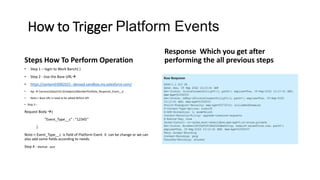
Response Which you get after
performing the all previous steps
@RestResourceful class -
• Api-
/services/apexrest/memberPortolio
• method-(Get , Post, Put, Patch ,Delete)
• Note – these all Method Accept
• Different string parameter
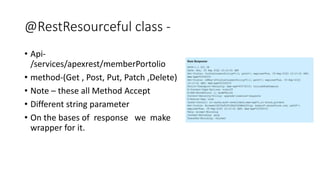
• On the bases of response we make
wrapper for it.

Platform Events Demo (1).pptx

  • 1.
    What is Platform Events •Document https://developer.salesforce.com/docs/atlas.en- us.platform_events.meta/platform_events/platform_events_intro.htm • In Salesforce, We can connect the business process with the external apps using Platform Events by exchanging real-time data. • Platform events are scalable and secure messages holding data. • The publishers publish the event messages that the subscribers receive in real-time. • If one wants to modify the data publishes, he needs to define platform event fields.
  • 2.
    How To GetAccess Token Step 1- Open Postman Step 2- Slick Import Step 3- Select raw text Step 4- Write curl request – Note- Username ,password and client_id, client_secret it could be different depends where platform event and connected app is created. curl -v https://test.salesforce.com//services/oauth2/token -d "grant_type=password" -d "client_id=3MVG9Lf04EwncL7mOf8fdrWEYGdt.Bg.nRGx5QaFGh7zKV35M_jX4sL5ogBuW.MX3wwruIFJtJrzedofccDll" -d "client_secret=4500FEB31381ABDC9582D47CCA931C3715C13FB0A0DF4B74FFE1B99C5B067312" -d "username=ankita@claimvantage.cloudvandana.com.devxad" -d "password=welcome@123 Step 5- Click on Continue https://test.salesforce.com//services/oauth2/token Step 6- Click on Send Step 7- You will Get Access Token After Access token { "access_token": "00D3H0000008pCe!AQUAQNxc1ZFshiHpyju1muKNKrsGOqGi9z.0HKBnee_fZjws9R7g1uMnCZicuPimMGSl1OatibdcV_S2_3S1DQKktJC9gnRn", "instance_url": "https://sanlam03082021--devxad.sandbox.my.salesforce.com", "id": "https://test.salesforce.com/id/00D3H0000008pCeUAI/0050C000005gcM3QAI", "token_type": "Bearer", "issued_at": "1662444521130", "signature": "46tDXjYbs0ioxFwcXrRHXX6eg34dBecC5wNMnOnsmlQ=" }
  • 3.
    How to TriggerPlatform Events Steps How To Perform Operation • Step 1 – login to Work Banch( ) • Step 2 - Use the Base URL • https://sanlam03082021--devxad.sandbox.my.salesforce.com/ • Api  /services/data/v52.0/sobjects/MemberPortfolio_Response_Event__e • Note-> Base URL Is need to be added Before API • Step 3 – Request Body { "Event_Type__c" : "12345“ } Note-> Event_Type__c is field of Platform Event it can be change or we can also add some fields according to needs. Step 4 - Method - post Response Which you get after performing the all previous steps
  • 4.
    @RestResourceful class - •Api- /services/apexrest/memberPortolio • method-(Get , Post, Put, Patch ,Delete) • Note – these all Method Accept • Different string parameter • On the bases of response we make wrapper for it.