Pivotal Cloud Platform Deep Dive 
Part 2: Architecture and The Operator Experience 
Pivotal CF Team 
© Copyright 2014 Pivotal. All rights reserved. 
2
Cloud Foundry Architecture Stack 
Router 
Cloud Controller 
UAA/Login Servers Health Manager 
Service Broker Node(s) 
Loggregator 
DEA Pool 
Messaging (NATS) 
BOSH Director BOSH Agent 
! 
IaaS 
© Copyright 2014 Pivotal. All rights reserved. 3
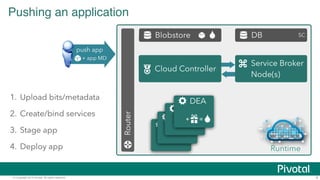
Pushing an application 
Router 
Blobstore DB 
SC 
Cloud Controller Service Broker 
Node(s) 
DEA 
DEA 
DEA 
DEA 
Runtime 
push app 
+ app MD 
1. Upload bits/metadata 
2. Create/bind services 
3. Stage app 
4. Deploy app 
+ = 
© Copyright 2014 Pivotal. All rights reserved. 4
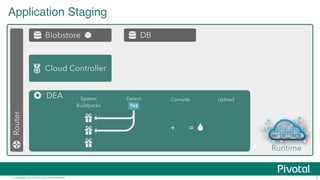
Application Staging 
Router 
Blobstore DB 
Cloud Controller 
DEA 
Runtime 
Detect Compile Upload 
No 
System 
Buildpacks 
+ = 
Yes 
© Copyright 2014 Pivotal. All rights reserved. 5
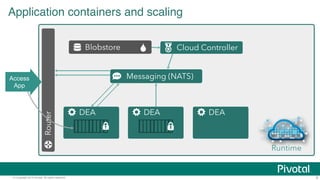
Application containers and scaling 
Blobstore 
Router 
Cloud Controller 
DEA 
Messaging (NATS) 
DEA DEA 
Runtime 
Access 
App 
© Copyright 2014 Pivotal. All rights reserved. 6
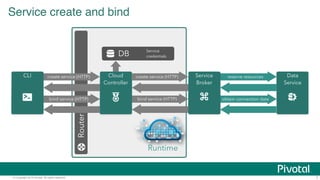
Service create and bind 
DB 
CLI Cloud 
create service (HTTP) 
bind service (HTTP) 
Router 
Service 
credentials 
reserve resources 
obtain connection data 
Controller 
Service 
Broker 
Data 
Service 
create service (HTTP) 
bind service (HTTP) 
Runtime 
© Copyright 2014 Pivotal. All rights reserved. 7
What’s on Pivotal CF for an 
operator? 
© Copyright 2014 Pivotal. © Copyright 2014 Pivotal. AAllll rriigghhttss rreesseerrvveedd.. 
8
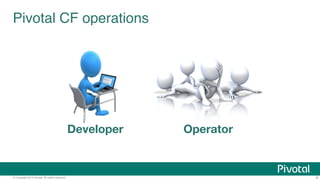
Pivotal CF operations 
Developer Operator 
© Copyright 2014 Pivotal. All rights reserved. 9
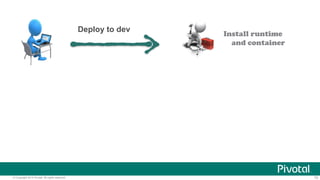
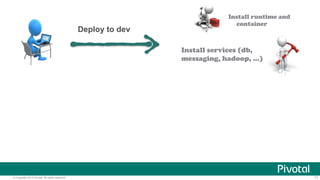
Install runtime 
and container 
Deploy to dev 
© Copyright 2014 Pivotal. All rights reserved. 10
Install runtime and 
container 
Install services (db, 
messaging, hadoop, …) 
Deploy to dev 
© Copyright 2014 Pivotal. All rights reserved. 11
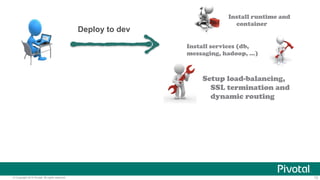
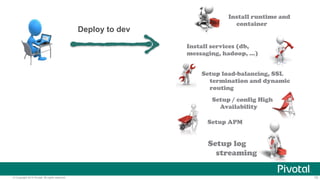
Install runtime and 
container 
Install services (db, 
messaging, hadoop, …) 
Setup load-balancing, 
SSL termination and 
dynamic routing 
Deploy to dev 
© Copyright 2014 Pivotal. All rights reserved. 12
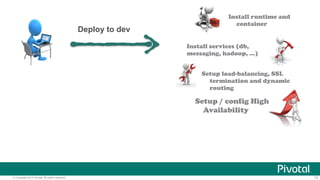
Install runtime and 
container 
Install services (db, 
messaging, hadoop, …) 
Setup load-balancing, SSL 
termination and dynamic 
routing 
Setup / config High 
Availability 
Deploy to dev 
© Copyright 2014 Pivotal. All rights reserved. 13
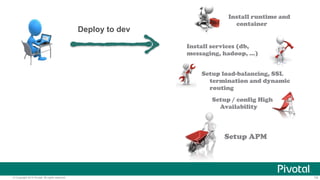
Install runtime and 
container 
Install services (db, 
messaging, hadoop, …) 
Setup load-balancing, SSL 
termination and dynamic 
routing 
Setup / config High 
Availability 
Setup APM 
Deploy to dev 
© Copyright 2014 Pivotal. All rights reserved. 14
Install runtime and 
container 
Install services (db, 
messaging, hadoop, …) 
Setup load-balancing, SSL 
termination and dynamic 
routing 
Setup / config High 
Availability 
Setup APM 
Setup log 
streaming 
Deploy to dev 
© Copyright 2014 Pivotal. All rights reserved. 15
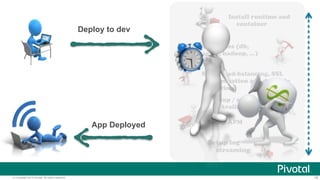
Install runtime and 
container 
Install services (db, 
messaging, hadoop, …) 
Setup load-balancing, SSL 
termination and dynamic 
routing 
Setup / config High 
Availability 
Setup APM 
Setup log 
streaming 
Deploy to dev 
App Deployed 
© Copyright 2014 Pivotal. All rights reserved. 16
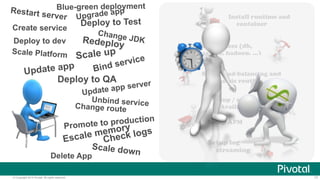
Install runtime and 
container 
Install services (db, 
messaging, hadoop, …) 
Setup load-balancing and 
dynamic routing 
Setup / config High 
Availability 
Setup APM 
Setup log 
streaming 
Blue-green deployment 
Restart server 
Create service 
Deploy to dev 
Upgrade app 
Deploy to Test 
Change JDK 
Redeploy 
Scale up 
Scale Platform 
Update app 
Bind service 
Deploy to QA 
Update app server 
Unbind service 
Change route 
Promote to production 
Escale memory 
Check logs 
Scale down 
Delete App 
© Copyright 2014 Pivotal. All rights reserved. 17
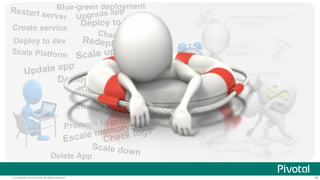
Install runtime and 
container 
Install services (db, 
messaging, hadoop, …) 
Setup load-balancing and 
dynamic routing 
Setup / config High 
Availability 
Setup APM 
Setup log 
streaming 
Blue-green deployment 
Restart server 
Create service 
Deploy to dev 
Upgrade app 
Deploy to Test 
Change JDK 
Redeploy 
Scale up 
Scale Platform 
Update app 
Bind service 
Deploy to QA 
Update app server 
Unbind service 
Change route 
Promote to production 
Escale memory 
Check logs 
Scale down 
Delete App 
© Copyright 2014 Pivotal. All rights reserved. 18
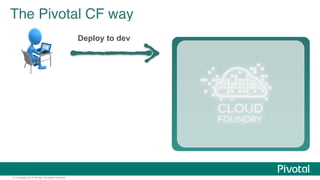
The Pivotal CF way 
© Copyright 2014 Pivotal. All rights reserved. 
Deploy to dev
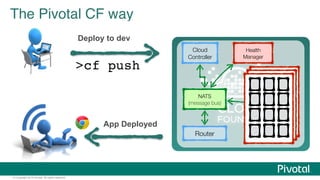
The Pivotal CF way 
© Copyright 2014 Pivotal. All rights reserved. 
Deploy to dev 
> cf push 
Cloud 
Controller 
Health 
Manager 
NATS 
(message bus) 
Router 
App Deployed
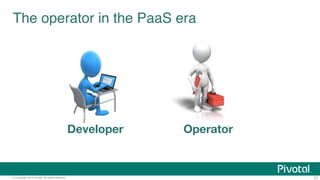
The operator in the PaaS era 
Developer Operator 
© Copyright 2014 Pivotal. All rights reserved. 21
The operator in the PaaS era 
© Copyright 2014 Pivotal. All rights reserved. 22
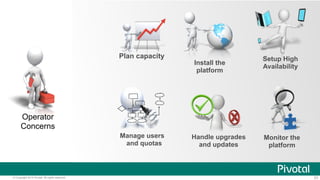
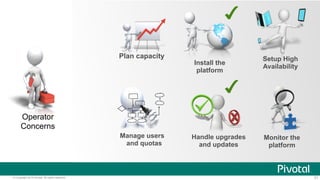
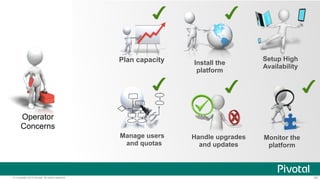
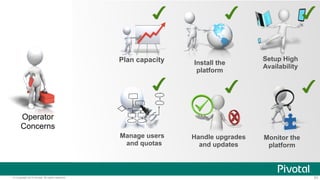
Operator 
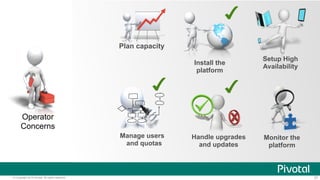
Concerns 
Setup High 
Availability 
Monitor the 
platform 
Install the 
platform 
Handle upgrades 
and updates 
Plan capacity 
Manage users 
and quotas 
© Copyright 2014 Pivotal. All rights reserved. 23
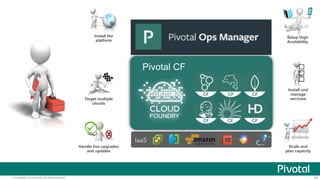
Pivotal CF 
Target multiple services 
IaaS 
Install the 
platform 
Setup High 
Availability 
clouds 
Handle live upgrades 
and updates 
Install and 
manage 
Scale and 
plan capacity 
© Copyright 2014 Pivotal. All rights reserved. 24
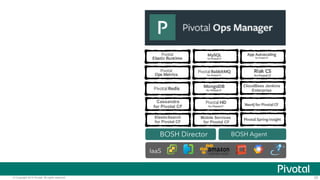
Mobile Services 
for Pivotal CF 
Cassandra 
for Pivotal CF 
ElasticSearch 
for Pivotal CF 
CloudBees Jenkins 
Enterprise 
BOSH Director BOSH Agent 
IaaS 
© Copyright 2014 Pivotal. All rights reserved. 25
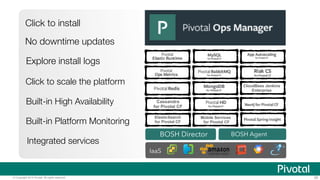
Mobile Services 
for Pivotal CF 
Cassandra 
for Pivotal CF 
ElasticSearch 
for Pivotal CF 
CloudBees Jenkins 
Enterprise 
BOSH Director BOSH Agent 
IaaS 
Click to install 
No downtime updates 
Explore install logs 
Click to scale the platform 
Built-in High Availability 
Built-in Platform Monitoring 
Integrated services 
© Copyright 2014 Pivotal. All rights reserved. 26
© Copyright 2014 Pivotal. All rights reserved. 
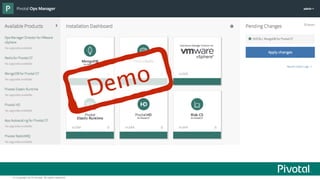
Demo
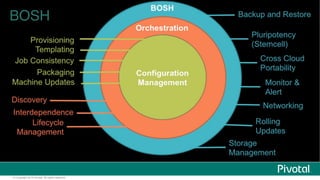
BOSH 
© Copyright 2014 Pivotal. All rights reserved.
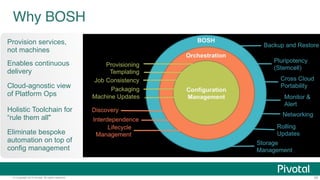
Why BOSH 
Provision services, 
not machines 
Enables continuous 
delivery 
Cloud-agnostic view 
of Platform Ops 
Holistic Toolchain for 
“rule them all" 
Eliminate bespoke 
automation on top of 
config management 
© Copyright 2014 Pivotal. All rights reserved. 29
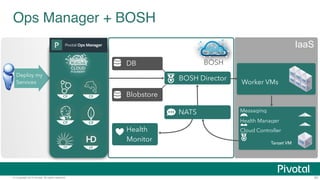
Ops Manager + BOSH 
DB 
Blobstore 
BOSH 
Health 
Monitor 
Deploy my 
Services 
Worker VMs 
Messaging 
Health Manager 
Cloud Controller 
Target VM 
BOSH Director 
NATS 
IaaS 
© Copyright 2014 Pivotal. All rights reserved. 30
Operator 
Concerns 
Setup High 
Availability 
Monitor the 
platform 
Install the 
platform 
Handle upgrades 
and updates 
Plan capacity 
Manage users 
and quotas 
© Copyright 2014 Pivotal. All rights reserved. 31
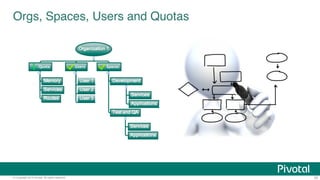
Orgs, Spaces, Users and Quotas 
© Copyright 2014 Pivotal. All rights reserved. 32
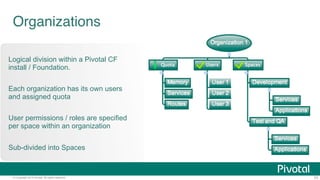
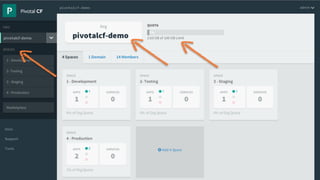
Organizations 
Logical division within a Pivotal CF 
install / Foundation. 
Each organization has its own users 
and assigned quota 
User permissions / roles are specified 
per space within an organization 
Sub-divided into Spaces 
© Copyright 2014 Pivotal. All rights reserved. 33
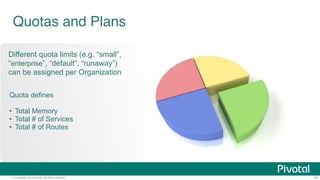
Quotas and Plans 
Different quota limits (e.g. “small”, 
“enterprise”, “default”, “runaway”) 
can be assigned per Organization 
Quota defines 
© Copyright 2014 Pivotal. All rights reserved. 34 
!• 
Total Memory 
• Total # of Services 
• Total # of Routes
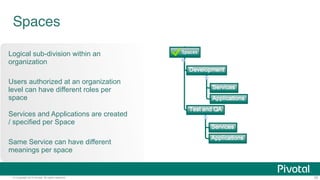
Spaces 
Logical sub-division within an 
organization 
Users authorized at an organization 
level can have different roles per 
space 
Services and Applications are created 
/ specified per Space 
Same Service can have different 
meanings per space 
© Copyright 2014 Pivotal. All rights reserved. 35
© Copyright 2014 Pivotal. All rights reserved. 36
Operator 
Concerns 
Setup High 
Availability 
Monitor the 
platform 
Install the 
platform 
Handle upgrades 
and updates 
Plan capacity 
Manage users 
and quotas 
© Copyright 2014 Pivotal. All rights reserved. 37
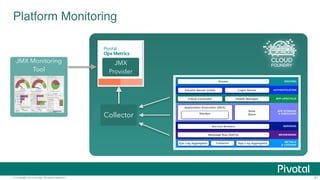
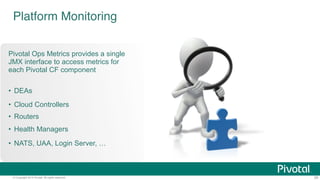
Platform Monitoring 
How do I know when to scale DEAs? 
How many requests each Router is servicing? 
What is the current load of my Cloud Controllers? 
© Copyright 2014 Pivotal. All rights reserved. 38
Platform Monitoring 
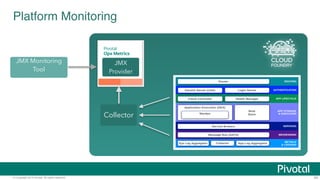
Pivotal Ops Metrics provides a single 
JMX interface to access metrics for 
each Pivotal CF component 
• DEAs 
• Cloud Controllers 
• Routers 
• Health Managers 
• NATS, UAA, Login Server, … 
© Copyright 2014 Pivotal. All rights reserved. 39
Platform Monitoring 
JMX 
Provider 
Collector 
JMX Monitoring 
Tool 
© Copyright 2014 Pivotal. All rights reserved. 40
Platform Monitoring 
JMX 
Provider 
Collector 
JMX Monitoring 
Tool 
© Copyright 2014 Pivotal. All rights reserved. 41
Operator 
Concerns 
Setup High 
Availability 
Monitor the 
platform 
Install the 
platform 
Handle upgrades 
and updates 
Plan capacity 
Manage users 
and quotas 
© Copyright 2014 Pivotal. All rights reserved. 42
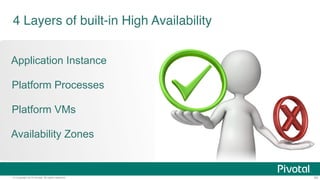
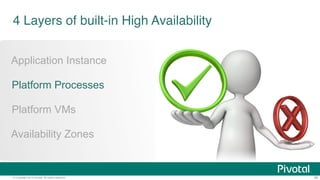
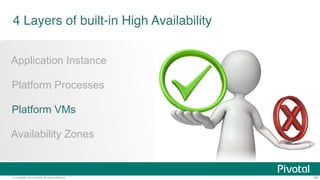
4 Layers of built-in High Availability 
Application Instance 
Platform Processes 
Platform VMs 
Availability Zones 
© Copyright 2014 Pivotal. All rights reserved. 43
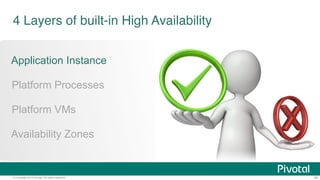
4 Layers of built-in High Availability 
Application Instance 
Platform Processes 
Platform VMs 
Availability Zones 
© Copyright 2014 Pivotal. All rights reserved. 44
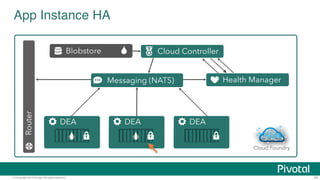
App Instance HA 
Blobstore 
Router 
Cloud Controller 
DEA 
Messaging (NATS) 
DEA DEA 
Actual State 
Health Manager 
Cloud Foundry 
Runtime 
© Copyright 2014 Pivotal. All rights reserved. 45
4 Layers of built-in High Availability 
Application Instance 
Platform Processes 
Platform VMs 
Availability Zones 
© Copyright 2014 Pivotal. All rights reserved. 46
DB 
© Copyright 2014 Pivotal. All rights reserved. 
47 
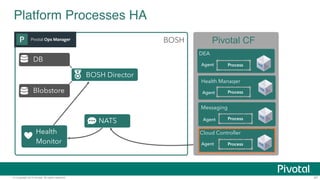
Platform Processes HA 
Blobstore 
BOSH 
Health 
Monitor 
Pivotal CF 
DEA 
Agent Process 
Health Manager 
Agent 
Messaging 
Agent 
Process 
Process 
Cloud Controller Target 
BOSH Director 
NATS 
Agent 
Process
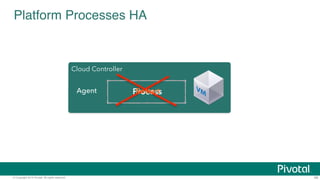
Platform Processes HA 
Cloud ControllTearrget 
Agent PRreoscteasrts 
© Copyright 2014 Pivotal. All rights reserved. 48
4 Layers of built-in High Availability 
Application Instance 
Platform Processes 
Platform VMs 
Availability Zones 
© Copyright 2014 Pivotal. All rights reserved. 49
DB 
© Copyright 2014 Pivotal. All rights reserved. 
50 
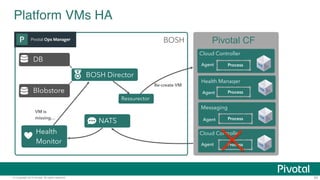
Platform VMs HA 
Blobstore 
BOSH 
Health 
Monitor 
Pivotal CF 
Cloud Controller 
Agent Process 
Health Manager 
Agent 
Messaging 
BOSH Director 
NATS Agent 
Process 
Process 
Cloud Controller 
Agent Process 
Ressurector 
Re-create VM 
VM is 
missing…
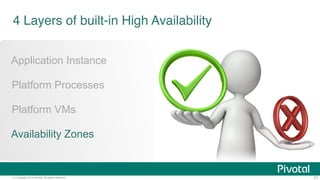
4 Layers of built-in High Availability 
Application Instance 
Platform Processes 
Platform VMs 
Availability Zones 
© Copyright 2014 Pivotal. All rights reserved. 51
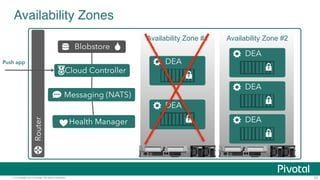
Messaging (NATS) 
© Copyright 2014 Pivotal. All rights reserved. 
Availability Zone #2 
52 
Availability Zones 
DEA 
DEA 
DEA 
Router 
Blobstore 
Cloud Controller 
Health Manager 
Push app 
Availability Zone #1 
DEA 
DEA
Operator 
Concerns 
Setup High 
Availability 
Monitor the 
platform 
Install the 
platform 
Handle upgrades 
and updates 
Plan capacity 
Manage users 
and quotas 
© Copyright 2014 Pivotal. All rights reserved. 53
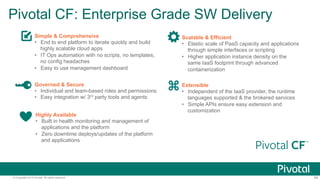
Pivotal CF: Enterprise Grade SW Delivery 
Simple & Comprehensive 
• End to end platform to iterate quickly and build 
highly scalable cloud apps 
• IT Ops automation with no scripts, no templates, 
no config headaches 
• Easy to use management dashboard 
Scalable & Efficient 
• Elastic scale of PaaS capacity and applications 
through simple interfaces or scripting 
• Higher application instance density on the 
same IaaS footprint through advanced 
containerization 
Extensible 
• Independent of the IaaS provider, the runtime 
languages supported & the brokered services 
• Simple APIs ensure easy extension and 
customization 
Governed & Secure 
• Individual and team-based roles and permissions 
• Easy integration w/ 3rd party tools and agents 
Highly Available 
• Built in health monitoring and management of 
applications and the platform 
• Zero downtime deploys/updates of the platform 
and applications 
© Copyright 2014 Pivotal. All rights reserved. 54
Pivotal CF: 
The Platform for a New Era of Software Innovation 
INTEGRATED OPERATOR 
FUNCTIONS READY MIDDLEWARE SERVICES AUTO DEPLOY 
AND SCALE 
• Instant Dynamic Routing 
• Streaming Logging Agg 
• ID/team/RBAC/Policy 
• APM, Auto-scaling 
• Ready integration 
• Four layers of built-in 
Availability 
• Auto-detect runtimes, 
frameworks 
• “Push and it works” 
model 
• CF Push [.WAR] 
• CF Push [Docker] 
• CF Push [.ASP] 
• Elastic Pivotal HD 
• HAWQ Analytics 
• Mobile Push 
• Mobile Sync 
• Mobile API 
• MySQL HA 
• Redis 
• Rabbit MQ 
• Elastic Search 
• Cassandra 
• Jenkins (Partner) 
….and more 
DEPLOY, OPERATE, UPDATE, SCALE ON ANY INFRASTRUCTURE 
© Copyright 2014 Pivotal. All rights reserved. 55
A NEW PLATFORM FOR A NEW ERA

Part 2: Architecture and the Operator Experience (Pivotal Cloud Platform Roadshow)

  • 1.
    Pivotal Cloud PlatformDeep Dive Part 2: Architecture and The Operator Experience Pivotal CF Team © Copyright 2014 Pivotal. All rights reserved. 2
  • 2.
    Cloud Foundry ArchitectureStack Router Cloud Controller UAA/Login Servers Health Manager Service Broker Node(s) Loggregator DEA Pool Messaging (NATS) BOSH Director BOSH Agent ! IaaS © Copyright 2014 Pivotal. All rights reserved. 3
  • 3.
    Pushing an application Router Blobstore DB SC Cloud Controller Service Broker Node(s) DEA DEA DEA DEA Runtime push app + app MD 1. Upload bits/metadata 2. Create/bind services 3. Stage app 4. Deploy app + = © Copyright 2014 Pivotal. All rights reserved. 4
  • 4.
    Application Staging Router Blobstore DB Cloud Controller DEA Runtime Detect Compile Upload No System Buildpacks + = Yes © Copyright 2014 Pivotal. All rights reserved. 5
  • 5.
    Application containers andscaling Blobstore Router Cloud Controller DEA Messaging (NATS) DEA DEA Runtime Access App © Copyright 2014 Pivotal. All rights reserved. 6
  • 6.
    Service create andbind DB CLI Cloud create service (HTTP) bind service (HTTP) Router Service credentials reserve resources obtain connection data Controller Service Broker Data Service create service (HTTP) bind service (HTTP) Runtime © Copyright 2014 Pivotal. All rights reserved. 7
  • 7.
    What’s on PivotalCF for an operator? © Copyright 2014 Pivotal. © Copyright 2014 Pivotal. AAllll rriigghhttss rreesseerrvveedd.. 8
  • 8.
    Pivotal CF operations Developer Operator © Copyright 2014 Pivotal. All rights reserved. 9
  • 9.
    Install runtime andcontainer Deploy to dev © Copyright 2014 Pivotal. All rights reserved. 10
  • 10.
    Install runtime and container Install services (db, messaging, hadoop, …) Deploy to dev © Copyright 2014 Pivotal. All rights reserved. 11
  • 11.
    Install runtime and container Install services (db, messaging, hadoop, …) Setup load-balancing, SSL termination and dynamic routing Deploy to dev © Copyright 2014 Pivotal. All rights reserved. 12
  • 12.
    Install runtime and container Install services (db, messaging, hadoop, …) Setup load-balancing, SSL termination and dynamic routing Setup / config High Availability Deploy to dev © Copyright 2014 Pivotal. All rights reserved. 13
  • 13.
    Install runtime and container Install services (db, messaging, hadoop, …) Setup load-balancing, SSL termination and dynamic routing Setup / config High Availability Setup APM Deploy to dev © Copyright 2014 Pivotal. All rights reserved. 14
  • 14.
    Install runtime and container Install services (db, messaging, hadoop, …) Setup load-balancing, SSL termination and dynamic routing Setup / config High Availability Setup APM Setup log streaming Deploy to dev © Copyright 2014 Pivotal. All rights reserved. 15
  • 15.
    Install runtime and container Install services (db, messaging, hadoop, …) Setup load-balancing, SSL termination and dynamic routing Setup / config High Availability Setup APM Setup log streaming Deploy to dev App Deployed © Copyright 2014 Pivotal. All rights reserved. 16
  • 16.
    Install runtime and container Install services (db, messaging, hadoop, …) Setup load-balancing and dynamic routing Setup / config High Availability Setup APM Setup log streaming Blue-green deployment Restart server Create service Deploy to dev Upgrade app Deploy to Test Change JDK Redeploy Scale up Scale Platform Update app Bind service Deploy to QA Update app server Unbind service Change route Promote to production Escale memory Check logs Scale down Delete App © Copyright 2014 Pivotal. All rights reserved. 17
  • 17.
    Install runtime and container Install services (db, messaging, hadoop, …) Setup load-balancing and dynamic routing Setup / config High Availability Setup APM Setup log streaming Blue-green deployment Restart server Create service Deploy to dev Upgrade app Deploy to Test Change JDK Redeploy Scale up Scale Platform Update app Bind service Deploy to QA Update app server Unbind service Change route Promote to production Escale memory Check logs Scale down Delete App © Copyright 2014 Pivotal. All rights reserved. 18
  • 18.
    The Pivotal CFway © Copyright 2014 Pivotal. All rights reserved. Deploy to dev
  • 19.
    The Pivotal CFway © Copyright 2014 Pivotal. All rights reserved. Deploy to dev > cf push Cloud Controller Health Manager NATS (message bus) Router App Deployed
  • 20.
    The operator inthe PaaS era Developer Operator © Copyright 2014 Pivotal. All rights reserved. 21
  • 21.
    The operator inthe PaaS era © Copyright 2014 Pivotal. All rights reserved. 22
  • 22.
    Operator Concerns SetupHigh Availability Monitor the platform Install the platform Handle upgrades and updates Plan capacity Manage users and quotas © Copyright 2014 Pivotal. All rights reserved. 23
  • 23.
    Pivotal CF Targetmultiple services IaaS Install the platform Setup High Availability clouds Handle live upgrades and updates Install and manage Scale and plan capacity © Copyright 2014 Pivotal. All rights reserved. 24
  • 24.
    Mobile Services forPivotal CF Cassandra for Pivotal CF ElasticSearch for Pivotal CF CloudBees Jenkins Enterprise BOSH Director BOSH Agent IaaS © Copyright 2014 Pivotal. All rights reserved. 25
  • 25.
    Mobile Services forPivotal CF Cassandra for Pivotal CF ElasticSearch for Pivotal CF CloudBees Jenkins Enterprise BOSH Director BOSH Agent IaaS Click to install No downtime updates Explore install logs Click to scale the platform Built-in High Availability Built-in Platform Monitoring Integrated services © Copyright 2014 Pivotal. All rights reserved. 26
  • 26.
    © Copyright 2014Pivotal. All rights reserved. Demo
  • 27.
    BOSH © Copyright2014 Pivotal. All rights reserved.
  • 28.
    Why BOSH Provisionservices, not machines Enables continuous delivery Cloud-agnostic view of Platform Ops Holistic Toolchain for “rule them all" Eliminate bespoke automation on top of config management © Copyright 2014 Pivotal. All rights reserved. 29
  • 29.
    Ops Manager +BOSH DB Blobstore BOSH Health Monitor Deploy my Services Worker VMs Messaging Health Manager Cloud Controller Target VM BOSH Director NATS IaaS © Copyright 2014 Pivotal. All rights reserved. 30
  • 30.
    Operator Concerns SetupHigh Availability Monitor the platform Install the platform Handle upgrades and updates Plan capacity Manage users and quotas © Copyright 2014 Pivotal. All rights reserved. 31
  • 31.
    Orgs, Spaces, Usersand Quotas © Copyright 2014 Pivotal. All rights reserved. 32
  • 32.
    Organizations Logical divisionwithin a Pivotal CF install / Foundation. Each organization has its own users and assigned quota User permissions / roles are specified per space within an organization Sub-divided into Spaces © Copyright 2014 Pivotal. All rights reserved. 33
  • 33.
    Quotas and Plans Different quota limits (e.g. “small”, “enterprise”, “default”, “runaway”) can be assigned per Organization Quota defines © Copyright 2014 Pivotal. All rights reserved. 34 !• Total Memory • Total # of Services • Total # of Routes
  • 34.
    Spaces Logical sub-divisionwithin an organization Users authorized at an organization level can have different roles per space Services and Applications are created / specified per Space Same Service can have different meanings per space © Copyright 2014 Pivotal. All rights reserved. 35
  • 35.
    © Copyright 2014Pivotal. All rights reserved. 36
  • 36.
    Operator Concerns SetupHigh Availability Monitor the platform Install the platform Handle upgrades and updates Plan capacity Manage users and quotas © Copyright 2014 Pivotal. All rights reserved. 37
  • 37.
    Platform Monitoring Howdo I know when to scale DEAs? How many requests each Router is servicing? What is the current load of my Cloud Controllers? © Copyright 2014 Pivotal. All rights reserved. 38
  • 38.
    Platform Monitoring PivotalOps Metrics provides a single JMX interface to access metrics for each Pivotal CF component • DEAs • Cloud Controllers • Routers • Health Managers • NATS, UAA, Login Server, … © Copyright 2014 Pivotal. All rights reserved. 39
  • 39.
    Platform Monitoring JMX Provider Collector JMX Monitoring Tool © Copyright 2014 Pivotal. All rights reserved. 40
  • 40.
    Platform Monitoring JMX Provider Collector JMX Monitoring Tool © Copyright 2014 Pivotal. All rights reserved. 41
  • 41.
    Operator Concerns SetupHigh Availability Monitor the platform Install the platform Handle upgrades and updates Plan capacity Manage users and quotas © Copyright 2014 Pivotal. All rights reserved. 42
  • 42.
    4 Layers ofbuilt-in High Availability Application Instance Platform Processes Platform VMs Availability Zones © Copyright 2014 Pivotal. All rights reserved. 43
  • 43.
    4 Layers ofbuilt-in High Availability Application Instance Platform Processes Platform VMs Availability Zones © Copyright 2014 Pivotal. All rights reserved. 44
  • 44.
    App Instance HA Blobstore Router Cloud Controller DEA Messaging (NATS) DEA DEA Actual State Health Manager Cloud Foundry Runtime © Copyright 2014 Pivotal. All rights reserved. 45
  • 45.
    4 Layers ofbuilt-in High Availability Application Instance Platform Processes Platform VMs Availability Zones © Copyright 2014 Pivotal. All rights reserved. 46
  • 46.
    DB © Copyright2014 Pivotal. All rights reserved. 47 Platform Processes HA Blobstore BOSH Health Monitor Pivotal CF DEA Agent Process Health Manager Agent Messaging Agent Process Process Cloud Controller Target BOSH Director NATS Agent Process
  • 47.
    Platform Processes HA Cloud ControllTearrget Agent PRreoscteasrts © Copyright 2014 Pivotal. All rights reserved. 48
  • 48.
    4 Layers ofbuilt-in High Availability Application Instance Platform Processes Platform VMs Availability Zones © Copyright 2014 Pivotal. All rights reserved. 49
  • 49.
    DB © Copyright2014 Pivotal. All rights reserved. 50 Platform VMs HA Blobstore BOSH Health Monitor Pivotal CF Cloud Controller Agent Process Health Manager Agent Messaging BOSH Director NATS Agent Process Process Cloud Controller Agent Process Ressurector Re-create VM VM is missing…
  • 50.
    4 Layers ofbuilt-in High Availability Application Instance Platform Processes Platform VMs Availability Zones © Copyright 2014 Pivotal. All rights reserved. 51
  • 51.
    Messaging (NATS) ©Copyright 2014 Pivotal. All rights reserved. Availability Zone #2 52 Availability Zones DEA DEA DEA Router Blobstore Cloud Controller Health Manager Push app Availability Zone #1 DEA DEA
  • 52.
    Operator Concerns SetupHigh Availability Monitor the platform Install the platform Handle upgrades and updates Plan capacity Manage users and quotas © Copyright 2014 Pivotal. All rights reserved. 53
  • 53.
    Pivotal CF: EnterpriseGrade SW Delivery Simple & Comprehensive • End to end platform to iterate quickly and build highly scalable cloud apps • IT Ops automation with no scripts, no templates, no config headaches • Easy to use management dashboard Scalable & Efficient • Elastic scale of PaaS capacity and applications through simple interfaces or scripting • Higher application instance density on the same IaaS footprint through advanced containerization Extensible • Independent of the IaaS provider, the runtime languages supported & the brokered services • Simple APIs ensure easy extension and customization Governed & Secure • Individual and team-based roles and permissions • Easy integration w/ 3rd party tools and agents Highly Available • Built in health monitoring and management of applications and the platform • Zero downtime deploys/updates of the platform and applications © Copyright 2014 Pivotal. All rights reserved. 54
  • 54.
    Pivotal CF: ThePlatform for a New Era of Software Innovation INTEGRATED OPERATOR FUNCTIONS READY MIDDLEWARE SERVICES AUTO DEPLOY AND SCALE • Instant Dynamic Routing • Streaming Logging Agg • ID/team/RBAC/Policy • APM, Auto-scaling • Ready integration • Four layers of built-in Availability • Auto-detect runtimes, frameworks • “Push and it works” model • CF Push [.WAR] • CF Push [Docker] • CF Push [.ASP] • Elastic Pivotal HD • HAWQ Analytics • Mobile Push • Mobile Sync • Mobile API • MySQL HA • Redis • Rabbit MQ • Elastic Search • Cassandra • Jenkins (Partner) ….and more DEPLOY, OPERATE, UPDATE, SCALE ON ANY INFRASTRUCTURE © Copyright 2014 Pivotal. All rights reserved. 55
  • 55.
    A NEW PLATFORMFOR A NEW ERA