Physical Layer – Transmission
Media
CS442
Transmission Media
• Two basic formats
– Guided media : wires, fiber optics
• Medium is important
– Unguided media : wireless, radio transmission
• Antenna is important
• Each have tradeoffs over data rate, distance
– Attenuation : weakening of signal over distance
Mini Electromagnetic Review
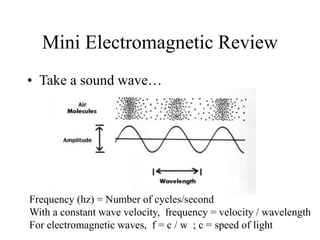
• Take a sound wave…
Frequency (hz) = Number of cycles/second
With a constant wave velocity, frequency = velocity / wavelength
For electromagnetic waves, f = c / w ; c = speed of light
Mini Electromagnetic Review
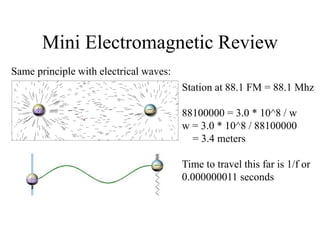
Same principle with electrical waves:
Station at 88.1 FM = 88.1 Mhz
88100000 = 3.0 * 10^8 / w
w = 3.0 * 10^8 / 88100000
= 3.4 meters
Time to travel this far is 1/f or
0.000000011 seconds
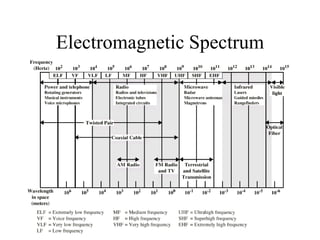
Electromagnetic Spectrum
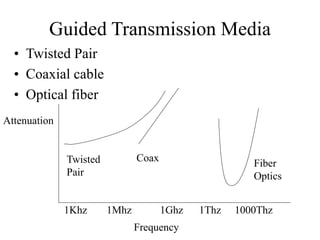
Guided Transmission Media
• Twisted Pair
• Coaxial cable
• Optical fiber
Attenuation
Frequency
1Khz 1Mhz 1Ghz 1Thz 1000Thz
Twisted
Pair
Coax
Fiber
Optics
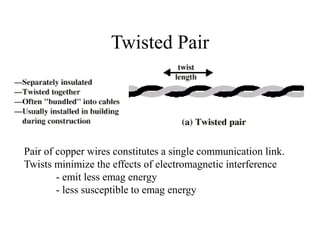
Twisted Pair
Pair of copper wires constitutes a single communication link.
Twists minimize the effects of electromagnetic interference
- emit less emag energy
- less susceptible to emag energy
Twisted Pair - Applications
• Most common medium
• Telephone network
– POTS
– Between house and local exchange (subscriber loop), also
called the end office. From the end office to Central Office
(CO) class 4  CO class 1 via Public Switched Telephone
Network (PSTN)
• Within buildings
– To private branch exchange (PBX)
• For local area networks (LAN)
– 10Mbps or 100Mbps
– Possible to rev up to 1Gbps – Gigabit Ethernet
Twisted Pair - Pros and Cons
• Cheap
• Easy to work with
– Can use as digital or analog
• Limited bandwidth/data rate
– Generally 1Mhz and 100Mbps
• Short range
– 2km for digital, 5km for analog
• Direct relationship between data rate and range
– Gigabit Ethernet
• 1000Mbps over 4 Cat5 UTP up to 100 meters
– IEEE 802.3ab standard in 1999
• 1000Mbps over 1 Cat5 UTP up to 24 meters
Unshielded and Shielded TP
• Unshielded Twisted Pair (UTP)
– Ordinary telephone wire
– Cheapest
– Easiest to install
– Suffers from external EM interference
• Shielded Twisted Pair (STP)
– Metal braid or sheathing that reduces interference
– More expensive
– Harder to handle (thick, heavy)
UTP Categories
• Cat 1
– Used for audio frequencies, speaker wire, etc. Not for
networking.
• Cat 2
– Up to 1.5Mhz, used for analog phones, not for
networking
• Cat 3
– EIA 568-A Spec from here on up
– up to 16MHz
– Voice grade found in most offices
– Twist length of 7.5 cm to 10 cm
• Cat 4
– up to 20 MHz
– Not frequently used today, was used for Token Ring
UTP Categories Cont.
• Cat 5
– up to 100MHz
– Twist length 0.6 cm to 0.85 cm
– Commonly pre-installed in new office buildings
• Cat 5e “Enhanced”
– Up to 100Mhz
– Specifies minimum characteristics for NEXT (Near End Crosstalk)
and ELFEXT (Equal level far end crosstalk)
• Coupling of signal from one pair to another
• Coupling takes place when transmit signal entering the link
couples back to receiving pair, i.e. near transmitted signal is
picked up by near receiving pair
• Cat 6
– Proposed standard up to 250Mhz
• Cat 7
– Proposed standard up to 600Mhz
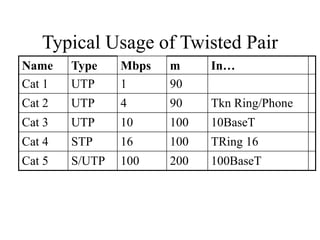
Typical Usage of Twisted Pair
Name Type Mbps m In…
Cat 1 UTP 1 90
Cat 2 UTP 4 90 Tkn Ring/Phone
Cat 3 UTP 10 100 10BaseT
Cat 4 STP 16 100 TRing 16
Cat 5 S/UTP 100 200 100BaseT
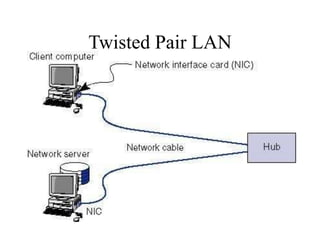
Twisted Pair LAN
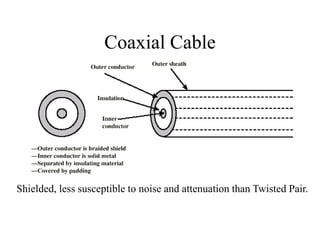
Coaxial Cable
Shielded, less susceptible to noise and attenuation than Twisted Pair.
Coaxial Cable Applications
• Most versatile medium
• Television distribution
– Cable TV
• Long distance telephone transmission
– Can carry 10,000 voice calls simultaneously
– Being replaced by fiber optic
• Short distance computer systems links
• Local area networks
– More expensive than twisted pair, not as popular for
LANs
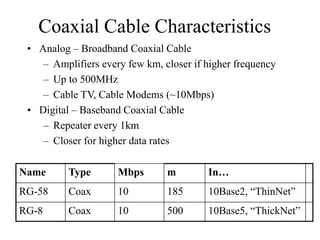
Coaxial Cable Characteristics
• Analog – Broadband Coaxial Cable
– Amplifiers every few km, closer if higher frequency
– Up to 500MHz
– Cable TV, Cable Modems (~10Mbps)
• Digital – Baseband Coaxial Cable
– Repeater every 1km
– Closer for higher data rates
Name Type Mbps m In…
RG-58 Coax 10 185 10Base2, “ThinNet”
RG-8 Coax 10 500 10Base5, “ThickNet”
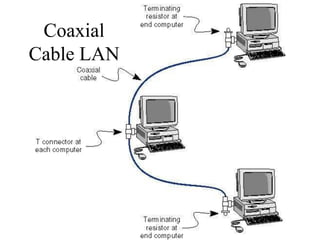
Coaxial
Cable LAN
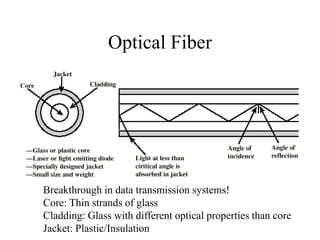
Optical Fiber
Breakthrough in data transmission systems!
Core: Thin strands of glass
Cladding: Glass with different optical properties than core
Jacket: Plastic/Insulation
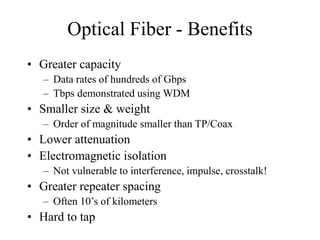
Optical Fiber - Benefits
• Greater capacity
– Data rates of hundreds of Gbps
– Tbps demonstrated using WDM
• Smaller size & weight
– Order of magnitude smaller than TP/Coax
• Lower attenuation
• Electromagnetic isolation
– Not vulnerable to interference, impulse, crosstalk!
• Greater repeater spacing
– Often 10’s of kilometers
• Hard to tap
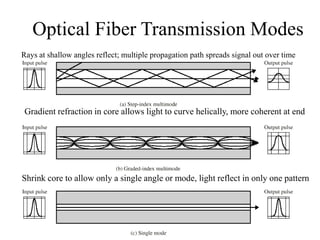
Optical Fiber Transmission Modes
Gradient refraction in core allows light to curve helically, more coherent at end
Shrink core to allow only a single angle or mode, light reflect in only one pattern
Rays at shallow angles reflect; multiple propagation path spreads signal out over time
Wireless or Radiated
Transmission
• Unguided media
• Transmission and reception via antenna
– Desirable to make antenna one-quarter or one-half the
wavelength
• Directional
– Focused beam
– Careful alignment required
• Omnidirectional
– Signal spreads in all directions
– Can be received by many antennas
Frequencies
• 2GHz to 40GHz
– Microwave
– Highly directional
– Point to point
– Satellite
• 30MHz to 1GHz
– Omnidirectional
– Broadcast radio
• 3 x 10¹¹ to 2 x 10¹⁴
– Infrared
– Local
• Higher frequencies  Higher data rates
Terrestrial Microwave
• Typically parabolic dish, focused beam, line of
sight
• Max distance between antenna:
d=7.14 * Sqrt(hK) ; K=4/3,
; h=antenna ht in meters
; d=distance in km
so two 1 meter antenna can be 7.14*Sqrt(4/3)=8.2 km
apart
• Applications
– Long haul telecommunications, television. May need
repeaters
– Short range for BN or closed-circuit TV
Terrestrial Microwave
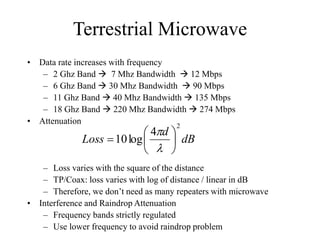
• Data rate increases with frequency
– 2 Ghz Band  7 Mhz Bandwidth  12 Mbps
– 6 Ghz Band  30 Mhz Bandwidth  90 Mbps
– 11 Ghz Band  40 Mhz Bandwidth  135 Mbps
– 18 Ghz Band  220 Mhz Bandwidth  274 Mbps
• Attenuation
– Loss varies with the square of the distance
– TP/Coax: loss varies with log of distance / linear in dB
– Therefore, we don’t need as many repeaters with microwave
• Interference and Raindrop Attenuation
– Frequency bands strictly regulated
– Use lower frequency to avoid raindrop problem
dB
d
Loss
2
4
log
10 








Satellite Microwave
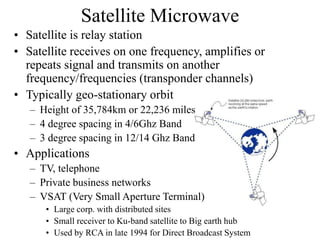
• Satellite is relay station
• Satellite receives on one frequency, amplifies or
repeats signal and transmits on another
frequency/frequencies (transponder channels)
• Typically geo-stationary orbit
– Height of 35,784km or 22,236 miles
– 4 degree spacing in 4/6Ghz Band
– 3 degree spacing in 12/14 Ghz Band
• Applications
– TV, telephone
– Private business networks
– VSAT (Very Small Aperture Terminal)
• Large corp. with distributed sites
• Small receiver to Ku-band satellite to Big earth hub
• Used by RCA in late 1994 for Direct Broadcast System
Satellite Transmission
Characteristics
• Optimum Frequency Range 1-10Ghz
– Below 1Ghz, natural noise. Above 10Ghz, attenuation
from the atmosphere
– Most applications use the 5.925-6.425 Ghz range
uplink, 4.2-4.7Ghz range downlink (4/6 Ghz Band)
• Propagation delay
– 35784000m / 3.0 * 108 m/s  0.12 seconds one way
– About quarter second propagation delay round trip,
noticeable for phone conversations, problem for two-
way communications
• Error /flow control?
• Low orbit satellites a solution? (Iridium, Tachyon)
Broadcast Radio
• 30Mhz to 2 Ghz
• Omnidirectional
– Use loop or wire antenna instead of dish
• Applications
– Range covers FM radio, UHF and VHF television
– 802.11b operates in the 2.4Ghz ISM band
• Due to lower frequencies than microwave, less
problems with attenuation
• Same equation for antenna distance, attenuation as
microwave
• Drawbacks
– Suffers from multipath interference, Reflections
– Possible security concerns
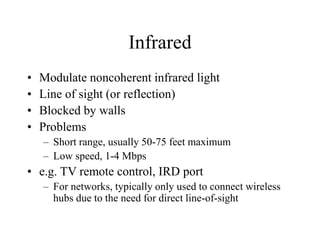
Infrared
• Modulate noncoherent infrared light
• Line of sight (or reflection)
• Blocked by walls
• Problems
– Short range, usually 50-75 feet maximum
– Low speed, 1-4 Mbps
• e.g. TV remote control, IRD port
– For networks, typically only used to connect wireless
hubs due to the need for direct line-of-sight
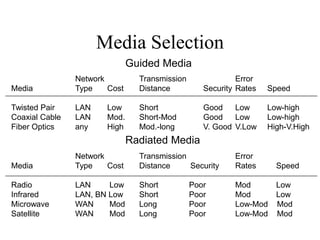
Media Selection
Network Transmission Error
Media Type Cost Distance Security Rates Speed
Twisted Pair LAN Low Short Good Low Low-high
Coaxial Cable LAN Mod. Short-Mod Good Low Low-high
Fiber Optics any High Mod.-long V. Good V.Low High-V.High
Network Transmission Error
Media Type Cost Distance Security Rates Speed
Radio LAN Low Short Poor Mod Low
Infrared LAN, BN Low Short Poor Mod Low
Microwave WAN Mod Long Poor Low-Mod Mod
Satellite WAN Mod Long Poor Low-Mod Mod
Guided Media
Radiated Media
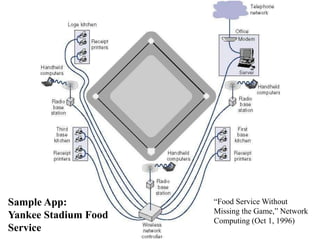
Sample App:
Yankee Stadium Food
Service
“Food Service Without
Missing the Game,” Network
Computing (Oct 1, 1996)

physical.ppt

  • 1.
    Physical Layer –Transmission Media CS442
  • 2.
    Transmission Media • Twobasic formats – Guided media : wires, fiber optics • Medium is important – Unguided media : wireless, radio transmission • Antenna is important • Each have tradeoffs over data rate, distance – Attenuation : weakening of signal over distance
  • 3.
    Mini Electromagnetic Review •Take a sound wave… Frequency (hz) = Number of cycles/second With a constant wave velocity, frequency = velocity / wavelength For electromagnetic waves, f = c / w ; c = speed of light
  • 4.
    Mini Electromagnetic Review Sameprinciple with electrical waves: Station at 88.1 FM = 88.1 Mhz 88100000 = 3.0 * 10^8 / w w = 3.0 * 10^8 / 88100000 = 3.4 meters Time to travel this far is 1/f or 0.000000011 seconds
  • 5.
  • 6.
    Guided Transmission Media •Twisted Pair • Coaxial cable • Optical fiber Attenuation Frequency 1Khz 1Mhz 1Ghz 1Thz 1000Thz Twisted Pair Coax Fiber Optics
  • 7.
    Twisted Pair Pair ofcopper wires constitutes a single communication link. Twists minimize the effects of electromagnetic interference - emit less emag energy - less susceptible to emag energy
  • 8.
    Twisted Pair -Applications • Most common medium • Telephone network – POTS – Between house and local exchange (subscriber loop), also called the end office. From the end office to Central Office (CO) class 4  CO class 1 via Public Switched Telephone Network (PSTN) • Within buildings – To private branch exchange (PBX) • For local area networks (LAN) – 10Mbps or 100Mbps – Possible to rev up to 1Gbps – Gigabit Ethernet
  • 9.
    Twisted Pair -Pros and Cons • Cheap • Easy to work with – Can use as digital or analog • Limited bandwidth/data rate – Generally 1Mhz and 100Mbps • Short range – 2km for digital, 5km for analog • Direct relationship between data rate and range – Gigabit Ethernet • 1000Mbps over 4 Cat5 UTP up to 100 meters – IEEE 802.3ab standard in 1999 • 1000Mbps over 1 Cat5 UTP up to 24 meters
  • 10.
    Unshielded and ShieldedTP • Unshielded Twisted Pair (UTP) – Ordinary telephone wire – Cheapest – Easiest to install – Suffers from external EM interference • Shielded Twisted Pair (STP) – Metal braid or sheathing that reduces interference – More expensive – Harder to handle (thick, heavy)
  • 11.
    UTP Categories • Cat1 – Used for audio frequencies, speaker wire, etc. Not for networking. • Cat 2 – Up to 1.5Mhz, used for analog phones, not for networking • Cat 3 – EIA 568-A Spec from here on up – up to 16MHz – Voice grade found in most offices – Twist length of 7.5 cm to 10 cm • Cat 4 – up to 20 MHz – Not frequently used today, was used for Token Ring
  • 12.
    UTP Categories Cont. •Cat 5 – up to 100MHz – Twist length 0.6 cm to 0.85 cm – Commonly pre-installed in new office buildings • Cat 5e “Enhanced” – Up to 100Mhz – Specifies minimum characteristics for NEXT (Near End Crosstalk) and ELFEXT (Equal level far end crosstalk) • Coupling of signal from one pair to another • Coupling takes place when transmit signal entering the link couples back to receiving pair, i.e. near transmitted signal is picked up by near receiving pair • Cat 6 – Proposed standard up to 250Mhz • Cat 7 – Proposed standard up to 600Mhz
  • 13.
    Typical Usage ofTwisted Pair Name Type Mbps m In… Cat 1 UTP 1 90 Cat 2 UTP 4 90 Tkn Ring/Phone Cat 3 UTP 10 100 10BaseT Cat 4 STP 16 100 TRing 16 Cat 5 S/UTP 100 200 100BaseT
  • 14.
  • 15.
    Coaxial Cable Shielded, lesssusceptible to noise and attenuation than Twisted Pair.
  • 16.
    Coaxial Cable Applications •Most versatile medium • Television distribution – Cable TV • Long distance telephone transmission – Can carry 10,000 voice calls simultaneously – Being replaced by fiber optic • Short distance computer systems links • Local area networks – More expensive than twisted pair, not as popular for LANs
  • 17.
    Coaxial Cable Characteristics •Analog – Broadband Coaxial Cable – Amplifiers every few km, closer if higher frequency – Up to 500MHz – Cable TV, Cable Modems (~10Mbps) • Digital – Baseband Coaxial Cable – Repeater every 1km – Closer for higher data rates Name Type Mbps m In… RG-58 Coax 10 185 10Base2, “ThinNet” RG-8 Coax 10 500 10Base5, “ThickNet”
  • 18.
  • 19.
    Optical Fiber Breakthrough indata transmission systems! Core: Thin strands of glass Cladding: Glass with different optical properties than core Jacket: Plastic/Insulation
  • 20.
    Optical Fiber -Benefits • Greater capacity – Data rates of hundreds of Gbps – Tbps demonstrated using WDM • Smaller size & weight – Order of magnitude smaller than TP/Coax • Lower attenuation • Electromagnetic isolation – Not vulnerable to interference, impulse, crosstalk! • Greater repeater spacing – Often 10’s of kilometers • Hard to tap
  • 21.
    Optical Fiber TransmissionModes Gradient refraction in core allows light to curve helically, more coherent at end Shrink core to allow only a single angle or mode, light reflect in only one pattern Rays at shallow angles reflect; multiple propagation path spreads signal out over time
  • 22.
    Wireless or Radiated Transmission •Unguided media • Transmission and reception via antenna – Desirable to make antenna one-quarter or one-half the wavelength • Directional – Focused beam – Careful alignment required • Omnidirectional – Signal spreads in all directions – Can be received by many antennas
  • 23.
    Frequencies • 2GHz to40GHz – Microwave – Highly directional – Point to point – Satellite • 30MHz to 1GHz – Omnidirectional – Broadcast radio • 3 x 10¹¹ to 2 x 10¹⁴ – Infrared – Local • Higher frequencies  Higher data rates
  • 24.
    Terrestrial Microwave • Typicallyparabolic dish, focused beam, line of sight • Max distance between antenna: d=7.14 * Sqrt(hK) ; K=4/3, ; h=antenna ht in meters ; d=distance in km so two 1 meter antenna can be 7.14*Sqrt(4/3)=8.2 km apart • Applications – Long haul telecommunications, television. May need repeaters – Short range for BN or closed-circuit TV
  • 25.
    Terrestrial Microwave • Datarate increases with frequency – 2 Ghz Band  7 Mhz Bandwidth  12 Mbps – 6 Ghz Band  30 Mhz Bandwidth  90 Mbps – 11 Ghz Band  40 Mhz Bandwidth  135 Mbps – 18 Ghz Band  220 Mhz Bandwidth  274 Mbps • Attenuation – Loss varies with the square of the distance – TP/Coax: loss varies with log of distance / linear in dB – Therefore, we don’t need as many repeaters with microwave • Interference and Raindrop Attenuation – Frequency bands strictly regulated – Use lower frequency to avoid raindrop problem dB d Loss 2 4 log 10         
  • 26.
    Satellite Microwave • Satelliteis relay station • Satellite receives on one frequency, amplifies or repeats signal and transmits on another frequency/frequencies (transponder channels) • Typically geo-stationary orbit – Height of 35,784km or 22,236 miles – 4 degree spacing in 4/6Ghz Band – 3 degree spacing in 12/14 Ghz Band • Applications – TV, telephone – Private business networks – VSAT (Very Small Aperture Terminal) • Large corp. with distributed sites • Small receiver to Ku-band satellite to Big earth hub • Used by RCA in late 1994 for Direct Broadcast System
  • 27.
    Satellite Transmission Characteristics • OptimumFrequency Range 1-10Ghz – Below 1Ghz, natural noise. Above 10Ghz, attenuation from the atmosphere – Most applications use the 5.925-6.425 Ghz range uplink, 4.2-4.7Ghz range downlink (4/6 Ghz Band) • Propagation delay – 35784000m / 3.0 * 108 m/s  0.12 seconds one way – About quarter second propagation delay round trip, noticeable for phone conversations, problem for two- way communications • Error /flow control? • Low orbit satellites a solution? (Iridium, Tachyon)
  • 28.
    Broadcast Radio • 30Mhzto 2 Ghz • Omnidirectional – Use loop or wire antenna instead of dish • Applications – Range covers FM radio, UHF and VHF television – 802.11b operates in the 2.4Ghz ISM band • Due to lower frequencies than microwave, less problems with attenuation • Same equation for antenna distance, attenuation as microwave • Drawbacks – Suffers from multipath interference, Reflections – Possible security concerns
  • 29.
    Infrared • Modulate noncoherentinfrared light • Line of sight (or reflection) • Blocked by walls • Problems – Short range, usually 50-75 feet maximum – Low speed, 1-4 Mbps • e.g. TV remote control, IRD port – For networks, typically only used to connect wireless hubs due to the need for direct line-of-sight
  • 30.
    Media Selection Network TransmissionError Media Type Cost Distance Security Rates Speed Twisted Pair LAN Low Short Good Low Low-high Coaxial Cable LAN Mod. Short-Mod Good Low Low-high Fiber Optics any High Mod.-long V. Good V.Low High-V.High Network Transmission Error Media Type Cost Distance Security Rates Speed Radio LAN Low Short Poor Mod Low Infrared LAN, BN Low Short Poor Mod Low Microwave WAN Mod Long Poor Low-Mod Mod Satellite WAN Mod Long Poor Low-Mod Mod Guided Media Radiated Media
  • 31.
    Sample App: Yankee StadiumFood Service “Food Service Without Missing the Game,” Network Computing (Oct 1, 1996)