2
Physical Database Design
•Purpose–translate the logical description
of data into the technical specifications for
storing and retrieving data
• Goal–create a design for storing data that
will provide adequate performance and
insure database integrity, security, and
recoverability
3.
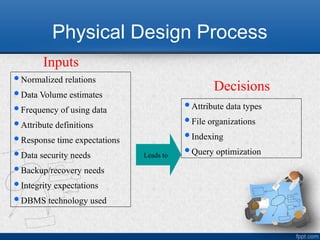
Physical Design Process
Normalizedrelations
Data Volume estimates
Frequency of using data
Attribute definitions
Response time expectations
Data security needs
Backup/recovery needs
Integrity expectations
DBMS technology used
Inputs
Attribute data types
File organizations
Indexing
Query optimization
Leads to
Decisions
5
Designing Fields
• Field:smallest unit of data in
database
• Field design
–Choosing data type
–Coding, compression, encryption
–Controlling data integrity
6.
Choosing Data Types
•CHAR–fixed-length character
• VARCHAR2–variable-length character (memo)
• LONG–large number
• NUMBER–positive/negative number
• INEGER–positive/negative whole number
• DATE–actual date
• BLOB–binary large object (good for graphics,
sound clips, etc.)
7.
7
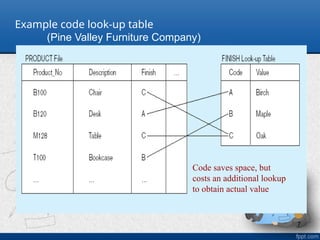
Example code look-uptable
(Pine Valley Furniture Company)
Code saves space, but
costs an additional lookup
to obtain actual value
8.
Performance Issues
• Usually,not all attributes of a table are
used in a query or report.
• Instead, attributes from different tables are
accessed in a query or report.
• This makes a DBMS to consume many
resources and spend considerable amount
of time to execute a query based on
multiple tables.
8
9.
9
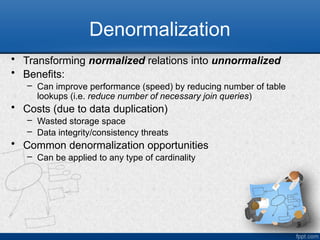
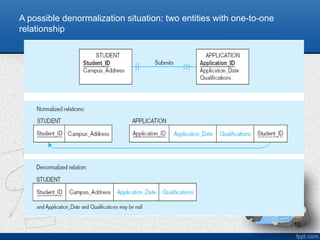
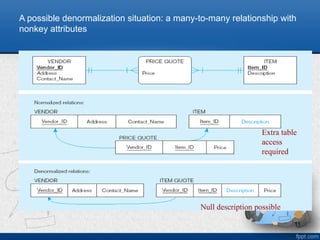
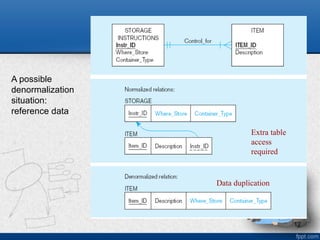
Denormalization
• Transforming normalizedrelations into unnormalized
• Benefits:
– Can improve performance (speed) by reducing number of table
lookups (i.e. reduce number of necessary join queries)
• Costs (due to data duplication)
– Wasted storage space
– Data integrity/consistency threats
• Common denormalization opportunities
– Can be applied to any type of cardinality
13
File Organizations
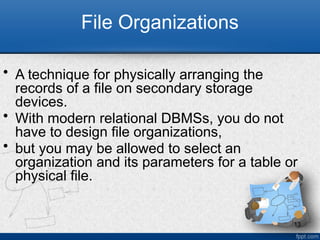
• Atechnique for physically arranging the
records of a file on secondary storage
devices.
• With modern relational DBMSs, you do not
have to design file organizations,
• but you may be allowed to select an
organization and its parameters for a table or
physical file.
14.
14
Sequential File Organizations
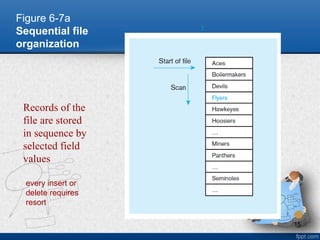
•The storage of records in a file in
sequence according to a primary key
value.
• To locate a particular record, a program
must normally scan the file from the
beginning until the desired record is
located
16
Indexed File Organizations
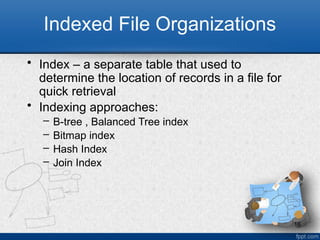
•Index – a separate table that used to
determine the location of records in a file for
quick retrieval
• Indexing approaches:
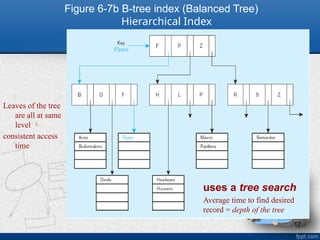
– B-tree , Balanced Tree index
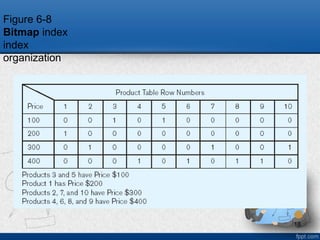
– Bitmap index
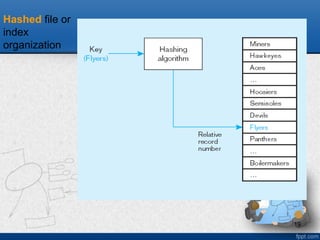
– Hash Index
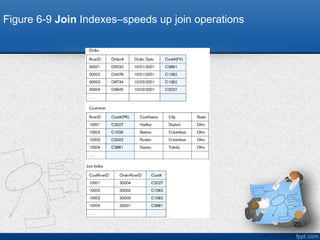
– Join Index
17.
17
Figure 6-7b B-treeindex (Balanced Tree)
Hierarchical Index
uses a tree search
Average time to find desired
record = depth of the tree
Leaves of the tree
are all at same
level
consistent access
time