12-Apr-19
12-Apr-19
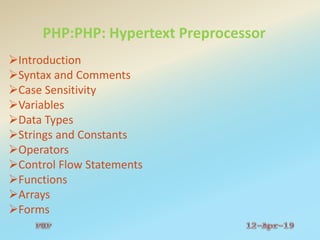
PHP:PHP: Hypertext Preprocessor
Introduction
Syntax and Comments
Case Sensitivity
Variables
Data Types
Strings and Constants
Operators
Control Flow Statements
Functions
Arrays
Forms
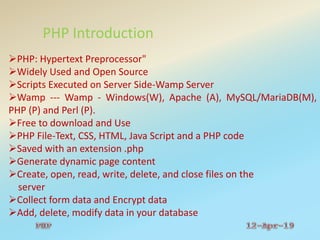
PHP Introduction
PHP: Hypertext Preprocessor"
Widely Used and Open Source
Scripts Executed on Server Side-Wamp Server
Wamp --- Wamp - Windows(W), Apache (A), MySQL/MariaDB(M),
PHP (P) and Perl (P).
Free to download and Use
PHP File-Text, CSS, HTML, Java Script and a PHP code
Saved with an extension .php
Generate dynamic page content
Create, open, read, write, delete, and close files on the
server
Collect form data and Encrypt data
Add, delete, modify data in your database
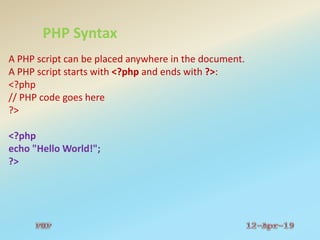
PHP Syntax
A PHP script can be placed anywhere in the document.
A PHP script starts with <?php and ends with ?>:
<?php
// PHP code goes here
?>
<?php
echo "Hello World!";
?>
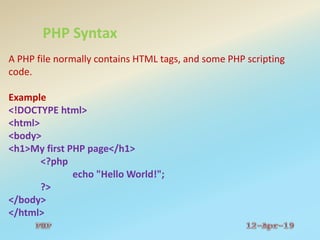
PHP Syntax
A PHP file normally contains HTML tags, and some PHP scripting
code.
Example
<!DOCTYPE html>
<html>
<body>
<h1>My first PHP page</h1>
<?php
echo "Hello World!";
?>
</body>
</html>
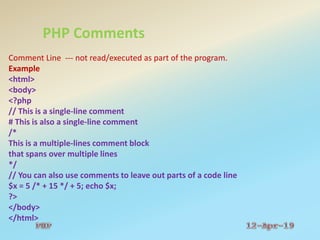
PHP Comments
Comment Line --- not read/executed as part of the program.
Example
<html>
<body>
<?php
// This is a single-line comment
# This is also a single-line comment
/*
This is a multiple-lines comment block
that spans over multiple lines
*/
// You can also use comments to leave out parts of a code line
$x = 5 /* + 15 */ + 5; echo $x;
?>
</body>
</html>
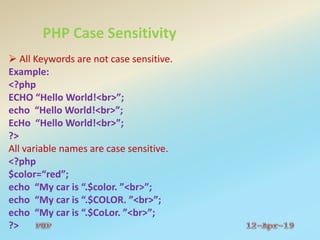
PHP Case Sensitivity
 All Keywords are not case sensitive.
Example:
<?php
ECHO “Hello World!<br>”;
echo “Hello World!<br>”;
EcHo “Hello World!<br>”;
?>
All variable names are case sensitive.
<?php
$color=“red”;
echo “My car is “.$color. ”<br>”;
echo “My car is “.$COLOR. ”<br>”;
echo “My car is “.$CoLor. ”<br>”;
?>
PHP Variables
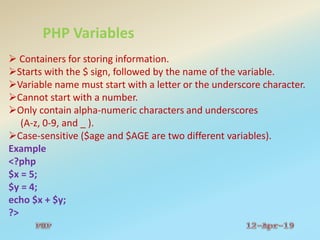
 Containers for storing information.
Starts with the $ sign, followed by the name of the variable.
Variable name must start with a letter or the underscore character.
Cannot start with a number.
Only contain alpha-numeric characters and underscores
(A-z, 0-9, and _ ).
Case-sensitive ($age and $AGE are two different variables).
Example
<?php
$x = 5;
$y = 4;
echo $x + $y;
?>
PHP Variables
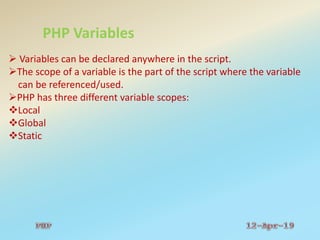
 Variables can be declared anywhere in the script.
The scope of a variable is the part of the script where the variable
can be referenced/used.
PHP has three different variable scopes:
Local
Global
Static
PHP Variables
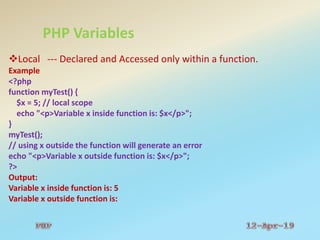
Local --- Declared and Accessed only within a function.
Example
<?php
function myTest() {
$x = 5; // local scope
echo "<p>Variable x inside function is: $x</p>";
}
myTest();
// using x outside the function will generate an error
echo "<p>Variable x outside function is: $x</p>";
?>
Output:
Variable x inside function is: 5
Variable x outside function is:
PHP Variables
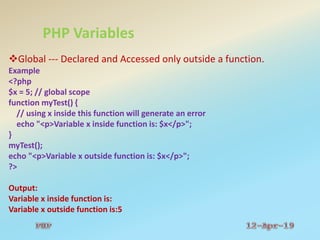
Global --- Declared and Accessed only outside a function.
Example
<?php
$x = 5; // global scope
function myTest() {
// using x inside this function will generate an error
echo "<p>Variable x inside function is: $x</p>";
}
myTest();
echo "<p>Variable x outside function is: $x</p>";
?>
Output:
Variable x inside function is:
Variable x outside function is:5
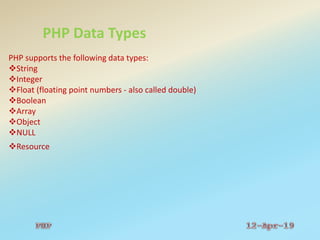
PHP Data Types
PHP supports the following data types:
String
Integer
Float (floating point numbers - also called double)
Boolean
Array
Object
NULL
Resource
PHP Data Types
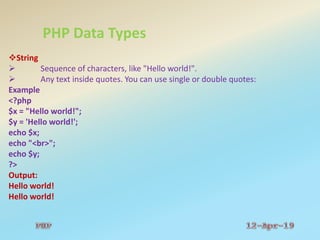
String
 Sequence of characters, like "Hello world!".
 Any text inside quotes. You can use single or double quotes:
Example
<?php
$x = "Hello world!";
$y = 'Hello world!';
echo $x;
echo "<br>";
echo $y;
?>
Output:
Hello world!
Hello world!
PHP Data Types
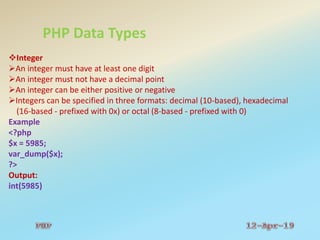
Integer
An integer must have at least one digit
An integer must not have a decimal point
An integer can be either positive or negative
Integers can be specified in three formats: decimal (10-based), hexadecimal
(16-based - prefixed with 0x) or octal (8-based - prefixed with 0)
Example
<?php
$x = 5985;
var_dump($x);
?>
Output:
int(5985)
PHP Data Types
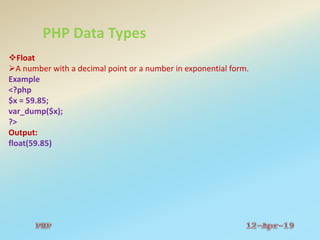
Float
A number with a decimal point or a number in exponential form.
Example
<?php
$x = 59.85;
var_dump($x);
?>
Output:
float(59.85)
PHP Data Types
Boolean
A Boolean represents two possible states: TRUE or FALSE.
Used in conditional Testing.
$x = true;
$y = false;
Array
Stores multiple values in one single variable.
Example
<?php
$cars = array("Volvo","BMW","Toyota");
var_dump($cars);
?>
Output:
array(3) { [0]=> string(5) "Volvo" [1]=> string(3) "BMW" [2]=> string(6) "Toyota" }
PHP Data Types
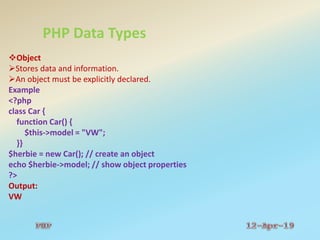
Object
Stores data and information.
An object must be explicitly declared.
Example
<?php
class Car {
function Car() {
$this->model = "VW";
}}
$herbie = new Car(); // create an object
echo $herbie->model; // show object properties
?>
Output:
VW
PHP Data Types
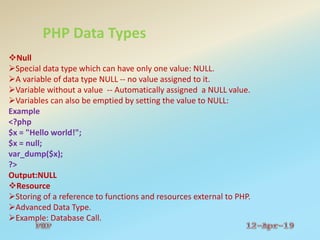
Null
Special data type which can have only one value: NULL.
A variable of data type NULL -- no value assigned to it.
Variable without a value -- Automatically assigned a NULL value.
Variables can also be emptied by setting the value to NULL:
Example
<?php
$x = "Hello world!";
$x = null;
var_dump($x);
?>
Output:NULL
Resource
Storing of a reference to functions and resources external to PHP.
Advanced Data Type.
Example: Database Call.
PHP Strings
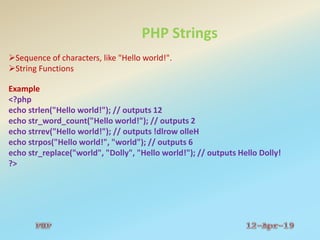
Sequence of characters, like "Hello world!".
String Functions
Example
<?php
echo strlen("Hello world!"); // outputs 12
echo str_word_count("Hello world!"); // outputs 2
echo strrev("Hello world!"); // outputs !dlrow olleH
echo strpos("Hello world!", "world"); // outputs 6
echo str_replace("world", "Dolly", "Hello world!"); // outputs Hello Dolly!
?>
PHP Constants
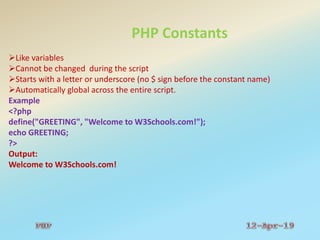
Like variables
Cannot be changed during the script
Starts with a letter or underscore (no $ sign before the constant name)
Automatically global across the entire script.
Example
<?php
define("GREETING", "Welcome to W3Schools.com!");
echo GREETING;
?>
Output:
Welcome to W3Schools.com!
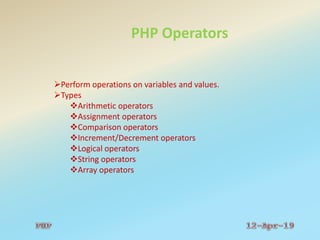
PHP Operators
Perform operations on variables and values.
Types
Arithmetic operators
Assignment operators
Comparison operators
Increment/Decrement operators
Logical operators
String operators
Array operators
PHP Operators
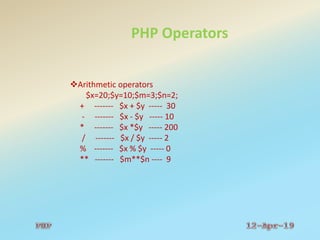
Arithmetic operators
$x=20;$y=10;$m=3;$n=2;
+ ------- $x + $y ----- 30
- ------- $x - $y ----- 10
* ------- $x *$y ----- 200
/ ------- $x / $y ----- 2
% ------- $x % $y ----- 0
** ------- $m**$n ---- 9
PHP Operators
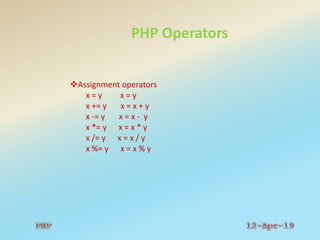
Assignment operators
x = y x = y
x += y x = x + y
x -= y x = x - y
x *= y x = x * y
x /= y x = x / y
x %= y x = x % y
PHP Operators
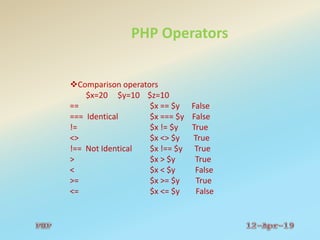
Comparison operators
$x=20 $y=10 $z=10
== $x == $y False
=== Identical $x === $y False
!= $x != $y True
<> $x <> $y True
!== Not Identical $x !== $y True
> $x > $y True
< $x < $y False
>= $x >= $y True
<= $x <= $y False
PHP Operators
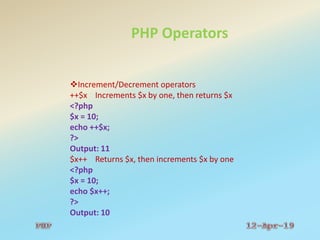
Increment/Decrement operators
++$x Increments $x by one, then returns $x
<?php
$x = 10;
echo ++$x;
?>
Output: 11
$x++ Returns $x, then increments $x by one
<?php
$x = 10;
echo $x++;
?>
Output: 10
PHP Operators
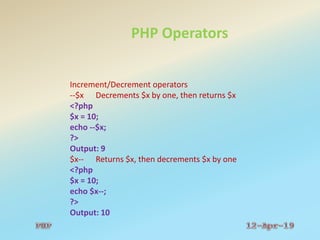
Increment/Decrement operators
--$x Decrements $x by one, then returns $x
<?php
$x = 10;
echo --$x;
?>
Output: 9
$x-- Returns $x, then decrements $x by one
<?php
$x = 10;
echo $x--;
?>
Output: 10
PHP Operators
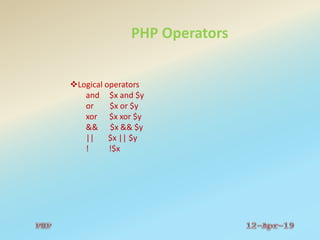
Logical operators
and $x and $y
or $x or $y
xor $x xor $y
&& $x && $y
|| $x || $y
! !$x
PHP Operators
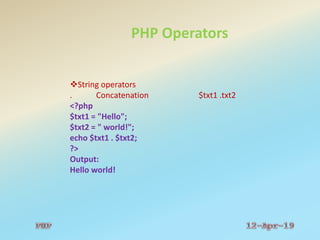
String operators
. Concatenation $txt1 .txt2
<?php
$txt1 = "Hello";
$txt2 = " world!";
echo $txt1 . $txt2;
?>
Output:
Hello world!
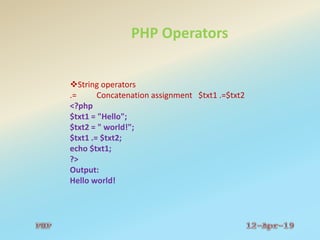
PHP Operators
String operators
.= Concatenation assignment $txt1 .=$txt2
<?php
$txt1 = "Hello";
$txt2 = " world!";
$txt1 .= $txt2;
echo $txt1;
?>
Output:
Hello world!
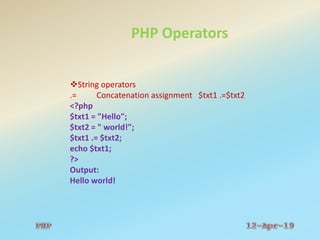
PHP Operators
String operators
.= Concatenation assignment $txt1 .=$txt2
<?php
$txt1 = "Hello";
$txt2 = " world!";
$txt1 .= $txt2;
echo $txt1;
?>
Output:
Hello world!
PHP Operators
Array operators
+ Union $x + $y
<?php
$x = array("a" => "red", "b" => "green");
$y = array("c" => "blue", "d" => "yellow");
print_r($x + $y); // union of $x and $y
?>
Output:
Array ( [a] => red [b] => green [c] => blue [d] =>
yellow )
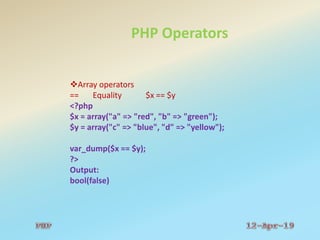
PHP Operators
Array operators
== Equality $x == $y
<?php
$x = array("a" => "red", "b" => "green");
$y = array("c" => "blue", "d" => "yellow");
var_dump($x == $y);
?>
Output:
bool(false)
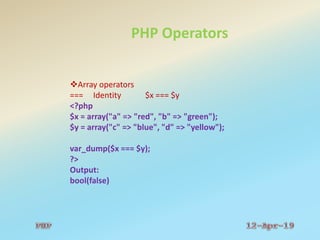
PHP Operators
Array operators
=== Identity $x === $y
<?php
$x = array("a" => "red", "b" => "green");
$y = array("c" => "blue", "d" => "yellow");
var_dump($x === $y);
?>
Output:
bool(false)
PHP Operators
Array operators
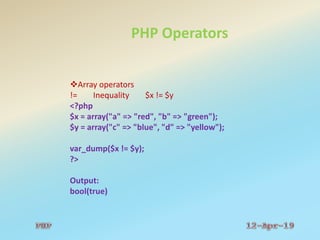
!= Inequality $x != $y
<?php
$x = array("a" => "red", "b" => "green");
$y = array("c" => "blue", "d" => "yellow");
var_dump($x != $y);
?>
Output:
bool(true)
PHP Operators
Array operators
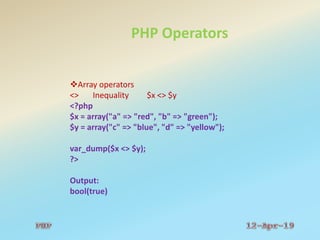
<> Inequality $x <> $y
<?php
$x = array("a" => "red", "b" => "green");
$y = array("c" => "blue", "d" => "yellow");
var_dump($x <> $y);
?>
Output:
bool(true)
PHP Operators
Array operators
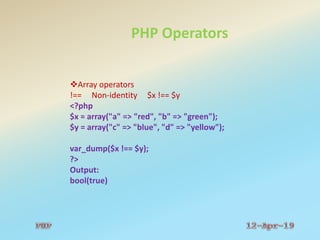
!== Non-identity $x !== $y
<?php
$x = array("a" => "red", "b" => "green");
$y = array("c" => "blue", "d" => "yellow");
var_dump($x !== $y);
?>
Output:
bool(true)
PHP Control Flow Statements
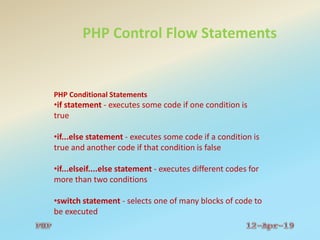
PHP Conditional Statements
•if statement - executes some code if one condition is
true
•if...else statement - executes some code if a condition is
true and another code if that condition is false
•if...elseif....else statement - executes different codes for
more than two conditions
•switch statement - selects one of many blocks of code to
be executed
PHP Control Flow Statements
PHP Conditional Statements
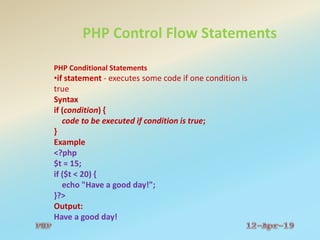
•if statement - executes some code if one condition is
true
Syntax
if (condition) {
code to be executed if condition is true;
}
Example
<?php
$t = 15;
if ($t < 20) {
echo "Have a good day!";
}?>
Output:
Have a good day!
PHP Control Flow Statements
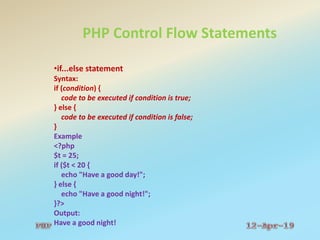
•if...else statement
Syntax:
if (condition) {
code to be executed if condition is true;
} else {
code to be executed if condition is false;
}
Example
<?php
$t = 25;
if ($t < 20 {
echo "Have a good day!";
} else {
echo "Have a good night!";
}?>
Output:
Have a good night!
PHP Control Flow Statements
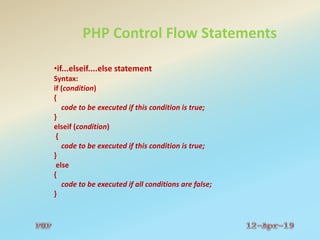
•if...elseif....else statement
Syntax:
if (condition)
{
code to be executed if this condition is true;
}
elseif (condition)
{
code to be executed if this condition is true;
}
else
{
code to be executed if all conditions are false;
}
PHP Control Flow Statements
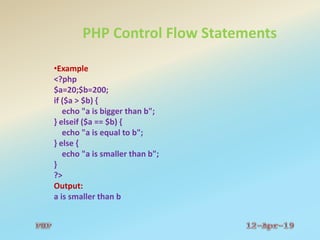
•Example
<?php
$a=20;$b=200;
if ($a > $b) {
echo "a is bigger than b";
} elseif ($a == $b) {
echo "a is equal to b";
} else {
echo "a is smaller than b";
}
?>
Output:
a is smaller than b
PHP Control Flow Statements
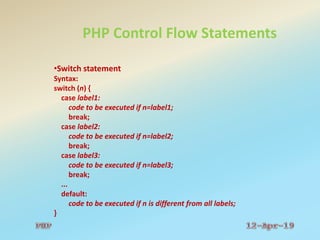
•Switch statement
Syntax:
switch (n) {
case label1:
code to be executed if n=label1;
break;
case label2:
code to be executed if n=label2;
break;
case label3:
code to be executed if n=label3;
break;
...
default:
code to be executed if n is different from all labels;
}
PHP Control Flow Statements
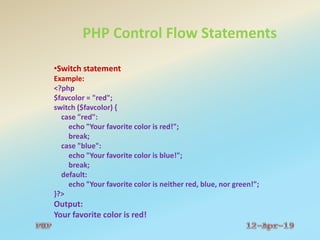
•Switch statement
Example:
<?php
$favcolor = "red";
switch ($favcolor) {
case "red":
echo "Your favorite color is red!";
break;
case "blue":
echo "Your favorite color is blue!";
break;
default:
echo "Your favorite color is neither red, blue, nor green!";
}?>
Output:
Your favorite color is red!
PHP Control Flow Statements
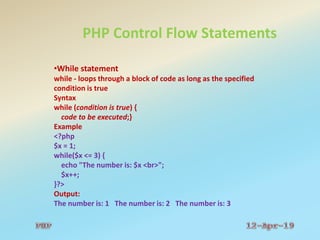
•While statement
while - loops through a block of code as long as the specified
condition is true
Syntax
while (condition is true) {
code to be executed;}
Example
<?php
$x = 1;
while($x <= 3) {
echo "The number is: $x <br>";
$x++;
}?>
Output:
The number is: 1 The number is: 2 The number is: 3
PHP Control Flow Statements
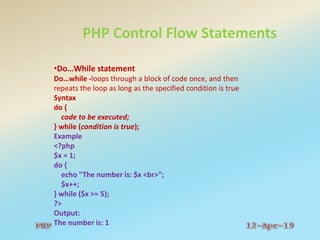
•Do…While statement
Do…while -loops through a block of code once, and then
repeats the loop as long as the specified condition is true
Syntax
do {
code to be executed;
} while (condition is true);
Example
<?php
$x = 1;
do {
echo "The number is: $x <br>";
$x++;
} while ($x >= 5);
?>
Output:
The number is: 1
PHP Control Flow Statements
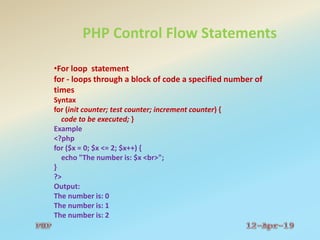
•For loop statement
for - loops through a block of code a specified number of
times
Syntax
for (init counter; test counter; increment counter) {
code to be executed; }
Example
<?php
for ($x = 0; $x <= 2; $x++) {
echo "The number is: $x <br>";
}
?>
Output:
The number is: 0
The number is: 1
The number is: 2
PHP Control Flow Statements
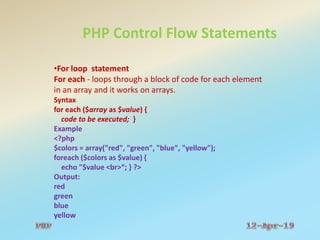
•For loop statement
For each - loops through a block of code for each element
in an array and it works on arrays.
Syntax
for each ($array as $value) {
code to be executed; }
Example
<?php
$colors = array("red", "green", "blue", "yellow");
foreach ($colors as $value) {
echo "$value <br>“; } ?>
Output:
red
green
blue
yellow
PHP Functions
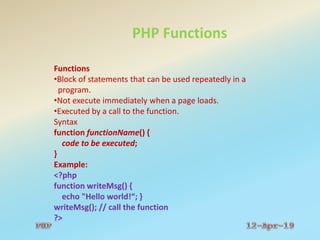
Functions
•Block of statements that can be used repeatedly in a
program.
•Not execute immediately when a page loads.
•Executed by a call to the function.
Syntax
function functionName() {
code to be executed;
}
Example:
<?php
function writeMsg() {
echo "Hello world!“; }
writeMsg(); // call the function
?>
PHP Functions
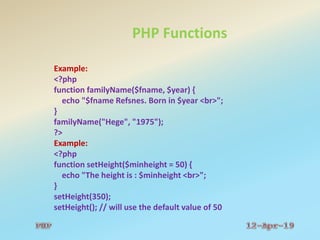
Example:
<?php
function familyName($fname, $year) {
echo "$fname Refsnes. Born in $year <br>";
}
familyName("Hege", "1975");
?>
Example:
<?php
function setHeight($minheight = 50) {
echo "The height is : $minheight <br>";
}
setHeight(350);
setHeight(); // will use the default value of 50
PHP Functions
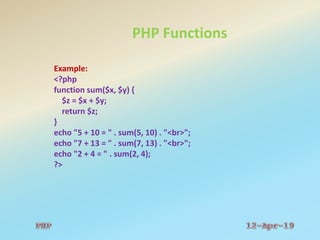
Example:
<?php
function sum($x, $y) {
$z = $x + $y;
return $z;
}
echo "5 + 10 = " . sum(5, 10) . "<br>";
echo "7 + 13 = " . sum(7, 13) . "<br>";
echo "2 + 4 = " . sum(2, 4);
?>
PHP Arrays
An array is a special variable, which can hold more than one value
at a time.
Types:
Indexed arrays - Arrays with a numeric index
Associative arrays - Arrays with named keys
Multidimensional arrays - Containing one or more arrays
Example
<?php
$cars = array("Volvo", "BMW”);
echo "I like " . $cars[0] . ”and " . $cars[1] . ".";
$age = array("Peter"=>"35", "Ben"=>"37", "Joe"=>"43");
echo "Peter is " . $age['Peter'] . " years old.";
?>
Output:
I like Volvo and BMW.
Peter is 35 years old.
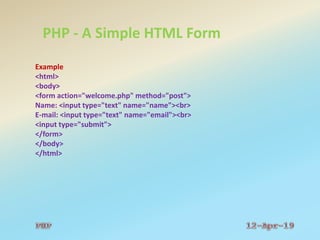
PHP - A Simple HTML Form
Example
<html>
<body>
<form action="welcome.php" method="post">
Name: <input type="text" name="name"><br>
E-mail: <input type="text" name="email"><br>
<input type="submit">
</form>
</body>
</html>
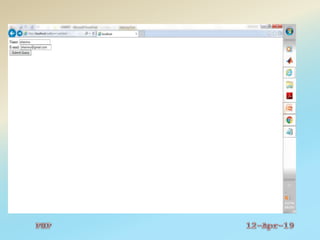
PHP - A Simple HTML Form
Example
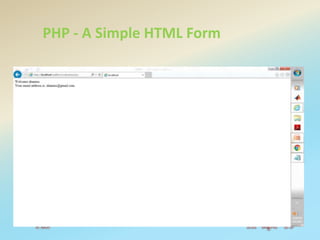
Welcome.php
<html>
<body>
Welcome <?php echo $_POST["name"]; ?><br>
Your email address is: <?php echo $_POST["email"]; ?>
</body>
</html>
PHP - A Simple HTML Form
Example
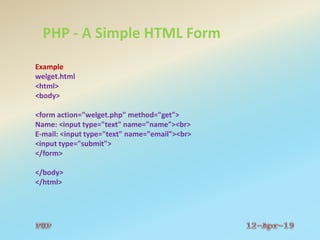
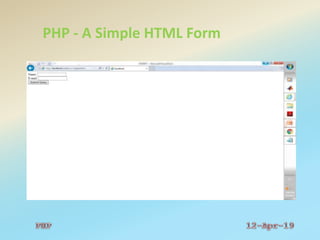
welget.html
<html>
<body>
<form action="welget.php" method="get">
Name: <input type="text" name="name"><br>
E-mail: <input type="text" name="email"><br>
<input type="submit">
</form>
</body>
</html>
PHP - A Simple HTML Form
Example
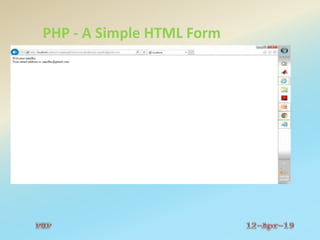
welget.php
<html>
<body>
Welcome <?php echo $_GET["name"]; ?><br>
Your email address is: <?php echo $_GET["email"]; ?>
</body>
</html>
PHP - A Simple HTML Form
PHP Basics

PHP Basics

  • 1.
  • 2.
  • 3.
    PHP:PHP: Hypertext Preprocessor Introduction Syntaxand Comments Case Sensitivity Variables Data Types Strings and Constants Operators Control Flow Statements Functions Arrays Forms
  • 4.
    PHP Introduction PHP: HypertextPreprocessor" Widely Used and Open Source Scripts Executed on Server Side-Wamp Server Wamp --- Wamp - Windows(W), Apache (A), MySQL/MariaDB(M), PHP (P) and Perl (P). Free to download and Use PHP File-Text, CSS, HTML, Java Script and a PHP code Saved with an extension .php Generate dynamic page content Create, open, read, write, delete, and close files on the server Collect form data and Encrypt data Add, delete, modify data in your database
  • 5.
    PHP Syntax A PHPscript can be placed anywhere in the document. A PHP script starts with <?php and ends with ?>: <?php // PHP code goes here ?> <?php echo "Hello World!"; ?>
  • 6.
    PHP Syntax A PHPfile normally contains HTML tags, and some PHP scripting code. Example <!DOCTYPE html> <html> <body> <h1>My first PHP page</h1> <?php echo "Hello World!"; ?> </body> </html>
  • 7.
    PHP Comments Comment Line--- not read/executed as part of the program. Example <html> <body> <?php // This is a single-line comment # This is also a single-line comment /* This is a multiple-lines comment block that spans over multiple lines */ // You can also use comments to leave out parts of a code line $x = 5 /* + 15 */ + 5; echo $x; ?> </body> </html>
  • 8.
    PHP Case Sensitivity All Keywords are not case sensitive. Example: <?php ECHO “Hello World!<br>”; echo “Hello World!<br>”; EcHo “Hello World!<br>”; ?> All variable names are case sensitive. <?php $color=“red”; echo “My car is “.$color. ”<br>”; echo “My car is “.$COLOR. ”<br>”; echo “My car is “.$CoLor. ”<br>”; ?>
  • 9.
    PHP Variables  Containersfor storing information. Starts with the $ sign, followed by the name of the variable. Variable name must start with a letter or the underscore character. Cannot start with a number. Only contain alpha-numeric characters and underscores (A-z, 0-9, and _ ). Case-sensitive ($age and $AGE are two different variables). Example <?php $x = 5; $y = 4; echo $x + $y; ?>
  • 10.
    PHP Variables  Variablescan be declared anywhere in the script. The scope of a variable is the part of the script where the variable can be referenced/used. PHP has three different variable scopes: Local Global Static
  • 11.
    PHP Variables Local ---Declared and Accessed only within a function. Example <?php function myTest() { $x = 5; // local scope echo "<p>Variable x inside function is: $x</p>"; } myTest(); // using x outside the function will generate an error echo "<p>Variable x outside function is: $x</p>"; ?> Output: Variable x inside function is: 5 Variable x outside function is:
  • 12.
    PHP Variables Global ---Declared and Accessed only outside a function. Example <?php $x = 5; // global scope function myTest() { // using x inside this function will generate an error echo "<p>Variable x inside function is: $x</p>"; } myTest(); echo "<p>Variable x outside function is: $x</p>"; ?> Output: Variable x inside function is: Variable x outside function is:5
  • 13.
    PHP Data Types PHPsupports the following data types: String Integer Float (floating point numbers - also called double) Boolean Array Object NULL Resource
  • 14.
    PHP Data Types String Sequence of characters, like "Hello world!".  Any text inside quotes. You can use single or double quotes: Example <?php $x = "Hello world!"; $y = 'Hello world!'; echo $x; echo "<br>"; echo $y; ?> Output: Hello world! Hello world!
  • 15.
    PHP Data Types Integer Aninteger must have at least one digit An integer must not have a decimal point An integer can be either positive or negative Integers can be specified in three formats: decimal (10-based), hexadecimal (16-based - prefixed with 0x) or octal (8-based - prefixed with 0) Example <?php $x = 5985; var_dump($x); ?> Output: int(5985)
  • 16.
    PHP Data Types Float Anumber with a decimal point or a number in exponential form. Example <?php $x = 59.85; var_dump($x); ?> Output: float(59.85)
  • 17.
    PHP Data Types Boolean ABoolean represents two possible states: TRUE or FALSE. Used in conditional Testing. $x = true; $y = false; Array Stores multiple values in one single variable. Example <?php $cars = array("Volvo","BMW","Toyota"); var_dump($cars); ?> Output: array(3) { [0]=> string(5) "Volvo" [1]=> string(3) "BMW" [2]=> string(6) "Toyota" }
  • 18.
    PHP Data Types Object Storesdata and information. An object must be explicitly declared. Example <?php class Car { function Car() { $this->model = "VW"; }} $herbie = new Car(); // create an object echo $herbie->model; // show object properties ?> Output: VW
  • 19.
    PHP Data Types Null Specialdata type which can have only one value: NULL. A variable of data type NULL -- no value assigned to it. Variable without a value -- Automatically assigned a NULL value. Variables can also be emptied by setting the value to NULL: Example <?php $x = "Hello world!"; $x = null; var_dump($x); ?> Output:NULL Resource Storing of a reference to functions and resources external to PHP. Advanced Data Type. Example: Database Call.
  • 20.
    PHP Strings Sequence ofcharacters, like "Hello world!". String Functions Example <?php echo strlen("Hello world!"); // outputs 12 echo str_word_count("Hello world!"); // outputs 2 echo strrev("Hello world!"); // outputs !dlrow olleH echo strpos("Hello world!", "world"); // outputs 6 echo str_replace("world", "Dolly", "Hello world!"); // outputs Hello Dolly! ?>
  • 21.
    PHP Constants Like variables Cannotbe changed during the script Starts with a letter or underscore (no $ sign before the constant name) Automatically global across the entire script. Example <?php define("GREETING", "Welcome to W3Schools.com!"); echo GREETING; ?> Output: Welcome to W3Schools.com!
  • 22.
    PHP Operators Perform operationson variables and values. Types Arithmetic operators Assignment operators Comparison operators Increment/Decrement operators Logical operators String operators Array operators
  • 23.
    PHP Operators Arithmetic operators $x=20;$y=10;$m=3;$n=2; +------- $x + $y ----- 30 - ------- $x - $y ----- 10 * ------- $x *$y ----- 200 / ------- $x / $y ----- 2 % ------- $x % $y ----- 0 ** ------- $m**$n ---- 9
  • 24.
    PHP Operators Assignment operators x= y x = y x += y x = x + y x -= y x = x - y x *= y x = x * y x /= y x = x / y x %= y x = x % y
  • 25.
    PHP Operators Comparison operators $x=20$y=10 $z=10 == $x == $y False === Identical $x === $y False != $x != $y True <> $x <> $y True !== Not Identical $x !== $y True > $x > $y True < $x < $y False >= $x >= $y True <= $x <= $y False
  • 26.
    PHP Operators Increment/Decrement operators ++$xIncrements $x by one, then returns $x <?php $x = 10; echo ++$x; ?> Output: 11 $x++ Returns $x, then increments $x by one <?php $x = 10; echo $x++; ?> Output: 10
  • 27.
    PHP Operators Increment/Decrement operators --$xDecrements $x by one, then returns $x <?php $x = 10; echo --$x; ?> Output: 9 $x-- Returns $x, then decrements $x by one <?php $x = 10; echo $x--; ?> Output: 10
  • 28.
    PHP Operators Logical operators and$x and $y or $x or $y xor $x xor $y && $x && $y || $x || $y ! !$x
  • 29.
    PHP Operators String operators .Concatenation $txt1 .txt2 <?php $txt1 = "Hello"; $txt2 = " world!"; echo $txt1 . $txt2; ?> Output: Hello world!
  • 30.
    PHP Operators String operators .=Concatenation assignment $txt1 .=$txt2 <?php $txt1 = "Hello"; $txt2 = " world!"; $txt1 .= $txt2; echo $txt1; ?> Output: Hello world!
  • 31.
    PHP Operators String operators .=Concatenation assignment $txt1 .=$txt2 <?php $txt1 = "Hello"; $txt2 = " world!"; $txt1 .= $txt2; echo $txt1; ?> Output: Hello world!
  • 32.
    PHP Operators Array operators +Union $x + $y <?php $x = array("a" => "red", "b" => "green"); $y = array("c" => "blue", "d" => "yellow"); print_r($x + $y); // union of $x and $y ?> Output: Array ( [a] => red [b] => green [c] => blue [d] => yellow )
  • 33.
    PHP Operators Array operators ==Equality $x == $y <?php $x = array("a" => "red", "b" => "green"); $y = array("c" => "blue", "d" => "yellow"); var_dump($x == $y); ?> Output: bool(false)
  • 34.
    PHP Operators Array operators ===Identity $x === $y <?php $x = array("a" => "red", "b" => "green"); $y = array("c" => "blue", "d" => "yellow"); var_dump($x === $y); ?> Output: bool(false)
  • 35.
    PHP Operators Array operators !=Inequality $x != $y <?php $x = array("a" => "red", "b" => "green"); $y = array("c" => "blue", "d" => "yellow"); var_dump($x != $y); ?> Output: bool(true)
  • 36.
    PHP Operators Array operators <>Inequality $x <> $y <?php $x = array("a" => "red", "b" => "green"); $y = array("c" => "blue", "d" => "yellow"); var_dump($x <> $y); ?> Output: bool(true)
  • 37.
    PHP Operators Array operators !==Non-identity $x !== $y <?php $x = array("a" => "red", "b" => "green"); $y = array("c" => "blue", "d" => "yellow"); var_dump($x !== $y); ?> Output: bool(true)
  • 38.
    PHP Control FlowStatements PHP Conditional Statements •if statement - executes some code if one condition is true •if...else statement - executes some code if a condition is true and another code if that condition is false •if...elseif....else statement - executes different codes for more than two conditions •switch statement - selects one of many blocks of code to be executed
  • 39.
    PHP Control FlowStatements PHP Conditional Statements •if statement - executes some code if one condition is true Syntax if (condition) { code to be executed if condition is true; } Example <?php $t = 15; if ($t < 20) { echo "Have a good day!"; }?> Output: Have a good day!
  • 40.
    PHP Control FlowStatements •if...else statement Syntax: if (condition) { code to be executed if condition is true; } else { code to be executed if condition is false; } Example <?php $t = 25; if ($t < 20 { echo "Have a good day!"; } else { echo "Have a good night!"; }?> Output: Have a good night!
  • 41.
    PHP Control FlowStatements •if...elseif....else statement Syntax: if (condition) { code to be executed if this condition is true; } elseif (condition) { code to be executed if this condition is true; } else { code to be executed if all conditions are false; }
  • 42.
    PHP Control FlowStatements •Example <?php $a=20;$b=200; if ($a > $b) { echo "a is bigger than b"; } elseif ($a == $b) { echo "a is equal to b"; } else { echo "a is smaller than b"; } ?> Output: a is smaller than b
  • 43.
    PHP Control FlowStatements •Switch statement Syntax: switch (n) { case label1: code to be executed if n=label1; break; case label2: code to be executed if n=label2; break; case label3: code to be executed if n=label3; break; ... default: code to be executed if n is different from all labels; }
  • 44.
    PHP Control FlowStatements •Switch statement Example: <?php $favcolor = "red"; switch ($favcolor) { case "red": echo "Your favorite color is red!"; break; case "blue": echo "Your favorite color is blue!"; break; default: echo "Your favorite color is neither red, blue, nor green!"; }?> Output: Your favorite color is red!
  • 45.
    PHP Control FlowStatements •While statement while - loops through a block of code as long as the specified condition is true Syntax while (condition is true) { code to be executed;} Example <?php $x = 1; while($x <= 3) { echo "The number is: $x <br>"; $x++; }?> Output: The number is: 1 The number is: 2 The number is: 3
  • 46.
    PHP Control FlowStatements •Do…While statement Do…while -loops through a block of code once, and then repeats the loop as long as the specified condition is true Syntax do { code to be executed; } while (condition is true); Example <?php $x = 1; do { echo "The number is: $x <br>"; $x++; } while ($x >= 5); ?> Output: The number is: 1
  • 47.
    PHP Control FlowStatements •For loop statement for - loops through a block of code a specified number of times Syntax for (init counter; test counter; increment counter) { code to be executed; } Example <?php for ($x = 0; $x <= 2; $x++) { echo "The number is: $x <br>"; } ?> Output: The number is: 0 The number is: 1 The number is: 2
  • 48.
    PHP Control FlowStatements •For loop statement For each - loops through a block of code for each element in an array and it works on arrays. Syntax for each ($array as $value) { code to be executed; } Example <?php $colors = array("red", "green", "blue", "yellow"); foreach ($colors as $value) { echo "$value <br>“; } ?> Output: red green blue yellow
  • 49.
    PHP Functions Functions •Block ofstatements that can be used repeatedly in a program. •Not execute immediately when a page loads. •Executed by a call to the function. Syntax function functionName() { code to be executed; } Example: <?php function writeMsg() { echo "Hello world!“; } writeMsg(); // call the function ?>
  • 50.
    PHP Functions Example: <?php function familyName($fname,$year) { echo "$fname Refsnes. Born in $year <br>"; } familyName("Hege", "1975"); ?> Example: <?php function setHeight($minheight = 50) { echo "The height is : $minheight <br>"; } setHeight(350); setHeight(); // will use the default value of 50
  • 51.
    PHP Functions Example: <?php function sum($x,$y) { $z = $x + $y; return $z; } echo "5 + 10 = " . sum(5, 10) . "<br>"; echo "7 + 13 = " . sum(7, 13) . "<br>"; echo "2 + 4 = " . sum(2, 4); ?>
  • 52.
    PHP Arrays An arrayis a special variable, which can hold more than one value at a time. Types: Indexed arrays - Arrays with a numeric index Associative arrays - Arrays with named keys Multidimensional arrays - Containing one or more arrays Example <?php $cars = array("Volvo", "BMW”); echo "I like " . $cars[0] . ”and " . $cars[1] . "."; $age = array("Peter"=>"35", "Ben"=>"37", "Joe"=>"43"); echo "Peter is " . $age['Peter'] . " years old."; ?> Output: I like Volvo and BMW. Peter is 35 years old.
  • 53.
    PHP - ASimple HTML Form Example <html> <body> <form action="welcome.php" method="post"> Name: <input type="text" name="name"><br> E-mail: <input type="text" name="email"><br> <input type="submit"> </form> </body> </html>
  • 54.
    PHP - ASimple HTML Form
  • 55.
    PHP - ASimple HTML Form Example Welcome.php <html> <body> Welcome <?php echo $_POST["name"]; ?><br> Your email address is: <?php echo $_POST["email"]; ?> </body> </html>
  • 56.
    PHP - ASimple HTML Form
  • 57.
    PHP - ASimple HTML Form Example welget.html <html> <body> <form action="welget.php" method="get"> Name: <input type="text" name="name"><br> E-mail: <input type="text" name="email"><br> <input type="submit"> </form> </body> </html>
  • 58.
    PHP - ASimple HTML Form
  • 59.
    PHP - ASimple HTML Form Example welget.php <html> <body> Welcome <?php echo $_GET["name"]; ?><br> Your email address is: <?php echo $_GET["email"]; ?> </body> </html>
  • 60.
    PHP - ASimple HTML Form