Subject: Web Design and Programming Lecturer: Ahmed Ali Saihood
1
Chapter 5
Part I
PHP
 PHP is a server scripting language, and a powerful tool for making
dynamic and interactive Web pages.
 PHP scripts are executed on the server.
Basic PHP Syntax
A PHP script can be placed anywhere in the document.
A PHP script starts with <?php and ends with ?>:
<?php
// PHP code goes here
?>
The default file extension for PHP files is ".php".
A PHP file normally contains HTML tags, and some PHP scripting code.
Below, we have an example of a simple PHP file, with a PHP script that
uses a built-in PHP function "echo" to output the text "Hello World!" on
a web page:
<!DOCTYPE html>
<html>
<body>
<h1>My first PHP page</h1>
<?php
echo "Hello World!";
?>
Subject: Web Design and Programming Lecturer: Ahmed Ali Saihood
2
</body>
</html>
PHP Variables
Variables are "containers" for storing information.
Creating (Declaring) PHP Variables: In PHP, a variable starts with the $ sign,
followed by the name of the variable:
<!DOCTYPE html>
<html>
<body>
<?php
$txt = "Hello world!";
$x = 5;
$y = 10.5;
echo $txt;
echo "<br>";
echo $x;
echo "<br>";
echo $y;
?>
</body>
</html>
PHP echo and print Statements
In PHP there are two basic ways to get output: echo.
The echo statement can be used with or without parentheses: echo or
echo().
<!DOCTYPE html>
<html>
<body>
Subject: Web Design and Programming Lecturer: Ahmed Ali Saihood
3
<?php
echo "<h2>PHP is Fun!</h2>";
echo "Hello world!<br>";
echo "I'm about to learn PHP!<br>";
echo "This ", "string ", "was ", "made ", "with multiple parameters.";
?>
</body>
</html>
The following example shows how to output text and variables with the
echo statement:
<!DOCTYPE html>
<html>
<body>
<?php
$txt1 = "Learn PHP";
$txt2 = "W3Schools.com";
$x = 5;
$y = 4;
echo "<h2>" . $txt1 . "</h2>";
echo "Study PHP at " . $txt2 . "<br>";
echo $x + $y;
?>
</body>
</html>
Subject: Web Design and Programming Lecturer: Ahmed Ali Saihood
4
PHP Data Types
Variables can store data of different types, and different data types can
do different things.
PHP supports the following data types:
 String
 Integer
 Float (floating point numbers - also called double)
 Boolean
 Array
 NULL
1. PHP String
A string is a sequence of characters, like "Hello world!".
A string can be any text inside quotes. You can use single or double quotes:
<!DOCTYPE html>
<html>
<body>
<?php
$x = "Hello world!";
$y = 'Hello world!';
echo $x;
echo "<br>";
echo $y;
?>
</body>
</html
Subject: Web Design and Programming Lecturer: Ahmed Ali Saihood
5
2. PHP Integer
In the following example $x is an integer. The PHP var_dump() function
returns the data type and value:
<!DOCTYPE html>
<html>
<body>
<?php
$x = 5985;
var_dump($x);
?>
</body>
</html>
3. PHP Float
In the following example $x is a float. The PHP var_dump() function
returns the data type and value:
<!DOCTYPE html>
<html>
<body>
<?php
$x = 10.365;
var_dump($x);
?>
</body>
</html>
4. PHP Boolean
A Boolean represents two possible states: TRUE or FALSE.
$x = true;
$y = false;
Subject: Web Design and Programming Lecturer: Ahmed Ali Saihood
6
5. PHP Array
An array stores multiple values in one single variable.
In the following example $cars is an array. The PHP var_dump()
function returns the data type and value:
<!DOCTYPE html>
<html>
<body>
<?php
$cars = array("Volvo","BMW","Toyota");
var_dump($cars);
?>
</body>
</html>
6. PHP NULL Value
Null is a special data type which can have only one value: NULL.
A variable of data type NULL is a variable that has no value assigned to it.
<!DOCTYPE html>
<html>
<body>
<?php
$x = "Hello world!";
$x = null;
var_dump($x);
?>
</body>
</html>
PHP Strings
A string is a sequence of characters, like "Hello world!".
Subject: Web Design and Programming Lecturer: Ahmed Ali Saihood
7
Get The Length of a String
The PHP strlen() function returns the length of a string.
<?php
echo strlen("Hello world!"); // outputs 12
?>
Count The Number of Words in a String
The PHP str_word_count() function counts the number of words in a
string:
<?php
echo str_word_count("Hello world!"); // outputs 2
?>
Reverse a String
The PHP strrev() function reverses a string:
<?php
echo strrev("Hello world!"); // outputs !dlrow olleH
?>
Search For a Specific Text Within a String
The PHP strpos() function searches for a specific text within a string.
If a match is found, the function returns the character position of the
first match. If no match is found, it will return FALSE.
<?php
echo strpos("Hello world!", "world"); // outputs 6
?>
Replace Text Within a String
Subject: Web Design and Programming Lecturer: Ahmed Ali Saihood
8
The PHP str_replace() function replaces some characters with some
other characters in a string.
<?php
echo str_replace("world", "Dolly", "Hello world!"); // outputs Hello
Dolly!
?>
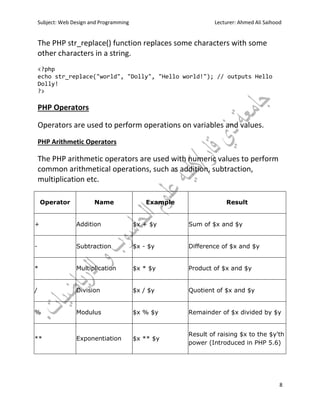
PHP Operators
Operators are used to perform operations on variables and values.
PHP Arithmetic Operators
The PHP arithmetic operators are used with numeric values to perform
common arithmetical operations, such as addition, subtraction,
multiplication etc.
Operator Name Example Result
+ Addition $x + $y Sum of $x and $y
- Subtraction $x - $y Difference of $x and $y
* Multiplication $x * $y Product of $x and $y
/ Division $x / $y Quotient of $x and $y
% Modulus $x % $y Remainder of $x divided by $y
** Exponentiation $x ** $y
Result of raising $x to the $y'th
power (Introduced in PHP 5.6)
Subject: Web Design and Programming Lecturer: Ahmed Ali Saihood
9
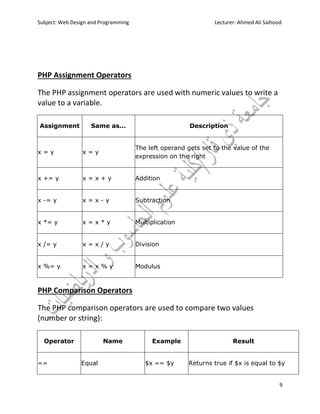
PHP Assignment Operators
The PHP assignment operators are used with numeric values to write a
value to a variable.
Assignment Same as... Description
x = y x = y
The left operand gets set to the value of the
expression on the right
x += y x = x + y Addition
x -= y x = x - y Subtraction
x *= y x = x * y Multiplication
x /= y x = x / y Division
x %= y x = x % y Modulus
PHP Comparison Operators
The PHP comparison operators are used to compare two values
(number or string):
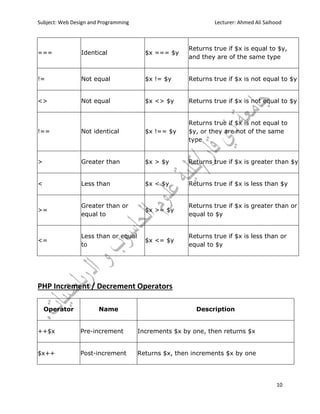
Operator Name Example Result
== Equal $x == $y Returns true if $x is equal to $y
Subject: Web Design and Programming Lecturer: Ahmed Ali Saihood
10
=== Identical $x === $y
Returns true if $x is equal to $y,
and they are of the same type
!= Not equal $x != $y Returns true if $x is not equal to $y
<> Not equal $x <> $y Returns true if $x is not equal to $y
!== Not identical $x !== $y
Returns true if $x is not equal to
$y, or they are not of the same
type
> Greater than $x > $y Returns true if $x is greater than $y
< Less than $x < $y Returns true if $x is less than $y
>=
Greater than or
equal to
$x >= $y
Returns true if $x is greater than or
equal to $y
<=
Less than or equal
to
$x <= $y
Returns true if $x is less than or
equal to $y
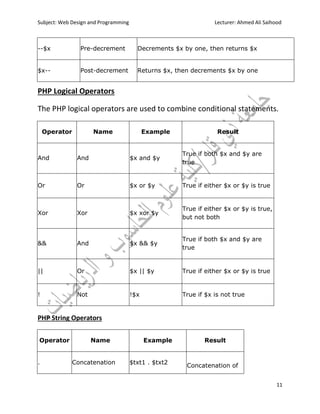
PHP Increment / Decrement Operators
Operator Name Description
++$x Pre-increment Increments $x by one, then returns $x
$x++ Post-increment Returns $x, then increments $x by one
Subject: Web Design and Programming Lecturer: Ahmed Ali Saihood
11
--$x Pre-decrement Decrements $x by one, then returns $x
$x-- Post-decrement Returns $x, then decrements $x by one
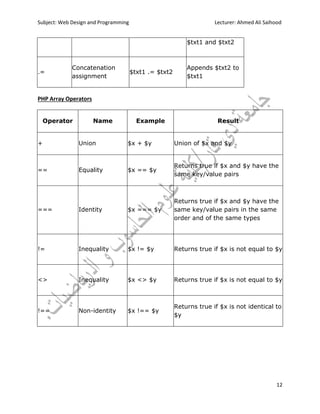
PHP Logical Operators
The PHP logical operators are used to combine conditional statements.
Operator Name Example Result
And And $x and $y
True if both $x and $y are
true
Or Or $x or $y True if either $x or $y is true
Xor Xor $x xor $y
True if either $x or $y is true,
but not both
&& And $x && $y
True if both $x and $y are
true
|| Or $x || $y True if either $x or $y is true
! Not !$x True if $x is not true
PHP String Operators
Operator Name Example Result
. Concatenation $txt1 . $txt2
Concatenation of
Subject: Web Design and Programming Lecturer: Ahmed Ali Saihood
12
$txt1 and $txt2
.=
Concatenation
assignment
$txt1 .= $txt2
Appends $txt2 to
$txt1
PHP Array Operators
Operator Name Example Result
+ Union $x + $y Union of $x and $y
== Equality $x == $y
Returns true if $x and $y have the
same key/value pairs
=== Identity $x === $y
Returns true if $x and $y have the
same key/value pairs in the same
order and of the same types
!= Inequality $x != $y Returns true if $x is not equal to $y
<> Inequality $x <> $y Returns true if $x is not equal to $y
!== Non-identity $x !== $y
Returns true if $x is not identical to
$y

PHP-Part1

  • 1.
    Subject: Web Designand Programming Lecturer: Ahmed Ali Saihood 1 Chapter 5 Part I PHP  PHP is a server scripting language, and a powerful tool for making dynamic and interactive Web pages.  PHP scripts are executed on the server. Basic PHP Syntax A PHP script can be placed anywhere in the document. A PHP script starts with <?php and ends with ?>: <?php // PHP code goes here ?> The default file extension for PHP files is ".php". A PHP file normally contains HTML tags, and some PHP scripting code. Below, we have an example of a simple PHP file, with a PHP script that uses a built-in PHP function "echo" to output the text "Hello World!" on a web page: <!DOCTYPE html> <html> <body> <h1>My first PHP page</h1> <?php echo "Hello World!"; ?>
  • 2.
    Subject: Web Designand Programming Lecturer: Ahmed Ali Saihood 2 </body> </html> PHP Variables Variables are "containers" for storing information. Creating (Declaring) PHP Variables: In PHP, a variable starts with the $ sign, followed by the name of the variable: <!DOCTYPE html> <html> <body> <?php $txt = "Hello world!"; $x = 5; $y = 10.5; echo $txt; echo "<br>"; echo $x; echo "<br>"; echo $y; ?> </body> </html> PHP echo and print Statements In PHP there are two basic ways to get output: echo. The echo statement can be used with or without parentheses: echo or echo(). <!DOCTYPE html> <html> <body>
  • 3.
    Subject: Web Designand Programming Lecturer: Ahmed Ali Saihood 3 <?php echo "<h2>PHP is Fun!</h2>"; echo "Hello world!<br>"; echo "I'm about to learn PHP!<br>"; echo "This ", "string ", "was ", "made ", "with multiple parameters."; ?> </body> </html> The following example shows how to output text and variables with the echo statement: <!DOCTYPE html> <html> <body> <?php $txt1 = "Learn PHP"; $txt2 = "W3Schools.com"; $x = 5; $y = 4; echo "<h2>" . $txt1 . "</h2>"; echo "Study PHP at " . $txt2 . "<br>"; echo $x + $y; ?> </body> </html>
  • 4.
    Subject: Web Designand Programming Lecturer: Ahmed Ali Saihood 4 PHP Data Types Variables can store data of different types, and different data types can do different things. PHP supports the following data types:  String  Integer  Float (floating point numbers - also called double)  Boolean  Array  NULL 1. PHP String A string is a sequence of characters, like "Hello world!". A string can be any text inside quotes. You can use single or double quotes: <!DOCTYPE html> <html> <body> <?php $x = "Hello world!"; $y = 'Hello world!'; echo $x; echo "<br>"; echo $y; ?> </body> </html
  • 5.
    Subject: Web Designand Programming Lecturer: Ahmed Ali Saihood 5 2. PHP Integer In the following example $x is an integer. The PHP var_dump() function returns the data type and value: <!DOCTYPE html> <html> <body> <?php $x = 5985; var_dump($x); ?> </body> </html> 3. PHP Float In the following example $x is a float. The PHP var_dump() function returns the data type and value: <!DOCTYPE html> <html> <body> <?php $x = 10.365; var_dump($x); ?> </body> </html> 4. PHP Boolean A Boolean represents two possible states: TRUE or FALSE. $x = true; $y = false;
  • 6.
    Subject: Web Designand Programming Lecturer: Ahmed Ali Saihood 6 5. PHP Array An array stores multiple values in one single variable. In the following example $cars is an array. The PHP var_dump() function returns the data type and value: <!DOCTYPE html> <html> <body> <?php $cars = array("Volvo","BMW","Toyota"); var_dump($cars); ?> </body> </html> 6. PHP NULL Value Null is a special data type which can have only one value: NULL. A variable of data type NULL is a variable that has no value assigned to it. <!DOCTYPE html> <html> <body> <?php $x = "Hello world!"; $x = null; var_dump($x); ?> </body> </html> PHP Strings A string is a sequence of characters, like "Hello world!".
  • 7.
    Subject: Web Designand Programming Lecturer: Ahmed Ali Saihood 7 Get The Length of a String The PHP strlen() function returns the length of a string. <?php echo strlen("Hello world!"); // outputs 12 ?> Count The Number of Words in a String The PHP str_word_count() function counts the number of words in a string: <?php echo str_word_count("Hello world!"); // outputs 2 ?> Reverse a String The PHP strrev() function reverses a string: <?php echo strrev("Hello world!"); // outputs !dlrow olleH ?> Search For a Specific Text Within a String The PHP strpos() function searches for a specific text within a string. If a match is found, the function returns the character position of the first match. If no match is found, it will return FALSE. <?php echo strpos("Hello world!", "world"); // outputs 6 ?> Replace Text Within a String
  • 8.
    Subject: Web Designand Programming Lecturer: Ahmed Ali Saihood 8 The PHP str_replace() function replaces some characters with some other characters in a string. <?php echo str_replace("world", "Dolly", "Hello world!"); // outputs Hello Dolly! ?> PHP Operators Operators are used to perform operations on variables and values. PHP Arithmetic Operators The PHP arithmetic operators are used with numeric values to perform common arithmetical operations, such as addition, subtraction, multiplication etc. Operator Name Example Result + Addition $x + $y Sum of $x and $y - Subtraction $x - $y Difference of $x and $y * Multiplication $x * $y Product of $x and $y / Division $x / $y Quotient of $x and $y % Modulus $x % $y Remainder of $x divided by $y ** Exponentiation $x ** $y Result of raising $x to the $y'th power (Introduced in PHP 5.6)
  • 9.
    Subject: Web Designand Programming Lecturer: Ahmed Ali Saihood 9 PHP Assignment Operators The PHP assignment operators are used with numeric values to write a value to a variable. Assignment Same as... Description x = y x = y The left operand gets set to the value of the expression on the right x += y x = x + y Addition x -= y x = x - y Subtraction x *= y x = x * y Multiplication x /= y x = x / y Division x %= y x = x % y Modulus PHP Comparison Operators The PHP comparison operators are used to compare two values (number or string): Operator Name Example Result == Equal $x == $y Returns true if $x is equal to $y
  • 10.
    Subject: Web Designand Programming Lecturer: Ahmed Ali Saihood 10 === Identical $x === $y Returns true if $x is equal to $y, and they are of the same type != Not equal $x != $y Returns true if $x is not equal to $y <> Not equal $x <> $y Returns true if $x is not equal to $y !== Not identical $x !== $y Returns true if $x is not equal to $y, or they are not of the same type > Greater than $x > $y Returns true if $x is greater than $y < Less than $x < $y Returns true if $x is less than $y >= Greater than or equal to $x >= $y Returns true if $x is greater than or equal to $y <= Less than or equal to $x <= $y Returns true if $x is less than or equal to $y PHP Increment / Decrement Operators Operator Name Description ++$x Pre-increment Increments $x by one, then returns $x $x++ Post-increment Returns $x, then increments $x by one
  • 11.
    Subject: Web Designand Programming Lecturer: Ahmed Ali Saihood 11 --$x Pre-decrement Decrements $x by one, then returns $x $x-- Post-decrement Returns $x, then decrements $x by one PHP Logical Operators The PHP logical operators are used to combine conditional statements. Operator Name Example Result And And $x and $y True if both $x and $y are true Or Or $x or $y True if either $x or $y is true Xor Xor $x xor $y True if either $x or $y is true, but not both && And $x && $y True if both $x and $y are true || Or $x || $y True if either $x or $y is true ! Not !$x True if $x is not true PHP String Operators Operator Name Example Result . Concatenation $txt1 . $txt2 Concatenation of
  • 12.
    Subject: Web Designand Programming Lecturer: Ahmed Ali Saihood 12 $txt1 and $txt2 .= Concatenation assignment $txt1 .= $txt2 Appends $txt2 to $txt1 PHP Array Operators Operator Name Example Result + Union $x + $y Union of $x and $y == Equality $x == $y Returns true if $x and $y have the same key/value pairs === Identity $x === $y Returns true if $x and $y have the same key/value pairs in the same order and of the same types != Inequality $x != $y Returns true if $x is not equal to $y <> Inequality $x <> $y Returns true if $x is not equal to $y !== Non-identity $x !== $y Returns true if $x is not identical to $y