P H P
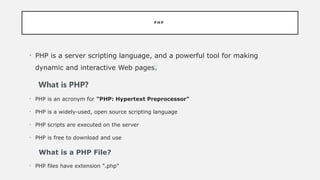
•PHP is a server scripting language, and a powerful tool for making
dynamic and interactive Web pages.
What is PHP?
• PHP is an acronym for "PHP: Hypertext Preprocessor"
• PHP is a widely-used, open source scripting language
• PHP scripts are executed on the server
• PHP is free to download and use
What is a PHP File?
• PHP files have extension ".php"
3.
WHAT CAN PHPDO?
• PHP can generate dynamic page content
• PHP can create, open, read, write, delete, and close files on the server
• PHP can collect form data
• PHP can send and receive cookies
• PHP can add, delete, modify data in your database
• PHP can be used to control user-access
• PHP can encrypt data
4.
P H PS Y N T A X P H P C O M M E N T S
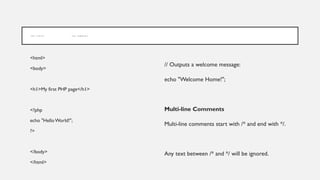
<html>
<body>
<h1>My first PHP page</h1>
<?php
echo "Hello World!";
?>
</body>
</html>
// Outputs a welcome message:
echo "Welcome Home!";
Multi-line Comments
Multi-line comments start with /* and end with */.
Any text between /* and */ will be ignored.
5.
PHP VARIABLES
• Avariable starts with the $ sign, followed by the name of the variable
• A variable name must start with a letter or the underscore character
• A variable name cannot start with a number
• A variable name can only contain alpha-numeric characters and underscores
• Variable names are case-sensitive
Example- $x = 5;
$y = "John"
6.
P H PVA R I A B L E S S C O P E
The scope of a variable is the part of the script where the variable can be referenced/used.
PHP has three different variable scopes:
• local
• global
• static
7.
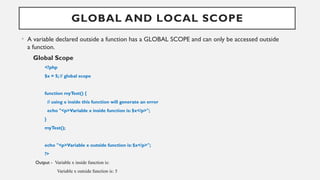
GLOBAL AND LOCALSCOPE
• A variable declared outside a function has a GLOBAL SCOPE and can only be accessed outside
a function.
Global Scope
<?php
$x = 5; // global scope
function myTest() {
// using x inside this function will generate an error
echo "<p>Variable x inside function is: $x</p>";
}
myTest();
echo "<p>Variable x outside function is: $x</p>";
?>
Output - Variable x inside function is:
Variable x outside function is: 5
8.
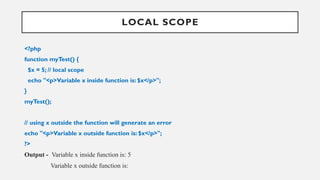
LOCAL SCOPE
<?php
function myTest(){
$x = 5; // local scope
echo "<p>Variable x inside function is: $x</p>";
}
myTest();
// using x outside the function will generate an error
echo "<p>Variable x outside function is: $x</p>";
?>
Output - Variable x inside function is: 5
Variable x outside function is:
9.
P H PE C H O A N D P R I N T S T A T E M E N T S
echo and print are more or less the same.They are both used to output data to the screen.
• The differences are small: echo has no return value while print has a return value of 1 so it can be
used in expressions.
• echo can take multiple parameters (although such usage is rare) while print can take one
argument. echo is marginally faster than print.
10.
P H PD A T A T Y P E S
Variables can store data of different types, and different data types can do different
things.
PHP supports the following data types:
• String
• Integer
• Float (floating point numbers - also called double)
• Boolean
• Array
• NULL
11.
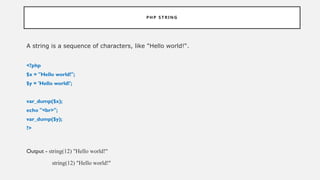
P H PS T R I N G
A string is a sequence of characters, like "Hello world!“.
<?php
$x = "Hello world!";
$y = 'Hello world!';
var_dump($x);
echo "<br>";
var_dump($y);
?>
Output - string(12) "Hello world!"
string(12) "Hello world!"
12.
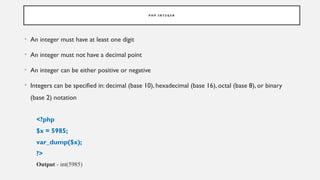
P H PI N T E G E R
• An integer must have at least one digit
• An integer must not have a decimal point
• An integer can be either positive or negative
• Integers can be specified in: decimal (base 10), hexadecimal (base 16), octal (base 8), or binary
(base 2) notation
<?php
$x = 5985;
var_dump($x);
?>
Output - int(5985)
13.
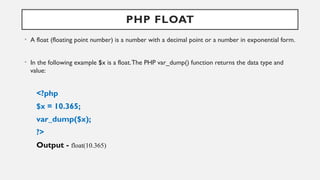
PHP FLOAT
• Afloat (floating point number) is a number with a decimal point or a number in exponential form.
• In the following example $x is a float.The PHP var_dump() function returns the data type and
value:
<?php
$x = 10.365;
var_dump($x);
?>
Output - float(10.365)
14.
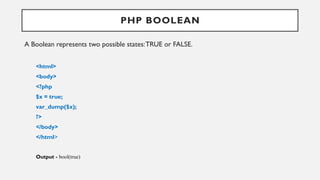
PHP BOOLEAN
A Booleanrepresents two possible states:TRUE or FALSE.
<html>
<body>
<?php
$x = true;
var_dump($x);
?>
</body>
</html>
Output - bool(true)
15.
P H PA R R A Y
• An array stores multiple values in one single variable.
• In the following example $cars is an array.The PHP var_dump() function returns the data type
and value:
<?php
$cars = array("BMW","Toyota");
var_dump($cars);
?>
Output –
array(2) { [0]=> string(3) "BMW" [1]=> string(6) "Toyota" }
16.
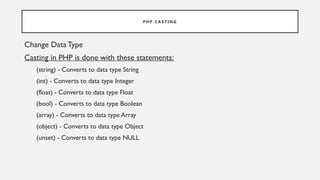
P H PC A S T I N G
Change DataType
Casting in PHP is done with these statements:
(string) - Converts to data type String
(int) - Converts to data type Integer
(float) - Converts to data type Float
(bool) - Converts to data type Boolean
(array) - Converts to data type Array
(object) - Converts to data type Object
(unset) - Converts to data type NULL
17.
<?php
$a="first step";
$b="2";
$c="true";
$d="3.89";
$f="null";
$a= (string)$a;
$b= (array) $b;
$c= (bool) $c;
$d= (float) $d;
$f= (string) $f;
//To verify the type of any object in PHP, use
the var_dump() funtion:
var_du($a);
echo"<br>";
var_dump($b);
echo"<br>";
var_dump($c);
echo"<br>";
var_dump($d);
echo"<br>";
var_dump($f);
?>
OUTPUT :
string(10) "first step"
array(1) { [0]=> string(1) "2" }
bool(true)
float(3.89)
string(4) "null"
18.
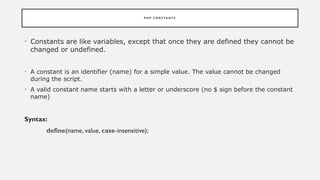
P H PC O N S T A N T S
• Constants are like variables, except that once they are defined they cannot be
changed or undefined.
• A constant is an identifier (name) for a simple value. The value cannot be changed
during the script.
• A valid constant name starts with a letter or underscore (no $ sign before the constant
name)
Syntax:
define(name, value, case-insensitive);
19.
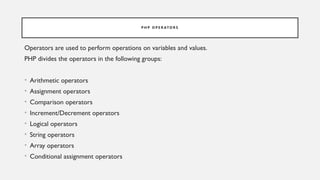
P H PO P E R ATO R S
Operators are used to perform operations on variables and values.
PHP divides the operators in the following groups:
• Arithmetic operators
• Assignment operators
• Comparison operators
• Increment/Decrement operators
• Logical operators
• String operators
• Array operators
• Conditional assignment operators
20.
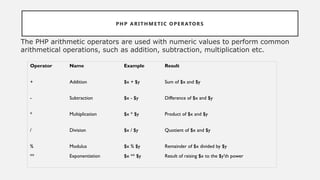
PHP ARITHMETIC OPERATORS
ThePHP arithmetic operators are used with numeric values to perform common
arithmetical operations, such as addition, subtraction, multiplication etc.
Operator Name Example Result
+ Addition $x + $y Sum of $x and $y
- Subtraction $x - $y Difference of $x and $y
* Multiplication $x * $y Product of $x and $y
/ Division $x / $y Quotient of $x and $y
% Modulus $x % $y Remainder of $x divided by $y
** Exponentiation $x ** $y Result of raising $x to the $y'th power
21.
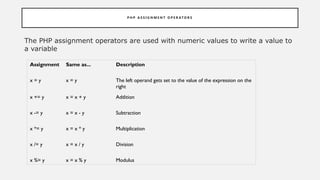
P H PA S S I G N M E N T O P E R AT O R S
The PHP assignment operators are used with numeric values to write a value to
a variable
Assignment Same as... Description
x = y x = y The left operand gets set to the value of the expression on the
right
x += y x = x + y Addition
x -= y x = x - y Subtraction
x *= y x = x * y Multiplication
x /= y x = x / y Division
x %= y x = x % y Modulus
22.
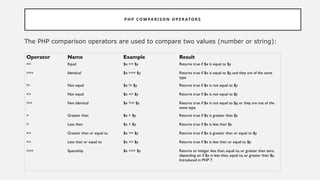
P H PC O M PA R I S O N O P E R ATO R S
The PHP comparison operators are used to compare two values (number or string):
Operator Name Example Result
== Equal $x == $y Returns true if $x is equal to $y
=== Identical $x === $y Returns true if $x is equal to $y, and they are of the same
type
!= Not equal $x != $y Returns true if $x is not equal to $y
<> Not equal $x <> $y Returns true if $x is not equal to $y
!== Not identical $x !== $y Returns true if $x is not equal to $y, or they are not of the
same type
> Greater than $x > $y Returns true if $x is greater than $y
< Less than $x < $y Returns true if $x is less than $y
>= Greater than or equal to $x >= $y Returns true if $x is greater than or equal to $y
<= Less than or equal to $x <= $y Returns true if $x is less than or equal to $y
<=> Spaceship $x <=> $y Returns an integer less than, equal to, or greater than zero,
depending on if $x is less than, equal to, or greater than $y.
Introduced in PHP 7.
23.
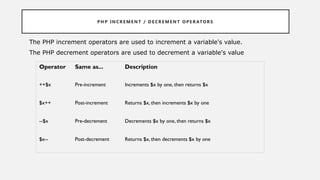
PH P INCR E ME N T / D E CRE M EN T O PE R ATOR S
The PHP increment operators are used to increment a variable's value.
The PHP decrement operators are used to decrement a variable's value
Operator Same as... Description
++$x Pre-increment Increments $x by one, then returns $x
$x++ Post-increment Returns $x, then increments $x by one
--$x Pre-decrement Decrements $x by one, then returns $x
$x-- Post-decrement Returns $x, then decrements $x by one
24.
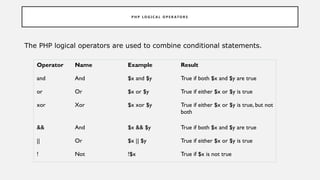
P H PL O G I C A L O P E R AT O R S
The PHP logical operators are used to combine conditional statements.
Operator Name Example Result
and And $x and $y True if both $x and $y are true
or Or $x or $y True if either $x or $y is true
xor Xor $x xor $y True if either $x or $y is true, but not
both
&& And $x && $y True if both $x and $y are true
|| Or $x || $y True if either $x or $y is true
! Not !$x True if $x is not true
25.
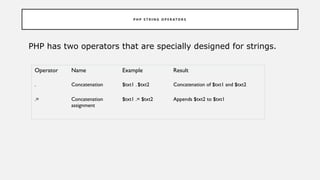
P H PS T R I N G O P E R AT O R S
PHP has two operators that are specially designed for strings.
Operator Name Example Result
. Concatenation $txt1 . $txt2 Concatenation of $txt1 and $txt2
.= Concatenation
assignment
$txt1 .= $txt2 Appends $txt2 to $txt1
26.
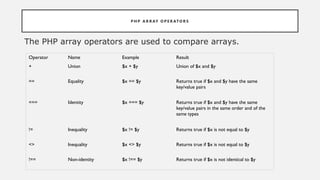
P H PA R R AY O P E R ATO R S
The PHP array operators are used to compare arrays.
Operator Name Example Result
+ Union $x + $y Union of $x and $y
== Equality $x == $y Returns true if $x and $y have the same
key/value pairs
=== Identity $x === $y Returns true if $x and $y have the same
key/value pairs in the same order and of the
same types
!= Inequality $x != $y Returns true if $x is not equal to $y
<> Inequality $x <> $y Returns true if $x is not equal to $y
!== Non-identity $x !== $y Returns true if $x is not identical to $y
27.
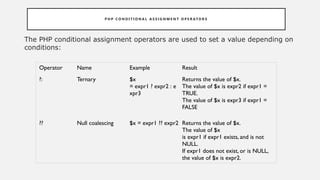
P H PC O N D I T I O N A L A S S I G N M E N T O P E R ATO R S
The PHP conditional assignment operators are used to set a value depending on
conditions:
Operator Name Example Result
?: Ternary $x
= expr1 ? expr2 : e
xpr3
Returns the value of $x.
The value of $x is expr2 if expr1 =
TRUE.
The value of $x is expr3 if expr1 =
FALSE
?? Null coalescing $x = expr1 ?? expr2 Returns the value of $x.
The value of $x
is expr1 if expr1 exists, and is not
NULL.
If expr1 does not exist, or is NULL,
the value of $x is expr2.
28.
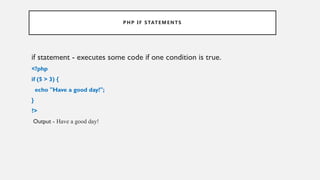
PHP IF STATEMENTS
ifstatement - executes some code if one condition is true.
<?php
if (5 > 3) {
echo "Have a good day!";
}
?>
Output - Have a good day!
29.
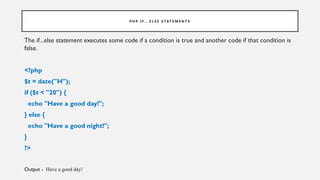
P H PI F. . . E L S E S TAT E M E N T S
The if...else statement executes some code if a condition is true and another code if that condition is
false.
<?php
$t = date("H");
if ($t < "20") {
echo "Have a good day!";
} else {
echo "Have a good night!";
}
?>
Output - Have a good day!
30.
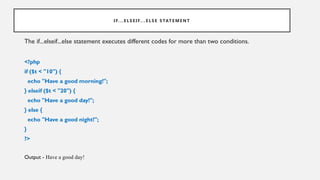
I F. .. E LS E I F. . . E LS E S TAT E ME NT
The if...elseif...else statement executes different codes for more than two conditions.
<?php
if ($t < "10") {
echo "Have a good morning!";
} elseif ($t < "20") {
echo "Have a good day!";
} else {
echo "Have a good night!";
}
?>
Output - Have a good day!
![P H P A R R A Y
• An array stores multiple values in one single variable.
• In the following example $cars is an array.The PHP var_dump() function returns the data type
and value:
<?php
$cars = array("BMW","Toyota");
var_dump($cars);
?>
Output –
array(2) { [0]=> string(3) "BMW" [1]=> string(6) "Toyota" }](https://image.slidesharecdn.com/phpppt-250410173810-96aa735c/85/PHP-PPT-pptxPHP-PPT-pptxPHP-PPT-pptxPHP-n-15-320.jpg)
![<?php
$a="first step";
$b="2";
$c="true";
$d="3.89";
$f="null";
$a= (string) $a;
$b= (array) $b;
$c= (bool) $c;
$d= (float) $d;
$f= (string) $f;
//To verify the type of any object in PHP, use
the var_dump() funtion:
var_du($a);
echo"<br>";
var_dump($b);
echo"<br>";
var_dump($c);
echo"<br>";
var_dump($d);
echo"<br>";
var_dump($f);
?>
OUTPUT :
string(10) "first step"
array(1) { [0]=> string(1) "2" }
bool(true)
float(3.89)
string(4) "null"](https://image.slidesharecdn.com/phpppt-250410173810-96aa735c/85/PHP-PPT-pptxPHP-PPT-pptxPHP-PPT-pptxPHP-n-17-320.jpg)