
Personal computer
Francesco Zoino
INTRODUCTION
2
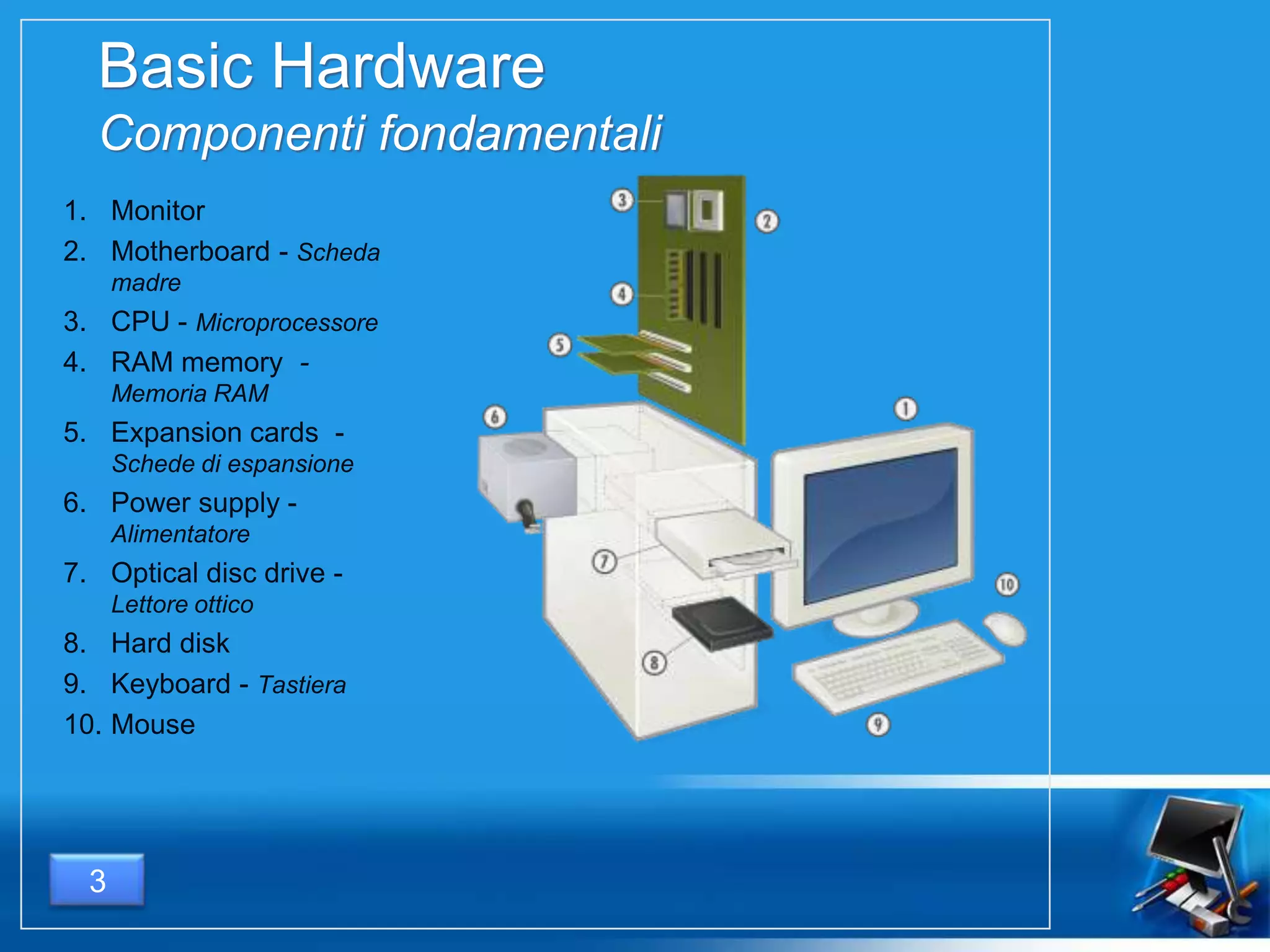
Basic Hardware
Componenti fondamentali
1. Monitor
2. Motherboard - Scheda
madre
3. CPU - Microprocessore
4. RAM memory -
Memoria RAM
5. Expansion cards -
Schede di espansione
6. Power supply -
Alimentatore
7. Optical disc drive -
Lettore ottico
8. Hard disk
9. Keyboard - Tastiera
10. Mouse
3
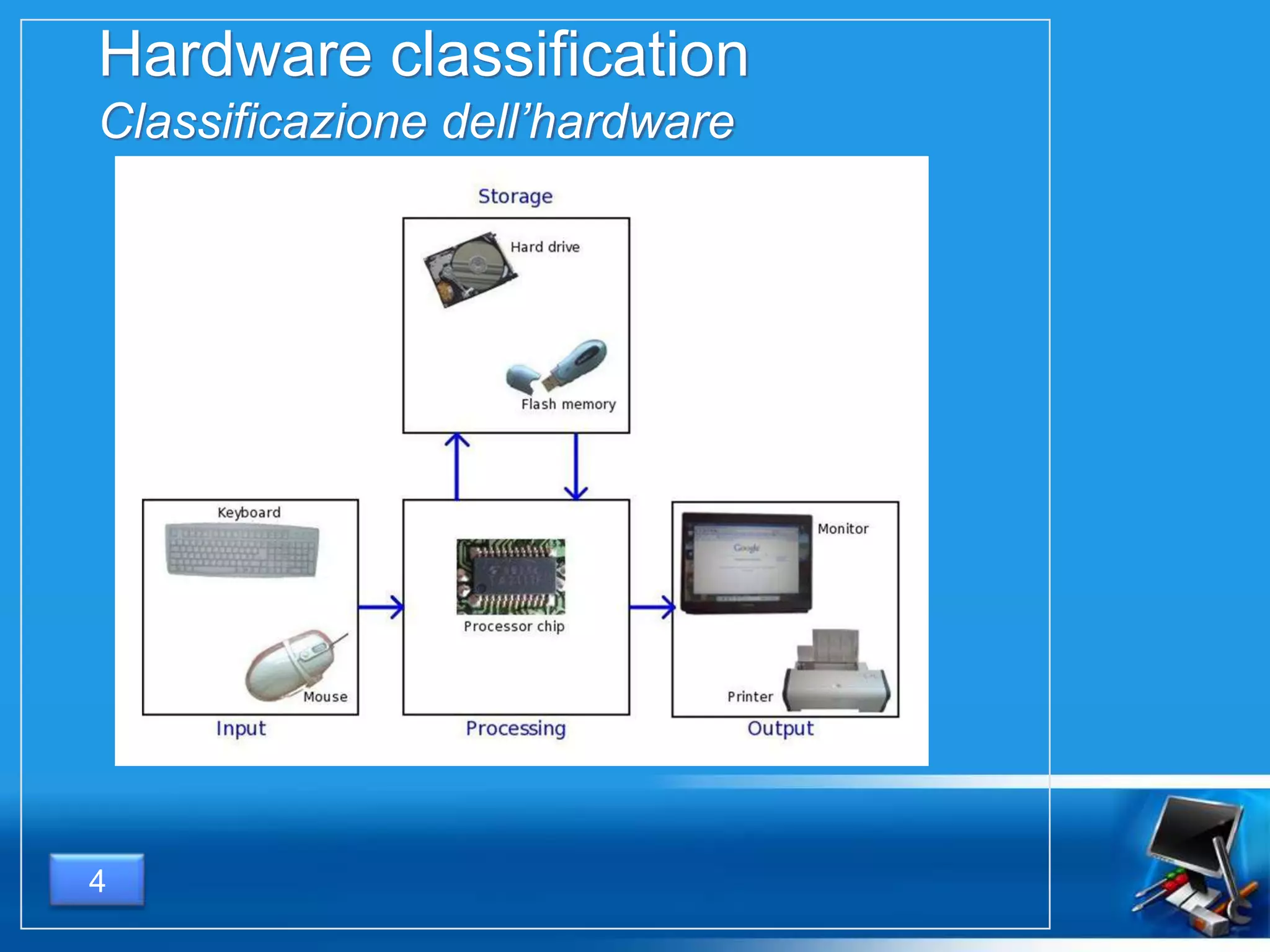
Hardware classification
Classificazione dell’hardware
4
INPUT DEVICES
DISPOSITIVI DI INPUT
5
What is
Cos’è
6
A input device is a hardware component
that allows the introduction of
information from the external world
inside the computer.
Un dispositivo di input è un componente
hardware che consente l’immissione di
informazioni provenienti dal mondo
esterno all’interno di un computer.
Examples
Esempi
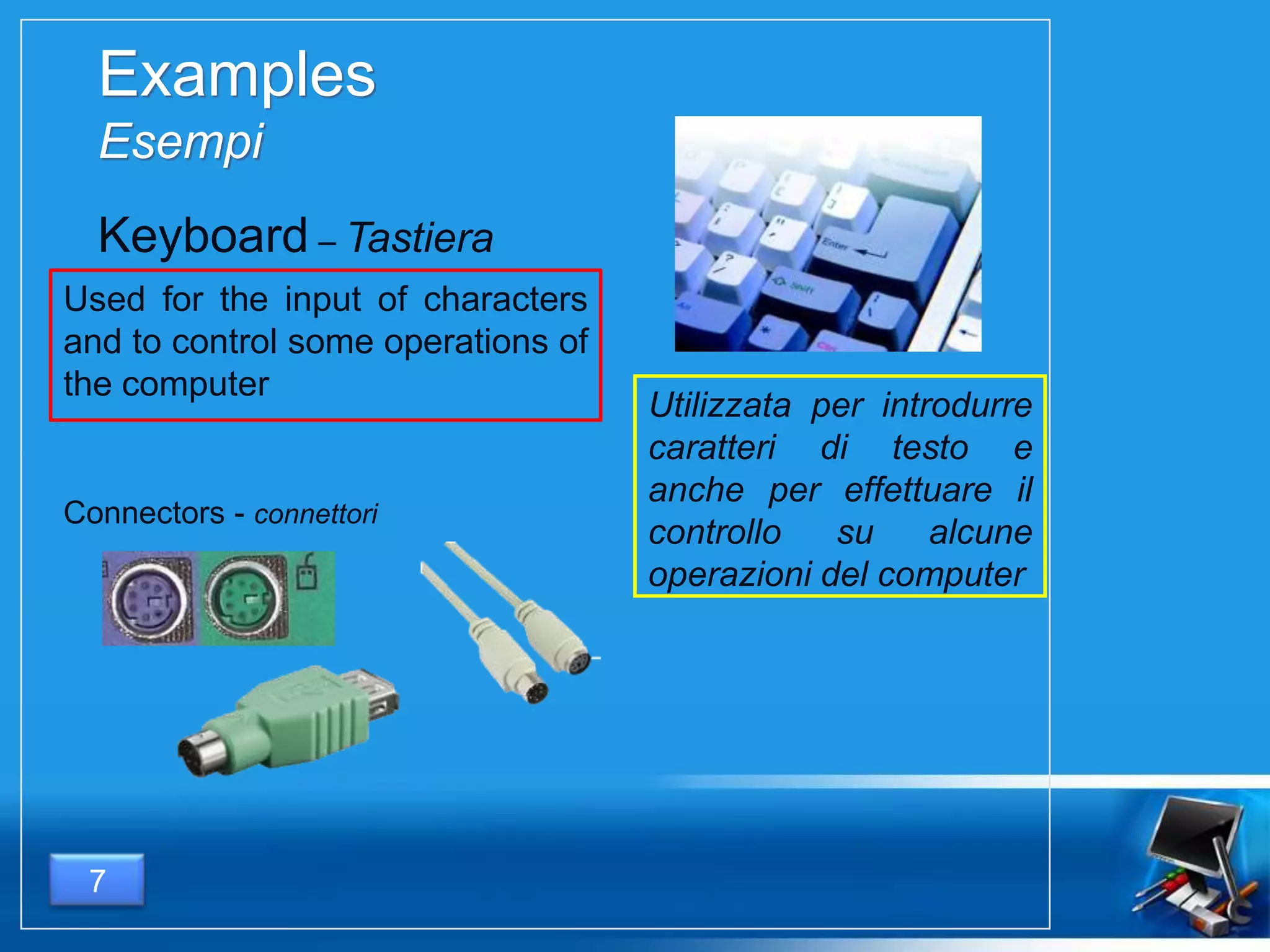
Used for the input of characters
and to control some operations of
the computer
7
Keyboard – Tastiera
Utilizzata per introdurre
caratteri di testo e
anche per effettuare il
controllo su alcune
operazioni del computer
Connectors - connettori
Examples
Esempi
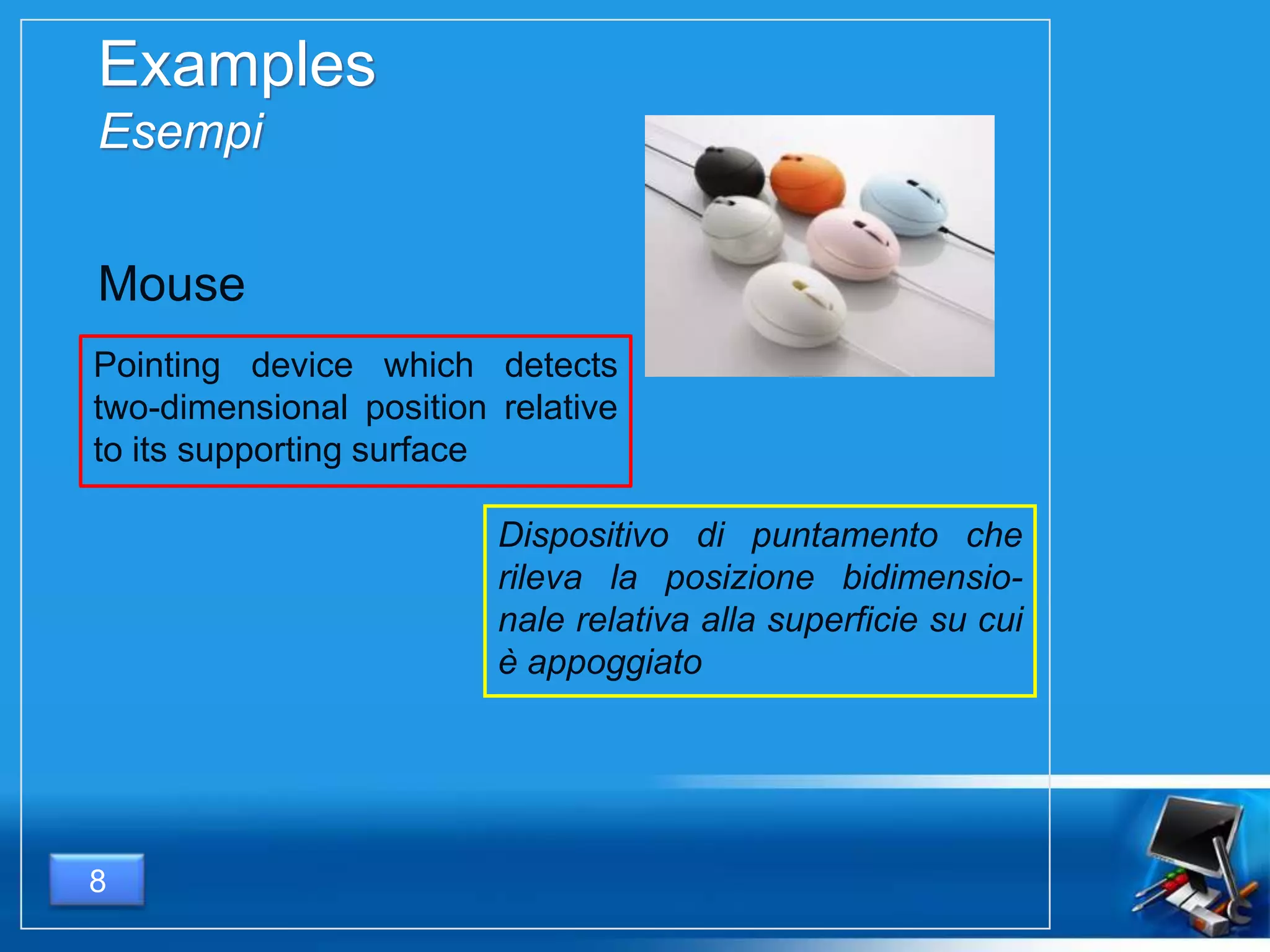
Pointing device which detects
two-dimensional position relative
to its supporting surface
8
Mouse
Dispositivo di puntamento che
rileva la posizione bidimensio-
nale relativa alla superficie su cui
è appoggiato
Examples
Esempi
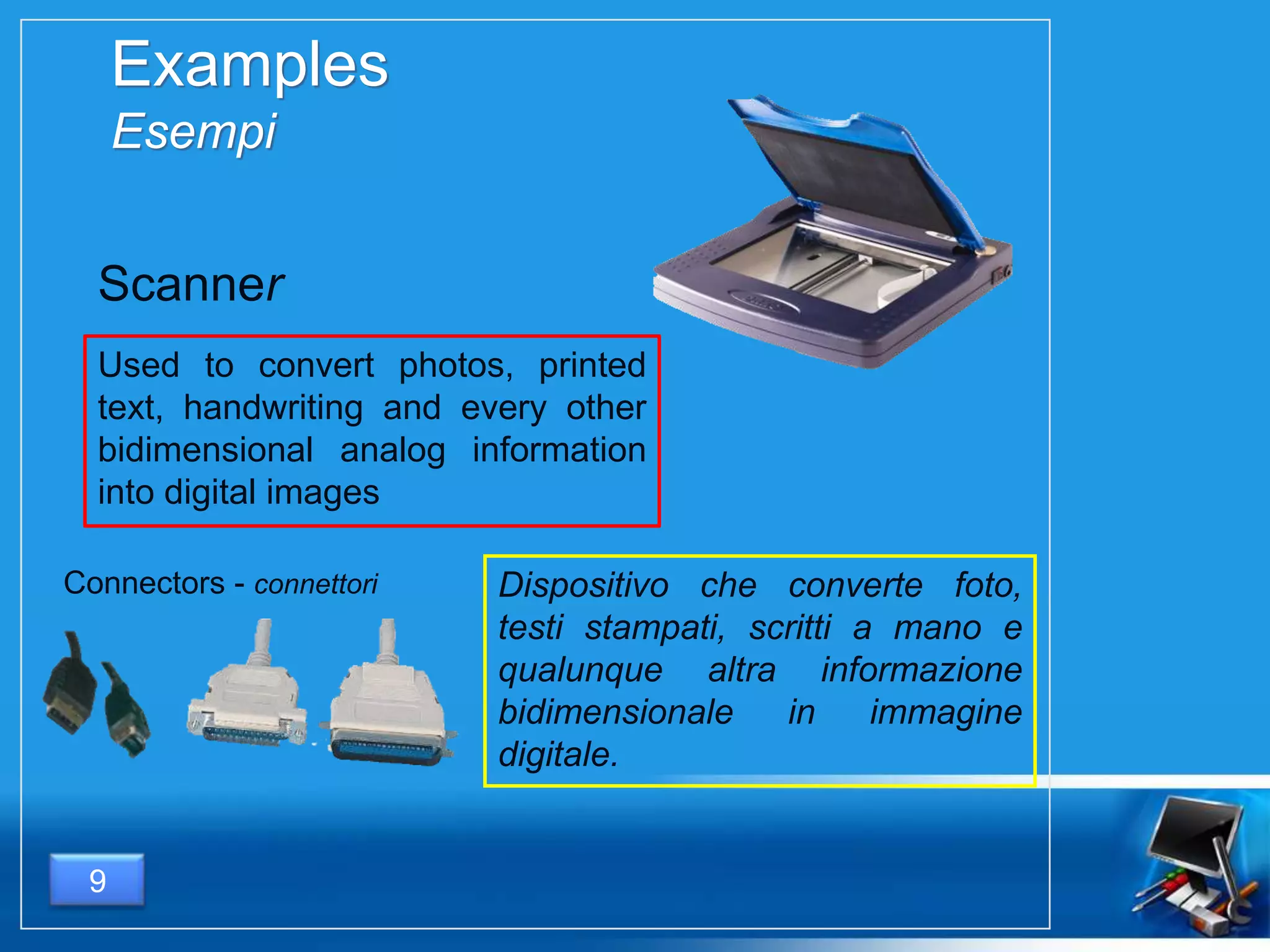
Used to convert photos, printed
text, handwriting and every other
bidimensional analog information
into digital images
9
Dispositivo che converte foto,
testi stampati, scritti a mano e
qualunque altra informazione
bidimensionale in immagine
digitale.
Scanner
Connectors - connettori
Examples
Esempi
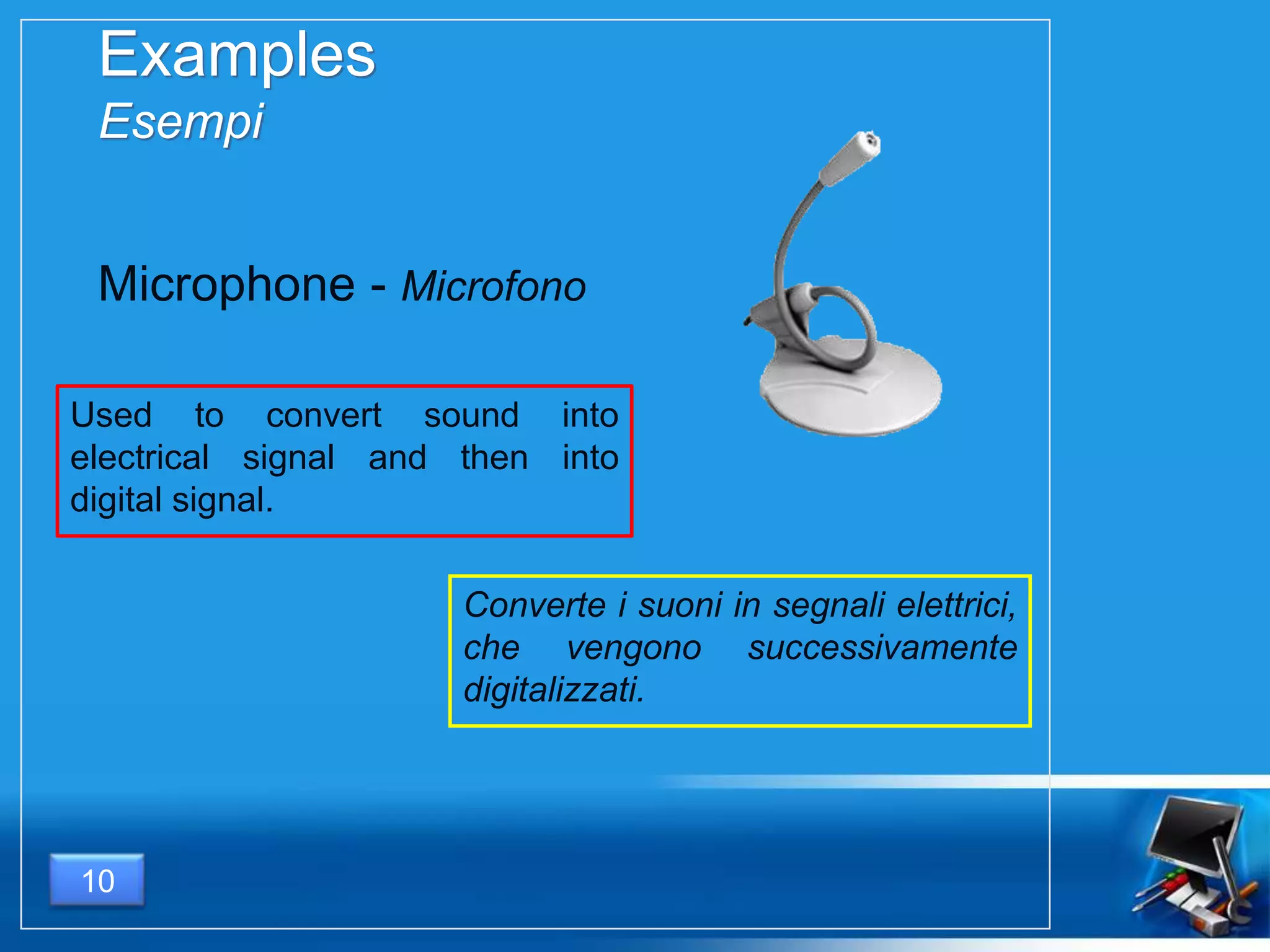
Used to convert sound into
electrical signal and then into
digital signal.
10
Microphone - Microfono
Converte i suoni in segnali elettrici,
che vengono successivamente
digitalizzati.
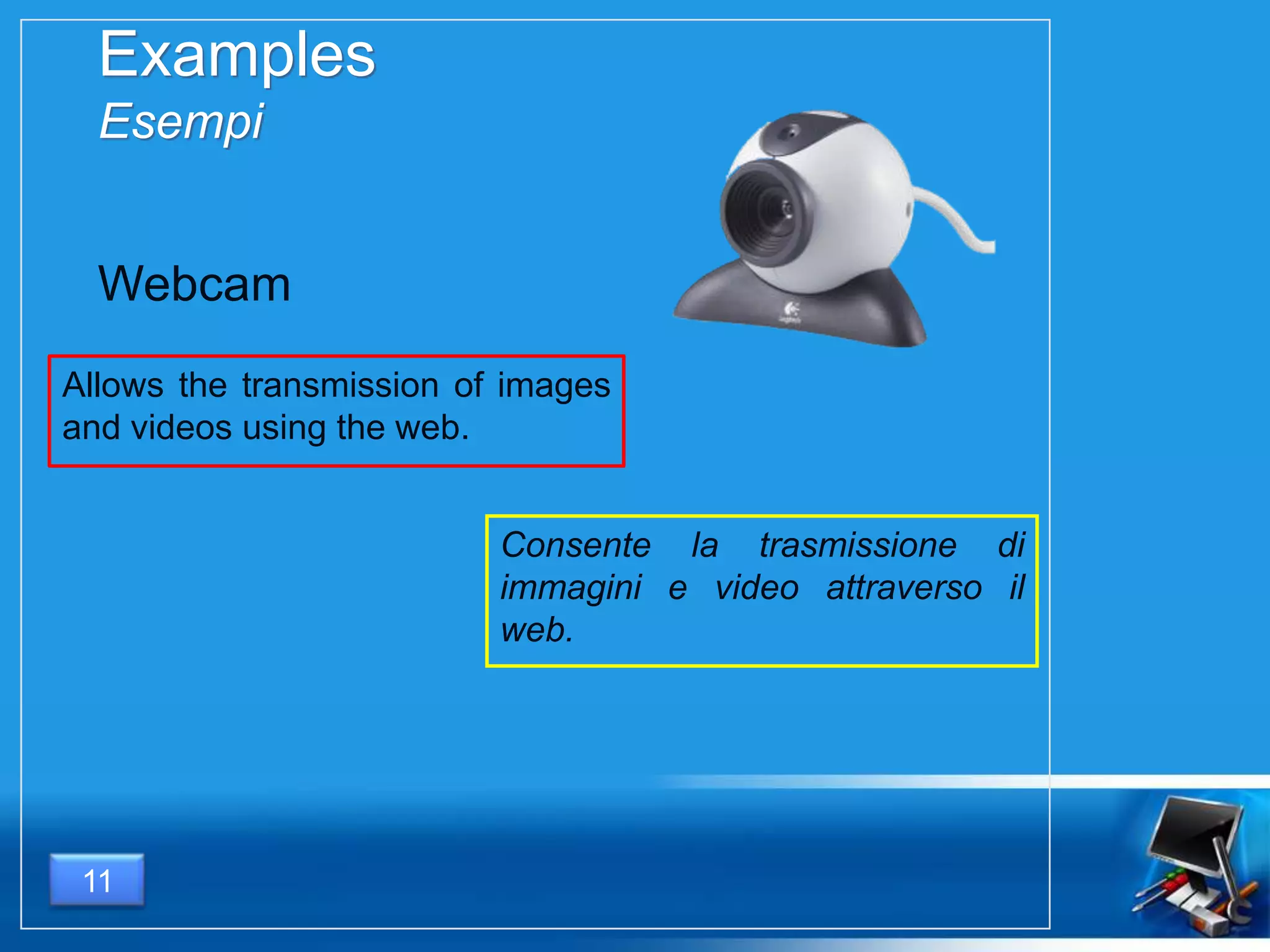
Consente la trasmissione di
immagini e video attraverso il
web.
11
Examples
Esempi
Allows the transmission of images
and videos using the web.
Webcam
12
PROCESSING UNIT
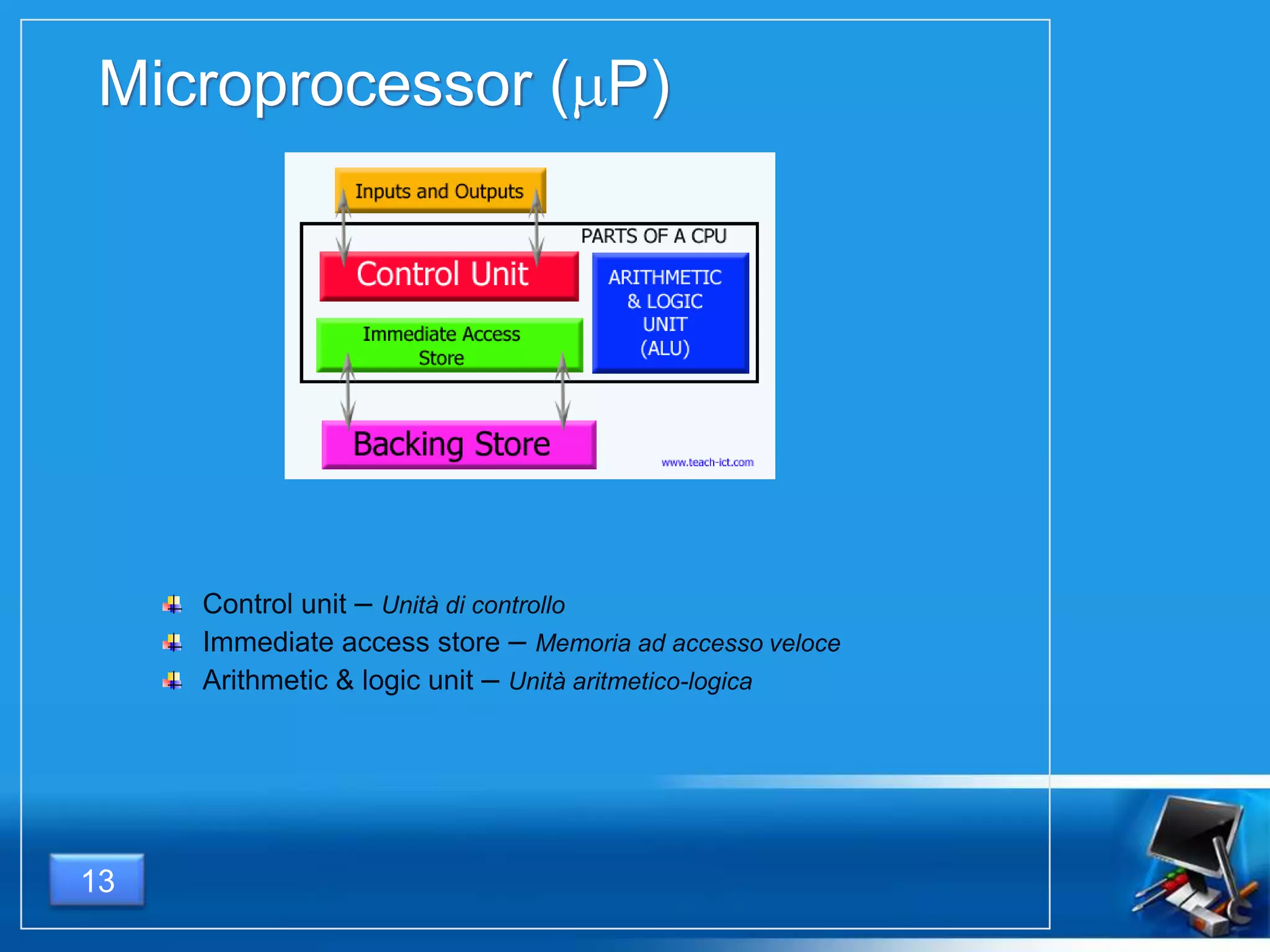
Microprocessor ( P)
Control unit – Unità di controllo
Immediate access store – Memoria ad accesso veloce
Arithmetic & logic unit – Unità aritmetico-logica
13
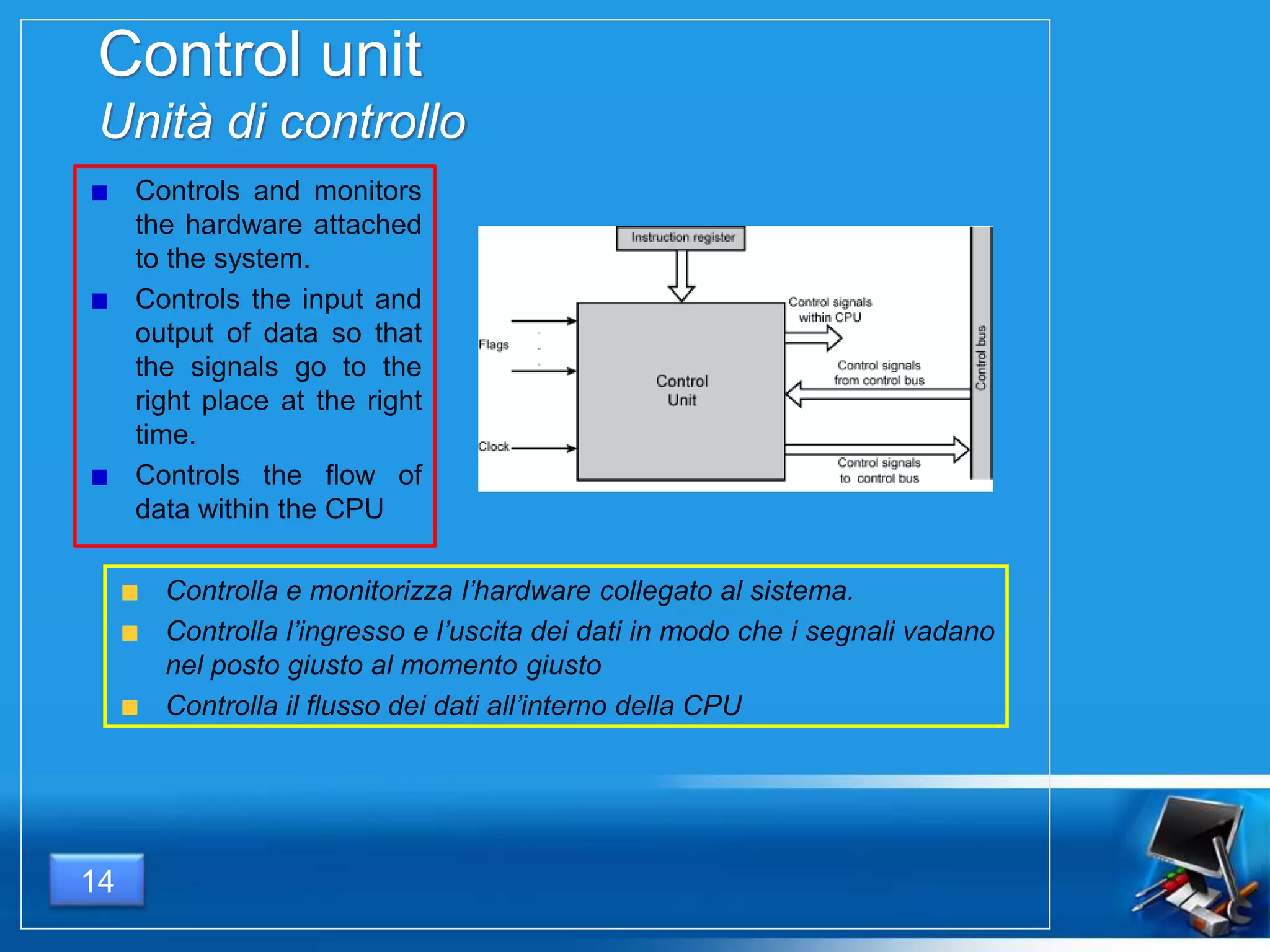
Control unit
Unità di controllo
Controls and monitors
the hardware attached
to the system.
Controls the input and
output of data so that
the signals go to the
right place at the right
time.
Controls the flow of
data within the CPU
Controlla e monitorizza l’hardware collegato al sistema.
Controlla l’ingresso e l’uscita dei dati in modo che i segnali vadano
nel posto giusto al momento giusto
Controlla il flusso dei dati all’interno della CPU
14
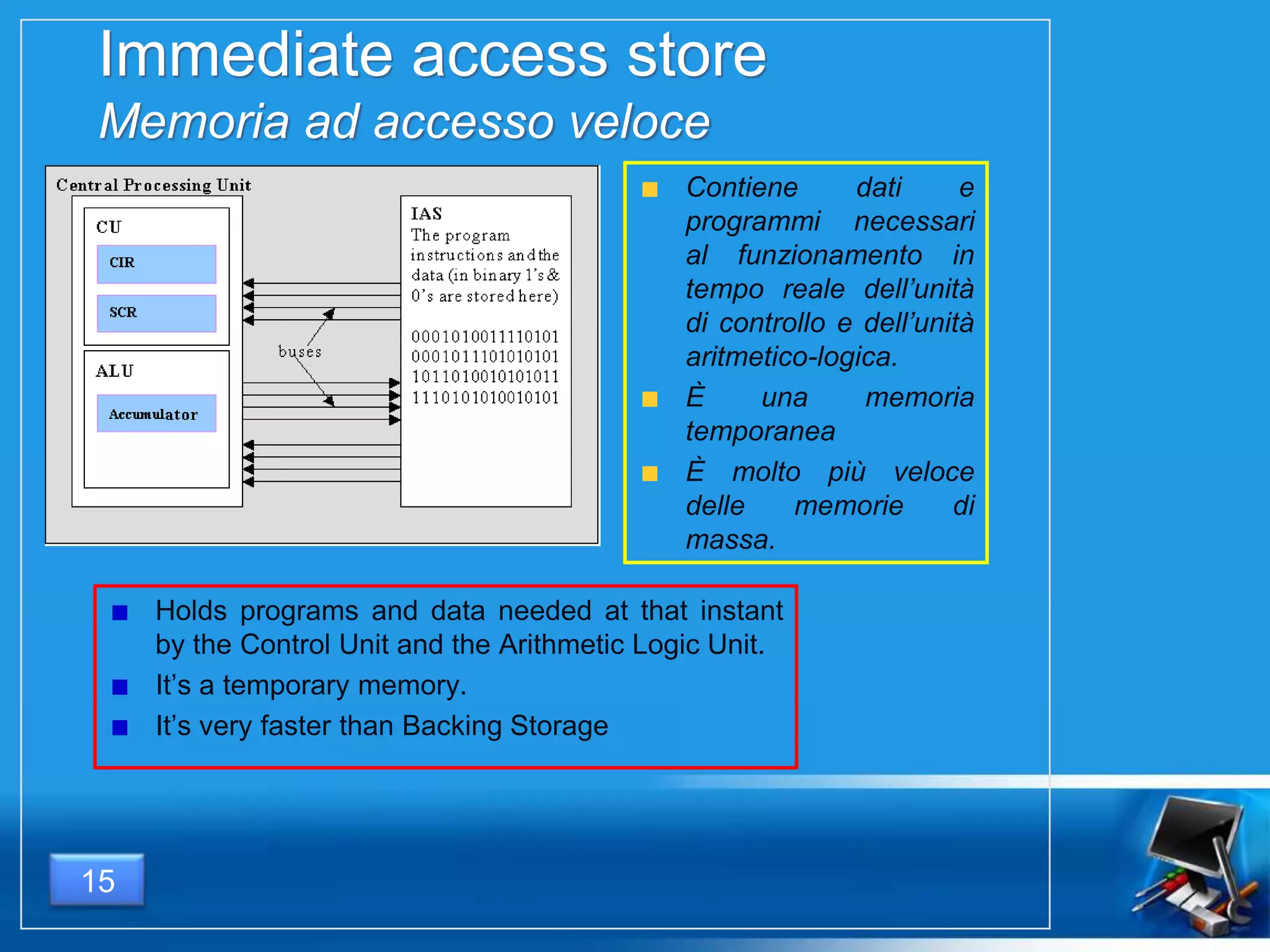
Immediate access store
Memoria ad accesso veloce
Holds programs and data needed at that instant
by the Control Unit and the Arithmetic Logic Unit.
It’s a temporary memory.
It’s very faster than Backing Storage
Contiene dati e
programmi necessari
al funzionamento in
tempo reale dell’unità
di controllo e dell’unità
aritmetico-logica.
È una memoria
temporanea
È molto più veloce
delle memorie di
massa.
15
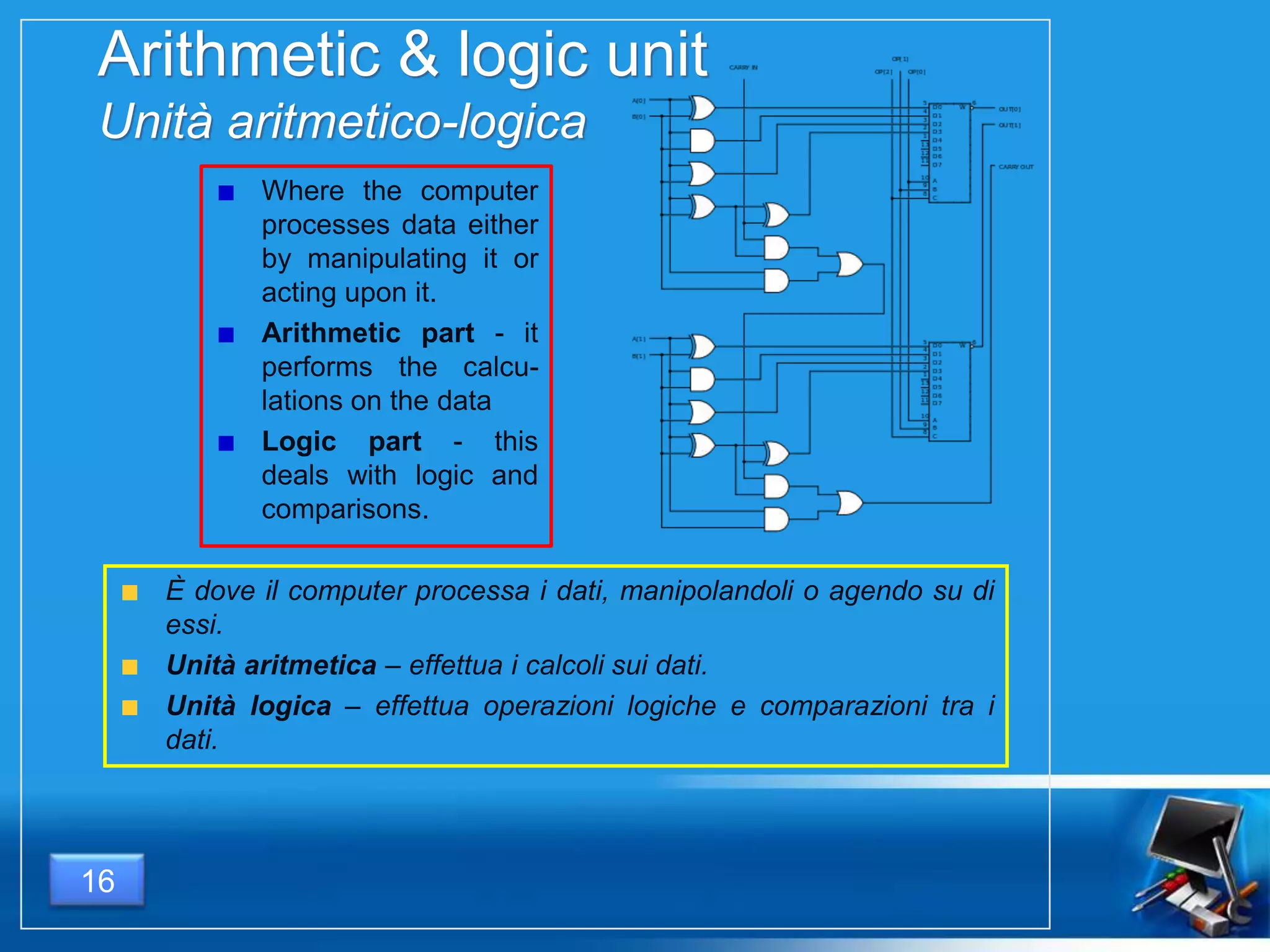
Arithmetic & logic unit
Unità aritmetico-logica
Where the computer
processes data either
by manipulating it or
acting upon it.
Arithmetic part - it
performs the calcu-
lations on the data
Logic part - this
deals with logic and
comparisons.
È dove il computer processa i dati, manipolandoli o agendo su di
essi.
Unità aritmetica – effettua i calcoli sui dati.
Unità logica – effettua operazioni logiche e comparazioni tra i
dati.
16
How fast is a CPU?
Quanto è veloce un P ?
It depends on 3 main factors:
Clock frequency – the number of operations made in 1 second
(measured in Hz = s-1)
Cache memory – the very fast memory which is inside the CPU
MIPS – Million of Instruction per Second
The higher these values, the faster the CPU will be.
17
Dipende da 3 fattori fondamentali:
Frequenza di clock – il numero di operazioni
effettuate in 1 secondo (si misura in Hz = s-1 )
Memoria cache – la velocissima memoria
situata all’interno della CPU.
MIPS – Milioni di Istruzioni per Secondo
Più alti sono i loro valori, più veloce sarà il P.
18
Difference between clock frequency
and MIPS
Differenza tra frequenza di clock e MIPS
Some processors, even if they have the same clock
frequency as others, can execute a higher number of
instructions in the same amount of time, because of the way
in which instructions have been programmed. So they have
different value of MIPS but the same value of clock
frequency.
Alcuni processori, pur avendo la stessa frequenza di clock di altri, sono in
grado di eseguire un numero di istruzioni maggiore nell’unità di tempo,
grazie al diverso modo in cui le istruzioni sono state programmate.
Pertanto essi hanno lo stesso valore di frequenza di clock, ma un
differente valore di MIPS.
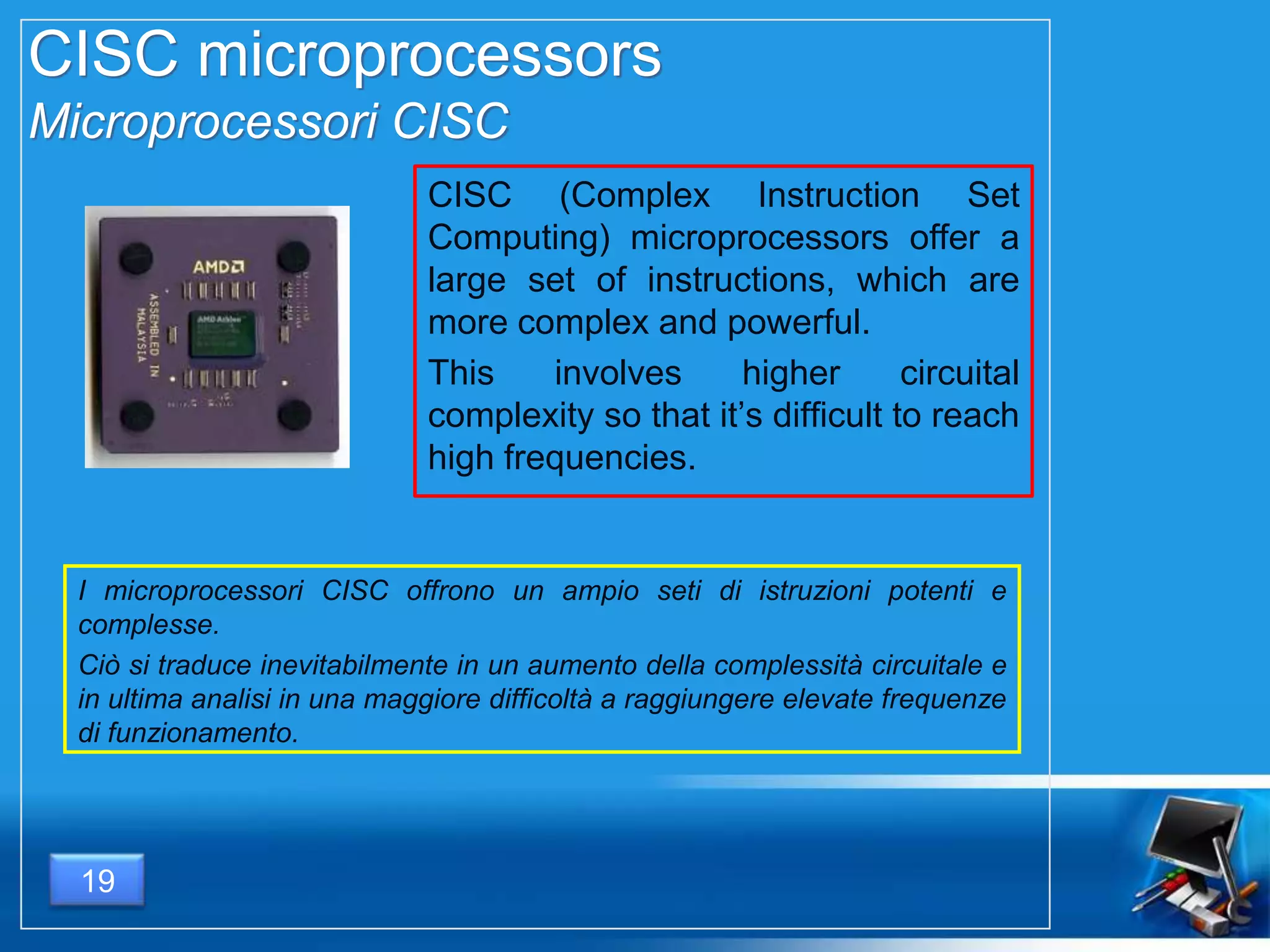
CISC microprocessors
Microprocessori CISC
CISC (Complex Instruction Set
Computing) microprocessors offer a
large set of instructions, which are
more complex and powerful.
This involves higher circuital
complexity so that it’s difficult to reach
high frequencies.
I microprocessori CISC offrono un ampio seti di istruzioni potenti e
complesse.
Ciò si traduce inevitabilmente in un aumento della complessità circuitale e
in ultima analisi in una maggiore difficoltà a raggiungere elevate frequenze
di funzionamento.
19
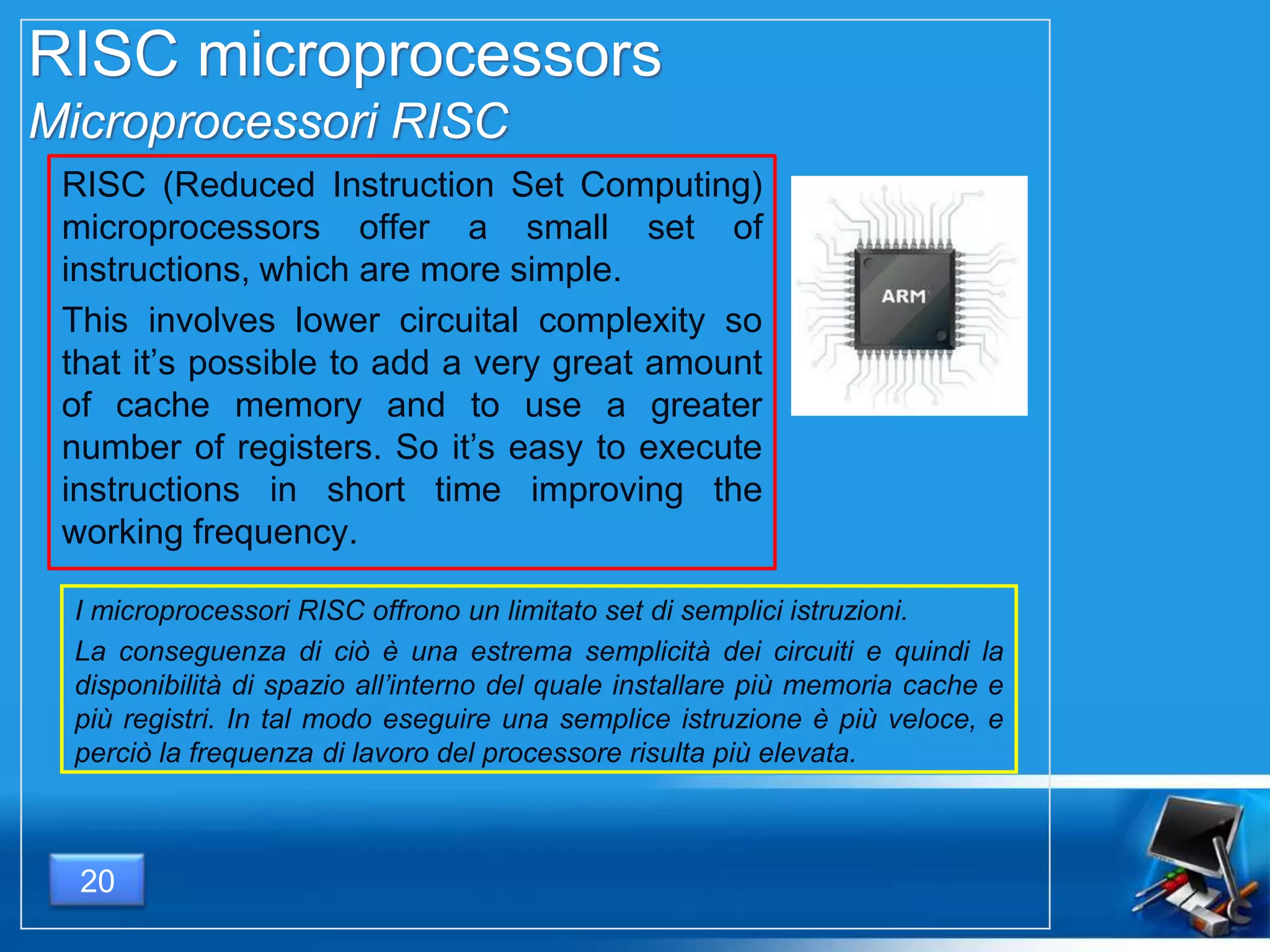
RISC microprocessors
Microprocessori RISC
RISC (Reduced Instruction Set Computing)
microprocessors offer a small set of
instructions, which are more simple.
This involves lower circuital complexity so
that it’s possible to add a very great amount
of cache memory and to use a greater
number of registers. So it’s easy to execute
instructions in short time improving the
working frequency.
I microprocessori RISC offrono un limitato set di semplici istruzioni.
La conseguenza di ciò è una estrema semplicità dei circuiti e quindi la
disponibilità di spazio all’interno del quale installare più memoria cache e
più registri. In tal modo eseguire una semplice istruzione è più veloce, e
perciò la frequenza di lavoro del processore risulta più elevata.
20
21
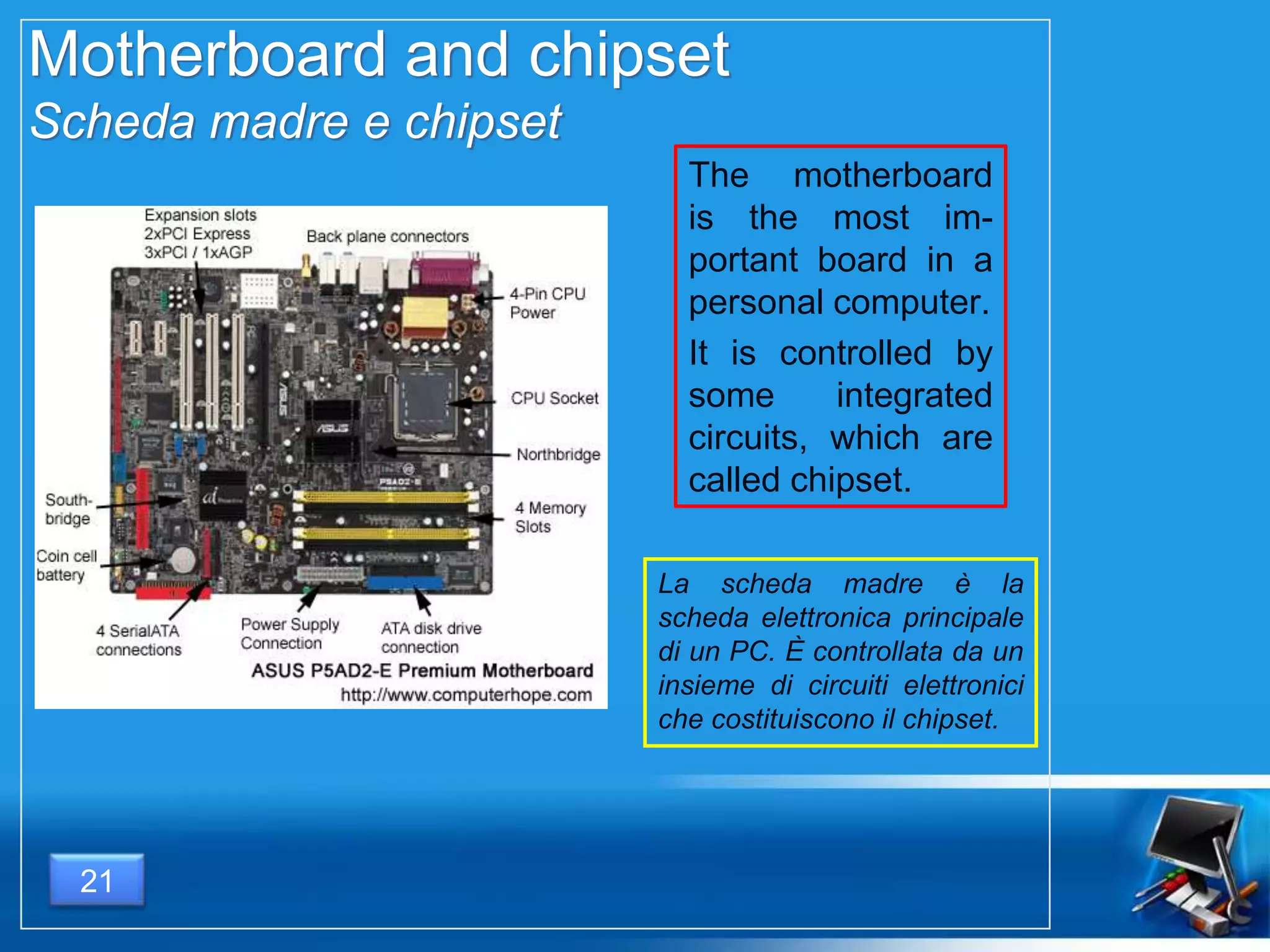
Motherboard and chipset
Scheda madre e chipset
The motherboard
is the most im-
portant board in a
personal computer.
It is controlled by
some integrated
circuits, which are
called chipset.
La scheda madre è la
scheda elettronica principale
di un PC. È controllata da un
insieme di circuiti elettronici
che costituiscono il chipset.
22
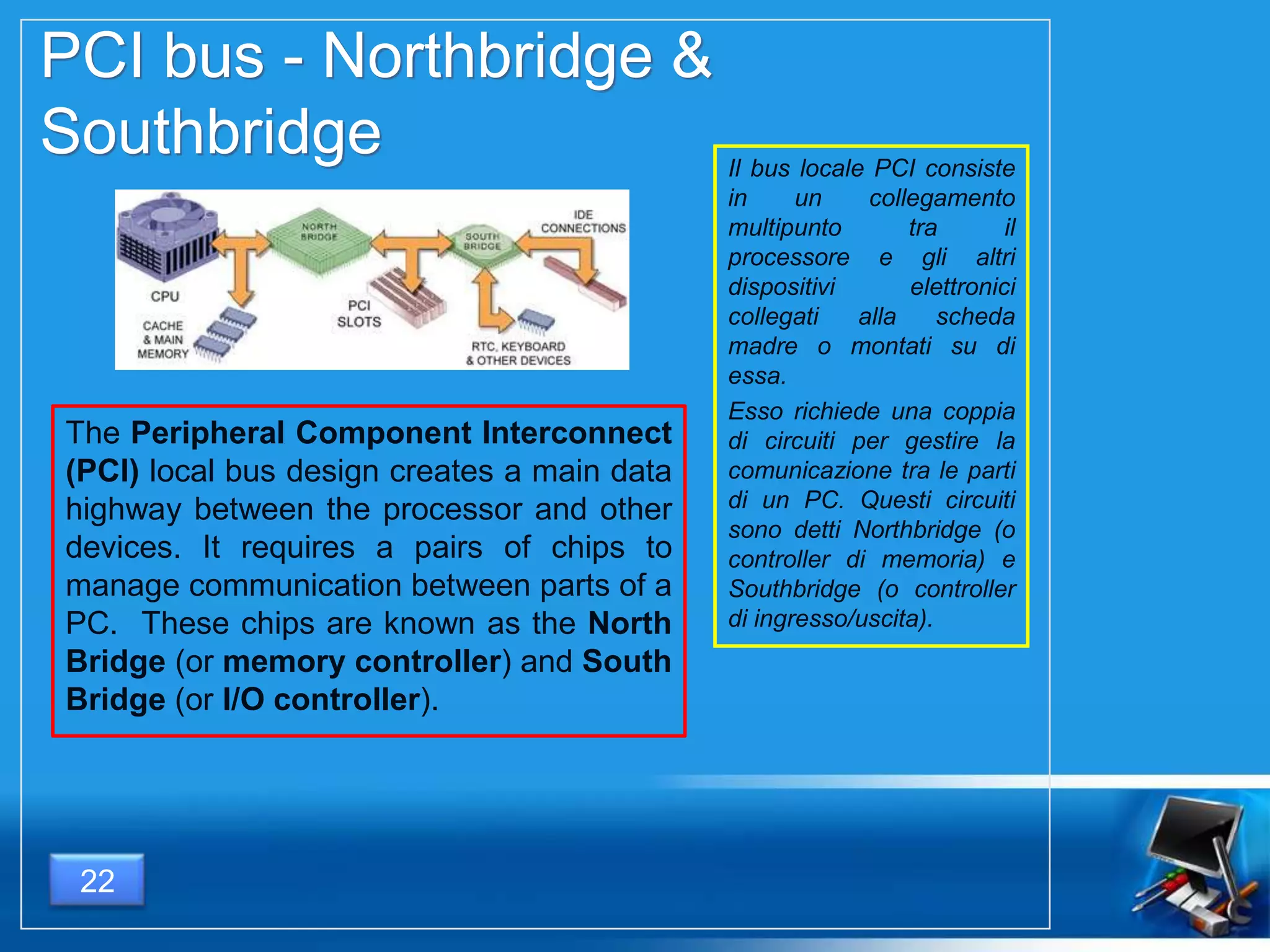
PCI bus - Northbridge &
Southbridge
The Peripheral Component Interconnect
(PCI) local bus design creates a main data
highway between the processor and other
devices. It requires a pairs of chips to
manage communication between parts of a
PC. These chips are known as the North
Bridge (or memory controller) and South
Bridge (or I/O controller).
Il bus locale PCI consiste
in un collegamento
multipunto tra il
processore e gli altri
dispositivi elettronici
collegati alla scheda
madre o montati su di
essa.
Esso richiede una coppia
di circuiti per gestire la
comunicazione tra le parti
di un PC. Questi circuiti
sono detti Northbridge (o
controller di memoria) e
Southbridge (o controller
di ingresso/uscita).
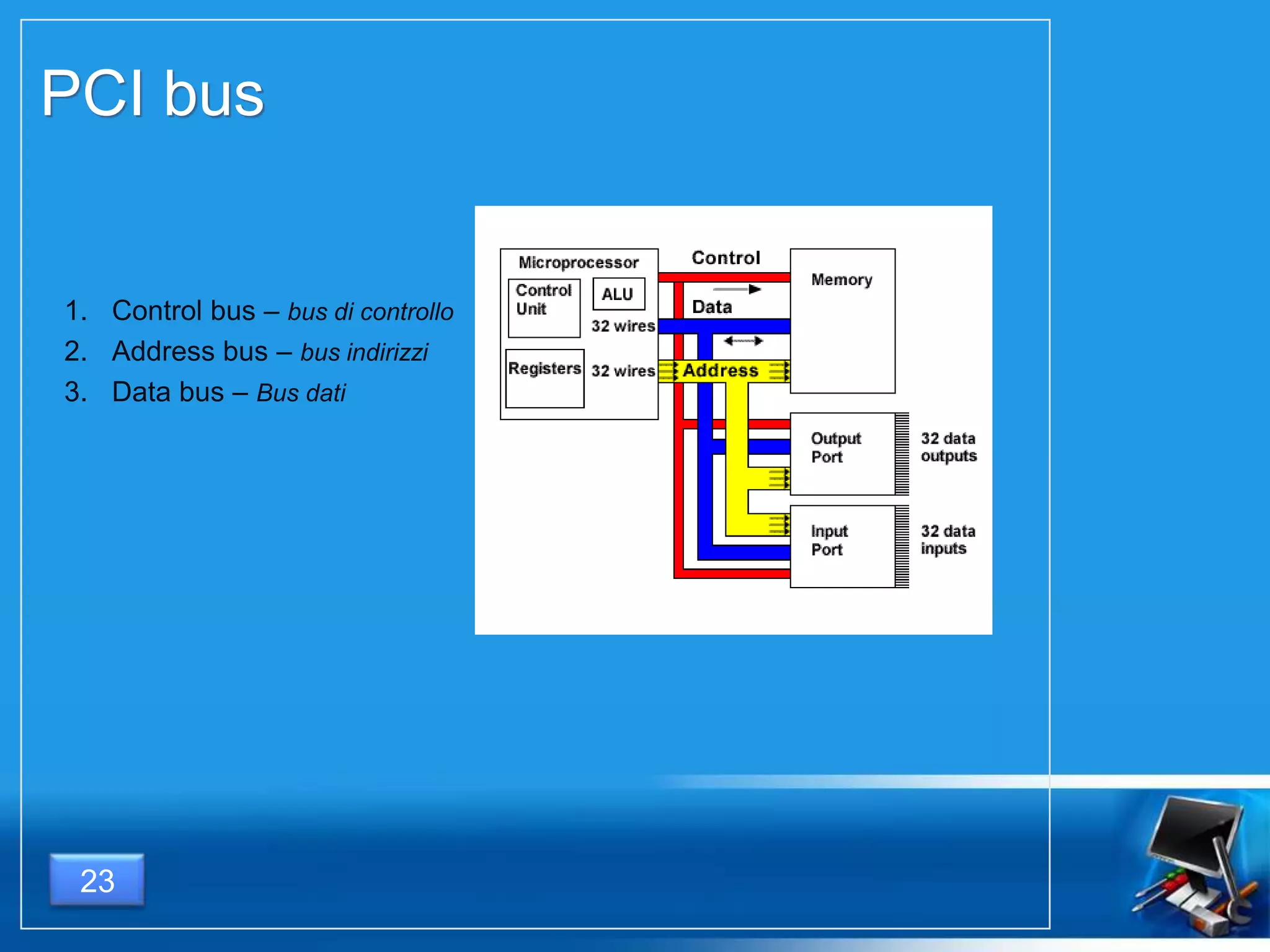
1. Control bus – bus di controllo
2. Address bus – bus indirizzi
3. Data bus – Bus dati
23
PCI bus
Universal Serial Bus
24
standard di comunicazione seriale
consente di collegare diverse periferiche ad un computer
consente a più periferiche di essere connesse usando una sola
interfaccia standardizzata ed un solo tipo di connettore
consente di collegare o scollegare i dispositivi senza dover riavviare il
computer (hot swap).
serial communication standard
allows to plug more than one
peripherals to PC using a unique
connector and only one interface.
allows hot swap.
STORAGE DEVICES
MEMORIE
25
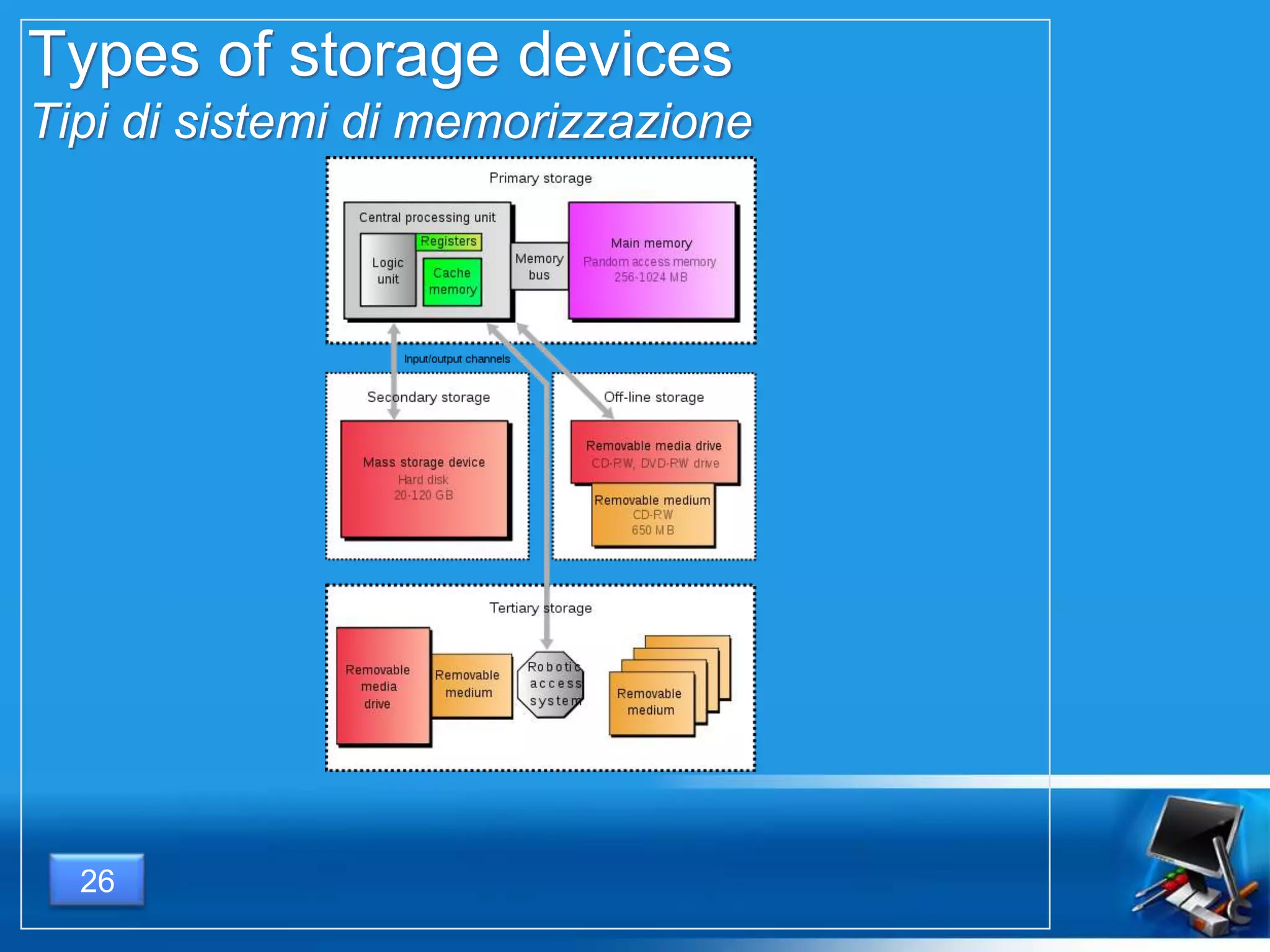
Types of storage devices
Tipi di sistemi di memorizzazione
26
Primary storage
Memoria primaria
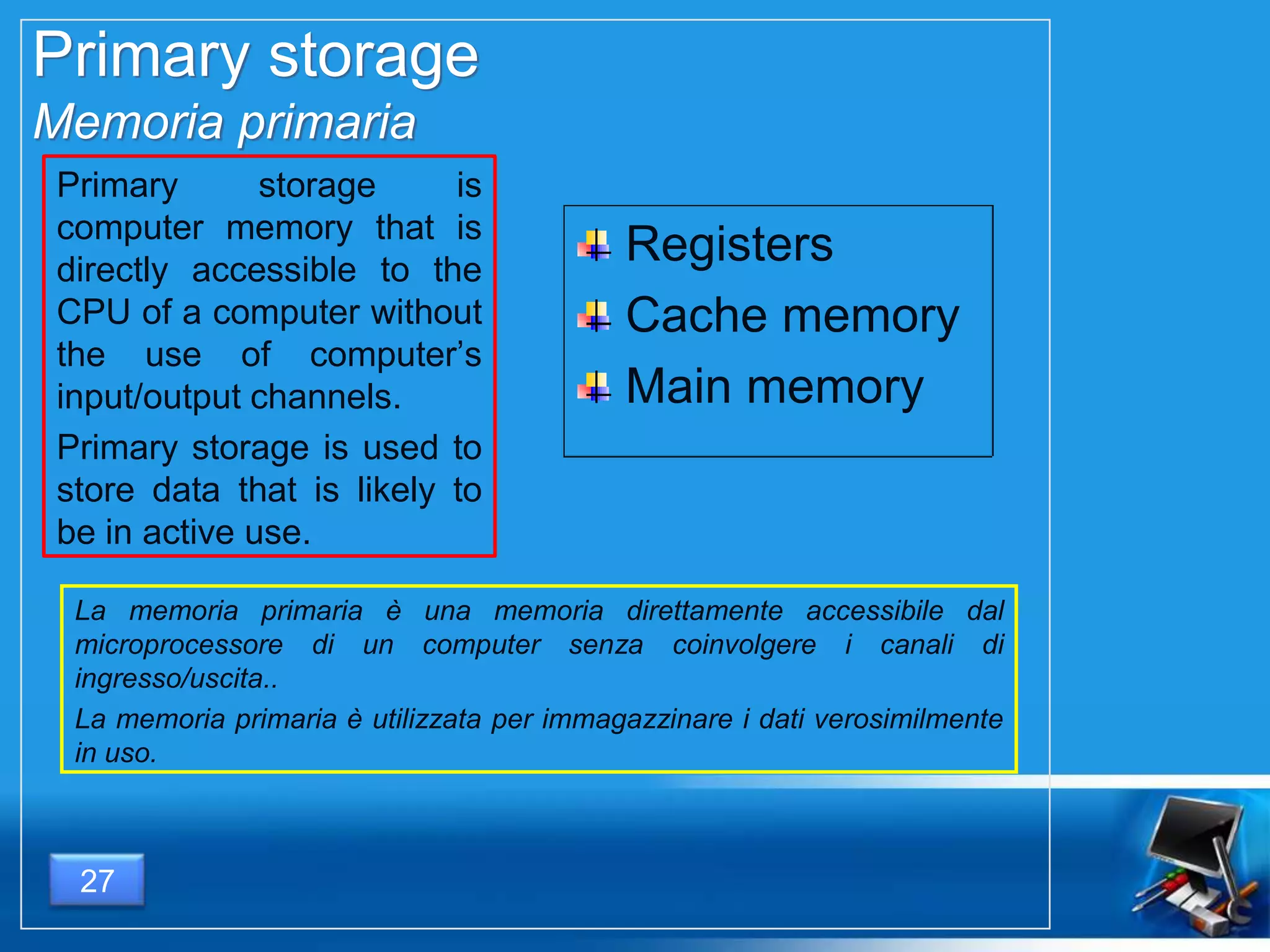
Primary storage is
computer memory that is
directly accessible to the
CPU of a computer without
the use of computer’s
input/output channels.
Primary storage is used to
store data that is likely to
be in active use.
La memoria primaria è una memoria direttamente accessibile dal
microprocessore di un computer senza coinvolgere i canali di
ingresso/uscita..
La memoria primaria è utilizzata per immagazzinare i dati verosimilmente
in uso.
Registers
Cache memory
Main memory
27
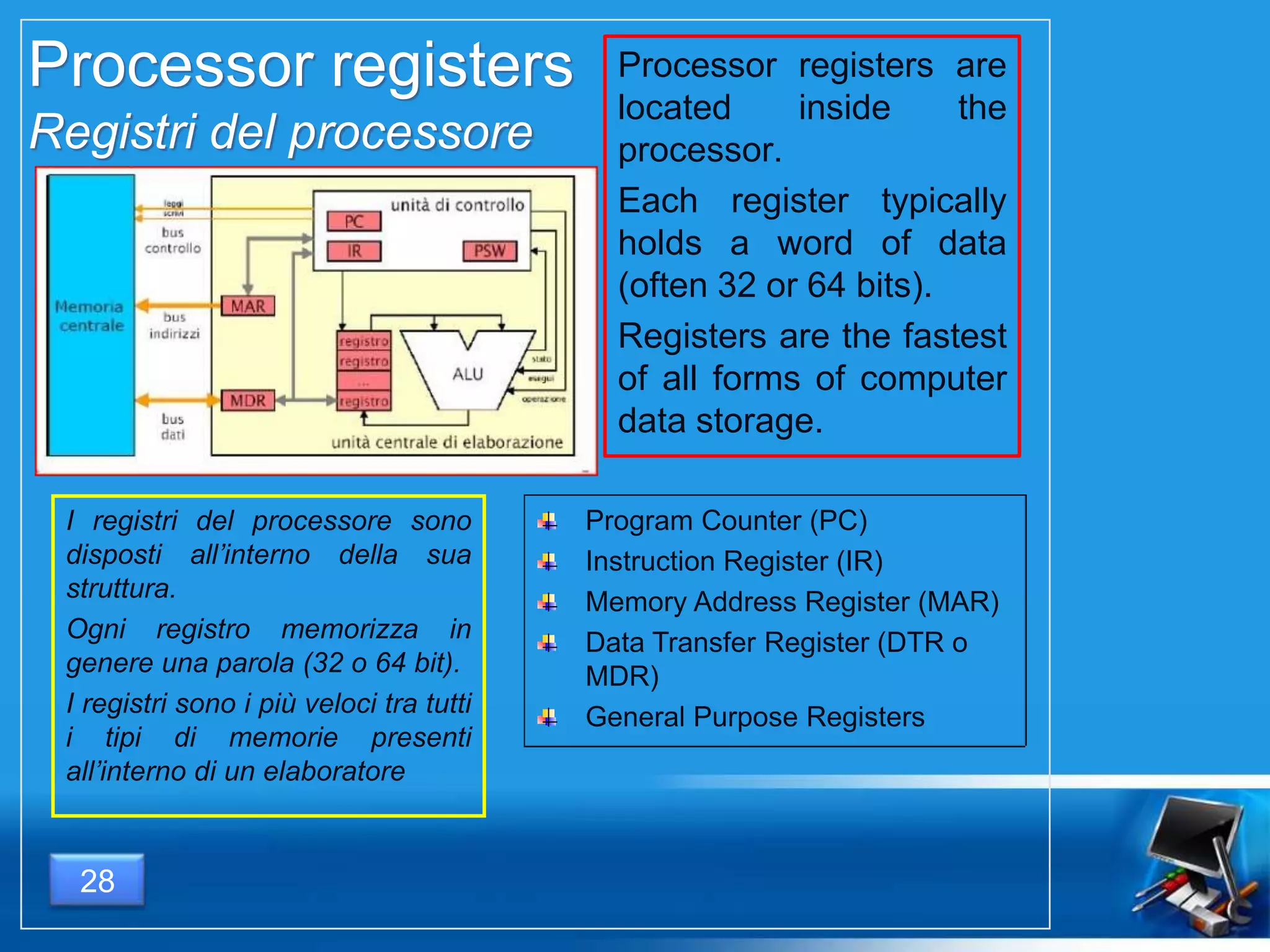
Processor registers
Registri del processore
Processor registers are
located inside the
processor.
Each register typically
holds a word of data
(often 32 or 64 bits).
Registers are the fastest
of all forms of computer
data storage.
I registri del processore sono
disposti all’interno della sua
struttura.
Ogni registro memorizza in
genere una parola (32 o 64 bit).
I registri sono i più veloci tra tutti
i tipi di memorie presenti
all’interno di un elaboratore
Program Counter (PC)
Instruction Register (IR)
Memory Address Register (MAR)
Data Transfer Register (DTR o
MDR)
General Purpose Registers
28
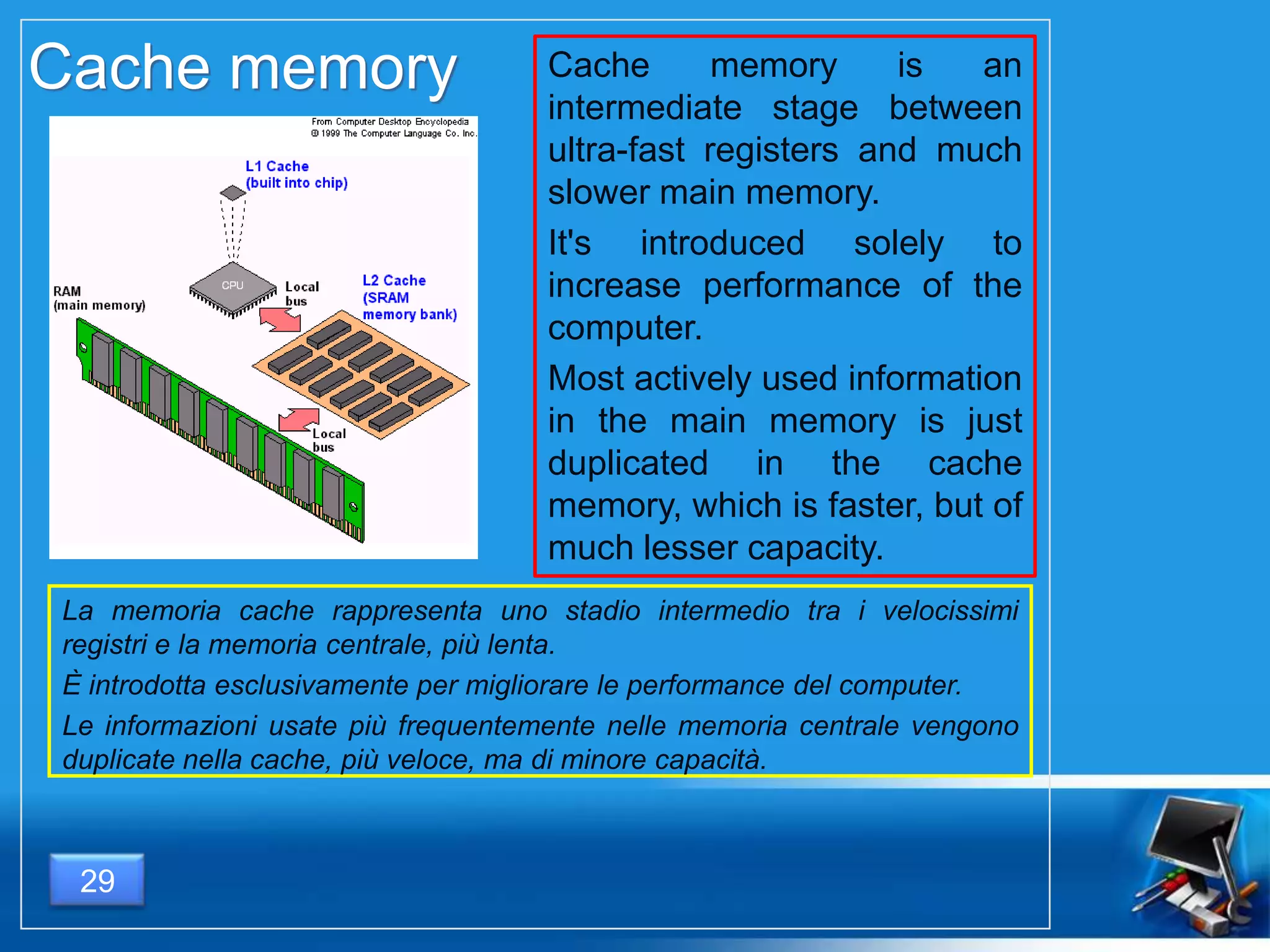
Cache memory is an
intermediate stage between
ultra-fast registers and much
slower main memory.
It's introduced solely to
increase performance of the
computer.
Most actively used information
in the main memory is just
duplicated in the cache
memory, which is faster, but of
much lesser capacity.
Cache memory
La memoria cache rappresenta uno stadio intermedio tra i velocissimi
registri e la memoria centrale, più lenta.
È introdotta esclusivamente per migliorare le performance del computer.
Le informazioni usate più frequentemente nelle memoria centrale vengono
duplicate nella cache, più veloce, ma di minore capacità.
29
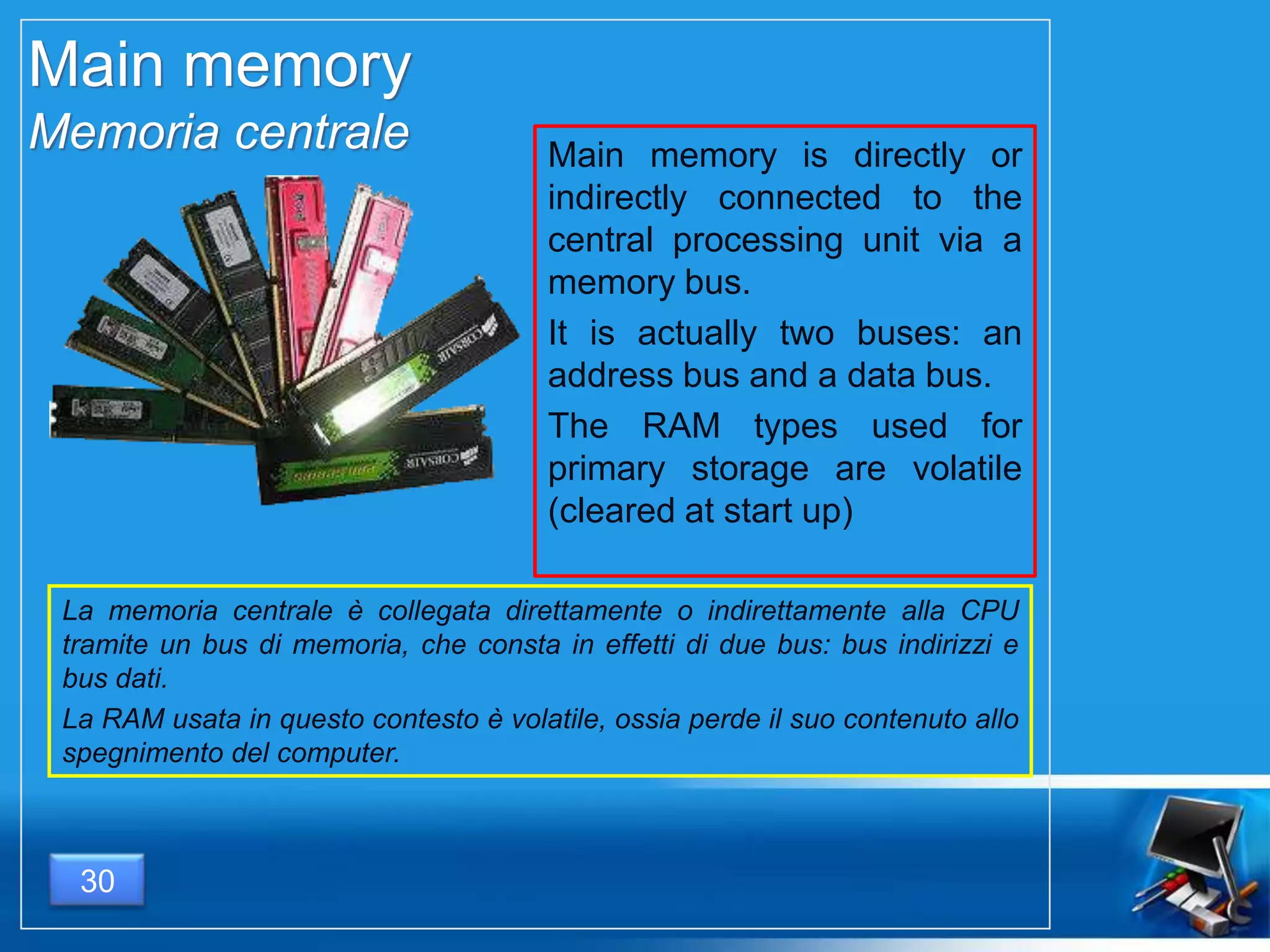
Main memory
Memoria centrale Main memory is directly or
indirectly connected to the
central processing unit via a
memory bus.
It is actually two buses: an
address bus and a data bus.
The RAM types used for
primary storage are volatile
(cleared at start up)
La memoria centrale è collegata direttamente o indirettamente alla CPU
tramite un bus di memoria, che consta in effetti di due bus: bus indirizzi e
bus dati.
La RAM usata in questo contesto è volatile, ossia perde il suo contenuto allo
spegnimento del computer.
30
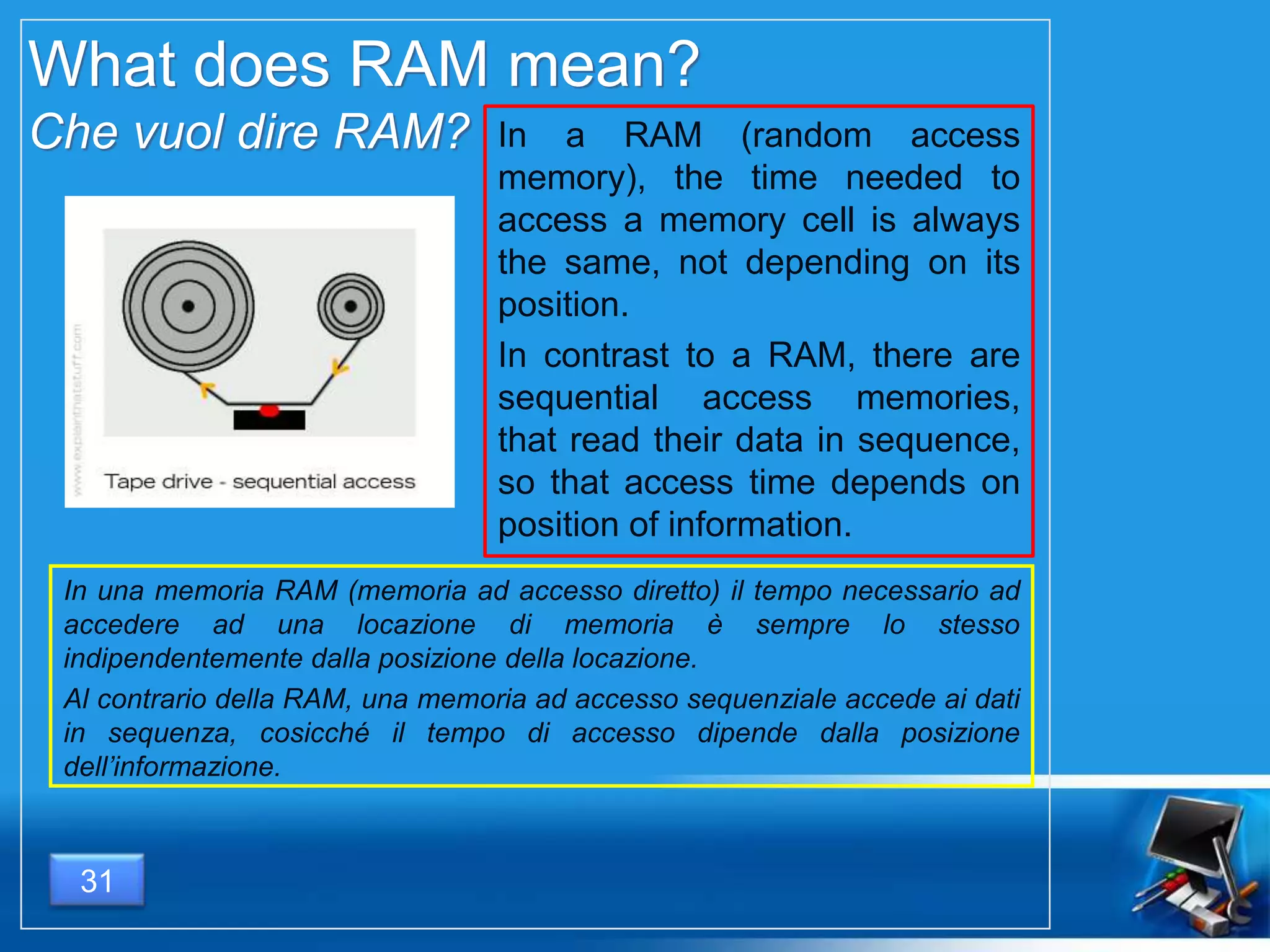
What does RAM mean?
Che vuol dire RAM? In a RAM (random access
memory), the time needed to
access a memory cell is always
the same, not depending on its
position.
In contrast to a RAM, there are
sequential access memories,
that read their data in sequence,
so that access time depends on
position of information.
In una memoria RAM (memoria ad accesso diretto) il tempo necessario ad
accedere ad una locazione di memoria è sempre lo stesso
indipendentemente dalla posizione della locazione.
Al contrario della RAM, una memoria ad accesso sequenziale accede ai dati
in sequenza, cosicché il tempo di accesso dipende dalla posizione
dell’informazione.
31
Read Only Memory - ROM
Memoria a sola lettura - ROM
As the RAM types used for primary
storage are volatile it’s necessary to
have a non-volatile memory containing
a small startup program (BIOS) and
used to bootstrap the computer.
This is called Read Only Memory
(ROM).
Large part of ROM are capable of
RAM access.
Poiché la RAM è
volatile, è necessario
avere una memoria non
volatile che contenga
un piccolo programma
di avvio del
computer, utilizzato per
farlo partire
all’accensione (BIOS –
Basic Input Output
Service).
Una memoria di questo
tipo è detta ROM.
Gran parte delle ROM
hanno un accesso di
tipo diretto e quindi
sono anche RAM.
32
Secondary storage
Memoria ausiliaria
not directly accessible by the CPU.
does not lose the data when the
device is powered down (it is non-
volatile).
two orders of magnitude less
expensive than primary storage.
consequently, modern computer
systems typically have two orders of
magnitude more secondary storage
than primary storage and data are
kept for a longer time there.
non direttamente acces-
sibile dalla CPU.
non perde i dati quando
il computer viene spento
(non volatile).
due ordini di grandezza
meno costosa delle
memoria centrale.
di conseguenza, la
quantità di memoria
ausiliaria è due ordini di
grandezza maggiore
rispetto alla primaria e
mantiene i dati per molto
maggior tempo.
33
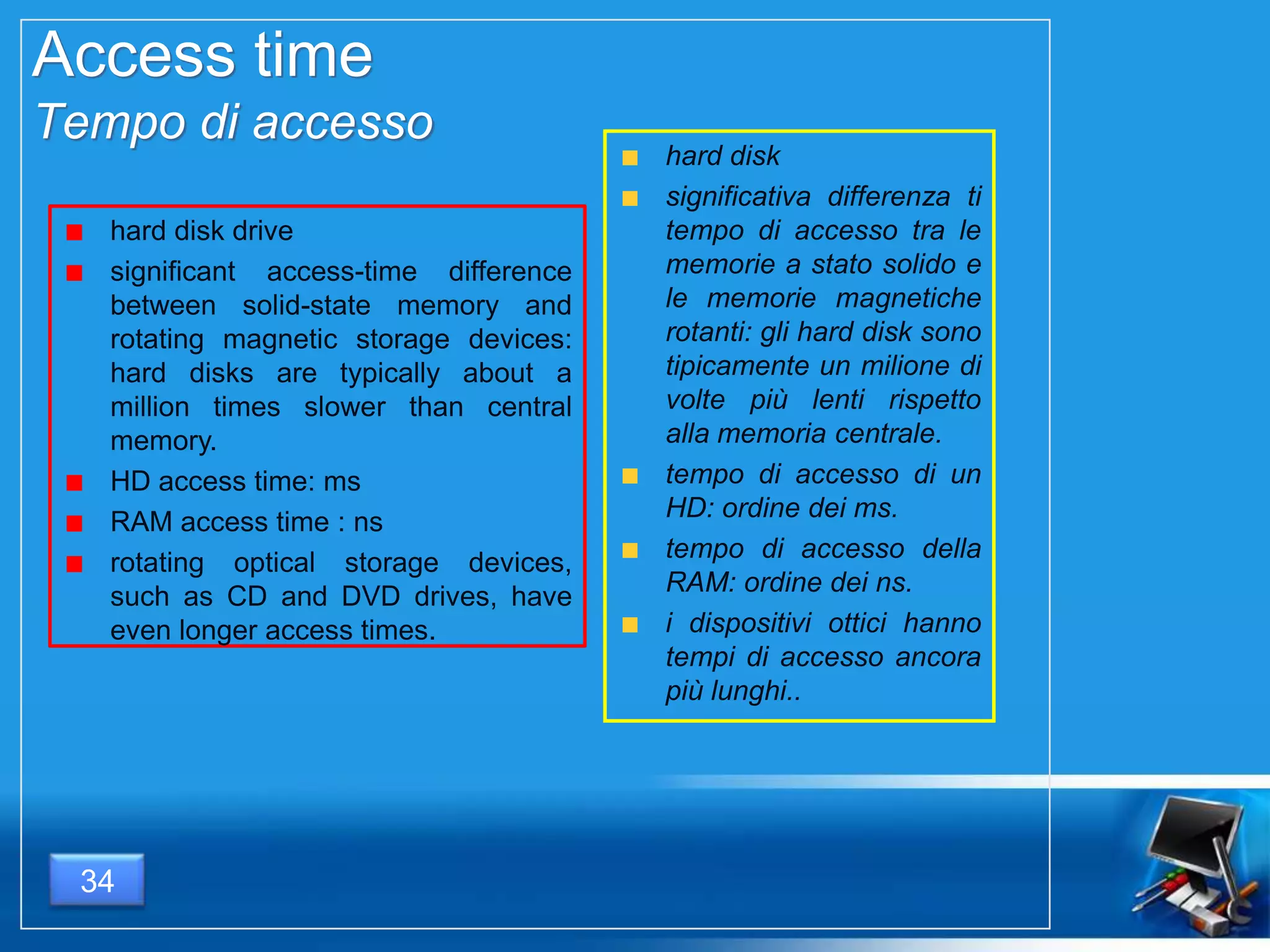
Access time
Tempo di accesso
hard disk drive
significant access-time difference
between solid-state memory and
rotating magnetic storage devices:
hard disks are typically about a
million times slower than central
memory.
HD access time: ms
RAM access time : ns
rotating optical storage devices,
such as CD and DVD drives, have
even longer access times.
hard disk
significativa differenza ti
tempo di accesso tra le
memorie a stato solido e
le memorie magnetiche
rotanti: gli hard disk sono
tipicamente un milione di
volte più lenti rispetto
alla memoria centrale.
tempo di accesso di un
HD: ordine dei ms.
tempo di accesso della
RAM: ordine dei ns.
i dispositivi ottici hanno
tempi di accesso ancora
più lunghi..
34
35
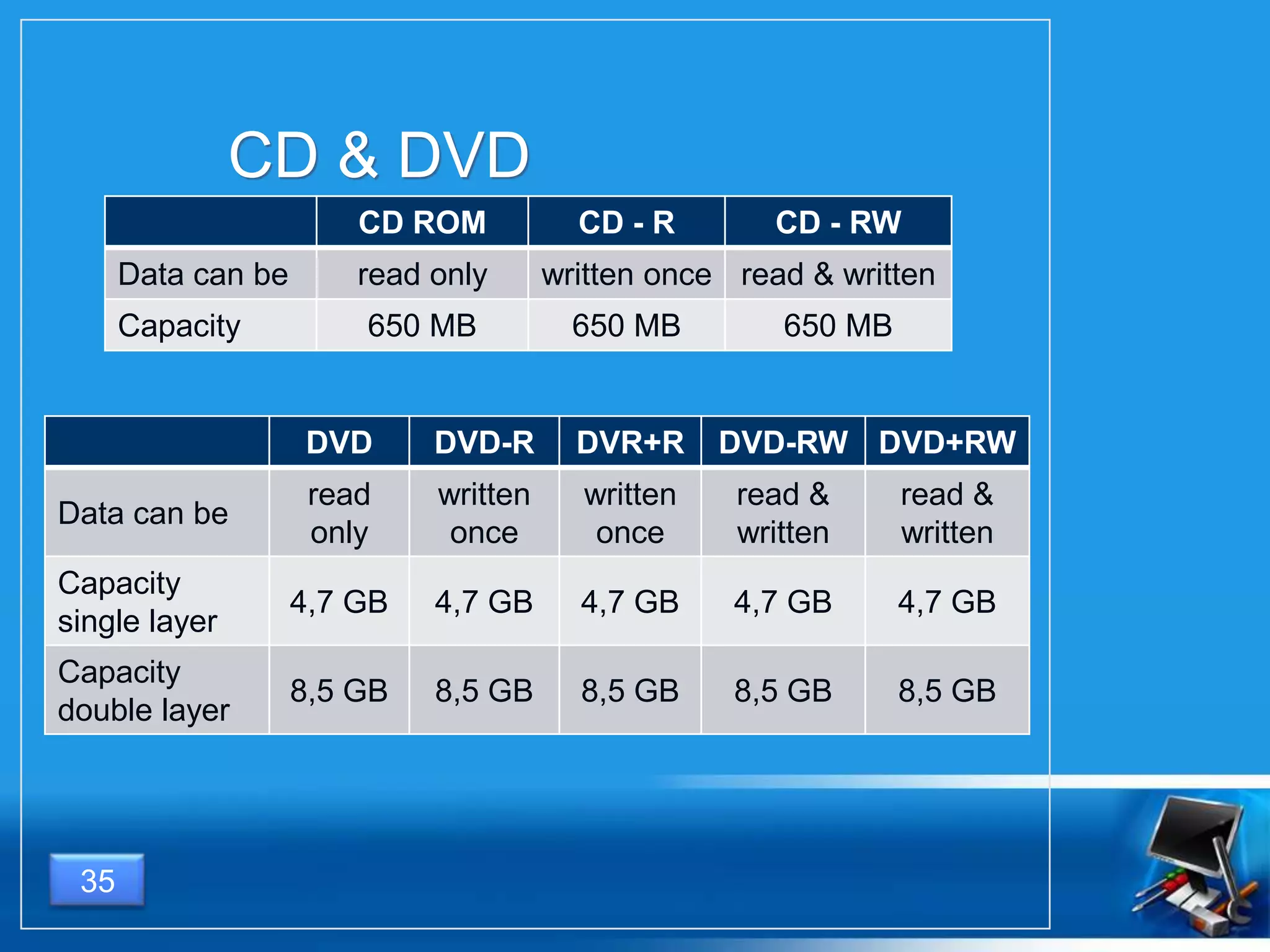
CD & DVD
CD ROM CD - R CD - RW
Data can be read only written once read & written
Capacity 650 MB 650 MB 650 MB
DVD DVD-R DVR+R DVD-RW DVD+RW
Data can be
read
only
written
once
written
once
read &
written
read &
written
Capacity
single layer
4,7 GB 4,7 GB 4,7 GB 4,7 GB 4,7 GB
Capacity
double layer
8,5 GB 8,5 GB 8,5 GB 8,5 GB 8,5 GB
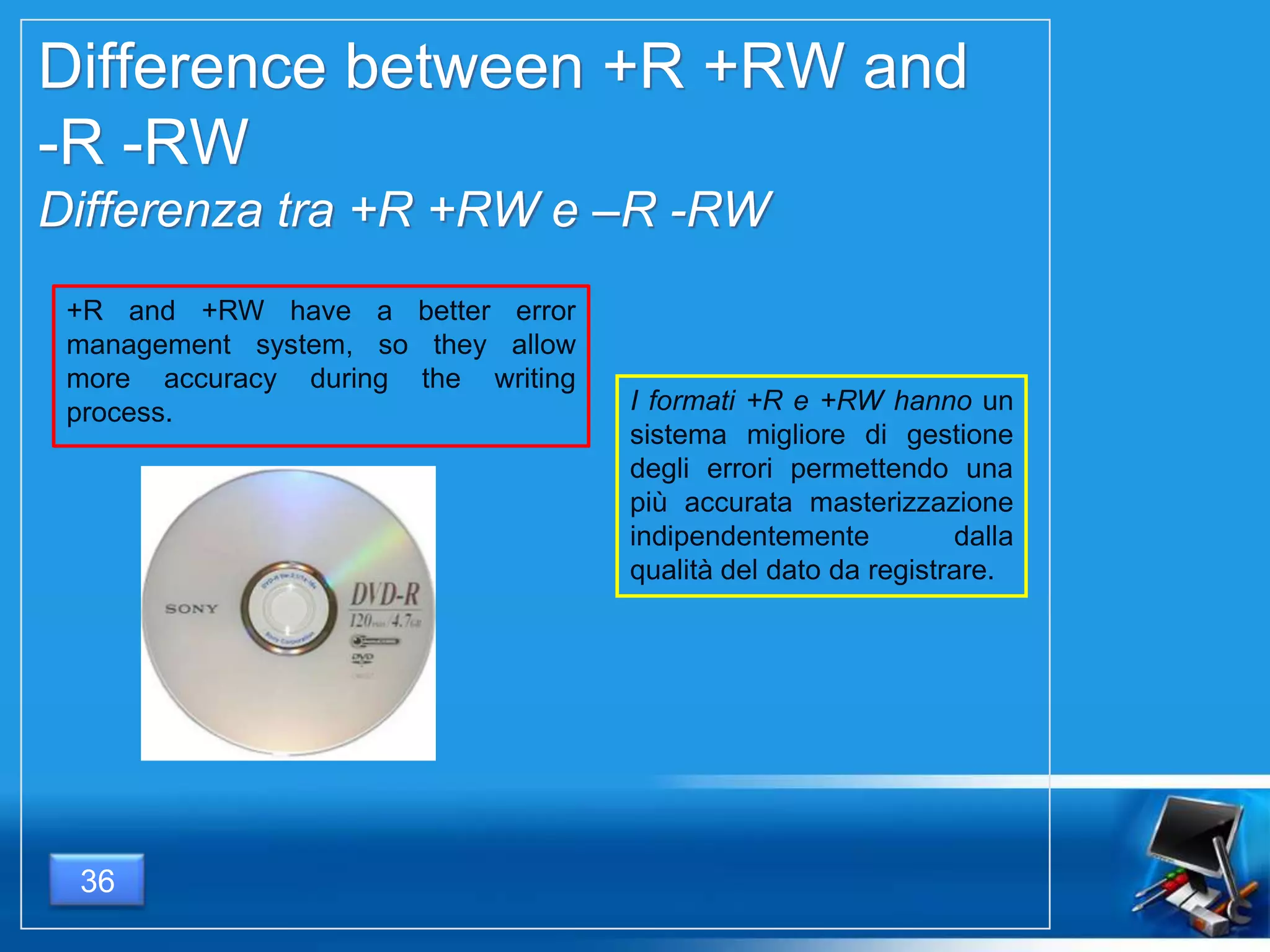
Difference between +R +RW and
-R -RW
Differenza tra +R +RW e –R -RW
I formati +R e +RW hanno un
sistema migliore di gestione
degli errori permettendo una
più accurata masterizzazione
indipendentemente dalla
qualità del dato da registrare.
+R and +RW have a better error
management system, so they allow
more accuracy during the writing
process.
36
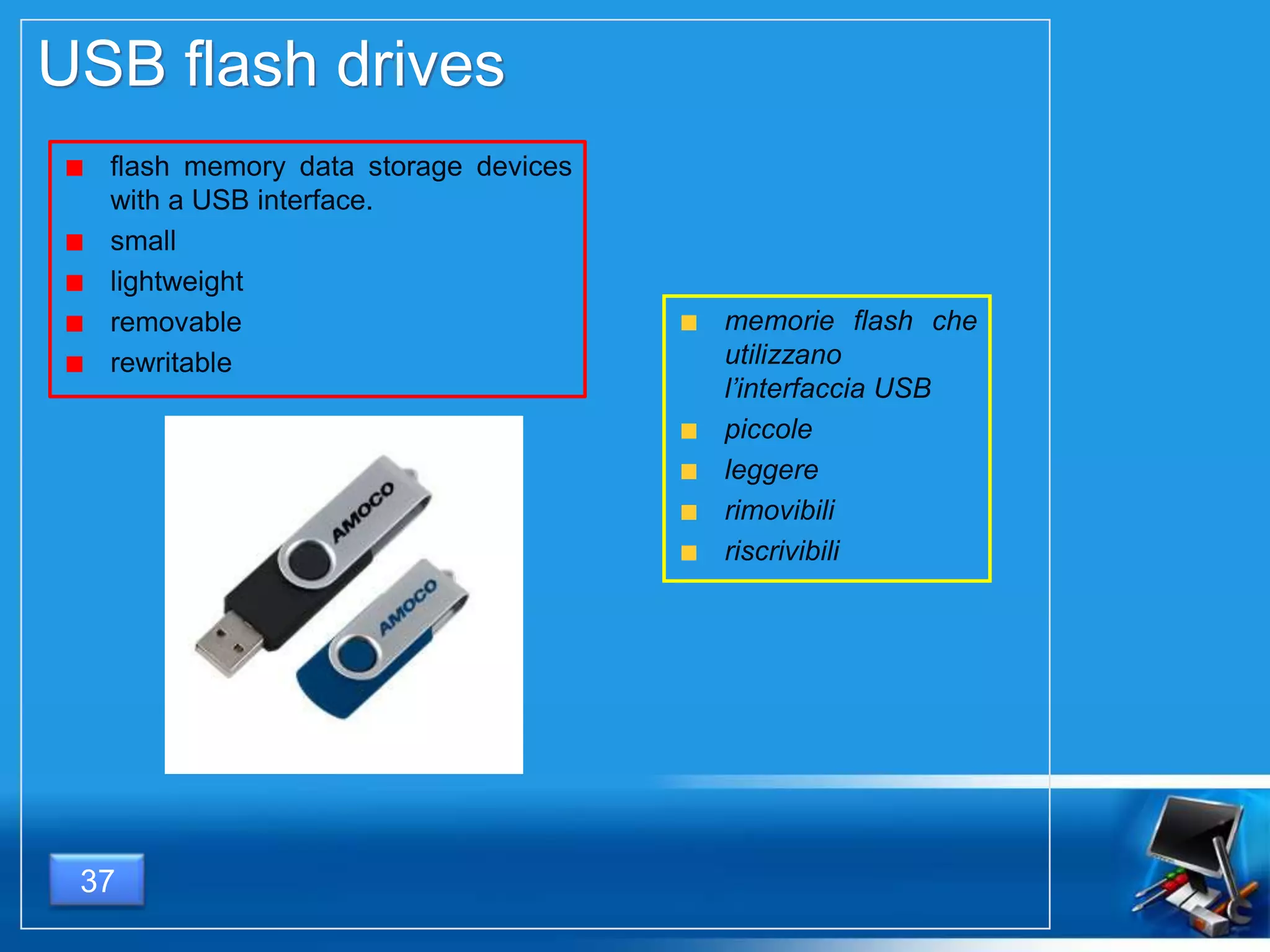
USB flash drives
flash memory data storage devices
with a USB interface.
small
lightweight
removable
rewritable
memorie flash che
utilizzano
l’interfaccia USB
piccole
leggere
rimovibili
riscrivibili
37
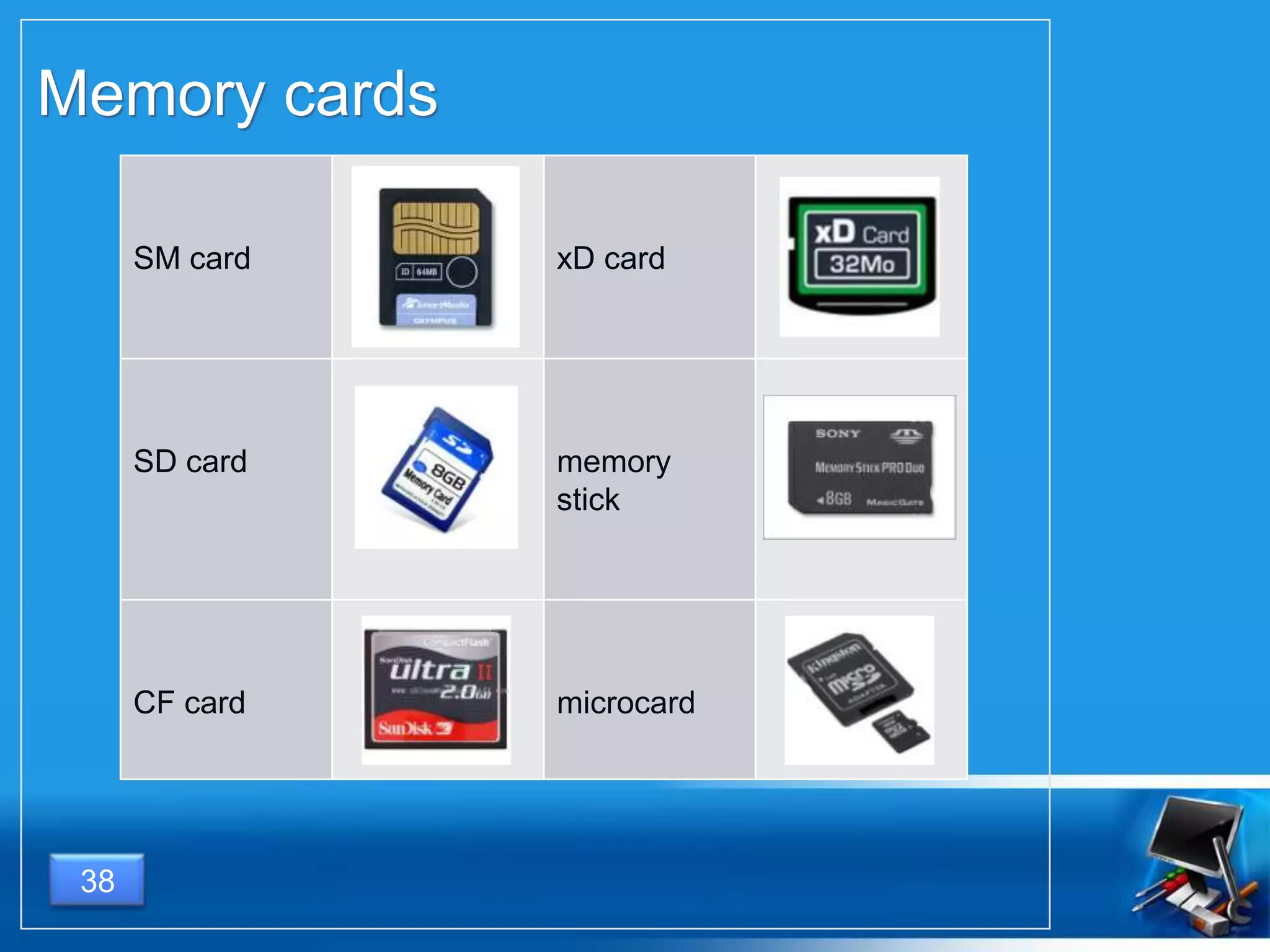
Memory cards
38
SM card xD card
SD card memory
stick
CF card microcard
OUTPUT DEVICES
DISPOSITIVI DI OUTPUT
39
What is
Cos’è
40
A output device is a hardware
component that translate the information
processed by the computer into a form
that humans can understand.
Un dispositivo di input è un componente
hardware che converte le informazioni
elaborate dal computer in una forma
comprensibile per gli esseri umani.
Examples
Esempi
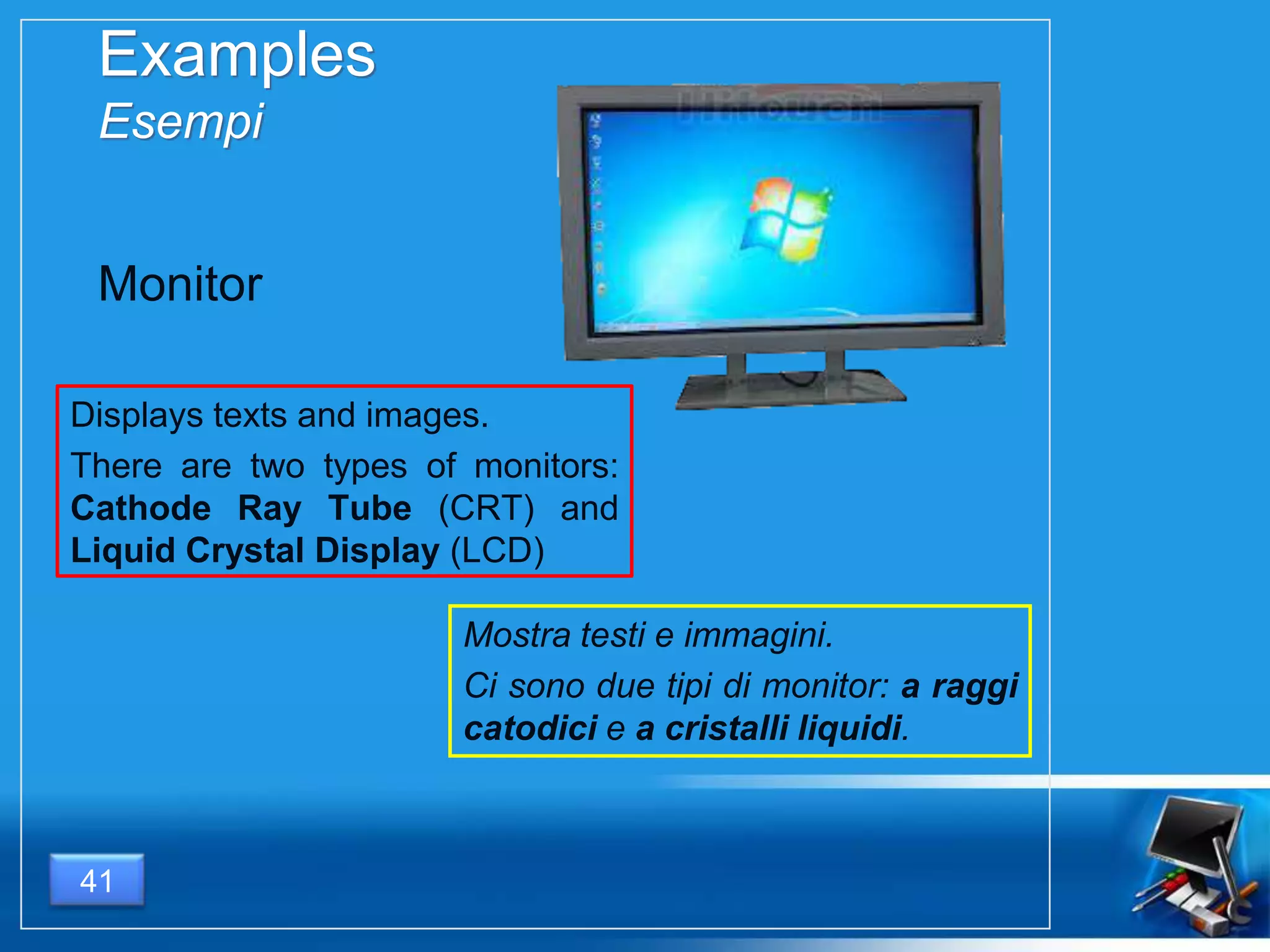
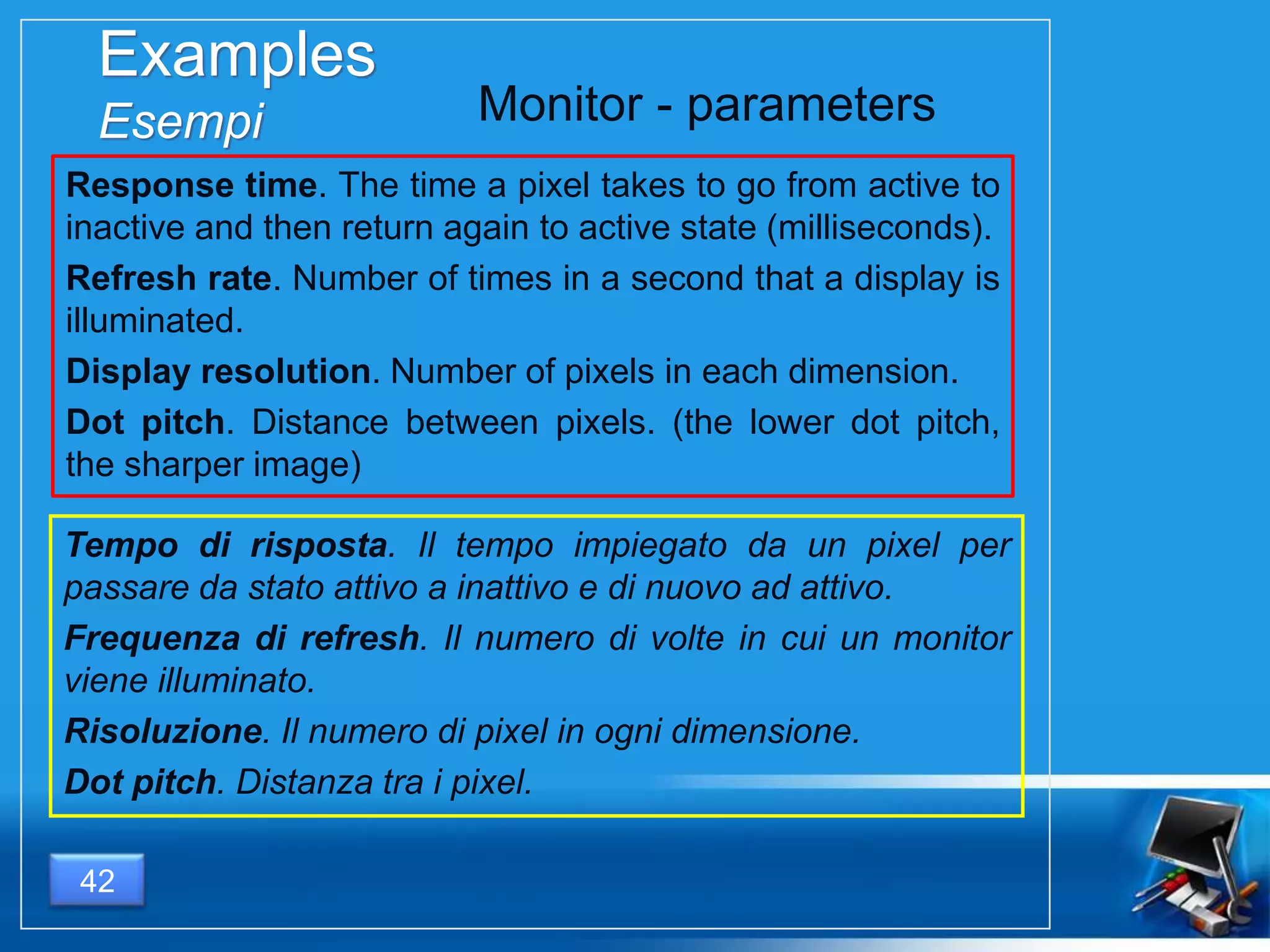
Displays texts and images.
There are two types of monitors:
Cathode Ray Tube (CRT) and
Liquid Crystal Display (LCD)
41
Monitor
Mostra testi e immagini.
Ci sono due tipi di monitor: a raggi
catodici e a cristalli liquidi.
Examples
Esempi
Response time. The time a pixel takes to go from active to
inactive and then return again to active state (milliseconds).
Refresh rate. Number of times in a second that a display is
illuminated.
Display resolution. Number of pixels in each dimension.
Dot pitch. Distance between pixels. (the lower dot pitch,
the sharper image)
42
Monitor - parameters
Tempo di risposta. Il tempo impiegato da un pixel per
passare da stato attivo a inattivo e di nuovo ad attivo.
Frequenza di refresh. Il numero di volte in cui un monitor
viene illuminato.
Risoluzione. Il numero di pixel in ogni dimensione.
Dot pitch. Distanza tra i pixel.
Examples
Esempi
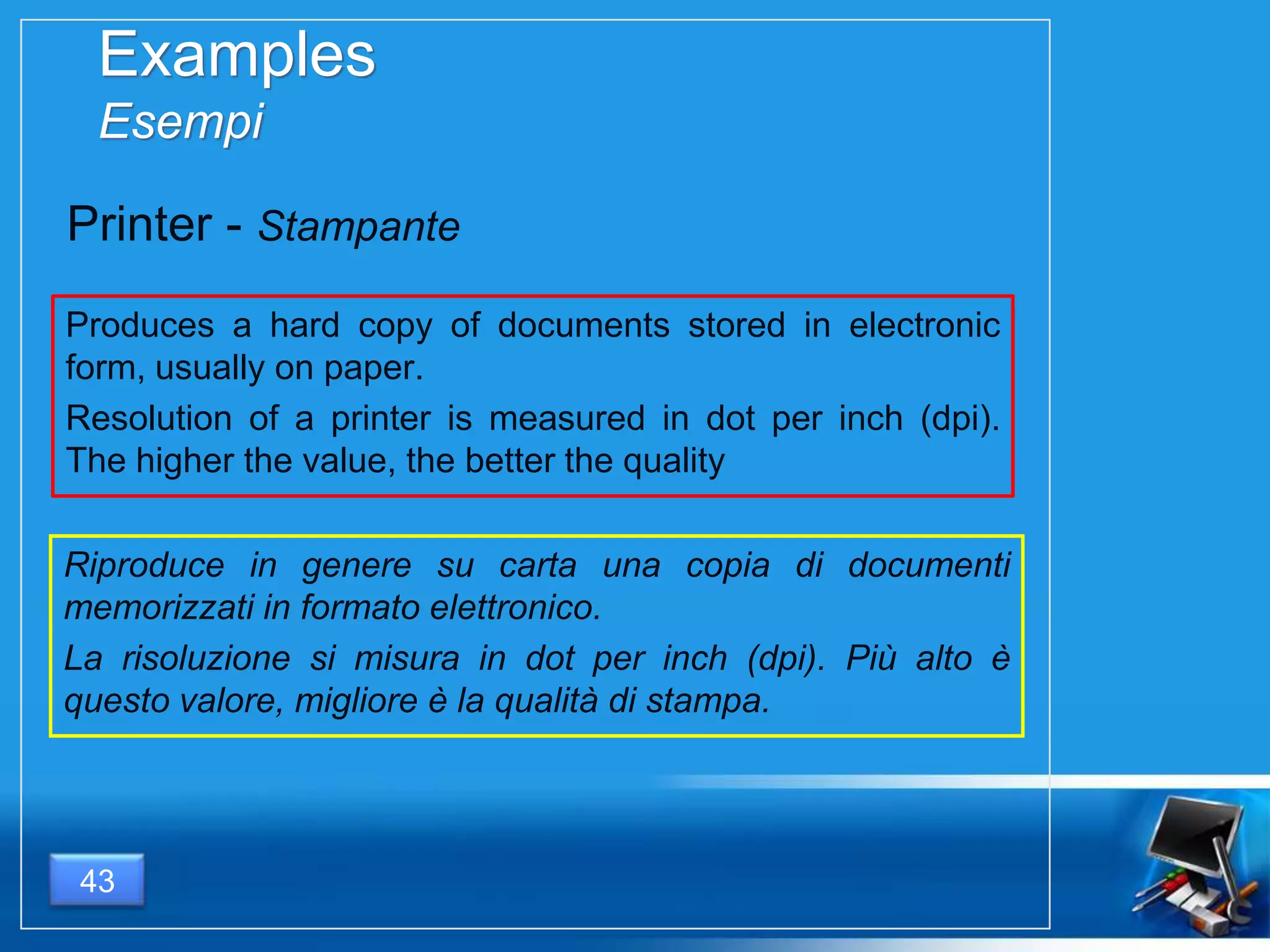
Produces a hard copy of documents stored in electronic
form, usually on paper.
Resolution of a printer is measured in dot per inch (dpi).
The higher the value, the better the quality
43
Printer - Stampante
Riproduce in genere su carta una copia di documenti
memorizzati in formato elettronico.
La risoluzione si misura in dot per inch (dpi). Più alto è
questo valore, migliore è la qualità di stampa.
Examples
Esempi
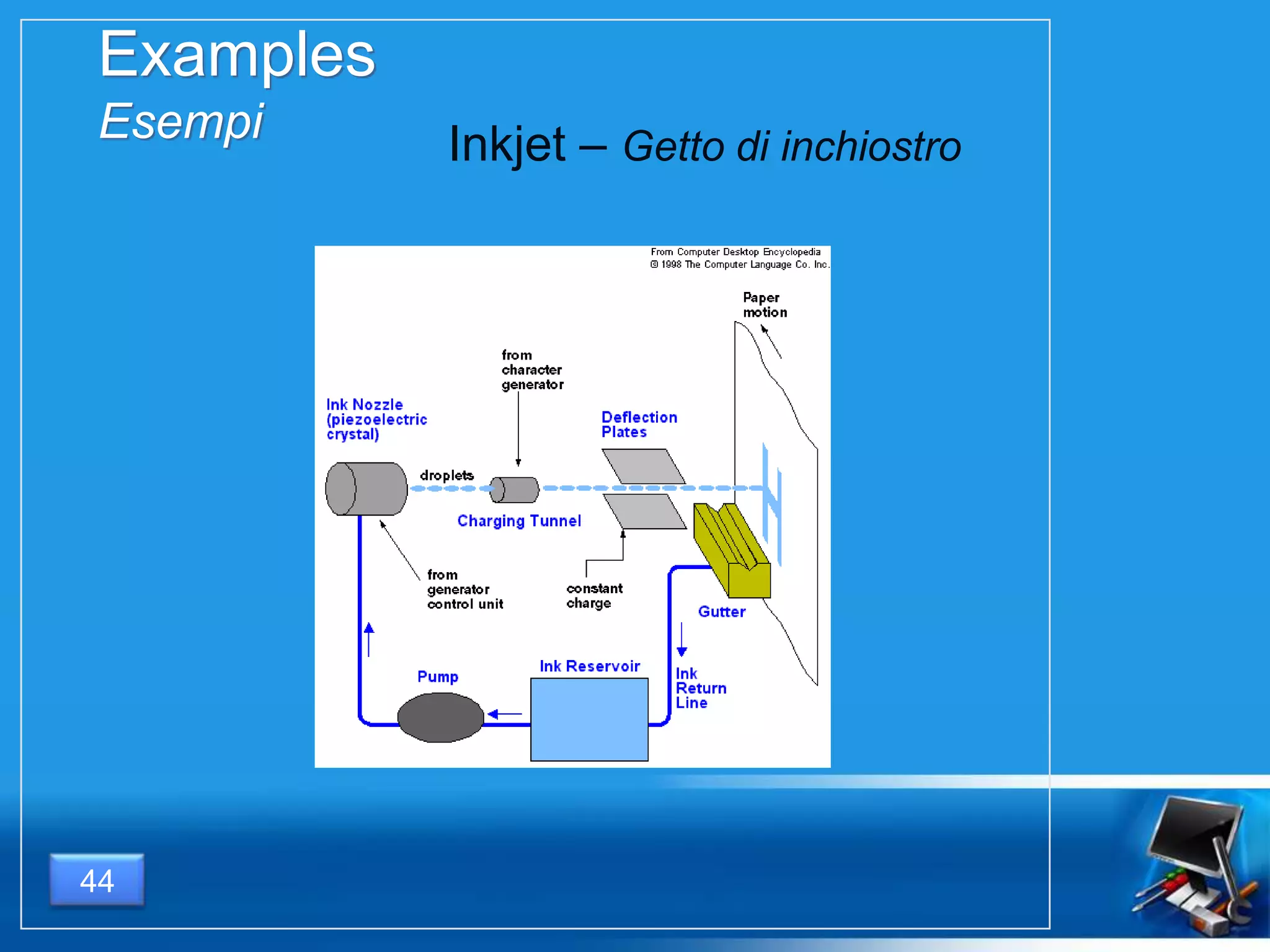
44
Inkjet – Getto di inchiostro
Examples
Esempi
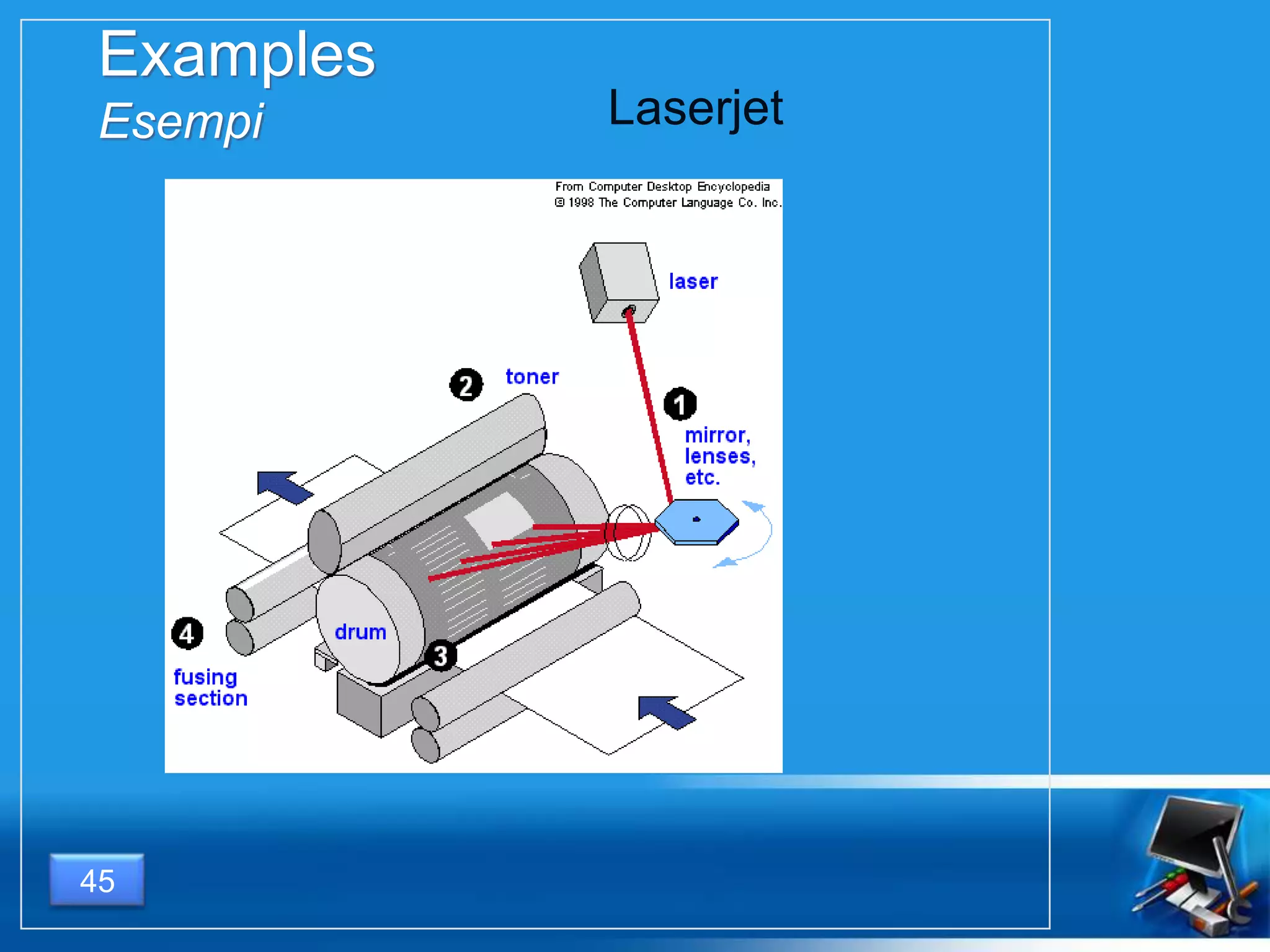
45
Laserjet
Examples
Esempi
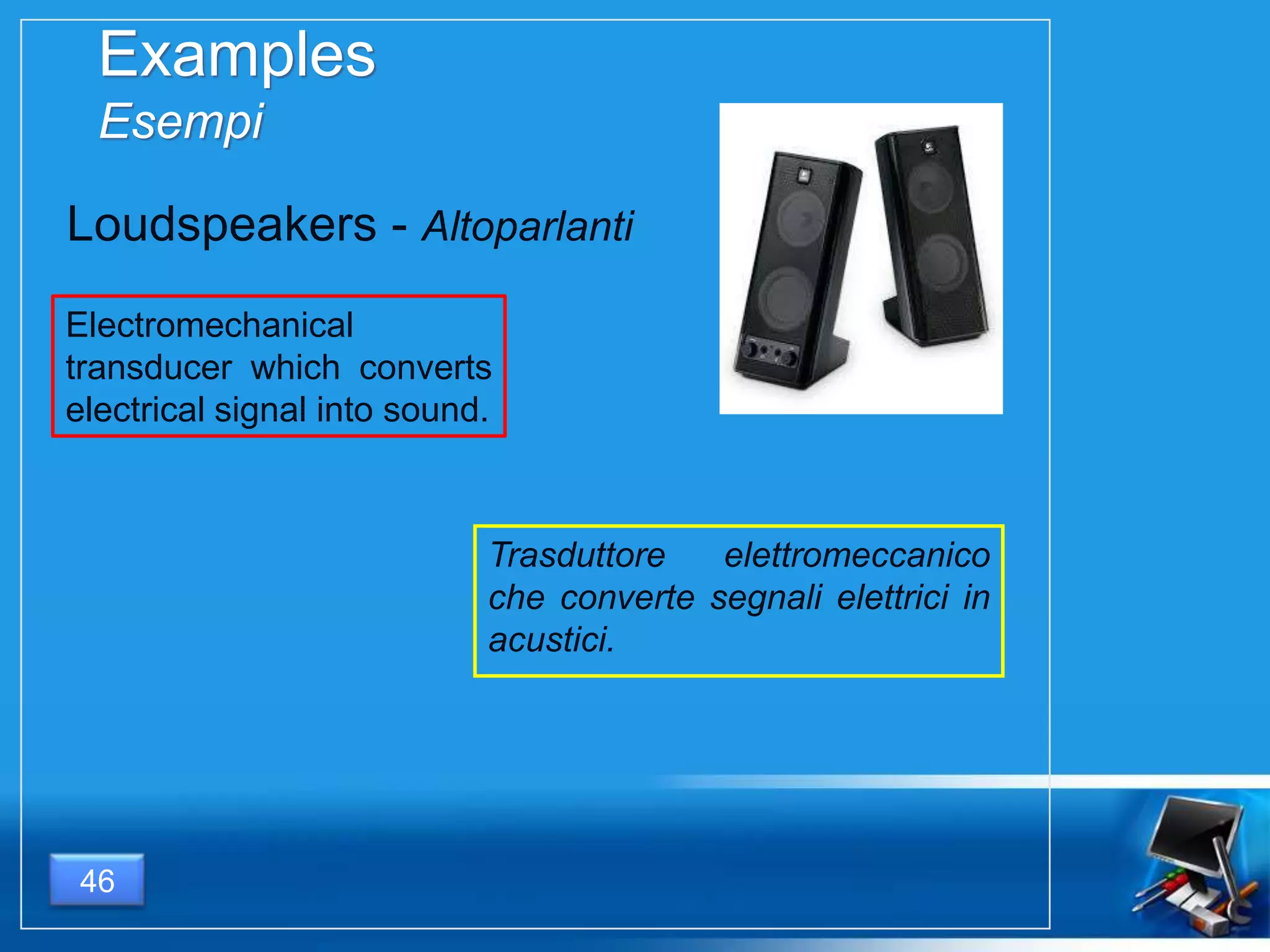
Electromechanical
transducer which converts
electrical signal into sound.
46
Loudspeakers - Altoparlanti
Trasduttore elettromeccanico
che converte segnali elettrici in
acustici.

Personal computer

  • 1.
  • 2.
  • 3.
    Basic Hardware Componenti fondamentali 1.Monitor 2. Motherboard - Scheda madre 3. CPU - Microprocessore 4. RAM memory - Memoria RAM 5. Expansion cards - Schede di espansione 6. Power supply - Alimentatore 7. Optical disc drive - Lettore ottico 8. Hard disk 9. Keyboard - Tastiera 10. Mouse 3
  • 4.
  • 5.
  • 6.
    What is Cos’è 6 A inputdevice is a hardware component that allows the introduction of information from the external world inside the computer. Un dispositivo di input è un componente hardware che consente l’immissione di informazioni provenienti dal mondo esterno all’interno di un computer.
  • 7.
    Examples Esempi Used for theinput of characters and to control some operations of the computer 7 Keyboard – Tastiera Utilizzata per introdurre caratteri di testo e anche per effettuare il controllo su alcune operazioni del computer Connectors - connettori
  • 8.
    Examples Esempi Pointing device whichdetects two-dimensional position relative to its supporting surface 8 Mouse Dispositivo di puntamento che rileva la posizione bidimensio- nale relativa alla superficie su cui è appoggiato
  • 9.
    Examples Esempi Used to convertphotos, printed text, handwriting and every other bidimensional analog information into digital images 9 Dispositivo che converte foto, testi stampati, scritti a mano e qualunque altra informazione bidimensionale in immagine digitale. Scanner Connectors - connettori
  • 10.
    Examples Esempi Used to convertsound into electrical signal and then into digital signal. 10 Microphone - Microfono Converte i suoni in segnali elettrici, che vengono successivamente digitalizzati.
  • 11.
    Consente la trasmissionedi immagini e video attraverso il web. 11 Examples Esempi Allows the transmission of images and videos using the web. Webcam
  • 12.
  • 13.
    Microprocessor ( P) Controlunit – Unità di controllo Immediate access store – Memoria ad accesso veloce Arithmetic & logic unit – Unità aritmetico-logica 13
  • 14.
    Control unit Unità dicontrollo Controls and monitors the hardware attached to the system. Controls the input and output of data so that the signals go to the right place at the right time. Controls the flow of data within the CPU Controlla e monitorizza l’hardware collegato al sistema. Controlla l’ingresso e l’uscita dei dati in modo che i segnali vadano nel posto giusto al momento giusto Controlla il flusso dei dati all’interno della CPU 14
  • 15.
    Immediate access store Memoriaad accesso veloce Holds programs and data needed at that instant by the Control Unit and the Arithmetic Logic Unit. It’s a temporary memory. It’s very faster than Backing Storage Contiene dati e programmi necessari al funzionamento in tempo reale dell’unità di controllo e dell’unità aritmetico-logica. È una memoria temporanea È molto più veloce delle memorie di massa. 15
  • 16.
    Arithmetic & logicunit Unità aritmetico-logica Where the computer processes data either by manipulating it or acting upon it. Arithmetic part - it performs the calcu- lations on the data Logic part - this deals with logic and comparisons. È dove il computer processa i dati, manipolandoli o agendo su di essi. Unità aritmetica – effettua i calcoli sui dati. Unità logica – effettua operazioni logiche e comparazioni tra i dati. 16
  • 17.
    How fast isa CPU? Quanto è veloce un P ? It depends on 3 main factors: Clock frequency – the number of operations made in 1 second (measured in Hz = s-1) Cache memory – the very fast memory which is inside the CPU MIPS – Million of Instruction per Second The higher these values, the faster the CPU will be. 17 Dipende da 3 fattori fondamentali: Frequenza di clock – il numero di operazioni effettuate in 1 secondo (si misura in Hz = s-1 ) Memoria cache – la velocissima memoria situata all’interno della CPU. MIPS – Milioni di Istruzioni per Secondo Più alti sono i loro valori, più veloce sarà il P.
  • 18.
    18 Difference between clockfrequency and MIPS Differenza tra frequenza di clock e MIPS Some processors, even if they have the same clock frequency as others, can execute a higher number of instructions in the same amount of time, because of the way in which instructions have been programmed. So they have different value of MIPS but the same value of clock frequency. Alcuni processori, pur avendo la stessa frequenza di clock di altri, sono in grado di eseguire un numero di istruzioni maggiore nell’unità di tempo, grazie al diverso modo in cui le istruzioni sono state programmate. Pertanto essi hanno lo stesso valore di frequenza di clock, ma un differente valore di MIPS.
  • 19.
    CISC microprocessors Microprocessori CISC CISC(Complex Instruction Set Computing) microprocessors offer a large set of instructions, which are more complex and powerful. This involves higher circuital complexity so that it’s difficult to reach high frequencies. I microprocessori CISC offrono un ampio seti di istruzioni potenti e complesse. Ciò si traduce inevitabilmente in un aumento della complessità circuitale e in ultima analisi in una maggiore difficoltà a raggiungere elevate frequenze di funzionamento. 19
  • 20.
    RISC microprocessors Microprocessori RISC RISC(Reduced Instruction Set Computing) microprocessors offer a small set of instructions, which are more simple. This involves lower circuital complexity so that it’s possible to add a very great amount of cache memory and to use a greater number of registers. So it’s easy to execute instructions in short time improving the working frequency. I microprocessori RISC offrono un limitato set di semplici istruzioni. La conseguenza di ciò è una estrema semplicità dei circuiti e quindi la disponibilità di spazio all’interno del quale installare più memoria cache e più registri. In tal modo eseguire una semplice istruzione è più veloce, e perciò la frequenza di lavoro del processore risulta più elevata. 20
  • 21.
    21 Motherboard and chipset Schedamadre e chipset The motherboard is the most im- portant board in a personal computer. It is controlled by some integrated circuits, which are called chipset. La scheda madre è la scheda elettronica principale di un PC. È controllata da un insieme di circuiti elettronici che costituiscono il chipset.
  • 22.
    22 PCI bus -Northbridge & Southbridge The Peripheral Component Interconnect (PCI) local bus design creates a main data highway between the processor and other devices. It requires a pairs of chips to manage communication between parts of a PC. These chips are known as the North Bridge (or memory controller) and South Bridge (or I/O controller). Il bus locale PCI consiste in un collegamento multipunto tra il processore e gli altri dispositivi elettronici collegati alla scheda madre o montati su di essa. Esso richiede una coppia di circuiti per gestire la comunicazione tra le parti di un PC. Questi circuiti sono detti Northbridge (o controller di memoria) e Southbridge (o controller di ingresso/uscita).
  • 23.
    1. Control bus– bus di controllo 2. Address bus – bus indirizzi 3. Data bus – Bus dati 23 PCI bus
  • 24.
    Universal Serial Bus 24 standarddi comunicazione seriale consente di collegare diverse periferiche ad un computer consente a più periferiche di essere connesse usando una sola interfaccia standardizzata ed un solo tipo di connettore consente di collegare o scollegare i dispositivi senza dover riavviare il computer (hot swap). serial communication standard allows to plug more than one peripherals to PC using a unique connector and only one interface. allows hot swap.
  • 25.
  • 26.
    Types of storagedevices Tipi di sistemi di memorizzazione 26
  • 27.
    Primary storage Memoria primaria Primarystorage is computer memory that is directly accessible to the CPU of a computer without the use of computer’s input/output channels. Primary storage is used to store data that is likely to be in active use. La memoria primaria è una memoria direttamente accessibile dal microprocessore di un computer senza coinvolgere i canali di ingresso/uscita.. La memoria primaria è utilizzata per immagazzinare i dati verosimilmente in uso. Registers Cache memory Main memory 27
  • 28.
    Processor registers Registri delprocessore Processor registers are located inside the processor. Each register typically holds a word of data (often 32 or 64 bits). Registers are the fastest of all forms of computer data storage. I registri del processore sono disposti all’interno della sua struttura. Ogni registro memorizza in genere una parola (32 o 64 bit). I registri sono i più veloci tra tutti i tipi di memorie presenti all’interno di un elaboratore Program Counter (PC) Instruction Register (IR) Memory Address Register (MAR) Data Transfer Register (DTR o MDR) General Purpose Registers 28
  • 29.
    Cache memory isan intermediate stage between ultra-fast registers and much slower main memory. It's introduced solely to increase performance of the computer. Most actively used information in the main memory is just duplicated in the cache memory, which is faster, but of much lesser capacity. Cache memory La memoria cache rappresenta uno stadio intermedio tra i velocissimi registri e la memoria centrale, più lenta. È introdotta esclusivamente per migliorare le performance del computer. Le informazioni usate più frequentemente nelle memoria centrale vengono duplicate nella cache, più veloce, ma di minore capacità. 29
  • 30.
    Main memory Memoria centraleMain memory is directly or indirectly connected to the central processing unit via a memory bus. It is actually two buses: an address bus and a data bus. The RAM types used for primary storage are volatile (cleared at start up) La memoria centrale è collegata direttamente o indirettamente alla CPU tramite un bus di memoria, che consta in effetti di due bus: bus indirizzi e bus dati. La RAM usata in questo contesto è volatile, ossia perde il suo contenuto allo spegnimento del computer. 30
  • 31.
    What does RAMmean? Che vuol dire RAM? In a RAM (random access memory), the time needed to access a memory cell is always the same, not depending on its position. In contrast to a RAM, there are sequential access memories, that read their data in sequence, so that access time depends on position of information. In una memoria RAM (memoria ad accesso diretto) il tempo necessario ad accedere ad una locazione di memoria è sempre lo stesso indipendentemente dalla posizione della locazione. Al contrario della RAM, una memoria ad accesso sequenziale accede ai dati in sequenza, cosicché il tempo di accesso dipende dalla posizione dell’informazione. 31
  • 32.
    Read Only Memory- ROM Memoria a sola lettura - ROM As the RAM types used for primary storage are volatile it’s necessary to have a non-volatile memory containing a small startup program (BIOS) and used to bootstrap the computer. This is called Read Only Memory (ROM). Large part of ROM are capable of RAM access. Poiché la RAM è volatile, è necessario avere una memoria non volatile che contenga un piccolo programma di avvio del computer, utilizzato per farlo partire all’accensione (BIOS – Basic Input Output Service). Una memoria di questo tipo è detta ROM. Gran parte delle ROM hanno un accesso di tipo diretto e quindi sono anche RAM. 32
  • 33.
    Secondary storage Memoria ausiliaria notdirectly accessible by the CPU. does not lose the data when the device is powered down (it is non- volatile). two orders of magnitude less expensive than primary storage. consequently, modern computer systems typically have two orders of magnitude more secondary storage than primary storage and data are kept for a longer time there. non direttamente acces- sibile dalla CPU. non perde i dati quando il computer viene spento (non volatile). due ordini di grandezza meno costosa delle memoria centrale. di conseguenza, la quantità di memoria ausiliaria è due ordini di grandezza maggiore rispetto alla primaria e mantiene i dati per molto maggior tempo. 33
  • 34.
    Access time Tempo diaccesso hard disk drive significant access-time difference between solid-state memory and rotating magnetic storage devices: hard disks are typically about a million times slower than central memory. HD access time: ms RAM access time : ns rotating optical storage devices, such as CD and DVD drives, have even longer access times. hard disk significativa differenza ti tempo di accesso tra le memorie a stato solido e le memorie magnetiche rotanti: gli hard disk sono tipicamente un milione di volte più lenti rispetto alla memoria centrale. tempo di accesso di un HD: ordine dei ms. tempo di accesso della RAM: ordine dei ns. i dispositivi ottici hanno tempi di accesso ancora più lunghi.. 34
  • 35.
    35 CD & DVD CDROM CD - R CD - RW Data can be read only written once read & written Capacity 650 MB 650 MB 650 MB DVD DVD-R DVR+R DVD-RW DVD+RW Data can be read only written once written once read & written read & written Capacity single layer 4,7 GB 4,7 GB 4,7 GB 4,7 GB 4,7 GB Capacity double layer 8,5 GB 8,5 GB 8,5 GB 8,5 GB 8,5 GB
  • 36.
    Difference between +R+RW and -R -RW Differenza tra +R +RW e –R -RW I formati +R e +RW hanno un sistema migliore di gestione degli errori permettendo una più accurata masterizzazione indipendentemente dalla qualità del dato da registrare. +R and +RW have a better error management system, so they allow more accuracy during the writing process. 36
  • 37.
    USB flash drives flashmemory data storage devices with a USB interface. small lightweight removable rewritable memorie flash che utilizzano l’interfaccia USB piccole leggere rimovibili riscrivibili 37
  • 38.
    Memory cards 38 SM cardxD card SD card memory stick CF card microcard
  • 39.
  • 40.
    What is Cos’è 40 A outputdevice is a hardware component that translate the information processed by the computer into a form that humans can understand. Un dispositivo di input è un componente hardware che converte le informazioni elaborate dal computer in una forma comprensibile per gli esseri umani.
  • 41.
    Examples Esempi Displays texts andimages. There are two types of monitors: Cathode Ray Tube (CRT) and Liquid Crystal Display (LCD) 41 Monitor Mostra testi e immagini. Ci sono due tipi di monitor: a raggi catodici e a cristalli liquidi.
  • 42.
    Examples Esempi Response time. Thetime a pixel takes to go from active to inactive and then return again to active state (milliseconds). Refresh rate. Number of times in a second that a display is illuminated. Display resolution. Number of pixels in each dimension. Dot pitch. Distance between pixels. (the lower dot pitch, the sharper image) 42 Monitor - parameters Tempo di risposta. Il tempo impiegato da un pixel per passare da stato attivo a inattivo e di nuovo ad attivo. Frequenza di refresh. Il numero di volte in cui un monitor viene illuminato. Risoluzione. Il numero di pixel in ogni dimensione. Dot pitch. Distanza tra i pixel.
  • 43.
    Examples Esempi Produces a hardcopy of documents stored in electronic form, usually on paper. Resolution of a printer is measured in dot per inch (dpi). The higher the value, the better the quality 43 Printer - Stampante Riproduce in genere su carta una copia di documenti memorizzati in formato elettronico. La risoluzione si misura in dot per inch (dpi). Più alto è questo valore, migliore è la qualità di stampa.
  • 44.
  • 45.
  • 46.
    Examples Esempi Electromechanical transducer which converts electricalsignal into sound. 46 Loudspeakers - Altoparlanti Trasduttore elettromeccanico che converte segnali elettrici in acustici.