975
CLINICS 2009;64(10):975-81
CLINICAL SCIENCE
I
Musculoskeletal System Medical Research Laboratory (LIM-41), Ortho-
paedic and Traumatology Institute, Hospital das Clínicas da Faculdade de
Medicina da Universidade de São Paulo - São Paulo/ SP, Brazil.
II
Occupational Therapy Division, Orthopaedic and Traumatology Institute,
Hospital das Clínicas da Faculdade de Medicina da Universidade de São
Paulo - São Paulo/ SP, Brazil.
Email: cesaramp@usp.br
Tel.: 55 11 3069.6903
Received for publication on April 09, 2009
Accepted for publication on July 16, 2009
DEVELOPMENT AND EVALUATION OF A HEAD-
CONTROLLED HUMAN-COMPUTER INTERFACE
WITH MOUSE-LIKE FUNCTIONS FOR PHYSICALLY
DISABLED USERS
César Augusto Martins Pereira,I
Raul Bolliger Neto,I
Ana Carolina Reynaldo,II
Maria Cândida de Miranda Luzo,II
Reginaldo Perilo OliveiraI
 
doi: 10.1590/S1807-59322009001000007
Pereira CAM, Neto RB, Reynaldo AC,Luzo MCM, Oliveira RP. Development and evaluation of a head-controlled human-
computer interface with mouse-like functions for physically disabled users. Clinics. 2009;64(10):975-81.
OBJECTIVES: The objectives of this study were to develop a pointing device controlled by head movement that had the same
functions as a conventional mouse and to evaluate the performance of the proposed device when operated by quadriplegic users.
METHODS: Ten individuals with cervical spinal cord injury participated in functional evaluations of the developed pointing
device. The device consisted of a video camera, computer software, and a target attached to the front part of a cap, which was
placed on the user’s head. The software captured images of the target coming from the video camera and processed them with the
aim of determining the displacement from the center of the target and correlating this with the movement of the computer cursor.
Evaluation of the interaction between each user and the proposed device was carried out using 24 multidirectional tests with two
degrees of difficulty.
RESULTS: According to the parameters of mean throughput and movement time, no statistically significant differences were
observed between the repetitions of the tests for either of the studied levels of difficulty.
CONCLUSIONS: The developed pointing device adequately emulates the movement functions of the computer cursor. It is easy
to use and can be learned quickly when operated by quadriplegic individuals.
KEYWORDS: Quadriplegia; Computer peripherals; Computer systems; Computer-assisted image processing; Task performance
and analysis.
INTRODUCTION
The popularization and constant technological advances
of computers have made them a necessary and almost
inevitable item in many people’s lives. Unfortunately,
people with medullary lesions or some sort of condition
that impedes movement of the upper limbs are unable
to adequately use the standard interfaces or devices of a
computer, such as the keyboard and mouse.
Human-computer interface (HCI) projects for people
with physical, cognitive, sensory, or communicative
disabilities relate directly to the field of assistive technology
devices and particularly to the field of computer access
devices. Some examples of these devices are switches,
joysticks, and trackballs that are activated by a moving part
of the body; programs that emulate a virtual keyboard on
the computer monitor; voice recognition systems; computer
vision systems controlled by eye movement; pointing
devices controlled by head movement; and devices that
employ the electrical potential of the brain (EEG) or muscles
(EMG).1-4
Pointing devices controlled by head movement are
interfaces that correlate the user’s head movements with
976
CLINICS 2009;64(10):975-81Head-controlled HCI for physically disabled users
Pereira CAM et al.
computer cursor movements. The most commonly used head
movements are flexion-extension and rotation.5-13
Functions
analogous to clicking the button of a conventional mouse can
also be carried out by means of sensors that are activated by
using the mouth or cheek, by blinking an eye, or by using
specific software that emulates the mouse click when the
user stops the cursor on the object of interest.4
Head pointing devices may utilize computer vision
techniques in which the software processes images from
a video camera and identifies certain objects or facial
characteristics of a user positioned in front of the camera.
Certain interfaces automatically recognize regions of the
head by means of a webcam-type camera. Others recognize
objects attached to the user’s head, such as small colorful
targets4,5,9,12
or reflective targets such as the Tracker Pro
(Madentec®
Ltd, Edmond, AB, Canada), HeadMouse
Extreme®
(Origin Instruments Corporation®
, Grand Prairie,
Texas, USA), and SmartNav®
devices (Natural Point®
Inc.,
Oregon, USA).
Studies on the usability attributes of pointing devices can
be carried out by means of performance tests or evaluations.
These tests are based on the simplest tasks for a device,
such as moving the cursor, drawing lines, or selecting
and dragging objects. The most commonly undertaken
evaluations involve tests of cursor movement and object
selection and are based on the concepts proposed by Fitts14
in 1954.8,15-19
In 2000, the International Organization for
Standardization (ISO) published the ISO 9241-920
standard,
which makes recommendations regarding the methodology
for evaluating the efficiency of pointing devices. Some
authors have used this standard to evaluate different types of
pointing devices.21-24
The objectives of this study were to develop a pointing
device that is controlled by head movement and has the
same functions as a conventional mouse for application
among physically disabled people, as well as to evaluate the
performance of the proposed device in accordance with ISO
9241-920
when operated by quadriplegic users.
MATERIALS AND METHODS
Ten quadriplegic volunteers (9 males and 1 female) were
evaluated. Their ages ranged from 24.5 to 53.7 years. All of
them had a cervical spinal cord injury; 30% had an injury at
the C3 level, 50% at the C4 level, and 20% at the C5 level.
They had been injured for periods ranging from 3.3 to 21
years.
The volunteers were literate, had basic notions about
computers, and were not limited to flexion, extension,
inclination, or rotation movements of less than 15º in relation
to the neutral position of the head.25
The present study was approved by the Scientific
Committee and Ethics Committee for Research Project
Analysis. All selected volunteers or their respective legal
guardians signed the free and informed consent statement.
Pointing device
The pointing device was composed of a video camera,
computer software, and a marker or “target.” The target was
attached to the front part of a cap placed on the user’s head
(Figure 1). The device was installed on a portable computer
(Aspire 5050 3233 model, ACER®
) with a 14.1-inch LCD
widescreen adjusted for a maximum resolution of 1280 x
800 pixels.
A Kinstone®
webcamwas connected to the computer via
USB. The images were adjusted to a resolution of 320 x 240
pixels and were acquired at a rate of 30 frames/second. The
camera had six light-emitting diodes (LEDs), which were
activated while the camera was in operation. A filter was
attached to the camera lens to filter out all visible light and
allow only infrared light to reach the camera’s sensor.
The target consisted of a plastic disc 15 mm in diameter
that was glued to a plastic cylinder with a chamfer so that it
could fit on the brim of the cap. On the surface of the plastic
disc, a reflective silver-colored material (Scotchlite®
9910
model, 3M®
) was glued to the surface of the plastic disc.
The software was developed using the Delphi®
2006
programming language. Its main functions were to capture
the images of the target coming from the camera, process
them to determine the position of the target center, move the
cursor of the operating system, and emulate a mouse click.
The target color could be selected as white, red, blue,
green, or yellow. The standard for representing the colors of
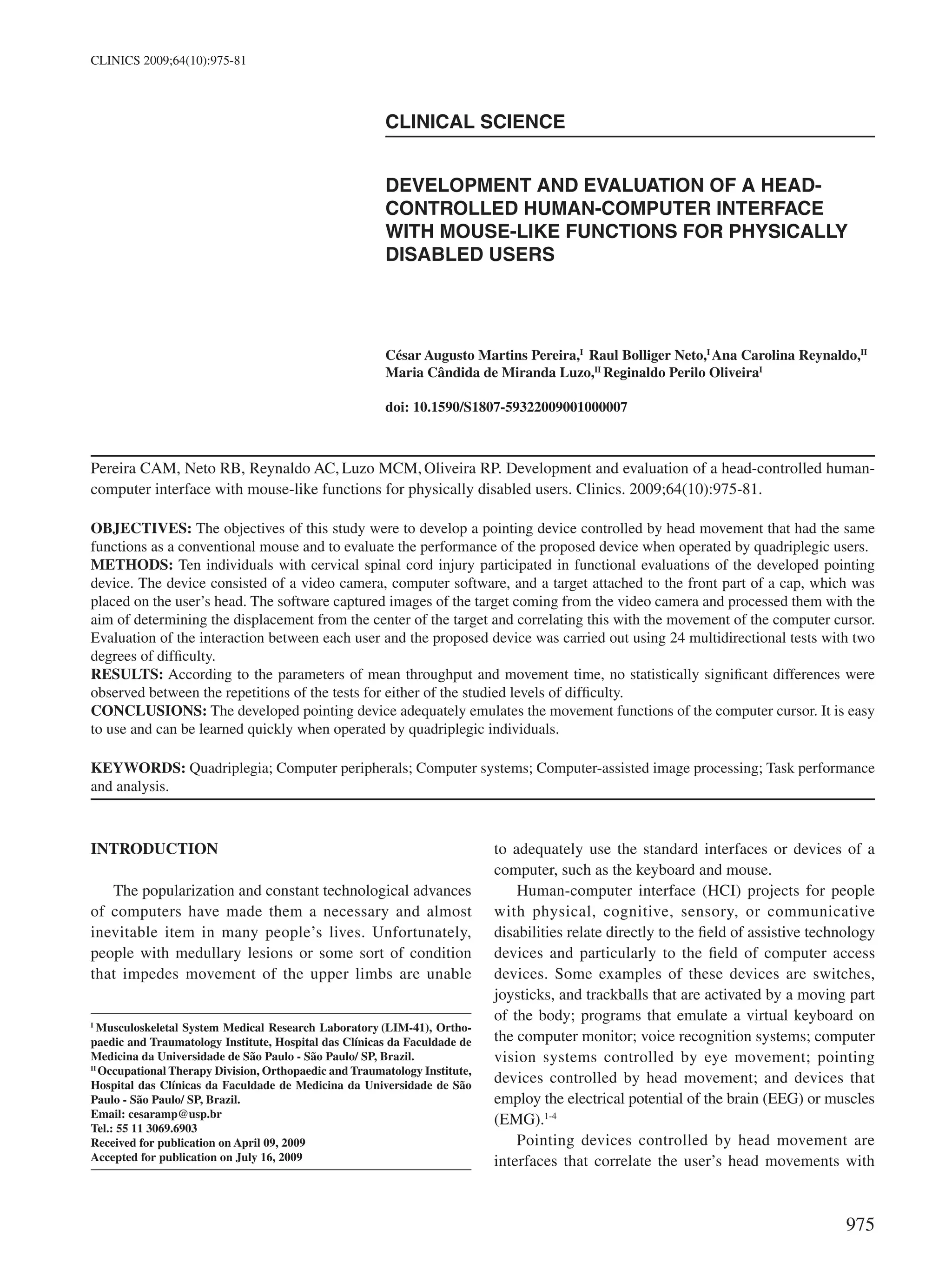
Figure 1 - User with the pointing device composed of computer software,
a webcam-type camera, and a reflective target attached to the brim of a cap
977
CLINICS 2009;64(10):975-81 Head-controlled HCI for physically disabled users
Pereira CAM et al.
the images from the video camera was hue, saturation, and
intensity (HSI).26
The software utilized the HSI parameters to identify the
target with the desired color. White was used in the present
study because the camera sensor represented the infrared
light spectrum as this color.
During the process of scanning for the target, the
software first searched for possible objects with the same
previously selected color. To achieve this, tracking was
carried out vertically on a certain number of columns of the
video image. If an object with the specified color was found,
an identification process began that used eight points located
on the edge of the object, numbered 1 to 8, with 45º angles
between them.
An algorithm was developed with the function of finding
circular or elliptical objects based on the eight points found
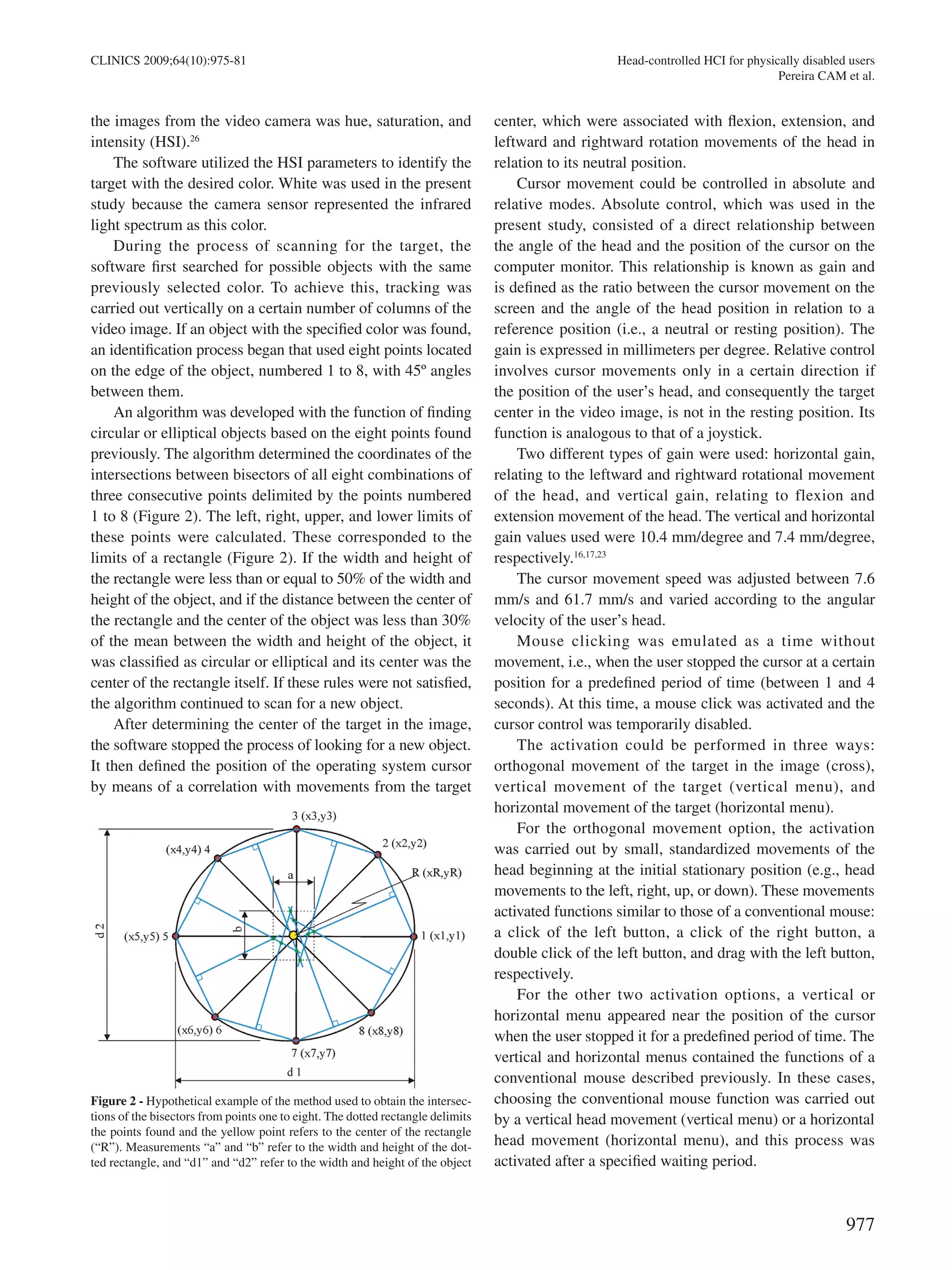
previously. The algorithm determined the coordinates of the
intersections between bisectors of all eight combinations of
three consecutive points delimited by the points numbered
1 to 8 (Figure 2). The left, right, upper, and lower limits of
these points were calculated. These corresponded to the
limits of a rectangle (Figure 2). If the width and height of
the rectangle were less than or equal to 50% of the width and
height of the object, and if the distance between the center of
the rectangle and the center of the object was less than 30%
of the mean between the width and height of the object, it
was classified as circular or elliptical and its center was the
center of the rectangle itself. If these rules were not satisfied,
the algorithm continued to scan for a new object.
After determining the center of the target in the image,
the software stopped the process of looking for a new object.
It then defined the position of the operating system cursor
by means of a correlation with movements from the target
center, which were associated with flexion, extension, and
leftward and rightward rotation movements of the head in
relation to its neutral position.
Cursor movement could be controlled in absolute and
relative modes. Absolute control, which was used in the
present study, consisted of a direct relationship between
the angle of the head and the position of the cursor on the
computer monitor. This relationship is known as gain and
is defined as the ratio between the cursor movement on the
screen and the angle of the head position in relation to a
reference position (i.e., a neutral or resting position). The
gain is expressed in millimeters per degree. Relative control
involves cursor movements only in a certain direction if
the position of the user’s head, and consequently the target
center in the video image, is not in the resting position. Its
function is analogous to that of a joystick.
Two different types of gain were used: horizontal gain,
relating to the leftward and rightward rotational movement
of the head, and vertical gain, relating to flexion and
extension movement of the head. The vertical and horizontal
gain values used were 10.4 mm/degree and 7.4 mm/degree,
respectively.16,17,23
The cursor movement speed was adjusted between 7.6
mm/s and 61.7 mm/s and varied according to the angular
velocity of the user’s head.
Mouse clicking was emulated as a time without
movement, i.e., when the user stopped the cursor at a certain
position for a predefined period of time (between 1 and 4
seconds). At this time, a mouse click was activated and the
cursor control was temporarily disabled.
The activation could be performed in three ways:
orthogonal movement of the target in the image (cross),
vertical movement of the target (vertical menu), and
horizontal movement of the target (horizontal menu).
For the orthogonal movement option, the activation
was carried out by small, standardized movements of the
head beginning at the initial stationary position (e.g., head
movements to the left, right, up, or down). These movements
activated functions similar to those of a conventional mouse:
a click of the left button, a click of the right button, a
double click of the left button, and drag with the left button,
respectively.
For the other two activation options, a vertical or
horizontal menu appeared near the position of the cursor
when the user stopped it for a predefined period of time. The
vertical and horizontal menus contained the functions of a
conventional mouse described previously. In these cases,
choosing the conventional mouse function was carried out
by a vertical head movement (vertical menu) or a horizontal
head movement (horizontal menu), and this process was
activated after a specified waiting period.
Figure 2 - Hypothetical example of the method used to obtain the intersec-
tions of the bisectors from points one to eight. The dotted rectangle delimits
the points found and the yellow point refers to the center of the rectangle
(“R”). Measurements “a” and “b” refer to the width and height of the dot-
ted rectangle, and “d1” and “d2” refer to the width and height of the object
978
CLINICS 2009;64(10):975-81Head-controlled HCI for physically disabled users
Pereira CAM et al.
Functional evaluation
Software for evaluating the pointing device and the user’s
control over it was developed. The evaluations were based on
annex B of ISO 9241-9,20
which recommends performance
tests for input devices and has the objective of evaluating the
efficiency of the device during certain tasks that are commonly
carried out. Examples of these tasks are moving the cursor,
drawing outlines, and selecting and dragging objects.
To test the software developed herein, the
multidirectional performance test was employed. This
evaluates the user’s capacity to move the cursor between
two objects, in different directions, with a certain degree
of difficulty. The degree or index of difficulty, measured
in bits, represents the precision that the user is expected
to reproduce during the test and is related to the size and
distance between the objects.
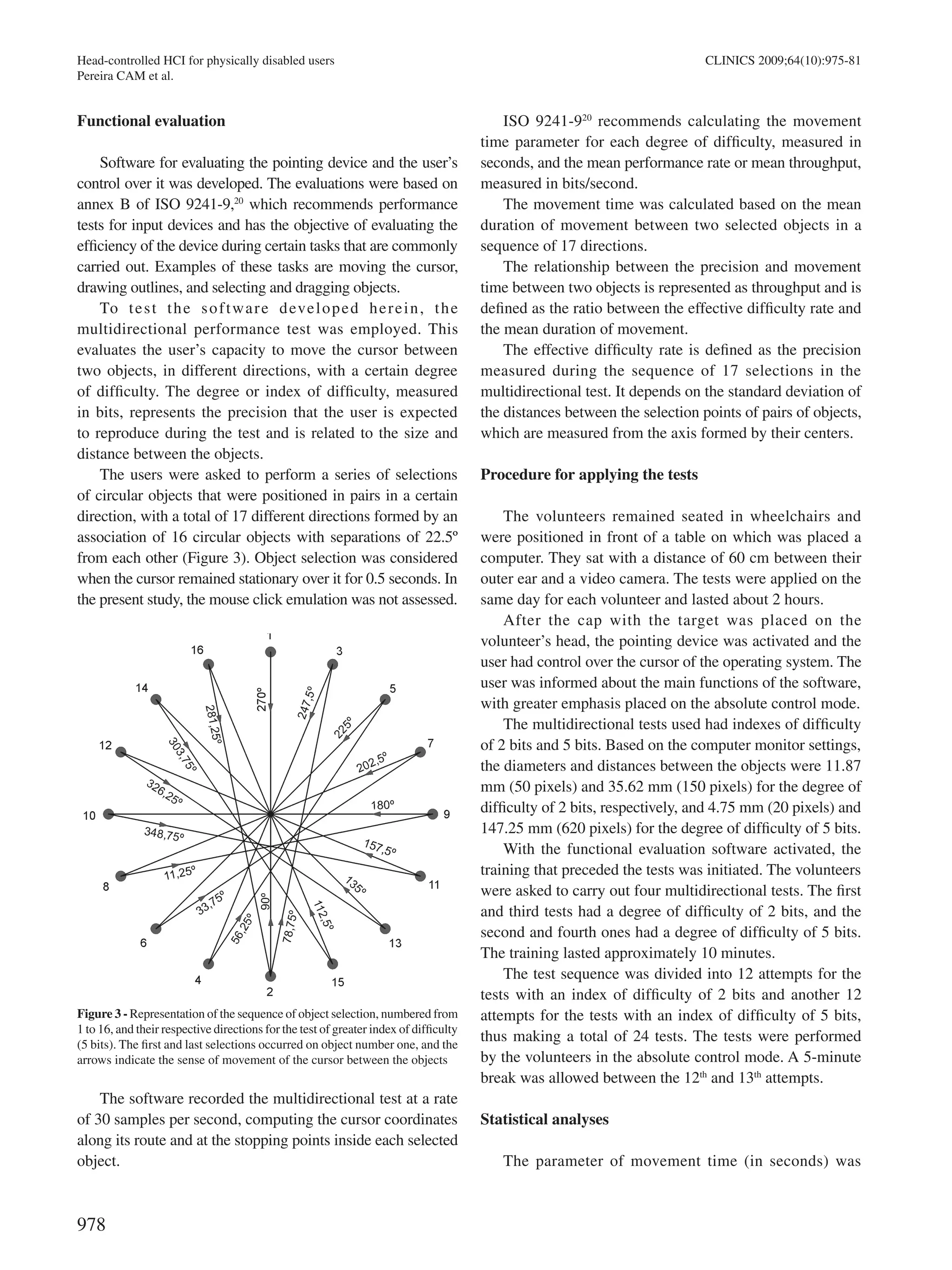
The users were asked to perform a series of selections
of circular objects that were positioned in pairs in a certain
direction, with a total of 17 different directions formed by an
association of 16 circular objects with separations of 22.5º
from each other (Figure 3). Object selection was considered
when the cursor remained stationary over it for 0.5 seconds. In
the present study, the mouse click emulation was not assessed.
The software recorded the multidirectional test at a rate
of 30 samples per second, computing the cursor coordinates
along its route and at the stopping points inside each selected
object.
ISO 9241-920
recommends calculating the movement
time parameter for each degree of difficulty, measured in
seconds, and the mean performance rate or mean throughput,
measured in bits/second.
The movement time was calculated based on the mean
duration of movement between two selected objects in a
sequence of 17 directions.
The relationship between the precision and movement
time between two objects is represented as throughput and is
defined as the ratio between the effective difficulty rate and
the mean duration of movement.
The effective difficulty rate is defined as the precision
measured during the sequence of 17 selections in the
multidirectional test. It depends on the standard deviation of
the distances between the selection points of pairs of objects,
which are measured from the axis formed by their centers.
Procedure for applying the tests
The volunteers remained seated in wheelchairs and
were positioned in front of a table on which was placed a
computer. They sat with a distance of 60 cm between their
outer ear and a video camera. The tests were applied on the
same day for each volunteer and lasted about 2 hours.
After the cap with the target was placed on the
volunteer’s head, the pointing device was activated and the
user had control over the cursor of the operating system. The
user was informed about the main functions of the software,
with greater emphasis placed on the absolute control mode.
The multidirectional tests used had indexes of difficulty
of 2 bits and 5 bits. Based on the computer monitor settings,
the diameters and distances between the objects were 11.87
mm (50 pixels) and 35.62 mm (150 pixels) for the degree of
difficulty of 2 bits, respectively, and 4.75 mm (20 pixels) and
147.25 mm (620 pixels) for the degree of difficulty of 5 bits.
With the functional evaluation software activated, the
training that preceded the tests was initiated. The volunteers
were asked to carry out four multidirectional tests. The first
and third tests had a degree of difficulty of 2 bits, and the
second and fourth ones had a degree of difficulty of 5 bits.
The training lasted approximately 10 minutes.
The test sequence was divided into 12 attempts for the
tests with an index of difficulty of 2 bits and another 12
attempts for the tests with an index of difficulty of 5 bits,
thus making a total of 24 tests. The tests were performed
by the volunteers in the absolute control mode. A 5-minute
break was allowed between the 12th
and 13th
attempts.
Statistical analyses
The parameter of movement time (in seconds) was
Figure 3 - Representation of the sequence of object selection, numbered from
1 to 16, and their respective directions for the test of greater index of difficulty
(5 bits). The first and last selections occurred on object number one, and the
arrows indicate the sense of movement of the cursor between the objects
979
CLINICS 2009;64(10):975-81 Head-controlled HCI for physically disabled users
Pereira CAM et al.
calculated for the indexes of difficulty of 2 and 5 bits. The
parameter of mean throughput (in bits/s) was calculated
based on the mean between pairs of performance rates
measured with indexes of difficulty of 2 and 5 bits. Both
parameters were calculated for each attempt.
For each attempt, the parameter of movement time was
obtained for each volunteer. This was based on the means
of the 17 directions studied in each multidirectional test
applied.
All parameters were compared between the attempts
by the analysis of variance (ANOVA) test for repeated
measurements. P-values less than or equal to 0.05 were
considered as significant.
RESULTS
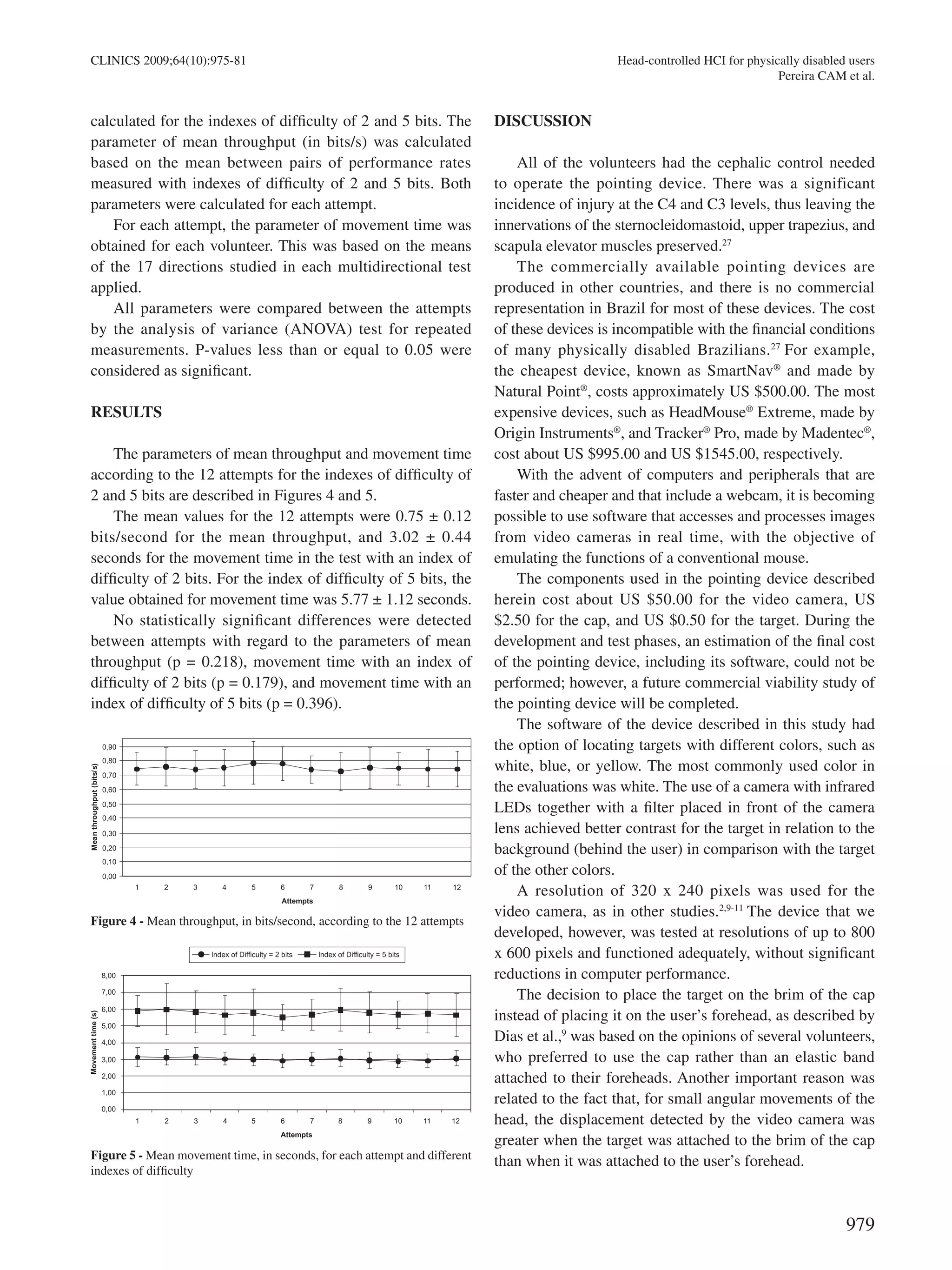
The parameters of mean throughput and movement time
according to the 12 attempts for the indexes of difficulty of
2 and 5 bits are described in Figures 4 and 5.
The mean values for the 12 attempts were 0.75 ± 0.12
bits/second for the mean throughput, and 3.02 ± 0.44
seconds for the movement time in the test with an index of
difficulty of 2 bits. For the index of difficulty of 5 bits, the
value obtained for movement time was 5.77 ± 1.12 seconds.
No statistically significant differences were detected
between attempts with regard to the parameters of mean
throughput (p = 0.218), movement time with an index of
difficulty of 2 bits (p = 0.179), and movement time with an
index of difficulty of 5 bits (p = 0.396).
DISCUSSION
All of the volunteers had the cephalic control needed
to operate the pointing device. There was a significant
incidence of injury at the C4 and C3 levels, thus leaving the
innervations of the sternocleidomastoid, upper trapezius, and
scapula elevator muscles preserved.27
The commercially available pointing devices are
produced in other countries, and there is no commercial
representation in Brazil for most of these devices. The cost
of these devices is incompatible with the financial conditions
of many physically disabled Brazilians.27
For example,
the cheapest device, known as SmartNav®
and made by
Natural Point®
, costs approximately US $500.00. The most
expensive devices, such as HeadMouse®
Extreme, made by
Origin Instruments®
, and Tracker®
Pro, made by Madentec®
,
cost about US $995.00 and US $1545.00, respectively.
With the advent of computers and peripherals that are
faster and cheaper and that include a webcam, it is becoming
possible to use software that accesses and processes images
from video cameras in real time, with the objective of
emulating the functions of a conventional mouse.
The components used in the pointing device described
herein cost about US $50.00 for the video camera, US
$2.50 for the cap, and US $0.50 for the target. During the
development and test phases, an estimation of the final cost
of the pointing device, including its software, could not be
performed; however, a future commercial viability study of
the pointing device will be completed.
The software of the device described in this study had
the option of locating targets with different colors, such as
white, blue, or yellow. The most commonly used color in
the evaluations was white. The use of a camera with infrared
LEDs together with a filter placed in front of the camera
lens achieved better contrast for the target in relation to the
background (behind the user) in comparison with the target
of the other colors.
A resolution of 320 x 240 pixels was used for the
video camera, as in other studies.2,9-11
The device that we
developed, however, was tested at resolutions of up to 800
x 600 pixels and functioned adequately, without significant
reductions in computer performance.
The decision to place the target on the brim of the cap
instead of placing it on the user’s forehead, as described by
Dias et al.,9
was based on the opinions of several volunteers,
who preferred to use the cap rather than an elastic band
attached to their foreheads. Another important reason was
related to the fact that, for small angular movements of the
head, the displacement detected by the video camera was
greater when the target was attached to the brim of the cap
than when it was attached to the user’s forehead.
Figure 4 - Mean throughput, in bits/second, according to the 12 attempts
Figure 5 - Mean movement time, in seconds, for each attempt and different
indexes of difficulty
980
CLINICS 2009;64(10):975-81Head-controlled HCI for physically disabled users
Pereira CAM et al.
The impressions of the volunteers regarding the
developed pointing device were very positive. Most of
the volunteers were unaware of such technology, yet they
became very interested in using it.
Soukoref and Mackenzie28
conducted a review of
the literature on evaluations of hand-controlled pointing
devices, with methodologies based on the concepts of Fitts’
law. They emphasized the importance of standardizing
the methodologies using ISO 9241-9,20
with the aim of
increasing quality and allowing comparisons between studies
of human-computer interfaces.
Regarding studies that have evaluated head-controlled
pointing devices, only Silva et al.23
and Man and Wong24
employed ISO-9241-920
in their methodologies. Other
studies,15-18
despite using the concepts of Fitts’ law such as
the use of multidirectional tests, did not make adjustments
to the theoretical index of difficulty to obtain the effective
index of difficulty. This adjustment is essential for ensuring
that the applied tests reflect the users’ performance during a
sequence of test repetitions.
According to ISO 9241-9,20
multidirectional tests should
be applied with different indexes of difficulty in order to
encompass the expected use of the device in question. We
chose to use two indexes of difficulty that would at least
represent the sizes of the most common graphical elements
in the operating system. Thus, for the index of difficulty of 2
bits, the diameters of the objects used in the multidirectional
tests had dimensions similar to graphical elements, such
as buttons, icons on the Windows®
wallpaper, and other
medium-sized elements. For the index of difficulty of 5 bits,
the dimensions were similar to small graphical elements,
such as text characters or graphical buttons on toolboxes
such as Combobox and Radiogroup.
Movement time is the parameter cited in the literature
for evaluating the degree of learning according to the
attempts in a multidirectional test. Our findings showed
that, after a training phase comprised of 68 repetitions
(four multidirectional pretests) performed to familiarize
the user with the system, there was no difference among
the following 12 evaluated attempts (i.e., there was a fast
learning curve). Each attempt consisted of 17 repetitions (17
different directions).
In the literature, the number of repetitions needed
to reach the learning curve has ranged from 8023
to 786
repetitions.17
Intermediate values of 720 and 768 repetitions
were reported by Radwin et al.15
and Lin et al.,16
respectively.
Silva et al.23
reported a number of repetitions similar to
the ones used in our study, but that are very different from
the number reported by other authors.15-17
Such similarities
may be related to the use of a video camera as an input
device and to the employment of ISO 9241-9.20
Other
authors15-17
employed an ultrasonic pointing device and did
not perform ISO 9241-920
based evaluations because their
studies were performed before this standard was published.
Such differences in methodological approaches could have
accounted for the discrepancy in the learning curves.
In general, none of the studied parameters presented
statistical differences between the first and last attempt, thus
demonstrating that the proposed pointing device was easily
used. The learning process of the users was fast as, within
a few minutes, they had achieved satisfactory control over
the device.
CONCLUSIONS
The pointing device adequately emulates the functions of
computer cursor movements and is easy to use, with a short
learning period when operated by quadriplegic individuals.
REFERENCES
1. 	 Müller AF, Zaro MA, Silva DP Jr, Sanches PRS, Ferlin EL, Thomé
PRO, et al. Dispositivo para emulação de mouse dedicado a pacientes
tetraplégicos ou portadores de doença degenerativa do sistema
neuromuscular. Acta Fisiátrica. 2001;8:63-6.
2. 	 Betke M, Gips J, Fleming P. The camera mouse: visual tracking of body
features to provide computer access for people with severe disabilities.
IEEE Trans Neural Syst Rehabil Eng. 2002;10:1-10.
3. 	 Bryant DP, Bryant BR.Assistive technology for people with disabilities.
In: Assistive technology devices to enhance access to information.
Boston: Allyn and Bacon; 2003. p.111.
4. 	 Mauri C, Granollers T, Lorés J, García M. Computer vision interaction
for people with severe movement restrictions. Human Tech. 2006;2:38-
54.
5. 	 Takami O, Irie N, Kang C, Ishimatsu T, Ochiai T. Computer interface to
use head movement for handicapped people. In: Proceedings of IEEE
TENCON Digital signal processing applications, 1996,Australia. p.468-
72.
6. 	 Evans DG, Drew R, Blenkhorn P. Controlling mouse position using an
infrared head-operated joystick. IEEE Trans Neural Syst Rehabil Eng.
2000;8:107-17.
7. 	 KimYW, Cho JH. ComputerA novel development of head-set computer
mouse using gyro sensors for the handcapped. In: Conference of 2nd
Annual International IEEE-EMBS Special Topic on Microtechnologies
in medicine and biology; 2002, Madison. p.356-9.
8. 	 Nunoshita M, Ebisawa Y. Head pointer based on ultrasonic position
measurement. In: Proceeding of 2nd joint EMBS/BMES, 2002, Houston.
p.1732-3.
981
CLINICS 2009;64(10):975-81 Head-controlled HCI for physically disabled users
Pereira CAM et al.
9. 	 Dias N, Osowsky J, Gamba HR, Nohama P. Mouse-câmera ativado
pelo movimento da cabeça. In: II seminário ATIID- acessibilidade, TI
e inclusão digital; 2003; São Paulo. Disponivel em: http://www.fsp.usp.
br/acessibilidade/informacao.htm
10. 	Graveleau V, Mirenkov N, Nikishkov G. A head-controlled user
interface. In: Proceedings of the 8th
International Conference on Humans
and computers, 2005, Aizu-Wakamatsu. p.306-11.
11. 	Morris T, Chauhan V. Facial feature tracking for cursor control. J
Network Comp App; 2006;29:62-80.
12. 	Lin CS, Shi TH, Lin CH, Yeh MS, Shei HJ. The measurement of the
angle of a user’s head in a novel head-tracker device. Measurement.
2006;39:750-7.
13. 	Eom GM, Kim KS, Kim CS, Lee J, Chung SC, Lee B, et al. Gyro-mouse
for the disabled: ‘click’ and ‘Position’ control of the mouse cursor. Int
J Control, Automat Syst. 2007;5:147-54.
14. 	Fitts PM. The information capacity of the human motor system in
controlling the amplitude of movement. J Exp Psychol. 1954;47:381-91.
15. 	Radwin RG,Vanderheiden GC, Lin ML.A method for evaluating head-
controlled computer input devices using Fitts’law. Human Factors.
1990;32:432-8.
16. 	Lin ML, Radwin RG, Vanderheiden GC. Gain effects on performance
using a head-controlled computer input device. Ergonomics.
1992;35:159-75.
17. 	Schaab JA, Radwin RG,Vanderheiden GC.A comparison of two control-
display gain measures for head-controlled computer input devices.
Human Factors. 1996; 38:390-403.
18. 	LoPresti EF, Brienza DM,Angelo J. Head-operated computer controls:
effect of control method on performance for subjects with and without
disability. Interact Comput. 2002;14:359-77.
19. 	LoPresti EF, Brienza DM. Adaptative software for head-operated
computer controls. IEEE Trans Neural Syst Rehabil Eng. 2004;12:102-
11.
20. 	International Standardization Organization (ISO). ISO 9241-9:
Ergonomic requirements for office work with visual display terminals
(VDTs) -- Part 9: Requirements for non-keyboard input devices. Suiça;
2000.
21. 	Mackenzie IS, Kauppinen T, Silfverberg M. Accuracy measures for
evaluation computer pointing devices. In: Proceedings of Human Factors
in Computing Systems; 2001; Seatle. EUA:ACM press, 2001. p.9-15.
22. 	Keates S, Hwang F, Langdon P, Clarkson PJ, Robinson P. Cursor
measures for motion-impaired computer users. In: Proceedings ofACM
SIGCAPH Conference of Assistive Technologies – ASSETS; EUA;
2002. EUA:ACM press. p.135-42.
23. 	Silva GC, Lyons MJ, Kawato S, Tetsutani N. Human factors evaluation
of vision-based facial gesture interface. In: Conference on computer
vision and pattern recognition for HCI; 2003. IEEE press; 2003. p.52-8.
24. 	Man DW, Wong MSL. Evaluation of computer-access solutions for
students with quadriplegic athetoid cerebral palsy. Am J Occup Ther.
2007;61:355-64.
25. 	Anson D, Lawler G, Kissinger A, Timko M, Tuminski J, Drew B.
Efficacy of three head-pointing devices for a mouse emulation task.
Assist Technol; 2002;14:140-50.
26. 	Marques Filho O,Vieira Neto H. Processamento digital de imagens. In:
Filtragem, Realce e Suavização de Imagens. Rio de Janeiro: Brasport;
1999. p.109.
27. 	Greve JMD, Casalis MEP, Barros Filho TEP. Diagnóstico e tratamento
da lesão da medula espinal. In: Avaliação da incapacidade e níveis
funcionais. São Paulo: Roca; 2001. p.87.
28. 	Soukoreff RW, Mackenzie IS. Towards a standard for pointing device
evaluation, perspectives on 27 years of Fitts’law research in HCI. Int J
Human Comp Studies. 2004;61:751-89.
Development and evaluation of a head-controlled human-computer interface with mouse-like functions for physically disabled users

Development and evaluation of a head-controlled human-computer interface with mouse-like functions for physically disabled users

  • 1.
    975 CLINICS 2009;64(10):975-81 CLINICAL SCIENCE I MusculoskeletalSystem Medical Research Laboratory (LIM-41), Ortho- paedic and Traumatology Institute, Hospital das Clínicas da Faculdade de Medicina da Universidade de São Paulo - São Paulo/ SP, Brazil. II Occupational Therapy Division, Orthopaedic and Traumatology Institute, Hospital das Clínicas da Faculdade de Medicina da Universidade de São Paulo - São Paulo/ SP, Brazil. Email: cesaramp@usp.br Tel.: 55 11 3069.6903 Received for publication on April 09, 2009 Accepted for publication on July 16, 2009 DEVELOPMENT AND EVALUATION OF A HEAD- CONTROLLED HUMAN-COMPUTER INTERFACE WITH MOUSE-LIKE FUNCTIONS FOR PHYSICALLY DISABLED USERS César Augusto Martins Pereira,I Raul Bolliger Neto,I Ana Carolina Reynaldo,II Maria Cândida de Miranda Luzo,II Reginaldo Perilo OliveiraI   doi: 10.1590/S1807-59322009001000007 Pereira CAM, Neto RB, Reynaldo AC,Luzo MCM, Oliveira RP. Development and evaluation of a head-controlled human- computer interface with mouse-like functions for physically disabled users. Clinics. 2009;64(10):975-81. OBJECTIVES: The objectives of this study were to develop a pointing device controlled by head movement that had the same functions as a conventional mouse and to evaluate the performance of the proposed device when operated by quadriplegic users. METHODS: Ten individuals with cervical spinal cord injury participated in functional evaluations of the developed pointing device. The device consisted of a video camera, computer software, and a target attached to the front part of a cap, which was placed on the user’s head. The software captured images of the target coming from the video camera and processed them with the aim of determining the displacement from the center of the target and correlating this with the movement of the computer cursor. Evaluation of the interaction between each user and the proposed device was carried out using 24 multidirectional tests with two degrees of difficulty. RESULTS: According to the parameters of mean throughput and movement time, no statistically significant differences were observed between the repetitions of the tests for either of the studied levels of difficulty. CONCLUSIONS: The developed pointing device adequately emulates the movement functions of the computer cursor. It is easy to use and can be learned quickly when operated by quadriplegic individuals. KEYWORDS: Quadriplegia; Computer peripherals; Computer systems; Computer-assisted image processing; Task performance and analysis. INTRODUCTION The popularization and constant technological advances of computers have made them a necessary and almost inevitable item in many people’s lives. Unfortunately, people with medullary lesions or some sort of condition that impedes movement of the upper limbs are unable to adequately use the standard interfaces or devices of a computer, such as the keyboard and mouse. Human-computer interface (HCI) projects for people with physical, cognitive, sensory, or communicative disabilities relate directly to the field of assistive technology devices and particularly to the field of computer access devices. Some examples of these devices are switches, joysticks, and trackballs that are activated by a moving part of the body; programs that emulate a virtual keyboard on the computer monitor; voice recognition systems; computer vision systems controlled by eye movement; pointing devices controlled by head movement; and devices that employ the electrical potential of the brain (EEG) or muscles (EMG).1-4 Pointing devices controlled by head movement are interfaces that correlate the user’s head movements with
  • 2.
    976 CLINICS 2009;64(10):975-81Head-controlled HCIfor physically disabled users Pereira CAM et al. computer cursor movements. The most commonly used head movements are flexion-extension and rotation.5-13 Functions analogous to clicking the button of a conventional mouse can also be carried out by means of sensors that are activated by using the mouth or cheek, by blinking an eye, or by using specific software that emulates the mouse click when the user stops the cursor on the object of interest.4 Head pointing devices may utilize computer vision techniques in which the software processes images from a video camera and identifies certain objects or facial characteristics of a user positioned in front of the camera. Certain interfaces automatically recognize regions of the head by means of a webcam-type camera. Others recognize objects attached to the user’s head, such as small colorful targets4,5,9,12 or reflective targets such as the Tracker Pro (Madentec® Ltd, Edmond, AB, Canada), HeadMouse Extreme® (Origin Instruments Corporation® , Grand Prairie, Texas, USA), and SmartNav® devices (Natural Point® Inc., Oregon, USA). Studies on the usability attributes of pointing devices can be carried out by means of performance tests or evaluations. These tests are based on the simplest tasks for a device, such as moving the cursor, drawing lines, or selecting and dragging objects. The most commonly undertaken evaluations involve tests of cursor movement and object selection and are based on the concepts proposed by Fitts14 in 1954.8,15-19 In 2000, the International Organization for Standardization (ISO) published the ISO 9241-920 standard, which makes recommendations regarding the methodology for evaluating the efficiency of pointing devices. Some authors have used this standard to evaluate different types of pointing devices.21-24 The objectives of this study were to develop a pointing device that is controlled by head movement and has the same functions as a conventional mouse for application among physically disabled people, as well as to evaluate the performance of the proposed device in accordance with ISO 9241-920 when operated by quadriplegic users. MATERIALS AND METHODS Ten quadriplegic volunteers (9 males and 1 female) were evaluated. Their ages ranged from 24.5 to 53.7 years. All of them had a cervical spinal cord injury; 30% had an injury at the C3 level, 50% at the C4 level, and 20% at the C5 level. They had been injured for periods ranging from 3.3 to 21 years. The volunteers were literate, had basic notions about computers, and were not limited to flexion, extension, inclination, or rotation movements of less than 15º in relation to the neutral position of the head.25 The present study was approved by the Scientific Committee and Ethics Committee for Research Project Analysis. All selected volunteers or their respective legal guardians signed the free and informed consent statement. Pointing device The pointing device was composed of a video camera, computer software, and a marker or “target.” The target was attached to the front part of a cap placed on the user’s head (Figure 1). The device was installed on a portable computer (Aspire 5050 3233 model, ACER® ) with a 14.1-inch LCD widescreen adjusted for a maximum resolution of 1280 x 800 pixels. A Kinstone® webcamwas connected to the computer via USB. The images were adjusted to a resolution of 320 x 240 pixels and were acquired at a rate of 30 frames/second. The camera had six light-emitting diodes (LEDs), which were activated while the camera was in operation. A filter was attached to the camera lens to filter out all visible light and allow only infrared light to reach the camera’s sensor. The target consisted of a plastic disc 15 mm in diameter that was glued to a plastic cylinder with a chamfer so that it could fit on the brim of the cap. On the surface of the plastic disc, a reflective silver-colored material (Scotchlite® 9910 model, 3M® ) was glued to the surface of the plastic disc. The software was developed using the Delphi® 2006 programming language. Its main functions were to capture the images of the target coming from the camera, process them to determine the position of the target center, move the cursor of the operating system, and emulate a mouse click. The target color could be selected as white, red, blue, green, or yellow. The standard for representing the colors of Figure 1 - User with the pointing device composed of computer software, a webcam-type camera, and a reflective target attached to the brim of a cap
  • 3.
    977 CLINICS 2009;64(10):975-81 Head-controlledHCI for physically disabled users Pereira CAM et al. the images from the video camera was hue, saturation, and intensity (HSI).26 The software utilized the HSI parameters to identify the target with the desired color. White was used in the present study because the camera sensor represented the infrared light spectrum as this color. During the process of scanning for the target, the software first searched for possible objects with the same previously selected color. To achieve this, tracking was carried out vertically on a certain number of columns of the video image. If an object with the specified color was found, an identification process began that used eight points located on the edge of the object, numbered 1 to 8, with 45º angles between them. An algorithm was developed with the function of finding circular or elliptical objects based on the eight points found previously. The algorithm determined the coordinates of the intersections between bisectors of all eight combinations of three consecutive points delimited by the points numbered 1 to 8 (Figure 2). The left, right, upper, and lower limits of these points were calculated. These corresponded to the limits of a rectangle (Figure 2). If the width and height of the rectangle were less than or equal to 50% of the width and height of the object, and if the distance between the center of the rectangle and the center of the object was less than 30% of the mean between the width and height of the object, it was classified as circular or elliptical and its center was the center of the rectangle itself. If these rules were not satisfied, the algorithm continued to scan for a new object. After determining the center of the target in the image, the software stopped the process of looking for a new object. It then defined the position of the operating system cursor by means of a correlation with movements from the target center, which were associated with flexion, extension, and leftward and rightward rotation movements of the head in relation to its neutral position. Cursor movement could be controlled in absolute and relative modes. Absolute control, which was used in the present study, consisted of a direct relationship between the angle of the head and the position of the cursor on the computer monitor. This relationship is known as gain and is defined as the ratio between the cursor movement on the screen and the angle of the head position in relation to a reference position (i.e., a neutral or resting position). The gain is expressed in millimeters per degree. Relative control involves cursor movements only in a certain direction if the position of the user’s head, and consequently the target center in the video image, is not in the resting position. Its function is analogous to that of a joystick. Two different types of gain were used: horizontal gain, relating to the leftward and rightward rotational movement of the head, and vertical gain, relating to flexion and extension movement of the head. The vertical and horizontal gain values used were 10.4 mm/degree and 7.4 mm/degree, respectively.16,17,23 The cursor movement speed was adjusted between 7.6 mm/s and 61.7 mm/s and varied according to the angular velocity of the user’s head. Mouse clicking was emulated as a time without movement, i.e., when the user stopped the cursor at a certain position for a predefined period of time (between 1 and 4 seconds). At this time, a mouse click was activated and the cursor control was temporarily disabled. The activation could be performed in three ways: orthogonal movement of the target in the image (cross), vertical movement of the target (vertical menu), and horizontal movement of the target (horizontal menu). For the orthogonal movement option, the activation was carried out by small, standardized movements of the head beginning at the initial stationary position (e.g., head movements to the left, right, up, or down). These movements activated functions similar to those of a conventional mouse: a click of the left button, a click of the right button, a double click of the left button, and drag with the left button, respectively. For the other two activation options, a vertical or horizontal menu appeared near the position of the cursor when the user stopped it for a predefined period of time. The vertical and horizontal menus contained the functions of a conventional mouse described previously. In these cases, choosing the conventional mouse function was carried out by a vertical head movement (vertical menu) or a horizontal head movement (horizontal menu), and this process was activated after a specified waiting period. Figure 2 - Hypothetical example of the method used to obtain the intersec- tions of the bisectors from points one to eight. The dotted rectangle delimits the points found and the yellow point refers to the center of the rectangle (“R”). Measurements “a” and “b” refer to the width and height of the dot- ted rectangle, and “d1” and “d2” refer to the width and height of the object
  • 4.
    978 CLINICS 2009;64(10):975-81Head-controlled HCIfor physically disabled users Pereira CAM et al. Functional evaluation Software for evaluating the pointing device and the user’s control over it was developed. The evaluations were based on annex B of ISO 9241-9,20 which recommends performance tests for input devices and has the objective of evaluating the efficiency of the device during certain tasks that are commonly carried out. Examples of these tasks are moving the cursor, drawing outlines, and selecting and dragging objects. To test the software developed herein, the multidirectional performance test was employed. This evaluates the user’s capacity to move the cursor between two objects, in different directions, with a certain degree of difficulty. The degree or index of difficulty, measured in bits, represents the precision that the user is expected to reproduce during the test and is related to the size and distance between the objects. The users were asked to perform a series of selections of circular objects that were positioned in pairs in a certain direction, with a total of 17 different directions formed by an association of 16 circular objects with separations of 22.5º from each other (Figure 3). Object selection was considered when the cursor remained stationary over it for 0.5 seconds. In the present study, the mouse click emulation was not assessed. The software recorded the multidirectional test at a rate of 30 samples per second, computing the cursor coordinates along its route and at the stopping points inside each selected object. ISO 9241-920 recommends calculating the movement time parameter for each degree of difficulty, measured in seconds, and the mean performance rate or mean throughput, measured in bits/second. The movement time was calculated based on the mean duration of movement between two selected objects in a sequence of 17 directions. The relationship between the precision and movement time between two objects is represented as throughput and is defined as the ratio between the effective difficulty rate and the mean duration of movement. The effective difficulty rate is defined as the precision measured during the sequence of 17 selections in the multidirectional test. It depends on the standard deviation of the distances between the selection points of pairs of objects, which are measured from the axis formed by their centers. Procedure for applying the tests The volunteers remained seated in wheelchairs and were positioned in front of a table on which was placed a computer. They sat with a distance of 60 cm between their outer ear and a video camera. The tests were applied on the same day for each volunteer and lasted about 2 hours. After the cap with the target was placed on the volunteer’s head, the pointing device was activated and the user had control over the cursor of the operating system. The user was informed about the main functions of the software, with greater emphasis placed on the absolute control mode. The multidirectional tests used had indexes of difficulty of 2 bits and 5 bits. Based on the computer monitor settings, the diameters and distances between the objects were 11.87 mm (50 pixels) and 35.62 mm (150 pixels) for the degree of difficulty of 2 bits, respectively, and 4.75 mm (20 pixels) and 147.25 mm (620 pixels) for the degree of difficulty of 5 bits. With the functional evaluation software activated, the training that preceded the tests was initiated. The volunteers were asked to carry out four multidirectional tests. The first and third tests had a degree of difficulty of 2 bits, and the second and fourth ones had a degree of difficulty of 5 bits. The training lasted approximately 10 minutes. The test sequence was divided into 12 attempts for the tests with an index of difficulty of 2 bits and another 12 attempts for the tests with an index of difficulty of 5 bits, thus making a total of 24 tests. The tests were performed by the volunteers in the absolute control mode. A 5-minute break was allowed between the 12th and 13th attempts. Statistical analyses The parameter of movement time (in seconds) was Figure 3 - Representation of the sequence of object selection, numbered from 1 to 16, and their respective directions for the test of greater index of difficulty (5 bits). The first and last selections occurred on object number one, and the arrows indicate the sense of movement of the cursor between the objects
  • 5.
    979 CLINICS 2009;64(10):975-81 Head-controlledHCI for physically disabled users Pereira CAM et al. calculated for the indexes of difficulty of 2 and 5 bits. The parameter of mean throughput (in bits/s) was calculated based on the mean between pairs of performance rates measured with indexes of difficulty of 2 and 5 bits. Both parameters were calculated for each attempt. For each attempt, the parameter of movement time was obtained for each volunteer. This was based on the means of the 17 directions studied in each multidirectional test applied. All parameters were compared between the attempts by the analysis of variance (ANOVA) test for repeated measurements. P-values less than or equal to 0.05 were considered as significant. RESULTS The parameters of mean throughput and movement time according to the 12 attempts for the indexes of difficulty of 2 and 5 bits are described in Figures 4 and 5. The mean values for the 12 attempts were 0.75 ± 0.12 bits/second for the mean throughput, and 3.02 ± 0.44 seconds for the movement time in the test with an index of difficulty of 2 bits. For the index of difficulty of 5 bits, the value obtained for movement time was 5.77 ± 1.12 seconds. No statistically significant differences were detected between attempts with regard to the parameters of mean throughput (p = 0.218), movement time with an index of difficulty of 2 bits (p = 0.179), and movement time with an index of difficulty of 5 bits (p = 0.396). DISCUSSION All of the volunteers had the cephalic control needed to operate the pointing device. There was a significant incidence of injury at the C4 and C3 levels, thus leaving the innervations of the sternocleidomastoid, upper trapezius, and scapula elevator muscles preserved.27 The commercially available pointing devices are produced in other countries, and there is no commercial representation in Brazil for most of these devices. The cost of these devices is incompatible with the financial conditions of many physically disabled Brazilians.27 For example, the cheapest device, known as SmartNav® and made by Natural Point® , costs approximately US $500.00. The most expensive devices, such as HeadMouse® Extreme, made by Origin Instruments® , and Tracker® Pro, made by Madentec® , cost about US $995.00 and US $1545.00, respectively. With the advent of computers and peripherals that are faster and cheaper and that include a webcam, it is becoming possible to use software that accesses and processes images from video cameras in real time, with the objective of emulating the functions of a conventional mouse. The components used in the pointing device described herein cost about US $50.00 for the video camera, US $2.50 for the cap, and US $0.50 for the target. During the development and test phases, an estimation of the final cost of the pointing device, including its software, could not be performed; however, a future commercial viability study of the pointing device will be completed. The software of the device described in this study had the option of locating targets with different colors, such as white, blue, or yellow. The most commonly used color in the evaluations was white. The use of a camera with infrared LEDs together with a filter placed in front of the camera lens achieved better contrast for the target in relation to the background (behind the user) in comparison with the target of the other colors. A resolution of 320 x 240 pixels was used for the video camera, as in other studies.2,9-11 The device that we developed, however, was tested at resolutions of up to 800 x 600 pixels and functioned adequately, without significant reductions in computer performance. The decision to place the target on the brim of the cap instead of placing it on the user’s forehead, as described by Dias et al.,9 was based on the opinions of several volunteers, who preferred to use the cap rather than an elastic band attached to their foreheads. Another important reason was related to the fact that, for small angular movements of the head, the displacement detected by the video camera was greater when the target was attached to the brim of the cap than when it was attached to the user’s forehead. Figure 4 - Mean throughput, in bits/second, according to the 12 attempts Figure 5 - Mean movement time, in seconds, for each attempt and different indexes of difficulty
  • 6.
    980 CLINICS 2009;64(10):975-81Head-controlled HCIfor physically disabled users Pereira CAM et al. The impressions of the volunteers regarding the developed pointing device were very positive. Most of the volunteers were unaware of such technology, yet they became very interested in using it. Soukoref and Mackenzie28 conducted a review of the literature on evaluations of hand-controlled pointing devices, with methodologies based on the concepts of Fitts’ law. They emphasized the importance of standardizing the methodologies using ISO 9241-9,20 with the aim of increasing quality and allowing comparisons between studies of human-computer interfaces. Regarding studies that have evaluated head-controlled pointing devices, only Silva et al.23 and Man and Wong24 employed ISO-9241-920 in their methodologies. Other studies,15-18 despite using the concepts of Fitts’ law such as the use of multidirectional tests, did not make adjustments to the theoretical index of difficulty to obtain the effective index of difficulty. This adjustment is essential for ensuring that the applied tests reflect the users’ performance during a sequence of test repetitions. According to ISO 9241-9,20 multidirectional tests should be applied with different indexes of difficulty in order to encompass the expected use of the device in question. We chose to use two indexes of difficulty that would at least represent the sizes of the most common graphical elements in the operating system. Thus, for the index of difficulty of 2 bits, the diameters of the objects used in the multidirectional tests had dimensions similar to graphical elements, such as buttons, icons on the Windows® wallpaper, and other medium-sized elements. For the index of difficulty of 5 bits, the dimensions were similar to small graphical elements, such as text characters or graphical buttons on toolboxes such as Combobox and Radiogroup. Movement time is the parameter cited in the literature for evaluating the degree of learning according to the attempts in a multidirectional test. Our findings showed that, after a training phase comprised of 68 repetitions (four multidirectional pretests) performed to familiarize the user with the system, there was no difference among the following 12 evaluated attempts (i.e., there was a fast learning curve). Each attempt consisted of 17 repetitions (17 different directions). In the literature, the number of repetitions needed to reach the learning curve has ranged from 8023 to 786 repetitions.17 Intermediate values of 720 and 768 repetitions were reported by Radwin et al.15 and Lin et al.,16 respectively. Silva et al.23 reported a number of repetitions similar to the ones used in our study, but that are very different from the number reported by other authors.15-17 Such similarities may be related to the use of a video camera as an input device and to the employment of ISO 9241-9.20 Other authors15-17 employed an ultrasonic pointing device and did not perform ISO 9241-920 based evaluations because their studies were performed before this standard was published. Such differences in methodological approaches could have accounted for the discrepancy in the learning curves. In general, none of the studied parameters presented statistical differences between the first and last attempt, thus demonstrating that the proposed pointing device was easily used. The learning process of the users was fast as, within a few minutes, they had achieved satisfactory control over the device. CONCLUSIONS The pointing device adequately emulates the functions of computer cursor movements and is easy to use, with a short learning period when operated by quadriplegic individuals. REFERENCES 1. Müller AF, Zaro MA, Silva DP Jr, Sanches PRS, Ferlin EL, Thomé PRO, et al. Dispositivo para emulação de mouse dedicado a pacientes tetraplégicos ou portadores de doença degenerativa do sistema neuromuscular. Acta Fisiátrica. 2001;8:63-6. 2. Betke M, Gips J, Fleming P. The camera mouse: visual tracking of body features to provide computer access for people with severe disabilities. IEEE Trans Neural Syst Rehabil Eng. 2002;10:1-10. 3. Bryant DP, Bryant BR.Assistive technology for people with disabilities. In: Assistive technology devices to enhance access to information. Boston: Allyn and Bacon; 2003. p.111. 4. Mauri C, Granollers T, Lorés J, García M. Computer vision interaction for people with severe movement restrictions. Human Tech. 2006;2:38- 54. 5. Takami O, Irie N, Kang C, Ishimatsu T, Ochiai T. Computer interface to use head movement for handicapped people. In: Proceedings of IEEE TENCON Digital signal processing applications, 1996,Australia. p.468- 72. 6. Evans DG, Drew R, Blenkhorn P. Controlling mouse position using an infrared head-operated joystick. IEEE Trans Neural Syst Rehabil Eng. 2000;8:107-17. 7. KimYW, Cho JH. ComputerA novel development of head-set computer mouse using gyro sensors for the handcapped. In: Conference of 2nd Annual International IEEE-EMBS Special Topic on Microtechnologies in medicine and biology; 2002, Madison. p.356-9. 8. Nunoshita M, Ebisawa Y. Head pointer based on ultrasonic position measurement. In: Proceeding of 2nd joint EMBS/BMES, 2002, Houston. p.1732-3.
  • 7.
    981 CLINICS 2009;64(10):975-81 Head-controlledHCI for physically disabled users Pereira CAM et al. 9. Dias N, Osowsky J, Gamba HR, Nohama P. Mouse-câmera ativado pelo movimento da cabeça. In: II seminário ATIID- acessibilidade, TI e inclusão digital; 2003; São Paulo. Disponivel em: http://www.fsp.usp. br/acessibilidade/informacao.htm 10. Graveleau V, Mirenkov N, Nikishkov G. A head-controlled user interface. In: Proceedings of the 8th International Conference on Humans and computers, 2005, Aizu-Wakamatsu. p.306-11. 11. Morris T, Chauhan V. Facial feature tracking for cursor control. J Network Comp App; 2006;29:62-80. 12. Lin CS, Shi TH, Lin CH, Yeh MS, Shei HJ. The measurement of the angle of a user’s head in a novel head-tracker device. Measurement. 2006;39:750-7. 13. Eom GM, Kim KS, Kim CS, Lee J, Chung SC, Lee B, et al. Gyro-mouse for the disabled: ‘click’ and ‘Position’ control of the mouse cursor. Int J Control, Automat Syst. 2007;5:147-54. 14. Fitts PM. The information capacity of the human motor system in controlling the amplitude of movement. J Exp Psychol. 1954;47:381-91. 15. Radwin RG,Vanderheiden GC, Lin ML.A method for evaluating head- controlled computer input devices using Fitts’law. Human Factors. 1990;32:432-8. 16. Lin ML, Radwin RG, Vanderheiden GC. Gain effects on performance using a head-controlled computer input device. Ergonomics. 1992;35:159-75. 17. Schaab JA, Radwin RG,Vanderheiden GC.A comparison of two control- display gain measures for head-controlled computer input devices. Human Factors. 1996; 38:390-403. 18. LoPresti EF, Brienza DM,Angelo J. Head-operated computer controls: effect of control method on performance for subjects with and without disability. Interact Comput. 2002;14:359-77. 19. LoPresti EF, Brienza DM. Adaptative software for head-operated computer controls. IEEE Trans Neural Syst Rehabil Eng. 2004;12:102- 11. 20. International Standardization Organization (ISO). ISO 9241-9: Ergonomic requirements for office work with visual display terminals (VDTs) -- Part 9: Requirements for non-keyboard input devices. Suiça; 2000. 21. Mackenzie IS, Kauppinen T, Silfverberg M. Accuracy measures for evaluation computer pointing devices. In: Proceedings of Human Factors in Computing Systems; 2001; Seatle. EUA:ACM press, 2001. p.9-15. 22. Keates S, Hwang F, Langdon P, Clarkson PJ, Robinson P. Cursor measures for motion-impaired computer users. In: Proceedings ofACM SIGCAPH Conference of Assistive Technologies – ASSETS; EUA; 2002. EUA:ACM press. p.135-42. 23. Silva GC, Lyons MJ, Kawato S, Tetsutani N. Human factors evaluation of vision-based facial gesture interface. In: Conference on computer vision and pattern recognition for HCI; 2003. IEEE press; 2003. p.52-8. 24. Man DW, Wong MSL. Evaluation of computer-access solutions for students with quadriplegic athetoid cerebral palsy. Am J Occup Ther. 2007;61:355-64. 25. Anson D, Lawler G, Kissinger A, Timko M, Tuminski J, Drew B. Efficacy of three head-pointing devices for a mouse emulation task. Assist Technol; 2002;14:140-50. 26. Marques Filho O,Vieira Neto H. Processamento digital de imagens. In: Filtragem, Realce e Suavização de Imagens. Rio de Janeiro: Brasport; 1999. p.109. 27. Greve JMD, Casalis MEP, Barros Filho TEP. Diagnóstico e tratamento da lesão da medula espinal. In: Avaliação da incapacidade e níveis funcionais. São Paulo: Roca; 2001. p.87. 28. Soukoreff RW, Mackenzie IS. Towards a standard for pointing device evaluation, perspectives on 27 years of Fitts’law research in HCI. Int J Human Comp Studies. 2004;61:751-89.