
1
PENTESTING LAYER 2 PROTOCOLS
By
Temmar Abdessamad
temmar.abdessamad@gmail.com
2
Outline
1 Why Worry About Layer 2 Security ?
4 Conclusion
3 Pentesting Layer 2 methodology
2 Playing with Layer 2 protocols
1
3
Why Worry About Layer 2 Security ?
Application
Presentation
Session
Transport
Network
Data Link
Physical
Application
Presentation
Session
Transport
Network
Data Link
Physical
Physical Links
MAC addresses
IP addresses
Initial Compromise
• Application Stream
POP3, IMAP, IM
SSL, SSH ...
Compromised
• OSI model was built to allow different layers to work without the knowledge of each other
• Unfortunately this means if one layer is hacked, communications are compromised without the other
layers being aware of the problem
• When it comes to networking ... layer 2 can be a very weak link !
• Security is only as strong as the weakest link
4
Outline
1 Why Worry About Layer 2 Security ?
4 Conclusion
3 Pentesting Layer 2 methodology
Playing with Layer 2 protocols2
5
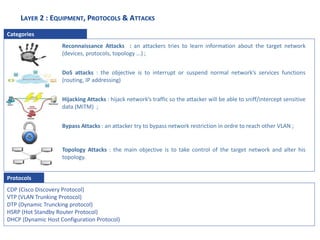
LAYER 2 : EQUIPMENT, PROTOCOLS & ATTACKS
Categories
CDP (Cisco Discovery Protocol)
VTP (VLAN Trunking Protocol)
DTP (Dynamic Truncking protocol)
HSRP (Hot Standby Router Protocol)
DHCP (Dynamic Host Configuration Protocol)
Protocols
Reconnaissance Attacks : an attackers tries to learn information about the target network
(devices, protocols, topology ...) ;
DoS attacks : the objective is to interrupt or suspend normal network’s services functions
(routing, IP addressing)
Hijacking Attacks : hijack network’s traffic so the attacker will be able to sniff/intercept sensitive
data (MiTM) ;
Bypass Attacks : an attacker try to bypass network restriction in ordre to reach other VLAN ;
Topology Attacks : the main objective is to take control of the target network and alter his
topology.
6
Cisco Discovery Protocol (CDP)
 Cisco Discovery Protocol (CDP) is a Cisco proprietary protocol
 Allows Cisco devices to discover each other (IP address, software version, router model, etc)
 How it works : Each network entity broadcasts a CDP packet once per minute
 CDP does not run over IP : it runs directly over the data link layer.
Presentation Vulnerabilities Attacks Mitigation
7
Cisco Discovery Protocol (CDP)
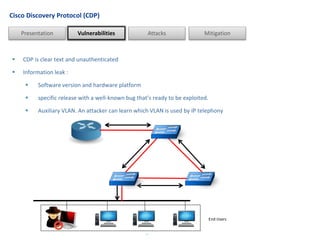
 CDP is clear text and unauthenticated
 Information leak :
 Software version and hardware platform
 specific release with a well-known bug that’s ready to be exploited.
 Auxiliary VLAN. An attacker can learn which VLAN is used by IP telephony
Presentation Vulnerabilities Attacks Mitigation
End Users
8
Cisco Discovery Protocol (CDP)
 CDP Cache Pollution - CDP table becomes unusable because it contains a lot of false information
Presentation Vulnerabilities Attacks Mitigation
Network A
Switch> sh cdp neighbors
Port Device-ID Port-ID Platform
-------- ---------------- -------------------- ------------
2/16 2651e FastEthernet0/1 cisco 2651
2/21 inet3 FastEthernet0/0 cisco 2651
2/36 r2-7206 Ethernet2/0.1 cisco 7206VXR
2/47 00M55I1 Ethernet0 yersinia
2/47 00N55I1 Ethernet0 yersinia
2/47 00N66I1 Ethernet0 yersinia
9
Cisco Discovery Protocol (CDP)
 Only enable CDP on ports to other network devices and uplinks, & disabling it to access ports
 But, CDP must remain enabled on ports to IP phones
 To turn off CDP :
Presentation Vulnerabilities Attacks Mitigation
CatOS> (enable) set cdp disable <mod>/<port> | all
IOS(config)#no cdp run
IOS(config-if)#no cdp enable
10
Hot Standby Router Protocol (HSRP)
 It makes a group of adjacent routers appear as a single virtual router.
 Each physical router has its own MAC and IP addresses, but it shares one MAC and one IP address for the
virtual router.
 Routers exchanges HSRP messages to elect the active router. A standby router can becomes active when
 It receives no more HSRP hello messages from the active router
 The active router explicitly wants to become standby
Presentation Vulnerabilities Attacks Mitigation
Hosts with a Default Route to 192.168.0.8
Router A
IP : 192.168.0.7
MAC : From Hardware
Router B
IP : 192.168.0.7
MAC : 000.0C07.AC01
Router C
IP : 192.168.0.7
MAC : From Hardware
HSRP Group
11
 HSRP is clear text : HSRP commits a slight information leackage by adverstising all the routers’IP addresses,
authentication Data ...
 There is a possibility for a standby router to immediatly take over the role of the active router :
 Standby routers used their own MAC addresses as source MAC
 The active router uses the virtual MAC addresses
Hot Standby Router Protocol (HSRP)
Presentation Vulnerabilities Attacks Mitigation
12
Hot Standby Router Protocol (HSRP)
 DoS attack - an attacker send fake HSRP packet where the priority is set to the maximum value 255 & the
correct value for Authentication Data, Group virtual IP address. All trafic sent to a black hole.
Presentation Vulnerabilities Attacks Mitigation
Hosts with a Default Route to 192.168.0.7
Router A
IP : 192.168.0.7
MAC : From Hardware
Router B
IP : 192.168.0.7
MAC : 000.0C07.AC01
Router C
IP : 192.168.0.7
MAC : From Hardware
HSRP Group
Active Virtual Router
IP : 192.168.0.7
MAC : 000.0C07.AC01
Network A
Network B
13
Hot Standby Router Protocol (HSRP)
 Man-In-The-Middle attack – attacker can intercept, listen & modify unprotected data
Presentation Vulnerabilities Attacks Mitigation
Hosts with a Default Route to 192.168.0.8
Router A
IP : 192.168.0.7
MAC : From Hardware
Router B
IP : 192.168.0.7
MAC : 000.0C07.AC01
HSRP Group
Active Virtual Router
IP : 192.168.0.7
MAC : 000.0C07.AC01
Router C
IP : 192.168.0.7
MAC : From Hardware
14
Hot Standby Router Protocol (HSRP)
 The ways to mitigate these attacks rely on preventing :
 Forging valid authentication data. If the attacker is unable to present the correct credentials, all
other routers reject his packets.
 Sending HSRP packets. The network infrastructure blocks all HSRP packets except those sent by
authorized HSRP routers.
Presentation Vulnerabilities Attacks Mitigation
How to protect us from these attacks ?
Okey ... But How ?!
Using strong authentication : MD5 Key Chain to authenticate HSRP messages
15
Others Attacks
This protocol gives an attacker the ability to add and remove VLAN from the network.
If a switch port has been configured to send and/or listen to DTP advertisements, a hacker can easily coerce the
port into becoming a trunk.
Hijacking Traffic Using DHCP Rogue Servers
DNS Server DHCP Server File Server
ClientAttacker
10.50.72.66
Attacker replies with
Fraudulent information.
This include his own
computer as the gateway,
so all packets from clients
pass through his server.
Hi may I please have IP, Gateway
& DNS @ ?
Client sends DHCP requests
packets for IP, DNS &
gateway addresses
IP : 10.50.72.0/24
GW :10.50.72.66
DNS : 10.50.72.66
VTP (VLAN Trunking Protocol)
DTP (Dynamic Trunking Protocol)
DHCP (Dynamic Host Configuration Protocol )
16
Outline
1 Why Worry About Layer 2 Security ?
4 Conclusion
3 Pentesting Layer 2 methodology
2 Playing with Layer 2 protocols
17
Pentesting Layer 2 - Methodology
Sniffing
(CDP, VTP, HSRP, DHCP ...)
NoAnalyze CDP packets
& pick your own IP @
Reconnaissance attacks
Yes
CDP packet analysis
HSRP packets
DHCP information
Become an active router
Introduce rogue DHCP server
MiTM
DNS Hijacking
DTP protocol analysis Enable truncking mode
Sniff network traffic of top layersHijacking attacks
DHCP Enabled ?
18
Outline
1 Why Worry About Layer 2 Security ?
4 Conclusion
3 Pentesting Layer 2 methodology
2 Playing with Layer 2 protocols
19
Conclusion
 According to our last pen test missions, 95 % of these attacks are successful, which prove that layer 2
security is always ignored by companies
 In general we recommend :
 Managing switches in as secure a manner as possible (SSH, permit lists, etc.)
 Using a dedicated VLAN ID for all trunk ports. Be paranoid: do not use VLAN 1 for anything.
 Setting users ports to a non trunking state.
 Deploying port-security whenever possible for user ports.
 Using private VLANS where appropriate to further divide L2 networks.
 Disabling all unused ports and put them in an unused VLAN.
 Disabling CDP whenever possible
 Ensuring DHCP attack prevention (DHCP snooping)
20
REFERENCES
LAN Switch Security: What Hackers Know About Your Switches
Eric Vyncke, Christopher Paggen
Yersinia, a framework for layer 2 attacks - Black Hat
Berrueta Andres

Pentesting layer 2 protocols

  • 1.
    1 PENTESTING LAYER 2PROTOCOLS By Temmar Abdessamad temmar.abdessamad@gmail.com
  • 2.
    2 Outline 1 Why WorryAbout Layer 2 Security ? 4 Conclusion 3 Pentesting Layer 2 methodology 2 Playing with Layer 2 protocols 1
  • 3.
    3 Why Worry AboutLayer 2 Security ? Application Presentation Session Transport Network Data Link Physical Application Presentation Session Transport Network Data Link Physical Physical Links MAC addresses IP addresses Initial Compromise • Application Stream POP3, IMAP, IM SSL, SSH ... Compromised • OSI model was built to allow different layers to work without the knowledge of each other • Unfortunately this means if one layer is hacked, communications are compromised without the other layers being aware of the problem • When it comes to networking ... layer 2 can be a very weak link ! • Security is only as strong as the weakest link
  • 4.
    4 Outline 1 Why WorryAbout Layer 2 Security ? 4 Conclusion 3 Pentesting Layer 2 methodology Playing with Layer 2 protocols2
  • 5.
    5 LAYER 2 :EQUIPMENT, PROTOCOLS & ATTACKS Categories CDP (Cisco Discovery Protocol) VTP (VLAN Trunking Protocol) DTP (Dynamic Truncking protocol) HSRP (Hot Standby Router Protocol) DHCP (Dynamic Host Configuration Protocol) Protocols Reconnaissance Attacks : an attackers tries to learn information about the target network (devices, protocols, topology ...) ; DoS attacks : the objective is to interrupt or suspend normal network’s services functions (routing, IP addressing) Hijacking Attacks : hijack network’s traffic so the attacker will be able to sniff/intercept sensitive data (MiTM) ; Bypass Attacks : an attacker try to bypass network restriction in ordre to reach other VLAN ; Topology Attacks : the main objective is to take control of the target network and alter his topology.
  • 6.
    6 Cisco Discovery Protocol(CDP)  Cisco Discovery Protocol (CDP) is a Cisco proprietary protocol  Allows Cisco devices to discover each other (IP address, software version, router model, etc)  How it works : Each network entity broadcasts a CDP packet once per minute  CDP does not run over IP : it runs directly over the data link layer. Presentation Vulnerabilities Attacks Mitigation
  • 7.
    7 Cisco Discovery Protocol(CDP)  CDP is clear text and unauthenticated  Information leak :  Software version and hardware platform  specific release with a well-known bug that’s ready to be exploited.  Auxiliary VLAN. An attacker can learn which VLAN is used by IP telephony Presentation Vulnerabilities Attacks Mitigation End Users
  • 8.
    8 Cisco Discovery Protocol(CDP)  CDP Cache Pollution - CDP table becomes unusable because it contains a lot of false information Presentation Vulnerabilities Attacks Mitigation Network A Switch> sh cdp neighbors Port Device-ID Port-ID Platform -------- ---------------- -------------------- ------------ 2/16 2651e FastEthernet0/1 cisco 2651 2/21 inet3 FastEthernet0/0 cisco 2651 2/36 r2-7206 Ethernet2/0.1 cisco 7206VXR 2/47 00M55I1 Ethernet0 yersinia 2/47 00N55I1 Ethernet0 yersinia 2/47 00N66I1 Ethernet0 yersinia
  • 9.
    9 Cisco Discovery Protocol(CDP)  Only enable CDP on ports to other network devices and uplinks, & disabling it to access ports  But, CDP must remain enabled on ports to IP phones  To turn off CDP : Presentation Vulnerabilities Attacks Mitigation CatOS> (enable) set cdp disable <mod>/<port> | all IOS(config)#no cdp run IOS(config-if)#no cdp enable
  • 10.
    10 Hot Standby RouterProtocol (HSRP)  It makes a group of adjacent routers appear as a single virtual router.  Each physical router has its own MAC and IP addresses, but it shares one MAC and one IP address for the virtual router.  Routers exchanges HSRP messages to elect the active router. A standby router can becomes active when  It receives no more HSRP hello messages from the active router  The active router explicitly wants to become standby Presentation Vulnerabilities Attacks Mitigation Hosts with a Default Route to 192.168.0.8 Router A IP : 192.168.0.7 MAC : From Hardware Router B IP : 192.168.0.7 MAC : 000.0C07.AC01 Router C IP : 192.168.0.7 MAC : From Hardware HSRP Group
  • 11.
    11  HSRP isclear text : HSRP commits a slight information leackage by adverstising all the routers’IP addresses, authentication Data ...  There is a possibility for a standby router to immediatly take over the role of the active router :  Standby routers used their own MAC addresses as source MAC  The active router uses the virtual MAC addresses Hot Standby Router Protocol (HSRP) Presentation Vulnerabilities Attacks Mitigation
  • 12.
    12 Hot Standby RouterProtocol (HSRP)  DoS attack - an attacker send fake HSRP packet where the priority is set to the maximum value 255 & the correct value for Authentication Data, Group virtual IP address. All trafic sent to a black hole. Presentation Vulnerabilities Attacks Mitigation Hosts with a Default Route to 192.168.0.7 Router A IP : 192.168.0.7 MAC : From Hardware Router B IP : 192.168.0.7 MAC : 000.0C07.AC01 Router C IP : 192.168.0.7 MAC : From Hardware HSRP Group Active Virtual Router IP : 192.168.0.7 MAC : 000.0C07.AC01 Network A Network B
  • 13.
    13 Hot Standby RouterProtocol (HSRP)  Man-In-The-Middle attack – attacker can intercept, listen & modify unprotected data Presentation Vulnerabilities Attacks Mitigation Hosts with a Default Route to 192.168.0.8 Router A IP : 192.168.0.7 MAC : From Hardware Router B IP : 192.168.0.7 MAC : 000.0C07.AC01 HSRP Group Active Virtual Router IP : 192.168.0.7 MAC : 000.0C07.AC01 Router C IP : 192.168.0.7 MAC : From Hardware
  • 14.
    14 Hot Standby RouterProtocol (HSRP)  The ways to mitigate these attacks rely on preventing :  Forging valid authentication data. If the attacker is unable to present the correct credentials, all other routers reject his packets.  Sending HSRP packets. The network infrastructure blocks all HSRP packets except those sent by authorized HSRP routers. Presentation Vulnerabilities Attacks Mitigation How to protect us from these attacks ? Okey ... But How ?! Using strong authentication : MD5 Key Chain to authenticate HSRP messages
  • 15.
    15 Others Attacks This protocolgives an attacker the ability to add and remove VLAN from the network. If a switch port has been configured to send and/or listen to DTP advertisements, a hacker can easily coerce the port into becoming a trunk. Hijacking Traffic Using DHCP Rogue Servers DNS Server DHCP Server File Server ClientAttacker 10.50.72.66 Attacker replies with Fraudulent information. This include his own computer as the gateway, so all packets from clients pass through his server. Hi may I please have IP, Gateway & DNS @ ? Client sends DHCP requests packets for IP, DNS & gateway addresses IP : 10.50.72.0/24 GW :10.50.72.66 DNS : 10.50.72.66 VTP (VLAN Trunking Protocol) DTP (Dynamic Trunking Protocol) DHCP (Dynamic Host Configuration Protocol )
  • 16.
    16 Outline 1 Why WorryAbout Layer 2 Security ? 4 Conclusion 3 Pentesting Layer 2 methodology 2 Playing with Layer 2 protocols
  • 17.
    17 Pentesting Layer 2- Methodology Sniffing (CDP, VTP, HSRP, DHCP ...) NoAnalyze CDP packets & pick your own IP @ Reconnaissance attacks Yes CDP packet analysis HSRP packets DHCP information Become an active router Introduce rogue DHCP server MiTM DNS Hijacking DTP protocol analysis Enable truncking mode Sniff network traffic of top layersHijacking attacks DHCP Enabled ?
  • 18.
    18 Outline 1 Why WorryAbout Layer 2 Security ? 4 Conclusion 3 Pentesting Layer 2 methodology 2 Playing with Layer 2 protocols
  • 19.
    19 Conclusion  According toour last pen test missions, 95 % of these attacks are successful, which prove that layer 2 security is always ignored by companies  In general we recommend :  Managing switches in as secure a manner as possible (SSH, permit lists, etc.)  Using a dedicated VLAN ID for all trunk ports. Be paranoid: do not use VLAN 1 for anything.  Setting users ports to a non trunking state.  Deploying port-security whenever possible for user ports.  Using private VLANS where appropriate to further divide L2 networks.  Disabling all unused ports and put them in an unused VLAN.  Disabling CDP whenever possible  Ensuring DHCP attack prevention (DHCP snooping)
  • 20.
    20 REFERENCES LAN Switch Security:What Hackers Know About Your Switches Eric Vyncke, Christopher Paggen Yersinia, a framework for layer 2 attacks - Black Hat Berrueta Andres

Editor's Notes

  • #10 Because CDP is mainly interesting to use between network devices and not toward end-user hosts, the best way to prevent both the DoS attacks and information leaks is to only enable CDP on ports to other network devices and uplinks while disabling it to access ports. Because of the low level of risk and the benefits of CDP in IP phone deployment, as well as for network operation and troubleshooting, it is better to leave CDP enabled on all ports. Of course, the best option is to only configure CDP on ports where it is required (such as those with an IP phone) to reduce risk exposure.