Boost Your Online Branding
with a WordPress Blog
OPCUG/PATACS
March 16, 2024
by
Gary Vaughan, Web Designer
Agenda
1. Why a Blog for a PATACS Member?
2. General Website Planning Steps
3. Simple Social Media and Website Software Options
4. Moving up to a WordPress (WP) Website
5. WordPress.Com - a user-friendly WP Option
6. WP as a tool/community to “do good”
Format: Slides, Demo, Q+A…see this [link TBD] for Slides copy
Special 10% Discount Offer!: See Brochure for 3 Website Services!
Icons Source: Iconmonstr
About Me…
• 15 Years IT Contractor at State Dept until June 2022 (WP Support)
• Career Project Manager in int’l development (USAID, Peace Corps)
• MBA and PMP (Project Management Professional) – see my LinkedIn.
• Volunteer Website coaching of non-profits since 2018 (see pro bono
sites to offer your services: Taproot Plus, or Catchafire)
• Launched my Website Design Consulting Fall 2022!
A Website tells your Story!
• Rationale for a Blog…
• A digital “storefront” you control and “brand”
• A “hub” for other social media
• A broad and deep “container” for your content and story
*Website as a space to hone, update your “value add”
-- for easy entry to learn/experiment with WordPress software…
-- to launch a personal blog or hobbyist site…
-- or your solopreneur/non-profit services.
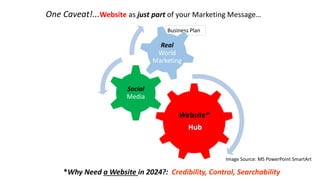
Business Plan
Website*
Hub
Social
Media
Real
World
Marketing
One Caveat!...Website as just part of your Marketing Message…
*Why Need a Website in 2024?: Credibility, Control, Searchability
Image Source: MS PowerPoint SmartArt
Do you really need a website?
• Is a site worth the “investment” (esp. up front cost)?
• More time than money to set up and maintain
• Easier alternatives to a website:
• Engage on 1 or more social media platforms
• Use a rich LinkedIn profile & network as a starting point on Web
• Set up a simple “personal landing page” – About.Me or better on WP.COM
Start with Social Media
• Focus on 2-3 top Platforms
• LinkedIn, Twitter (X), Facebook Business, Instagram (dynamic!)
• Draft profile, engage with community
• Lay basis for future connection to website
• Explore Freelancing sites (if “Solopreneur” option)
• Examples: simple Fiverr (I plan to launch!), more complex Upwork
• One-off sales – globally competitive!
• Sharpen your “value add” and website brand
Website Planning Tips
• Audience (demographics)
• Models (inspirational websites)
• Site Map (your site sketch or outline)
• Content (text, images, logo…)
• Team (site Admin and support)
• Design (or redesign…migration?)
Draft a Project Plan (√ graphical Trello) or Brainstorm Design (√ Figma tool)
My Drawn Site Map for “Marketing Maven” [Demo]
Website Design Best Practices
• Layout: professional, brand-consistent, up-to-date Theme
• Scanability: Clean, Readable text… with a “call to action”
• Navigation: Easy-to-find info, Visual Hierarchy
• Images: Optimize size, photos, copyright…Quality!
• Engagement: Build for traffic on Web, “SEO”
• Testing: check browser/device compatibility
Image Source: Pexels [WP.COM]
Blog Drafting Tips
• Practical: How tos, Top Tips, Best of…
• Templates, Infographics, Icons
• Story-telling (√ Selective Potential lighthouse touring)
• Apt Headline, engaging intro
• Short points, break up text – blogs as a narrative form!
• Cite sources, beware copyright (√ free images – Pexels, Wikimedia)√
 Check Blog Writing Tips
Try Simple Software to Build your Website
• Simple “Website Builders”? – software to build and host your site
• Easy, low cost… but limited ability to customize your site
• “Proprietary” – so decide on one (difficult to switch!)
• Examples: Wix, Weebly, Squarespace, GoDaddy (free!), etc.
PC Magazine Ranking of Websitebuilders for 2024
Image Source: Digital Branding Institute
Move Up to WordPress
• WordPress a Leader on the Web
• Open Source Software + Thousands of Themes, Plugins
• 45% of Web is on WordPress – Community Support!
• Cost: small monthly charges typically for hosting and support
WordPress.Org (advanced) vs. WordPress.Com (simplified)
A WP.COM Solution: Key Features
• A simplified, hosted WordPress service by Automattic
• Free or small fee ($4-$25/month), depending on Plan
• Built-in Updates, Security, Backup, Site Analytics (user traffic)
• Great Support!: FAQ knowledge base, webinars, classes, forums
• Con: most plans w/ limited add-ons (Plugins), can retire Themes
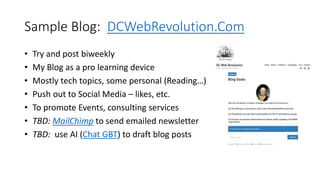
Sample Blog: DCWebRevolution.Com
• Try and post biweekly
• My Blog as a pro learning device
• Mostly tech topics, some personal (Reading…)
• Push out to Social Media – likes, etc.
• To promote Events, consulting services
• TBD: MailChimp to send emailed newsletter
• TBD: use AI (Chat GBT) to draft blog posts
Other Pro Blog Examples
• The Perimeter
• UK Photos, WP.COM site…Tips: √ Events focus, Media outreach, visual impact
• Mind the Workplace
• US Law Prof, WP.COM site …Tips: √ Simple blog layout, hi value blog articles
• Selective Potential
• US Life Stylist, Squarespace site…Tips: √ use of Blog Categories for
travels/services
Basic WordPress Concepts
• Dashboard vs Site View – internal controls vs external public site
• Theme – a type, or style of layout
• Media – place for images, photos, PDFs
• Post – changing content, like a Blog post
• Page – more static content, like an About page
• Menu – a place to organize and display your content on site
• Block Editor – modular blocks to build Pages and Posts
• Site Editor – updated flexible Editor + related Block Themes
WP.COM Demo (20 min.)
1. Demo a Winery Blog [“Libre 2”: Classic Theme]
2. Show site’s “Dashboard”
• Frontend (Public View): Blog Posts, Pages, Menu, Footer
• Backend (Input Actions): Left sidebar, “Coming Soon”…Add sites
• Add Content: Pages, Posts, Media
• Navigation: Theme (layout), Menu (location, display)
• Interaction: Feedback, Comments…Analytics
See Annexes 1-2 for WP.COM Start-up Tips
Quick Account/Bare Site Setup Steps (15 min)
My 3 Theme (layout) Suggestions
WP.COM Support Resources
• Get WP Answers on Support (or “?” on your Dashboard, or Google it)
• Sign up for free Webinar or see past Webinars (see Webinars).
• Learn from WordPress Community: WordCamps, Wordpresstv
• My Notes from attending WC US at National Harbor last August
• Upcoming “WordCamps”:
• Montclair, NJ: 6/1/24
• WC Canada – Ottawa: 7/11-13/24
• WC US – Portland, OR: 9/17-20/24
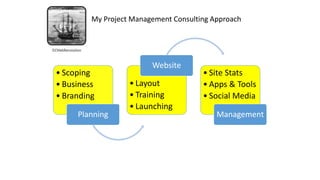
• Scoping
• Business
• Branding
Planning
• Layout
• Training
• Launching
Website
• Site Stats
• Apps & Tools
• Social Media
Management
My Project Management Consulting Approach
My Conclusions
• A Blog/Website can enhance your “brand” and traffic
• A site as a “hub” for social media interaction with your Audience
• WordPress dominates Web, and WP.COM - an easy entrée
• WP.COM offers a wealth of self-help resources and support
• Check out my WP.COM account set-up steps…and DIY Option – see
my Resources link!
Explore WordPress.Com today!
Contact Me
• Email: gary@dcwebrevolution.com
• Cell: 703-899-9940
• Website: https://dcwebrevolution.com
Free PATACS-Only Offer: An added 10% off my Brochure prices!
Brochure prices: New Website $100, Website Check $50, Online Business Plan $200
Call or Email me with any questions.
Coming Soon: Launch of my Web Design services on Fiverr!
Thank
You!*
ANNEXES
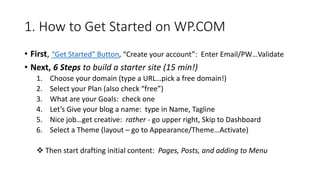
1. How to Get Started on WP.COM
• First, “Get Started” Button, “Create your account”: Enter Email/PW…Validate
• Next, 6 Steps to build a starter site (15 min!)
1. Choose your domain (type a URL…pick a free domain!)
2. Select your Plan (also check “free”)
3. What are your Goals: check one
4. Let’s Give your blog a name: type in Name, Tagline
5. Nice job…get creative: rather - go upper right, Skip to Dashboard
6. Select a Theme (layout – go to Appearance/Theme…Activate)
 Then start drafting initial content: Pages, Posts, and adding to Menu
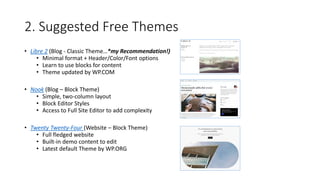
2. Suggested Free Themes
• Libre 2 (Blog - Classic Theme…*my Recommendation!)
• Minimal format + Header/Color/Font options
• Learn to use blocks for content
• Theme updated by WP.COM
• Nook (Blog – Block Theme)
• Simple, two-column layout
• Block Editor Styles
• Access to Full Site Editor to add complexity
• Twenty Twenty-Four (Website – Block Theme)
• Full fledged website
• Built-in demo content to edit
• Latest default Theme by WP.ORG
3. Resources to Grow your Site – Tools
Harness additional online tools and apps…..
• Design Logos or Infographics (free Canva tool, DIY Infographics)
• Try Podcasting (How to Article, Software Options)
• Produce Videos (Infographic, Software Options - Capcut
• Link to Appointment App (6 Top Appointment Apps for Your Business)
• Automate Emailed Newsletters (for ex., MailChimp)
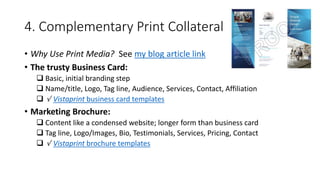
4. Complementary Print Collateral
• Why Use Print Media? See my blog article link
• The trusty Business Card:
 Basic, initial branding step
 Name/title, Logo, Tag line, Audience, Services, Contact, Affiliation
 √ Vistaprint business card templates
• Marketing Brochure:
 Content like a condensed website; longer form than business card
 Tag line, Logo/Images, Bio, Testimonials, Services, Pricing, Contact
 √ Vistaprint brochure templates
Use WP to Help Your Community!
WP as a tool to promote and help your local cause
• Inspiring story of Shambi Broome in Columbia, SC
• She is a full-time WP Web Developer and cancer survivor
• Founded a non-profit to train girls in coding: Webgyrlz Code
• Mobilized girls to build a website vs local food insecurity: Cancel Hunger
• Video of her talk at WP US in DC last August.
• Another example: WP.ORG supports “Kids Camps” to teach WP
WP is a great way to mobilize local talent and resources to do good!

PATACS_WPCOM_Slides_March16_2024_FINAL_Z.pptx

  • 1.
    Boost Your OnlineBranding with a WordPress Blog OPCUG/PATACS March 16, 2024 by Gary Vaughan, Web Designer
  • 2.
    Agenda 1. Why aBlog for a PATACS Member? 2. General Website Planning Steps 3. Simple Social Media and Website Software Options 4. Moving up to a WordPress (WP) Website 5. WordPress.Com - a user-friendly WP Option 6. WP as a tool/community to “do good” Format: Slides, Demo, Q+A…see this [link TBD] for Slides copy Special 10% Discount Offer!: See Brochure for 3 Website Services! Icons Source: Iconmonstr
  • 3.
    About Me… • 15Years IT Contractor at State Dept until June 2022 (WP Support) • Career Project Manager in int’l development (USAID, Peace Corps) • MBA and PMP (Project Management Professional) – see my LinkedIn. • Volunteer Website coaching of non-profits since 2018 (see pro bono sites to offer your services: Taproot Plus, or Catchafire) • Launched my Website Design Consulting Fall 2022!
  • 4.
    A Website tellsyour Story! • Rationale for a Blog… • A digital “storefront” you control and “brand” • A “hub” for other social media • A broad and deep “container” for your content and story *Website as a space to hone, update your “value add” -- for easy entry to learn/experiment with WordPress software… -- to launch a personal blog or hobbyist site… -- or your solopreneur/non-profit services.
  • 5.
    Business Plan Website* Hub Social Media Real World Marketing One Caveat!...Websiteas just part of your Marketing Message… *Why Need a Website in 2024?: Credibility, Control, Searchability Image Source: MS PowerPoint SmartArt
  • 6.
    Do you reallyneed a website? • Is a site worth the “investment” (esp. up front cost)? • More time than money to set up and maintain • Easier alternatives to a website: • Engage on 1 or more social media platforms • Use a rich LinkedIn profile & network as a starting point on Web • Set up a simple “personal landing page” – About.Me or better on WP.COM
  • 7.
    Start with SocialMedia • Focus on 2-3 top Platforms • LinkedIn, Twitter (X), Facebook Business, Instagram (dynamic!) • Draft profile, engage with community • Lay basis for future connection to website • Explore Freelancing sites (if “Solopreneur” option) • Examples: simple Fiverr (I plan to launch!), more complex Upwork • One-off sales – globally competitive! • Sharpen your “value add” and website brand
  • 8.
    Website Planning Tips •Audience (demographics) • Models (inspirational websites) • Site Map (your site sketch or outline) • Content (text, images, logo…) • Team (site Admin and support) • Design (or redesign…migration?) Draft a Project Plan (√ graphical Trello) or Brainstorm Design (√ Figma tool) My Drawn Site Map for “Marketing Maven” [Demo]
  • 9.
    Website Design BestPractices • Layout: professional, brand-consistent, up-to-date Theme • Scanability: Clean, Readable text… with a “call to action” • Navigation: Easy-to-find info, Visual Hierarchy • Images: Optimize size, photos, copyright…Quality! • Engagement: Build for traffic on Web, “SEO” • Testing: check browser/device compatibility Image Source: Pexels [WP.COM]
  • 10.
    Blog Drafting Tips •Practical: How tos, Top Tips, Best of… • Templates, Infographics, Icons • Story-telling (√ Selective Potential lighthouse touring) • Apt Headline, engaging intro • Short points, break up text – blogs as a narrative form! • Cite sources, beware copyright (√ free images – Pexels, Wikimedia)√  Check Blog Writing Tips
  • 11.
    Try Simple Softwareto Build your Website • Simple “Website Builders”? – software to build and host your site • Easy, low cost… but limited ability to customize your site • “Proprietary” – so decide on one (difficult to switch!) • Examples: Wix, Weebly, Squarespace, GoDaddy (free!), etc. PC Magazine Ranking of Websitebuilders for 2024 Image Source: Digital Branding Institute
  • 12.
    Move Up toWordPress • WordPress a Leader on the Web • Open Source Software + Thousands of Themes, Plugins • 45% of Web is on WordPress – Community Support! • Cost: small monthly charges typically for hosting and support WordPress.Org (advanced) vs. WordPress.Com (simplified)
  • 13.
    A WP.COM Solution:Key Features • A simplified, hosted WordPress service by Automattic • Free or small fee ($4-$25/month), depending on Plan • Built-in Updates, Security, Backup, Site Analytics (user traffic) • Great Support!: FAQ knowledge base, webinars, classes, forums • Con: most plans w/ limited add-ons (Plugins), can retire Themes
  • 14.
    Sample Blog: DCWebRevolution.Com •Try and post biweekly • My Blog as a pro learning device • Mostly tech topics, some personal (Reading…) • Push out to Social Media – likes, etc. • To promote Events, consulting services • TBD: MailChimp to send emailed newsletter • TBD: use AI (Chat GBT) to draft blog posts
  • 15.
    Other Pro BlogExamples • The Perimeter • UK Photos, WP.COM site…Tips: √ Events focus, Media outreach, visual impact • Mind the Workplace • US Law Prof, WP.COM site …Tips: √ Simple blog layout, hi value blog articles • Selective Potential • US Life Stylist, Squarespace site…Tips: √ use of Blog Categories for travels/services
  • 16.
    Basic WordPress Concepts •Dashboard vs Site View – internal controls vs external public site • Theme – a type, or style of layout • Media – place for images, photos, PDFs • Post – changing content, like a Blog post • Page – more static content, like an About page • Menu – a place to organize and display your content on site • Block Editor – modular blocks to build Pages and Posts • Site Editor – updated flexible Editor + related Block Themes
  • 17.
    WP.COM Demo (20min.) 1. Demo a Winery Blog [“Libre 2”: Classic Theme] 2. Show site’s “Dashboard” • Frontend (Public View): Blog Posts, Pages, Menu, Footer • Backend (Input Actions): Left sidebar, “Coming Soon”…Add sites • Add Content: Pages, Posts, Media • Navigation: Theme (layout), Menu (location, display) • Interaction: Feedback, Comments…Analytics See Annexes 1-2 for WP.COM Start-up Tips Quick Account/Bare Site Setup Steps (15 min) My 3 Theme (layout) Suggestions
  • 18.
    WP.COM Support Resources •Get WP Answers on Support (or “?” on your Dashboard, or Google it) • Sign up for free Webinar or see past Webinars (see Webinars). • Learn from WordPress Community: WordCamps, Wordpresstv • My Notes from attending WC US at National Harbor last August • Upcoming “WordCamps”: • Montclair, NJ: 6/1/24 • WC Canada – Ottawa: 7/11-13/24 • WC US – Portland, OR: 9/17-20/24
  • 19.
    • Scoping • Business •Branding Planning • Layout • Training • Launching Website • Site Stats • Apps & Tools • Social Media Management My Project Management Consulting Approach
  • 20.
    My Conclusions • ABlog/Website can enhance your “brand” and traffic • A site as a “hub” for social media interaction with your Audience • WordPress dominates Web, and WP.COM - an easy entrée • WP.COM offers a wealth of self-help resources and support • Check out my WP.COM account set-up steps…and DIY Option – see my Resources link! Explore WordPress.Com today!
  • 21.
    Contact Me • Email:gary@dcwebrevolution.com • Cell: 703-899-9940 • Website: https://dcwebrevolution.com Free PATACS-Only Offer: An added 10% off my Brochure prices! Brochure prices: New Website $100, Website Check $50, Online Business Plan $200 Call or Email me with any questions. Coming Soon: Launch of my Web Design services on Fiverr!
  • 22.
  • 23.
  • 24.
    1. How toGet Started on WP.COM • First, “Get Started” Button, “Create your account”: Enter Email/PW…Validate • Next, 6 Steps to build a starter site (15 min!) 1. Choose your domain (type a URL…pick a free domain!) 2. Select your Plan (also check “free”) 3. What are your Goals: check one 4. Let’s Give your blog a name: type in Name, Tagline 5. Nice job…get creative: rather - go upper right, Skip to Dashboard 6. Select a Theme (layout – go to Appearance/Theme…Activate)  Then start drafting initial content: Pages, Posts, and adding to Menu
  • 25.
    2. Suggested FreeThemes • Libre 2 (Blog - Classic Theme…*my Recommendation!) • Minimal format + Header/Color/Font options • Learn to use blocks for content • Theme updated by WP.COM • Nook (Blog – Block Theme) • Simple, two-column layout • Block Editor Styles • Access to Full Site Editor to add complexity • Twenty Twenty-Four (Website – Block Theme) • Full fledged website • Built-in demo content to edit • Latest default Theme by WP.ORG
  • 26.
    3. Resources toGrow your Site – Tools Harness additional online tools and apps….. • Design Logos or Infographics (free Canva tool, DIY Infographics) • Try Podcasting (How to Article, Software Options) • Produce Videos (Infographic, Software Options - Capcut • Link to Appointment App (6 Top Appointment Apps for Your Business) • Automate Emailed Newsletters (for ex., MailChimp)
  • 27.
    4. Complementary PrintCollateral • Why Use Print Media? See my blog article link • The trusty Business Card:  Basic, initial branding step  Name/title, Logo, Tag line, Audience, Services, Contact, Affiliation  √ Vistaprint business card templates • Marketing Brochure:  Content like a condensed website; longer form than business card  Tag line, Logo/Images, Bio, Testimonials, Services, Pricing, Contact  √ Vistaprint brochure templates
  • 28.
    Use WP toHelp Your Community! WP as a tool to promote and help your local cause • Inspiring story of Shambi Broome in Columbia, SC • She is a full-time WP Web Developer and cancer survivor • Founded a non-profit to train girls in coding: Webgyrlz Code • Mobilized girls to build a website vs local food insecurity: Cancel Hunger • Video of her talk at WP US in DC last August. • Another example: WP.ORG supports “Kids Camps” to teach WP WP is a great way to mobilize local talent and resources to do good!