Overhead Projectors,
PowerPoint and Other Visual
Aids
Visual Aids
 What are Visual Aids?
 Why do we use Visual Aids?
 How do we use Visual Aids?
 Using PowerPoint and Other Programs
 Summarize and conclude
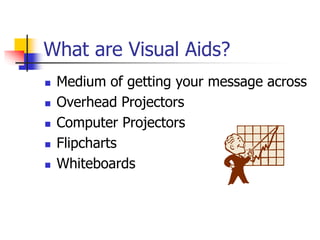
What are Visual Aids?
 Medium of getting your message across
 Overhead Projectors
 Computer Projectors
 Flipcharts
 Whiteboards
Why Do We Use Visual Aids?
 Assists in preparation
 Highlights Key Points
 Increases Audience Retention
 Stimulate the Brain
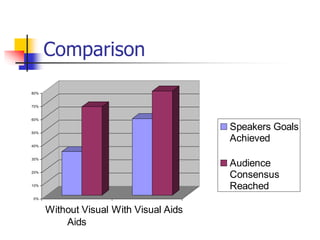
Comparison
0%
10%
20%
30%
40%
50%
60%
70%
80%
Without Visual
Aids
With Visual Aids
Speakers Goals
Achieved
Audience
Consensus
Reached
How Do we use Visual Aids?
 Remember: “Your The Star”
 Minimize To Maximize
 Set-Up the Show
 Practice & Performance
Creating Slides
 One Idea Per Slide
 Six Lines Per Slide
 Six Words Per Line
 Heading to be at Least 36 Font
 Points to be at least 28 Font
 All Fonts Should be Sans Serif
Adding Impact to Slides
 Try Adding Different Colours
 Try Adding Pictures
Setting up your Visual Aid
 “Know The Aid”
 See the Screen
 Position at an Angle for use
 Test the Visual Aid
 Have a “Plan B”
Practice
 The 5 P’s
 “Walk the Talk”
Performance
 Talk to the Audience not to the Screen
 Don’t Point, Use a Pointer
 Hide future points
 Use frames to Stop Light Spillage
 Turn off when your on
PowerPoint
 All the Same rules apply plus
 Don’t use timers
 Minimize use of slide transitions
 Have a Backup & Test

Overhead Projectors, PowerPoint and Other Visual Aids.ppt

  • 1.
  • 2.
    Visual Aids  Whatare Visual Aids?  Why do we use Visual Aids?  How do we use Visual Aids?  Using PowerPoint and Other Programs  Summarize and conclude
  • 3.
    What are VisualAids?  Medium of getting your message across  Overhead Projectors  Computer Projectors  Flipcharts  Whiteboards
  • 4.
    Why Do WeUse Visual Aids?  Assists in preparation  Highlights Key Points  Increases Audience Retention  Stimulate the Brain
  • 5.
    Comparison 0% 10% 20% 30% 40% 50% 60% 70% 80% Without Visual Aids With VisualAids Speakers Goals Achieved Audience Consensus Reached
  • 6.
    How Do weuse Visual Aids?  Remember: “Your The Star”  Minimize To Maximize  Set-Up the Show  Practice & Performance
  • 7.
    Creating Slides  OneIdea Per Slide  Six Lines Per Slide  Six Words Per Line  Heading to be at Least 36 Font  Points to be at least 28 Font  All Fonts Should be Sans Serif
  • 8.
    Adding Impact toSlides  Try Adding Different Colours  Try Adding Pictures
  • 9.
    Setting up yourVisual Aid  “Know The Aid”  See the Screen  Position at an Angle for use  Test the Visual Aid  Have a “Plan B”
  • 10.
    Practice  The 5P’s  “Walk the Talk”
  • 11.
    Performance  Talk tothe Audience not to the Screen  Don’t Point, Use a Pointer  Hide future points  Use frames to Stop Light Spillage  Turn off when your on
  • 12.
    PowerPoint  All theSame rules apply plus  Don’t use timers  Minimize use of slide transitions  Have a Backup & Test