OUMH 1103
  Learning Skills for ODL

            Topik: 2
Environmen Pembelajaran
      Online di OUM
   Disediakan Oleh: Dr. Richard Ng
Objektif:

    Pada akhir topik, anda akan dapat:

    • Menguraikan 7 komponen komputer PC;
    • Menakrifkan konsep Internet;
    • Memahami Browser – IE, Mozilla, Chrome;
    • Memahami dan menggunakan dokumen pdf;
    • Menghuraiakan 4 menu utama MyVLE;
    • Menggunakan MyVLE untuk membantu dalam
       pembelajaran


Prepared by Dr Richard Ng (2011)                Page 2
2.1. Apa itu komputer?


                                   Komputer


                     Hardware                 Software
                   (Perkakasan)               (Perisian)


                                              Arahan kepada
                                                Komputer


Prepared by Dr Richard Ng (2011)                              Page 3
2.2. Komponen sesuatu Komputer:

                                     • CPU

               Input               Process                   Output

          •   Keyboard                                       • Monitor
          •   Mouse                                          • Printer
          •   Joystick                         • RAM
                                     Main
          •   Touch pad                        • ROM
                                    Memory
          •   Touch screen                     • Cache
          •   Touch pen

                                                 •   Hard Disk
                                                 •   Floppy Disk
                                   Secondary     •   CD-ROM
                                    Storage      •   Flash Card
                                                 •   Thumb drive
Prepared by Dr Richard Ng (2011)                                         Page 4
2.3. Personal computer:


      (Source: Capron, H.L. (2003). Computers. New Jersey: Prentice Hall)


Prepared by Dr Richard Ng (2011)                                            Page 5
2.4. Konsep Asas Internet


      Source: Laudon & Laudon (2003). Management Information System. New Jersey: Prentice Hall.

Prepared by Dr Richard Ng (2011)                                                                  Page 6
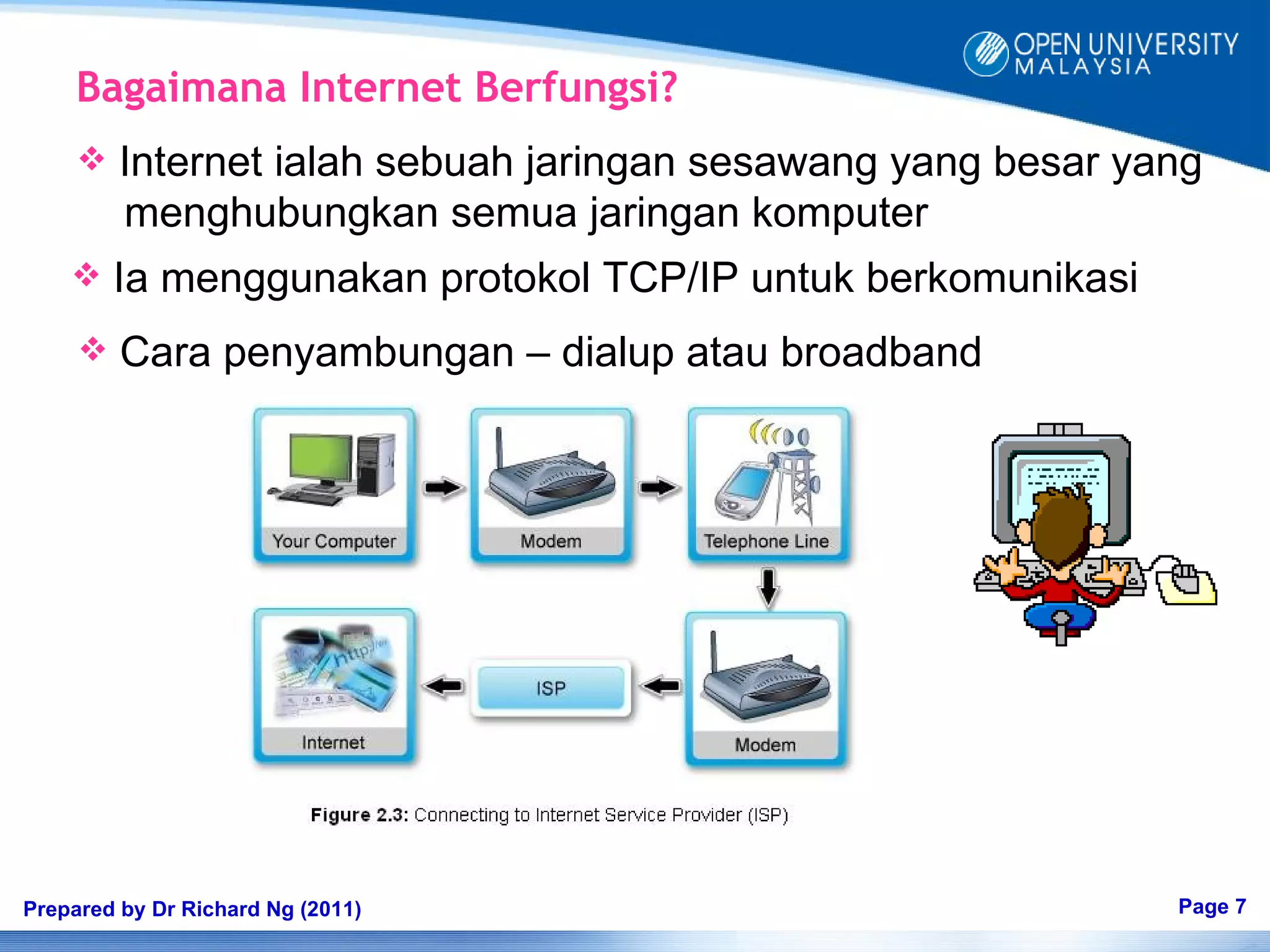
Bagaimana Internet Berfungsi?
        Internet ialah sebuah jaringan sesawang yang besar yang
         menghubungkan semua jaringan komputer
        Ia menggunakan protokol TCP/IP untuk berkomunikasi
        Cara penyambungan – dialup atau broadband


Prepared by Dr Richard Ng (2011)                              Page 7
2.5. Apakah yang dapat anda lakukan di
         Internet?
                             Diskusi
                             Online
        Mengakses
    Bahan Teks dan                           Pertukaran
        Multimedia                           Emel


         Mengakses
               Dan
       Memuat-turun                          Mencari
             Bahan                           Maklumat


Prepared by Dr Richard Ng (2011)                          Page 8
2.6. Memahami Konsep Internet:

       World wide web – www
                - the World Wide Web is the interface that enables
                  users to access information in multimedia formats
                  from databases all over the world

       Website
                - A website is any site in the World Wide Web
                - A website consists of many web pages
                - The first page is the homepage

       Webpage
                - A document on the World Wide Web
                - Usually, a Web page contains links to other Web pages


Prepared by Dr Richard Ng (2011)                                          Page 9
   Web Browser
                - A Web browser is the software that allows you to view
                  the Internet and move around it
                - Example: Internet Explorer , Mozilla Fire Fox, Google Chrome


       Uniform Resource Locator (URL)
                -   is an address of a website
                -   Example: http://www.oum.edu.my
                -   http:// represents hypertext transfer protocol
                -   www represents worldwide web
                -   oum represents the domain name
                -   .edu represents the host identifier
                -   .my represents the country code

Prepared by Dr Richard Ng (2011)                                            Page 10
   Hyperlink (Pautan)
                  - jump or link to other locations
                  - displayed as underlined text, graphical objects, or pictures

                    http://www.oum.edu.my/


Prepared by Dr Richard Ng (2011)                                                   Page 11
2.7. Microsoft Internet Explorer   Title Bar
                                                     Menu Bar


                                                     Tool Bar

                                                    Address Bar


Prepared by Dr Richard Ng (2011)                         Page 12
2.8. Portable Document Format (PDF)
           Fail PDF adalah sejenis perisian yang di gunakan
            untuk pertukaran dokumen tanpa mengubah isi
            kandungan
           Nama fail diakhiri dengan .pdf
          Acrobat Reader
           diperlukan untuk
           membaca fail PDF
          Acrobat Reader
           boleh dimuat-turun
           dari Internet melalui
           www.adobe.com


Prepared by Dr Richard Ng (2011)                               Page 13
Sampel fail PDF


Prepared by Dr Richard Ng (2011)   Page 14
2.9. OUM’s MYVLE


Prepared by Dr Richard Ng (2011)   Page 15
2.9. My Virtual Learning Environment (MyVLE)
       Cara mengakses MyVLE:
           Langkah: 1 – Taip URL  www.oum.edu.my
           Langkah : 2 – Klik pada‘First time login’
           Langkah : 3 – Taip nombor Kad Pengenalan
           Langkah : 4 – Daftar username dan password dan klik
                          submit
           Langkah : 5 – Login melalui portal OUM dengan
                          menggunakan username dan password
           Langkah : 6 – Dalame MyVLE, anda dapat mengakases
                          myProfile, E-Services, email, Library,
                         Resources, OUM doc, Help, myCourse dan
                          Quick Links, announcement
Prepared by Dr Richard Ng (2011)                                  Page 16
Course Link


Prepared by Dr Richard Ng (2011)   Page 17
Course Forum


Prepared by Dr Richard Ng (2011)   Page 18
Digital Library


Prepared by Dr Richard Ng (2011)   Page 19
Bagaimana MyVLE membantu
     Menambahbaik Pembelajaran Anda?
        Self-assessment
        Course materials and references
        Communication and collaborative learning
        Sharing resources and information


Prepared by Dr Richard Ng (2011)                    Page 20
   Self-assessment
            Membantu anda menguji pemahaman anda seberapa
             kali yang anda perlukan dan pada bila-bila masa

        Course Content and Assignment
            Mengakses bahan bacaan secara online serta memuat-
             turun soalan tugasan
        Communication and Collaborative Learning
            Membolehkan anda berkomunikasi dan belajar daripada
             tutor dan rakan pelajar pada bila-bila masa
                  - Online Discussion Forum
                  - Gmail
                  - Chat


Prepared by Dr Richard Ng (2011)                                  Page 21
Past Years Questions:
    May 2008 - Part B

       MyVLE, can enhance an OUM student’s learning.

       c) Describe four tools in myVLE, and explain how each
          tool can enhance the learning of an OUM student
                                                     (10 marks)

       a) Ali does not want to attend face-to-face tutorial and
          he believes that being active in myVLE is enough for
          his learning at OUM. State FOUR (4) consequences
          of his action.
                                                     (10 marks)

Prepared by Dr Richard Ng (2011)                             Page 22
Sample Answers

      a) Four tools in myVLE that can enhance learning are:

            i) Self Assessment tool – contains practice questions
               which allows us to test ourselves as many times as
               we wish at our own pace and comfort and at our own
               time
            ii) Course Content and Assignment - contains the
                most recent, accurate, reliable and just-in-time
                information or course content
            iii) Communication and Collaboration – consists of
                 online forum and email - allows us to interact,
                 communicate and learn from our tutor and peers
                 anytime and anywhere

Prepared by Dr Richard Ng (2011)                                   Page 23
iv) Useful Resources - contains extra content in the learning
          module that we can use as additional resources for our
          subjects. It contains added information from various
          resources like YouTube, iRadio  or website

b) Four consequences of not attending face-to-face tutorial:

      i) Ali must possess skills in using computer and Internet
         in order to stay active in the myVLE
      ii) The quality of learning depends on the active
          participation of all learners


Prepared by Dr Richard Ng (2011)                               Page 24
iii) Ali will lose the opportunity of getting help from his
              face-to-face tutor and also from his course mates
         iv) Issues related to course materials, assignments and
             other related issues are discussed during the
             face-to-face tutorial sessions


Prepared by Dr Richard Ng (2011)                                   Page 25
Question?
            Question?
                 Question?         End of
                                   Topic
                                     2


Prepared by Dr Richard Ng (2011)            Page 26

OUMH1103 - BM - Topik 2

  • 1.
    OUMH 1103 Learning Skills for ODL Topik: 2 Environmen Pembelajaran Online di OUM Disediakan Oleh: Dr. Richard Ng
  • 2.
    Objektif: Pada akhir topik, anda akan dapat: • Menguraikan 7 komponen komputer PC; • Menakrifkan konsep Internet; • Memahami Browser – IE, Mozilla, Chrome; • Memahami dan menggunakan dokumen pdf; • Menghuraiakan 4 menu utama MyVLE; • Menggunakan MyVLE untuk membantu dalam pembelajaran Prepared by Dr Richard Ng (2011) Page 2
  • 3.
    2.1. Apa itukomputer? Komputer Hardware Software (Perkakasan) (Perisian) Arahan kepada Komputer Prepared by Dr Richard Ng (2011) Page 3
  • 4.
    2.2. Komponen sesuatuKomputer: • CPU Input Process Output • Keyboard • Monitor • Mouse • Printer • Joystick • RAM Main • Touch pad • ROM Memory • Touch screen • Cache • Touch pen • Hard Disk • Floppy Disk Secondary • CD-ROM Storage • Flash Card • Thumb drive Prepared by Dr Richard Ng (2011) Page 4
  • 5.
    2.3. Personal computer: (Source: Capron, H.L. (2003). Computers. New Jersey: Prentice Hall) Prepared by Dr Richard Ng (2011) Page 5
  • 6.
    2.4. Konsep AsasInternet Source: Laudon & Laudon (2003). Management Information System. New Jersey: Prentice Hall. Prepared by Dr Richard Ng (2011) Page 6
  • 7.
    Bagaimana Internet Berfungsi?  Internet ialah sebuah jaringan sesawang yang besar yang menghubungkan semua jaringan komputer  Ia menggunakan protokol TCP/IP untuk berkomunikasi  Cara penyambungan – dialup atau broadband Prepared by Dr Richard Ng (2011) Page 7
  • 8.
    2.5. Apakah yangdapat anda lakukan di Internet? Diskusi Online Mengakses Bahan Teks dan Pertukaran Multimedia Emel Mengakses Dan Memuat-turun Mencari Bahan Maklumat Prepared by Dr Richard Ng (2011) Page 8
  • 9.
    2.6. Memahami KonsepInternet:  World wide web – www - the World Wide Web is the interface that enables users to access information in multimedia formats from databases all over the world  Website - A website is any site in the World Wide Web - A website consists of many web pages - The first page is the homepage  Webpage - A document on the World Wide Web - Usually, a Web page contains links to other Web pages Prepared by Dr Richard Ng (2011) Page 9
  • 10.
    Web Browser - A Web browser is the software that allows you to view the Internet and move around it - Example: Internet Explorer , Mozilla Fire Fox, Google Chrome  Uniform Resource Locator (URL) - is an address of a website - Example: http://www.oum.edu.my - http:// represents hypertext transfer protocol - www represents worldwide web - oum represents the domain name - .edu represents the host identifier - .my represents the country code Prepared by Dr Richard Ng (2011) Page 10
  • 11.
    Hyperlink (Pautan) - jump or link to other locations - displayed as underlined text, graphical objects, or pictures http://www.oum.edu.my/ Prepared by Dr Richard Ng (2011) Page 11
  • 12.
    2.7. Microsoft InternetExplorer Title Bar Menu Bar Tool Bar Address Bar Prepared by Dr Richard Ng (2011) Page 12
  • 13.
    2.8. Portable DocumentFormat (PDF)  Fail PDF adalah sejenis perisian yang di gunakan untuk pertukaran dokumen tanpa mengubah isi kandungan  Nama fail diakhiri dengan .pdf  Acrobat Reader diperlukan untuk membaca fail PDF  Acrobat Reader boleh dimuat-turun dari Internet melalui www.adobe.com Prepared by Dr Richard Ng (2011) Page 13
  • 14.
    Sampel fail PDF Preparedby Dr Richard Ng (2011) Page 14
  • 15.
    2.9. OUM’s MYVLE Preparedby Dr Richard Ng (2011) Page 15
  • 16.
    2.9. My VirtualLearning Environment (MyVLE)  Cara mengakses MyVLE:  Langkah: 1 – Taip URL  www.oum.edu.my  Langkah : 2 – Klik pada‘First time login’  Langkah : 3 – Taip nombor Kad Pengenalan  Langkah : 4 – Daftar username dan password dan klik submit  Langkah : 5 – Login melalui portal OUM dengan menggunakan username dan password  Langkah : 6 – Dalame MyVLE, anda dapat mengakases myProfile, E-Services, email, Library, Resources, OUM doc, Help, myCourse dan Quick Links, announcement Prepared by Dr Richard Ng (2011) Page 16
  • 17.
    Course Link Prepared byDr Richard Ng (2011) Page 17
  • 18.
    Course Forum Prepared byDr Richard Ng (2011) Page 18
  • 19.
    Digital Library Prepared byDr Richard Ng (2011) Page 19
  • 20.
    Bagaimana MyVLE membantu Menambahbaik Pembelajaran Anda?  Self-assessment  Course materials and references  Communication and collaborative learning  Sharing resources and information Prepared by Dr Richard Ng (2011) Page 20
  • 21.
    Self-assessment  Membantu anda menguji pemahaman anda seberapa kali yang anda perlukan dan pada bila-bila masa  Course Content and Assignment  Mengakses bahan bacaan secara online serta memuat- turun soalan tugasan  Communication and Collaborative Learning  Membolehkan anda berkomunikasi dan belajar daripada tutor dan rakan pelajar pada bila-bila masa - Online Discussion Forum - Gmail - Chat Prepared by Dr Richard Ng (2011) Page 21
  • 22.
    Past Years Questions: May 2008 - Part B MyVLE, can enhance an OUM student’s learning. c) Describe four tools in myVLE, and explain how each tool can enhance the learning of an OUM student (10 marks) a) Ali does not want to attend face-to-face tutorial and he believes that being active in myVLE is enough for his learning at OUM. State FOUR (4) consequences of his action. (10 marks) Prepared by Dr Richard Ng (2011) Page 22
  • 23.
    Sample Answers a) Four tools in myVLE that can enhance learning are: i) Self Assessment tool – contains practice questions which allows us to test ourselves as many times as we wish at our own pace and comfort and at our own time ii) Course Content and Assignment - contains the most recent, accurate, reliable and just-in-time information or course content iii) Communication and Collaboration – consists of online forum and email - allows us to interact, communicate and learn from our tutor and peers anytime and anywhere Prepared by Dr Richard Ng (2011) Page 23
  • 24.
    iv) Useful Resources- contains extra content in the learning module that we can use as additional resources for our subjects. It contains added information from various resources like YouTube, iRadio  or website b) Four consequences of not attending face-to-face tutorial: i) Ali must possess skills in using computer and Internet in order to stay active in the myVLE ii) The quality of learning depends on the active participation of all learners Prepared by Dr Richard Ng (2011) Page 24
  • 25.
    iii) Ali willlose the opportunity of getting help from his face-to-face tutor and also from his course mates iv) Issues related to course materials, assignments and other related issues are discussed during the face-to-face tutorial sessions Prepared by Dr Richard Ng (2011) Page 25
  • 26.
    Question? Question? Question? End of Topic 2 Prepared by Dr Richard Ng (2011) Page 26