http://mongodb.org http://10gen.com Building applications with MongoDB – An introduction  Roger Bodamer [email_address] @rogerb
Today ’s Talk Developing your first Web Application with MongoDB What is MongoDB, Platforms and availability Data Modeling, queries and geospatial queries Location bases App Example uses MongoDB Javascript shell
Why MongoDB Intrinsic support for agile development Super low latency access to your data Very little CPU overhead No Additional caching layer required Built in Replication and Horizontal Scaling support
MongoDB Document Oriented Database Data is stored in documents, not tables / relations MongoDB is Implemented in C++ for best performance Platforms 32/64 bit Windows Linux, Mac OS-X, FreeBSD,  Solaris Language drivers for: Ruby / Ruby-on-Rails  Java C# JavaScript  C / C++  Erlang  Python, Perl others..... and much more ! ..
Design Want to build an app where users can check in to a location Leave notes or comments about that location Iterative Approach: Decide requirements Design documents Rinse, repeat :-)
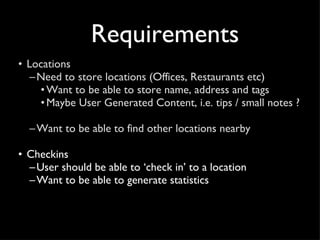
Requirements Locations Need to store locations (Offices, Restaurants etc) Want to be able to store name, address and tags Maybe User Generated Content, i.e. tips / small notes ?  Want to be able to find other locations nearby
Requirements Locations Need to store locations (Offices, Restaurants etc) Want to be able to store name, address and tags Maybe User Generated Content, i.e. tips / small notes ?  Want to be able to find other locations nearby Checkins User should be able to ‘check in’ to a location Want to be able to generate statistics
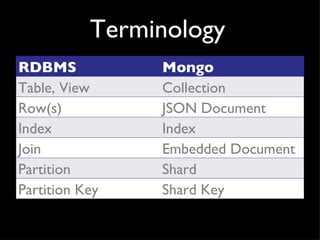
Terminology RDBMS Mongo Table, View Collection Row(s) JSON Document Index Index Join Embedded Document Partition Shard Partition Key Shard Key
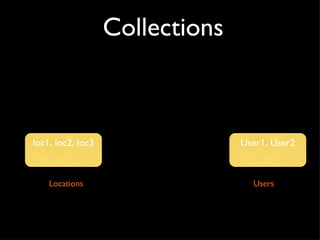
Collections loc1, loc2, loc3 Locations Users User1, User2
JSON Sample Doc {  _id  : ObjectId("4c4ba5c0672c685e5e8aabf3"), author  : "roger",  date  : "Sat Jul 24 2010 19:47:11 GMT-0700 (PDT)",  text  : ”MongoSF",  tags  : [ ”San Francisco", ”MongoDB" ] }  Notes: -  _id  is unique, but can be anything you’d like
BSON JSON has powerful, but limited set of datatypes Mongo extends datypes with Date, Int types, Id, … MongoDB stores data in BSON BSON is a binary representation of JSON Optimized for performance and navigational abilities Also compression See bsonspec.org
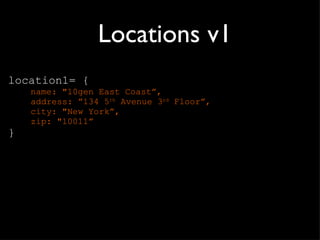
Locations v1 location1= { name: "10gen East Coast ”, address: ”134 5 th  Avenue 3 rd  Floor”, city: "New York”, zip: "10011” }
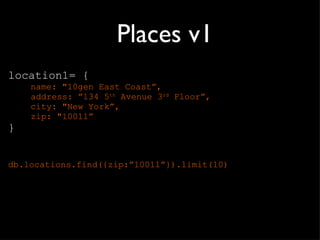
Places v1 location1= { name: "10gen East Coast ”, address: ”134 5 th  Avenue 3 rd  Floor”, city: "New York”, zip: "10011” } db.locations.find({zip: ”10011”}).limit(10)
Places v2 location1 = { name: "10gen East Coast ”, address: "17 West 18th Street 8th Floor”, city: "New York”, zip: "10011”, tags: [ “business”, “mongodb”] }
Places v2 location1 = { name: "10gen East Coast ”, address: "17 West 18th Street 8th Floor”, city: "New York”, zip: "10011”, tags: [ “business”, “mongodb”] } db.locations.find({zip: ”10011”, tags:”business”})
Places v3 location1 = { name: "10gen East Coast ”, address: "17 West 18th Street 8th Floor”, city: "New York”, zip: "10011”, tags: [ “business”, “mongodb”], latlong: [40.0,72.0] }
Places v3 location1 = { name: "10gen East Coast ”, address: "17 West 18th Street 8th Floor”, city: "New York”, zip: "10011”, tags: [ “business”, “cool place”], latlong: [40.0,72.0] } db.locations.ensureIndex({latlong: ”2d”})
Places v3 location1 = { name: "10gen HQ ”, address: "17 West 18th Street 8th Floor”, city: "New York”, zip: "10011”, tags: [ “business”, “cool place”], latlong: [40.0,72.0] } db.locations.ensureIndex({latlong: ”2d”}) db.locations.find({latlong:{$near:[40,70]}})
Places v4 location1 = { name: "10gen HQ ”, address: "17 West 18th Street 8th Floor”, city: "New York”, zip: "10011”, latlong: [40.0,72.0], tags: [ “business”, “cool place”], tips: [ {user:"nosh", time:6/26/2010, tip:"stop by  for office hours on Wednesdays from 4-6pm"},    {.....},  ] }
Querying your Places Creating your indexes db.locations.ensureIndex({tags:1}) db.locations.ensureIndex({name:1}) db.locations.ensureIndex({latlong: ”2d”}) Finding places: db. locations .find({latlong:{$near:[40,70]}}) With regular expressions: db. locations .find({name: /^ typeaheadstring /) By tag: db. locations .find({tags:  “business”})
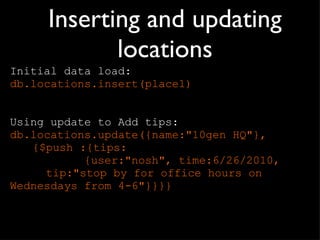
Inserting and updating locations Initial data load: db.locations.insert(place1) Using update to Add tips: db.locations.update({name:"10gen HQ"},  {$push :{tips:    {user:"nosh", time:6/26/2010,    tip:"stop by for office hours on    Wednesdays from 4-6"}}}}
Requirements Locations Need to store locations (Offices, Restaurants etc) Want to be able to store name, address and tags Maybe User Generated Content, i.e. tips / small notes ?  Want to be able to find other locations nearby Checkins User should be able to ‘check in’ to a location Want to be able to generate statistics
Users user1 = { name:  “nosh” email:  “nosh@10gen.com”, . . . checkins: [{   location:  “10gen HQ”, ts: 9/20/2010 10:12:00, … }, … ] }
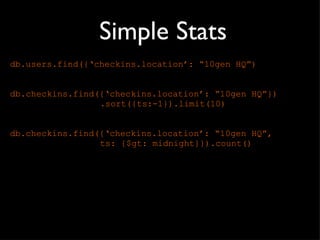
Simple Stats db.users.find({‘checkins.location’:  “10gen HQ”) db.checkins.find({‘checkins.location’:  “10gen HQ”}) .sort({ts:-1}).limit(10) db.checkins.find({‘checkins.location’:  “10gen HQ”,  ts: {$gt: midnight}}).count()
Alternative user1 = { name:  “nosh” email:  “nosh@10gen.com”, . . . checkins: [ 4b97e62bf1d8c7152c9ccb74,  5a20e62bf1d8c736ab ] } checkins [] = ObjectId reference to locations collection
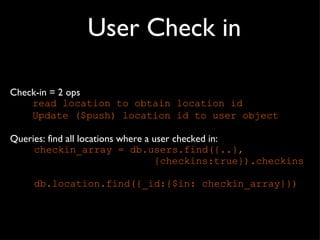
User Check in Check-in = 2 ops read location to obtain location id Update ($push) location id to user object Queries: find all locations where a user checked in:  checkin_array = db.users.find({..}, {checkins:true}).checkins db.location.find({_id:{$in: checkin_array}})
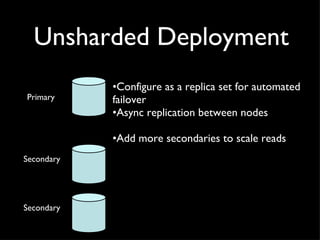
Unsharded Deployment Configure as a replica set for automated failover Async replication between nodes Add more secondaries to scale reads Secondary Primary Secondary
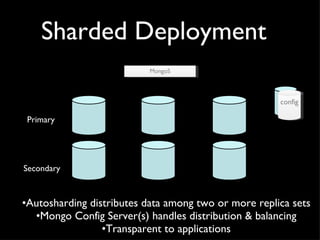
Sharded Deployment Autosharding distributes data among two or more replica sets Mongo Config Server(s) handles distribution & balancing Transparent to applications Secondary Primary MongoS config
Use Cases RDBMS replacement for high-traffic web applications Content Management-type applications Real-time analytics High-speed data logging Web 2.0, Media, SaaS, Gaming, Finance, Telecom, Healthcare
http://mongodb.org http://10gen.com 10Gen is hiring!  @mongodb [email_address] @rogerb

Mongo Web Apps: OSCON 2011

  • 1.
    http://mongodb.org http://10gen.com Buildingapplications with MongoDB – An introduction Roger Bodamer [email_address] @rogerb
  • 2.
    Today ’s TalkDeveloping your first Web Application with MongoDB What is MongoDB, Platforms and availability Data Modeling, queries and geospatial queries Location bases App Example uses MongoDB Javascript shell
  • 3.
    Why MongoDB Intrinsicsupport for agile development Super low latency access to your data Very little CPU overhead No Additional caching layer required Built in Replication and Horizontal Scaling support
  • 4.
    MongoDB Document OrientedDatabase Data is stored in documents, not tables / relations MongoDB is Implemented in C++ for best performance Platforms 32/64 bit Windows Linux, Mac OS-X, FreeBSD, Solaris Language drivers for: Ruby / Ruby-on-Rails Java C# JavaScript C / C++ Erlang Python, Perl others..... and much more ! ..
  • 5.
    Design Want tobuild an app where users can check in to a location Leave notes or comments about that location Iterative Approach: Decide requirements Design documents Rinse, repeat :-)
  • 6.
    Requirements Locations Needto store locations (Offices, Restaurants etc) Want to be able to store name, address and tags Maybe User Generated Content, i.e. tips / small notes ? Want to be able to find other locations nearby
  • 7.
    Requirements Locations Needto store locations (Offices, Restaurants etc) Want to be able to store name, address and tags Maybe User Generated Content, i.e. tips / small notes ? Want to be able to find other locations nearby Checkins User should be able to ‘check in’ to a location Want to be able to generate statistics
  • 8.
    Terminology RDBMS MongoTable, View Collection Row(s) JSON Document Index Index Join Embedded Document Partition Shard Partition Key Shard Key
  • 9.
    Collections loc1, loc2,loc3 Locations Users User1, User2
  • 10.
    JSON Sample Doc{ _id : ObjectId("4c4ba5c0672c685e5e8aabf3"), author : "roger", date : "Sat Jul 24 2010 19:47:11 GMT-0700 (PDT)", text : ”MongoSF", tags : [ ”San Francisco", ”MongoDB" ] } Notes: - _id is unique, but can be anything you’d like
  • 11.
    BSON JSON haspowerful, but limited set of datatypes Mongo extends datypes with Date, Int types, Id, … MongoDB stores data in BSON BSON is a binary representation of JSON Optimized for performance and navigational abilities Also compression See bsonspec.org
  • 12.
    Locations v1 location1={ name: "10gen East Coast ”, address: ”134 5 th Avenue 3 rd Floor”, city: "New York”, zip: "10011” }
  • 13.
    Places v1 location1={ name: "10gen East Coast ”, address: ”134 5 th Avenue 3 rd Floor”, city: "New York”, zip: "10011” } db.locations.find({zip: ”10011”}).limit(10)
  • 14.
    Places v2 location1= { name: "10gen East Coast ”, address: "17 West 18th Street 8th Floor”, city: "New York”, zip: "10011”, tags: [ “business”, “mongodb”] }
  • 15.
    Places v2 location1= { name: "10gen East Coast ”, address: "17 West 18th Street 8th Floor”, city: "New York”, zip: "10011”, tags: [ “business”, “mongodb”] } db.locations.find({zip: ”10011”, tags:”business”})
  • 16.
    Places v3 location1= { name: "10gen East Coast ”, address: "17 West 18th Street 8th Floor”, city: "New York”, zip: "10011”, tags: [ “business”, “mongodb”], latlong: [40.0,72.0] }
  • 17.
    Places v3 location1= { name: "10gen East Coast ”, address: "17 West 18th Street 8th Floor”, city: "New York”, zip: "10011”, tags: [ “business”, “cool place”], latlong: [40.0,72.0] } db.locations.ensureIndex({latlong: ”2d”})
  • 18.
    Places v3 location1= { name: "10gen HQ ”, address: "17 West 18th Street 8th Floor”, city: "New York”, zip: "10011”, tags: [ “business”, “cool place”], latlong: [40.0,72.0] } db.locations.ensureIndex({latlong: ”2d”}) db.locations.find({latlong:{$near:[40,70]}})
  • 19.
    Places v4 location1= { name: "10gen HQ ”, address: "17 West 18th Street 8th Floor”, city: "New York”, zip: "10011”, latlong: [40.0,72.0], tags: [ “business”, “cool place”], tips: [ {user:"nosh", time:6/26/2010, tip:"stop by for office hours on Wednesdays from 4-6pm"}, {.....}, ] }
  • 20.
    Querying your PlacesCreating your indexes db.locations.ensureIndex({tags:1}) db.locations.ensureIndex({name:1}) db.locations.ensureIndex({latlong: ”2d”}) Finding places: db. locations .find({latlong:{$near:[40,70]}}) With regular expressions: db. locations .find({name: /^ typeaheadstring /) By tag: db. locations .find({tags: “business”})
  • 21.
    Inserting and updatinglocations Initial data load: db.locations.insert(place1) Using update to Add tips: db.locations.update({name:"10gen HQ"}, {$push :{tips: {user:"nosh", time:6/26/2010, tip:"stop by for office hours on Wednesdays from 4-6"}}}}
  • 22.
    Requirements Locations Needto store locations (Offices, Restaurants etc) Want to be able to store name, address and tags Maybe User Generated Content, i.e. tips / small notes ? Want to be able to find other locations nearby Checkins User should be able to ‘check in’ to a location Want to be able to generate statistics
  • 23.
    Users user1 ={ name: “nosh” email: “nosh@10gen.com”, . . . checkins: [{ location: “10gen HQ”, ts: 9/20/2010 10:12:00, … }, … ] }
  • 24.
    Simple Stats db.users.find({‘checkins.location’: “10gen HQ”) db.checkins.find({‘checkins.location’: “10gen HQ”}) .sort({ts:-1}).limit(10) db.checkins.find({‘checkins.location’: “10gen HQ”, ts: {$gt: midnight}}).count()
  • 25.
    Alternative user1 ={ name: “nosh” email: “nosh@10gen.com”, . . . checkins: [ 4b97e62bf1d8c7152c9ccb74, 5a20e62bf1d8c736ab ] } checkins [] = ObjectId reference to locations collection
  • 26.
    User Check inCheck-in = 2 ops read location to obtain location id Update ($push) location id to user object Queries: find all locations where a user checked in: checkin_array = db.users.find({..}, {checkins:true}).checkins db.location.find({_id:{$in: checkin_array}})
  • 27.
    Unsharded Deployment Configureas a replica set for automated failover Async replication between nodes Add more secondaries to scale reads Secondary Primary Secondary
  • 28.
    Sharded Deployment Autoshardingdistributes data among two or more replica sets Mongo Config Server(s) handles distribution & balancing Transparent to applications Secondary Primary MongoS config
  • 29.
    Use Cases RDBMSreplacement for high-traffic web applications Content Management-type applications Real-time analytics High-speed data logging Web 2.0, Media, SaaS, Gaming, Finance, Telecom, Healthcare
  • 30.
    http://mongodb.org http://10gen.com 10Genis hiring! @mongodb [email_address] @rogerb

Editor's Notes

  • #2 1 doc can have multiple of locations and index on it.
  • #7 Memory mapped files, BSON, indexes, multiple data types, binary files, etc @ main datasets: places and checkins use cases: given current loc find places nearby; add notes to locations Record checkins Generate stats about checkins
  • #8 Memory mapped files, BSON, indexes, multiple data types, binary files, etc @ main datasets: places and checkins use cases: given current loc find places nearby; add notes to locations Record checkins Generate stats about checkins
  • #10 Documents go into collections Todays app: users , places, checkins
  • #17 Latlong are actually real lat / long points $near gives you the closest 100
  • #18 Latlong are actually real lat / long points $near gives you the closest 100
  • #19 Latlong are actually real lat / long points $near gives you the closest 100
  • #23 Memory mapped files, BSON, indexes, multiple data types, binary files, etc @ main datasets: places and checkins use cases: given current loc find places nearby; add notes to locations Record checkins Generate stats about checkins