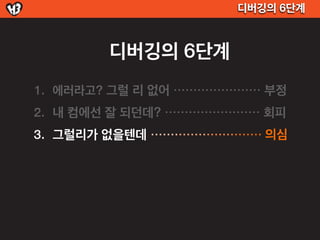
디버깅의 6단계
디버깅의 6단계
1. 에러라고? 그럴 리 없어 ・・・・・・・・・・・・・・・・・・・・・・ 부정
6.
디버깅의 6단계
디버깅의 6단계
1. 에러라고? 그럴 리 없어 ・・・・・・・・・・・・・・・・・・・・・・ 부정
2. 내 컴에선 잘 되던데? ・・・・・・・・・・・・・・・・・・・・・・・・ 회피
7.
디버깅의 6단계
디버깅의 6단계
1. 에러라고? 그럴 리 없어 ・・・・・・・・・・・・・・・・・・・・・・ 부정
2. 내 컴에선 잘 되던데? ・・・・・・・・・・・・・・・・・・・・・・・・ 회피
3. 그럴리가 없을텐데 ・・・・・・・・・・・・・・・・・・・・・・・・・・・・ 의심
8.
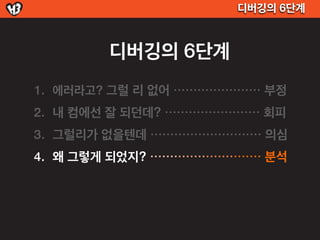
디버깅의 6단계
디버깅의 6단계
1. 에러라고? 그럴 리 없어 ・・・・・・・・・・・・・・・・・・・・・・ 부정
2. 내 컴에선 잘 되던데? ・・・・・・・・・・・・・・・・・・・・・・・・ 회피
3. 그럴리가 없을텐데 ・・・・・・・・・・・・・・・・・・・・・・・・・・・・ 의심
4. 왜 그렇게 되었지? ・・・・・・・・・・・・・・・・・・・・・・・・・・・・ 분석
9.
디버깅의 6단계
디버깅의 6단계
1. 에러라고? 그럴 리 없어 ・・・・・・・・・・・・・・・・・・・・・・ 부정
2. 내 컴에선 잘 되던데? ・・・・・・・・・・・・・・・・・・・・・・・・ 회피
3. 그럴리가 없을텐데 ・・・・・・・・・・・・・・・・・・・・・・・・・・・・ 의심
4. 왜 그렇게 되었지? ・・・・・・・・・・・・・・・・・・・・・・・・・・・・ 분석
5. 헉... 알았다! ・・・・・・・・・・・・・・・・・・・・・・・・・・・・・・・・・・・ 각성
10.
디버깅의 6단계
디버깅의 6단계
1. 에러라고? 그럴 리 없어 ・・・・・・・・・・・・・・・・・・・・・・ 부정
2. 내 컴에선 잘 되던데? ・・・・・・・・・・・・・・・・・・・・・・・・ 회피
3. 그럴리가 없을텐데 ・・・・・・・・・・・・・・・・・・・・・・・・・・・・ 의심
4. 왜 그렇게 되었지? ・・・・・・・・・・・・・・・・・・・・・・・・・・・・ 분석
5. 헉... 알았다! ・・・・・・・・・・・・・・・・・・・・・・・・・・・・・・・・・・・ 각성
6. 이게 어떻게 동작했던거지? @.@ ・・・・・・・・・ 반성
11.
디버깅의 6단계
디버깅의 6단계
1. 에러라고? 그럴 리 없어 ・・・・・・・・・・・・・・・・・・・・・・ 부정
2. 내 컴에선 잘 되던데? ・・・・・・・・・・・・・・・・・・・・・・・・ 회피
3. 그럴리가 없을텐데 ・・・・・・・・・・・・・・・・・・・・・・・・・・・・ 의심
4. 왜 그렇게 되었지? ・・・・・・・・・・・・・・・・・・・・・・・・・・・・ 분석
5. 헉... 알았다! ・・・・・・・・・・・・・・・・・・・・・・・・・・・・・・・・・・・ 각성
6. 이게 어떻게 동작했던거지? @.@ ・・・・・・・・・ 반성
12.
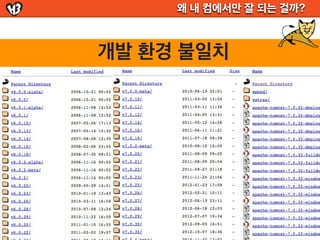
왜 내 컴에서만잘 되는 걸까?
개발 환경 불일치
Image - http://futurist.se/gldt/page/3/
Vagrant로 로컬에 우분투VM 실행하기
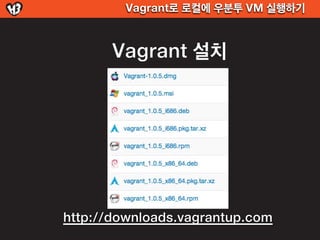
Vagrant 설치
http://downloads.vagrantup.com
32.
Vagrant로 로컬에 우분투VM 실행하기
$ vagrant
Usage: vagrant [-v] [-h] command [<args>]
-v, --version Print the version and exit.
-h, --help Print this help.
Available subcommands:
box
destroy
gem
halt
init Command Line Interface
package
provision
reload GUI 없어요
resume
ssh
ssh-config
status
suspend
up
33.
Vagrant로 로컬에 우분투VM 실행하기
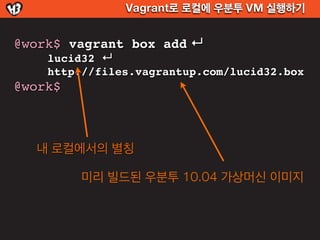
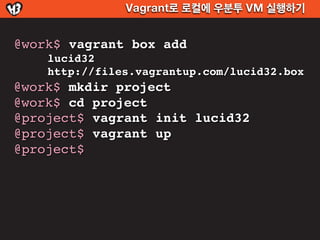
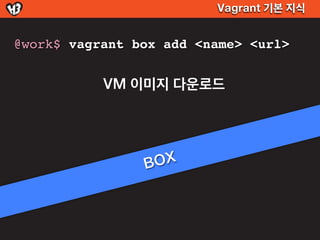
@work$ vagrant box add ↵
lucid32 ↵
http://files.vagrantup.com/lucid32.box
@work$
내 로컬에서의 별칭
미리 빌드된 우분투 10.04 가상머신 이미지
Vagrant로 로컬에 우분투VM 실행하기
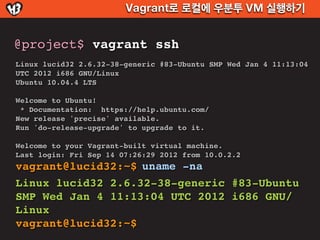
@project$ vagrant ssh
Linux lucid32 2.6.32-38-generic #83-Ubuntu SMP Wed Jan 4 11:13:04
UTC 2012 i686 GNU/Linux
Ubuntu 10.04.4 LTS
Welcome to Ubuntu!
* Documentation: https://help.ubuntu.com/
New release 'precise' available.
Run 'do-release-upgrade' to upgrade to it.
Welcome to your Vagrant-built virtual machine.
Last login: Fri Sep 14 07:26:29 2012 from 10.0.2.2
vagrant@lucid32:~$ uname -na
Linux lucid32 2.6.32-38-generic #83-Ubuntu
SMP Wed Jan 4 11:13:04 UTC 2012 i686 GNU/
Linux
vagrant@lucid32:~$
Vagrant 기본 지식
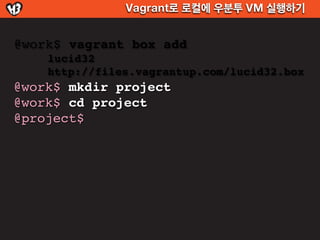
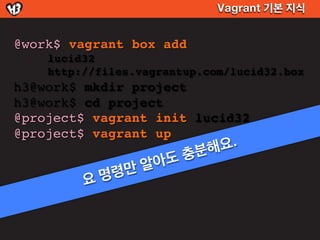
@work$vagrant box add
lucid32
http://files.vagrantup.com/lucid32.box
h3@work$ mkdir project
h3@work$ cd project
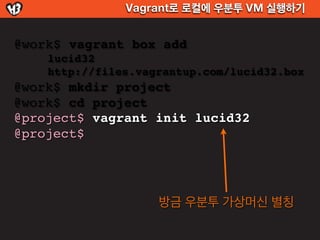
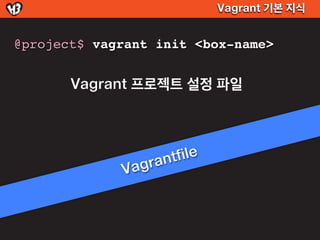
@project$ vagrant init lucid32
@project$ vagrant up
분해 요.
알아도충
명령 만
요
Vagrant 기본 지식
$vagrant box add lucid32 http://~~
$ cd ~/.vagrant.d/box
@$[HOME]/.vagrant.d/box$ ls -al
drwxr-xr-x Oct 31 17:07 lucid32
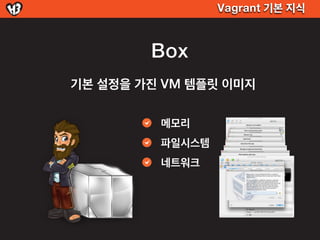
Ubuntu VM
Ubunt Ubuntu VM
u
Ubuntu VM
Ubuntu VM
Ubuntu VM
44.
Vagrant 기본 지식
box 다운로드
공식
http://files.vagrantup.com/[box이름].box
- lucid32, lucid64, precise32, precise64
3rd party
http://vagrantbox.es
Vagrant 기본 지식
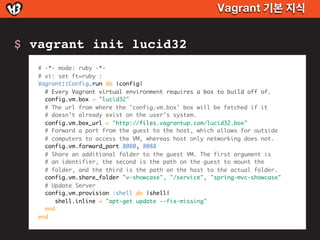
$vagrant init lucid32
# -*- mode: ruby -*-
# vi: set ft=ruby :
Vagrant::Config.run do |config|
# Every Vagrant virtual environment requires a box to build off of.
config.vm.box = "lucid32"
# The url from where the 'config.vm.box' box will be fetched if it
# doesn't already exist on the user's system.
config.vm.box_url = "http://files.vagrantup.com/lucid32.box"
# Forward a port from the guest to the host, which allows for outside
# computers to access the VM, whereas host only networking does not.
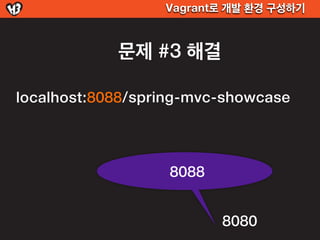
config.vm.forward_port 8080, 8088
# Share an additional folder to the guest VM. The first argument is
# an identifier, the second is the path on the guest to mount the
# folder, and the third is the path on the host to the actual folder.
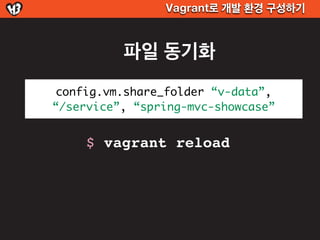
config.vm.share_folder "v-showcase", "/service", "spring-mvc-showcase"
# Update Server
config.vm.provision :shell do |shell|
shell.inline = "apt-get update --fix-missing"
end
end
Vagrant로 개발 환경구성하기
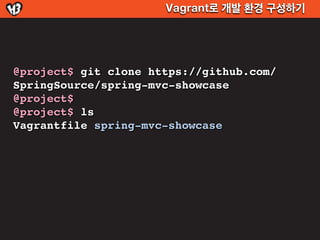
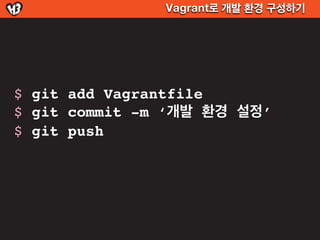
$ git add Vagrantfile
$ git commit -m ‘개발 환경 설정’
$ git push
73.
Vagrant로 개발 환경구성하기
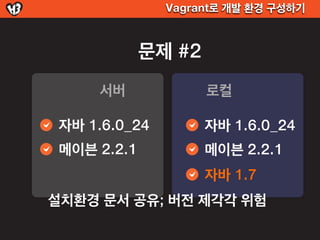
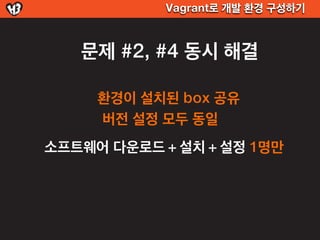
서버 OS != 로컬 OS
서버 OS == 로컬 OS
설치 환경 문서로 공유
설치 환경 자체가 공유
소프트웨어 버전 불일치
소프트웨어 버전 전부 일치
개발자마다 개발 환경 구축
설치는 단 한명이!
쓰고 있는 포트 충돌
손쉬운 포트 포워딩
분산 환경 구성하기
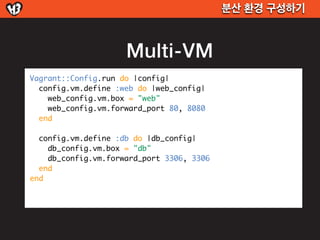
Multi-VM
Vagrant::Config.run do |config|
config.vm.define :web do |web_config|
web_config.vm.box = "web"
web_config.vm.forward_port 80, 8080
end
config.vm.define :db do |db_config|
db_config.vm.box = "db"
db_config.vm.forward_port 3306, 3306
end
end
77.
분산 환경 구성하기
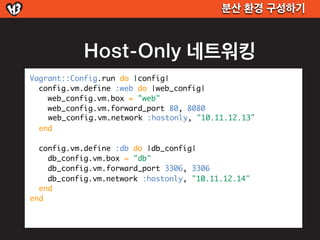
Host-Only 네트워킹
Vagrant::Config.run do |config|
config.vm.define :web do |web_config|
web_config.vm.box = "web"
web_config.vm.forward_port 80, 8080
web_config.vm.network :hostonly, "10.11.12.13"
end
config.vm.define :db do |db_config|
db_config.vm.box = "db"
db_config.vm.forward_port 3306, 3306
db_config.vm.network :hostonly, "10.11.12.14"
end
end
78.
Vagrant 사용
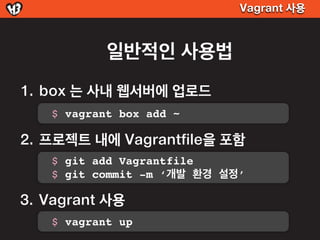
일반적인 사용법
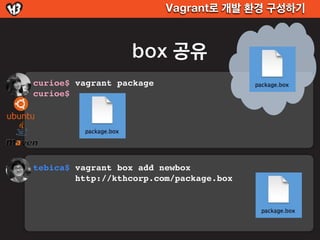
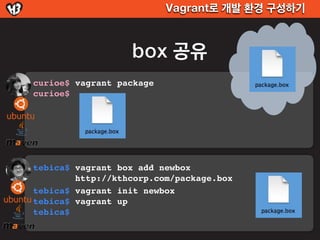
1. box 는 사내 웹서버에 업로드
$ vagrant box add ~
2. 프로젝트 내에 Vagrantfile을 포함
$ git add Vagrantfile
$ git commit -m ‘개발 환경 설정’
3. Vagrant 사용
$ vagrant up
79.
Vagrant 사용
facebook/tornado
https://github.com/facebook/tornado/blob/master/maint/vm/ubuntu10.04/Vagrantfile
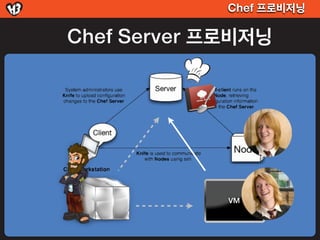
Chef 프로비저닝
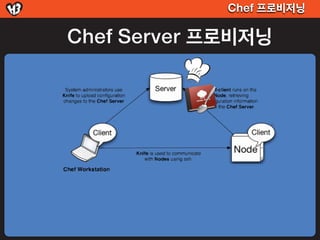
Chef Server 프로비저닝
config.vm.provision :chef_client do |chef|
chef.chef_server_url = "http://cocina.kthcorp.com"
chef.validation_key_path = "chef/validation.pem"
chef.run_list = ["role[baas]"]
end










![Vagrant로 로컬에 우분투 VM 실행하기
$ vagrant
Usage: vagrant [-v] [-h] command [<args>]
-v, --version Print the version and exit.
-h, --help Print this help.
Available subcommands:
box
destroy
gem
halt
init Command Line Interface
package
provision
reload GUI 없어요
resume
ssh
ssh-config
status
suspend
up](https://image.slidesharecdn.com/c6-vagrantshare-121107074434-phpapp01/85/H3-2012-vagrant-32-320.jpg)


![Vagrant 기본 지식
$ vagrant box add lucid32 http://~~
$ cd ~/.vagrant.d/box
@$[HOME]/.vagrant.d/box$ ls -al
drwxr-xr-x Oct 31 17:07 lucid32
Ubuntu VM
Ubunt Ubuntu VM
u
Ubuntu VM
Ubuntu VM
Ubuntu VM](https://image.slidesharecdn.com/c6-vagrantshare-121107074434-phpapp01/85/H3-2012-vagrant-43-320.jpg)
![Vagrant 기본 지식
box 다운로드
공식
http://files.vagrantup.com/[box이름].box
- lucid32, lucid64, precise32, precise64
3rd party
http://vagrantbox.es](https://image.slidesharecdn.com/c6-vagrantshare-121107074434-phpapp01/85/H3-2012-vagrant-44-320.jpg)














![Chef 프로비저닝
Chef Server 프로비저닝
config.vm.provision :chef_client do |chef|
chef.chef_server_url = "http://cocina.kthcorp.com"
chef.validation_key_path = "chef/validation.pem"
chef.run_list = ["role[baas]"]
end](https://image.slidesharecdn.com/c6-vagrantshare-121107074434-phpapp01/85/H3-2012-vagrant-85-320.jpg)






![[세미나] Vagrant 이지원](https://cdn.slidesharecdn.com/ss_thumbnails/vagrant-131020085713-phpapp01-thumbnail.jpg?width=640&height=640&fit=bounds)


![[1A7]Ansible의이해와활용](https://cdn.slidesharecdn.com/ss_thumbnails/1a7ansible-140928232208-phpapp02-thumbnail.jpg?width=640&height=640&fit=bounds)


![Docker 기본 및 Docker Swarm을 활용한 분산 서버 관리 A부터 Z까지 [전체모드에서 봐주세요]](https://cdn.slidesharecdn.com/ss_thumbnails/dockerandswarmmode-181009120848-thumbnail.jpg?width=640&height=640&fit=bounds)
![[Nomad connection]docker seminar 15.10.08](https://cdn.slidesharecdn.com/ss_thumbnails/nomadconnectiondockerseminar-15-151012144050-lva1-app6892-thumbnail.jpg?width=640&height=640&fit=bounds)


![[오픈소스컨설팅] Docker를 활용한 Gitlab CI/CD 구성 테스트](https://cdn.slidesharecdn.com/ss_thumbnails/dockergitlabci-cd-180103202327-thumbnail.jpg?width=640&height=640&fit=bounds)


![[오픈소스컨설팅]Docker기초 실습 교육 20181113_v3](https://cdn.slidesharecdn.com/ss_thumbnails/oscdockereducation20181113hanv3-181113075418-thumbnail.jpg?width=640&height=640&fit=bounds)

![[JBoss User Group] Vagrant 소개](https://cdn.slidesharecdn.com/ss_thumbnails/presentations-140329032618-phpapp01-thumbnail.jpg?width=640&height=640&fit=bounds)


![[17.01.19] docker introduction (Korean Version)](https://cdn.slidesharecdn.com/ss_thumbnails/170119docker-170502020016-thumbnail.jpg?width=640&height=640&fit=bounds)

![[OpenStack] 공개 소프트웨어 오픈스택 입문 & 파헤치기](https://cdn.slidesharecdn.com/ss_thumbnails/opensource-skimmingopenstackwithkoreausergroup-180824144737-thumbnail.jpg?width=640&height=640&fit=bounds)


![[발표자료]안드로메다에서 온 디자이너이야기 5차 next_web_지훈_20130221](https://cdn.slidesharecdn.com/ss_thumbnails/5nextweb20130221-130303211405-phpapp01-thumbnail.jpg?width=640&height=640&fit=bounds)


![[H3 2012] Open API 와 Ruby on Rails 에 대한 이야기](https://cdn.slidesharecdn.com/ss_thumbnails/d6-openapiror-121106201436-phpapp01-thumbnail.jpg?width=640&height=640&fit=bounds)
![[H3 2012] UX, 애자일하고 싶어요](https://cdn.slidesharecdn.com/ss_thumbnails/c2ux-121106200852-phpapp01-thumbnail.jpg?width=640&height=640&fit=bounds)
![[H3 2012] Instant Prototyping with ROR](https://cdn.slidesharecdn.com/ss_thumbnails/d5-instant-prototyping-with-ror-pdf-121105220413-phpapp01-thumbnail.jpg?width=640&height=640&fit=bounds)
![[H3 2012] Bridge over troubled water : make plug-in for Appspresso](https://cdn.slidesharecdn.com/ss_thumbnails/d4-bridgeovertroubledwaternomovie-121105220008-phpapp02-thumbnail.jpg?width=640&height=640&fit=bounds)
![[H3 2012] 스마트모바일 환경에서의 App.품질관리전략](https://cdn.slidesharecdn.com/ss_thumbnails/d3-121105220000-phpapp02-thumbnail.jpg?width=640&height=640&fit=bounds)
![[H3 2012] 스타트업 개발사의 생존필수 아이템, BaaS 모바일 고객센터](https://cdn.slidesharecdn.com/ss_thumbnails/d2-baaspdf-121105215952-phpapp01-thumbnail.jpg?width=640&height=640&fit=bounds)
![[H3 2012] Local based SNS를 이용한 타겟 마케팅](https://cdn.slidesharecdn.com/ss_thumbnails/d1-localbasedsnsdata-121105215925-phpapp02-thumbnail.jpg?width=640&height=640&fit=bounds)
![[H3 2012] 오픈소스로 개발 실력 쌓기](https://cdn.slidesharecdn.com/ss_thumbnails/a6-121105215831-phpapp01-thumbnail.jpg?width=640&height=640&fit=bounds)
![[H3 2012] 앱(APP) 중심으로 생각하기 - DevOps와 자동화](https://cdn.slidesharecdn.com/ss_thumbnails/c4-devops2012102902pdf-121105214403-phpapp01-thumbnail.jpg?width=640&height=640&fit=bounds)
![[H3 2012] 하이브리드앱 제작 사례 공유 - 푸딩얼굴인식 3.0](https://cdn.slidesharecdn.com/ss_thumbnails/c3-121105214358-phpapp02-thumbnail.jpg?width=640&height=640&fit=bounds)
![[H3 2012] Cloud Database Service - Hulahoop를 소개합니다.](https://cdn.slidesharecdn.com/ss_thumbnails/c1-hulahoop-121105214317-phpapp01-thumbnail.jpg?width=640&height=640&fit=bounds)
![[H3 2012] 기획/디자인/개발자 모두 알아야 하는 '대박앱의 비밀'](https://cdn.slidesharecdn.com/ss_thumbnails/b6-slideshare-121105214055-phpapp01-thumbnail.jpg?width=640&height=640&fit=bounds)
![[H3 2012] OAuth2 - API 인증을위한 만능 도구상자](https://cdn.slidesharecdn.com/ss_thumbnails/b5-oauth2api-121105213616-phpapp02-thumbnail.jpg?width=640&height=640&fit=bounds)
![[H3 2012] 오픈 소스로 구현하는 실시간 데이터 처리를 위한 CEP](https://cdn.slidesharecdn.com/ss_thumbnails/b2-real-timecepv2-6-121105213524-phpapp01-thumbnail.jpg?width=640&height=640&fit=bounds)
![[H3 2012] 로그속 사용자 발자국 들여다보기](https://cdn.slidesharecdn.com/ss_thumbnails/b3-1030-121105213433-phpapp01-thumbnail.jpg?width=640&height=640&fit=bounds)