Overview Datasheet

In general, OS simulators provide support for developing applications by mimicking the host computer
hardware/software and often behave as a virtualization platform for the developer. Not all the
developers/testers can have access to the actual OS licenses and/or hardware. MapuSoft’s OS
Simulator is designed to create a better simulation environment.
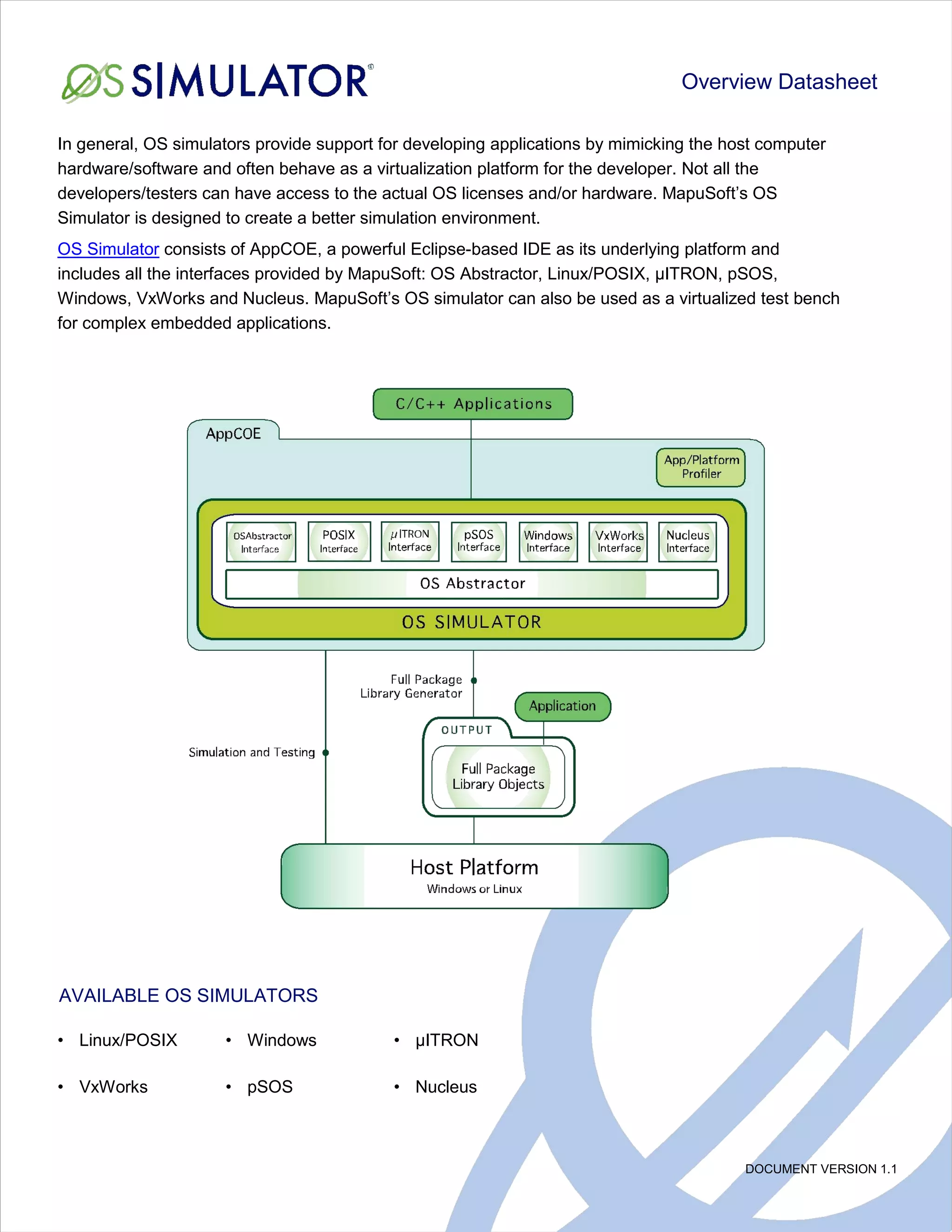
OS Simulator consists of AppCOE, a powerful Eclipse-based IDE as its underlying platform and
includes all the interfaces provided by MapuSoft: OS Abstractor, Linux/POSIX, µITRON, pSOS,
Windows, VxWorks and Nucleus. MapuSoft’s OS simulator can also be used as a virtualized test bench
for complex embedded applications.


AVAILABLE OS SIMULATORS

• Linux/POSIX        • Windows             • µITRON

• VxWorks            • pSOS                • Nucleus


                                                                                         DOCUMENT VERSION 1.1
WHY USE OS SIMULATOR?

• Reduce testing effort by using a host rather than the resource restricted target platform

• Simulate a complex system on one host machine and save money by eliminating the need for using
    expensive target platforms
• Perform modular testing by connecting application modules loosely via a simulated communication
    interface

USING OS SIMULATOR AS A VIRTUALIZED TESTING PLATFORM:

OS Simulators provide the ability to simulate, test and run an entire system of C/C++ applications developed
for Linux/POSIX, micro-ITRON, pSOS, Windows, VxWorks and Nucleus on a host PC for the target OS. It
allows applications to take full advantage of powerful resources like CPU, memory, drivers, middleware and
tools on the host platform so that testing of the application can start before those target components are ready.
Following are the OS Simulator benefits when used as a Virtualized Testing Platform.


• OS Simulator allows you to do modular testing
    > Modules can be broken down into separate processes with dedicated heap memory
    > Ability to develop the low level communication mechanism across modules using user shared tiered
      memory pools
    > Load modules dynamically from a module (or) statically via the command prompt

• Easy to simulate and test the low level hardware interface either on shared memory or via a device driver
    thread/process
• Can load other modules dynamically from any module (or) also statically load via command prompt

• OS Simulator allows a standalone application (block) as a separate fully independent process and can
    also be dedicated to run on a single core under SMP
• OS Simulator allows interdependent multiple applications (blocks) as individual processes, which can
    interact and share resources that are not marked private

RELEVANT LINKS:

Please refer to this link for the latest release notes about the API coverage provided by OS
Simulator: http://mapusoft.com/admin/wp-content/uploads/release_notes_138.pdf

A free evaluation can be downloaded here: http://mapusoft.com/downloads/

For user manual & technical documentation visit this link: http://mapusoft.com/products/techdata/

For any technical or sales questions please submit a ticket at the MapuSoft support site at this link:
http://mapusoft.com/support/


©2012 MapuSoft Technologies, Inc. All Rights Reserved. Material content is subject to change. OS Changer, OS Abstractor, AppCOE, Cross-OS
Hypervisor, OS Simulator, Linux OK, OS Version UpKit, Ada-C/C++ Changer and MapuSoft are registered trademarks of MapuSoft Technologies, Inc.   www.mapusoft.com
Eclipse is a registered trademark of the Eclipse Foundation. All other brands or product names are the property of
their respective holders.                                                                                                                        1.877.MAPUSOFT
Os simulator

Os simulator

  • 1.
    Overview Datasheet In general,OS simulators provide support for developing applications by mimicking the host computer hardware/software and often behave as a virtualization platform for the developer. Not all the developers/testers can have access to the actual OS licenses and/or hardware. MapuSoft’s OS Simulator is designed to create a better simulation environment. OS Simulator consists of AppCOE, a powerful Eclipse-based IDE as its underlying platform and includes all the interfaces provided by MapuSoft: OS Abstractor, Linux/POSIX, µITRON, pSOS, Windows, VxWorks and Nucleus. MapuSoft’s OS simulator can also be used as a virtualized test bench for complex embedded applications. AVAILABLE OS SIMULATORS • Linux/POSIX • Windows • µITRON • VxWorks • pSOS • Nucleus DOCUMENT VERSION 1.1
  • 2.
    WHY USE OSSIMULATOR? • Reduce testing effort by using a host rather than the resource restricted target platform • Simulate a complex system on one host machine and save money by eliminating the need for using expensive target platforms • Perform modular testing by connecting application modules loosely via a simulated communication interface USING OS SIMULATOR AS A VIRTUALIZED TESTING PLATFORM: OS Simulators provide the ability to simulate, test and run an entire system of C/C++ applications developed for Linux/POSIX, micro-ITRON, pSOS, Windows, VxWorks and Nucleus on a host PC for the target OS. It allows applications to take full advantage of powerful resources like CPU, memory, drivers, middleware and tools on the host platform so that testing of the application can start before those target components are ready. Following are the OS Simulator benefits when used as a Virtualized Testing Platform. • OS Simulator allows you to do modular testing > Modules can be broken down into separate processes with dedicated heap memory > Ability to develop the low level communication mechanism across modules using user shared tiered memory pools > Load modules dynamically from a module (or) statically via the command prompt • Easy to simulate and test the low level hardware interface either on shared memory or via a device driver thread/process • Can load other modules dynamically from any module (or) also statically load via command prompt • OS Simulator allows a standalone application (block) as a separate fully independent process and can also be dedicated to run on a single core under SMP • OS Simulator allows interdependent multiple applications (blocks) as individual processes, which can interact and share resources that are not marked private RELEVANT LINKS: Please refer to this link for the latest release notes about the API coverage provided by OS Simulator: http://mapusoft.com/admin/wp-content/uploads/release_notes_138.pdf A free evaluation can be downloaded here: http://mapusoft.com/downloads/ For user manual & technical documentation visit this link: http://mapusoft.com/products/techdata/ For any technical or sales questions please submit a ticket at the MapuSoft support site at this link: http://mapusoft.com/support/ ©2012 MapuSoft Technologies, Inc. All Rights Reserved. Material content is subject to change. OS Changer, OS Abstractor, AppCOE, Cross-OS Hypervisor, OS Simulator, Linux OK, OS Version UpKit, Ada-C/C++ Changer and MapuSoft are registered trademarks of MapuSoft Technologies, Inc. www.mapusoft.com Eclipse is a registered trademark of the Eclipse Foundation. All other brands or product names are the property of their respective holders. 1.877.MAPUSOFT