Oracle VM
Server for x86
Hard Partitioning
CPU Cores and CPU Threads
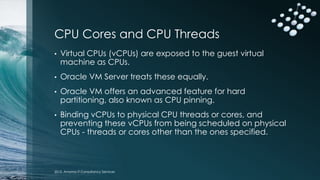
• Virtual CPUs (vCPUs) are exposed to the guest virtual
machine as CPUs.
• Oracle VM Server treats these equally.
• Oracle VM offers an advanced feature for hard
partitioning, also known as CPU pinning.
• Binding vCPUs to physical CPU threads or cores, and
preventing these vCPUs from being scheduled on physical
CPUs - threads or cores other than the ones specified.
2015, Amonra IT Consultancy Services
Oracle Hard Partition Licensing
• To conform to the Oracle hard partition licensing
requirement, you must follow the instructions described
here to bind vCPUs to physical CPU threads or cores.
• Live migration of CPU pinned virtual machines to another
Oracle VM Server is not permitted.
• Oracle VM 3, DRS (Distributed Resource Scheduler) and
DPM (Distributed Power Management) policies should not
be enabled.
2015, Amonra IT Consultancy Services
Get a Summary of the Server Hardware
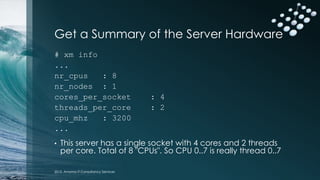
# xm info
...
nr_cpus : 8
nr_nodes : 1
cores_per_socket : 4
threads_per_core : 2
cpu_mhz : 3200
...
• This server has a single socket with 4 cores and 2 threads
per core. Total of 8 "CPUs". So CPU 0..7 is really thread 0..7
2015, Amonra IT Consultancy Services
Get the CPU Topology
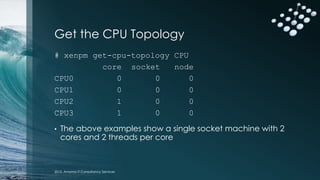
# xenpm get-cpu-topology CPU
core socket node
CPU0 0 0 0
CPU1 0 0 0
CPU2 1 0 0
CPU3 1 0 0
• The above examples show a single socket machine with 2
cores and 2 threads per core
2015, Amonra IT Consultancy Services
Get the CPU Topology for
vCPU Bindings to Physical CPUs
# xm vcpu-list 1
Name ID VCPU CPU State time(s) CPU Affinity
000246c63f 1 0 5 -b- 4673.36 5-6
000246c63f 1 1 5 -b- 4435.09 5-6
• In the above example, you have a guest with 2 virtual
CPUs both running
• The column CPU Affinity shows 5-6, which means that both
virtual CPUs could be running on either thread 5 or 6
2015, Amonra IT Consultancy Services
Check the CPUs pinned
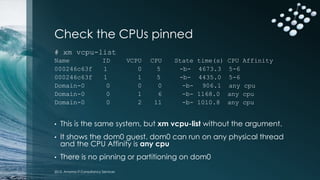
# xm vcpu-list
Name ID VCPU CPU State time(s) CPU Affinity
000246c63f 1 0 5 -b- 4673.3 5-6
000246c63f 1 1 5 -b- 4435.0 5-6
Domain-0 0 0 0 -b- 906.1 any cpu
Domain-0 0 1 6 -b- 1168.0 any cpu
Domain-0 0 2 11 -b- 1010.8 any cpu
• This is the same system, but xm vcpu-list without the argument.
• It shows the dom0 guest. dom0 can run on any physical thread
and the CPU Affinity is any cpu
• There is no pinning or partitioning on dom0
2015, Amonra IT Consultancy Services
Setting Hard Partitioning
# ./ovm_vmcontrol -u admin -p Manager1 -h
localhost -v vmtest -c vcpuget
Oracle VM VM Control utility 0.5.2.
Connected. Command : vcpuget
Current pinning of virtual CPUs to physical
threads : 5,6
• In the above example, a virtual machine named vmtest
accepts the action vcpuget to show that virtual CPUs of
this guest are bound to threads 5 and 6.
2015, Amonra IT Consultancy Services
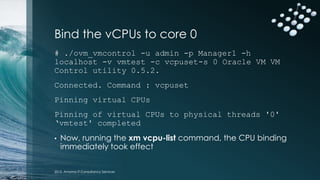
Bind the vCPUs to core 0
# ./ovm_vmcontrol -u admin -p Manager1 -h
localhost -v vmtest -c vcpuset-s 0 Oracle VM VM
Control utility 0.5.2.
Connected. Command : vcpuset
Pinning virtual CPUs
Pinning of virtual CPUs to physical threads '0'
‘vmtest' completed
• Now, running the xm vcpu-list command, the CPU binding
immediately took effect
2015, Amonra IT Consultancy Services
Conclusion
• With Oracle VM Server for x86, to conform to the Oracle
hard partition licensing requirement, you must:
• Bind a virtual machine to physical CPUs or cores.
• Prevents the software from running on physical cores other than
the ones specified.
• Virtual machines are configured with dedicated CPU resources
instead of the default of resource scheduling, which is to use all
available CPUs of the server.
• Using hard partitioning to limit Oracle product software licensing
(also adds some restrictions such as live migration, DRS and DPM)
2015, Amonra IT Consultancy Services
Thank You
Gary Waldrom
Amonra IT Consulting Services
e: gary@amonra.co.uk
w: www.amonra.co.uk
2015, Amonra IT Consultancy Services

Oracle VM 3 Hard Partitioning

  • 1.
    Oracle VM Server forx86 Hard Partitioning
  • 2.
    CPU Cores andCPU Threads • Virtual CPUs (vCPUs) are exposed to the guest virtual machine as CPUs. • Oracle VM Server treats these equally. • Oracle VM offers an advanced feature for hard partitioning, also known as CPU pinning. • Binding vCPUs to physical CPU threads or cores, and preventing these vCPUs from being scheduled on physical CPUs - threads or cores other than the ones specified. 2015, Amonra IT Consultancy Services
  • 3.
    Oracle Hard PartitionLicensing • To conform to the Oracle hard partition licensing requirement, you must follow the instructions described here to bind vCPUs to physical CPU threads or cores. • Live migration of CPU pinned virtual machines to another Oracle VM Server is not permitted. • Oracle VM 3, DRS (Distributed Resource Scheduler) and DPM (Distributed Power Management) policies should not be enabled. 2015, Amonra IT Consultancy Services
  • 4.
    Get a Summaryof the Server Hardware # xm info ... nr_cpus : 8 nr_nodes : 1 cores_per_socket : 4 threads_per_core : 2 cpu_mhz : 3200 ... • This server has a single socket with 4 cores and 2 threads per core. Total of 8 "CPUs". So CPU 0..7 is really thread 0..7 2015, Amonra IT Consultancy Services
  • 5.
    Get the CPUTopology # xenpm get-cpu-topology CPU core socket node CPU0 0 0 0 CPU1 0 0 0 CPU2 1 0 0 CPU3 1 0 0 • The above examples show a single socket machine with 2 cores and 2 threads per core 2015, Amonra IT Consultancy Services
  • 6.
    Get the CPUTopology for vCPU Bindings to Physical CPUs # xm vcpu-list 1 Name ID VCPU CPU State time(s) CPU Affinity 000246c63f 1 0 5 -b- 4673.36 5-6 000246c63f 1 1 5 -b- 4435.09 5-6 • In the above example, you have a guest with 2 virtual CPUs both running • The column CPU Affinity shows 5-6, which means that both virtual CPUs could be running on either thread 5 or 6 2015, Amonra IT Consultancy Services
  • 7.
    Check the CPUspinned # xm vcpu-list Name ID VCPU CPU State time(s) CPU Affinity 000246c63f 1 0 5 -b- 4673.3 5-6 000246c63f 1 1 5 -b- 4435.0 5-6 Domain-0 0 0 0 -b- 906.1 any cpu Domain-0 0 1 6 -b- 1168.0 any cpu Domain-0 0 2 11 -b- 1010.8 any cpu • This is the same system, but xm vcpu-list without the argument. • It shows the dom0 guest. dom0 can run on any physical thread and the CPU Affinity is any cpu • There is no pinning or partitioning on dom0 2015, Amonra IT Consultancy Services
  • 8.
    Setting Hard Partitioning #./ovm_vmcontrol -u admin -p Manager1 -h localhost -v vmtest -c vcpuget Oracle VM VM Control utility 0.5.2. Connected. Command : vcpuget Current pinning of virtual CPUs to physical threads : 5,6 • In the above example, a virtual machine named vmtest accepts the action vcpuget to show that virtual CPUs of this guest are bound to threads 5 and 6. 2015, Amonra IT Consultancy Services
  • 9.
    Bind the vCPUsto core 0 # ./ovm_vmcontrol -u admin -p Manager1 -h localhost -v vmtest -c vcpuset-s 0 Oracle VM VM Control utility 0.5.2. Connected. Command : vcpuset Pinning virtual CPUs Pinning of virtual CPUs to physical threads '0' ‘vmtest' completed • Now, running the xm vcpu-list command, the CPU binding immediately took effect 2015, Amonra IT Consultancy Services
  • 10.
    Conclusion • With OracleVM Server for x86, to conform to the Oracle hard partition licensing requirement, you must: • Bind a virtual machine to physical CPUs or cores. • Prevents the software from running on physical cores other than the ones specified. • Virtual machines are configured with dedicated CPU resources instead of the default of resource scheduling, which is to use all available CPUs of the server. • Using hard partitioning to limit Oracle product software licensing (also adds some restrictions such as live migration, DRS and DPM) 2015, Amonra IT Consultancy Services
  • 11.
    Thank You Gary Waldrom AmonraIT Consulting Services e: gary@amonra.co.uk w: www.amonra.co.uk 2015, Amonra IT Consultancy Services