The FI-WARE Project – Base Platform for Future
Service Infrastructures
FIWARE Testbed
Henar Muñoz Frutos
Jose Ignacio Carretero
From hardware to
Openstack
The FI-WARE Project – Base Platform for Future
Service Infrastructures
FIWARE project
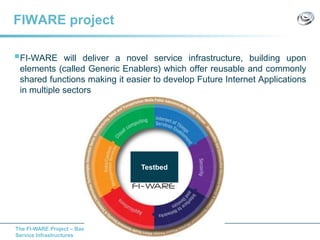
FI-WARE will deliver a novel service infrastructure, building upon
elements (called Generic Enablers) which offer reusable and commonly
shared functions making it easier to develop Future Internet Applications
in multiple sectors
Testbed
The FI-WARE Project – Base Platform for Future
Service Infrastructures
The hardware…
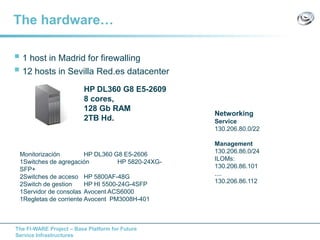
 1 host in Madrid for firewalling
 12 hosts in Sevilla Red.es datacenter
HP DL360 G8 E5-2609
8 cores,
128 Gb RAM
2TB Hd.
Monitorización HP DL360 G8 E5-2606
1Switches de agregación HP 5820-24XG-
SFP+
2Switches de acceso HP 5800AF-48G
2Switch de gestion HP HI 5500-24G-4SFP
1Servidor de consolas Avocent ACS6000
1Regletas de corriente Avocent PM3008H-401
Networking
Service
130.206.80.0/22
Management
130.206.86.0/24
ILOMs:
130.206.86.101
....
130.206.86.112
The FI-WARE Project – Base Platform for Future
Service Infrastructures
First step: install the OS
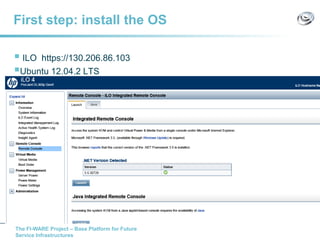
 ILO https://130.206.86.103
Ubuntu 12.04.2 LTS
The FI-WARE Project – Base Platform for Future
Service Infrastructures
Install hypervisor
Check if the host is KVM compatible
• egrep -c '(vmx|svm)' /proc/cpuinfo (If 1 or more it does )
• kvm-ok (KVM acceleration can be used)
Install kvm
• sudo apt-get install qemu-kvm libvirt-bin bridge-utils
› libvirt-bin provides libvirtd (to administer qemu and kvm instances using libvirt)
› qemu-kvm (kvm in Karmic and earlier) is the backend
› bridge-utils provides a bridge from your network to the virtual machines
Adding user '<username>' to group 'libvirtd
• sudo adduser `id -un` libvirtd
• groups (to check)
 Verify
• virsh -c qemu:///system list
https://help.ubuntu.com/community/KVM/Installation
The FI-WARE Project – Base Platform for Future
Service Infrastructures
Some kvm/libvirt commands
VM from 0
• virt-install --name testkvm --ram 1024 --disk
path=/var/lib/libvirt/images/testkvm.qcow2.img,format=qcow2 -c /var/lib/libvirt/isos/ubuntu-12.04.1-
server-amd64.iso --vnc --noautoconsole --os-type linux --network=bridge:br100
VM info:
• virsh dumpxml <vmname>
VM create from XML
• virsh define <vmname>
VM start
• virsh start <vmname>
VM stop
• virsh destroy < vmname >
VM delete
• Virsh undefine <vmname>
The FI-WARE Project – Base Platform for Future
Service Infrastructures
KVM: Our scripts
Our scripts (Nacho’s scripts )
• newInstallation: to create an image
• updateVM.sh: Updates the IP, the MAC, provides a password
• traePaca.sh: to migrate VMs
./newInstallation.sh --image ubuntu-server-12.04-1.2.img --template
TemplateUbuntu1004.xml --name kvmtest2 --ram 712 --ipnum 253
The FI-WARE Project – Base Platform for Future
Service Infrastructures
KVM/Networking
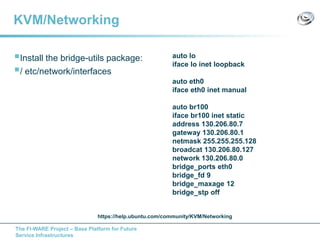
Install the bridge-utils package:
/ etc/network/interfaces
auto lo
iface lo inet loopback
auto eth0
iface eth0 inet manual
auto br100
iface br100 inet static
address 130.206.80.7
gateway 130.206.80.1
netmask 255.255.255.128
broadcat 130.206.80.127
network 130.206.80.0
bridge_ports eth0
bridge_fd 9
bridge_maxage 12
bridge_stp off
https://help.ubuntu.com/community/KVM/Networking
The FI-WARE Project – Base Platform for Future
Service Infrastructures
Firewalling
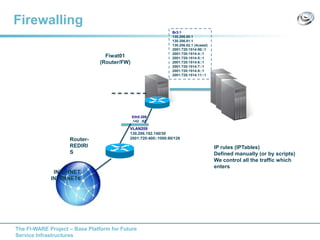
INTERNET
INTERNET6
Router-
REDIRI
S
Fiwat01
(Router/FW)
VLAN209
130.206.192.140/30
2001:720:400::1000:80/126
Eth0.209
.142 :82
Br3:1
130.206.80.1
130.206.81.1
130.206.82.1 (4caast)
2001:720:1514:80::1
2001:720:1514:4::1
2001:720:1514:5::1
2001:720:1514:6::1
2001:720:1514:7::1
2001:720:1514:8::1
2001:720:1514:11::1
IP rules (IPTables)
Defined manually (or by scripts)
We control all the traffic which
enters
The FI-WARE Project – Base Platform for Future
Service Infrastructures
Other tools
Backups
Maintenance (stap, stop VMs, hosts)
Sanity checks status
Check GEs status (in the catalogue)
The FI-WARE Project – Base Platform for Future
Service Infrastructures
Current solution works but…
It requires a lot of support from testbed people
• To deploy VMs
• To give access to Ips
The FI-WARE Project – Base Platform for Future
Service Infrastructures
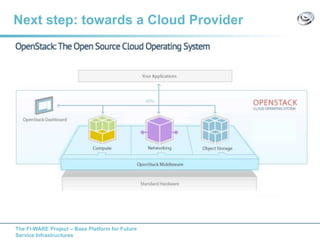
Next step: towards a Cloud Provider
The FI-WARE Project – Base Platform for Future
Service Infrastructures
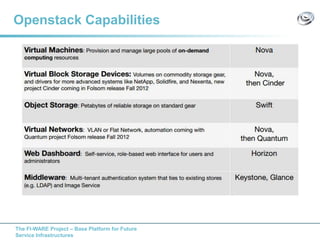
Openstack Capabilities
The FI-WARE Project – Base Platform for Future
Service Infrastructures
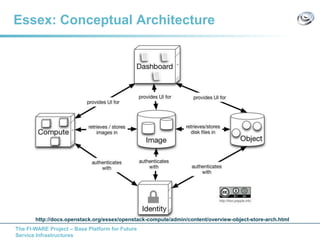
Essex: Conceptual Architecture
http://docs.openstack.org/essex/openstack-compute/admin/content/overview-object-store-arch.html
The FI-WARE Project – Base Platform for Future
Service Infrastructures
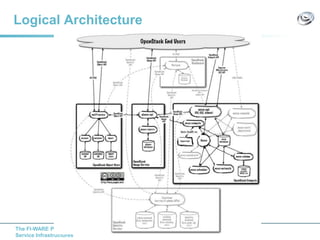
Logical Architecture
The FI-WARE Project – Base Platform for Future
Service Infrastructures
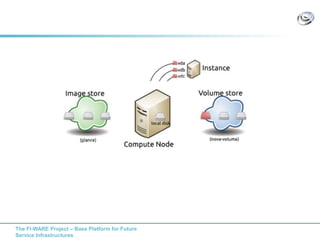
Compute: Some concepts
Project (tenant)
Images and Instances
Flavours
Keypairs
Security Ports
Floating Ips
Ephemeral Storage/Volume Storage
The FI-WARE Project – Base Platform for Future
Service Infrastructures
The FI-WARE Project – Base Platform for Future
Service Infrastructures
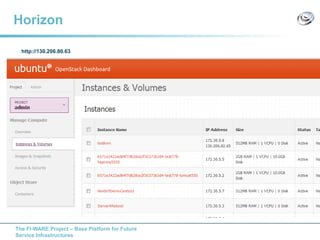
Horizon
http://130.206.80.63
The FI-WARE Project – Base Platform for Future
Service Infrastructures
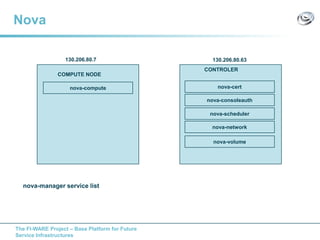
Nova
nova-cert
nova-manager service list
nova-consoleauth
nova-scheduler
CONTROLER
nova-network
nova-volume
COMPUTE NODE
nova-compute
130.206.80.63130.206.80.7
The FI-WARE Project – Base Platform for Future
Service Infrastructures
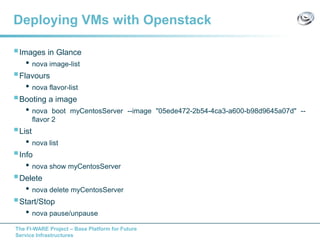
Deploying VMs with Openstack
Images in Glance
• nova image-list
Flavours
• nova flavor-list
Booting a image
• nova boot myCentosServer --image "05ede472-2b54-4ca3-a600-b98d9645a07d" --
flavor 2
List
• nova list
Info
• nova show myCentosServer
Delete
• nova delete myCentosServer
Start/Stop
• nova pause/unpause
The FI-WARE Project – Base Platform for Future
Service Infrastructures
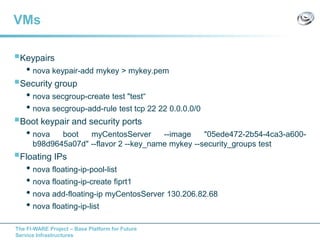
VMs
Keypairs
• nova keypair-add mykey > mykey.pem
Security group
• nova secgroup-create test "test“
• nova secgroup-add-rule test tcp 22 22 0.0.0.0/0
Boot keypair and security ports
• nova boot myCentosServer --image "05ede472-2b54-4ca3-a600-
b98d9645a07d" --flavor 2 --key_name mykey --security_groups test
Floating IPs
• nova floating-ip-pool-list
• nova floating-ip-create fiprt1
• nova add-floating-ip myCentosServer 130.206.82.68
• nova floating-ip-list
The FI-WARE Project – Base Platform for Future
Service Infrastructures
API
REST API…
http://docs.openstack.org/api/openstack-
compute/2/content/API_Operations-d1e2068.html
http://api.openstack.org/api-ref.html
The FI-WARE Project – Base Platform for Future
Service Infrastructures
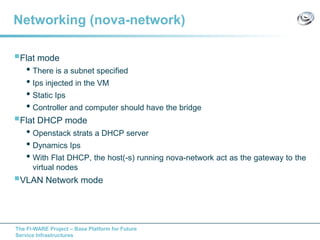
Networking (nova-network)
Flat mode
• There is a subnet specified
• Ips injected in the VM
• Static Ips
• Controller and computer should have the bridge
Flat DHCP mode
• Openstack strats a DHCP server
• Dynamics Ips
• With Flat DHCP, the host(-s) running nova-network act as the gateway to the
virtual nodes
VLAN Network mode
The FI-WARE Project – Base Platform for Future
Service Infrastructures
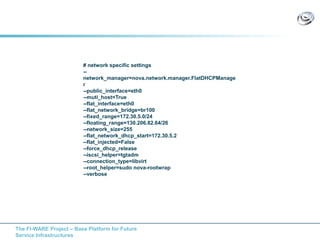
# network specific settings
--
network_manager=nova.network.manager.FlatDHCPManage
r
--public_interface=eth0
--muti_host=True
--flat_interface=eth0
--flat_network_bridge=br100
--fixed_range=172.30.5.0/24
--floating_range=130.206.82.64/26
--network_size=255
--flat_network_dhcp_start=172.30.5.2
--flat_injected=False
--force_dhcp_release
--iscsi_helper=tgtadm
--connection_type=libvirt
--root_helper=sudo nova-rootwrap
--verbose
The FI-WARE Project – Base Platform for Future
Service Infrastructures
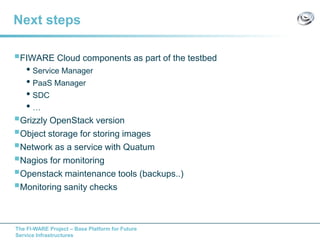
Next steps
FIWARE Cloud components as part of the testbed
• Service Manager
• PaaS Manager
• SDC
• …
Grizzly OpenStack version
Object storage for storing images
Network as a service with Quatum
Nagios for monitoring
Openstack maintenance tools (backups..)
Monitoring sanity checks
The FI-WARE Project – Base Platform for Future
Service Infrastructures
Others…
The FI-WARE Project – Base Platform for Future
Service Infrastructures
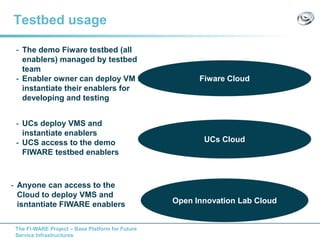
Testbed usage
Fiware Cloud
UCs Cloud
Open Innovation Lab Cloud
- The demo Fiware testbed (all
enablers) managed by testbed
team
- Enabler owner can deploy VM to
instantiate their enablers for
developing and testing
- UCs deploy VMS and
instantiate enablers
- UCS access to the demo
FIWARE testbed enablers
- Anyone can access to the
Cloud to deploy VMS and
isntantiate FIWARE enablers

Fiware testbed from hardware to openstack

  • 1.
    The FI-WARE Project– Base Platform for Future Service Infrastructures FIWARE Testbed Henar Muñoz Frutos Jose Ignacio Carretero From hardware to Openstack
  • 2.
    The FI-WARE Project– Base Platform for Future Service Infrastructures FIWARE project FI-WARE will deliver a novel service infrastructure, building upon elements (called Generic Enablers) which offer reusable and commonly shared functions making it easier to develop Future Internet Applications in multiple sectors Testbed
  • 3.
    The FI-WARE Project– Base Platform for Future Service Infrastructures The hardware…  1 host in Madrid for firewalling  12 hosts in Sevilla Red.es datacenter HP DL360 G8 E5-2609 8 cores, 128 Gb RAM 2TB Hd. Monitorización HP DL360 G8 E5-2606 1Switches de agregación HP 5820-24XG- SFP+ 2Switches de acceso HP 5800AF-48G 2Switch de gestion HP HI 5500-24G-4SFP 1Servidor de consolas Avocent ACS6000 1Regletas de corriente Avocent PM3008H-401 Networking Service 130.206.80.0/22 Management 130.206.86.0/24 ILOMs: 130.206.86.101 .... 130.206.86.112
  • 4.
    The FI-WARE Project– Base Platform for Future Service Infrastructures First step: install the OS  ILO https://130.206.86.103 Ubuntu 12.04.2 LTS
  • 5.
    The FI-WARE Project– Base Platform for Future Service Infrastructures Install hypervisor Check if the host is KVM compatible • egrep -c '(vmx|svm)' /proc/cpuinfo (If 1 or more it does ) • kvm-ok (KVM acceleration can be used) Install kvm • sudo apt-get install qemu-kvm libvirt-bin bridge-utils › libvirt-bin provides libvirtd (to administer qemu and kvm instances using libvirt) › qemu-kvm (kvm in Karmic and earlier) is the backend › bridge-utils provides a bridge from your network to the virtual machines Adding user '<username>' to group 'libvirtd • sudo adduser `id -un` libvirtd • groups (to check)  Verify • virsh -c qemu:///system list https://help.ubuntu.com/community/KVM/Installation
  • 6.
    The FI-WARE Project– Base Platform for Future Service Infrastructures Some kvm/libvirt commands VM from 0 • virt-install --name testkvm --ram 1024 --disk path=/var/lib/libvirt/images/testkvm.qcow2.img,format=qcow2 -c /var/lib/libvirt/isos/ubuntu-12.04.1- server-amd64.iso --vnc --noautoconsole --os-type linux --network=bridge:br100 VM info: • virsh dumpxml <vmname> VM create from XML • virsh define <vmname> VM start • virsh start <vmname> VM stop • virsh destroy < vmname > VM delete • Virsh undefine <vmname>
  • 7.
    The FI-WARE Project– Base Platform for Future Service Infrastructures KVM: Our scripts Our scripts (Nacho’s scripts ) • newInstallation: to create an image • updateVM.sh: Updates the IP, the MAC, provides a password • traePaca.sh: to migrate VMs ./newInstallation.sh --image ubuntu-server-12.04-1.2.img --template TemplateUbuntu1004.xml --name kvmtest2 --ram 712 --ipnum 253
  • 8.
    The FI-WARE Project– Base Platform for Future Service Infrastructures KVM/Networking Install the bridge-utils package: / etc/network/interfaces auto lo iface lo inet loopback auto eth0 iface eth0 inet manual auto br100 iface br100 inet static address 130.206.80.7 gateway 130.206.80.1 netmask 255.255.255.128 broadcat 130.206.80.127 network 130.206.80.0 bridge_ports eth0 bridge_fd 9 bridge_maxage 12 bridge_stp off https://help.ubuntu.com/community/KVM/Networking
  • 9.
    The FI-WARE Project– Base Platform for Future Service Infrastructures Firewalling INTERNET INTERNET6 Router- REDIRI S Fiwat01 (Router/FW) VLAN209 130.206.192.140/30 2001:720:400::1000:80/126 Eth0.209 .142 :82 Br3:1 130.206.80.1 130.206.81.1 130.206.82.1 (4caast) 2001:720:1514:80::1 2001:720:1514:4::1 2001:720:1514:5::1 2001:720:1514:6::1 2001:720:1514:7::1 2001:720:1514:8::1 2001:720:1514:11::1 IP rules (IPTables) Defined manually (or by scripts) We control all the traffic which enters
  • 10.
    The FI-WARE Project– Base Platform for Future Service Infrastructures Other tools Backups Maintenance (stap, stop VMs, hosts) Sanity checks status Check GEs status (in the catalogue)
  • 11.
    The FI-WARE Project– Base Platform for Future Service Infrastructures Current solution works but… It requires a lot of support from testbed people • To deploy VMs • To give access to Ips
  • 12.
    The FI-WARE Project– Base Platform for Future Service Infrastructures Next step: towards a Cloud Provider
  • 13.
    The FI-WARE Project– Base Platform for Future Service Infrastructures Openstack Capabilities
  • 14.
    The FI-WARE Project– Base Platform for Future Service Infrastructures Essex: Conceptual Architecture http://docs.openstack.org/essex/openstack-compute/admin/content/overview-object-store-arch.html
  • 15.
    The FI-WARE Project– Base Platform for Future Service Infrastructures Logical Architecture
  • 16.
    The FI-WARE Project– Base Platform for Future Service Infrastructures Compute: Some concepts Project (tenant) Images and Instances Flavours Keypairs Security Ports Floating Ips Ephemeral Storage/Volume Storage
  • 17.
    The FI-WARE Project– Base Platform for Future Service Infrastructures
  • 18.
    The FI-WARE Project– Base Platform for Future Service Infrastructures Horizon http://130.206.80.63
  • 19.
    The FI-WARE Project– Base Platform for Future Service Infrastructures Nova nova-cert nova-manager service list nova-consoleauth nova-scheduler CONTROLER nova-network nova-volume COMPUTE NODE nova-compute 130.206.80.63130.206.80.7
  • 20.
    The FI-WARE Project– Base Platform for Future Service Infrastructures Deploying VMs with Openstack Images in Glance • nova image-list Flavours • nova flavor-list Booting a image • nova boot myCentosServer --image "05ede472-2b54-4ca3-a600-b98d9645a07d" -- flavor 2 List • nova list Info • nova show myCentosServer Delete • nova delete myCentosServer Start/Stop • nova pause/unpause
  • 21.
    The FI-WARE Project– Base Platform for Future Service Infrastructures VMs Keypairs • nova keypair-add mykey > mykey.pem Security group • nova secgroup-create test "test“ • nova secgroup-add-rule test tcp 22 22 0.0.0.0/0 Boot keypair and security ports • nova boot myCentosServer --image "05ede472-2b54-4ca3-a600- b98d9645a07d" --flavor 2 --key_name mykey --security_groups test Floating IPs • nova floating-ip-pool-list • nova floating-ip-create fiprt1 • nova add-floating-ip myCentosServer 130.206.82.68 • nova floating-ip-list
  • 22.
    The FI-WARE Project– Base Platform for Future Service Infrastructures API REST API… http://docs.openstack.org/api/openstack- compute/2/content/API_Operations-d1e2068.html http://api.openstack.org/api-ref.html
  • 23.
    The FI-WARE Project– Base Platform for Future Service Infrastructures Networking (nova-network) Flat mode • There is a subnet specified • Ips injected in the VM • Static Ips • Controller and computer should have the bridge Flat DHCP mode • Openstack strats a DHCP server • Dynamics Ips • With Flat DHCP, the host(-s) running nova-network act as the gateway to the virtual nodes VLAN Network mode
  • 24.
    The FI-WARE Project– Base Platform for Future Service Infrastructures # network specific settings -- network_manager=nova.network.manager.FlatDHCPManage r --public_interface=eth0 --muti_host=True --flat_interface=eth0 --flat_network_bridge=br100 --fixed_range=172.30.5.0/24 --floating_range=130.206.82.64/26 --network_size=255 --flat_network_dhcp_start=172.30.5.2 --flat_injected=False --force_dhcp_release --iscsi_helper=tgtadm --connection_type=libvirt --root_helper=sudo nova-rootwrap --verbose
  • 25.
    The FI-WARE Project– Base Platform for Future Service Infrastructures Next steps FIWARE Cloud components as part of the testbed • Service Manager • PaaS Manager • SDC • … Grizzly OpenStack version Object storage for storing images Network as a service with Quatum Nagios for monitoring Openstack maintenance tools (backups..) Monitoring sanity checks
  • 26.
    The FI-WARE Project– Base Platform for Future Service Infrastructures Others…
  • 27.
    The FI-WARE Project– Base Platform for Future Service Infrastructures Testbed usage Fiware Cloud UCs Cloud Open Innovation Lab Cloud - The demo Fiware testbed (all enablers) managed by testbed team - Enabler owner can deploy VM to instantiate their enablers for developing and testing - UCs deploy VMS and instantiate enablers - UCS access to the demo FIWARE testbed enablers - Anyone can access to the Cloud to deploy VMS and isntantiate FIWARE enablers