Oracle
eBS R12
Overview
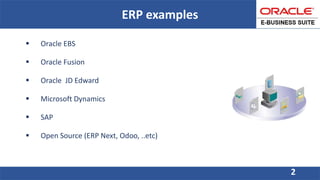
ERP examples
 Oracle EBS
 Oracle Fusion
 Oracle JD Edward
 Microsoft Dynamics
 SAP
 Open Source (ERP Next, Odoo, ..etc)
2
3
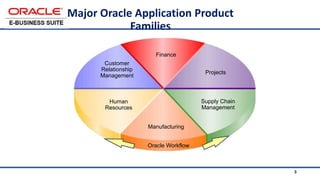
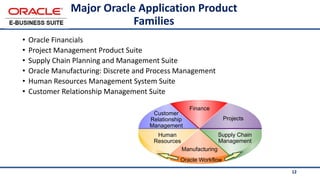
Major Oracle Application Product
Families
Customer
Relationship
Management
Supply Chain
Management
Manufacturing
Finance
Projects
Human
Resources
Oracle Workflow
4
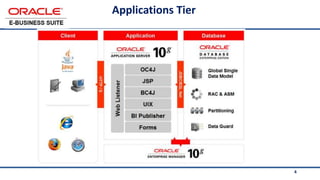
Applications Tier
5
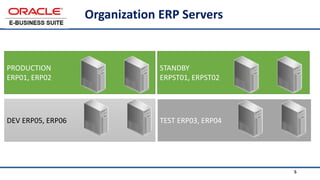
DEV ERP05, ERP06 TEST ERP03, ERP04
PRODUCTION
ERP01, ERP02
Organization ERP Servers
5
STANDBY
ERPST01, ERPST02
Main Tasks of ERP Team
 Integrate ERP with other current systems. Ensure system consistency and security.
 Involve in phases of Implementation project cycle including Analysis, development, testing.
 Monitor and Manage ERP Modules and Users.
 Build custom RDF reports with XML Templets and custom java OAF pages on demand.
 Use SQL & PL/SQL modules to build custom packages, procedures, functions, ..etc
 Monitor, review and perform tuning of database reports queries
 Build and update AME rules and attributes of approval and Hierarchies of approval.
 Communicate with Oracle Support to get the best support Organization needs
 Administrate and support the HRMS, SCM and Finance Modules
 Support and training the end users.
6
7
System Administrator
• User Management
• Monitoring Services and requests
• Work Flow Administrator
• …..
• …
7
8
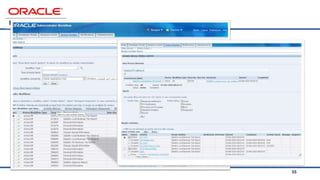
Work Flow Administrator
8
9
User Management
• Role – Menu – Function - Reports
9
10
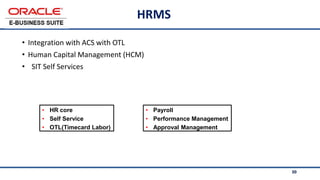
HRMS
• Integration with ACS with OTL
• Human Capital Management (HCM)
• SIT Self Services
10
• HR core
• Self Service
• OTL(Timecard Labor)
• Payroll
• Performance Management
• Approval Management
11
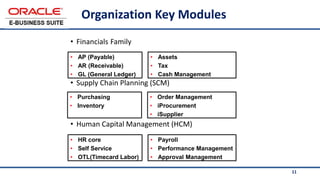
Organization Key Modules
• Financials Family
• Supply Chain Planning (SCM)
• Human Capital Management (HCM)
• AP (Payable)
• AR (Receivable)
• GL (General Ledger)
• Assets
• Tax
• Cash Management
• Purchasing
• Inventory
• Order Management
• iProcurement
• iSupplier
• HR core
• Self Service
• OTL(Timecard Labor)
• Payroll
• Performance Management
• Approval Management
12
Major Oracle Application Product
Families
• Oracle Financials
• Project Management Product Suite
• Supply Chain Planning and Management Suite
• Oracle Manufacturing: Discrete and Process Management
• Human Resources Management System Suite
• Customer Relationship Management Suite
Customer
Relationship
Management
Supply Chain
Management
Manufacturing
Finance
Projects
Human
Resources
Oracle Workflow
13
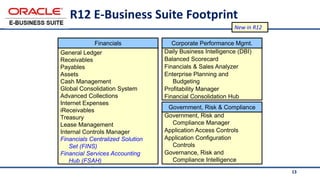
R12 E-Business Suite Footprint
General Ledger
Receivables
Payables
Assets
Cash Management
Global Consolidation System
Advanced Collections
Internet Expenses
iReceivables
Treasury
Lease Management
Internal Controls Manager
Financials Centralized Solution
Set (FINS)
Financial Services Accounting
Hub (FSAH)
Daily Business Intelligence (DBI)
Balanced Scorecard
Financials & Sales Analyzer
Enterprise Planning and
Budgeting
Profitability Manager
Financial Consolidation Hub
Government, Risk and
Compliance Manager
Application Access Controls
Application Configuration
Controls
Governance, Risk and
Compliance Intelligence
Financials Corporate Performance Mgmt.
Government, Risk & Compliance
New in R12
14
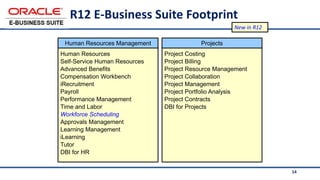
R12 E-Business Suite Footprint
Human Resources
Self-Service Human Resources
Advanced Benefits
Compensation Workbench
iRecruitment
Payroll
Performance Management
Time and Labor
Workforce Scheduling
Approvals Management
Learning Management
iLearning
Tutor
DBI for HR
Project Costing
Project Billing
Project Resource Management
Project Collaboration
Project Management
Project Portfolio Analysis
Project Contracts
DBI for Projects
Human Resources Management Projects
New in R12
15
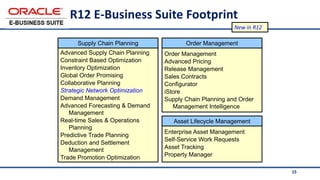
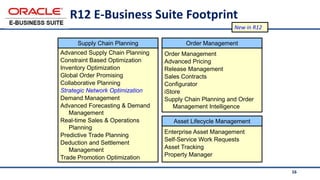
R12 E-Business Suite Footprint
Advanced Supply Chain Planning
Constraint Based Optimization
Inventory Optimization
Global Order Promising
Collaborative Planning
Strategic Network Optimization
Demand Management
Advanced Forecasting & Demand
Management
Real-time Sales & Operations
Planning
Predictive Trade Planning
Deduction and Settlement
Management
Trade Promotion Optimization
Order Management
Advanced Pricing
Release Management
Sales Contracts
Configurator
iStore
Supply Chain Planning and Order
Management Intelligence
Enterprise Asset Management
Self-Service Work Requests
Asset Tracking
Property Manager
Supply Chain Planning
Asset Lifecycle Management
Order Management
New in R12
16
R12 E-Business Suite Footprint
Advanced Supply Chain Planning
Constraint Based Optimization
Inventory Optimization
Global Order Promising
Collaborative Planning
Strategic Network Optimization
Demand Management
Advanced Forecasting & Demand
Management
Real-time Sales & Operations
Planning
Predictive Trade Planning
Deduction and Settlement
Management
Trade Promotion Optimization
Order Management
Advanced Pricing
Release Management
Sales Contracts
Configurator
iStore
Supply Chain Planning and Order
Management Intelligence
Enterprise Asset Management
Self-Service Work Requests
Asset Tracking
Property Manager
Supply Chain Planning
Asset Lifecycle Management
Order Management
New in R12
17
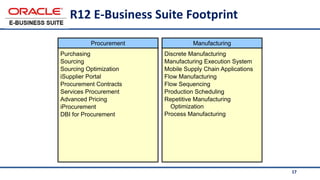
R12 E-Business Suite Footprint
Purchasing
Sourcing
Sourcing Optimization
iSupplier Portal
Procurement Contracts
Services Procurement
Advanced Pricing
iProcurement
DBI for Procurement
Discrete Manufacturing
Manufacturing Execution System
Mobile Supply Chain Applications
Flow Manufacturing
Flow Sequencing
Production Scheduling
Repetitive Manufacturing
Optimization
Process Manufacturing
Manufacturing
Procurement
18
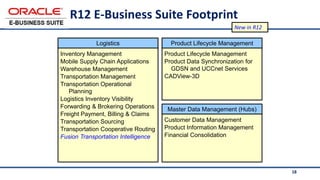
R12 E-Business Suite Footprint
Inventory Management
Mobile Supply Chain Applications
Warehouse Management
Transportation Management
Transportation Operational
Planning
Logistics Inventory Visibility
Forwarding & Brokering Operations
Freight Payment, Billing & Claims
Transportation Sourcing
Transportation Cooperative Routing
Fusion Transportation Intelligence
Product Lifecycle Management
Product Data Synchronization for
GDSN and UCCnet Services
CADView-3D
Customer Data Management
Product Information Management
Financial Consolidation
Logistics Product Lifecycle Management
Master Data Management (Hubs)
New in R12
19
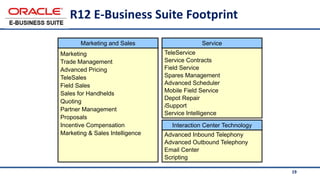
R12 E-Business Suite Footprint
Marketing
Trade Management
Advanced Pricing
TeleSales
Field Sales
Sales for Handhelds
Quoting
Partner Management
Proposals
Incentive Compensation
Marketing & Sales Intelligence
TeleService
Service Contracts
Field Service
Spares Management
Advanced Scheduler
Mobile Field Service
Depot Repair
iSupport
Service Intelligence
Advanced Inbound Telephony
Advanced Outbound Telephony
Email Center
Scripting
Marketing and Sales Service
Interaction Center Technology
20
Mission
• In support of Organization Strategic Plan, ERP team mission
is to provide, through end-user’s engagement, outstanding
applications and solutions that empower employees to:
 Provide exceptional services
 Effectively manages Organization’s business process
 Align ERP (eBS) applications with Organization’s business
process.
21
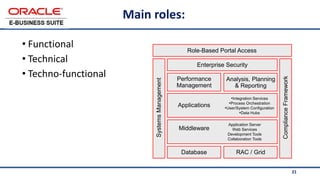
Main roles:
• Functional
• Technical
• Techno-functional
Middleware
Database RAC / Grid
Enterprise Security
Role-Based Portal Access
Performance
Management
Analysis, Planning
& Reporting
Compliance
Framework
Systems
Management
Applications
•Integration Services
•Process Orchestration
•User/System Configuration
•Data Hubs
Application Server
Web Services
Development Tools
Collaboration Tools
22
What Is Multi-Org?
• A server-side (applications and database) enhancement that enables single
installation of Oracle Applications
• Keeps transaction data and some setup data separate and secure by different
lines of business
23
Basic Business Needs
• The Multi-Org enhancement provides features that enable you to:
• Support multiple business units even if they use different ledgers
• Secure access to data on a single instance by line of business
• Define different organizational models
• Sell and ship from different legal entities
• Procure and receive from different legal entities
• Produce reports across entities or within a single entity
24
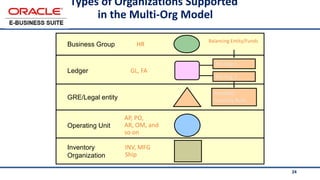
GL, FA
AP, PO,
AR, OM, and
so on
INV, MFG
Ship
Balancing Entity/Funds
HR
Inventory
Organization
Operating Unit
GRE/Legal entity
Ledger
Business Group
Bal Seg 1
Flexfield
Security Rule
Types of Organizations Supported
in the Multi-Org Model
Bal Seg 2
25
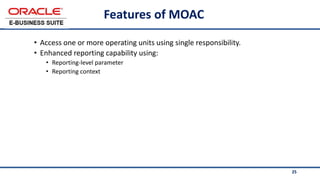
Features of MOAC
• Access one or more operating units using single responsibility.
• Enhanced reporting capability using:
• Reporting-level parameter
• Reporting context
26
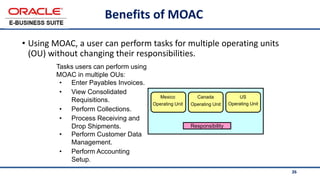
Benefits of MOAC
• Using MOAC, a user can perform tasks for multiple operating units
(OU) without changing their responsibilities.
Responsibility
Mexico
Operating Unit
Canada
Operating Unit
US
Operating Unit
Tasks users can perform using
MOAC in multiple OUs:
• Enter Payables Invoices.
• View Consolidated
Requisitions.
• Perform Collections.
• Process Receiving and
Drop Shipments.
• Perform Customer Data
Management.
• Perform Accounting
Setup.
27
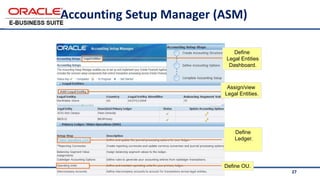
Accounting Setup Manager (ASM)
Define
Legal Entities
Dashboard.
Define
Ledger.
Define OU.
Assign/view
Legal Entities.
28
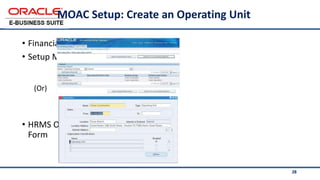
MOAC Setup: Create an Operating Unit
• Financials Accounting
• Setup Manager
(Or)
• HRMS Organization
Form
29
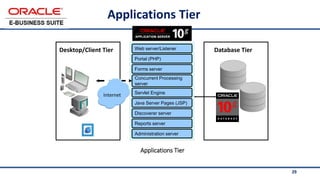
Applications Tier
Desktop/Client Tier Database Tier
Internet
Web server/Listener
Portal (PHP)
Forms server
Concurrent Processing
server
Servlet Engine
Java Server Pages (JSP)
Discoverer server
Reports server
Administration server
Applications Tier
30
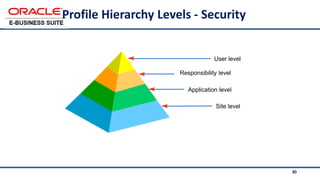
Profile Hierarchy Levels - Security
Site level
Application level
Responsibility level
User level
31
Forms Personalization:
• Rules and Actions
• Types: Global variables, Query-by-Example mode, Special menu entries, and
Zooms
• Administration: Security, Loading, and Performance
32
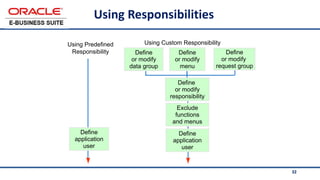
Using Responsibilities
Define
or modify
data group
Define
or modify
menu
Define
or modify
responsibility
Exclude
functions
and menus
Define
application
user
Using Predefined
Responsibility
Using Custom Responsibility
Define
or modify
request group
Define
application
user
33
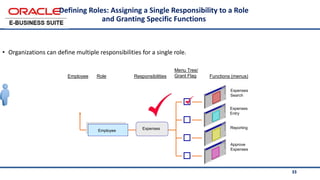
Defining Roles: Assigning a Single Responsibility to a Role
and Granting Specific Functions
• Organizations can define multiple responsibilities for a single role.
Employee
Expenses
Responsibilities
Expenses
Entry
Expenses
Search
Approve
Expenses
Reporting
Functions (menus)
Role
Employee
Menu Tree/
Grant Flag
34
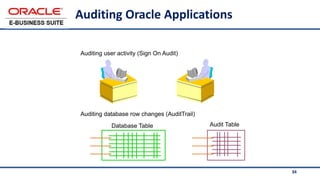
Auditing Oracle Applications
Auditing user activity (Sign On Audit)
Auditing database row changes (AuditTrail)
Database Table Audit Table
35
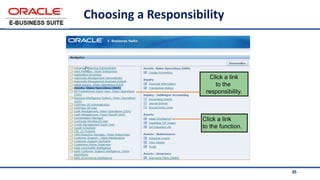
Choosing a Responsibility
Click a link
to the function.
Click a link
to the
responsibility.
36
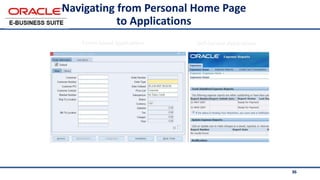
Navigating from Personal Home Page
to Applications
Forms-based applications Self-Service Applications
37
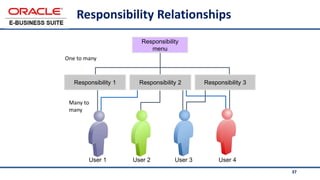
Responsibility Relationships
Responsibility
menu
User 1 User 3
User 2 User 4
One to many
Many to
many
Responsibility 1 Responsibility 2 Responsibility 3
38
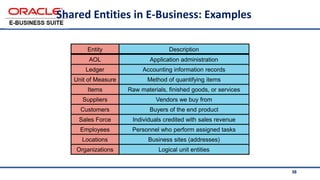
Shared Entities in E-Business: Examples
Application administration
AOL
Logical unit entities
Organizations
Business sites (addresses)
Locations
Personnel who perform assigned tasks
Employees
Individuals credited with sales revenue
Sales Force
Buyers of the end product
Customers
Vendors we buy from
Suppliers
Raw materials, finished goods, or services
Items
Method of quantifying items
Unit of Measure
Accounting information records
Ledger
Description
Entity
39
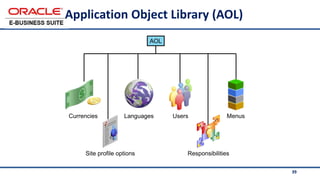
Application Object Library (AOL)
Currencies Languages Menus
Responsibilities
Users
AOL
Site profile options
40
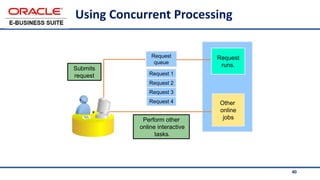
Using Concurrent Processing
Submits
request
Request
queue
Request
runs.
Other
online
jobs
Perform other
online interactive
tasks.
Request 1
Request 3
Request 4
Request 2
41
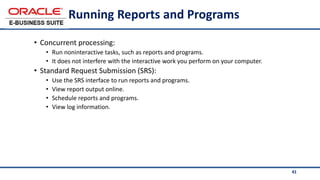
Running Reports and Programs
• Concurrent processing:
• Run noninteractive tasks, such as reports and programs.
• It does not interfere with the interactive work you perform on your computer.
• Standard Request Submission (SRS):
• Use the SRS interface to run reports and programs.
• View report output online.
• Schedule reports and programs.
• View log information.
42
What is SIT, Special Information Type
43
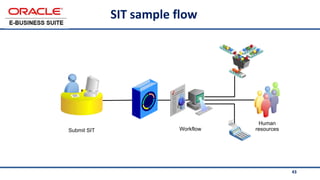
SIT sample flow
Human
resources
Workflow
Submit SIT
44
Samples of emp-SITs
• ExpandOrganization Special Information
• GPRS Request
• Service Request Form
• Test Line Services
• Training Requisition Local
• Training Requisition Abroad
• Emergency Loan Request
• Employee Wedding Gift
• Employee Relation Requisition (Death)
• Employee Relation Requisition
(New Born)
• Medical Expense Requisition
• Advance Payment
• Expense Report
• Donation Request
• Local Business Trip Advance
• Local Business Trip Report
• Int. Business Trip Advance
• Int. Business Trip Report
45
Samples of Manager-SITs
• Employee Transfer Request
• Employee Relation Requisition (School Fees)
• Employee of The Month
• Clearance Report
46
47
48
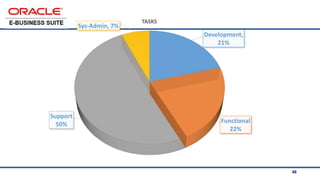
Development,
21%
Functional
22%
Support
50%
Sys-Admin, 7%
TASKS
49
50
51
Workflow
52
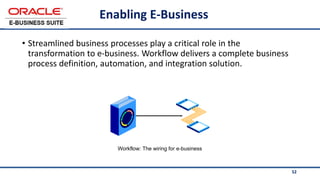
Enabling E-Business
• Streamlined business processes play a critical role in the
transformation to e-business. Workflow delivers a complete business
process definition, automation, and integration solution.
Workflow: The wiring for e-business
53
Workflow Activities: Examples
• A workflow is a set of business rules that can:
• Create accounting based on your requirements
• Route business documents internally for approval
• Initiate an outbound message (queue an approved purchase order for
transmission to a supplier)
• Be started as a result of an inbound message (for example, an inbound
Payables Invoice)
• Generate and send notifications that can be viewed from your personal home
page or the Notifications Window
• Generate and send email to an email client (respond directly to notifications
without accessing Oracle Applications)
54
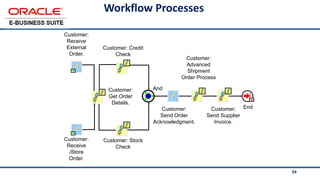
Workflow Processes
End
And
Customer:
Send Order
Acknowledgment.
Customer: Credit
Check
Customer: Stock
Check
Customer:
Advanced
Shipment
Order Process
Customer:
Send Supplier
Invoice.
Customer:
Receive
External
Order.
Customer:
Get Order
Details.
Customer:
Receive
iStore
Order.
55
56
Payroll
57
<Insert Picture Here >
• Payroll Definition Prerequisites
• Payment Methods
• Consolidation Set
• Payroll
• Valid Payment Methods
Payroll Module Objectives
58
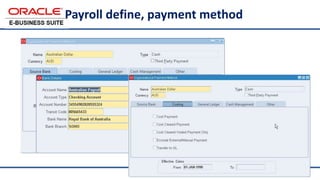
Payroll define, payment method
59
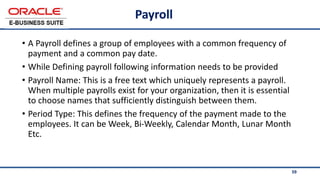
Payroll
• A Payroll defines a group of employees with a common frequency of
payment and a common pay date.
• While Defining payroll following information needs to be provided
• Payroll Name: This is a free text which uniquely represents a payroll.
When multiple payrolls exist for your organization, then it is essential
to choose names that sufficiently distinguish between them.
• Period Type: This defines the frequency of the payment made to the
employees. It can be Week, Bi-Weekly, Calendar Month, Lunar Month
Etc.
60
Payroll elements
•Elements
•Element Links
•Balances
•Fast Formulas
Formula Results and Processing Rules <Insert Picture Here >
61
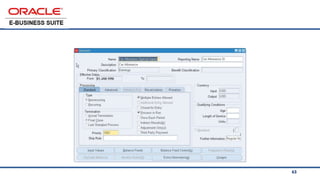
Elements
• Elements are building blocks to hold the actual values for all types of
benefits, earnings and deductions
• User defined names, types and values
• Elements provide a basic level of functionality
• Capture any type of information
• Eligibility based on assignment criteria
• Online or batch entry options
62
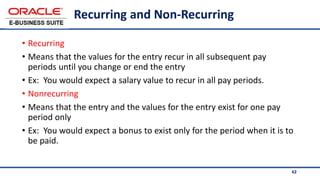
Recurring and Non-Recurring
• Recurring
• Means that the values for the entry recur in all subsequent pay
periods until you change or end the entry
• Ex: You would expect a salary value to recur in all pay periods.
• Nonrecurring
• Means that the entry and the values for the entry exist for one pay
period only
• Ex: You would expect a bonus to exist only for the period when it is to
be paid.
63
64
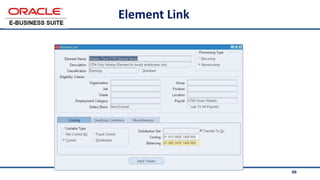
Element links
• Links provide a basic level of eligibility rule based
on specific work structures.
•Ex: If you define a link rule for an allowance
element to a specific location then an employee
can have an entry of that allowance element only
when they are assigned to that location.
65
Eligibility Rules
You can link to any or combination of the assignment components:
• Organizations
• Locations
• Jobs
• Positions
• Grades
• Payrolls
• People Group
• Employment Categories
• Salary Basis
66
Element Link
67
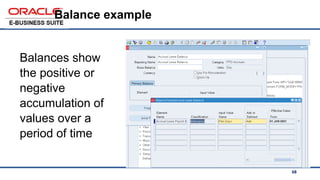
Balances
• Balances show the positive or negative accumulation of
values over a period of time
68
Balance example
Balances show
the positive or
negative
accumulation of
values over a
period of time
69
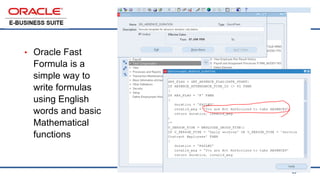
Fast formula
• Oracle Fast
Formula is a
simple way to
write formulas
using English
words and basic
Mathematical
functions
70
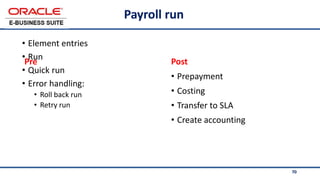
Payroll run
• Element entries
• Run
• Quick run
• Error handling:
• Roll back run
• Retry run
• Prepayment
• Costing
• Transfer to SLA
• Create accounting
Post
Pre
71
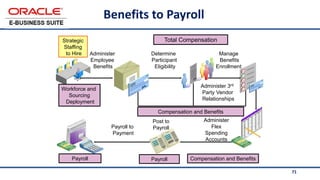
Benefits to Payroll
Total Compensation
Strategic
Staffing
to Hire
Compensation and Benefits
Workforce and
Sourcing
Deployment
Administer
Employee
Benefits
Manage
Benefits
Enrollment
Administer 3rd
Party Vendor
Relationships
Compensation and Benefits
Determine
Participant
Eligibility
Post to
Payroll
Administer
Flex
Spending
Accounts
Payroll to
Payment
Payroll
Payroll
72
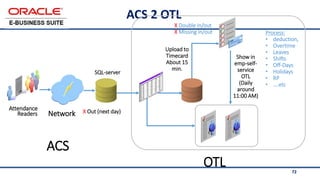
ACS 2 OTL
Attendance
Readers Network X Out (next day)
OTL
Upload to
Timecard
About 15
min.
Process:
• deduction,
• Overtime
• Leaves
• Shifts
• Off-Days
• Holidays
• RP
• ….etc
Show in
emp-self-
service
OTL
(Daily
around
11:00 AM)
ACS
SQL-server
X Double in/out
X Missing in/out
73
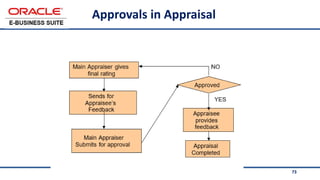
Approvals in Appraisal
74
OAF page of apprisals
75
Rates
Rates
76
76
Thank You…

Oracle eBS Overview.pptx

  • 1.
  • 2.
    ERP examples  OracleEBS  Oracle Fusion  Oracle JD Edward  Microsoft Dynamics  SAP  Open Source (ERP Next, Odoo, ..etc) 2
  • 3.
    3 Major Oracle ApplicationProduct Families Customer Relationship Management Supply Chain Management Manufacturing Finance Projects Human Resources Oracle Workflow
  • 4.
  • 5.
    5 DEV ERP05, ERP06TEST ERP03, ERP04 PRODUCTION ERP01, ERP02 Organization ERP Servers 5 STANDBY ERPST01, ERPST02
  • 6.
    Main Tasks ofERP Team  Integrate ERP with other current systems. Ensure system consistency and security.  Involve in phases of Implementation project cycle including Analysis, development, testing.  Monitor and Manage ERP Modules and Users.  Build custom RDF reports with XML Templets and custom java OAF pages on demand.  Use SQL & PL/SQL modules to build custom packages, procedures, functions, ..etc  Monitor, review and perform tuning of database reports queries  Build and update AME rules and attributes of approval and Hierarchies of approval.  Communicate with Oracle Support to get the best support Organization needs  Administrate and support the HRMS, SCM and Finance Modules  Support and training the end users. 6
  • 7.
    7 System Administrator • UserManagement • Monitoring Services and requests • Work Flow Administrator • ….. • … 7
  • 8.
  • 9.
    9 User Management • Role– Menu – Function - Reports 9
  • 10.
    10 HRMS • Integration withACS with OTL • Human Capital Management (HCM) • SIT Self Services 10 • HR core • Self Service • OTL(Timecard Labor) • Payroll • Performance Management • Approval Management
  • 11.
    11 Organization Key Modules •Financials Family • Supply Chain Planning (SCM) • Human Capital Management (HCM) • AP (Payable) • AR (Receivable) • GL (General Ledger) • Assets • Tax • Cash Management • Purchasing • Inventory • Order Management • iProcurement • iSupplier • HR core • Self Service • OTL(Timecard Labor) • Payroll • Performance Management • Approval Management
  • 12.
    12 Major Oracle ApplicationProduct Families • Oracle Financials • Project Management Product Suite • Supply Chain Planning and Management Suite • Oracle Manufacturing: Discrete and Process Management • Human Resources Management System Suite • Customer Relationship Management Suite Customer Relationship Management Supply Chain Management Manufacturing Finance Projects Human Resources Oracle Workflow
  • 13.
    13 R12 E-Business SuiteFootprint General Ledger Receivables Payables Assets Cash Management Global Consolidation System Advanced Collections Internet Expenses iReceivables Treasury Lease Management Internal Controls Manager Financials Centralized Solution Set (FINS) Financial Services Accounting Hub (FSAH) Daily Business Intelligence (DBI) Balanced Scorecard Financials & Sales Analyzer Enterprise Planning and Budgeting Profitability Manager Financial Consolidation Hub Government, Risk and Compliance Manager Application Access Controls Application Configuration Controls Governance, Risk and Compliance Intelligence Financials Corporate Performance Mgmt. Government, Risk & Compliance New in R12
  • 14.
    14 R12 E-Business SuiteFootprint Human Resources Self-Service Human Resources Advanced Benefits Compensation Workbench iRecruitment Payroll Performance Management Time and Labor Workforce Scheduling Approvals Management Learning Management iLearning Tutor DBI for HR Project Costing Project Billing Project Resource Management Project Collaboration Project Management Project Portfolio Analysis Project Contracts DBI for Projects Human Resources Management Projects New in R12
  • 15.
    15 R12 E-Business SuiteFootprint Advanced Supply Chain Planning Constraint Based Optimization Inventory Optimization Global Order Promising Collaborative Planning Strategic Network Optimization Demand Management Advanced Forecasting & Demand Management Real-time Sales & Operations Planning Predictive Trade Planning Deduction and Settlement Management Trade Promotion Optimization Order Management Advanced Pricing Release Management Sales Contracts Configurator iStore Supply Chain Planning and Order Management Intelligence Enterprise Asset Management Self-Service Work Requests Asset Tracking Property Manager Supply Chain Planning Asset Lifecycle Management Order Management New in R12
  • 16.
    16 R12 E-Business SuiteFootprint Advanced Supply Chain Planning Constraint Based Optimization Inventory Optimization Global Order Promising Collaborative Planning Strategic Network Optimization Demand Management Advanced Forecasting & Demand Management Real-time Sales & Operations Planning Predictive Trade Planning Deduction and Settlement Management Trade Promotion Optimization Order Management Advanced Pricing Release Management Sales Contracts Configurator iStore Supply Chain Planning and Order Management Intelligence Enterprise Asset Management Self-Service Work Requests Asset Tracking Property Manager Supply Chain Planning Asset Lifecycle Management Order Management New in R12
  • 17.
    17 R12 E-Business SuiteFootprint Purchasing Sourcing Sourcing Optimization iSupplier Portal Procurement Contracts Services Procurement Advanced Pricing iProcurement DBI for Procurement Discrete Manufacturing Manufacturing Execution System Mobile Supply Chain Applications Flow Manufacturing Flow Sequencing Production Scheduling Repetitive Manufacturing Optimization Process Manufacturing Manufacturing Procurement
  • 18.
    18 R12 E-Business SuiteFootprint Inventory Management Mobile Supply Chain Applications Warehouse Management Transportation Management Transportation Operational Planning Logistics Inventory Visibility Forwarding & Brokering Operations Freight Payment, Billing & Claims Transportation Sourcing Transportation Cooperative Routing Fusion Transportation Intelligence Product Lifecycle Management Product Data Synchronization for GDSN and UCCnet Services CADView-3D Customer Data Management Product Information Management Financial Consolidation Logistics Product Lifecycle Management Master Data Management (Hubs) New in R12
  • 19.
    19 R12 E-Business SuiteFootprint Marketing Trade Management Advanced Pricing TeleSales Field Sales Sales for Handhelds Quoting Partner Management Proposals Incentive Compensation Marketing & Sales Intelligence TeleService Service Contracts Field Service Spares Management Advanced Scheduler Mobile Field Service Depot Repair iSupport Service Intelligence Advanced Inbound Telephony Advanced Outbound Telephony Email Center Scripting Marketing and Sales Service Interaction Center Technology
  • 20.
    20 Mission • In supportof Organization Strategic Plan, ERP team mission is to provide, through end-user’s engagement, outstanding applications and solutions that empower employees to:  Provide exceptional services  Effectively manages Organization’s business process  Align ERP (eBS) applications with Organization’s business process.
  • 21.
    21 Main roles: • Functional •Technical • Techno-functional Middleware Database RAC / Grid Enterprise Security Role-Based Portal Access Performance Management Analysis, Planning & Reporting Compliance Framework Systems Management Applications •Integration Services •Process Orchestration •User/System Configuration •Data Hubs Application Server Web Services Development Tools Collaboration Tools
  • 22.
    22 What Is Multi-Org? •A server-side (applications and database) enhancement that enables single installation of Oracle Applications • Keeps transaction data and some setup data separate and secure by different lines of business
  • 23.
    23 Basic Business Needs •The Multi-Org enhancement provides features that enable you to: • Support multiple business units even if they use different ledgers • Secure access to data on a single instance by line of business • Define different organizational models • Sell and ship from different legal entities • Procure and receive from different legal entities • Produce reports across entities or within a single entity
  • 24.
    24 GL, FA AP, PO, AR,OM, and so on INV, MFG Ship Balancing Entity/Funds HR Inventory Organization Operating Unit GRE/Legal entity Ledger Business Group Bal Seg 1 Flexfield Security Rule Types of Organizations Supported in the Multi-Org Model Bal Seg 2
  • 25.
    25 Features of MOAC •Access one or more operating units using single responsibility. • Enhanced reporting capability using: • Reporting-level parameter • Reporting context
  • 26.
    26 Benefits of MOAC •Using MOAC, a user can perform tasks for multiple operating units (OU) without changing their responsibilities. Responsibility Mexico Operating Unit Canada Operating Unit US Operating Unit Tasks users can perform using MOAC in multiple OUs: • Enter Payables Invoices. • View Consolidated Requisitions. • Perform Collections. • Process Receiving and Drop Shipments. • Perform Customer Data Management. • Perform Accounting Setup.
  • 27.
    27 Accounting Setup Manager(ASM) Define Legal Entities Dashboard. Define Ledger. Define OU. Assign/view Legal Entities.
  • 28.
    28 MOAC Setup: Createan Operating Unit • Financials Accounting • Setup Manager (Or) • HRMS Organization Form
  • 29.
    29 Applications Tier Desktop/Client TierDatabase Tier Internet Web server/Listener Portal (PHP) Forms server Concurrent Processing server Servlet Engine Java Server Pages (JSP) Discoverer server Reports server Administration server Applications Tier
  • 30.
    30 Profile Hierarchy Levels- Security Site level Application level Responsibility level User level
  • 31.
    31 Forms Personalization: • Rulesand Actions • Types: Global variables, Query-by-Example mode, Special menu entries, and Zooms • Administration: Security, Loading, and Performance
  • 32.
    32 Using Responsibilities Define or modify datagroup Define or modify menu Define or modify responsibility Exclude functions and menus Define application user Using Predefined Responsibility Using Custom Responsibility Define or modify request group Define application user
  • 33.
    33 Defining Roles: Assigninga Single Responsibility to a Role and Granting Specific Functions • Organizations can define multiple responsibilities for a single role. Employee Expenses Responsibilities Expenses Entry Expenses Search Approve Expenses Reporting Functions (menus) Role Employee Menu Tree/ Grant Flag
  • 34.
    34 Auditing Oracle Applications Auditinguser activity (Sign On Audit) Auditing database row changes (AuditTrail) Database Table Audit Table
  • 35.
    35 Choosing a Responsibility Clicka link to the function. Click a link to the responsibility.
  • 36.
    36 Navigating from PersonalHome Page to Applications Forms-based applications Self-Service Applications
  • 37.
    37 Responsibility Relationships Responsibility menu User 1User 3 User 2 User 4 One to many Many to many Responsibility 1 Responsibility 2 Responsibility 3
  • 38.
    38 Shared Entities inE-Business: Examples Application administration AOL Logical unit entities Organizations Business sites (addresses) Locations Personnel who perform assigned tasks Employees Individuals credited with sales revenue Sales Force Buyers of the end product Customers Vendors we buy from Suppliers Raw materials, finished goods, or services Items Method of quantifying items Unit of Measure Accounting information records Ledger Description Entity
  • 39.
    39 Application Object Library(AOL) Currencies Languages Menus Responsibilities Users AOL Site profile options
  • 40.
    40 Using Concurrent Processing Submits request Request queue Request runs. Other online jobs Performother online interactive tasks. Request 1 Request 3 Request 4 Request 2
  • 41.
    41 Running Reports andPrograms • Concurrent processing: • Run noninteractive tasks, such as reports and programs. • It does not interfere with the interactive work you perform on your computer. • Standard Request Submission (SRS): • Use the SRS interface to run reports and programs. • View report output online. • Schedule reports and programs. • View log information.
  • 42.
    42 What is SIT,Special Information Type
  • 43.
  • 44.
    44 Samples of emp-SITs •ExpandOrganization Special Information • GPRS Request • Service Request Form • Test Line Services • Training Requisition Local • Training Requisition Abroad • Emergency Loan Request • Employee Wedding Gift • Employee Relation Requisition (Death) • Employee Relation Requisition (New Born) • Medical Expense Requisition • Advance Payment • Expense Report • Donation Request • Local Business Trip Advance • Local Business Trip Report • Int. Business Trip Advance • Int. Business Trip Report
  • 45.
    45 Samples of Manager-SITs •Employee Transfer Request • Employee Relation Requisition (School Fees) • Employee of The Month • Clearance Report
  • 46.
  • 47.
  • 48.
  • 49.
  • 50.
  • 51.
  • 52.
    52 Enabling E-Business • Streamlinedbusiness processes play a critical role in the transformation to e-business. Workflow delivers a complete business process definition, automation, and integration solution. Workflow: The wiring for e-business
  • 53.
    53 Workflow Activities: Examples •A workflow is a set of business rules that can: • Create accounting based on your requirements • Route business documents internally for approval • Initiate an outbound message (queue an approved purchase order for transmission to a supplier) • Be started as a result of an inbound message (for example, an inbound Payables Invoice) • Generate and send notifications that can be viewed from your personal home page or the Notifications Window • Generate and send email to an email client (respond directly to notifications without accessing Oracle Applications)
  • 54.
    54 Workflow Processes End And Customer: Send Order Acknowledgment. Customer:Credit Check Customer: Stock Check Customer: Advanced Shipment Order Process Customer: Send Supplier Invoice. Customer: Receive External Order. Customer: Get Order Details. Customer: Receive iStore Order.
  • 55.
  • 56.
  • 57.
    57 <Insert Picture Here> • Payroll Definition Prerequisites • Payment Methods • Consolidation Set • Payroll • Valid Payment Methods Payroll Module Objectives
  • 58.
  • 59.
    59 Payroll • A Payrolldefines a group of employees with a common frequency of payment and a common pay date. • While Defining payroll following information needs to be provided • Payroll Name: This is a free text which uniquely represents a payroll. When multiple payrolls exist for your organization, then it is essential to choose names that sufficiently distinguish between them. • Period Type: This defines the frequency of the payment made to the employees. It can be Week, Bi-Weekly, Calendar Month, Lunar Month Etc.
  • 60.
    60 Payroll elements •Elements •Element Links •Balances •FastFormulas Formula Results and Processing Rules <Insert Picture Here >
  • 61.
    61 Elements • Elements arebuilding blocks to hold the actual values for all types of benefits, earnings and deductions • User defined names, types and values • Elements provide a basic level of functionality • Capture any type of information • Eligibility based on assignment criteria • Online or batch entry options
  • 62.
    62 Recurring and Non-Recurring •Recurring • Means that the values for the entry recur in all subsequent pay periods until you change or end the entry • Ex: You would expect a salary value to recur in all pay periods. • Nonrecurring • Means that the entry and the values for the entry exist for one pay period only • Ex: You would expect a bonus to exist only for the period when it is to be paid.
  • 63.
  • 64.
    64 Element links • Linksprovide a basic level of eligibility rule based on specific work structures. •Ex: If you define a link rule for an allowance element to a specific location then an employee can have an entry of that allowance element only when they are assigned to that location.
  • 65.
    65 Eligibility Rules You canlink to any or combination of the assignment components: • Organizations • Locations • Jobs • Positions • Grades • Payrolls • People Group • Employment Categories • Salary Basis
  • 66.
  • 67.
    67 Balances • Balances showthe positive or negative accumulation of values over a period of time
  • 68.
    68 Balance example Balances show thepositive or negative accumulation of values over a period of time
  • 69.
    69 Fast formula • OracleFast Formula is a simple way to write formulas using English words and basic Mathematical functions
  • 70.
    70 Payroll run • Elemententries • Run • Quick run • Error handling: • Roll back run • Retry run • Prepayment • Costing • Transfer to SLA • Create accounting Post Pre
  • 71.
    71 Benefits to Payroll TotalCompensation Strategic Staffing to Hire Compensation and Benefits Workforce and Sourcing Deployment Administer Employee Benefits Manage Benefits Enrollment Administer 3rd Party Vendor Relationships Compensation and Benefits Determine Participant Eligibility Post to Payroll Administer Flex Spending Accounts Payroll to Payment Payroll Payroll
  • 72.
    72 ACS 2 OTL Attendance ReadersNetwork X Out (next day) OTL Upload to Timecard About 15 min. Process: • deduction, • Overtime • Leaves • Shifts • Off-Days • Holidays • RP • ….etc Show in emp-self- service OTL (Daily around 11:00 AM) ACS SQL-server X Double in/out X Missing in/out
  • 73.
  • 74.
    74 OAF page ofapprisals
  • 75.
  • 76.