Copyright © 2017, Oracle and/or its affiliates. All rights reserved. |
OAC V4 New Features Overview
Oracle Analytics
Product Management
Confidential – Oracle Internal/Restricted/Highly Restricted
Copyright © 2017, Oracle and/or its affiliates. All rights reserved. |
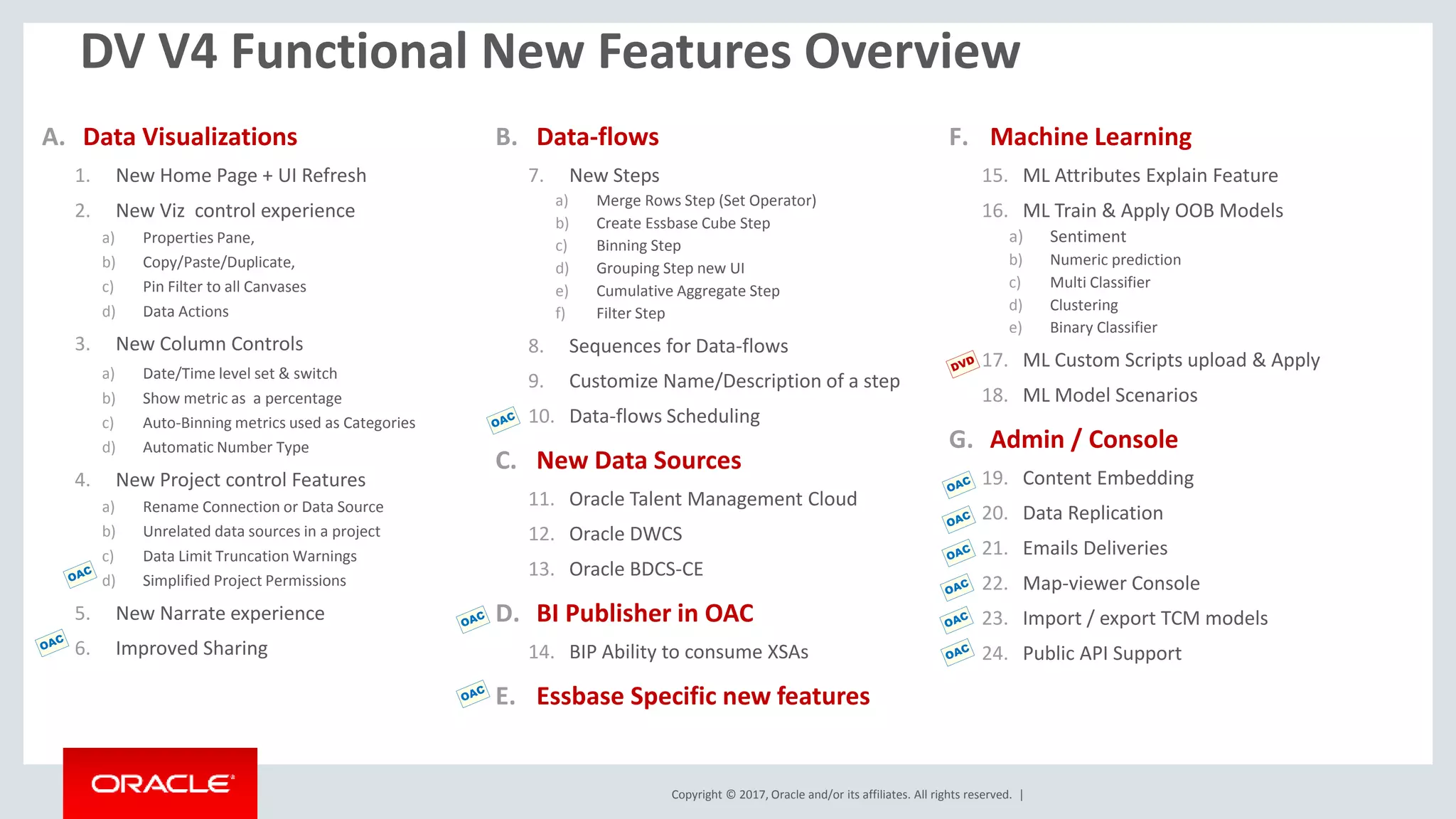
DV V4 Functional New Features Overview
A. Data Visualizations
1. New Home Page + UI Refresh
2. New Viz control experience
a) Properties Pane,
b) Copy/Paste/Duplicate,
c) Pin Filter to all Canvases
d) Data Actions
3. New Column Controls
a) Date/Time level set & switch
b) Show metric as a percentage
c) Auto-Binning metrics used as Categories
d) Automatic Number Type
4. New Project control Features
a) Rename Connection or Data Source
b) Unrelated data sources in a project
c) Data Limit Truncation Warnings
d) Simplified Project Permissions
5. New Narrate experience
6. Improved Sharing
B. Data-flows
7. New Steps
a) Merge Rows Step (Set Operator)
b) Create Essbase Cube Step
c) Binning Step
d) Grouping Step new UI
e) Cumulative Aggregate Step
f) Filter Step
8. Sequences for Data-flows
9. Customize Name/Description of a step
10. Data-flows Scheduling
C. New Data Sources
11. Oracle Talent Management Cloud
12. Oracle DWCS
13. Oracle BDCS-CE
D. BI Publisher in OAC
14. BIP Ability to consume XSAs
E. Essbase Specific new features
F. Machine Learning
15. ML Attributes Explain Feature
16. ML Train & Apply OOB Models
a) Sentiment
b) Numeric prediction
c) Multi Classifier
d) Clustering
e) Binary Classifier
17. ML Custom Scripts upload & Apply
18. ML Model Scenarios
G. Admin / Console
19. Content Embedding
20. Data Replication
21. Emails Deliveries
22. Map-viewer Console
23. Import / export TCM models
24. Public API Support
Copyright © 2017, Oracle and/or its affiliates. All rights reserved. | Confidential – Oracle Internal/Restricted/Highly Restricted 3
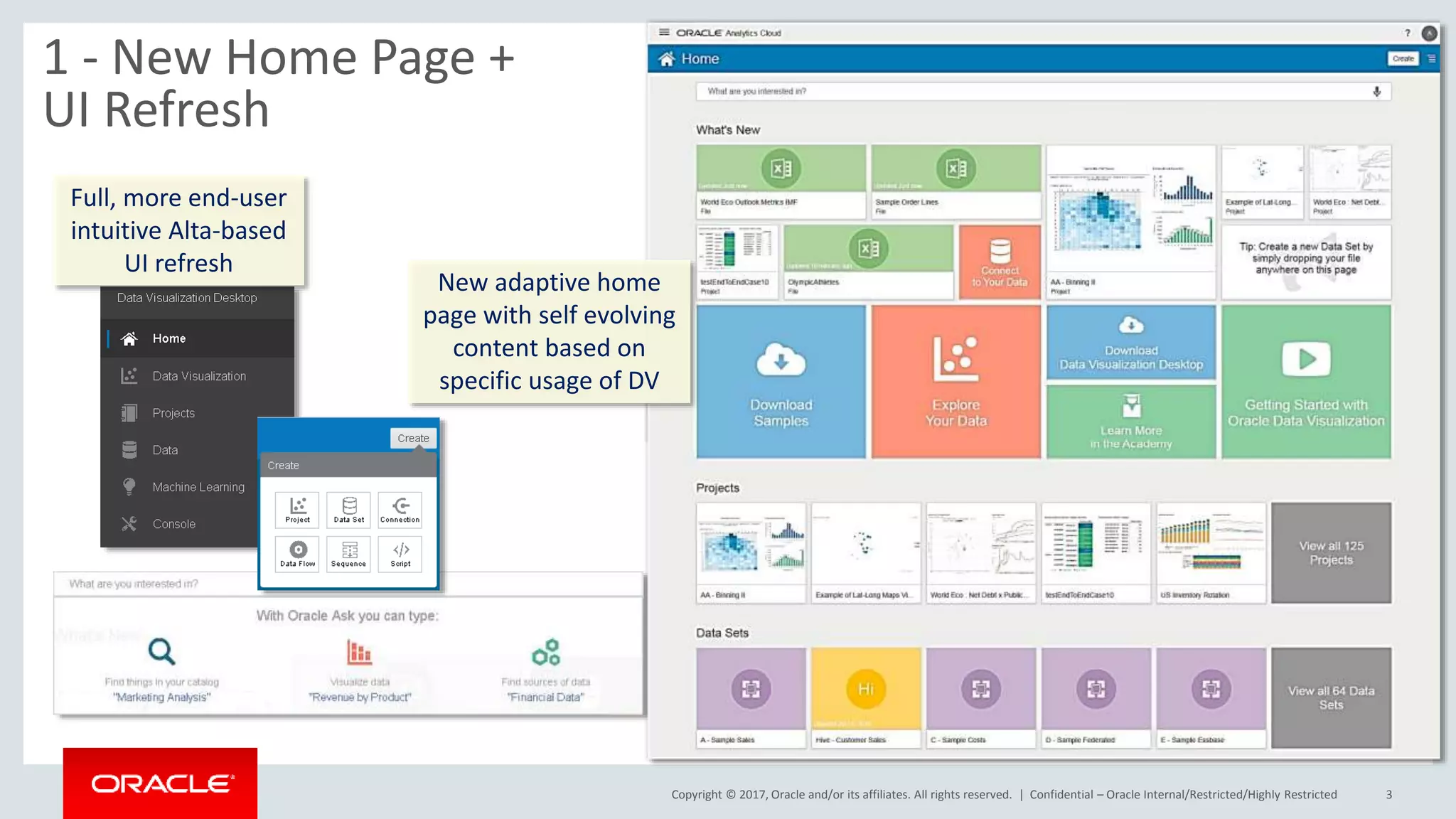
1 - New Home Page +
UI Refresh
Full, more end-user
intuitive Alta-based
UI refresh
New adaptive home
page with self evolving
content based on
specific usage of DV
Copyright © 2017, Oracle and/or its affiliates. All rights reserved. | Confidential – Oracle Internal/Restricted/Highly Restricted 4
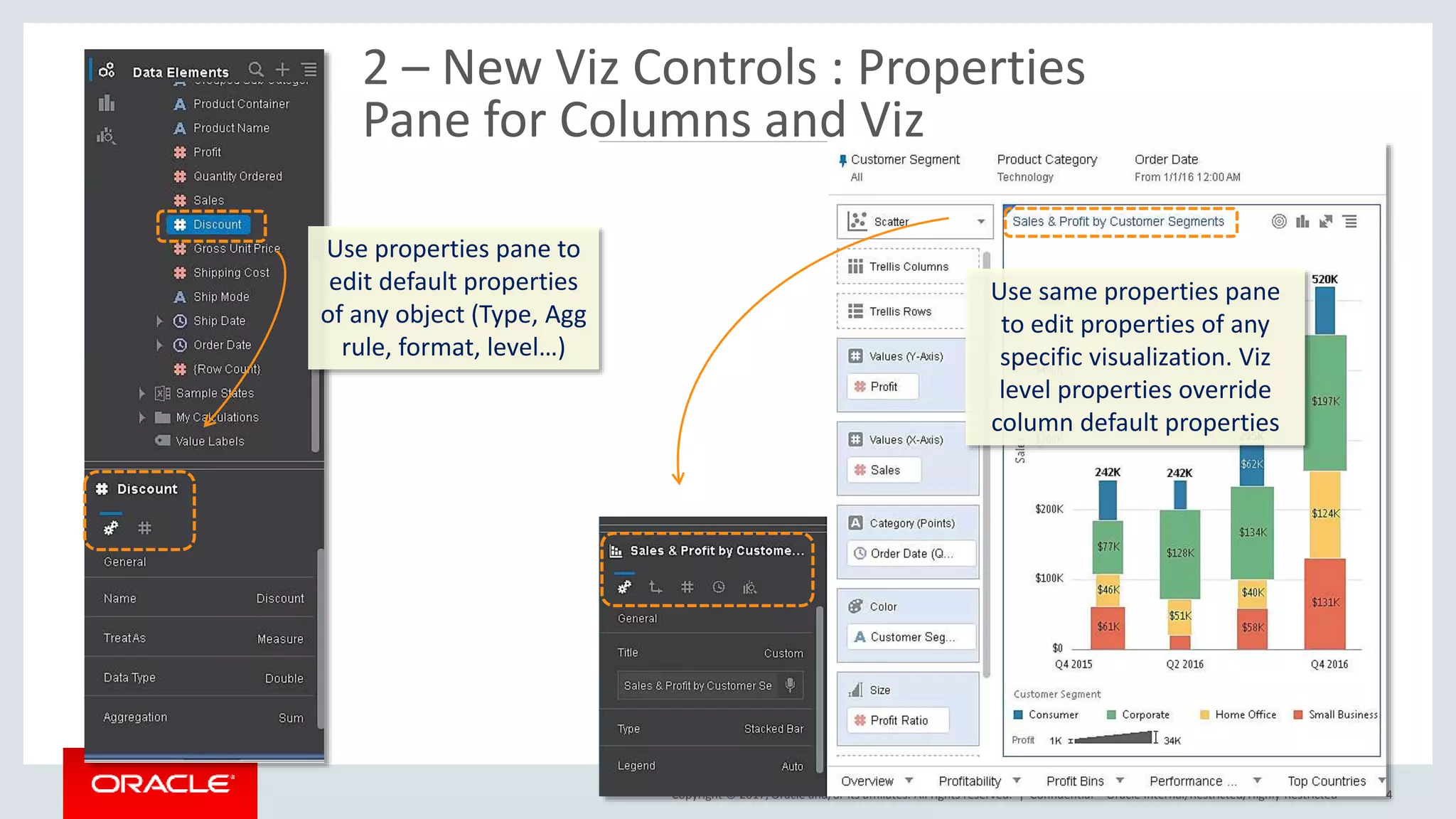
2 – New Viz Controls : Properties
Pane for Columns and Viz
Use properties pane to
edit default properties
of any object (Type, Agg
rule, format, level…)
Use same properties pane
to edit properties of any
specific visualization. Viz
level properties override
column default properties
Copyright © 2017, Oracle and/or its affiliates. All rights reserved. |
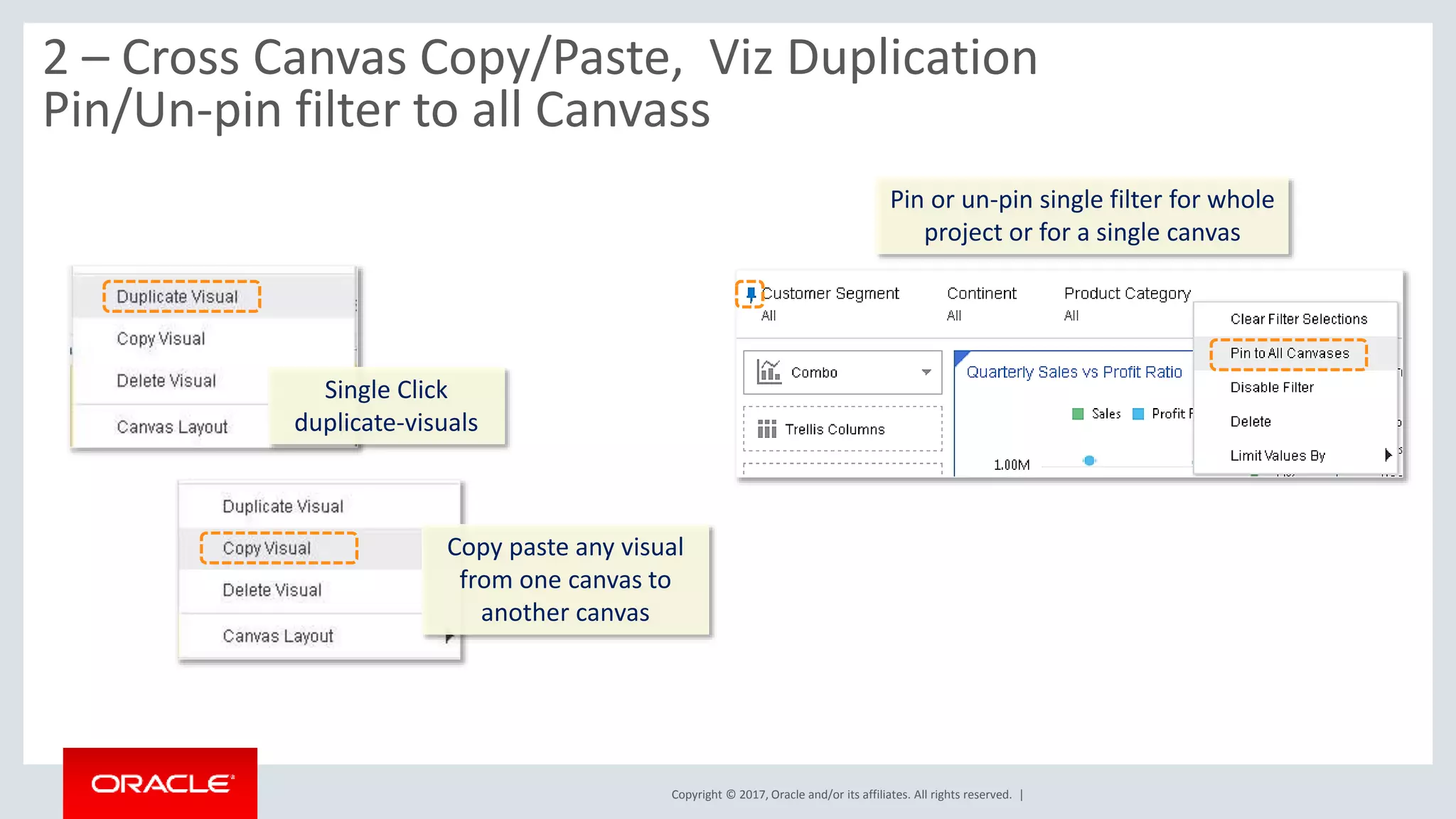
2 – Cross Canvas Copy/Paste, Viz Duplication
Pin/Un-pin filter to all Canvass
Single Click
duplicate-visuals
Copy paste any visual
from one canvas to
another canvas
Pin or un-pin single filter for whole
project or for a single canvas
Copyright © 2017, Oracle and/or its affiliates. All rights reserved. |
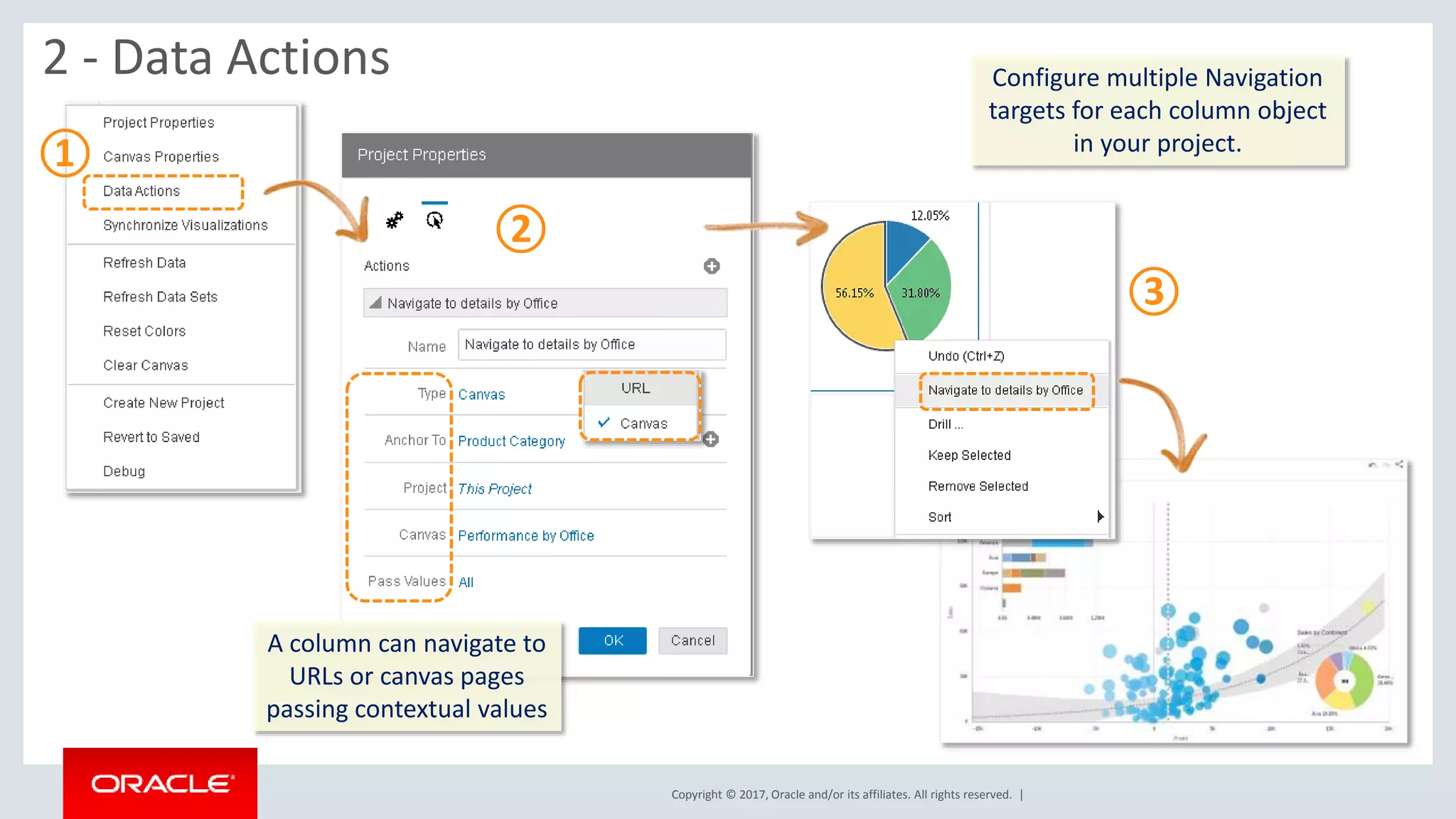
2 - Data Actions Configure multiple Navigation
targets for each column object
in your project.
①
②
③
A column can navigate to
URLs or canvas pages
passing contextual values
Copyright © 2017, Oracle and/or its affiliates. All rights reserved. | Confidential – Oracle Internal/Restricted/Highly Restricted 7
①
②
③
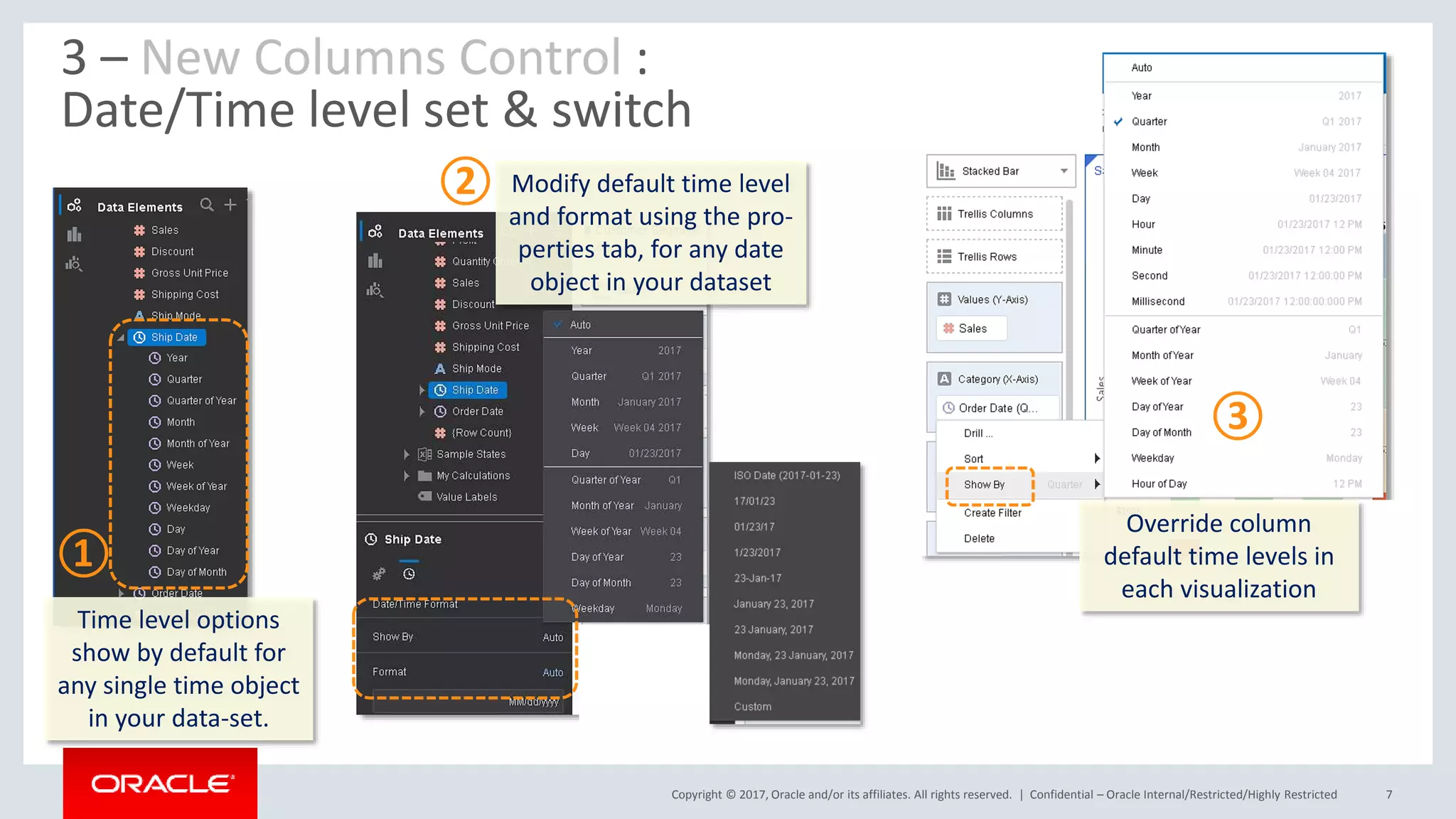
3 – New Columns Control :
Date/Time level set & switch
Time level options
show by default for
any single time object
in your data-set.
Modify default time level
and format using the pro-
perties tab, for any date
object in your dataset
Override column
default time levels in
each visualization
Copyright © 2017, Oracle and/or its affiliates. All rights reserved. | Confidential – Oracle Internal/Restricted/Highly Restricted 8
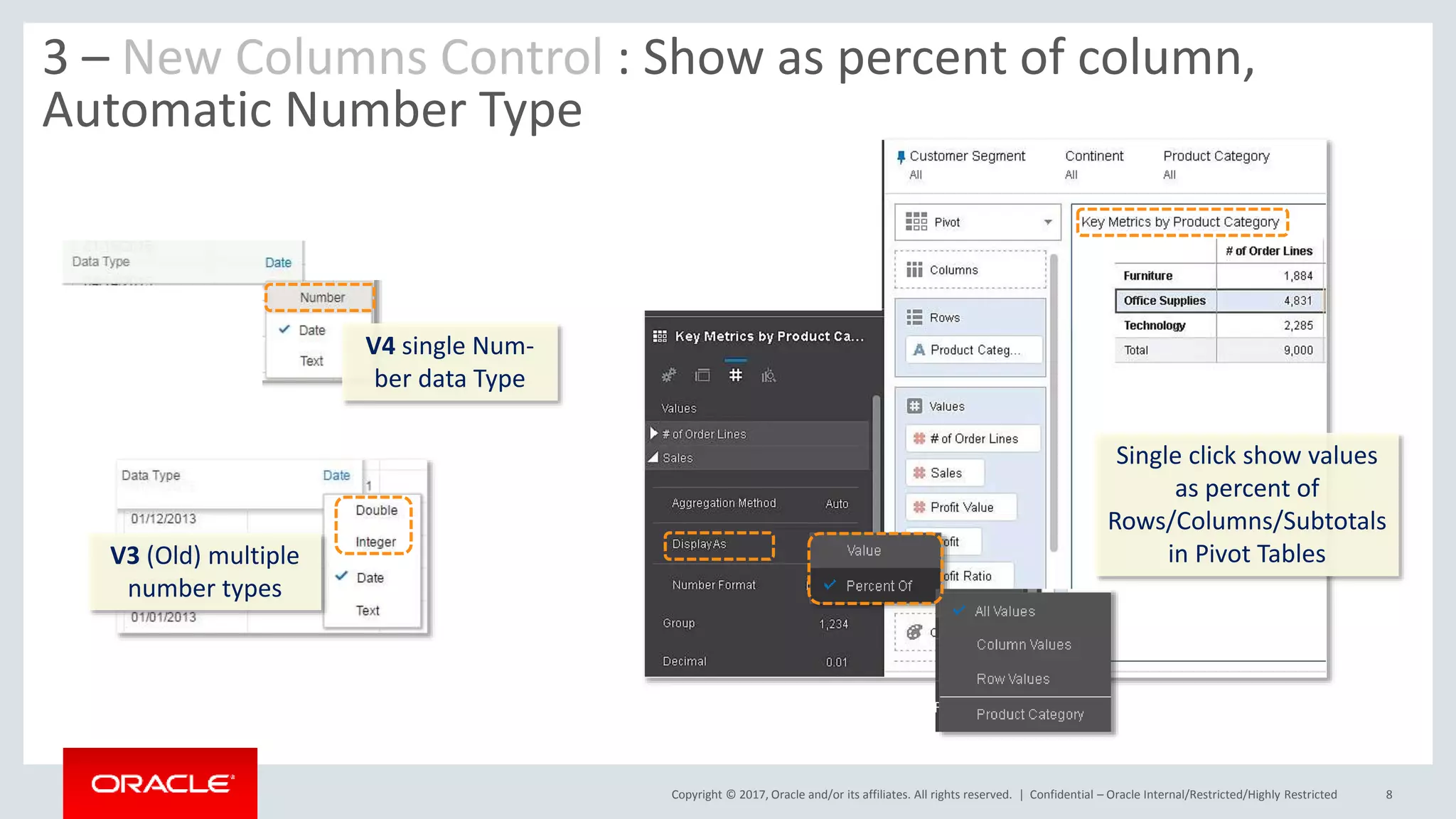
3 – New Columns Control : Show as percent of column,
Automatic Number Type
V4 single Num-
ber data Type
V3 (Old) multiple
number types
Single click show values
as percent of
Rows/Columns/Subtotals
in Pivot Tables
Copyright © 2017, Oracle and/or its affiliates. All rights reserved. | Confidential – Oracle Internal/Restricted/Highly Restricted 9
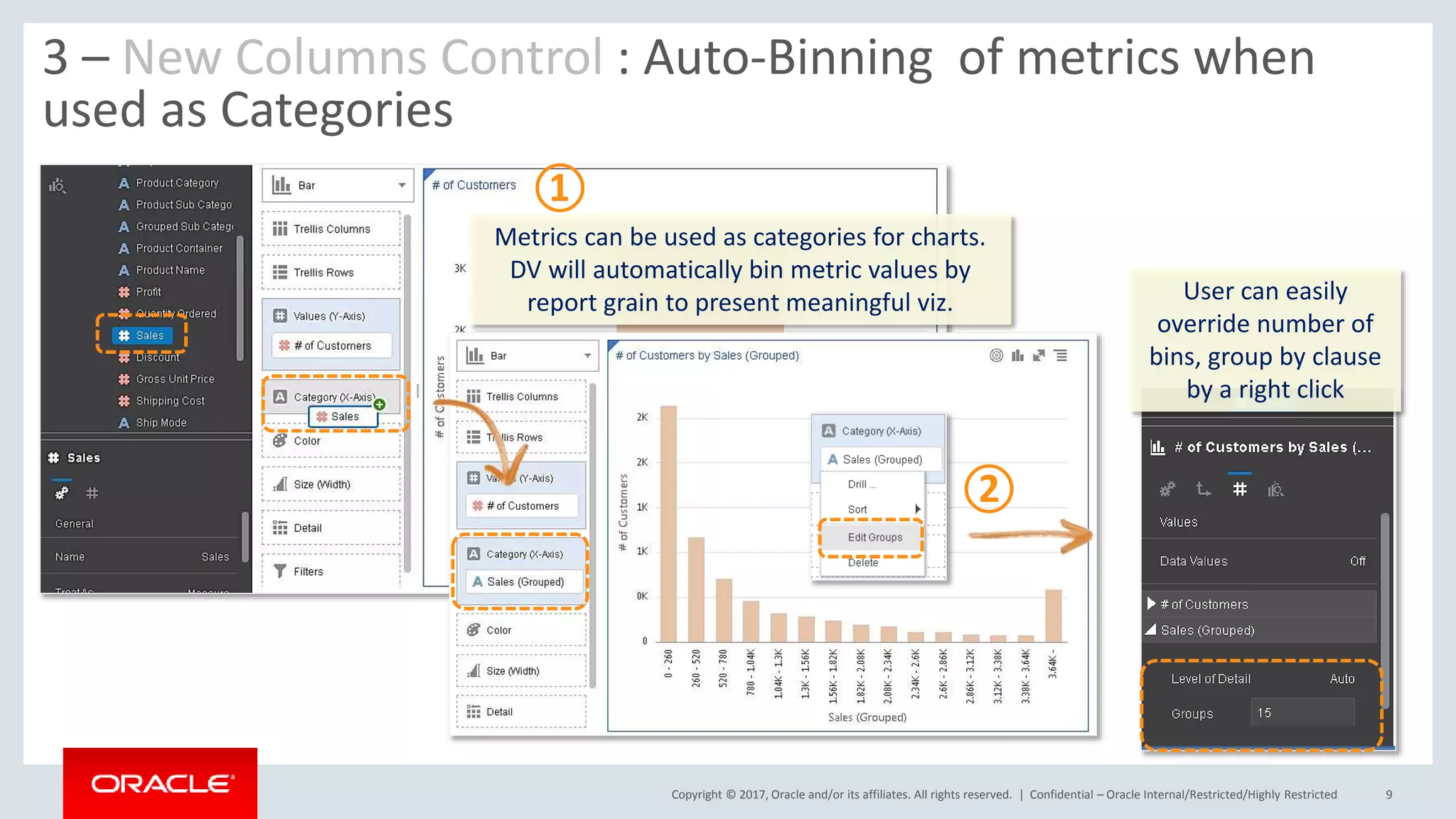
3 – New Columns Control : Auto-Binning of metrics when
used as Categories
Metrics can be used as categories for charts.
DV will automatically bin metric values by
report grain to present meaningful viz. User can easily
override number of
bins, group by clause
by a right click
①
②
Copyright © 2017, Oracle and/or its affiliates. All rights reserved. |
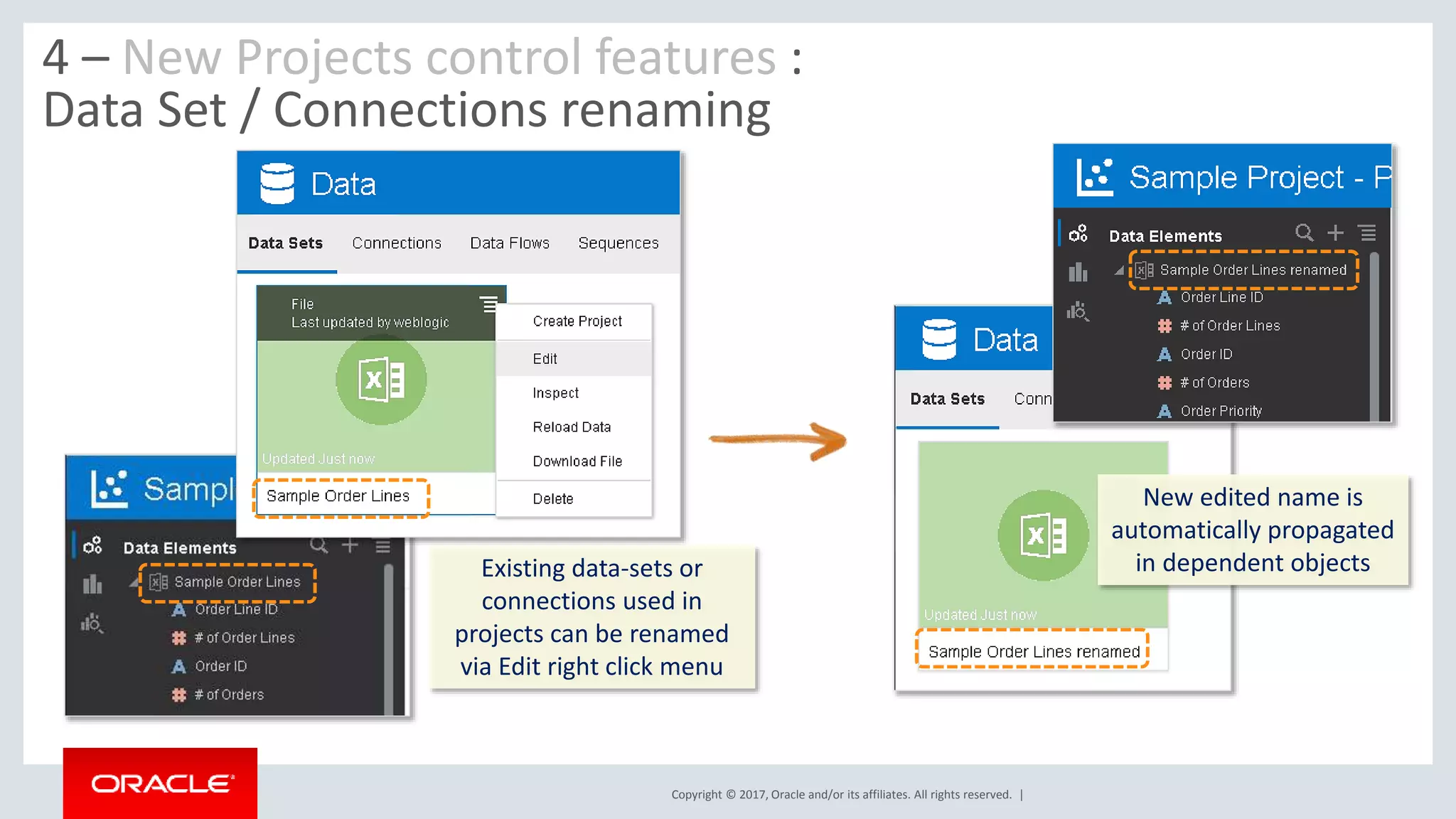
4 – New Projects control features :
Data Set / Connections renaming
Existing data-sets or
connections used in
projects can be renamed
via Edit right click menu
New edited name is
automatically propagated
in dependent objects
Copyright © 2017, Oracle and/or its affiliates. All rights reserved. | Confidential – Oracle Internal/Restricted/Highly Restricted 11
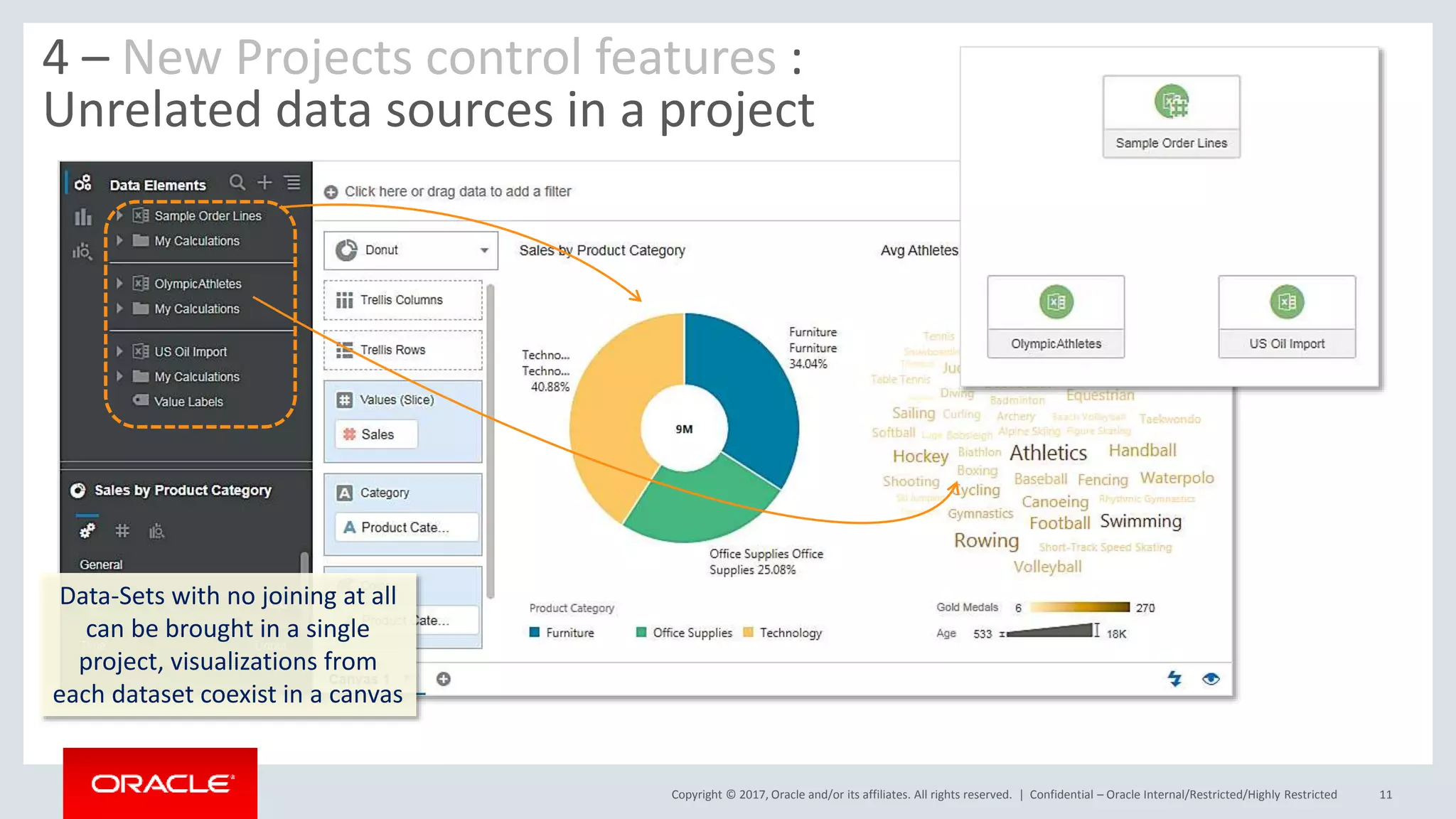
4 – New Projects control features :
Unrelated data sources in a project
Data-Sets with no joining at all
can be brought in a single
project, visualizations from
each dataset coexist in a canvas
Copyright © 2017, Oracle and/or its affiliates. All rights reserved. | Confidential – Oracle Internal/Restricted/Highly Restricted 12
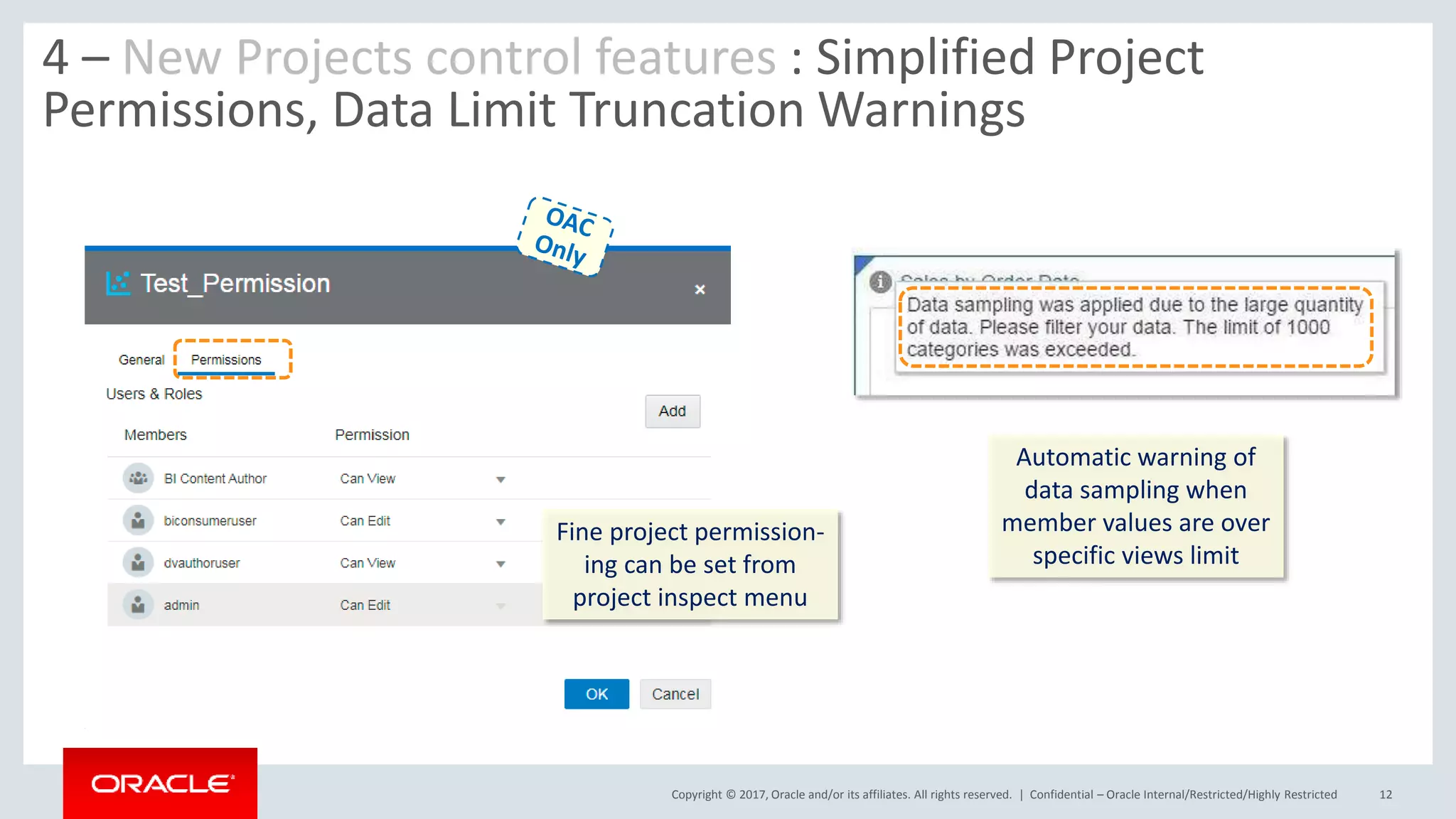
4 – New Projects control features : Simplified Project
Permissions, Data Limit Truncation Warnings
Fine project permission-
ing can be set from
project inspect menu
Automatic warning of
data sampling when
member values are over
specific views limit
Copyright © 2017, Oracle and/or its affiliates. All rights reserved. |
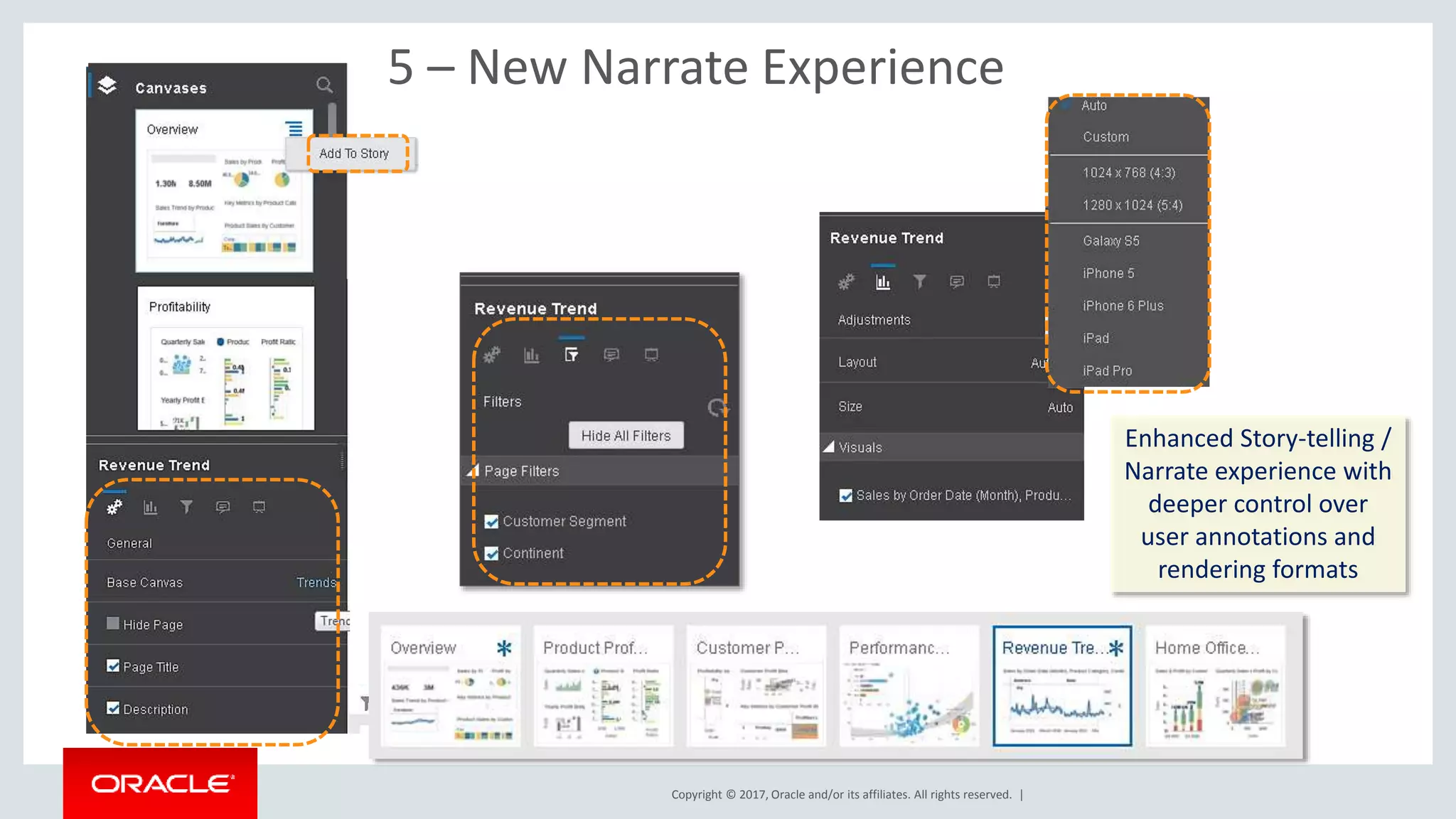
5 – New Narrate Experience
Enhanced Story-telling /
Narrate experience with
deeper control over
user annotations and
rendering formats
Copyright © 2017, Oracle and/or its affiliates. All rights reserved. | Confidential – Oracle Internal/Restricted/Highly Restricted 14
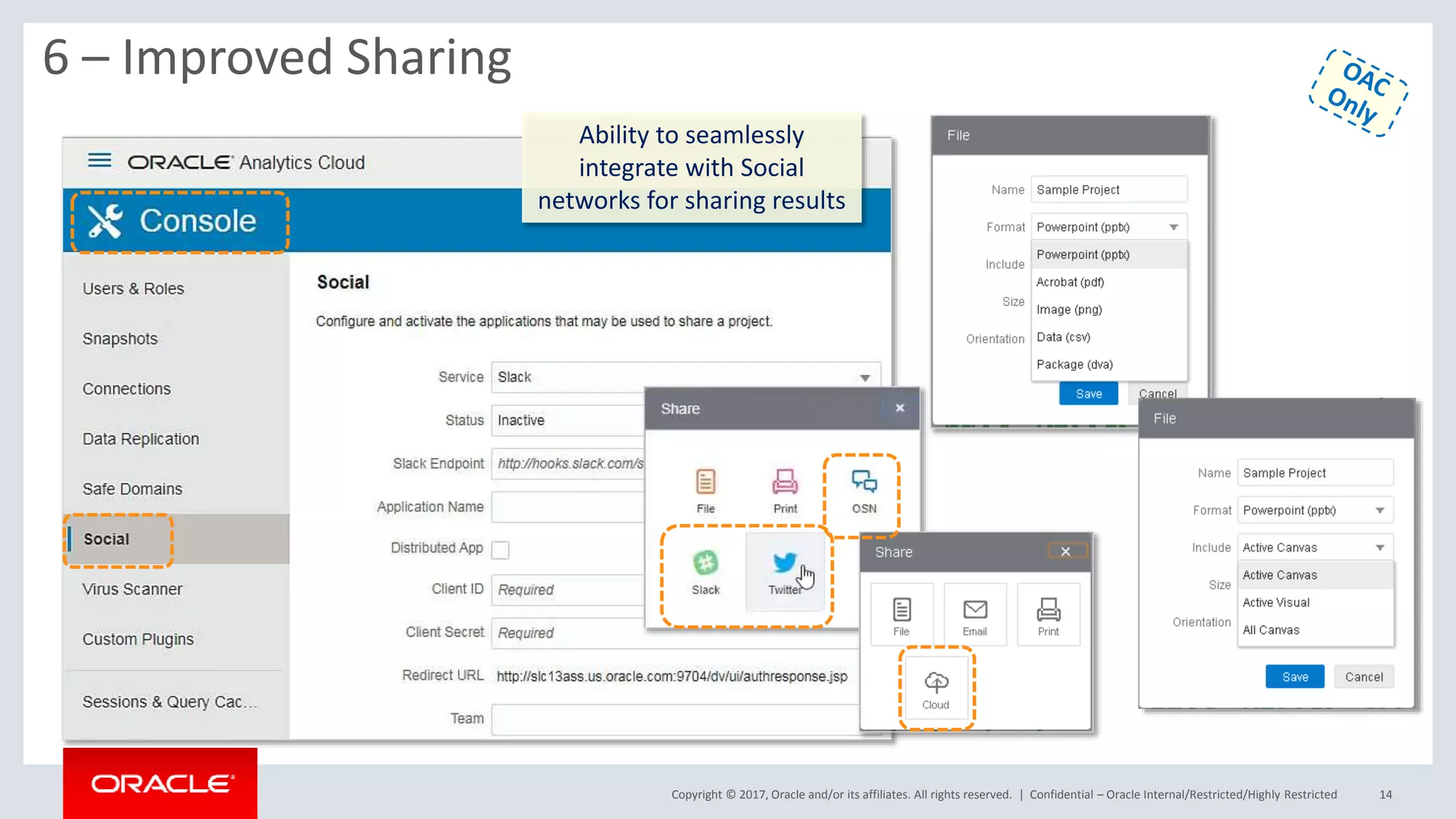
6 – Improved Sharing
Ability to seamlessly
integrate with Social
networks for sharing results
Copyright © 2017, Oracle and/or its affiliates. All rights reserved. |
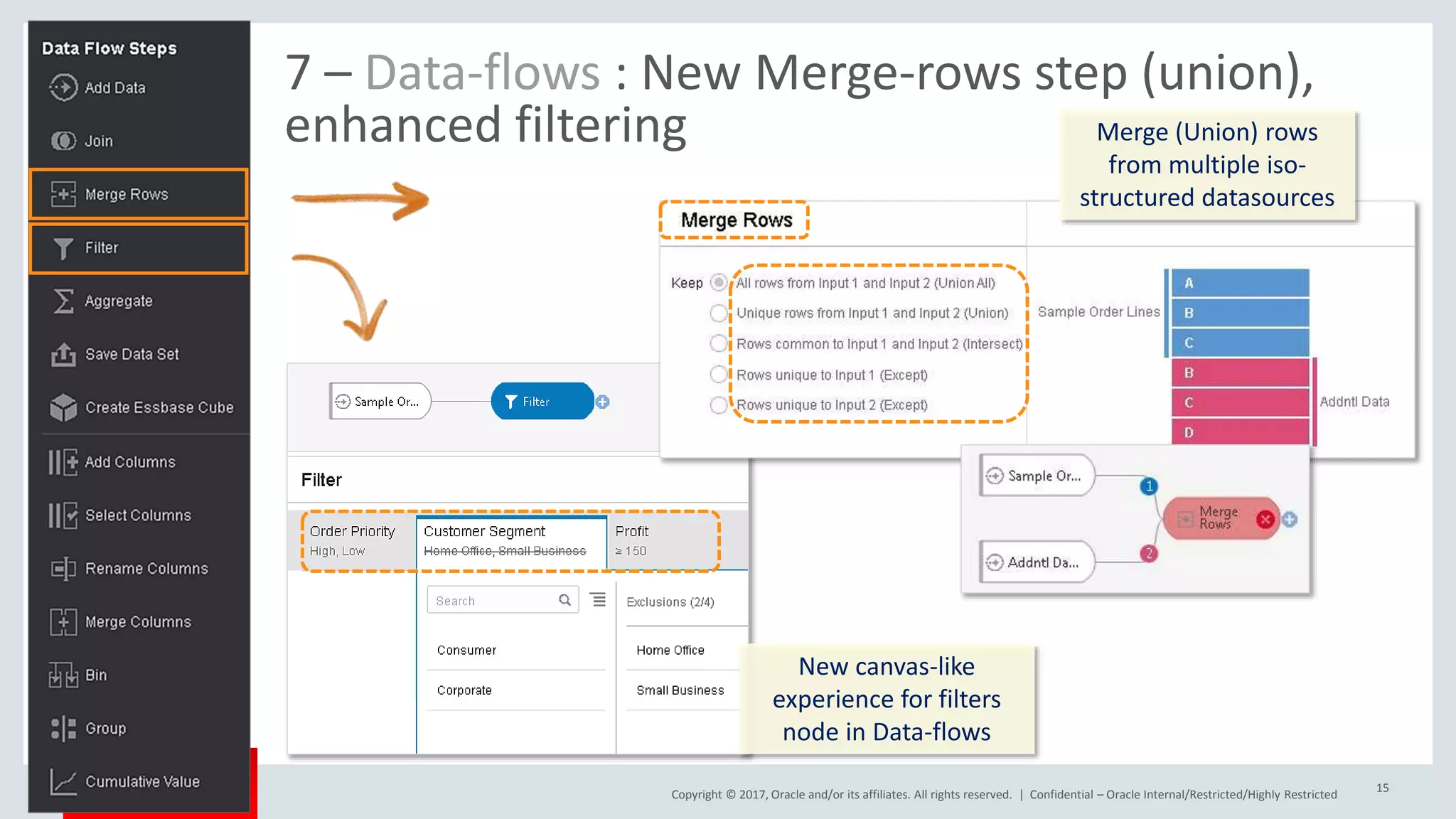
7 – Data-flows : New Merge-rows step (union),
enhanced filtering
Confidential – Oracle Internal/Restricted/Highly Restricted
15
Merge (Union) rows
from multiple iso-
structured datasources
New canvas-like
experience for filters
node in Data-flows
Copyright © 2017, Oracle and/or its affiliates. All rights reserved. | Confidential – Oracle Internal/Restricted/Highly Restricted
16
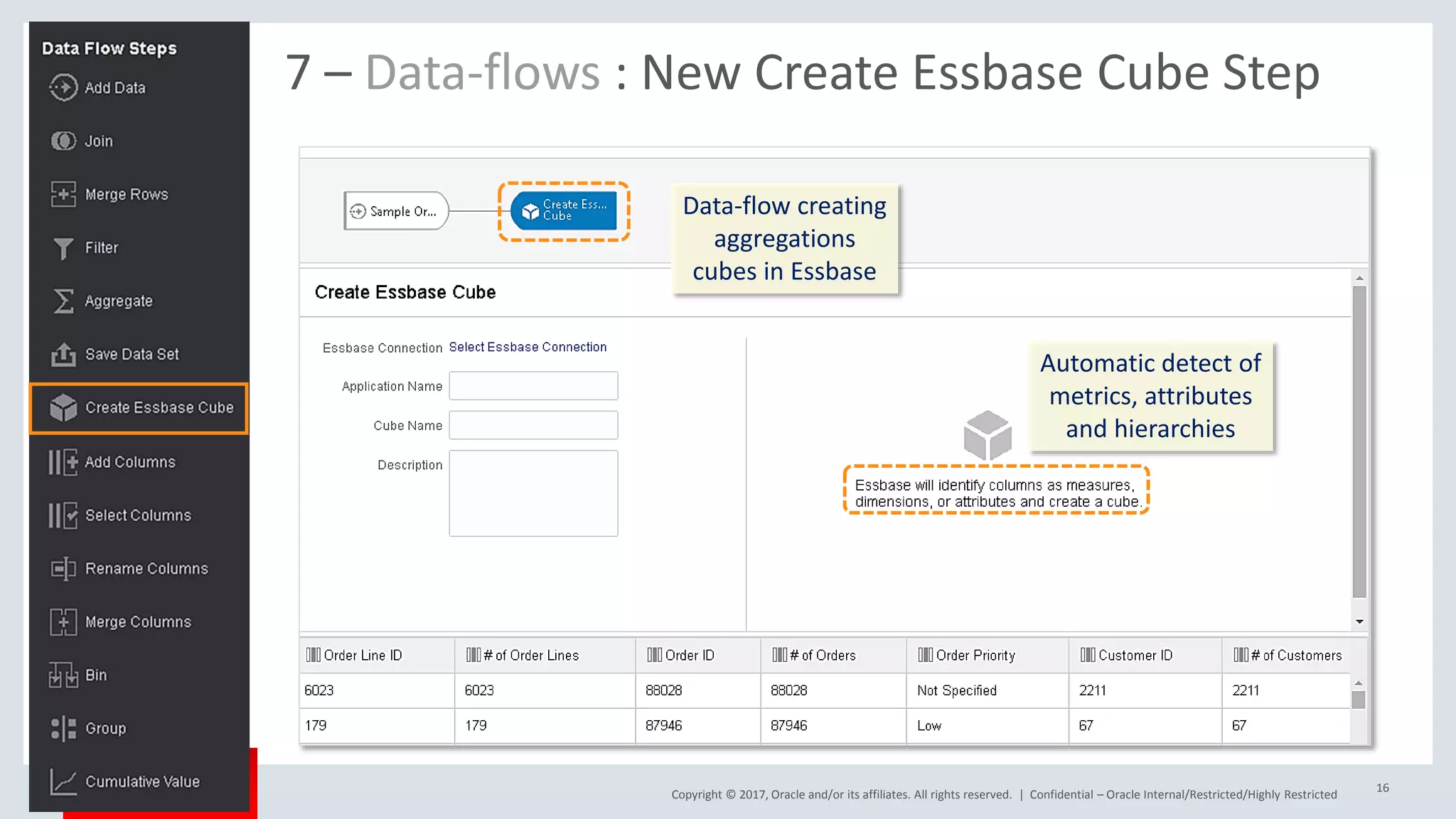
7 – Data-flows : New Create Essbase Cube Step
Data-flow creating
aggregations
cubes in Essbase
Automatic detect of
metrics, attributes
and hierarchies
Copyright © 2017, Oracle and/or its affiliates. All rights reserved. |
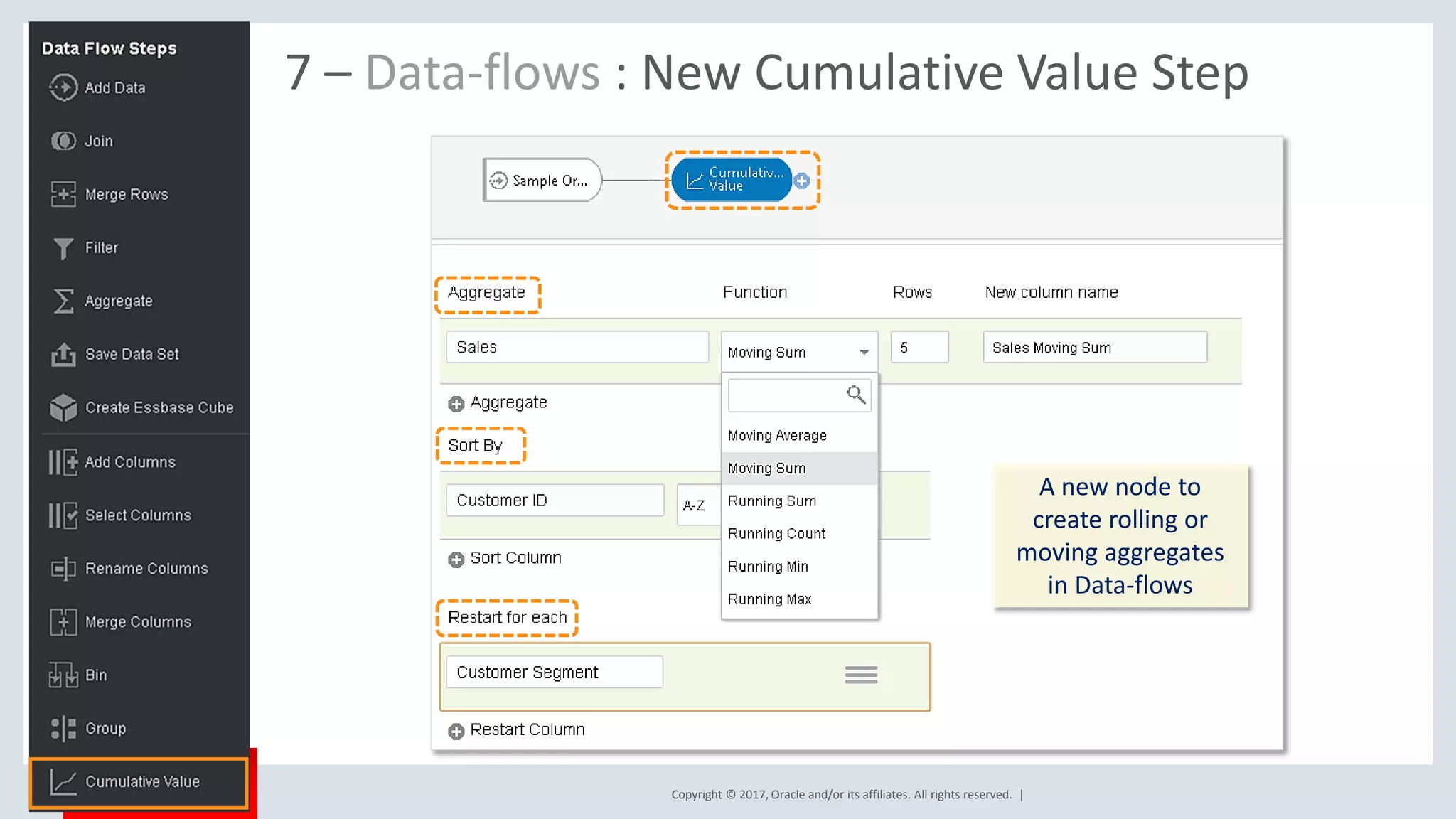
7 – Data-flows : New Cumulative Value Step
A new node to
create rolling or
moving aggregates
in Data-flows
Copyright © 2017, Oracle and/or its affiliates. All rights reserved. |
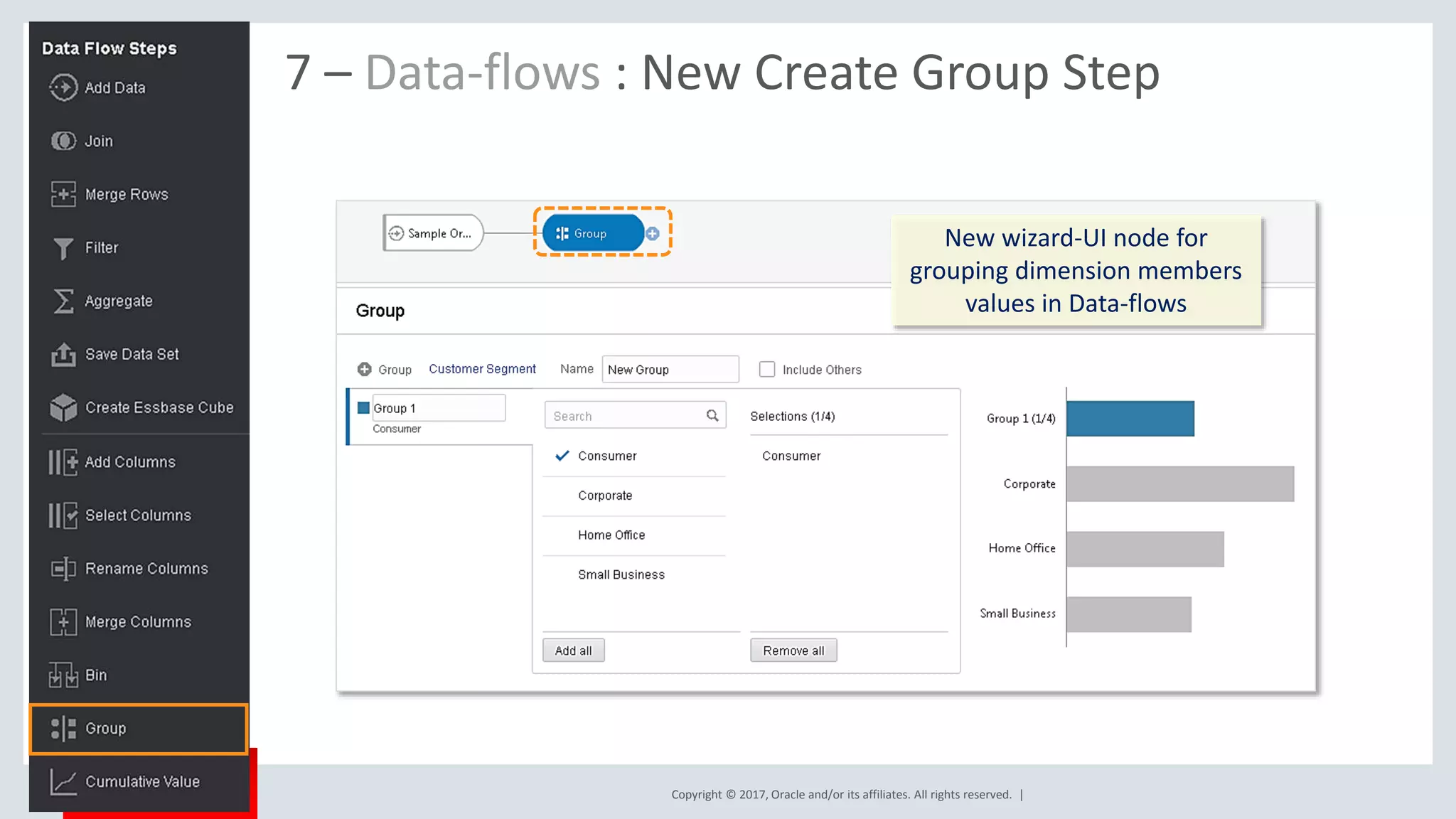
7 – Data-flows : New Create Group Step
New wizard-UI node for
grouping dimension members
values in Data-flows
Copyright © 2017, Oracle and/or its affiliates. All rights reserved. |
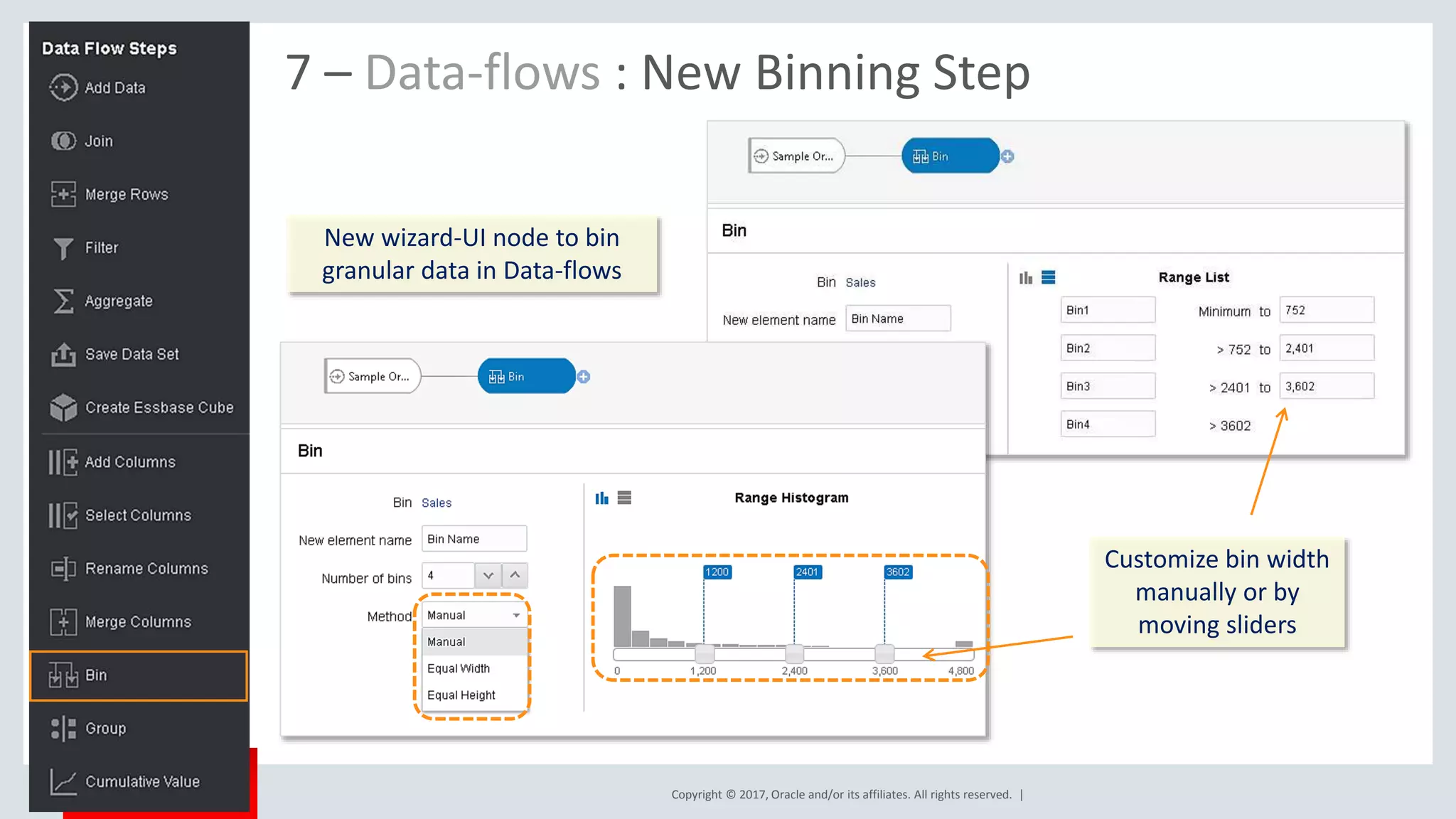
7 – Data-flows : New Binning Step
New wizard-UI node to bin
granular data in Data-flows
Customize bin width
manually or by
moving sliders
Copyright © 2017, Oracle and/or its affiliates. All rights reserved. | Confidential – Oracle Internal/Restricted/Highly Restricted
20
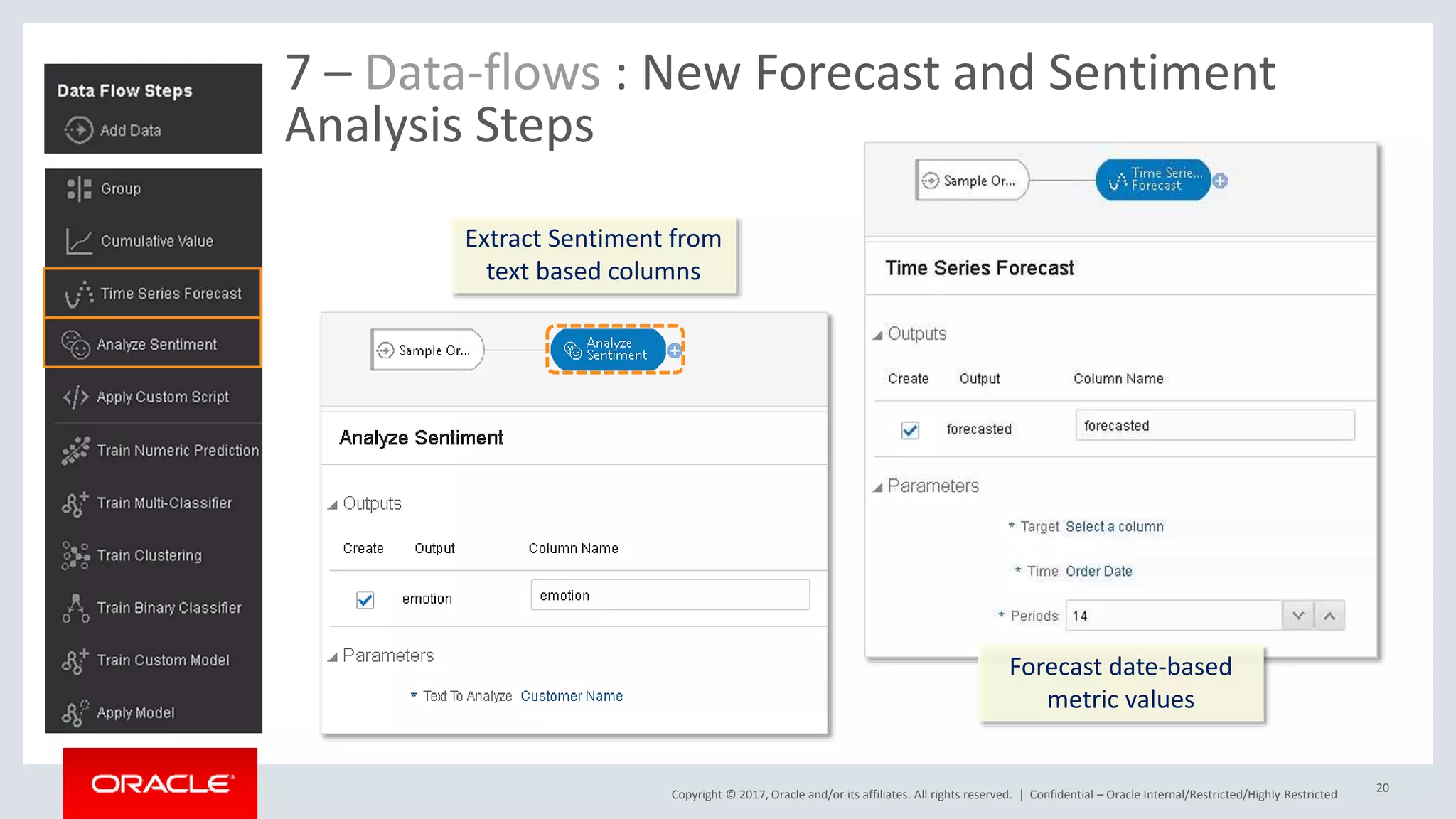
7 – Data-flows : New Forecast and Sentiment
Analysis Steps
Extract Sentiment from
text based columns
Forecast date-based
metric values
Copyright © 2017, Oracle and/or its affiliates. All rights reserved. |
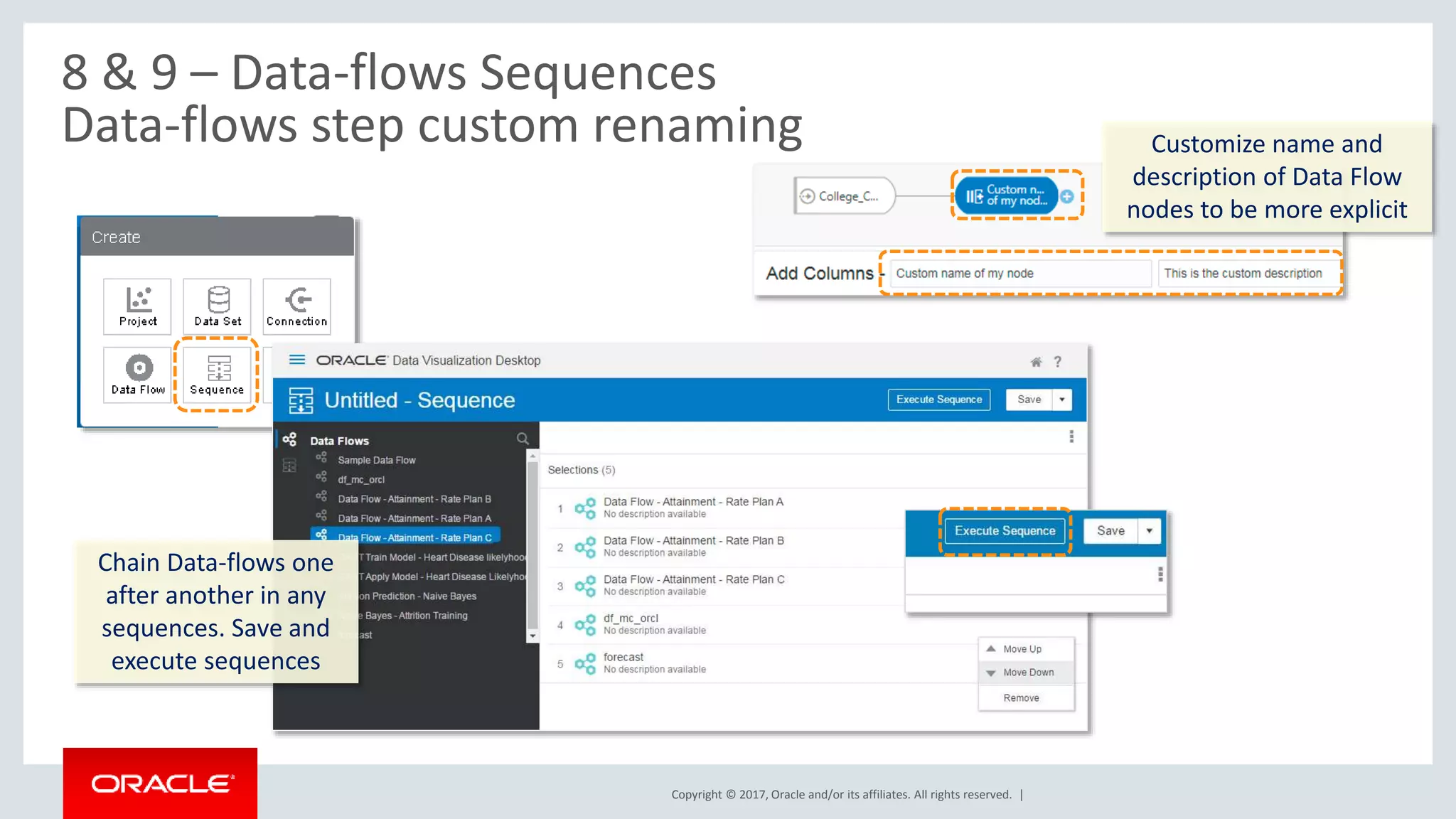
8 & 9 – Data-flows Sequences
Data-flows step custom renaming
Chain Data-flows one
after another in any
sequences. Save and
execute sequences
Customize name and
description of Data Flow
nodes to be more explicit
Copyright © 2017, Oracle and/or its affiliates. All rights reserved. |
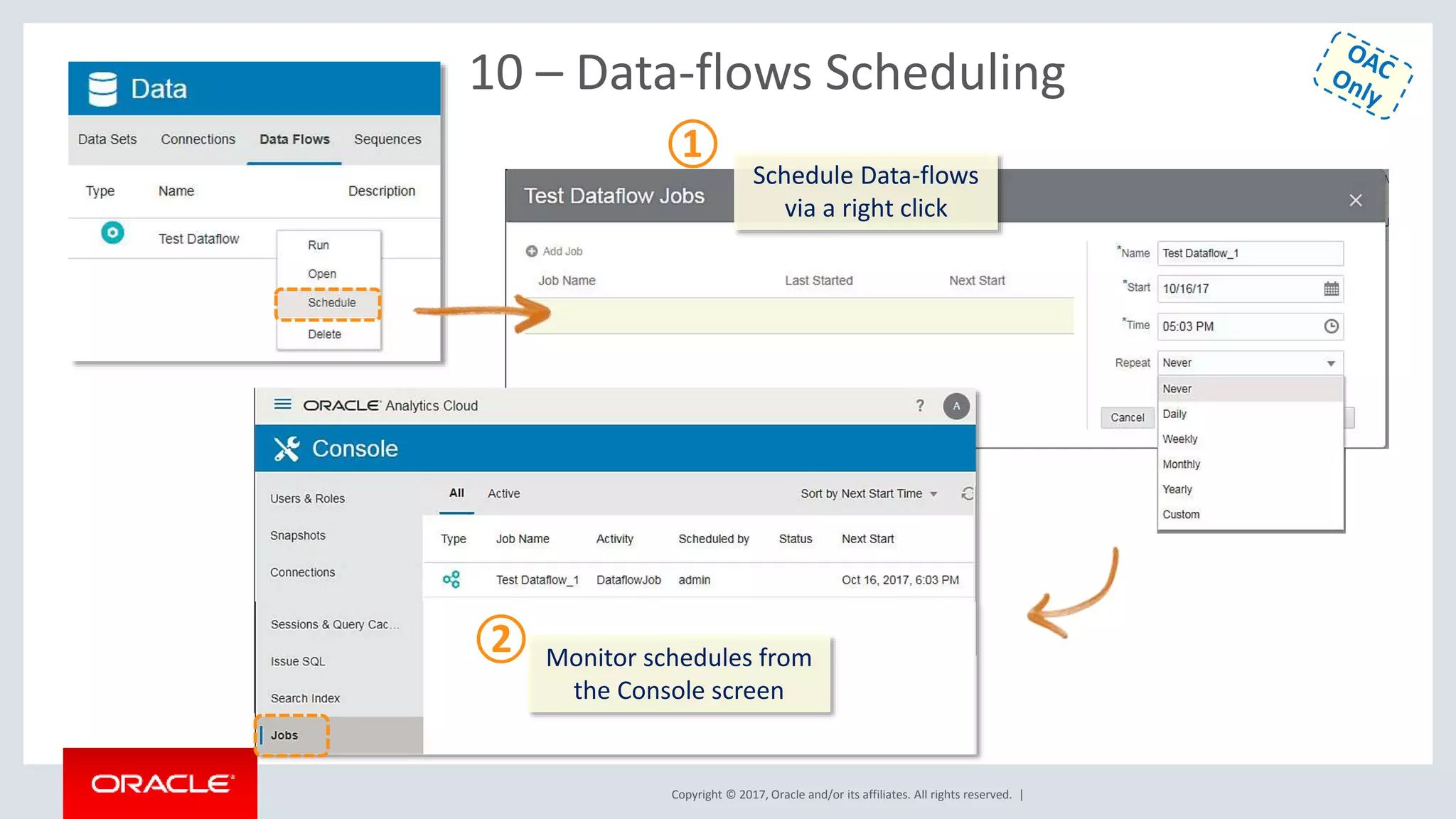
10 – Data-flows Scheduling
Schedule Data-flows
via a right click
Monitor schedules from
the Console screen
①
②
Copyright © 2017, Oracle and/or its affiliates. All rights reserved. |
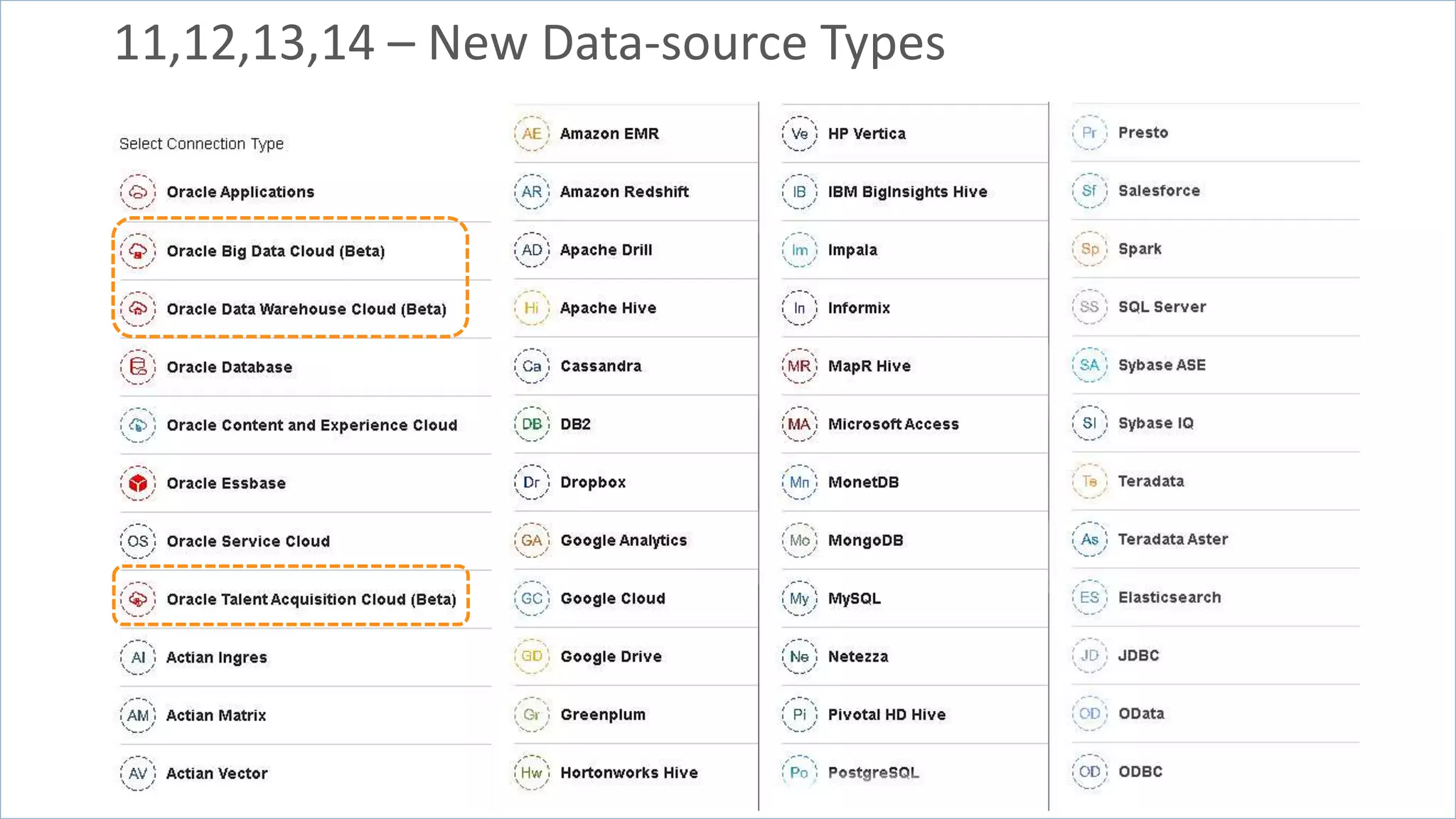
11,12,13,14 – New Data-source Types
Copyright © 2017, Oracle and/or its affiliates. All rights reserved. |
Essbase Specific New Features Overview
• Server Enhancements
– Calc Trace Support both via Calc Scripts & SmartView
– Data Audit Trail
– Support for Replicated Partitions
– Hybrid – Dynamic Solve Order based on member formula
• Web UI
– New Connections, Data Sources Interface (Drill Thru,
Location Aliases)
– Logs at Application Level
– Drill Through Support
– MAXL Execution from Jobs interface
– UI for App Configurations (Drop Down for parameters)
• Smart View
– Ability to Change Solve Order
• Cube Designer
– Improvements to the Transform Wizard
– Generation Names Support
– Text Lists Support in CD Wizard
– Support for Member Formula in unstructured import
– Support for Accounts Dimension hierarchy in
unstructured import
• …
24
Copyright © 2017, Oracle and/or its affiliates. All rights reserved. | Confidential – Oracle Internal/Restricted/Highly Restricted 25
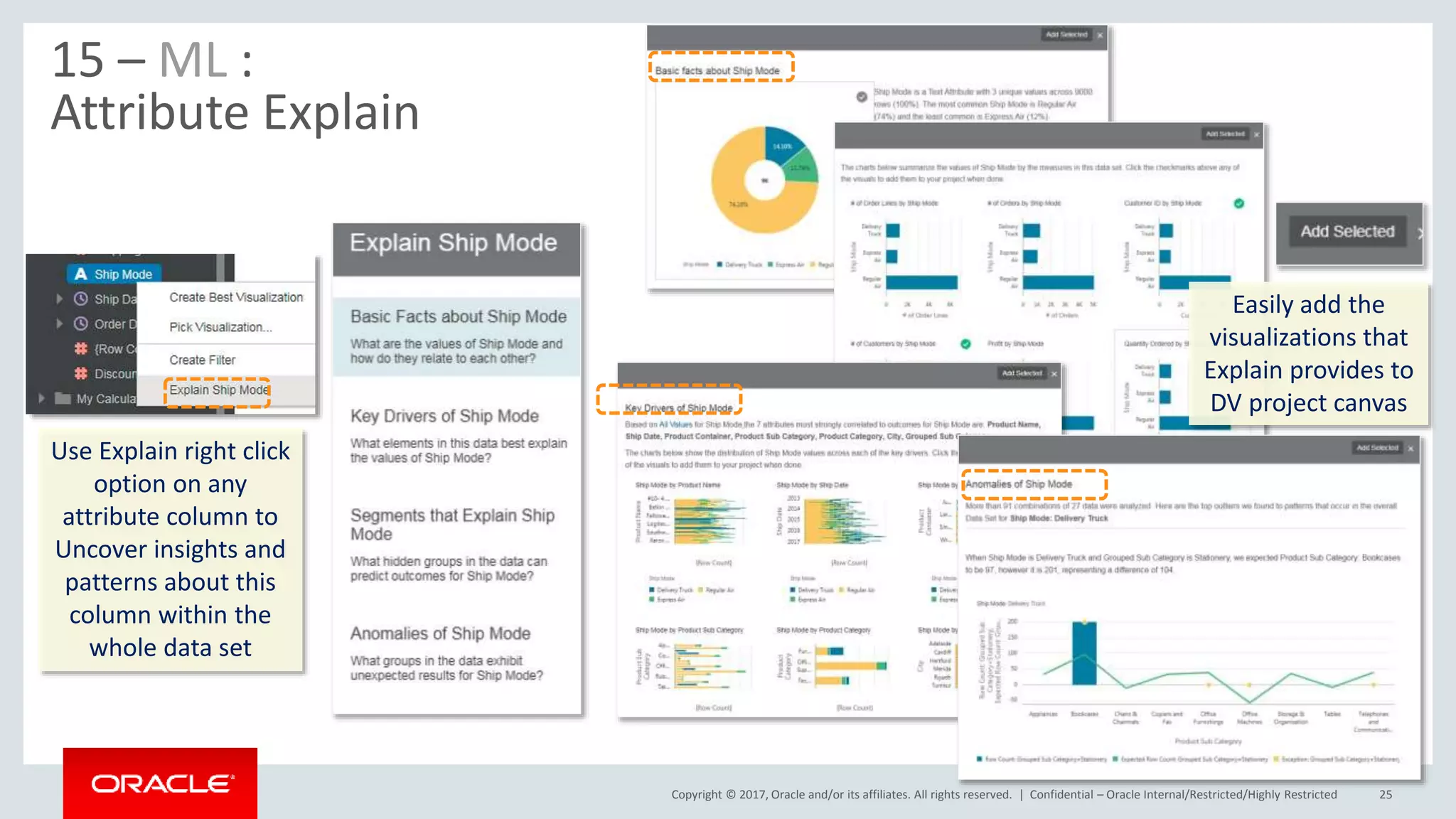
15 – ML :
Attribute Explain
Use Explain right click
option on any
attribute column to
Uncover insights and
patterns about this
column within the
whole data set
Easily add the
visualizations that
Explain provides to
DV project canvas
Copyright © 2017, Oracle and/or its affiliates. All rights reserved. | Confidential – Oracle Internal/Restricted/Highly Restricted
26
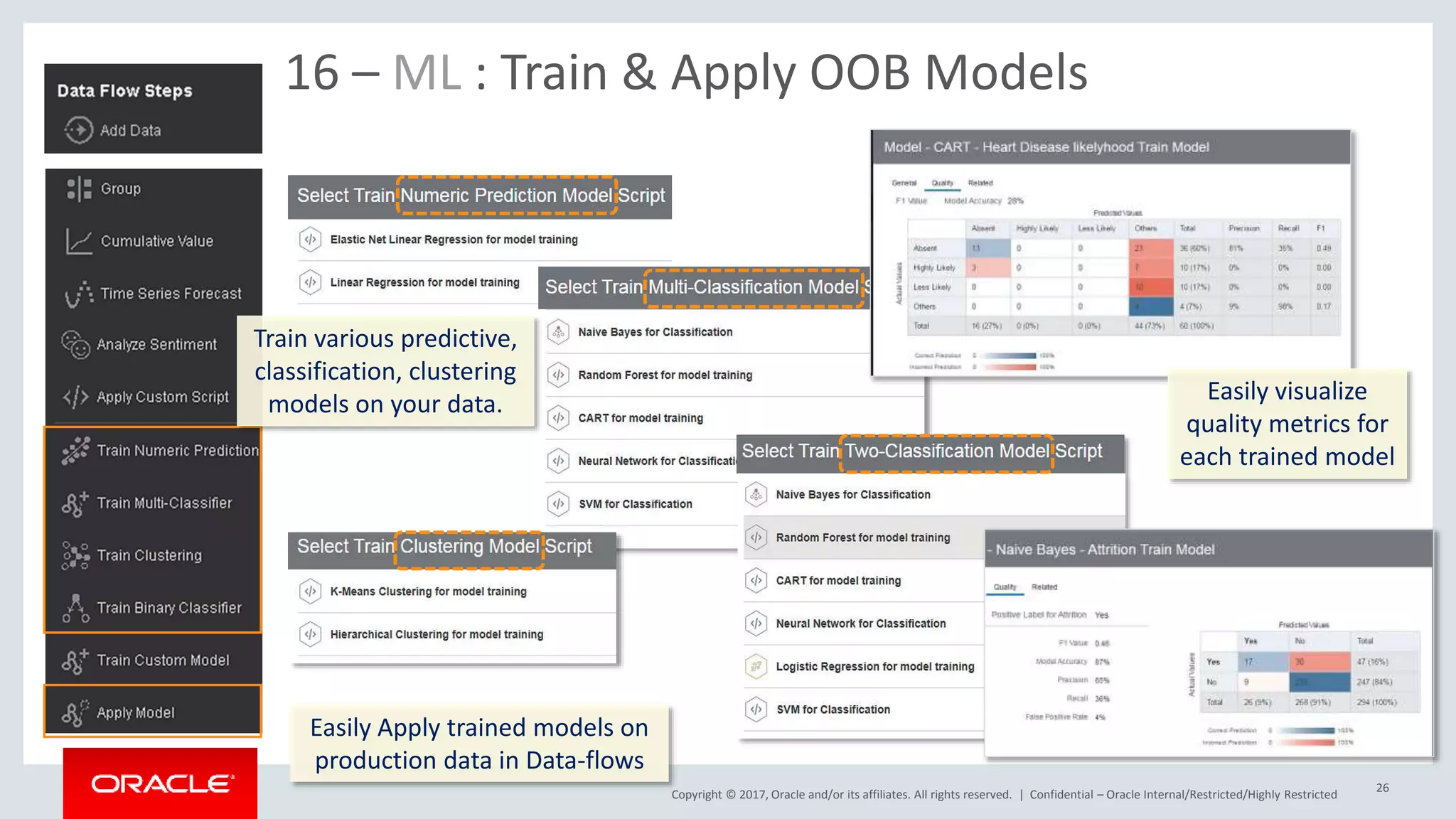
16 – ML : Train & Apply OOB Models
Train various predictive,
classification, clustering
models on your data. Easily visualize
quality metrics for
each trained model
Easily Apply trained models on
production data in Data-flows
Copyright © 2017, Oracle and/or its affiliates. All rights reserved. | Confidential – Oracle Internal/Restricted/Highly Restricted 27
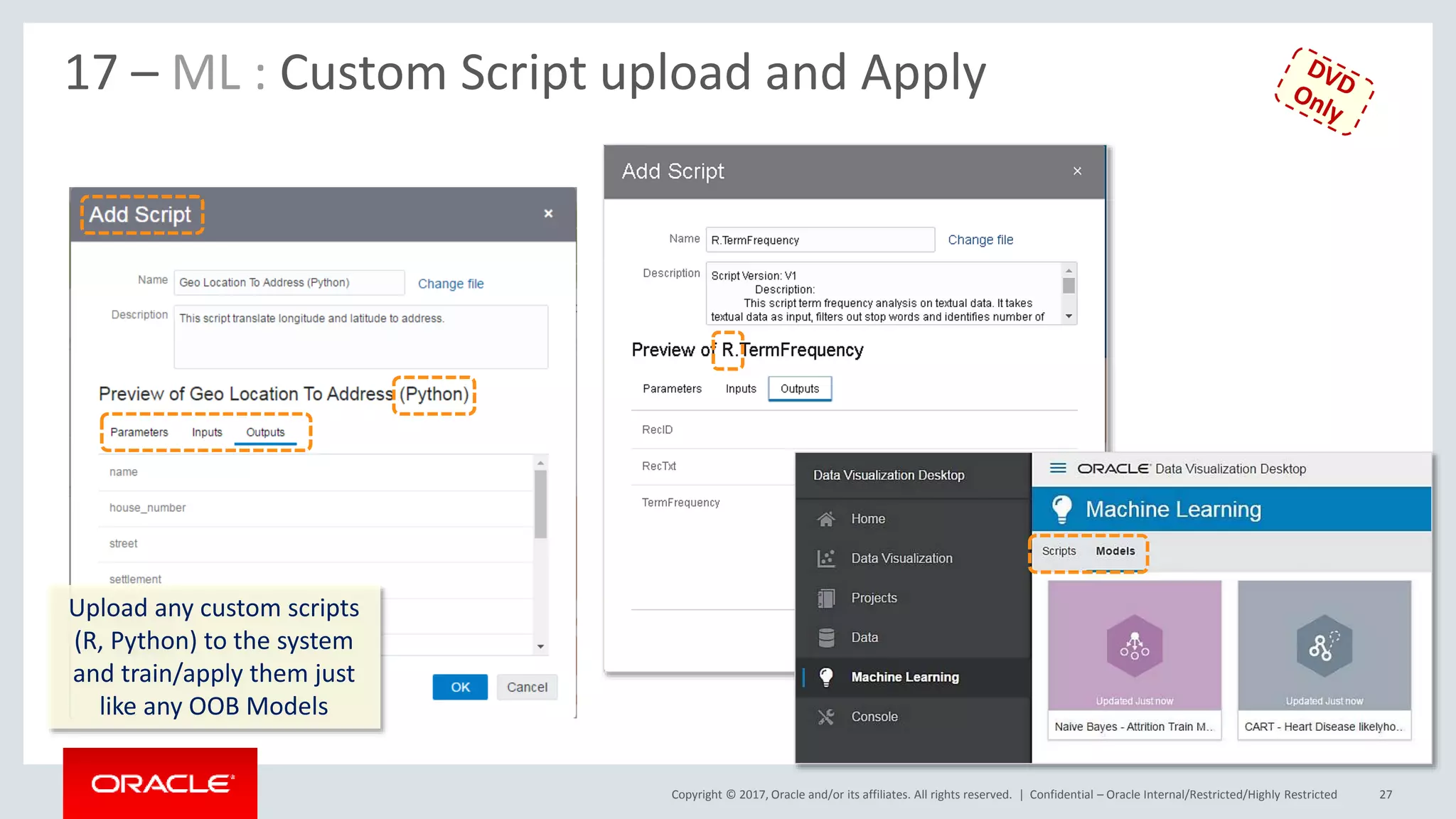
17 – ML : Custom Script upload and Apply
Upload any custom scripts
(R, Python) to the system
and train/apply them just
like any OOB Models
Copyright © 2017, Oracle and/or its affiliates. All rights reserved. | Confidential – Oracle Internal/Restricted/Highly Restricted 28
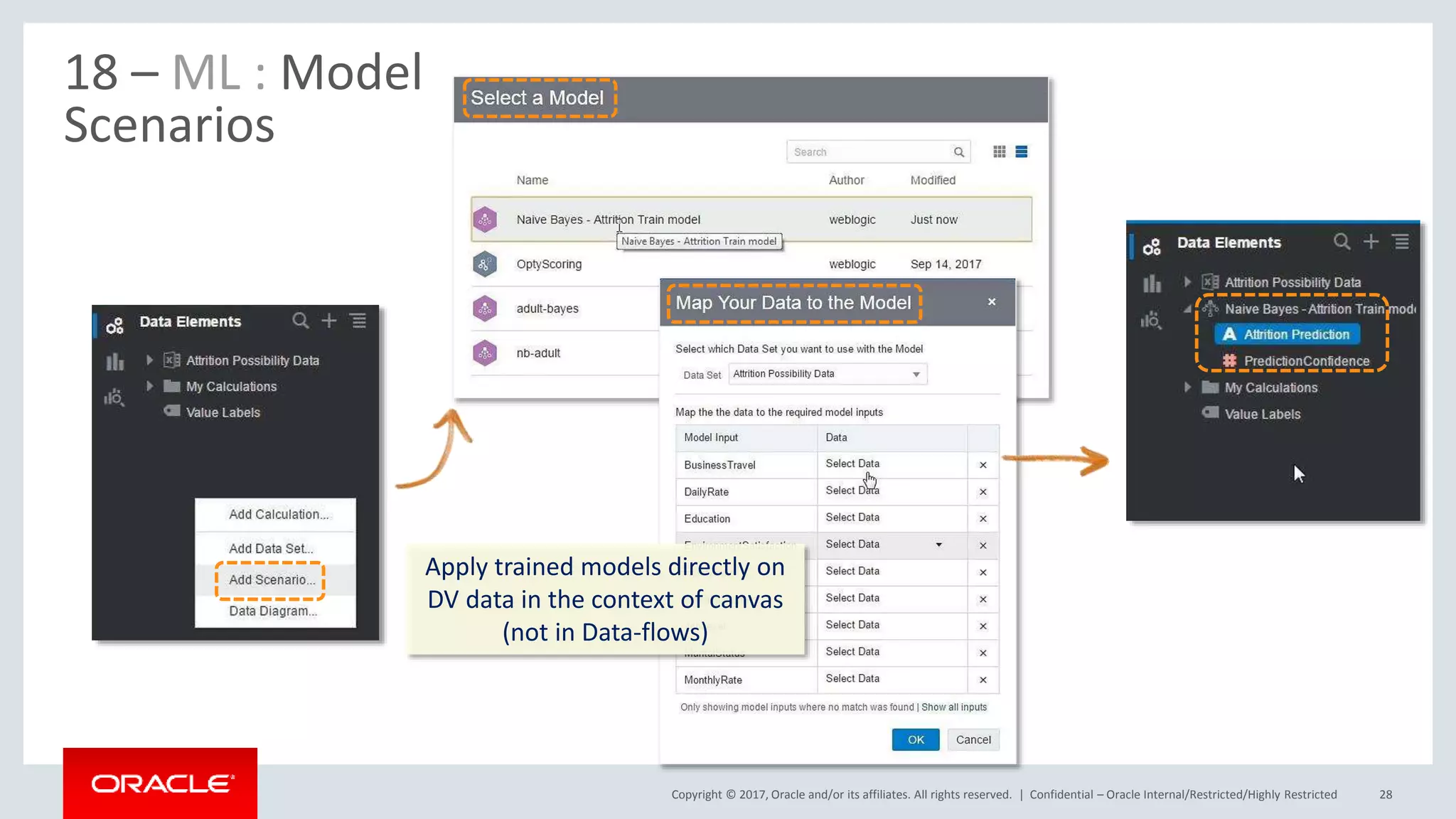
18 – ML : Model
Scenarios
Apply trained models directly on
DV data in the context of canvas
(not in Data-flows)
Copyright © 2017, Oracle and/or its affiliates. All rights reserved. |
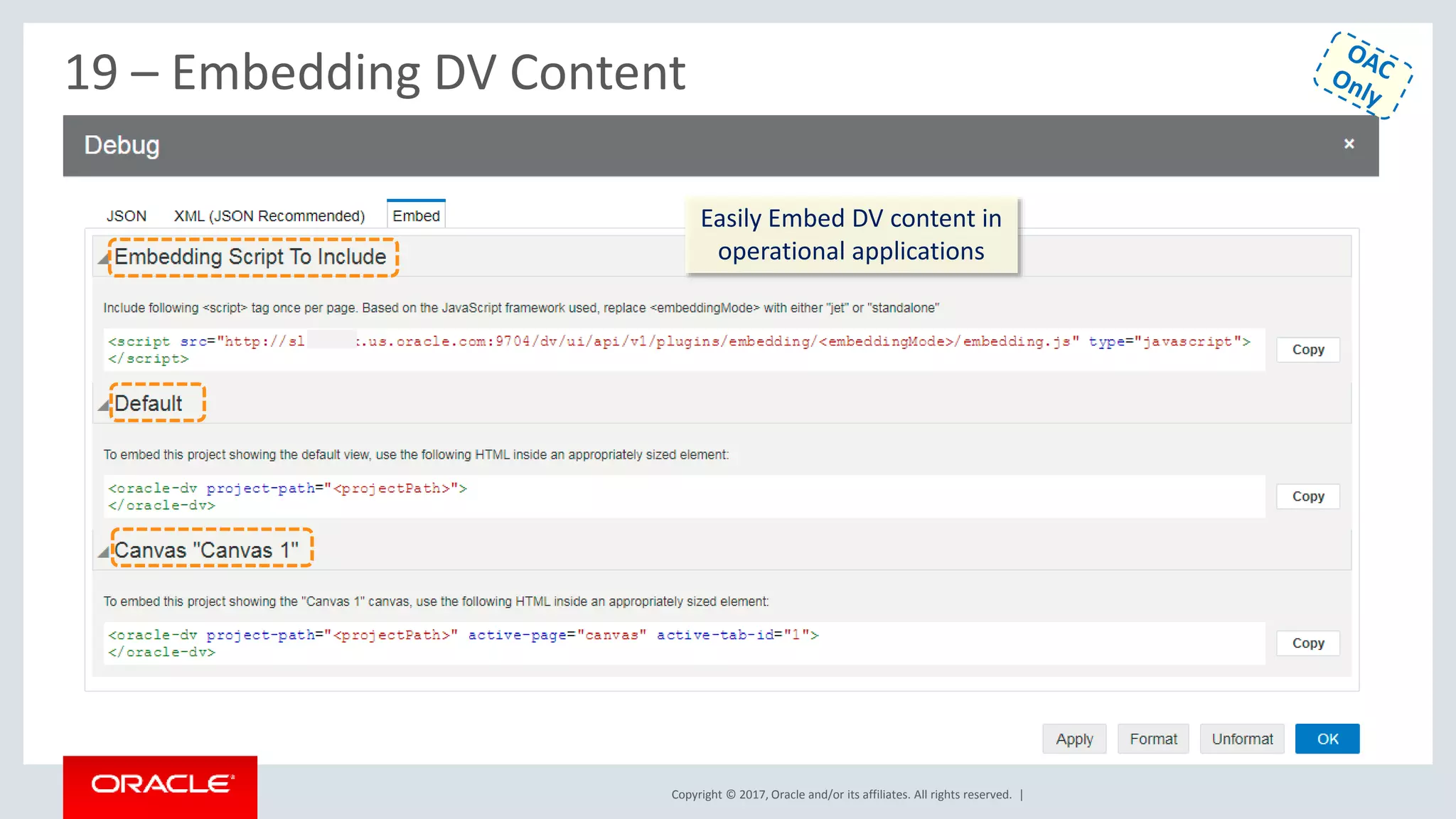
19 – Embedding DV Content
Easily Embed DV content in
operational applications
Copyright © 2017, Oracle and/or its affiliates. All rights reserved. | Confidential – Oracle Internal/Restricted/Highly Restricted 30
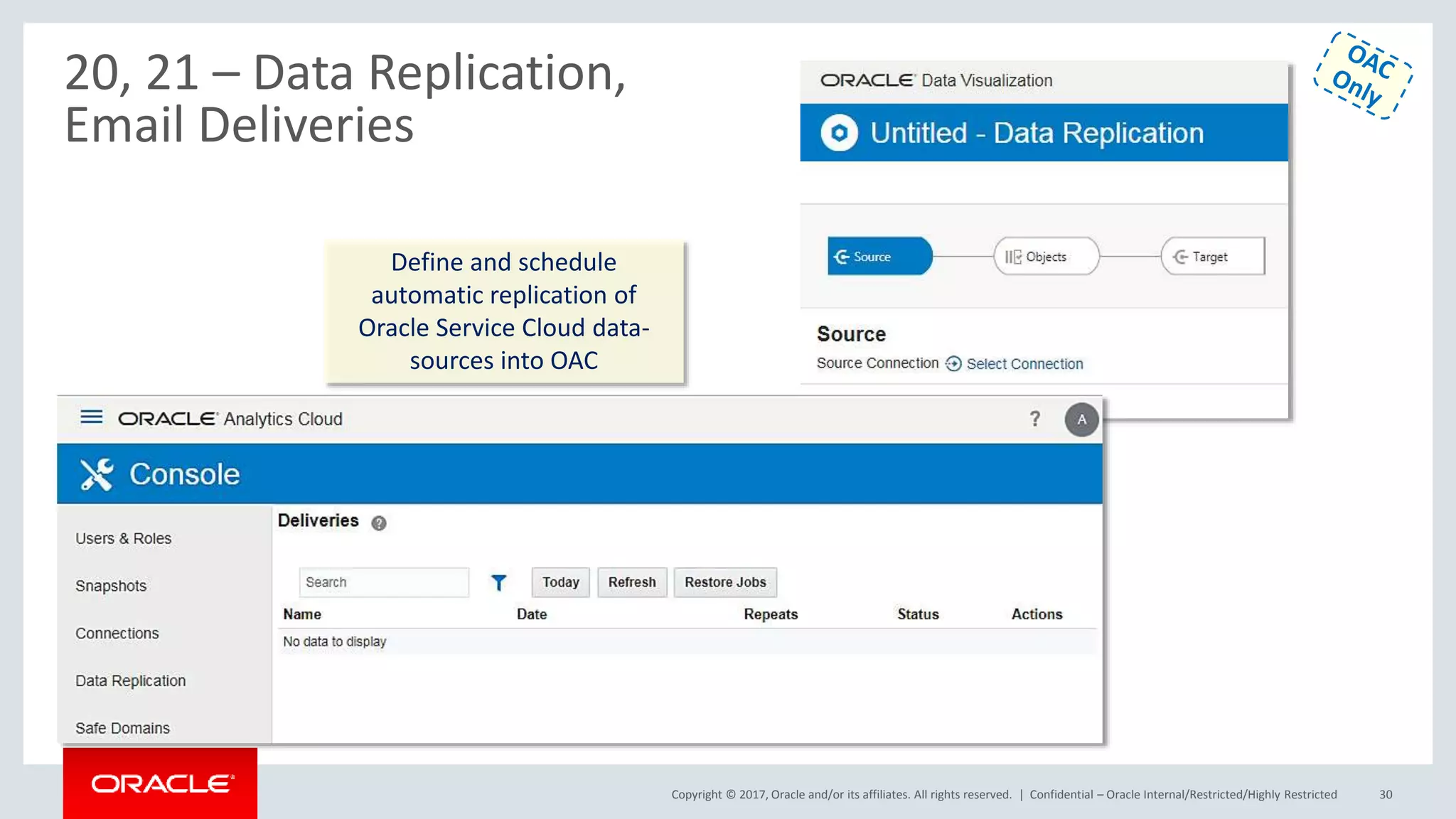
20, 21 – Data Replication,
Email Deliveries
Define and schedule
automatic replication of
Oracle Service Cloud data-
sources into OAC
Copyright © 2017, Oracle and/or its affiliates. All rights reserved. | Confidential – Oracle Internal/Restricted/Highly Restricted 31
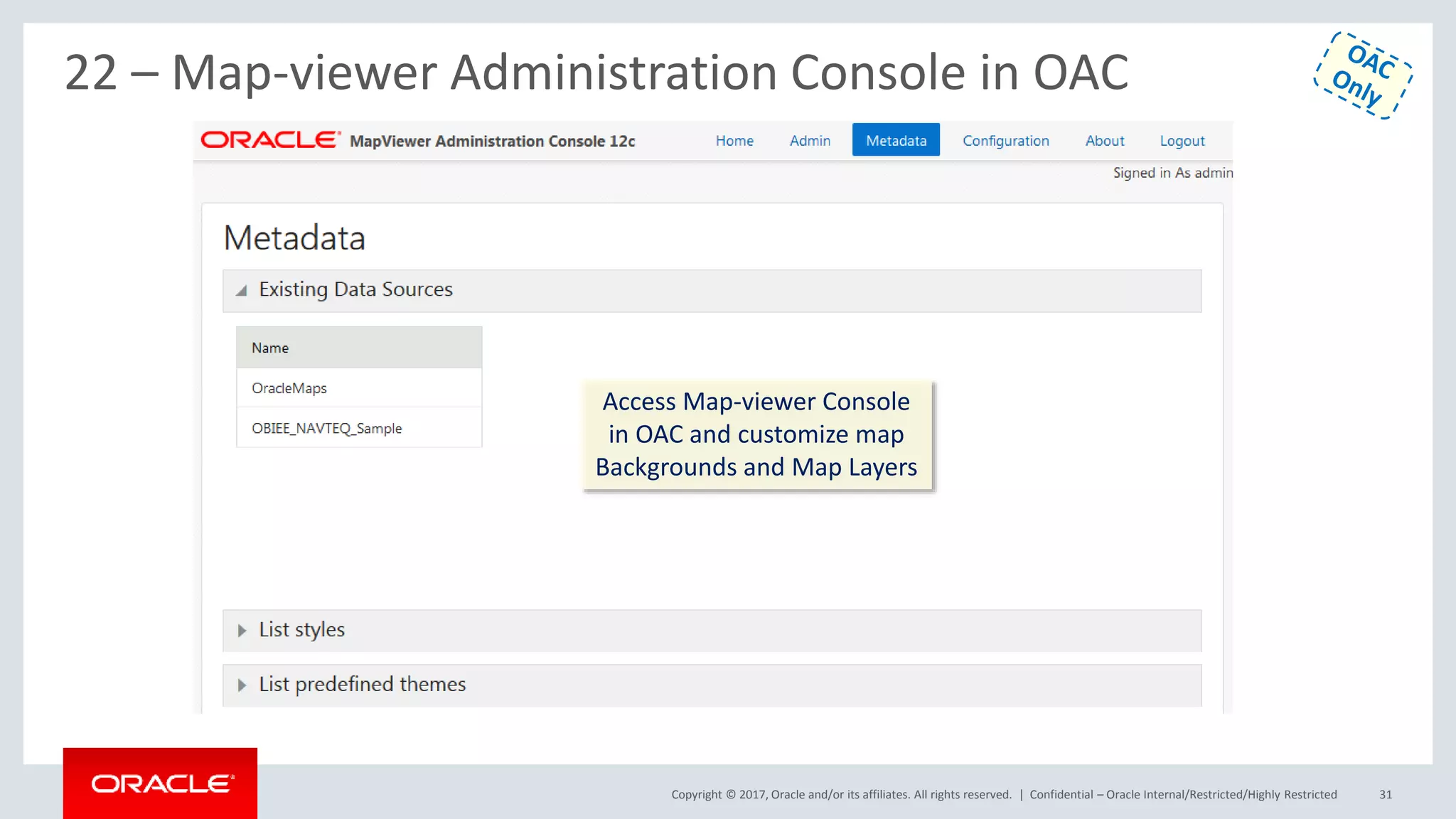
22 – Map-viewer Administration Console in OAC
Access Map-viewer Console
in OAC and customize map
Backgrounds and Map Layers
Copyright © 2017, Oracle and/or its affiliates. All rights reserved. | Confidential – Oracle Internal/Restricted/Highly Restricted 32
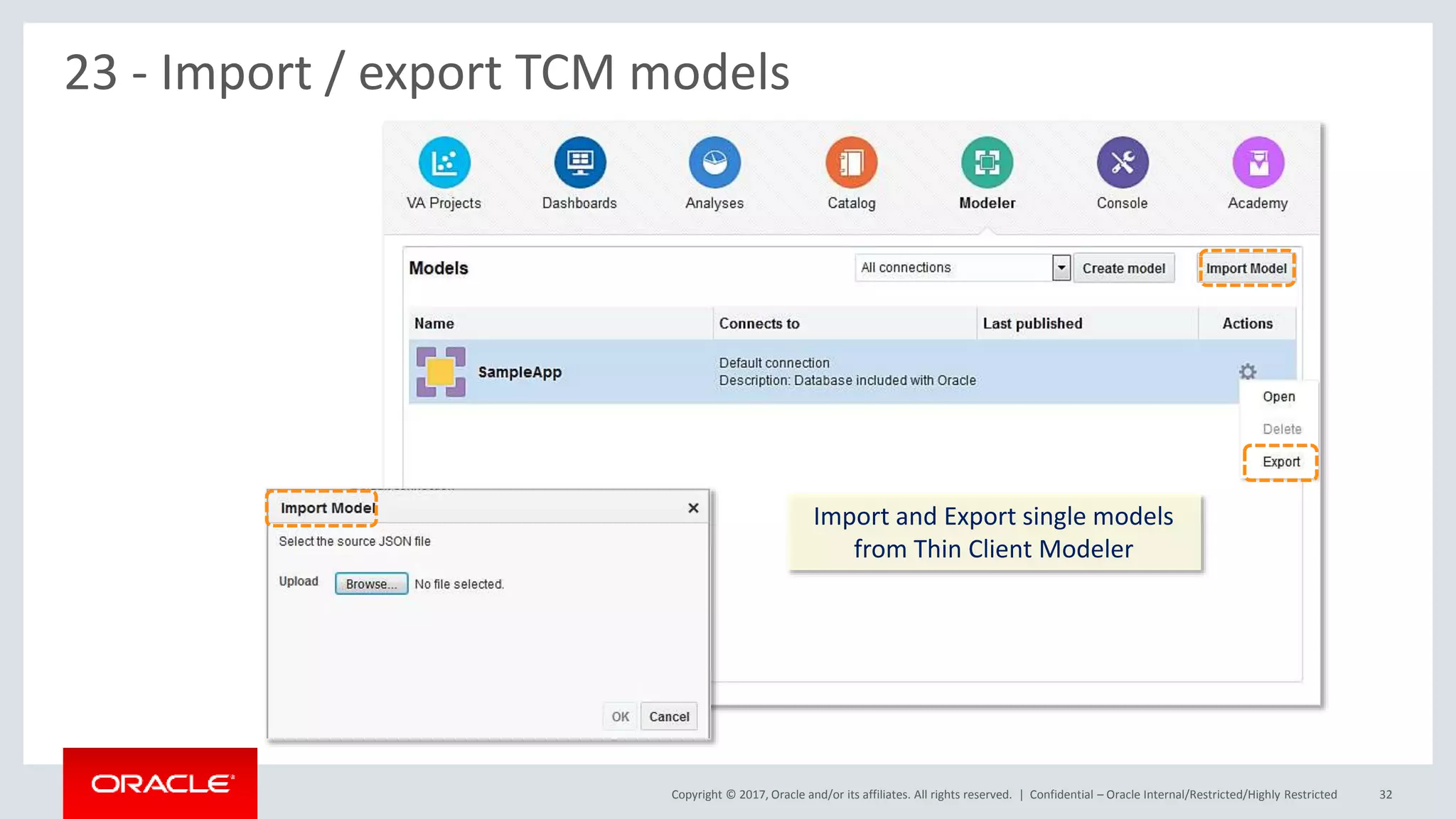
23 - Import / export TCM models
Import and Export single models
from Thin Client Modeler

Oracle DV V4 new features overview

  • 1.
    Copyright © 2017,Oracle and/or its affiliates. All rights reserved. | OAC V4 New Features Overview Oracle Analytics Product Management Confidential – Oracle Internal/Restricted/Highly Restricted
  • 2.
    Copyright © 2017,Oracle and/or its affiliates. All rights reserved. | DV V4 Functional New Features Overview A. Data Visualizations 1. New Home Page + UI Refresh 2. New Viz control experience a) Properties Pane, b) Copy/Paste/Duplicate, c) Pin Filter to all Canvases d) Data Actions 3. New Column Controls a) Date/Time level set & switch b) Show metric as a percentage c) Auto-Binning metrics used as Categories d) Automatic Number Type 4. New Project control Features a) Rename Connection or Data Source b) Unrelated data sources in a project c) Data Limit Truncation Warnings d) Simplified Project Permissions 5. New Narrate experience 6. Improved Sharing B. Data-flows 7. New Steps a) Merge Rows Step (Set Operator) b) Create Essbase Cube Step c) Binning Step d) Grouping Step new UI e) Cumulative Aggregate Step f) Filter Step 8. Sequences for Data-flows 9. Customize Name/Description of a step 10. Data-flows Scheduling C. New Data Sources 11. Oracle Talent Management Cloud 12. Oracle DWCS 13. Oracle BDCS-CE D. BI Publisher in OAC 14. BIP Ability to consume XSAs E. Essbase Specific new features F. Machine Learning 15. ML Attributes Explain Feature 16. ML Train & Apply OOB Models a) Sentiment b) Numeric prediction c) Multi Classifier d) Clustering e) Binary Classifier 17. ML Custom Scripts upload & Apply 18. ML Model Scenarios G. Admin / Console 19. Content Embedding 20. Data Replication 21. Emails Deliveries 22. Map-viewer Console 23. Import / export TCM models 24. Public API Support
  • 3.
    Copyright © 2017,Oracle and/or its affiliates. All rights reserved. | Confidential – Oracle Internal/Restricted/Highly Restricted 3 1 - New Home Page + UI Refresh Full, more end-user intuitive Alta-based UI refresh New adaptive home page with self evolving content based on specific usage of DV
  • 4.
    Copyright © 2017,Oracle and/or its affiliates. All rights reserved. | Confidential – Oracle Internal/Restricted/Highly Restricted 4 2 – New Viz Controls : Properties Pane for Columns and Viz Use properties pane to edit default properties of any object (Type, Agg rule, format, level…) Use same properties pane to edit properties of any specific visualization. Viz level properties override column default properties
  • 5.
    Copyright © 2017,Oracle and/or its affiliates. All rights reserved. | 2 – Cross Canvas Copy/Paste, Viz Duplication Pin/Un-pin filter to all Canvass Single Click duplicate-visuals Copy paste any visual from one canvas to another canvas Pin or un-pin single filter for whole project or for a single canvas
  • 6.
    Copyright © 2017,Oracle and/or its affiliates. All rights reserved. | 2 - Data Actions Configure multiple Navigation targets for each column object in your project. ① ② ③ A column can navigate to URLs or canvas pages passing contextual values
  • 7.
    Copyright © 2017,Oracle and/or its affiliates. All rights reserved. | Confidential – Oracle Internal/Restricted/Highly Restricted 7 ① ② ③ 3 – New Columns Control : Date/Time level set & switch Time level options show by default for any single time object in your data-set. Modify default time level and format using the pro- perties tab, for any date object in your dataset Override column default time levels in each visualization
  • 8.
    Copyright © 2017,Oracle and/or its affiliates. All rights reserved. | Confidential – Oracle Internal/Restricted/Highly Restricted 8 3 – New Columns Control : Show as percent of column, Automatic Number Type V4 single Num- ber data Type V3 (Old) multiple number types Single click show values as percent of Rows/Columns/Subtotals in Pivot Tables
  • 9.
    Copyright © 2017,Oracle and/or its affiliates. All rights reserved. | Confidential – Oracle Internal/Restricted/Highly Restricted 9 3 – New Columns Control : Auto-Binning of metrics when used as Categories Metrics can be used as categories for charts. DV will automatically bin metric values by report grain to present meaningful viz. User can easily override number of bins, group by clause by a right click ① ②
  • 10.
    Copyright © 2017,Oracle and/or its affiliates. All rights reserved. | 4 – New Projects control features : Data Set / Connections renaming Existing data-sets or connections used in projects can be renamed via Edit right click menu New edited name is automatically propagated in dependent objects
  • 11.
    Copyright © 2017,Oracle and/or its affiliates. All rights reserved. | Confidential – Oracle Internal/Restricted/Highly Restricted 11 4 – New Projects control features : Unrelated data sources in a project Data-Sets with no joining at all can be brought in a single project, visualizations from each dataset coexist in a canvas
  • 12.
    Copyright © 2017,Oracle and/or its affiliates. All rights reserved. | Confidential – Oracle Internal/Restricted/Highly Restricted 12 4 – New Projects control features : Simplified Project Permissions, Data Limit Truncation Warnings Fine project permission- ing can be set from project inspect menu Automatic warning of data sampling when member values are over specific views limit
  • 13.
    Copyright © 2017,Oracle and/or its affiliates. All rights reserved. | 5 – New Narrate Experience Enhanced Story-telling / Narrate experience with deeper control over user annotations and rendering formats
  • 14.
    Copyright © 2017,Oracle and/or its affiliates. All rights reserved. | Confidential – Oracle Internal/Restricted/Highly Restricted 14 6 – Improved Sharing Ability to seamlessly integrate with Social networks for sharing results
  • 15.
    Copyright © 2017,Oracle and/or its affiliates. All rights reserved. | 7 – Data-flows : New Merge-rows step (union), enhanced filtering Confidential – Oracle Internal/Restricted/Highly Restricted 15 Merge (Union) rows from multiple iso- structured datasources New canvas-like experience for filters node in Data-flows
  • 16.
    Copyright © 2017,Oracle and/or its affiliates. All rights reserved. | Confidential – Oracle Internal/Restricted/Highly Restricted 16 7 – Data-flows : New Create Essbase Cube Step Data-flow creating aggregations cubes in Essbase Automatic detect of metrics, attributes and hierarchies
  • 17.
    Copyright © 2017,Oracle and/or its affiliates. All rights reserved. | 7 – Data-flows : New Cumulative Value Step A new node to create rolling or moving aggregates in Data-flows
  • 18.
    Copyright © 2017,Oracle and/or its affiliates. All rights reserved. | 7 – Data-flows : New Create Group Step New wizard-UI node for grouping dimension members values in Data-flows
  • 19.
    Copyright © 2017,Oracle and/or its affiliates. All rights reserved. | 7 – Data-flows : New Binning Step New wizard-UI node to bin granular data in Data-flows Customize bin width manually or by moving sliders
  • 20.
    Copyright © 2017,Oracle and/or its affiliates. All rights reserved. | Confidential – Oracle Internal/Restricted/Highly Restricted 20 7 – Data-flows : New Forecast and Sentiment Analysis Steps Extract Sentiment from text based columns Forecast date-based metric values
  • 21.
    Copyright © 2017,Oracle and/or its affiliates. All rights reserved. | 8 & 9 – Data-flows Sequences Data-flows step custom renaming Chain Data-flows one after another in any sequences. Save and execute sequences Customize name and description of Data Flow nodes to be more explicit
  • 22.
    Copyright © 2017,Oracle and/or its affiliates. All rights reserved. | 10 – Data-flows Scheduling Schedule Data-flows via a right click Monitor schedules from the Console screen ① ②
  • 23.
    Copyright © 2017,Oracle and/or its affiliates. All rights reserved. | 11,12,13,14 – New Data-source Types
  • 24.
    Copyright © 2017,Oracle and/or its affiliates. All rights reserved. | Essbase Specific New Features Overview • Server Enhancements – Calc Trace Support both via Calc Scripts & SmartView – Data Audit Trail – Support for Replicated Partitions – Hybrid – Dynamic Solve Order based on member formula • Web UI – New Connections, Data Sources Interface (Drill Thru, Location Aliases) – Logs at Application Level – Drill Through Support – MAXL Execution from Jobs interface – UI for App Configurations (Drop Down for parameters) • Smart View – Ability to Change Solve Order • Cube Designer – Improvements to the Transform Wizard – Generation Names Support – Text Lists Support in CD Wizard – Support for Member Formula in unstructured import – Support for Accounts Dimension hierarchy in unstructured import • … 24
  • 25.
    Copyright © 2017,Oracle and/or its affiliates. All rights reserved. | Confidential – Oracle Internal/Restricted/Highly Restricted 25 15 – ML : Attribute Explain Use Explain right click option on any attribute column to Uncover insights and patterns about this column within the whole data set Easily add the visualizations that Explain provides to DV project canvas
  • 26.
    Copyright © 2017,Oracle and/or its affiliates. All rights reserved. | Confidential – Oracle Internal/Restricted/Highly Restricted 26 16 – ML : Train & Apply OOB Models Train various predictive, classification, clustering models on your data. Easily visualize quality metrics for each trained model Easily Apply trained models on production data in Data-flows
  • 27.
    Copyright © 2017,Oracle and/or its affiliates. All rights reserved. | Confidential – Oracle Internal/Restricted/Highly Restricted 27 17 – ML : Custom Script upload and Apply Upload any custom scripts (R, Python) to the system and train/apply them just like any OOB Models
  • 28.
    Copyright © 2017,Oracle and/or its affiliates. All rights reserved. | Confidential – Oracle Internal/Restricted/Highly Restricted 28 18 – ML : Model Scenarios Apply trained models directly on DV data in the context of canvas (not in Data-flows)
  • 29.
    Copyright © 2017,Oracle and/or its affiliates. All rights reserved. | 19 – Embedding DV Content Easily Embed DV content in operational applications
  • 30.
    Copyright © 2017,Oracle and/or its affiliates. All rights reserved. | Confidential – Oracle Internal/Restricted/Highly Restricted 30 20, 21 – Data Replication, Email Deliveries Define and schedule automatic replication of Oracle Service Cloud data- sources into OAC
  • 31.
    Copyright © 2017,Oracle and/or its affiliates. All rights reserved. | Confidential – Oracle Internal/Restricted/Highly Restricted 31 22 – Map-viewer Administration Console in OAC Access Map-viewer Console in OAC and customize map Backgrounds and Map Layers
  • 32.
    Copyright © 2017,Oracle and/or its affiliates. All rights reserved. | Confidential – Oracle Internal/Restricted/Highly Restricted 32 23 - Import / export TCM models Import and Export single models from Thin Client Modeler