Copyright © 2016, Oracle and/or its affiliates. All rights reserved. |
What’s coming with OAC 105.3.0
New Features Overview
Oracle Analytics Product Management
Jun 2019
OAC Some new Features Shipping Soon
A. Admin / OCI (Oracle Cloud
Infrastructure)
1. Pause/Resume services
2. Scale up/down for Subscription SKUs
3. Enhanced Service Admin Console
B. Data Sources
4. Data Gateway (Source from On Prem)
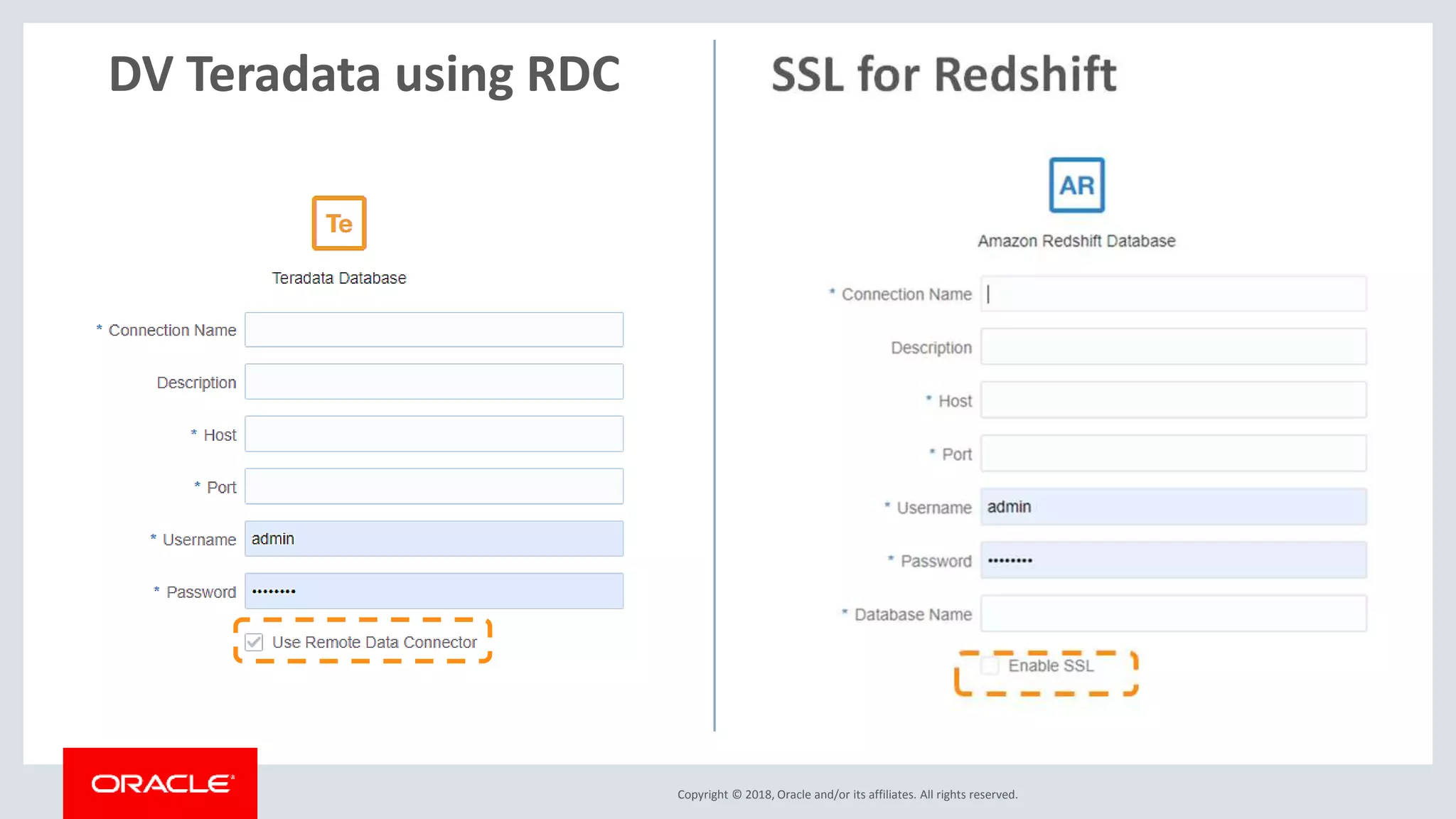
5. RDC for Teradata data-sources
6. SSL for Redshift
7. Essbase Alias in DV sources
C. Data Visualization
8. NLG – Language Narrative
9. Pivot Tables enhancements
10. Viz tooltips on/off toggle
11. ETS Forecast Algorithm
12. Canvas Experience enhancements
• Rename and copy
• Enable/Disable Brushing
• Single Refresh Data
13. Recommendation Enhancements
D. BI Publisher
14. Audit Feature Support
15. Auto Scaling
Start/Stop/Scale Services
Stop, start services, increase
decrease OCPUs or Users
Updated Service Admin Console
Drop-down list of values for
configuration parameters
New Layout for OAC Admin Console
Copyright © 2017, Oracle and/or its affiliates. All rights reserved. | Confidential – Oracle Internal/Restricted/Highly Restricted 5
Data Gateway
Deploy Data Gateway within your network
Register your Data
Gateway on your OAC
Create OAC con-
nections directly to
your On Prem DBs
Copyright © 2018, Oracle and/or its affiliates. All rights reserved.
5. DV Teradata using RDC
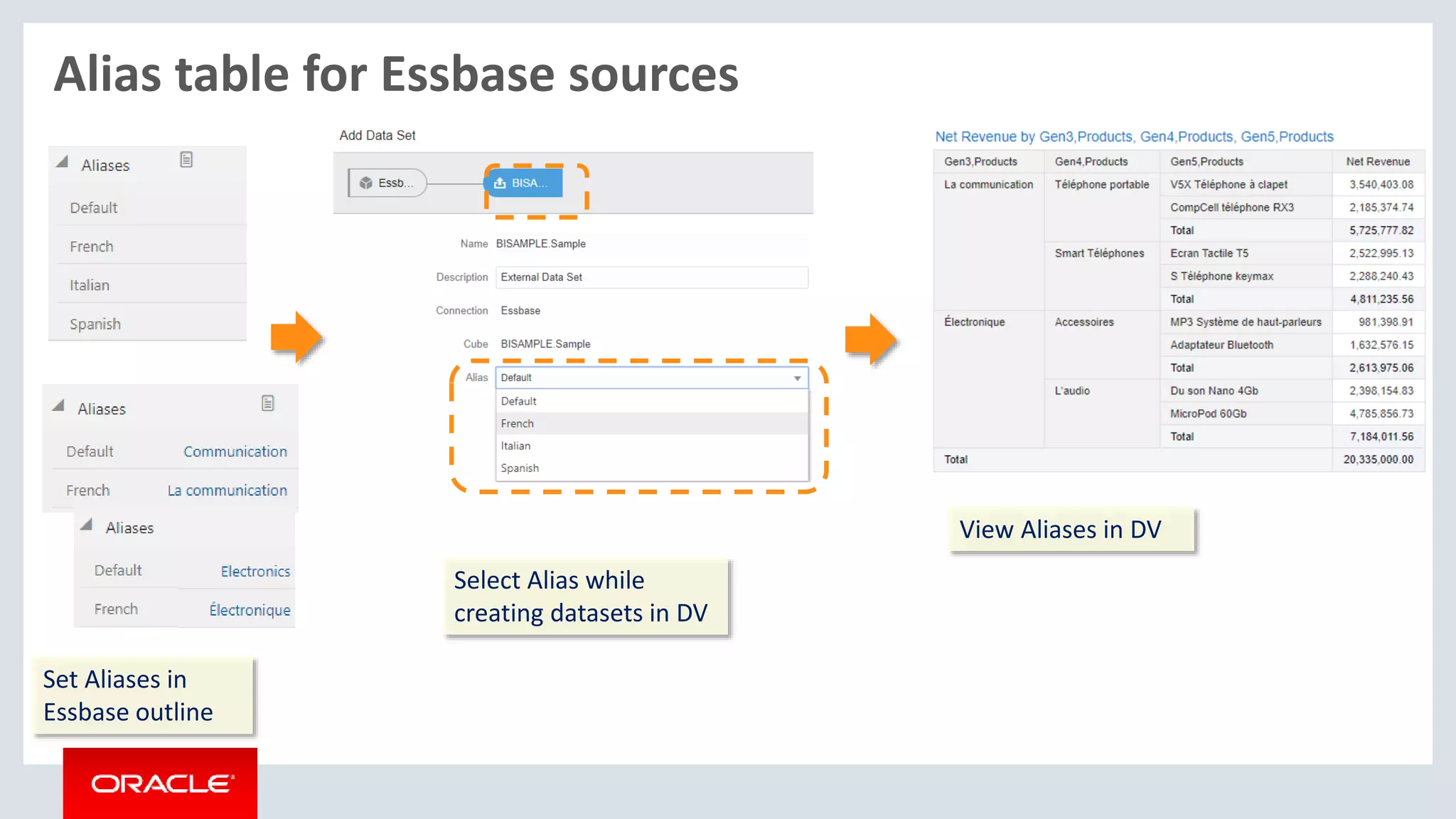
Alias table for Essbase sources
Set Aliases in
Essbase outline
Select Alias while
creating datasets in DV
View Aliases in DV
Copyright © 2018, Oracle and/or its affiliates. All rights reserved.
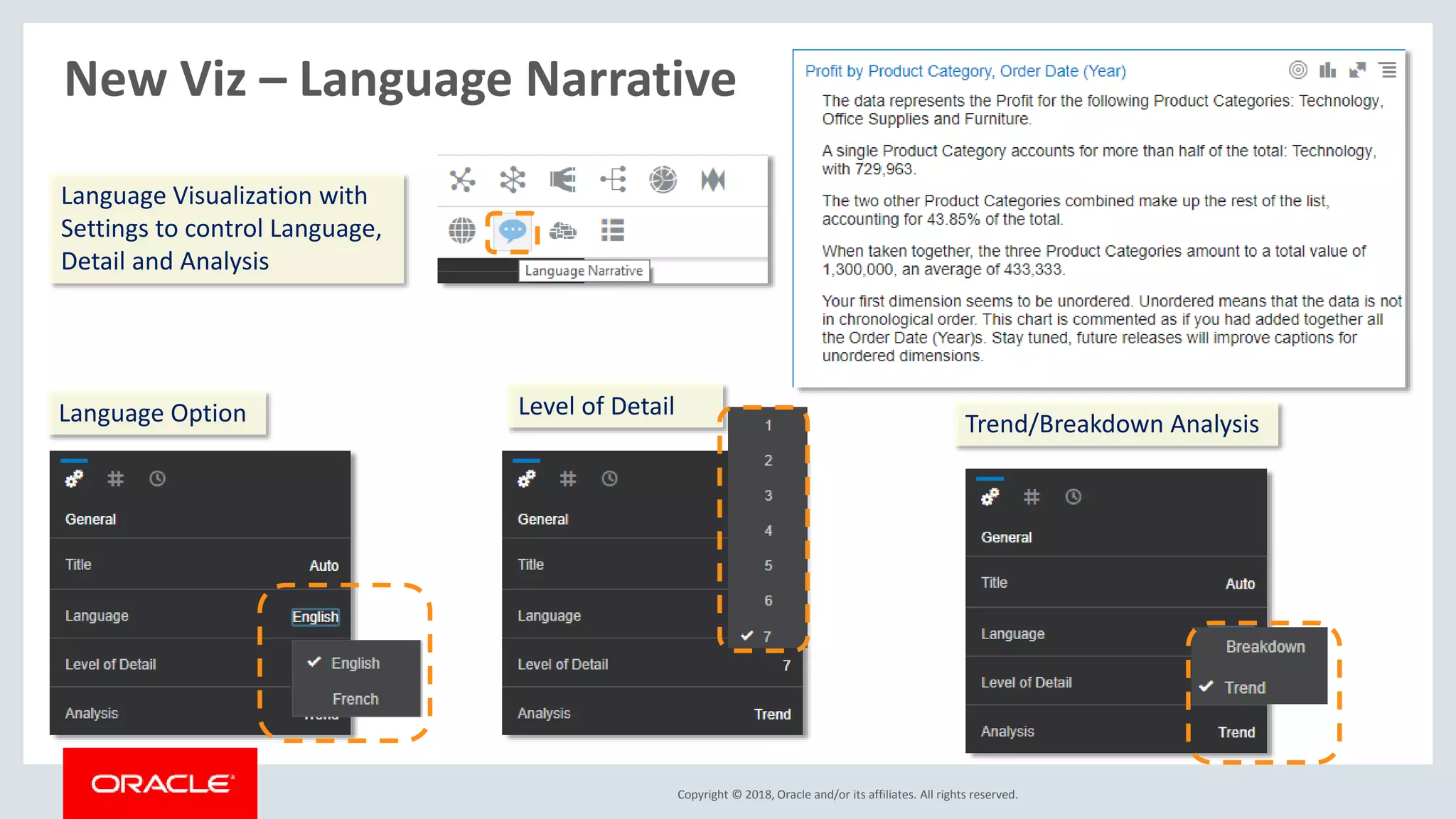
New Viz – Language Narrative
Language Visualization with
Settings to control Language,
Detail and Analysis
Language Option Level of Detail
Trend/Breakdown Analysis
Pivot Table enhancements
Pivot Table
TooltipsSingle click sort
Tooltips
Edit Totals Coloring
Default headers to on
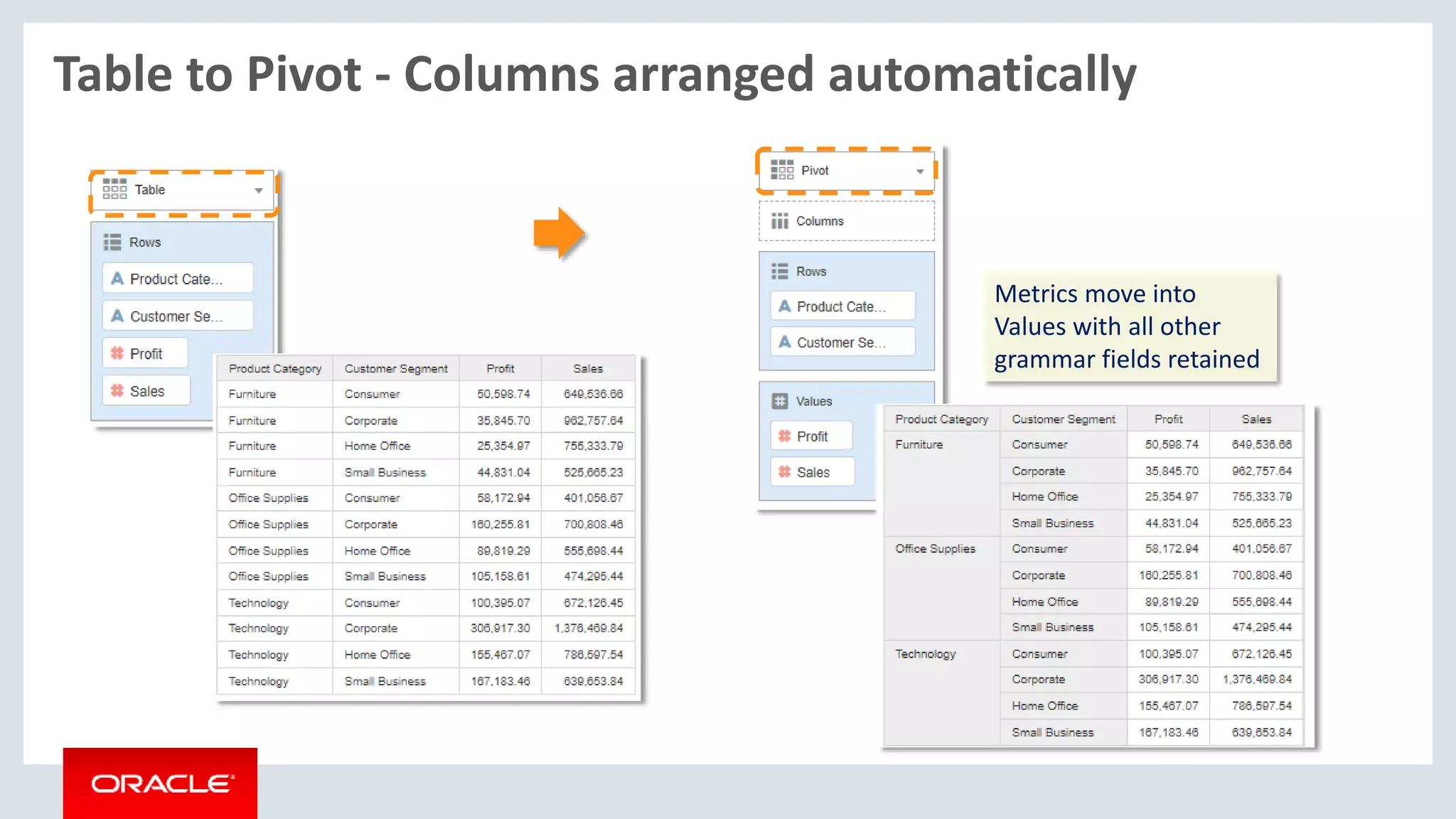
Table to Pivot - Columns arranged automatically
Metrics move into
Values with all other
grammar fields retained
Viz enhancements
Tooltip on/off to control tooltip format on mouseover
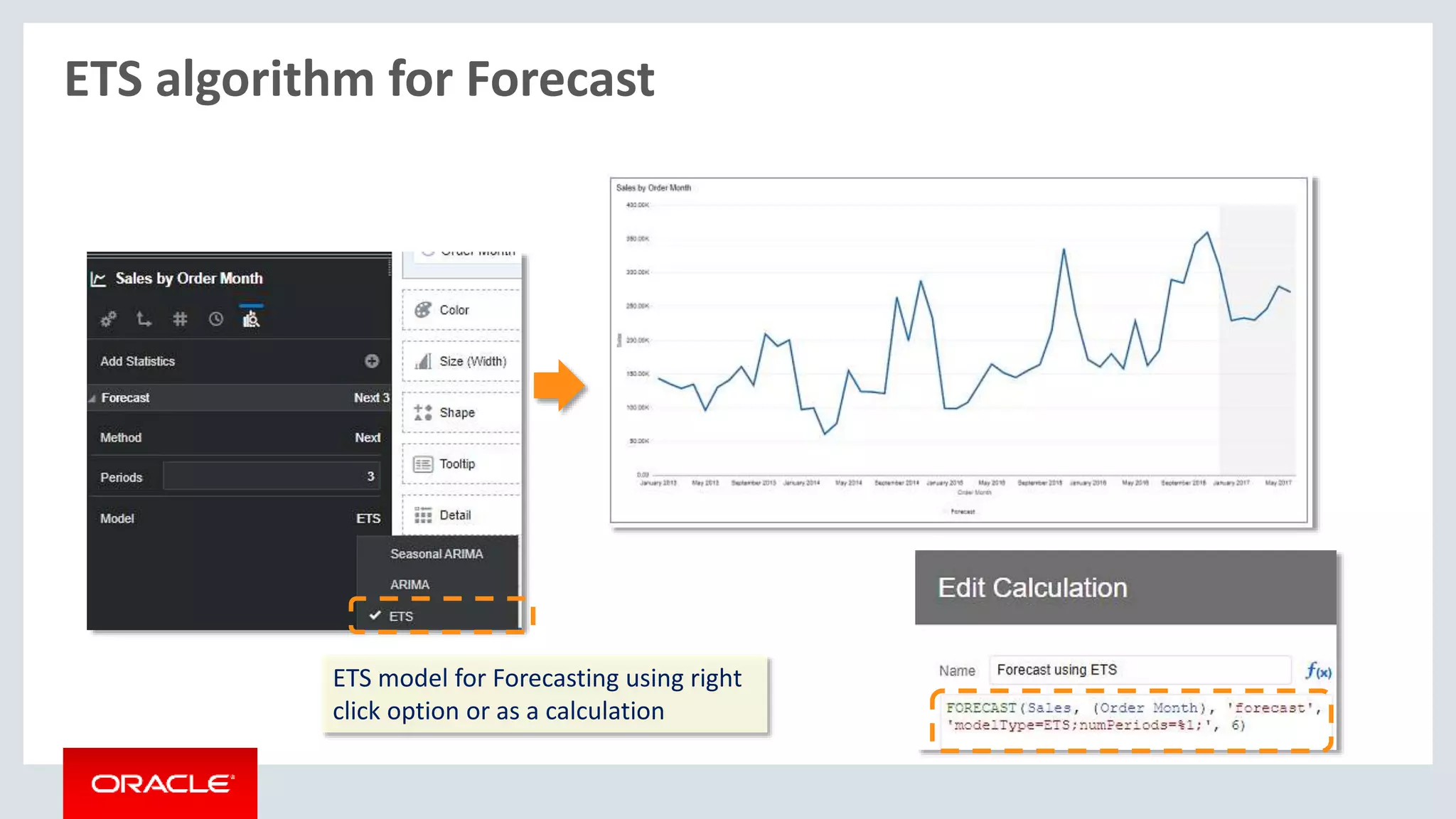
ETS algorithm for Forecast
ETS model for Forecasting using right
click option or as a calculation
Canvas Context editing without navigating
While viewing a canvas, you can
edit properties of a different canvas
without actually navigating to it
Active canvas
Edit canvas properties
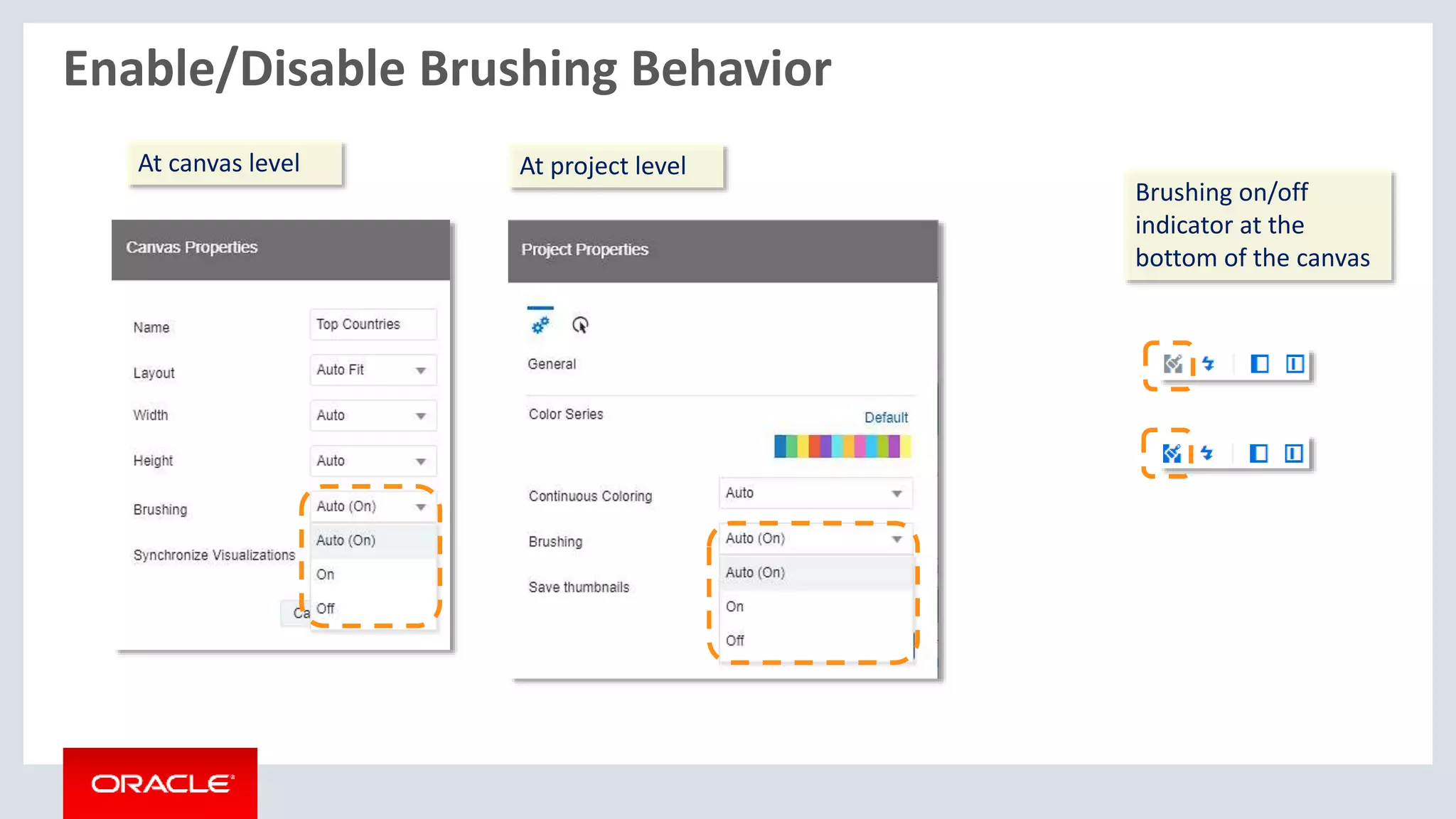
Enable/Disable Brushing Behavior
At canvas level At project level
Brushing on/off
indicator at the
bottom of the canvas
Copyright © 2017, Oracle and/or its affiliates. All rights reserved. |
BIP – Audit Logging and Sample Audit Report
Confidential – Oracle Internal/Restricted/Highly Restricted 15
1
Enable Monitor and
Audit Flag and set
Audit Level to Medium
Restrict access to this
Audit data source to
intended users
Create a JNDI data
source with JNDI
name as jdbc/
AuditViewDataSource
2
Copyright © 2017, Oracle and/or its affiliates. All rights reserved. | Confidential – Oracle Internal/Restricted/Highly Restricted 16
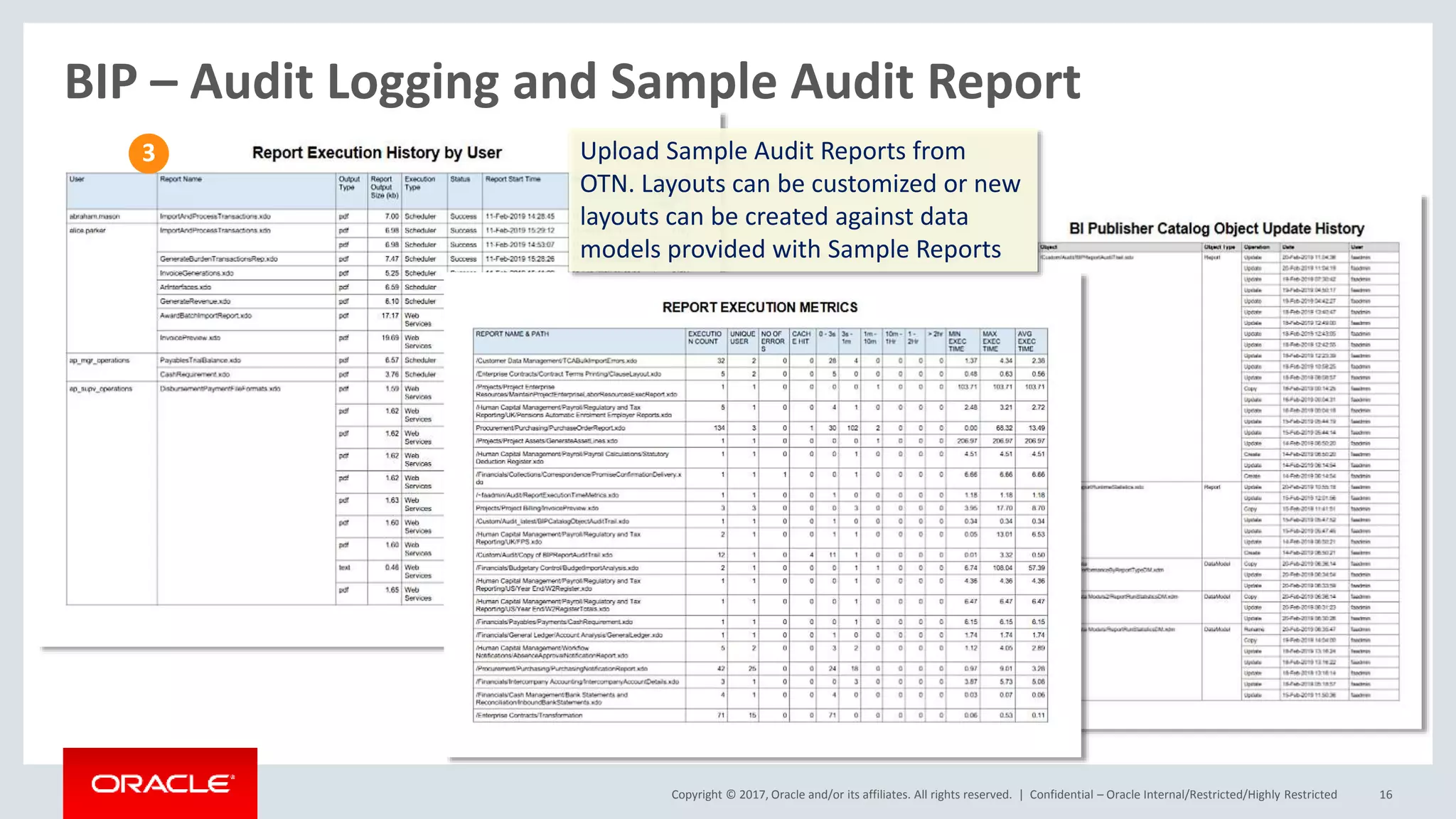
BIP – Audit Logging and Sample Audit Report
Upload Sample Audit Reports from
OTN. Layouts can be customized or new
layouts can be created against data
models provided with Sample Reports
3

OAC 105.3 Selected New Features Overview

  • 1.
    Copyright © 2016,Oracle and/or its affiliates. All rights reserved. | What’s coming with OAC 105.3.0 New Features Overview Oracle Analytics Product Management Jun 2019
  • 2.
    OAC Some newFeatures Shipping Soon A. Admin / OCI (Oracle Cloud Infrastructure) 1. Pause/Resume services 2. Scale up/down for Subscription SKUs 3. Enhanced Service Admin Console B. Data Sources 4. Data Gateway (Source from On Prem) 5. RDC for Teradata data-sources 6. SSL for Redshift 7. Essbase Alias in DV sources C. Data Visualization 8. NLG – Language Narrative 9. Pivot Tables enhancements 10. Viz tooltips on/off toggle 11. ETS Forecast Algorithm 12. Canvas Experience enhancements • Rename and copy • Enable/Disable Brushing • Single Refresh Data 13. Recommendation Enhancements D. BI Publisher 14. Audit Feature Support 15. Auto Scaling
  • 3.
    Start/Stop/Scale Services Stop, startservices, increase decrease OCPUs or Users
  • 4.
    Updated Service AdminConsole Drop-down list of values for configuration parameters New Layout for OAC Admin Console
  • 5.
    Copyright © 2017,Oracle and/or its affiliates. All rights reserved. | Confidential – Oracle Internal/Restricted/Highly Restricted 5 Data Gateway Deploy Data Gateway within your network Register your Data Gateway on your OAC Create OAC con- nections directly to your On Prem DBs
  • 6.
    Copyright © 2018,Oracle and/or its affiliates. All rights reserved. 5. DV Teradata using RDC
  • 7.
    Alias table forEssbase sources Set Aliases in Essbase outline Select Alias while creating datasets in DV View Aliases in DV
  • 8.
    Copyright © 2018,Oracle and/or its affiliates. All rights reserved. New Viz – Language Narrative Language Visualization with Settings to control Language, Detail and Analysis Language Option Level of Detail Trend/Breakdown Analysis
  • 9.
    Pivot Table enhancements PivotTable TooltipsSingle click sort Tooltips Edit Totals Coloring Default headers to on
  • 10.
    Table to Pivot- Columns arranged automatically Metrics move into Values with all other grammar fields retained
  • 11.
    Viz enhancements Tooltip on/offto control tooltip format on mouseover
  • 12.
    ETS algorithm forForecast ETS model for Forecasting using right click option or as a calculation
  • 13.
    Canvas Context editingwithout navigating While viewing a canvas, you can edit properties of a different canvas without actually navigating to it Active canvas Edit canvas properties
  • 14.
    Enable/Disable Brushing Behavior Atcanvas level At project level Brushing on/off indicator at the bottom of the canvas
  • 15.
    Copyright © 2017,Oracle and/or its affiliates. All rights reserved. | BIP – Audit Logging and Sample Audit Report Confidential – Oracle Internal/Restricted/Highly Restricted 15 1 Enable Monitor and Audit Flag and set Audit Level to Medium Restrict access to this Audit data source to intended users Create a JNDI data source with JNDI name as jdbc/ AuditViewDataSource 2
  • 16.
    Copyright © 2017,Oracle and/or its affiliates. All rights reserved. | Confidential – Oracle Internal/Restricted/Highly Restricted 16 BIP – Audit Logging and Sample Audit Report Upload Sample Audit Reports from OTN. Layouts can be customized or new layouts can be created against data models provided with Sample Reports 3